



AI Summary
Getting website traffic but no one filling out your forms? You’re not alone. The average form abandonment rate is nearly 68%.
Form abandonment is one of the biggest challenges website owners need to tackle to boost revenue.
So in this article, I’ll walk you through 9 proven tips for improving your form abandonment rate and turning those almost-customers into actual ones. I’ll also show you the new way to track abandonment right inside WordPress (no extra tools needed).
What Is Form Abandonment?
Simply put, form abandonment is when someone starts to fill out an online form but leaves the page without submitting it. It’s the most important part of conversion optimization.
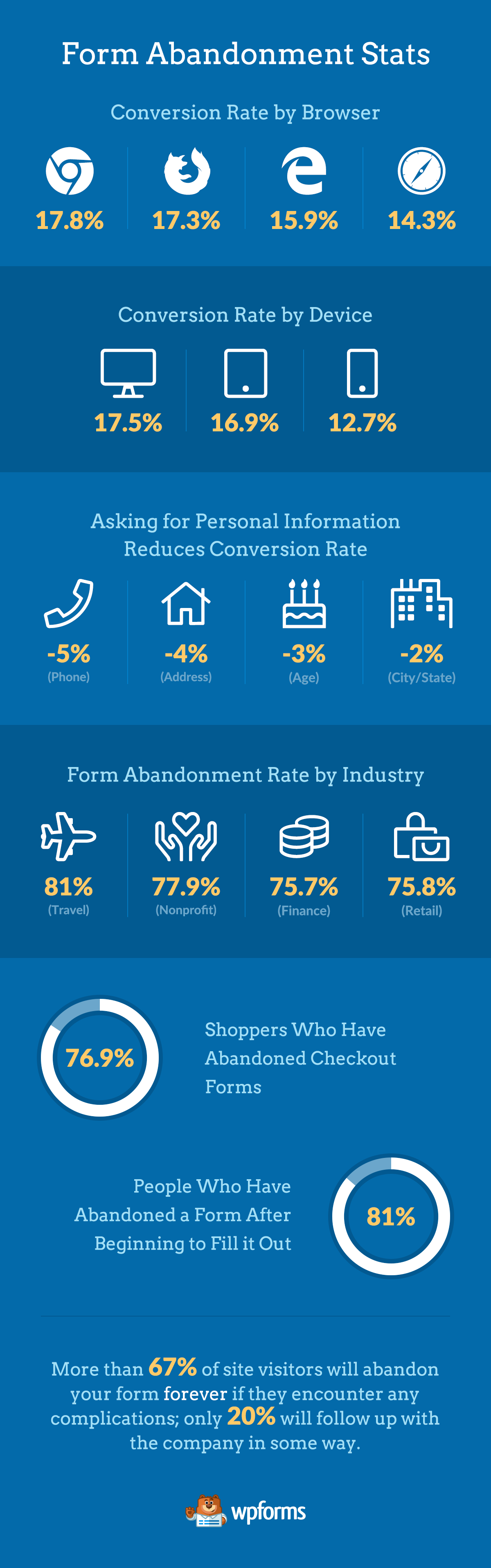
That’s because 81% of people have abandoned a form after beginning to fill it out!
Because so many website visitors begin the process of filling out a form but never complete it, form abandonment is insanely important to pay attention to and address.
And if you have a website that uses contact forms, you want to put extra energy into reducing form abandonment because:
- It will save you tons of money: Lowering your lead form abandonment rate will get you more leads with the same amount of traffic.
- You’ll increase your sales: 19% of people will return to complete a form if the company reaches out to re-engage them.
- People who start your forms are strong leads: When a website visitor starts filling out your form, it’s a huge sign they’re interested and highly likely to move forward through your sales funnel.
Your form abandonment rate is the percentage of people who start filling out a form but never submit it. To calculate it, divide the number of abandoned forms by the number of people who started the form, then multiply by 100. If 200 people start your form and 130 leave without submitting, your abandonment rate is 65%.
Since the average sits around 68%, anything below that number means you’re already ahead of most websites. The lower you can push it, the better.
Now that you know what form abandonment is and why you need to reduce it, let’s talk about how to track your form abandonment rate next.
How to Track Your Form Abandonment Rate
Here’s the part that matters. You can’t fix what you can’t measure, and for years that meant wrestling with Google Analytics event tracking or bolting on a separate tool.
That changed with WPForms v2.0 (released July 2026). WPForms Analytics is built right into the plugin, and it starts tracking every published form automatically the moment you update. Nothing to install, nothing to configure.
Head to WPForms » All Forms and you’ll see new Views, Interactions, and Conversion columns next to every form. Click any of those numbers to open that form’s analytics page, where five stat cards track views, interactions, conversion rate, abandonments, and errors.
WPForms counts an abandonment when someone starts filling out your form, then goes an hour without activity instead of submitting. So the number reflects visitors who actually started typing, not casual page views.
And all of that data stays in your own WordPress database. Form Analytics doesn’t set cookies, doesn’t record personal information about your visitors, and doesn’t send anything to outside services. It also ignores form previews and logged-in admins, so your own testing never inflates the numbers.
For setup details and a tour of every report, check out the complete guide to Form Analytics.
Want site-wide Google Analytics tracking on top of that? MonsterInsights is a wonderful companion to WPForms that sets up Google Analytics with just a few clicks.
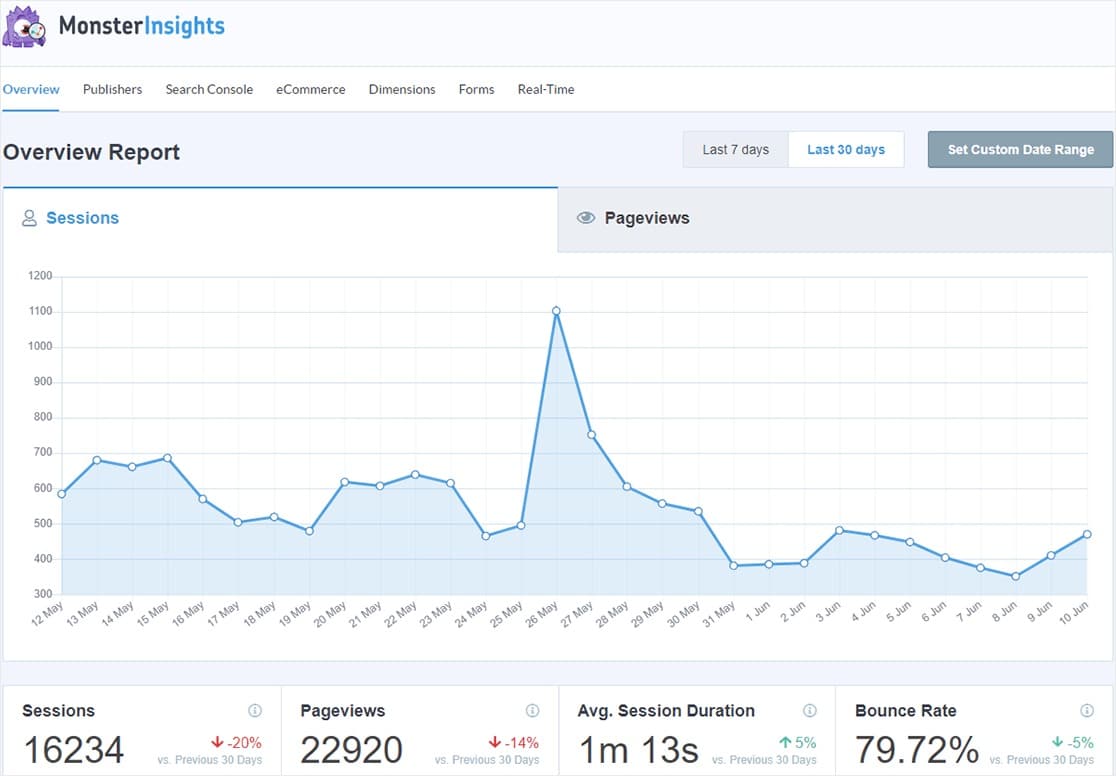
Check out their guide on how to track form abandonment in WordPress, and you can read more about why MonsterInsights rocks in our post about the best Google Analytics plugins for WordPress. For even more options, we’ve rounded up other amazing tools to track form analytics too.
Form Abandonment Statistics
A customer recently asked a great question. Why would a user abandon my form?
So, we decided to put together a handy form abandonment infographic with some of the biggest reasons people don’t finish filling out web forms.
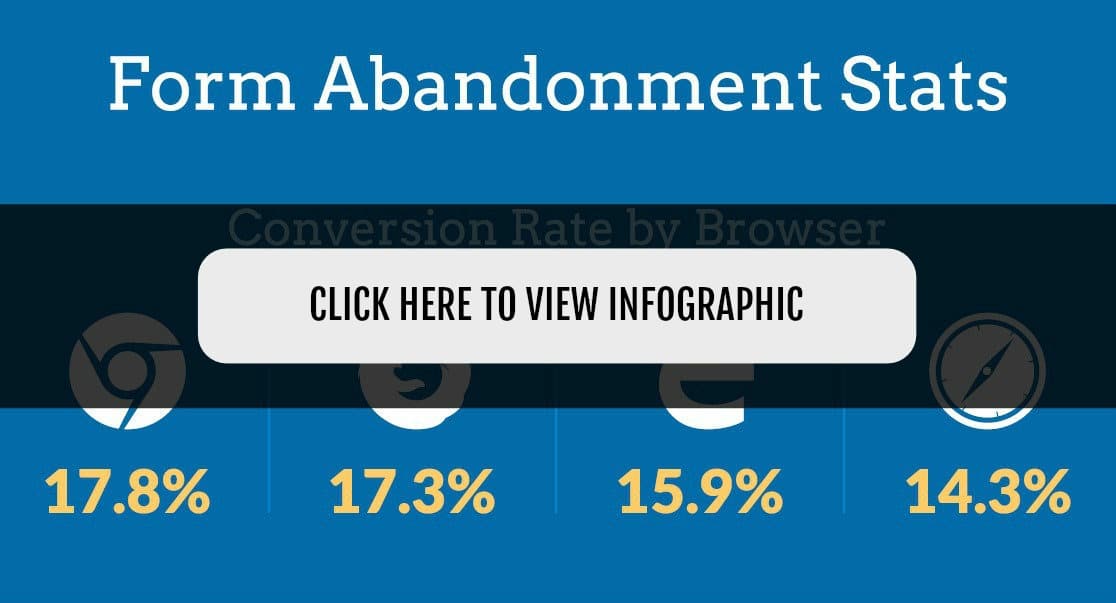
Now that you know why people abandon web forms, we’re ready to learn how to reduce form abandonment once and for all.
How to Reduce Your Form Abandonment Rate
So, how do you improve your form abandonment rate? Here are 9 proven ways.
1. Find Out Where People Give Up
Before you change a single field, look at the data.
The Form Fields table in WPForms Analytics breaks your form down field by field, showing views, interactions, abandonments, errors, and the average time visitors spend in each one. Sort the table by abandonments and your problem field jumps right out. Nine times out of ten, it’s a field asking for more than people want to give (a required phone number is a classic offender).
You can also set a conversion rate goal for any form. Pick a target percentage, and the dashboard shows a green arrow when you’re above it and a red one when you’re below. That gives every fix in the rest of this list a scoreboard.
For a full walkthrough of reading the reports, see our guide on using WPForms Analytics to improve your forms.
Once you know where people bail, the next step is rescuing the info they already typed.
2. Capture Partial Entries
The absolute easiest way to recover abandoning visitors is to use a tool that captures partial entries on your forms.
With our Form Abandonment addon, you can collect the info people put into your form fields (but didn’t hit submit).
Another way to work with partial entries is to let customers save their progress and come back to your form later when they’re ready to complete their purchase. The Save and Resume addon lets you do this while protecting your customers’ data by not saving credit card information for partial entries.
Both addons are included in WPForms Pro. (That’s the same tier that unlocks the full Analytics dashboard, so the pieces work together nicely.)
Then, you can follow up with those interested prospects. You can even set up automatic form abandonment emails to go out to them inviting them back to your website to finish the form.
You can read more about this awesome trick in the next tip.
3. Send Retargeting Emails
Retargeting emails are effective personalized messages that target and attempt to convince abandoned customers to return and complete their orders.
After capturing partial entries, you can send retargeting emails to remind your customers about you and the form they left. When done right, retargeting emails are proven to reduce order form abandonment significantly.
Some ways to convince your customers to complete the order form are:
- Look for examples: Check out how big brands handle form abandonment emails.
- Create a sense of urgency: If you’re selling a physical product, you can let your customers know that the product is almost out of stock. If you’re selling digital products on your site, send people to a landing page with a countdown timer to let them know the price is going back up soon.
Also, try using power words to imply urgency in your retargeting email like:
- Limited Time
- Hurry
- Rush
- Deadline
- Last Chance
- Offer Expires
- One Day Only
- Don’t Delay
- Act Now
- Final
4. Use Exit Intent
Using an exit intent popup is another great strategy to reduce order form abandonment.
With an exit intent popup, you can turn abandoning visitors into customers by automatically opening a customized popup at the precise moment they’re about to leave your site.

You can use OptinMonster to create multiple types of optin forms including these exit intent popups that are optimized for the highest conversion rates.
Plus, WPForms lets you easily connect your contact forms with OptinMonster using the WPForms block. For help doing this, read our tutorial on creating a contact form popup in WordPress.
5. Remove Every Field You Don’t Need
Every field you add gives someone a new reason to quit. HubSpot’s testing found that cutting a form from four fields to three lifted conversions by 50%, and required fields are the worst offenders.
So go through your form one field at a time and ask whether you actually use that answer. If you don’t, cut the field.
If you only need a field sometimes, try enabling smart conditional logic so it only appears when a visitor’s earlier answers make it relevant. Your form stays short for everyone else.
And if you genuinely can’t cut a field (looking at you, phone number), at least mark it optional. Required phone number fields are one of the most common reasons people abandon a form, and making them optional wins back a big chunk of those completions.
6. Break Long Forms Into Multiple Steps
Some forms just have to be long. Order forms, applications, registrations.
When you can’t cut any more fields, split what’s left into a multi-step form in WordPress instead. Three or four short pages feel far less overwhelming than a single wall of 20 fields, and the numbers back it up. Multi-page forms see completion rates around 14%, compared to under 5% for long single-page forms.
Just make sure you create a progress indicator so people can see how close they are to the finish line. Progress bars give visitors a reason to keep going instead of guessing how much form is left.
7. A/B Test Your Forms
Even if you follow form conversion best practices, it’s not guaranteed you’ll get positive results. Since every website is unique, you need to test what works best with your audience.
For more on that, check out this great post on the best A/B testing plugins and tools for your website.
And you no longer need a separate tool to judge the winner. Set a conversion rate goal in WPForms Analytics, run each version of your form for a couple of weeks, and compare the conversion rate cards to see which one hits the target.
8. Make Your Forms Mobile-Friendly
84% of people prefer to fill out forms on their desktop or laptop computer more than any other way.
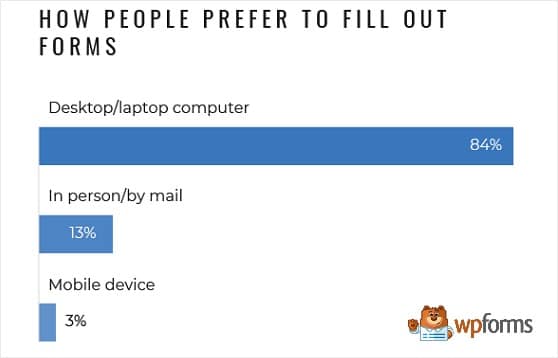
That said, just because people prefer something doesn’t mean they’re doing it. 45% of form data is submitted from a mobile device.
Because of this, creating mobile responsive forms is a must. And having a responsive theme for WordPress is important, too.
And any issues website visitors run into on your form are likely to cause them to abandon them. Worst of all, they may never come back.
If you want to make filling out your forms easy for mobile users, follow these best practices:
- Create input masks so users can’t make a mistake when filling out the different form fields, like in the phone number or password field.
- Label form fields and add descriptions so people understand exactly what information is needed in each form field.
- Always test your forms, even on mobile devices, to make sure they look good and work properly.
If you want to avoid form abandonment, your goal is to optimize the mobile experience as best you can so you don’t lose out on those sales.
9. Emphasize Form Security
There are lots of reasons why people abandon your web forms.
However, 29% of people cite security concerns as the #1 reason for leaving a site before submitting a form.
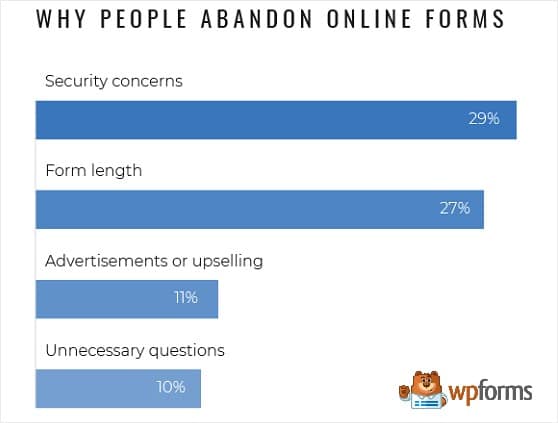
You may know your forms are safe, but how do your website visitors know?
If your web forms make users feel fearful that they aren’t secure, your abandonment rate will be sky-high. Especially if your forms accept credit card payments.
That’s why it’s so important to make sure your customers know their personal and payment information (like their credit card number) is secure at all times during the purchase process.
Here are some ways you can do just that:
- Use our official Stripe, Authorize.Net, Square, and PayPal Commerce integrations so people know they can trust your forms.
- Add an SSL Certificate: Use a plugin like the Really Simple SSL WordPress plugin, and check out these other free WordPress plugins to calm security fears and gain your visitors’ trust.
- Be GDPR Compliant: The way you collect, use, and store user information is important, especially if your customers are in Europe. So add a GDPR agreement form field to your forms. This way, people always know what you plan to do with any information you collect, even on an order form.
FAQs About Form Abandonment
Your form abandonment rate is easier to improve once you understand the basics. Here are the questions we hear most about tracking and reducing form abandonment in WordPress.
What is a good form abandonment rate?
The average form abandonment rate is around 68%, so anything below that puts you ahead of most websites. Short contact forms should aim much lower, while long checkout or application forms naturally run higher. Track your rate for a few weeks to set a baseline, then work on lowering it from there.
How do I calculate form abandonment rate?
Divide the number of people who started your form but didn’t submit it by the total number who started it, then multiply by 100. If 200 people begin your form and 130 leave without submitting, your abandonment rate is 65%. WPForms Analytics calculates this automatically for every form on your site.
How can I track form abandonment in WordPress?
Update to WPForms v2.0 or later and abandonment tracking is built in, with no setup required. Go to WPForms » All Forms and click any form’s stats to open its analytics page with views, conversion rate, abandonments, and errors. The full field-by-field breakdown requires a Pro license, while free users see form view counts.
How can I reduce form abandonment from email campaigns?
Make sure your form matches the promise in the email, because a mismatch makes subscribers bounce right away. Keep the form short and mobile-friendly, since most email opens happen on phones. And if someone still abandons it, capture the partial entry and send a retargeting email to invite them back.
Form Abandonment Stats Infographic
To help put average form abandonment stats into perspective, check out this infographic.
Next, Improve Your Site’s User Experience
A lower form abandonment rate is one of the fastest ways to get more from the traffic you already have. If payment forms are where you’re losing people, our guide to complaints about online payment forms covers the trust issues that make buyers hesitate.
And if you want the full tour of the new tracking tools, the WPForms Analytics announcement walks through the dashboard, conversion goals, and the built-in AI chat that answers questions about your form data.
Reduce Your Form Abandonment Rate Now
Ready to build your form? Get started today with the easiest WordPress form builder plugin. WPForms Pro includes lots of free templates and offers a 14-day money-back guarantee.
If this article helped you out, please follow us on Facebook and Twitter for more free WordPress tutorials and guides.





