


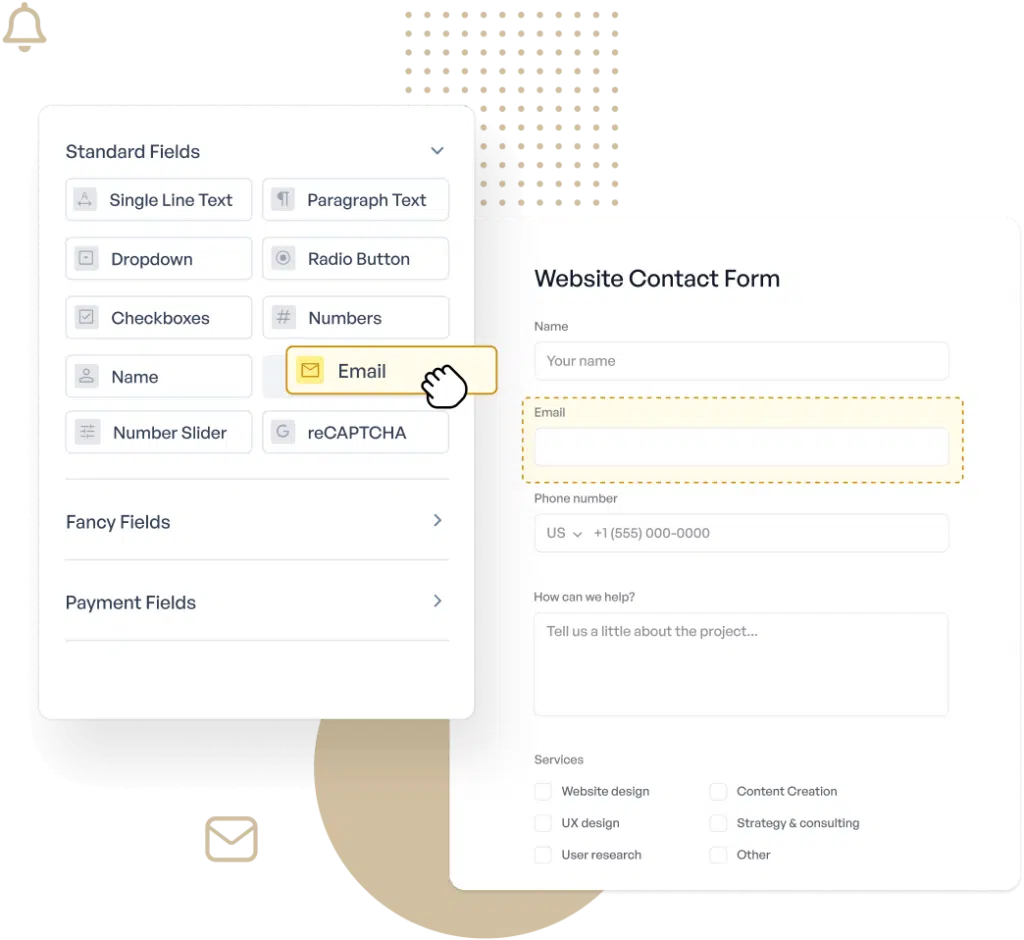
Drag & Drop Form Builder WordPress Plugin
Easily Build Any Form for Your WordPress Site
The most user-friendly WordPress form builder plugin for beginners on the market.
- Conditional Logic
- Multi-Page Forms
- Customizable Fields
- Survey Reporting
Create Online Forms Without Code
Building forms in WordPress can be a daunting task, but not with WPForms. Our intuitive drag & drop form builder makes it easy to create contact forms, online surveys, donation forms, and more in minutes, not hours.
User-Friendly Interface
The intuitive drag & drop builder lets you add, remove, and rearrange form fields with just a click.
2,100+ Form Templates
Start with our pre-built online form templates to save time and improve your workflow.
Mobile-Friendly Forms
WPForms is 100% responsive which means your forms will automatically look good on all devices.
Smart Conditional Logic
Personalize your drag and drop forms based on the user’s input. Easily show or hide fields with our smart conditional logic.
Form Notifications
Easily notify customers or employees when forms are submitted through automated emails, SMS, and more.
Entry Management
View all your leads, payments, WordPress form data, and more in one place to streamline your workflow.
Payments Made Easy
Securely accept credit card payments, donations, and online orders through your online forms.
kjbohmgarden
Verified CustomerSo far, I am just getting started with my website and am using the free version of WP Forms. Absolutely nothing has been straightforward about building this WordPress site except for this plugin! Everything in WP Forms is laid out and explained very clearly and the free version includes many choices. Everything seems to work the way it’s supposed to. I wholeheartedly recommend.
The Best WordPress Drag & Drop Form Builder Plugin
Create and publish forms in minutes… What are you waiting for?
Elevate Your Forms With 2,100+
Ready-Made Templates
- Review Form
- Waiver Form
- Screening Form
- Issue Form
- Disciplinary Form
- Petition Form
- Monitoring Form
- Vendor Form
- Expense Form
- Agreement Form
- Training Form
- Completion Form
- Request Form
- Medical Form
- Evaluation Form
- RMA Form
Before You Buy, Give It A Try
Take the plugin for a free spin.
No installation, no credit card, no strings attached.
Drag & Drop Form Builder – Frequently Asked Questions
Do you have a question about WPForms drag and drop online form builder? See the list below for our most frequently asked questions. If your question is not listed here, then please contact us.
How do I use the drag & drop builder in WPForms?
Simply select the fields you need from the left-hand panel in the builder and drag them into your form. You can then rearrange them as needed and customize their settings.
Can I use WPForms without any coding knowledge?
Absolutely. WPForms is designed to be user-friendly and does not require any coding skills. Our drag & drop builder makes it easy for anyone to create forms.
Are the forms created with WPForms mobile-friendly?
Yes, all forms created with WPForms are 100% responsive and look great on any device, whether it’s a mobile phone, tablet, or desktop.
What types of forms can I create with WPForms?
You can create a wide variety of forms including contact forms, order forms, registration forms, survey forms, and more. The possibilities are endless.
Even More Powerful Features
WPForms isn’t just about making form creation easy; it’s about making it powerful and versatile.
Conditional Logic
Easily create high performance forms with our smart conditional logic.
- Personalize forms based on user responses.
- Show or hide fields dynamically for better UX.
- Streamline data collection and improve form flow.
Form Confirmations
Show a success message on form submission or direct to a webpage.
- Customize confirmation messages after form submission.
- Redirect users to specific pages or URLs.
- Enhance user experience with tailored confirmations.
Entry Management
View all your form submissions in one place to streamline your workflow.
- Easily view and manage form entries from the dashboard.
- Filter and sort entries for better organization.
- Export entries for offline use and analysis.
-
“
WPForms is easy to use and creates flexible forms with provisions for admin editing. I’ve used Ninja Forms for years and I still like their product but WPForms offers several enhancements. I use Forminator Forms strictly for their integration with WPdatatables. It’s lack of back end editing makes it inferior to both WPForms and Ninja Forms. It’s pricing is tiered to support a variety of needs.
”Honshin
Verified Customer -
“
After experiencing a long-standing issue with my WPForms, I want to express my gratitude for the support I received in resolving the problem. I learned that a small error can cause significant delays and take a lot of time to fix. Thank you very much for helping me solve this issue. It saved me a lot of time and made me very happy.
”Chai Meenorngwar
Verified Customer -
“
Typically I use the Divi builder and often use the built in contact form, as I didn’t see any point in adding a new plugin when the functionality was already available. However, although the Divi form does work it is limited in functionality and the email it sends out it very basic. I have now after using WP Forms for the second time it is now going to be my default contact form on all new websites. It works and this new Payment option is great for e-commerce sites with only one product
”axiom28
Verified Customer -
“
The product, WP Forms, has always been fantastic. I also wish to point out the ease of support and the excellent communication, including fix status updates, provided by their team. I highly recommend WP Forms and the rest of their products/add-ons.
”Jeff Solomon
Verified Customer -
“
Quick and friendly service. They always tell you the issues and give you your next steps to fix them. I am not exaggerating when I say they have the best support in the industry and the best software product as well!
”Mark Rummel
Verified Customer -
“
For me, WPForms shows the perfect balance between simplicity and professionalism. Creating forms is incredibly easy, yet the platform offers endless possibilities to make your forms look and perform professionally. What truly sets WPForms apart, though, is their outstanding support team. They are always ready to assist and go the extra mile to help you achieve your goals. Even when the problem is external, they keep following up that you find the solution with your host,…! The variety of plugins available streamlines my workflow, making it even easier to manage tasks efficiently. I highly recommend WPForms for anyone looking for a reliable and versatile form builder!
”BeVo Belgie
Verified Customer -
“
Needed a quick contact form to make my site more legit. Plug and play and super fast to get it deployed. It’s FREE! And, I can keep using it until I need advanced features, but the basic–all I need a the moment–free for life. Can’t beat it! All around great plugin!
”docdocdocdoc
Verified Customer -
“
Great plugin that is easy to use for everyone from beginners to pros. Plenty of documentation, resources and tutorials available online for installation, setup and customization. The lite version is very robust and powerful. The plugin handles a lot of the heavy lifting while offering multiple styling options, themes and templates or you can completely customize and style your own form manually.
”Austyn87
Verified Customer -
“
I installed the plugin I created a contact page and this plugin popped up and said that it could create a form within minutes so I gave it a try they were right quick and easy will use it again
”jcettina
Verified Customer
-
“
WPForms is easy to use and creates flexible forms with provisions for admin editing. I’ve used Ninja Forms for years and I still like their product but WPForms offers several enhancements. I use Forminator Forms strictly for their integration with WPdatatables. It’s lack of back end editing makes it inferior to both WPForms and Ninja Forms. It’s pricing is tiered to support a variety of needs.
”Honshin
Verified Customer -
“
After experiencing a long-standing issue with my WPForms, I want to express my gratitude for the support I received in resolving the problem. I learned that a small error can cause significant delays and take a lot of time to fix. Thank you very much for helping me solve this issue. It saved me a lot of time and made me very happy.
”Chai Meenorngwar
Verified Customer -
“
Typically I use the Divi builder and often use the built in contact form, as I didn’t see any point in adding a new plugin when the functionality was already available. However, although the Divi form does work it is limited in functionality and the email it sends out it very basic. I have now after using WP Forms for the second time it is now going to be my default contact form on all new websites. It works and this new Payment option is great for e-commerce sites with only one product
”axiom28
Verified Customer
WordPress Forms
What are you waiting for?
- Online Form Builder
- Conditional Logic
- Conversational Forms
- Form Landing Pages
- Entry Management
- Form Abandonment
- Form Notifications
- File Uploads
- Calculation Forms
- Geolocation Forms
- Multi-Page Forms
- Repeater Fields
- PDF Generation
- Post Submissions
- Signature Forms
- Spam Protection
- Surveys and Polls
- User Registration
- Quizzes
- WPForms AI
What's New
View The Latest UpdatesEmail Subscription
Google Calendar Addon
PDF Addon
Form Themes for Everyone
Zoho CRM Addon
Cookie Consent
We use cookies to improve your experience on our site. By using our site, you consent to cookies.
Cookie Preferences
Manage your cookie preferences below:
Essential cookies enable basic functions and are necessary for the proper function of the website.
Easy Digital Downloads is a WordPress plugin for selling digital products effortlessly and managing transactions.
These cookies are used for managing login functionality on this website.
WPForms is a user-friendly WordPress plugin for creating custom forms with drag-and-drop functionality.
Statistics cookies collect information anonymously. This information helps us understand how visitors use our website.
Google Analytics is a powerful tool that tracks and analyzes website traffic for informed marketing decisions.
Service URL: business.safety.google (opens in a new window)
Marketing cookies are used to follow visitors to websites. The intention is to show ads that are relevant and engaging to the individual user.
OptinMonster is a powerful lead generation tool that helps businesses convert visitors into subscribers and customers.
Service URL: optinmonster.com (opens in a new window)
X Pixel enables businesses to track user interactions and optimize ad performance on the X platform effectively.
Service URL: x.com (opens in a new window)

