


AI Summary
Contact Form 7 just announced a feature freeze. At a recent WordCamp event, the CF7 team confirmed that version 6.2 will be the final major update. After that, the plugin will only receive bug fixes and security patches. The developer explicitly stated they’re moving on to the next project.
If you’re one of the 10 million+ site owners running CF7, your first thought is probably “my forms work fine, so why should I care?” That’s fair. But a plugin in feature freeze isn’t just missing new features. It’s a plugin that will slowly fall behind as WordPress itself keeps evolving.
I’ve been watching CF7’s development pace slow down for a while now, and this announcement confirms what many of us suspected. The good news is that switching is faster and easier than you’d expect, and there’s a free alternative that already does more than CF7 ever did.
11 Reasons to Switch From Contact Form 7 to WPForms
If you’ve already read our detailed WPForms vs Contact Form 7 comparison, you know the gap is wide. But the biggest question for most CF7 users is whether they can switch without paying anything. The answer is yes. Here’s how WPForms Lite (free) compares to CF7 right now.
| Feature | Contact Form 7 | WPForms Lite (Free) |
|---|---|---|
| Form builder | Text-based shortcode editor | Visual drag-and-drop + AI generation |
| Templates | 1 default template | Hundreds of free form templates |
| GDPR tools | None | GDPR Enhancements + Agreement field |
| Spam protection | reCAPTCHA only (manual setup) | Built-in honeypot anti-spam |
| Payments | Basic Stripe | Stripe + PayPal |
| AI features | None | AI form builder + AI Choices |
| Email marketing | Brevo + deprecated Constant Contact | Constant Contact |
| Future development | Feature freeze after 6.2 | Active development with regular releases |
| Price | Free | Free, forever |
That’s the free-to-free comparison. WPForms also has paid tiers that unlock significantly more, but I’ll get to those later. The point is that you can switch today without spending a cent.
- 1. The CF7 Feature Freeze Puts Your Site at Risk
- 2. You Can Switch in Minutes Without Rebuilding Anything
- 3. WPForms Lite Is Free, Forever
- 4. A Modern Form Builder With AI-Powered Generation
- 5. Accept Payments Directly in Your Forms
- 6. Built-In GDPR Compliance Tools
- 7. Spam Protection That Actually Works
- 8. Dedicated Support From a Real Team
- 9. Your Form Submissions Are Actually Saved
- 10. Powerful Upgrades When You're Ready
- 11. A Plugin That's Actively Getting Better
1. The CF7 Feature Freeze Puts Your Site at Risk
When WordPress releases a major core update and something breaks in CF7, who’s going to fix it? Bug fixes and security patches were promised, but “bug fixes” and “actively maintaining compatibility with a fast-moving CMS” are very different things.
Consider what’s already happening. CF7 6.2 will require PHP 8.3 or higher. WordPress itself is pushing toward newer PHP versions with every release. If CF7 stops keeping up with these requirements, your forms stop working.
And you’ll have no recourse other than to scramble for an alternative under pressure, which is a much worse position than switching on your own terms.
Then there’s security. CF7’s ecosystem of third-party extensions has already had vulnerabilities. The CF7 Redirection addon had a high-severity flaw in 2025 that allowed URL manipulation. With the core developer stepping away, the already thin security coverage gets even thinner.
You can switch now while it’s easy, or wait until something breaks and switch under pressure. The outcome is the same. The experience getting there is very different.
2. You Can Switch in Minutes Without Rebuilding Anything
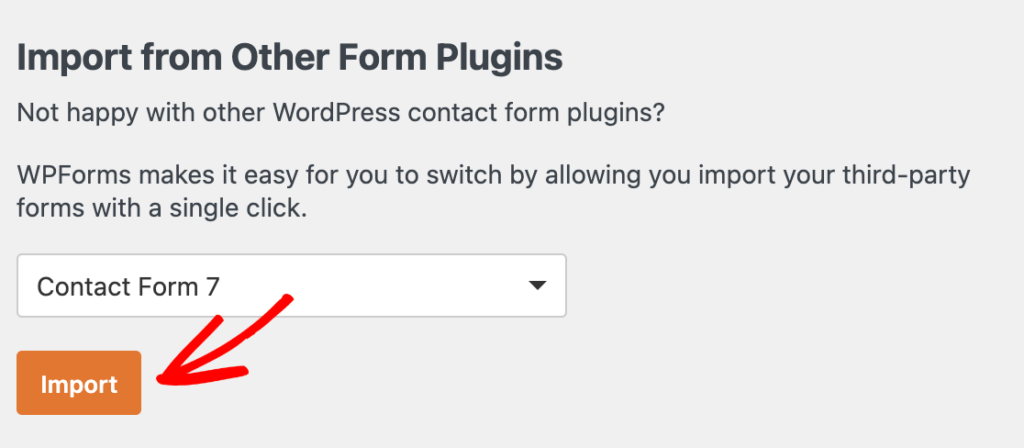
This is the question every CF7 user asks first, and the answer is better than you’d expect. WPForms has a built-in form importer that scans your site for Contact Form 7 forms and lets you import them with a few clicks.
Your form structure, fields, and settings transfer automatically. You don’t need to rebuild a single form from scratch. The whole process takes minutes.
Our step-by-step guide on how to import Contact Form 7 into WPForms walks through the entire process with screenshots.
And if you have CF7 submission data stored through a third-party plugin like Flamingo, our guide also covers data migration too.
3. WPForms Lite Is Free, Forever
This is the part that surprises most CF7 users. WPForms Lite isn’t a trial, a demo, or a feature-locked teaser. It’s a permanently free plugin that already does more than Contact Form 7.
With Lite, you get the full drag-and-drop form builder, AI form generation, AI Choices for auto-generating field options, payment fields with Stripe and PayPal, Constant Contact integration, and basic form templates.
If you ever want more features down the road, like conditional logic, entry storage, email marketing integrations, or advanced spam protection, you can upgrade to a paid tier at any time.

But the upgrade is optional. Plenty of sites run on WPForms Lite permanently and it handles everything they need.
4. A Modern Form Builder With AI-Powered Generation
Contact Form 7’s text-based editor hasn’t changed in years. You build forms by writing shortcode tags in a text box, then save, switch to a different tab, and refresh your page to see how it looks.
If you’re comfortable with HTML and shortcode syntax, it works. But it’s a workflow from 2007, and now it’s frozen there permanently.

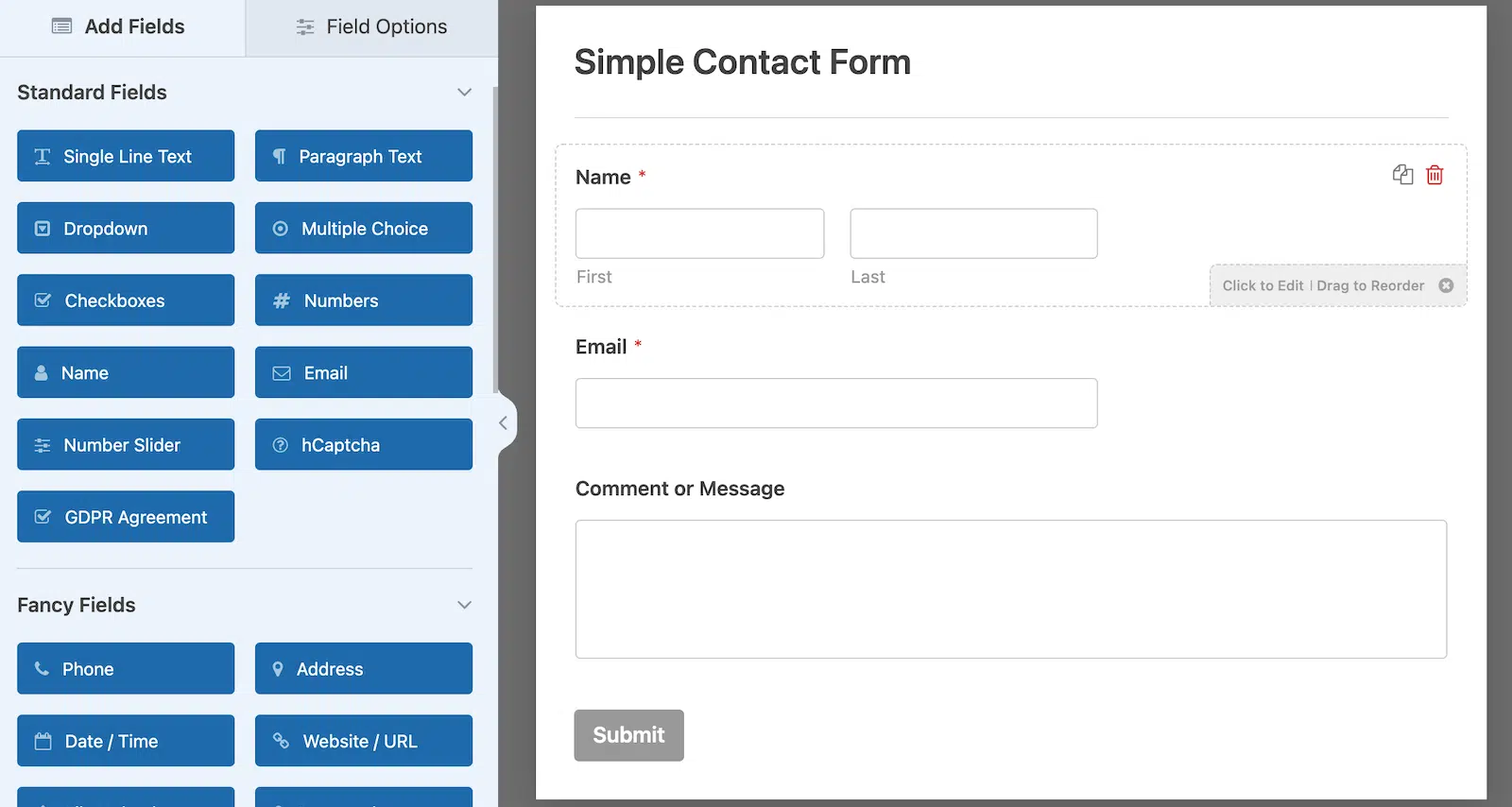
WPForms gives you a visual drag-and-drop builder where you can see your form in real time as you add and arrange fields. On the left, you’ll find the list of fields you can add.
Meanwhile, on the right side of the screen, you can see an editable preview of your form, where you can drag and drop other fields to your liking.
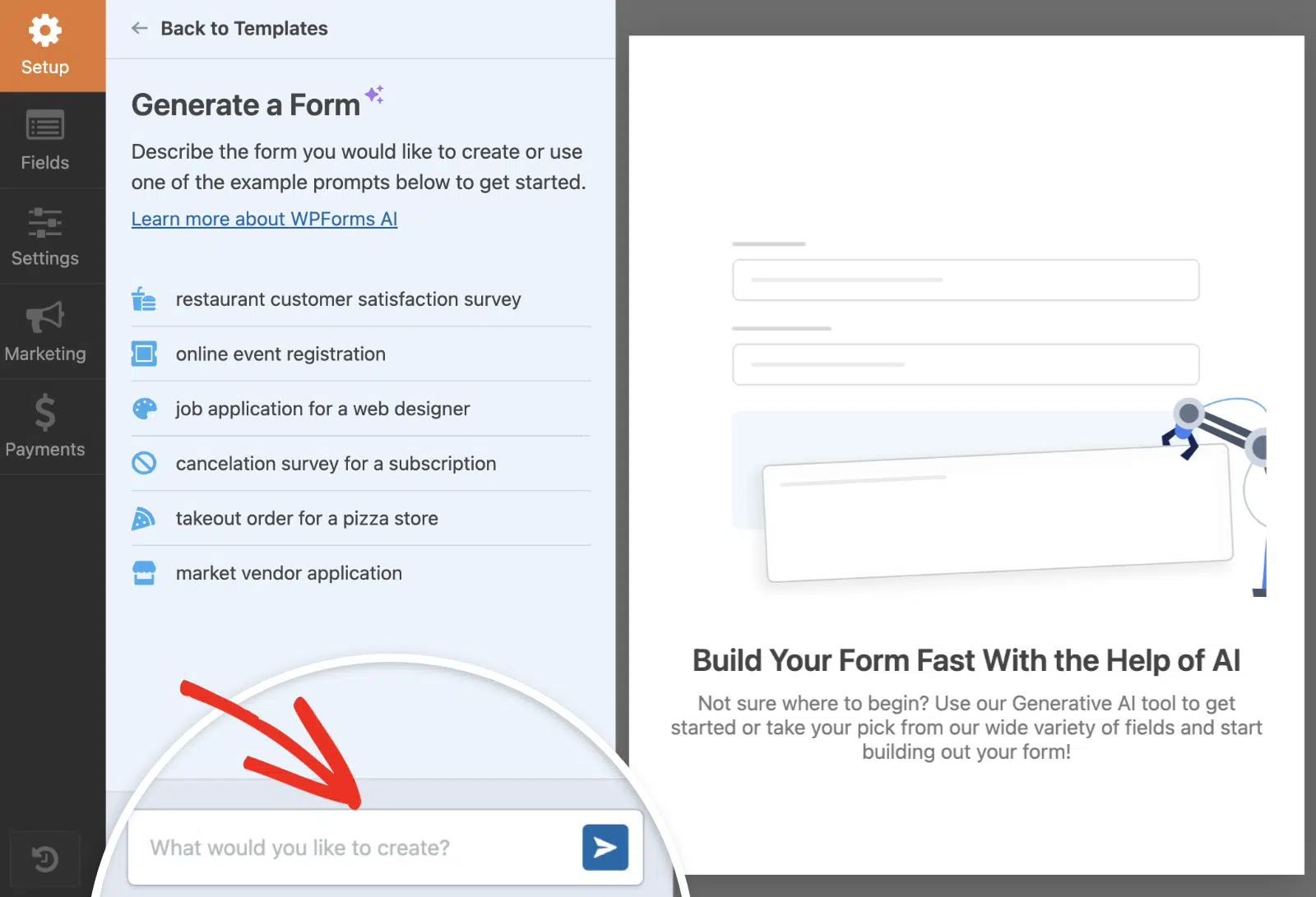
If you thought that was cool, WPForms also includes an AI form builder that generates complete forms from a text description. Tell it “I need a customer feedback form with a rating scale and a comment box” and it builds the form for you.
AI Choices takes this further by auto-generating smart field options for dropdowns and checkboxes. Both the AI form builder and AI Choices are available in WPForms Lite.
A plugin entering feature freeze vs. one actively shipping AI-powered features. That tells you everything about where each product is heading.
If you’re curious about how AI form building compares across the market, we put together a full breakdown of the best AI form builder options for WordPress.
5. Accept Payments Directly in Your Forms
CF7 recently added basic Stripe support, but it’s minimal. No PayPal, Square, recurring payments, coupons, or pricing calculations.
WPForms supports Stripe, PayPal, and Square. At the Pro tier, WPForms charges zero additional transaction fees on top of what the payment processor itself charges.
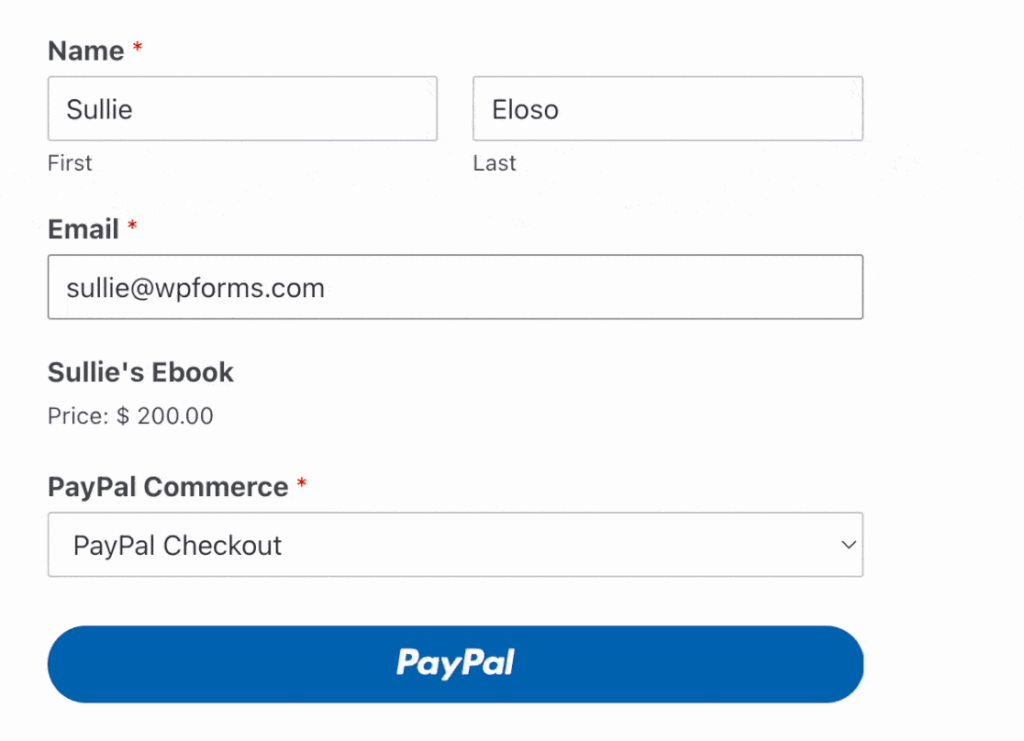
You also get recurring subscription payments, coupon codes, and a Calculations addon for building real-time pricing estimators, shipping calculators, or lead scoring forms.
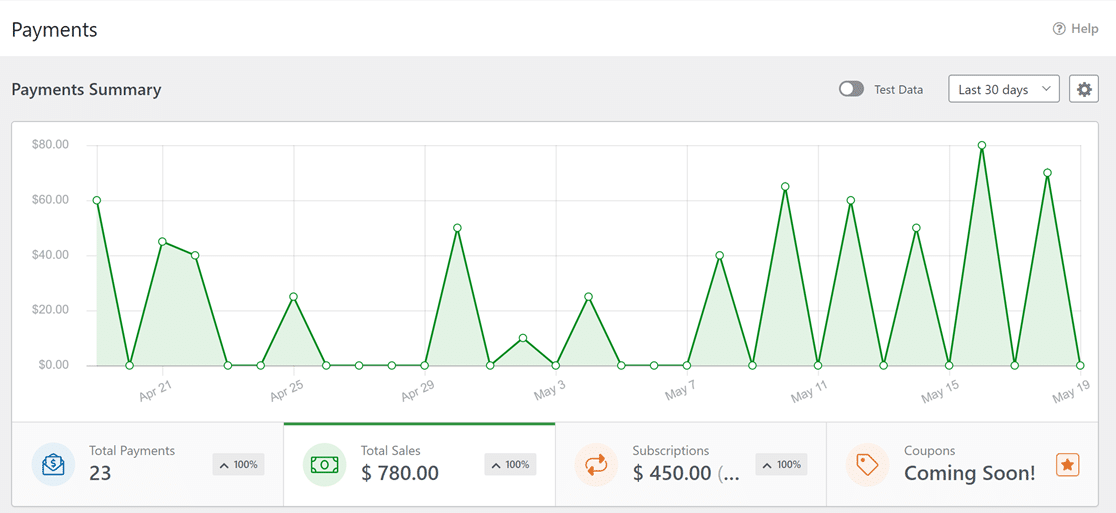
Once you start making sales with PayPal on your website, you can view your entire sales history and trends within the WordPress dashboard. This payments summary is accessible via WPForms » Payments.
With this payment summary, you can get a visual overview of your sales performance over time. It’s a massively helpful tool for monitoring your subscriptions, total payments, and sales value in dollars.
For a broader look at payment options, check out Stripe vs PayPal to see how the two biggest processors compare and which one is the best one for you.
6. Built-In GDPR Compliance Tools
CF7 has no GDPR features. No consent checkboxes designed for compliance, no way to disable IP tracking, no tools for handling data subject requests. If you need GDPR compliance with CF7, you’re bolting on yet another third-party plugin.
WPForms has GDPR compliance tools built into every tier, including the free Lite version. The GDPR Enhancements toggle activates controls for disabling user cookies and user detail collection (IP address and user agent).
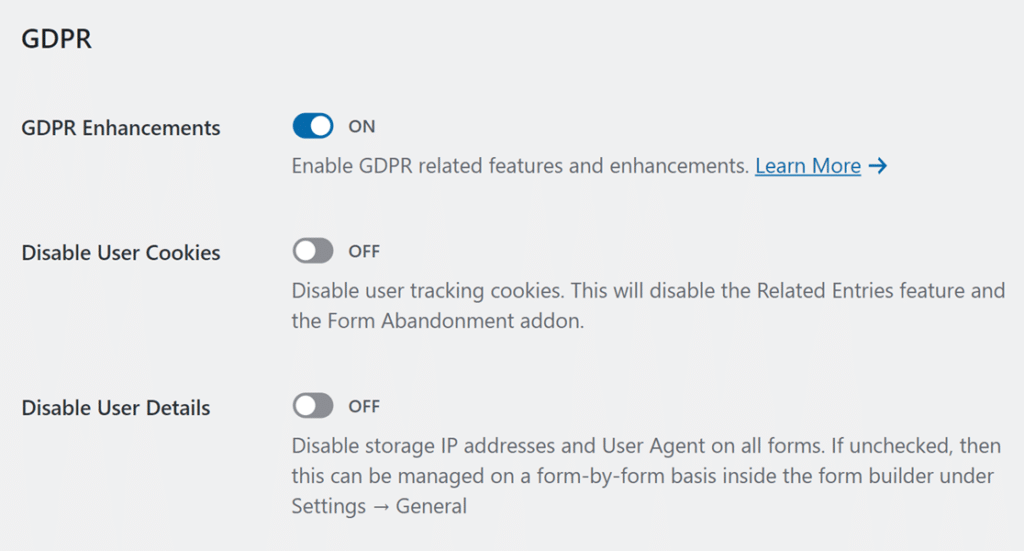
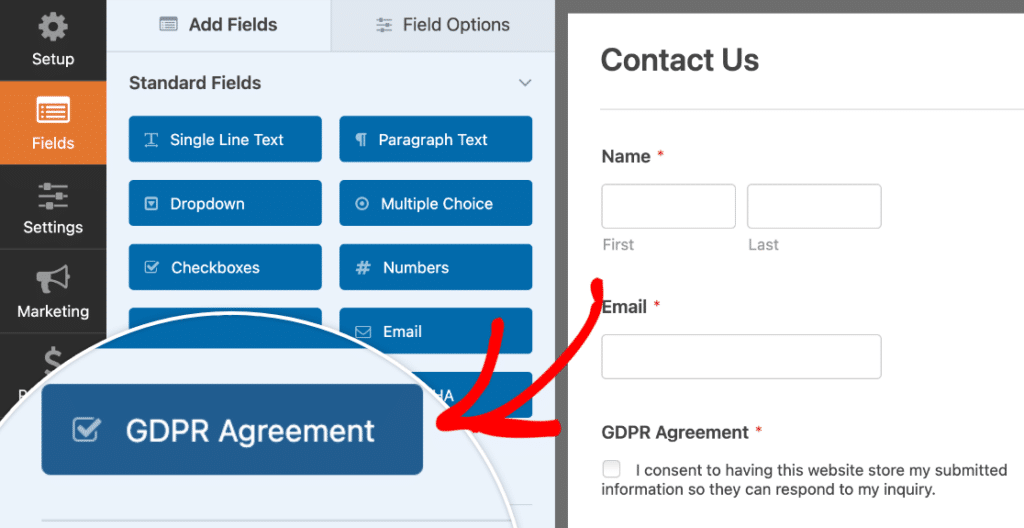
The GDPR Agreement field gives you a consent checkbox that’s always required, can’t be pre-checked, and only allows a single option. All of this is by design to meet GDPR’s explicit consent requirements.
With GDPR Enhancements enabled, a special GDPR Agreement field becomes available in your form builder under the Standard Fields section.
This field is specifically designed for GDPR consent collection. What makes the GDPR Agreement field different from a regular checkbox? Three things.
- It’s always required, so there’s no option to make it optional, because consent shouldn’t be optional when you’re collecting personal data.
- It can’t be pre-checked, as GDPR explicitly prohibits default consent. The user has to actively check the box themselves.
- It only allows a single checkbox, so you can’t add multiple options to this field. It’s a clear, binary “I consent” or “I don’t” choice.
For the full setup, check our guide on how to create GDPR compliant forms in WPForms.
7. Spam Protection That Actually Works
CF7’s approach to spam is basically “install reCAPTCHA and hope for the best.” You get reCAPTCHA integration and Akismet, both requiring manual configuration. There’s no built-in spam filtering layer, neither do you have any alternative CAPTCHA options.
WPForms takes a layered approach. At Basic and above, you get built-in anti-spam technology (WPForms’ proprietary system), plus your choice of reCAPTCHA, hCaptcha, Cloudflare Turnstile, and custom math or question-based CAPTCHAs. On top of that, there’s an allow/deny list to block specific email addresses or IPs.
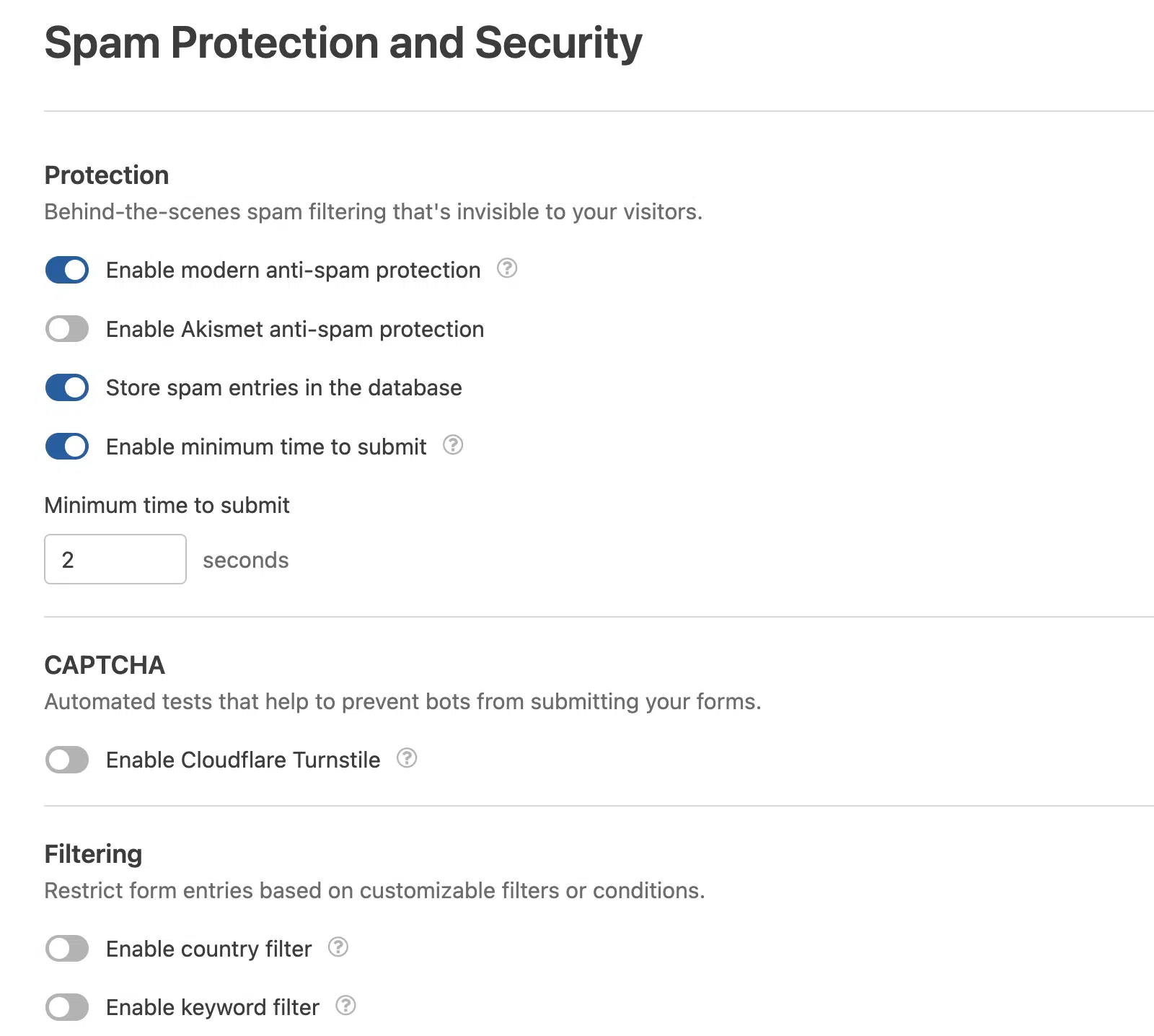
Multiple layers means spam has to get through all of them, not just one. If you want the full breakdown of how to set this up, our guide to building spam-free WordPress contact forms covers every option.
8. Dedicated Support From a Real Team
The WordPress.org support stats tell the story here. CF7 resolved 22 out of 65 support threads in the last two months. That’s a 34% resolution rate. WPForms resolved 24 out of 27 in the same period. That’s 89%.
The review numbers are just as telling. CF7 has 2,162 total reviews with a 4 out of 5 star rating, and 19% of those reviews are 1-star. WPForms has over 14,000 reviews with a 4.8 out of 5 star rating, and only 2.5% are 1-star.
That’s the free support comparison on WordPress.org alone. With a paid WPForms license, you get access to a dedicated support team on top of that.

Standard support at Basic+, Priority support at Pro, and Premium support at Elite. Real people who respond within hours, backed by extensive documentation, video tutorials, and a knowledge base.
CF7 is maintained by a solo developer who just announced he’s moving on. WPForms has a full team actively building and supporting the product. When your forms break and you need help, that difference matters.
9. Your Form Submissions Are Actually Saved
This has been CF7’s biggest gap for years. CF7 does not store form submissions. When someone fills out your form, CF7 sends an email notification and that’s it.
If the email fails (which happens more often than you’d think with wp_mail()), that submission is gone. You’ll never know someone tried to reach you.
WPForms stores every entry in your WordPress dashboard (Basic and above). You can search, filter, star, mark as read/unread, and export entries to CSV, Excel, or PDF.
If someone submits a form at 2 AM and the email notification lands in your spam folder, the entry is still sitting safely in your dashboard the next morning.
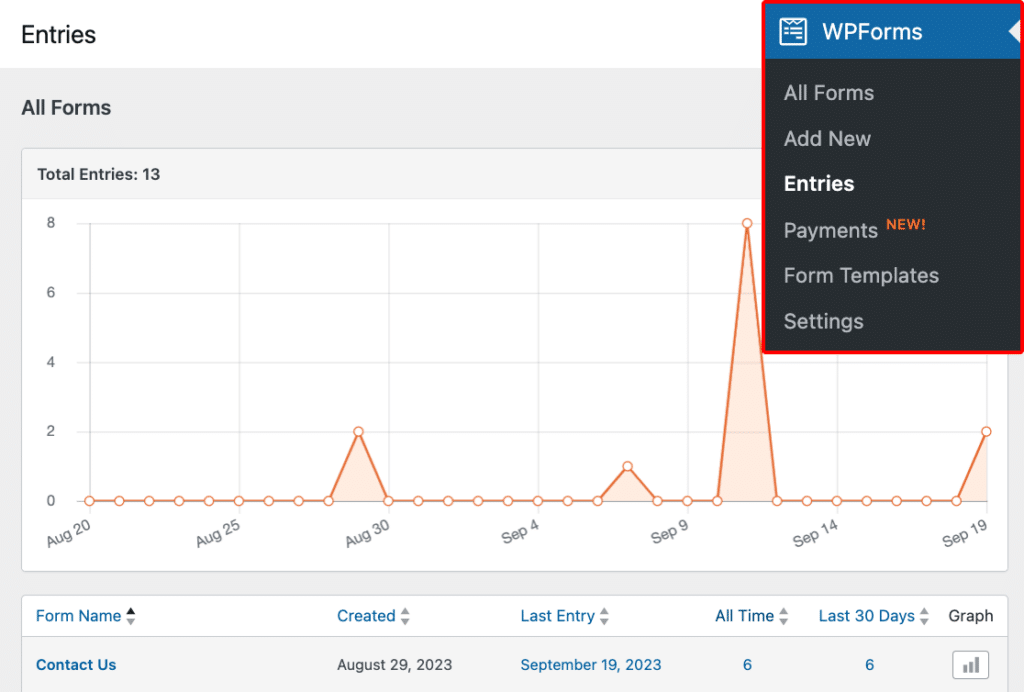
This is a paid feature (Basic tier, starting at $49.50/year), but for any site where form submissions matter to your business, it pays for itself the first time it saves a lead you would have lost on CF7.
For a full walkthrough of everything you can do with entries, the complete guide to form entries covers it all.
10. Powerful Upgrades When You’re Ready
WPForms Lite handles everything most CF7 users need right now. But if your needs grow, the paid tiers unlock a lot more without requiring a plugin switch. Your forms, settings, and data carry over seamlessly. Here’s what opens up when you upgrade.
- Conditional logic (Basic+) for showing or hiding fields based on user input. Check out this guide to set up conditional logic with WPForms.
- Multi-page forms (Basic+) with progress bars and animations. See how to create multi-page forms in literally a couple of minutes.
- Full payment suite (Pro) with Stripe, PayPal, and Square at zero additional WPForms fees, plus recurring payments, coupons, and pricing calculators. Tutorial at how to accept payments with Stripe.
- 12+ email marketing integrations (Plus+) including Mailchimp, Kit (formerly ConvertKit), AWeber, and more with proper field mapping to segment by form responses, and trigger marketing workflows.
- CRM integrations (Elite) with Salesforce, HubSpot, Pipedrive, and Zoho CRM.
- 10,000+ app connections via Zapier (Pro).
- Form templates with the full library of 2,100+ templates at Pro. Learn how to use form templates in WPForms.

None of this is required to switch from CF7. Think of it as headroom. Your forms can grow with your business instead of hitting a wall.
11. A Plugin That’s Actively Getting Better
CF7’s final feature update is version 6.2. After that, nothing new. Meanwhile, WPForms ships new features regularly.
Recent additions include a camera field that lets users snap photos directly from your form, a map field for location selection, AI-powered pricing calculators, and digital signatures for agreements and contracts.

That’s the difference between a plugin in feature freeze and one with a full team shipping updates. When you switch to WPForms, you’re not just getting a better form builder today. You’re getting one that will keep improving tomorrow.
FAQs About Switching From Contact Form 7 to WPForms
Moving away from a plugin you’ve used for years can raise questions. Here are the most common ones I’ve seen from WordPress site owners looking for the best Contact Form 7 alternatives.
Will I lose my existing CF7 form data when I switch?
The WPForms importer migrates your form structure (fields, labels, settings). CF7 doesn’t store form submissions in the first place, so there’s no entry data to transfer, but there’s a workaround which you can follow in our export Contact Form 7 data to WPForms guide.
Going forward, WPForms stores every submission in your WordPress dashboard, so you’ll never lose a form entry again.
Can I use WPForms for free like Contact Form 7?
Yes. WPForms Lite is free and already outperforms CF7 on ease of use, spam protection, and capabilities.
You get the drag-and-drop builder, AI form generation, AI Choices, payment fields, Stripe, Constant Contact integration, and basic form templates. For a detailed comparison, see our breakdown of WPForms Lite vs Contact Form 7.
Is Contact Form 7 going to stop working?
Not immediately. CF7 will continue to receive bug fixes and security patches after version 6.2. But no new features will be developed, and the developer has said they’re moving on.
As WordPress continues to evolve with new PHP requirements, block editor updates, and security standards, a plugin without active feature development becomes a growing compatibility risk over time.
Do I need to switch right now?
You don’t have to, but there’s no advantage in waiting. The migration takes minutes. And every day you stay on CF7, you’re missing features that could be improving your forms, capturing more leads, and growing your business.
Next, Make Your Forms Look as Good as They Work
Now that you know what WPForms can do, take a look at the design side. Our collection of beautiful contact form designs shows what’s possible when you pair a modern builder with a bit of creativity. And if you want to go beyond the defaults, learn how to customize a form template to match your brand perfectly.
Start Building Better Forms with WPForms
Ready to build your form? Get started today with the easiest WordPress form builder plugin. WPForms Pro includes lots of free templates and offers a 14-day money-back guarantee.
If this article helped you out, please follow us on Facebook and X (Twitter) for more free WordPress tutorials and guides.





