AI Summary
If you’ve ever spent a first meeting asking a new client for their phone number and budget, you already know why intake forms exist. Below are 11 intake form examples for businesses and nonprofits of all kinds, each paired with the WPForms template I’d start from.
For each one, I break down what the form collects and why it works, then share one tactic worth stealing for your own version. After the examples, you’ll find a checklist of the fields every intake form needs and a quick walkthrough for building yours in WPForms.
What Is an Intake Form? (Plus Why You Need One)
An intake form collects the details you need from a new client or patient before you start working together. It usually gets filled out before the first appointment, and it saves both of you from going over the same questions in person.
Depending on the industry, you’ll also hear it called an intake sheet or an intake questionnaire. Clinics often call it intake paperwork, while many service businesses just call it a new client form.
Used in nearly every business and industry, intake forms are highly customizable and versatile, as you’ll see. For most businesses, they pay off in five ways:
- Data Collection: Every new client gives you the same details in the same format, including the consent and health information some industries require you to keep on file.
- Improved Organization: Answers live in one place, so you walk into the first meeting already knowing the person’s goals and history.
- Enhanced Communication: Each submission reaches the right team member right away instead of sitting in a shared inbox.
- Reduced Administrative Burden: Nobody has to retype paper forms or call people back for the answers they skipped.
- Customization and Scalability: You can add a question, or a whole new intake form, as your services grow.
As you work on creating your intake forms, take inspiration from the intake form examples below. By incorporating the essential elements and tailoring your form to specific business needs, you can maximize the benefits of intake forms!
11 Intake Form Examples You Can Use Today
Use the table below to jump straight to the example closest to your business. The last column names the WPForms template to start from and the plan it needs. Basic templates work on every paid plan, and Pro templates need the Pro or Elite plan.
| # | Example Type | Best For | Key Fields | WPForms Template |
|---|---|---|---|---|
| 1 | Client Intake Form | Agencies, freelancers, consultants | Contact, business info, services needed, budget | Client Intake Form Template (Basic) |
| 2 | Recruiting Intake Form | HR teams, recruiters | Candidate details, resume upload, work history | Recruiting Intake Form Template (Basic) |
| 3 | Patient Intake Form | Healthcare practices, clinics | Medical history, insurance, current medications | Patient Intake Form Template (Basic) |
| 4 | Writing Center Intake Form | Universities, tutoring services | Student info, assignment type, areas to focus on | Writing Center Intake Form Template (Basic) |
| 5 | Animal Shelter Intake Form | Shelters, rescue groups | Animal details, temperament, medical info | Animal Intake Form Template (Pro) |
| 6 | Veterinarian Intake Form | Vet clinics | Pet info, owner contact, medical history | Veterinarian Intake Form Template (Basic) |
| 7 | Massage Intake Form | Massage therapists, spas | Health info, preferences, signed consent | Massage Intake Form Template (Pro) |
| 8 | Event Registration Intake Form | Event organizers, conference hosts | Company, contact, booth or attendee preferences | Event Registration Form Template (Pro) |
| 9 | Rental Application Intake Form | Property managers, landlords | Personal info, rental history, references | Rental Application Form Template (Pro) |
| 10 | Volunteer Intake Form | Non-profits, community groups | Contact, availability, areas of interest | Volunteer Recruitment Form Template (Basic) |
| 11 | Donation Intake Form | Charities, fundraising teams | Donor info, donation type, tax info | General Donation Form Template (Pro) |
1. Client Intake Form
Client intake forms help gather important project-related information that assists in managing client expectations and delivering successful outcomes.
The example below showcases a marketing agency’s client intake form that requests important information, such as:
- General Contact Information (Name, Email Address, Phone Number Fields)
- Business Information (Company/Organization and Website URL Fields)
- Service Required (Checkboxes List)
- Project Information (Message Field)

Why It Works
Thrive tailored this form to its digital marketing services, so a prospect can tell right away that the agency handles their kind of project. The answers also give the team enough to prepare a small audit of the requested services before the first call.
Upfront detail like this lines up your team’s work with the client’s goals from day one. Web design and digital marketing agency KLH Technology Solutions uses a WPForms client contact form similar to the one above to collect information about potential clients and schedule appointments.
Templates to Try
- General Intake Form (Basic)
- Client Intake Form Template (Basic)
Note: With WPForms, you can easily modify the layout, design, and style of your form to match your website design. Don’t forget to use the form builder to customize your forms to suit your unique services and client needs.
2. Recruiting Intake Form
Recruiting intake forms help you gather the information you need about job candidates, so you can screen applications faster and compare them side by side.
The example below from DigitalOcean keeps things short. It asks for:
- Contact Details (First Name, Last Name, Email, Phone, and City Fields)
- Resume/CV Upload (PDF, DOC, DOCX, TXT, or RTF Files)
- Cover Letter Upload
- Screening Questions (How They Heard About the Job and Work Authorization)

Why It Works
Candidates can get through this form in a few minutes, and the Apply With LinkedIn button speeds things up even more for anyone with a current profile. On your side, the two screening questions tell you right away whether someone meets the basic requirements, which saves the time you’d otherwise spend reading resumes that were never a fit.
Templates to Try
- Recruiting Intake Form (Basic)
- Job Application Upload Form (Basic)
3. Patient Intake Form
A patient intake form gathers basic information about a patient’s medical history. It is easy to read and fill out, making it less overwhelming for patients.
This example from PatientPop (now part of Tebra) fits all of the following onto a single page:
- Patient Details (Name, Date of Birth, Contact Information, and Emergency Contact)
- Insurance Information (Primary and Secondary Coverage, Policy Holder, ID, and Group Numbers)
- Payment and Prescription Policies (Copays, Missed-Appointment Fees, and Preferred Pharmacy)
- Patient Signature and Date

Why It Works
Clear sections and plain questions let patients get through the form quickly, while the practice still captures the insurance and policy details it needs before the visit. Collecting all of this upfront also shortens check-in, so people spend less time in the waiting room.
The same structure works for therapy and counseling practices too. They usually swap the insurance-heavy sections for questions about current concerns and past treatment.
Templates to Try
- Patient Intake Form (Basic)
- Patient Information Form (Basic)
- Counseling Intake Form (Basic)
4. Writing Center Intake Form
Writing center intake forms serve as a starting point for the tutoring session, helping the instructor get to know the student and their writing needs.
The example below comes from the University of Iowa Writing Center. It’s the application students fill out to join the center’s Honors Writing Fellows program, and it collects:
- Student Information (Name, Major, University ID, GPA, and Expected Degree Date)
- Contact Details (Email Address, Local Address, and Cell Phone Number)
- Faculty Recommendation (Recommender’s Name and Department)
- Leadership Experience (College Activities and Roles)

Why It Works
The University of Iowa form asks only for what the selection committee needs, from academic standing to a faculty member who can vouch for the student. Students know exactly what’s expected before they start, and the center gets applications it can compare side by side.
If you’re building an intake form for tutoring sessions instead, the same approach applies with different questions, like the assignment type and what the student wants help with.
Templates to Try
- Writing Center Intake Form (Basic)
- Writing Evaluation Form (Basic)
5. Animal Shelter Intake Form
Shelters and rescue groups rely on animal admission forms to gather data about the animals in their care and any special requirements they may have.
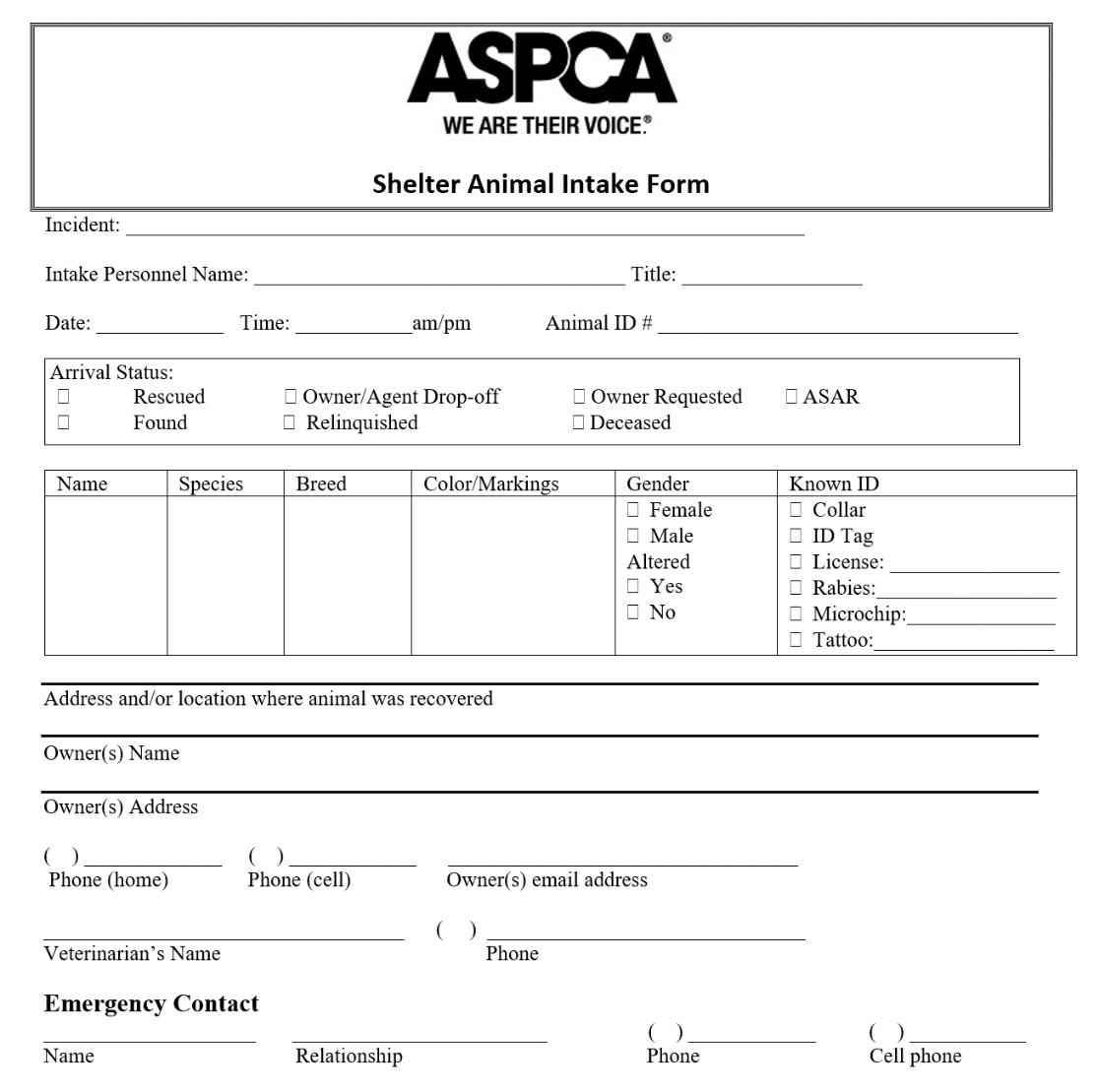
The following is an example of an animal shelter’s intake form, ASPCA, which includes critical questions such as those listed below:
- Animal Information (Name, Breed, Age, Gender Fields)
- Temperament (Behavioral Characteristics and Personality Fields)
- Contact Information (Name, Email Address, Phone Number Fields)
- Medical Information (Vaccination History, Medications, and Health Conditions Fields)
Why It Works
The form is built around animal welfare, so it covers temperament and medical history alongside the basics. Staff get what they need to keep each animal safe from the day it arrives.
Having those details upfront also makes placement easier later, because the shelter can match animals with the right adopters and answer their questions with confidence.
Templates to Try
- Animal Intake Form (Pro)
- Pet Adoption Application Form (Pro)
6. Veterinarian Patient Intake Form
In order to offer the best care possible, veterinarians use patient intake forms to collect vital information about pets and their owners.
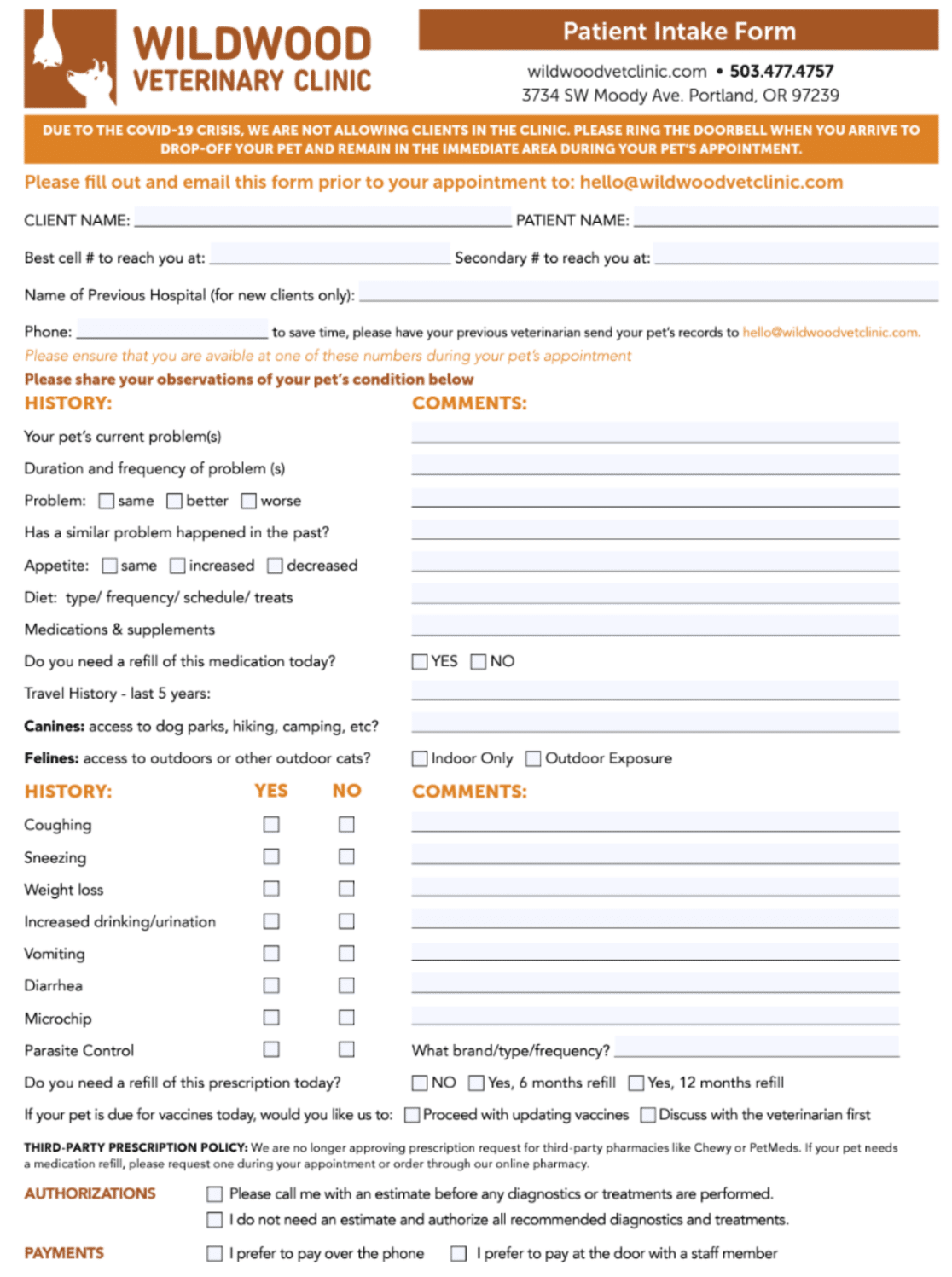
This intake form from the Wildwood Veterinary Clinic covers all the bases. It asks for:
- Owner and Pet Details (Client Name, Pet Name, and the Best Numbers to Call)
- Current Problem (Symptoms, How Long They’ve Lasted, Appetite, Diet, and Medications)
- Health History Checklist (Yes/No Questions on Coughing, Vomiting, Weight Loss, Microchip, and More)
- Vaccines and Refills (Whether to Update Vaccines and Refill Prescriptions at the Visit)
- Authorizations and Payment (Estimate Approval and How the Owner Prefers to Pay)
Why It Works
A form this thorough tells pet owners their animal is in good hands, and it gives the vet a full picture of the pet’s history before the exam starts. Staff can prepare for each appointment instead of asking the same questions at the front desk.
The authorization section is a smart touch too. Owners decide upfront whether they want a call with an estimate or approve all recommended treatment, so there are no surprises at checkout.
Templates to Try
- Veterinarian Patient Intake Form (Basic)
- Pet Care Appointment Form (Basic)
7. Massage Intake Form
A massage therapist’s ability to give successful, individualized treatments depends on the information they glean from massage intake forms.
Below is an example of a massage intake form by Clinicsense that benefits both potential clients and massage therapists and requests important info, such as:
- General Contact Information (Name, Email Address, Phone Number Fields)
- Health Information (Medical Conditions, Injuries, Allergies, and Medications Fields)
- Massage Preferences (Type of Massage, Pressure, and Focus Area Fields)
- Consent to Treatment (Agreement and Signature Fields)

Why It Works
Clients get a private place to mention conditions or injuries that could affect their session, plus a chance to say what pressure and focus areas they prefer. With that information, the therapist can plan a tailored treatment before the client is on the table.
The consent section matters just as much. A signed agreement on file gives you informed consent for every session, which protects both the client and your practice.
Templates to Try
- Massage Intake Form (Pro)
- Spa Client Intake Form (Pro)
8. Event Registration Intake Form
Intake forms for events help collect all the information you need from registrants in one centralized location, saving you time and stress.
The example below showcases an event registration intake form tailored for exhibitors that requests important information such as:
- Company/Organization Name
- Contact Information (Name, Email, Phone)
- Booth Preferences (Size, Location, Special Requests)
- Products/Services Offered

Why It Works
Because the form speaks directly to exhibitors, it shows them the organizers understand what a booth setup involves. The booth questions let each exhibitor ask for the size and spot that suits them, with room for special requests.
For the organizer, getting these details upfront makes the logistics manageable, from planning the floor layout to making sure every exhibitor has what they need on the day.
Templates to Try
9. Rental Application Intake Form
In order to properly vet prospective tenants, property management organizations and landlords rely heavily on rental application intake forms.
Here’s an example of what a rental application intake form can look like. This one runs to five pages, and the first page asks for:
- Property Details (Type, Size, Bedrooms, Rent, and Address)
- Tenancy Terms (Lease Type, Length, and Start Date)
- Applicant Details (Name, Date of Birth, ID Numbers, Phone, and Email)
- Household Questions (Other Occupants, Pets, and Vehicles)
- Background Question (Criminal Convictions)

Why It Works
Applicants see exactly what the landlord needs before they start, which takes the guesswork out of applying. For property managers, a complete application makes it easier to screen every tenant fairly and consistently.
Picking qualified tenants the first time saves money down the road, since it lowers the risk of missed rent and evictions.
Templates to Try
- Rental Application Form (Pro)
- Rental Agreement Form (Pro)
10. Volunteer Recruitment Intake Form
Volunteers are the backbone of many non-profit organizations, and the right volunteer intake form can make all the difference in finding the best candidates.
Check out this volunteer intake form from the American Red Cross. It collects:
- Personal and Contact Details (Name, Date of Birth, Age Group, Addresses, Phone Numbers, and Email)
- Emergency Contact (Name, Phone, and Relationship)
- Experience (Paid and Volunteer Work, With Supervisor Details)
- Licenses, Education, and Languages
- Skills and Interests (Checkboxes for Areas Like Driving, Teaching, Photography, and Fundraising)

Why It Works
The skills checklist does a lot of the work here. Volunteers can tick off what they’re good at in seconds, and the Red Cross gets a quick way to match each person with a role that suits them.
A good fit like that usually means a better experience for volunteers and stronger retention for your organization.
Templates to Try
- Volunteer Recruitment Form (Basic)
- Volunteer Signup Form (Pro)
11. Donation Intake Form
Donation intake forms help collect vital information from donors, helping you keep track of donations, show appreciation, and connect with your supporters.
The example below shows the donation intake form YRMC used to collect COVID-19 donations. YRMC has since become part of Dignity Health Arizona, but the form is still a great model because it requested information such as:
- Personal Information (Name, Email, Address, Phone)
- Donation Information (Items Donated, Quantity, and Value)
- Acknowledgment Letter for Filing Taxes

Why It Works
Donors can list each item they’re giving along with its quantity and value, then request an acknowledgment letter for their taxes in the same form. Offering that letter upfront shows donors the organization takes transparency seriously.
On your end, organized donor records make it easier to tailor outreach to different groups of supporters, which helps them feel more connected to your mission.
Templates to Try
- General Donation Form (Pro)
- Online Donation Form (Pro)
What to Include in an Intake Form
Every intake form needs the same four groups of fields, whatever your industry. All 11 examples above follow this pattern, even when their questions look nothing alike.
- Contact details: The Name and Email fields work on every WPForms plan, including the free Lite version. Phone and Address fields add smart formatting and validation from the Basic plan up.
- Reason for reaching out: Use a Dropdown or Checkboxes field for the service someone needs, plus a Paragraph Text field so they can explain it in their own words.
- Background you need to prepare: History, documents, and scheduling go here. File Upload and Camera fields handle documents and photos, and a Date / Time field collects appointment preferences. All three need a paid plan.
- Consent: A required checkbox covers privacy and terms. When you need a real signature on file, the Signature field handles it on the Pro and Elite plans.
Service-specific questions belong in that third group. A therapy practice asks about current concerns and past treatment, while a clinic asks about allergies and medications. An agency wants budgets and deadlines instead.
How to Create an Intake Form in WPForms
WPForms gives you two quick ways to build an intake form. You can start from one of the templates in this guide, or you can describe the form you need and let WPForms AI draft it for you. WPForms builds any form with a drag-and-drop builder and no code.
Step 1: Pick an Intake Template or Generate One With AI
In your WordPress dashboard, go to WPForms » Add New and type “intake” into the search bar. You’ll see the intake form templates from this article plus a few more, like counseling and coaching intake forms. Click Use Template on the one you want, and it opens in the form builder.

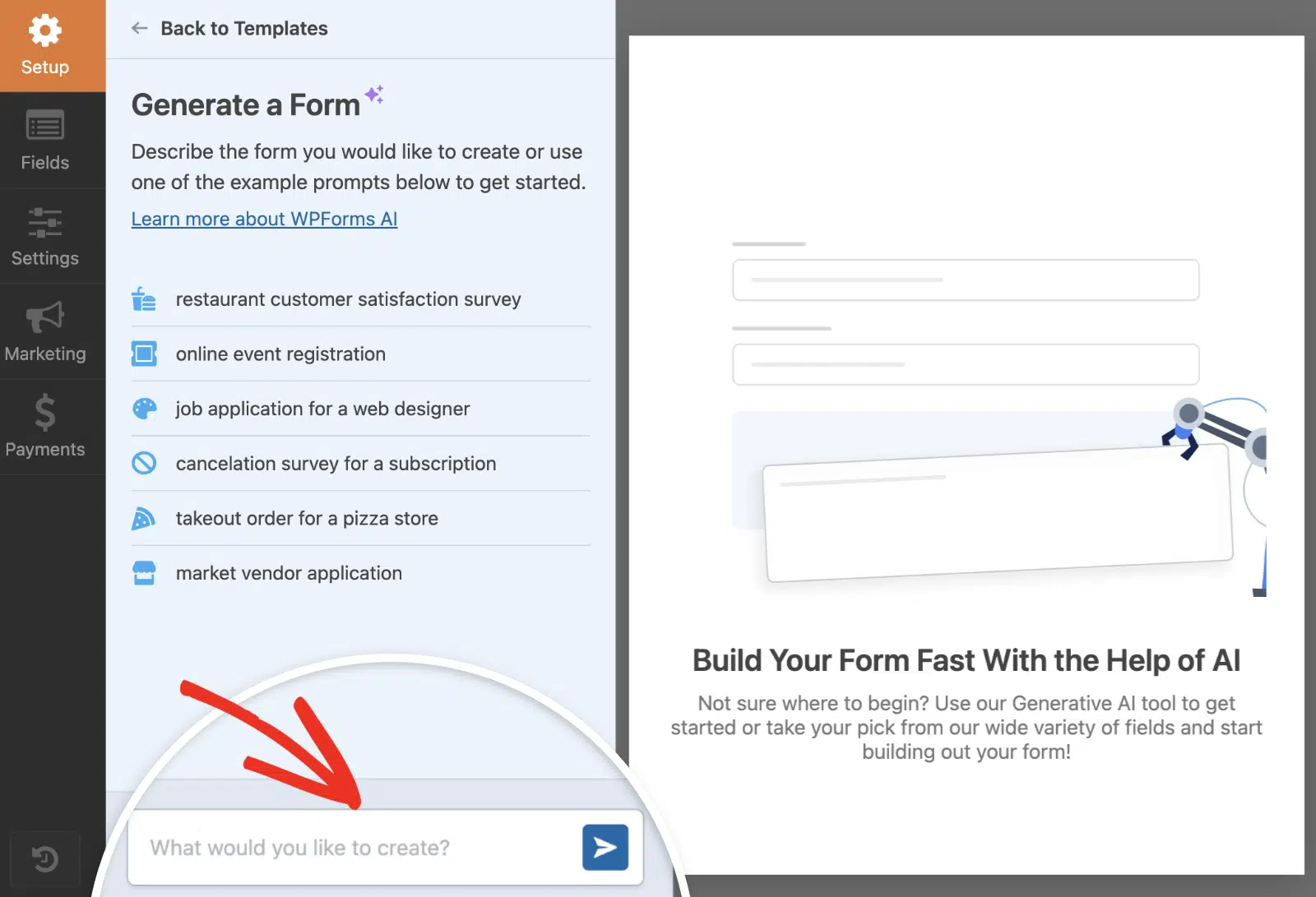
If you’d rather describe the form than browse templates, go to WPForms » Add New and choose Generate With AI. WPForms AI turns your plain-language description into a draft you can edit like any other form.
Keep in mind that the intake templates are part of WPForms’ paid plans. About half need Basic, and the rest, like the rental and donation templates, need Pro.
Step 2: Customize the Fields
Drag new fields in from the left panel, then click any field to change its label or options. A few settings make the biggest difference on intake forms:
- Smart branching: Use conditional logic to show follow-up questions only to the people they apply to (every paid plan).
- Page breaks: Split a long form into pages with a progress bar so it feels shorter (every paid plan).
- Uploads and photos: Add File Upload or Camera fields for documents, IDs, and insurance cards (every paid plan).
- Signatures: Add the Signature field when you need signed consent (Pro and Elite).

Step 3: Set Up Notifications and Confirmations
Next, open Settings » Notifications in the form builder.
Your team gets an email for every new entry by default, and on any paid plan you can add a second notification that sends the person a copy of their answers.
Paid plans also save every entry in your WordPress dashboard under WPForms » Entries.

The confirmation is what people see right after they submit, and you’ll find it under Settings » Confirmations. A thank-you Message is the default, but you can send people to a page on your site or any other URL.
Step 4: Publish and Share It
Click Embed in the form builder to add your intake form to a new or existing page, then publish that page.

For in-person intake, a QR code is the easiest way to get people onto the form. Open Settings » General and point the QR Code setting at the page your form lives on. Then click Generate QR Code and download it as a PNG, or as an SVG if you’re printing it.

Patients and clients can scan the code in your waiting room and fill in the form on their own phone. QR codes come with every WPForms plan, even the free Lite version. On the Pro and Elite plans, you can also swap the WPForms logo in the middle of the code for your own.
Intake Form Best Practices
Some things I’ve learned from building these forms in different industries, on top of the usual form best practices:
- Ask for the minimum upfront, then layer on detail later: A 30-field intake form on the first interaction is how you lose people. Start with 8-12 fields. If you need more, send a follow-up form after the first call.
- Find the question people quit on: Form Analytics tracks views on every WPForms plan. On Pro and Elite, it also shows drop-off for each field, so you can see exactly which question makes people abandon your intake form and cut or reword it.
- Use conditional logic for branching forms: A client intake form for a marketing agency shouldn’t ask every visitor about every service. Show only the SEO questions to people who checked SEO.
- Make file uploads work on mobile: Plenty of people will fill out your intake form on a phone, so test the upload flow on one before you publish.
- Send a confirmation email, not just a thank-you message: A confirmation email gives the submitter something to reference and signals professionalism. Set this up in the notification settings during build.
- Keep the form mobile-first in design: Anyone filling out your form at a front desk or in a waiting room is probably holding a phone. Single-column layouts, big tap targets, and short labels all matter.
- Comply with privacy laws upfront: If you’re collecting medical or financial data, add a consent checkbox and a link to your privacy policy. WPForms includes GDPR compliance tools on every paid tier.
- Connect the form to where the data needs to go: Don’t let entries pile up in WordPress. Push them to your CRM, Google Sheets, or your email marketing tool with a Zapier or native integration.
FAQs About Intake Forms
A few questions that come up often when people build intake forms for the first time. Use these as a quick reference whether you’re new to forms or just refining the one you already have.
What’s the difference between an intake form and a contact form?
A contact form is general-purpose, so anyone visiting your site can use it to send a question, comment, or request.
An intake form is structured for a specific business workflow. It’s tailored to a service or scenario and collects the exact information needed to start that workflow.
A contact form might have 3 fields. An intake form usually has 8 or more.
How long should an intake form be?
Aim for 8 to 12 questions. Shorter than that and you might miss something you need. Longer than that and people abandon the form before submitting.
If your workflow really does need more, break the form into multiple pages with a progress bar so it feels manageable.
Can I require certain fields conditionally?
Yes. With conditional logic, you can show or hide fields based on what someone selected earlier.
For example, only show the insurance section if the user marks “yes” on a medical-coverage question.
WPForms supports this on every paid tier, and it’s the single biggest tool for keeping intake forms short.
Do I need HIPAA compliance for medical intake forms?
If you’re collecting protected health information from patients in the United States, yes. HIPAA compliance covers how you store, transmit, and access that data.
The form builder is one piece, but the bigger pieces are your hosting, encryption, and signed business associate agreements with any service that touches the data.
Talk to a healthcare compliance specialist before you launch.
What’s the best free intake form builder?
WPForms Lite is the free option I’d start with on WordPress. It includes the drag-and-drop builder and the standard form fields, with unlimited forms on unlimited sites, so you can build a simple intake form from a blank form at no cost.
The ready-made intake templates in this guide need a paid plan, though. So do conditional logic, file uploads, and entry management, which is why most intake-form use cases land at Basic or Pro.
Is an intake sheet the same as an intake form?
Yes. An intake sheet, an intake questionnaire, and intake paperwork all describe the same thing, a set of questions a new client or patient answers before you work together.
The name changes by industry, and “sheet” usually hints at a paper version. An online intake form does the same job but submits straight to you, so nobody has to retype anything.
How do I make a fillable PDF intake form?
You can build one in a PDF editor like Adobe Acrobat, but an online form is usually easier for everyone.
People can fill it in on any device and submit it right away, without saving and emailing a file back to you.
If you still want a PDF for your records, the WPForms PDF addon (Pro and Elite) turns each submission into a styled PDF.
What are the main types of intake forms?
The most common types are client intake forms for service businesses, patient intake forms for healthcare, and therapy or counseling intake forms for mental health practices.
You’ll also see recruiting and HR intake forms for job candidates, plus project intake forms that teams use for internal requests. Every example in this guide fits one of these types.
Next, Create Interactive Forms That Engage Your Audience
Once your intake form is live, the next move is making sure people actually finish filling it out. Multi-page layouts, conditional logic, and progress bars all help.
For a deeper look at the techniques that lift completion rates, see our guide on creating interactive forms that boost engagement.
Ready to build your form? Get started today with the easiest WordPress form builder plugin. WPForms Pro includes lots of free templates and offers a 14-day money-back guarantee.
If this article helped you out, please follow us on Facebook and X (Twitter) for more free WordPress tutorials and guides.