


AI Summary
Are you considering downloading WPForms Pro nulled?
WPForms Pro nulled is a pirated copy of WPForms Pro with its license check stripped out, and it’s a common way for malware to get onto WordPress sites. A reader once asked us whether it was OK to use one, and the honest answer is no.
WPForms Lite is free on WordPress.org, and the paid plans start at $49.50 for your first year, so you don’t need a cracked copy to save money.
What Are WPForms Pro Nulled Plugins?
The WPForms Pro nulled plugins are pirated copies of the popular premium WordPress form builder that are distributed unethically over the internet.
Nulled means someone has removed the license check, so the plugin runs without a key from WPForms and without any connection to its update server.
Some people who copy and redistribute nulled plugins argue it’s completely OK since WordPress and any derivative works (like plugins and themes) are licensed under a General Public License (GPL).
And while it’s true that WordPress plugins fall under the GPL, using these unofficial duplicated copies of software often comes at a cost.

It causes honest WordPress companies (many that are small businesses) to lose money. Most importantly, it compromises the security and integrity of the websites using these nulled WordPress plugins.
Nulled plugins are often the reason why websites get hacked. They can contain hidden code, malware, or be missing important updates.
Why You Should Avoid WPForms Pro Nulled
A nulled copy of WPForms Pro can look like a smart way for small business owners to keep costs low while building a website. But if you do your research, you’ll quickly see that there’s more harm than good to using a WPForms license key nulled.
Here are some of the top reasons why you must avoid WPForms Pro nulled on your website.
1. Site Security
WPForms Pro nulled versions are extremely dangerous and can seriously compromise your WordPress security. That’s because many plugin cracks are known to carry malware.
And that malicious code can hide in areas of your site that are not easy to spot and spread through different files. Once infected, it can be very hard to remove the code from your WordPress installation.
You may even have to hire WordPress security experts for the job, which can be quite expensive. Worse, if Google or other search engines detect this malware distribution on your site, it could get de-indexed from search results.
And worst of all, you could lose all your site data and hard work if the malware infects crucial system files. So if you come across any sites offering a WPForms Pro plugin free download, be VERY cautious.
2. Data Exposure
Downloads that claim to be WPForms Pro nulled software can contain many different kinds of tracking code. This includes code that steals info from your site and displays it to hackers and criminals on the dark web, which is scary stuff.
This could expose your username, email address, and password. If you run an eCommerce store or membership website, then the personal information of your customers could also be at risk.
Every entry your visitors submit passes through your form plugin, from names and email addresses to file uploads and payment details. A script hidden in a nulled copy of WPForms Pro can quietly copy all of it.
A customer data breach can severely damage your brand reputation overnight, and all it takes is a malware attack. And usually, these kinds of hacks are super hard to detect and can go unnoticed as your WordPress site keeps functioning normally.
3. Bad for SEO
If you get a WPForms Pro license key free and download a pirated plugin, you could completely ruin your search engine rankings. Nulled WPForms Pro plugins can add spam links to your site. Plus, they could hijack your visitors and redirect them to dangerous websites.
These malicious events are really hard to spot with the human eye. The links hide deep inside the code on the backend of your site. You might not even be able to find which links are redirecting people because they won’t redirect you if you’re a site admin.

However, search engines will notice all this spammy redirection fast and penalize you, dropping your website in search engine rankings or even de-indexing your site completely.
You’ll have to spend months to recover your website’s SEO rankings and in some cases, you may even be forced to start over and create a new website from scratch. This alone makes it worth buying WPForms and getting a legitimate license.
4. Support & Documentation
Even the most experienced WordPress users need good support and documentation to get the most out of a solid plugin. The WPForms family is a tight-knit crew that includes software developers and support team members.

We love our product and spend a ton of time providing support and creating documentation for our users. We’re constantly adding new tutorials and step-by-step guides for every feature of WPForms.
And our fast and friendly online support loves helping people get everything they want out of our plugin and more. But if you’re using a free WPForms Pro WordPress plugin that’s nulled, you’ll miss out.
Here are some of our favorite things people have said about our support.
- “Excellent service! As a small social startup we do pretty much everything in house. Greatly appreciate the quick and efficient support I received today. Thank you!”
- “I was very impressed with the speed of the reply. We are a church/charity site so cannot afford much. Thank you Daisy. Great service.”
- “We’re HUGE fans of WPForms and have had much success with fast, intelligent SUPPORT, and easily-located styling options you offer online. WAY too often you pull your hair out trying to find appropriate classes for individual form fields, labels, etc. You don’t hide your documentation and it’s much appreciated! LOVE your add-ons too!”
- “As we would say in Massachusetts, the service was “Wicked Cool” and “Wicked Fast”. Thanks again, Anatoly!”
You can read more WPForms testimonials here.
5. No Access to Updates
Most WordPress plugins (especially paid plugins) regularly release updates to add new features, plus to fix bugs and security issues.
If you found and downloaded a WPForms Pro crack, you’ll have your WPForms license key nulled, meaning your unofficial plugin won’t receive any updates from WPForms.
Some nulled sites do post newer versions, but each one is another download from an anonymous uploader that you have to trust all over again. That’s why it’s such a bad idea to try and find WPForms addons nulled, too.
A stored cross-site scripting flaw in WPForms Pro (CVE-2023-7063) let attackers inject malicious scripts through a form submission, and WPForms fixed it in version 1.8.5.4.
Licensed sites got the fix as a normal plugin update, while a nulled copy older than 1.8.5.4 still has the hole. Nothing on your dashboard will warn you about it.
So this leaves your WordPress site with an outdated version which may become even more unsafe and full of bugs as technology changes and hackers get smarter. Even if you use a WordPress security plugin, it won’t protect you against some attacks.
WordPress regularly releases new versions, so plugins also need to release new versions to remain compatible. And since WPForms Pro nulled can’t be updated, your site may start misbehaving or even crash.
Check out our sister site’s post on why you should always use the latest WordPress version.
6. Access to New Features
Premium WordPress plugins are updated regularly to add new features. If you’re using a pirated WPForms Pro nulled version, you won’t get automatic updates. In fact, you won’t even know new features are available.
And your WPForms Pro nulled software will get outdated fast. Then, you won’t know about any awesome new features and you’ll be stuck with an outdated and incompatible plugin.

WPForms 2.0 added built-in Form Analytics, and newer releases brought a WPForms Dashboard and a QR code for every form.
And, we’re always getting better. These new features can significantly improve your site so you can make more money online.
7. Unethical Use Discourages Innovation
Some people think that downloading just 1 copy of a nulled plugin won’t hurt anyone. They usually justify the decision by thinking they can’t afford to pay for a plugin.
But a WPForms Pro free download is actually the result of someone’s talent, skill, and hard work. When someone uses a nulled plugin, people who make a living creating cool software for the world to use lose money.
People who develop plugins not only spend their time writing code, they also provide support, create documentation, maintain a website, hire support staff, and spend money to run their business.
Using nulled software can hurt their business, even if it’s just a single copy.

In fact, supporting these unethical practices online may discourage other developers from wanting to create new innovative products that can benefit millions of users.
It’s a lot easier to copy a plugin than to make one. So, when you pay for a plugin, you help encourage people who know how to code to keep coming up with awesome stuff.
So now that you know the big reasons why you must avoid WPForms Pro nulled versions, let’s take a look at how to get WPForms for free next.
How to Get WPForms for Free
We’re a team of real people who want to help as many people get access to the most user-friendly contact form plugin on the market.
And we don’t want you to put your website at risk just to use a WPForms Pro free download. But we know sometimes business costs can add up.
So that’s why we made WPForms Lite, a 100% free version of WPForms.
This means, you can start using the most beginner-friendly WordPress contact form plugin in the market completely free, without an illegitimate WPForms Pro free download!
WPForms Lite includes more than most people expect from a free plugin.
- Drag-and-drop builder: Build forms without code, or describe the form you want and let WPForms AI build it once you turn on Lite Connect.
- Free templates: Start from ready-made contact, newsletter signup, and payment form templates.
- Payments: Accept Stripe, PayPal, and Square payments, with a 3% WPForms fee per transaction until you upgrade to Pro.
- Spam protection: Built-in anti-spam works alongside reCAPTCHA, hCaptcha, Cloudflare Turnstile, and Akismet.
- Entry backups: Lite emails you every submission, and Lite Connect backs up your entries so you can restore them to your dashboard when you upgrade.
And you’ll have gorgeous-looking forms set up in minutes without writing any code.
If a paid version of WPForms isn’t in your budget right now, we’d like to invite you to use WPForms Lite instead of using a free WPForms Pro WordPress plugin that’s nulled. Let’s set it up.
Step 1: Install the WPForms Lite Plugin
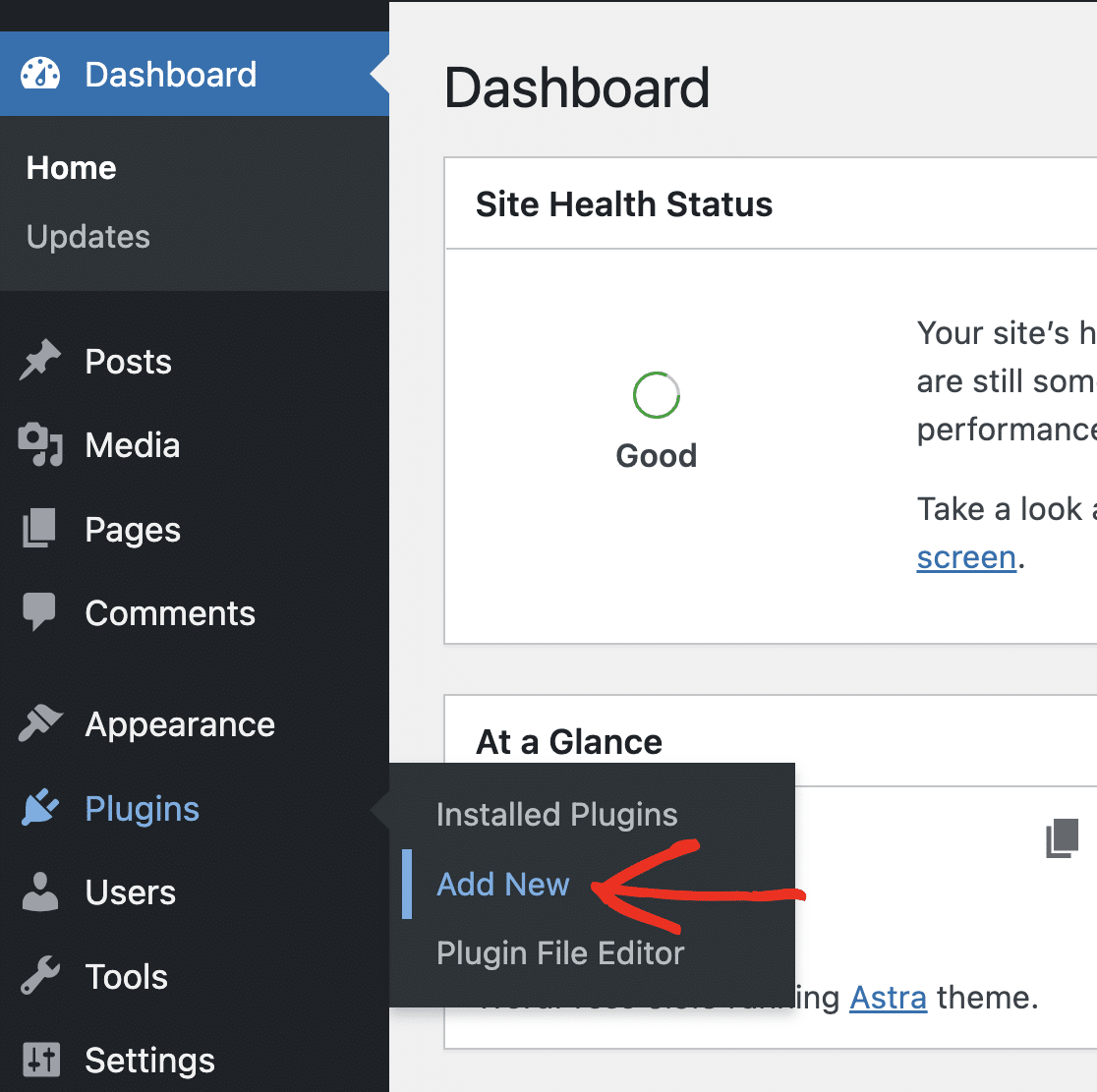
To install WPForms Lite, the free version of WPForms, start in your WordPress dashboard. Then head over to the panel on the left, hover over Plugins, and select Add Plugin. Older versions of WordPress, like the one in the screenshot below, call this Add New.
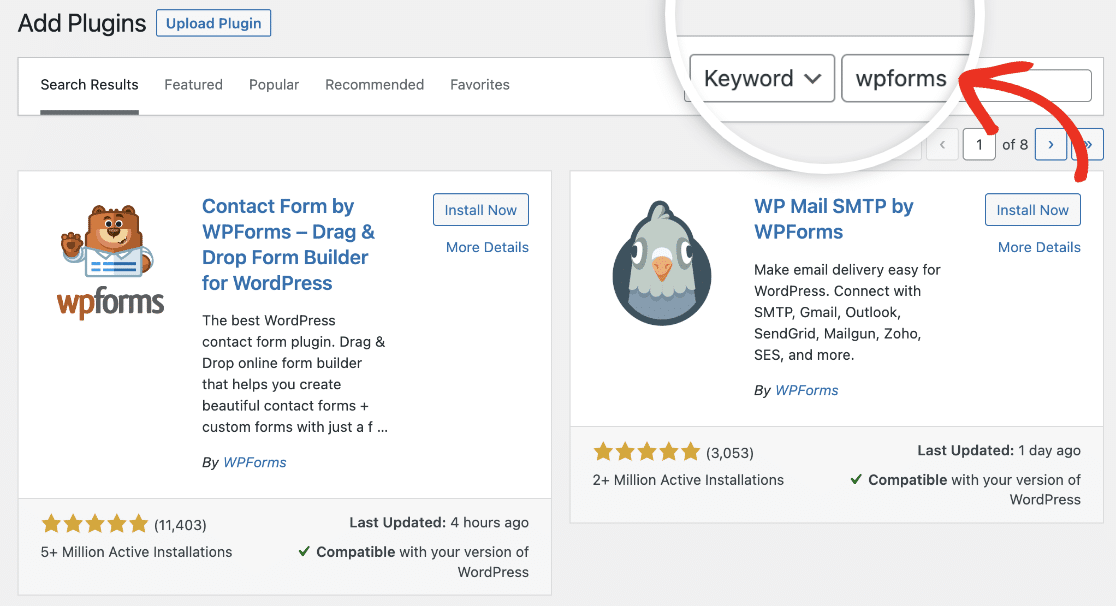
Next, type the keyword “WPForms” into the search box on the top right corner.
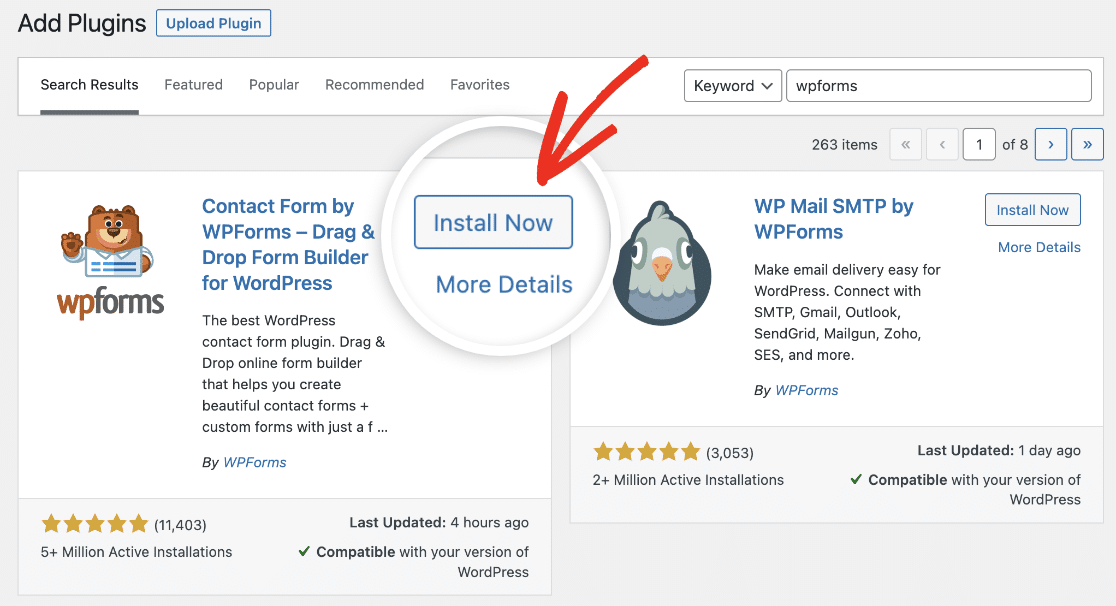
Now, click the Install Now button on the WPForms plugin card. The screenshot below shows its older name, Contact Form by WPForms.
Step 2: Activate the Plugin
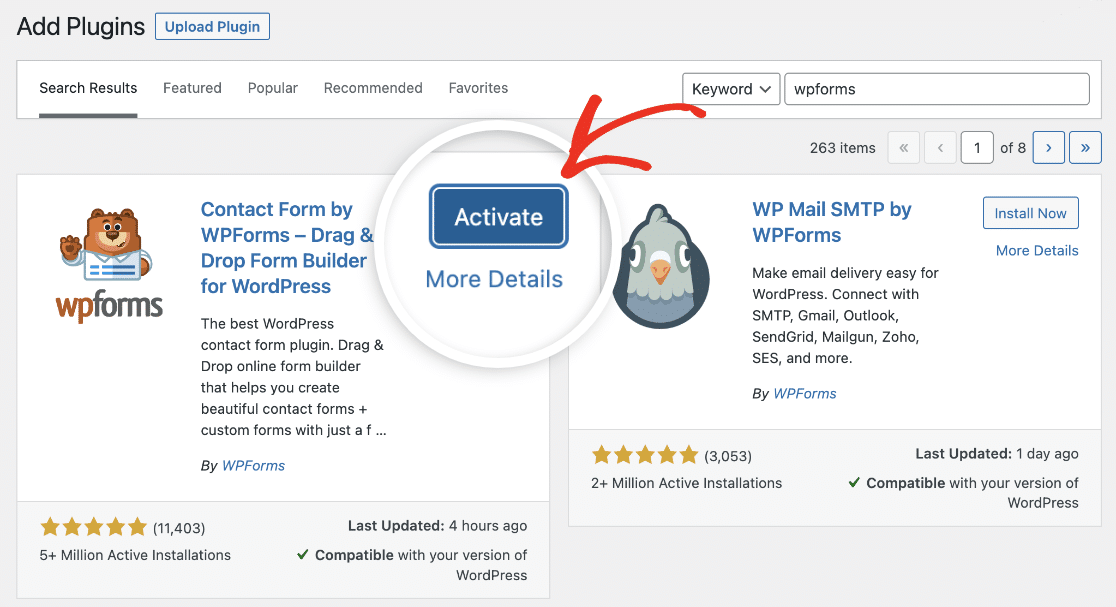
Next, click the Activate button.
And that’s it! You’re now ready to start using the best free WordPress forms plugin.
WPForms Lite comes with 70 free form templates to help you get started. Read our guide on how to create your first form for a quick walkthrough.
Step 3: Stick with Lite or Upgrade Later
WPForms Lite works well for basic needs. It allows form building without any cost, and there’s no pressure to upgrade. Many people use it for contact forms, sign-up sheets, or basic feedback forms.
When more advanced tools are needed, like file uploads, conditional logic, or payments without the 3% WPForms fee, a Pro license can be added anytime.
The upgrade takes only a few clicks, and all forms already built in Lite will still be there after switching to WPForms Pro. If you turn on Lite Connect, your backed-up entries come along too. This makes it easy to start small and only pay when it truly becomes necessary.
Brand new to WPForms and looking to get started with the WPForms Pro version right away? Check out this post on how to install and activate the WPForms plugin for help setting up WPForms Pro.
WPForms Pro Features
If you can afford a paid WPForms Pro License there’s quite a lot of value on offer.
When you weigh up the value you’d get for the cost of the WPForms Pro License or any other paid plan, with the potential costs of using a WPForms Pro nulled license, it’s a no-brainer.
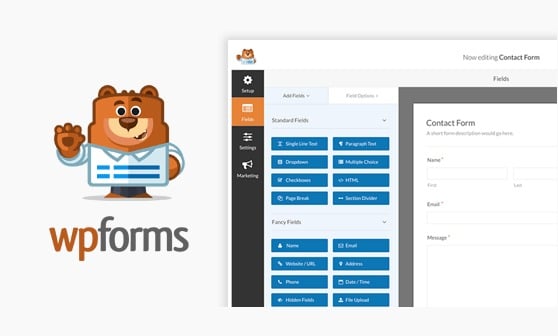
Take a look at some of these outstanding features below.
- Form abandonment
- Conversational contact forms so you can start using conversational marketing.
- 2,100+ form templates
- Conditional logic to create neat and dynamic forms
- User registration addon to let users register on your site
- File uploads through forms
- Multi-page forms to reduce form fatigue
- Offline forms that save and restore information if the connection is lost
- Custom CAPTCHA questions for an extra layer of spam protection
- Form locker addon to create password-protected pages
- WPForms charges no transaction fees on Stripe Pro, Square Pro, or PayPal Commerce payments. You pay only your payment processor’s fees.
- And a lot more!
Every WPForms paid plan comes with a 14-day, 100% money-back guarantee. Meaning if you don’t like WPForms in the first 14 days or you change your mind for any reason, you can get a 100% refund.
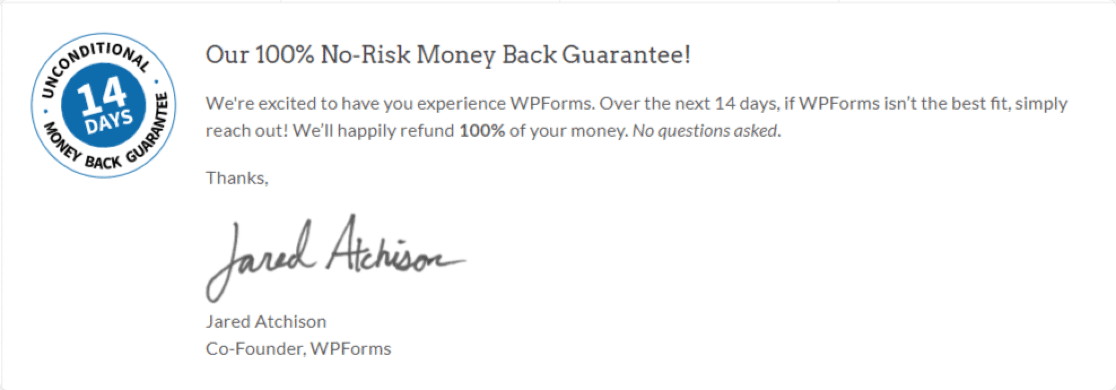
Many WPForms alternatives don’t have a convenient refund policy in place. So you might as well pay to get started, get the priority support, and just use the Money Back Guarantee if you don’t think WPForms Pro is worth the cost.
And we’re pretty confident you’ll love it, especially when your email list starts growing like crazy because your awesome new forms are boosting your lead generation.
How to Get a WPForms Pro License Key for Cheap
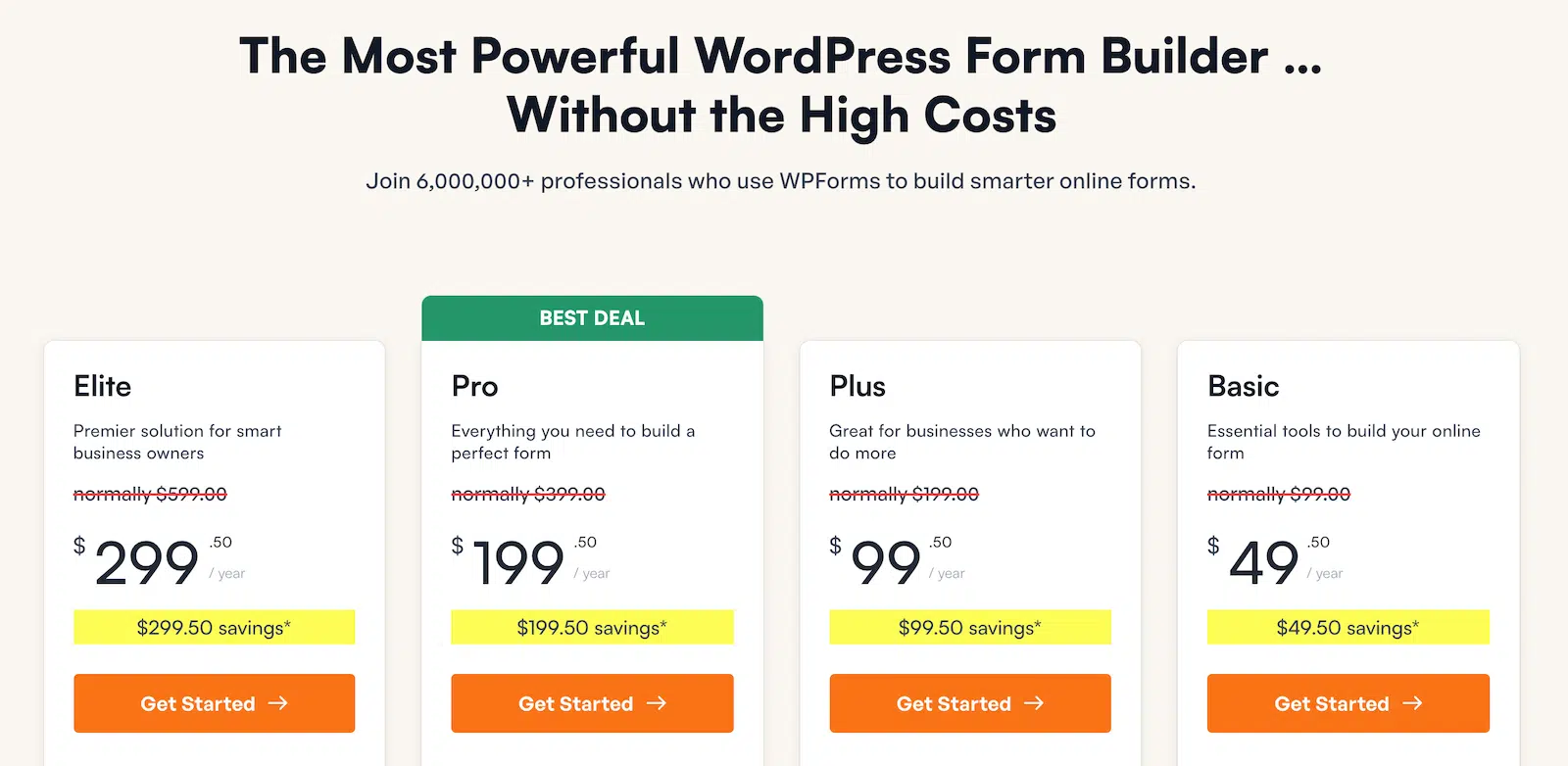
WPForms Pro costs $199.50 for your first year, half its normal $399 price, while nonprofits pay even less.
Now, you might have good reasons for wanting the WPForms Pro License free or at the most affordable costs.
While we’ve pointed out the dangers of using unethically-sourced WPForms cracks and nulled licenses, we’ll let you in on how to get reduced prices for your WPForms Pro License.
You won’t be getting WPForms absolutely free, but hopefully, by now, you understand why getting a WPForms Pro License free isn’t feasible.
These are the safe ways to get WPForms for free or for less.
| Option | Best for | What it costs |
|---|---|---|
| WPForms Lite | Contact forms, newsletter signups, and simple payment forms | Free |
| WPForms Basic | Storing entries, conditional logic, and file uploads | $49.50 for the first year (normally $99) |
| WPForms Pro | Surveys, signatures, and payments with no WPForms fee | $199.50 for the first year (normally $399) |
| Nonprofit license | Verified nonprofits that need Pro or Elite features | $99 a year for Pro, $199 a year for Elite |
| 14-day money-back guarantee | Trying any paid plan before you commit | Full refund within 14 days |
Are You a Nonprofit? Check Out Our Special Nonprofit License
If you’re a nonprofit, it makes sense that you might want to keep your costs low. We understand this, which is why we offer a discounted WPForms Pro License Key specifically for nonprofits.
With our Nonprofit license, you’ll pay 75% off the regular cost of the WPForms Pro license ($99 a year) or 66% off the cost of the Elite license ($199 a year).
These licenses will entitle you to the same features and addons as the regular licenses and can be used on up to 5 different sites.
To get started, you’ll have to put in an application which will be reviewed and approved once the authenticity of your nonprofit is verified.
WPForms Sales
WPForms offers sales from time to time. If you absolutely cannot afford to buy a WPForms Pro license at the regular price, getting the license when it goes on sale would be much safer than getting a WPForms crack.
For example, though we can’t guarantee any future sales, Black Friday and Cyber Monday are good times to check in on sales.
We’d advise, in this instance, that you get started with WPForms Lite, and subscribe to our mailing list, so you’ll know when our WPForms Pro License goes on sale.
But since there’s no telling precisely when the next WPForms Pro sale might be, the best thing to do would be to create some room in your budget for a WPForms Pro license.
Comparison: Nulled vs. Free vs. Paid
WPForms Lite is the only free option here that’s safe to run, because it’s the official plugin with updates and support behind it.
| Feature | WPForms Nulled | WPForms Lite (Free) | WPForms Pro |
|---|---|---|---|
| Security & Safety | Unsafe | Safe | Safe |
| Regular Updates | ✗ | ✔ | ✔ |
| Support Access | ✗ | Community Only | Priority |
| Advanced Features | Partial | Basic | All |
| Data Privacy | At Risk | Trusted | Trusted |
FAQs on WPForms Pro Nulled
Learning about WPForms Pro nulled is a popular topic of interest among our readers. Here are answers to some common queries about it.
Can I download WPForms Pro for free?
No. WPForms Pro is only available with a paid license, so any site offering a free WPForms Pro download is handing out a nulled copy.
The “WPForms Pro” uploads on GitHub are either the free Lite code or files you have no way to verify. The free, official option is WPForms Lite on WordPress.org.
How do I move from a nulled version to the official WPForms?
Remove the nulled copy first, then install the official plugin and add your license key. Here’s the order I’d follow.
- Back up your website.
- Deactivate and delete the nulled plugin and any nulled addons.
- Run a malware scan with a security plugin.
- Install WPForms Lite from Plugins » Add Plugin in your WordPress dashboard.
- Buy a license, then go to WPForms » Settings, paste your License Key, and click Verify Key.
- Click Connect and Install WPForms Pro to install the paid plugin automatically.
- Check that your forms still work as expected.
WPForms walks through the license steps in its guide to upgrading from WPForms Lite to a paid license.
Is it illegal to use WPForms Pro nulled?
It’s a legal gray area, and the security risk is much bigger than the legal one. The WPForms plugin is licensed under the GPL, version 2 or later, which allows the code to be shared and modified.
A nulled copy still isn’t a WPForms license, though. You get no official updates or support, and you can’t tell what the person who cracked it changed. S
hared or leaked license keys are a different matter, because WPForms’ terms don’t allow sharing a key and WPForms can suspend the account it came from.
Can nulled plugins harm my WordPress site?
Yes, they often include hidden code that can inject spam or steal information. You may not even notice it until your site slows down or gets blacklisted.
Does WPForms offer a free version?
Yes. WPForms Lite is free and available in the WordPress plugin library. It includes the drag-and-drop builder, 70 form templates, built-in spam protection, and Stripe, PayPal, or Square payments with a 3% WPForms fee.
Will a nulled plugin get updates?
Not from WPForms. A cracked copy can’t connect to the official update server, so security patches and bug fixes never arrive on their own. Getting a newer version means downloading another cracked copy and trusting a stranger’s files all over again.
What’s the refund policy if I buy Pro and don’t like it?
Every WPForms paid plan comes with a 14-day, 100% money-back guarantee. If it doesn’t work for you, you can ask for your money back.
Next, Do More With Free WordPress Plugins
If you love free things, check out this list we made of the best free WordPress plugins. And if you want to protect the forms you already have, read up on the WordPress form security risks worth watching for.
Ready to build your form? Get started today with the easiest WordPress form builder plugin. WPForms Pro includes lots of free templates and offers a 14-day money-back guarantee.
If this article helped you out, please follow us on Facebook and X (Twitter) for more free WordPress tutorials and guides.





I’ve been looking for a WP plugin that lets me create a form that I can allow other users to complete the form and then automatically convert that to a post.
I think your plugin will do that, but since I’m creating a personal site that will not generate any revenue, I can’t afford the $200/year that it looks like I will need to pay.
Do you have a “Free for personal use” available for those of us that will not be generating revenue from this plugin?
Hi David,
We offer a free version of the plugin called WPForms Lite but currently the only way to allow users to submit a form that will automatically post to your site would be to purchase the Pro license level of WPForms so that you can use our Post Submissions addon.
In case it helps though, currently all of our licenses are 50% off for the first year. All renewals, however, are charged at full price.
I hope this helps!
Hi
I have only used 2/5 sites on my account before my license expired. Although i have paid for the license which does not come cheap i cannot seem to use basic features like date/time which i had access to before without renewing it? When did this change happen?
License renewal should allow users to download the latest updates and version of WPForms. Not disable the plugin forcing users to renew, other plugin providers, do not do this. They allow you to use the plugin even after expiry and only encourage renewal if users need the latest/newer version of the plugin.
Renewal is at $399 whilst it is being offered to new customers at $199. Even if you gave it to me for $199 i still think it is too expensive.
Unfortuantely it will definitely force people underground for nulled versions or seek out alternative and most affordable form providers which is what i am doing now.
Having been a fan of WPForms for a few years, i don’t think i can no longer support it unless your prices change drastically.
Hi Khalid, Sorry to hear about the frustration you are facing here! Would you mind reaching out to us via support and we will try to help you with the best possible way.
The license provides access to support and plugin updates. This means that if you choose not to renew your license in the future, you’ll no longer receive updates or have access to support. However, your forms will still remain functional.
Updates are important to keep your site more secure, fix issues, and maintain code compatibility with various services. So while I would caution against keeping any out-of-date plugin on your site for too long, it’s generally not a significant issue for short periods of time.
Thank you for understanding!