AI Summary
How many places does one of your forms live on your site?
Your homepage, your contact page, your footer, a landing page or two.
In every one of them, your visitors see it surrounded by your headings, photos, and colors, never on its own.
Getting it to fit one of those pages in particular has often meant custom CSS or a separate styling plugin.
Now you can style your form on the page itself, with everything around it in view.
The Front-End Form Themes Editor Is Here!
Today, I’m thrilled to announce the Front-End Form Themes Editor, which lets you restyle your forms on your live pages and watch them change as you work!
Click Edit Form Theme in your admin bar, pick a form theme or adjust a color, and click Save Changes when it looks right. That page keeps its new look.
And the best part? You’ll find it in every WPForms plan, from Lite all the way up to Elite!
Everything the Front-End Form Themes Editor Can Do For You
The Form Theme panel opens from Edit Form Theme in your admin bar, on any page that shows a form. Here’s what it does:
- Watch Every Change Land on the Real Page: Pick a stock theme or adjust a color, a border, or a button, and the form updates right there, surrounded by the rest of your page.

- Give the Same Form Its Own Look on Each Page: Save on the form’s preview page to set its default look, or anywhere else to change just that spot. One form can stay quiet in a sidebar and stand out on a landing page, with no second copy.

- Start From 40+ Ready-Made Form Themes: Pick Classic or Default on any plan, or the other 40+ on a paid plan for a head start on almost any look. Tweak one, and WPForms saves your version as a copy, like “Ocean (Copy)”.

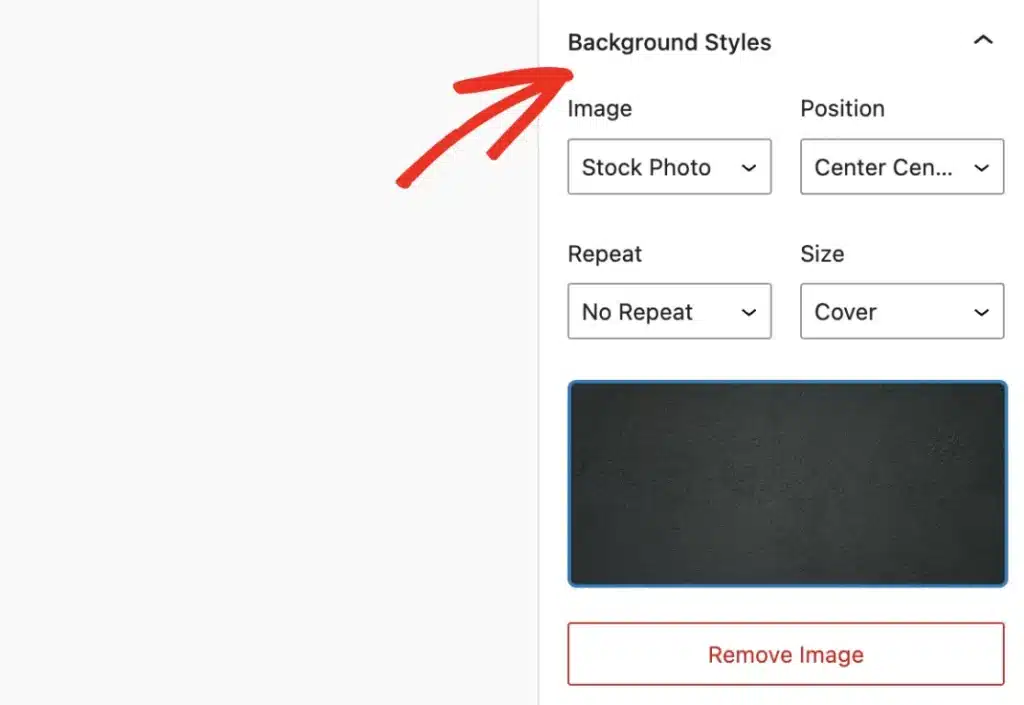
- Style Every Part of the Form: Field Styles, Label Styles, and Button Styles are on every plan. On a paid plan, Container Styles and Background Styles dress the box and the backdrop too, with colors, images, gradients, or stock photos.

- Open It From Wherever You Build: An Edit Theme button in the Form Builder, the WordPress block editor, Elementor, and Divi opens the panel on that exact form. Everything you’ve already styled keeps its look.
What This Looks Like for Your Business
Take a page you’ve just published for a holiday promotion, with a form that still wears your everyday look.
You open the page, click Edit Form Theme, and set the button to the red in your banner. The form changes right under the banner while you watch.
You round the field corners to match the cards beside it, then click Save Changes.
From the next visitor on, the promotion page has a form that looks made for it.
Who Is the Front-End Form Themes Editor Perfect For?
The Front-End Form Themes Editor is for anyone who wants their forms to look like part of their site. Here’s who will love it:
- Small business owners who want every form to match their brand colors, styled by eye on their own pages, with no CSS and no designer to call.
- Marketers who want a campaign or landing page to get its own version of a form’s look, while the same form keeps its usual style everywhere else.
- Agencies and developers who want one form to take a different look on each client page, and clients who can switch between form themes without touching the style settings.
- eCommerce store owners who want an order form that matches each product or sale page around it, without keeping a separate copy of the form for every page.
Style a Form on Its Page in Just a Few Clicks
Make sure you are running the latest version of WPForms, then follow along.
Step 1: Check Form Styling Settings
Go to WPForms » Settings » General and make sure that Include Form Styling is set to Base and form theme styling.

Step 2: Click Edit Form Theme in Your Admin Bar
The Edit Form Theme panel opens right on the page in the admin bar. If the page holds more than one form, pick yours from the Form selector.

Step 3: Pick a Form Theme and Fine-Tune the Styles
Choose a stock theme or one of your own, then adjust Field Styles, Label Styles, and Button Styles while the form updates.
On a paid plan, Container Styles and Background Styles style the form’s box and backdrop too.
Step 4: Save It for This Page or as the Form’s Default
Click Save Changes, and the new look stays on this page. To set the form’s default look instead, do the same on the form’s preview page.

Here’s What Makes This Truly Special
A separate styling plugin works on your form from the outside, through a settings screen of its own.
The Front-End Form Themes Editor is part of WPForms, so it uses the same form themes the Form Builder and the block editor already share.
It also knows where each copy of your form lives, so a look saved in one place stays in that place, whichever way the form got onto the page.
The look you approve on the page is exactly what your visitors see.
Ready to Give Your Forms a Look That Fits?
The Front-End Form Themes Editor is part of every WPForms plan, including WPForms Lite.
Update WPForms, open any page with a form, and click Edit Form Theme to start.
On any paid WPForms plan (Basic, Plus, Pro, or Elite), Container Styles, Background Styles, and all 40+ stock themes open up too, so your form can match even your boldest page.
New to WPForms? Get WPForms today and join more than 5 million website owners who trust WPForms to power their forms!
As always, thank you for your continued support of WPForms. We are always working to make every form you build look like it belongs on the page it’s on.
We can’t wait to see your forms in their new looks.
Syed and the WPForms Team
P.S. Publishing a new page soon? Get WPForms today, open the page, click Edit Form Theme, and fit your form to it in under 5 minutes.