


AI Summary
If you’re reading this, you might already know: Delighted, the popular Net Promoter Score platform, is sunsetting on June 30, 2026. Since acquiring Delighted, Qualtrics has decided to discontinue the product to focus on its enterprise-level AI-powered suites.
So, for those who relied on Delighted for affordable customer feedback, this creates an urgent problem. Users are being pushed toward the enterprise platform, but that might not be realistic for most small organizations…
Enter WPForms!
If you run a WordPress or WooCommerce site, WPForms is the better, more affordable option for NPS. In this post, I’ll walk you through the “where?” “what?” and “why?” of it all. Plus the all-important “how?” — I’ll show you how to quickly make the switch from Delighted to WPForms!
How to Switch to WPForms for Affordable NPS on WordPress
Why Go to WPForms?
WPForms offers everything you need for Net Promoter Score surveys, directly integrated into your WordPress site. No third-party platforms, no expensive migrations, and no learning curve if you’re already familiar with WordPress.
Native WordPress Integration

Unlike Delighted/Qualtrics, which requires embedding external forms or connecting via APIs, WPForms lives entirely within your WordPress dashboard. This means your NPS data stays on your own server, and gives you complete control and eliminates concerns about third-party data handling.
For WooCommerce store owners, this collaboration is particularly valuable. You can trigger NPS surveys after purchases, collect feedback on specific products, and connect customer satisfaction data directly to your eCommerce analytics.
Tons of Tools Included
When you unlock WPForms Pro for NPS surveys, you’re not just getting a single-purpose tool. You get:
- Unlimited NPS surveys for up to 5 WordPress sites
- Advanced form features like conditional logic, multi-page forms, and file uploads
- Payment processing through Stripe, PayPal, and Square
- Surveys and Polls reporting with automatic NPS calculations
- 2,000+ form templates for every business need
And so much more…
This makes WPForms not just a Delighted replacement, but a complete form and customer feedback solution.
How WPForms Handles NPS
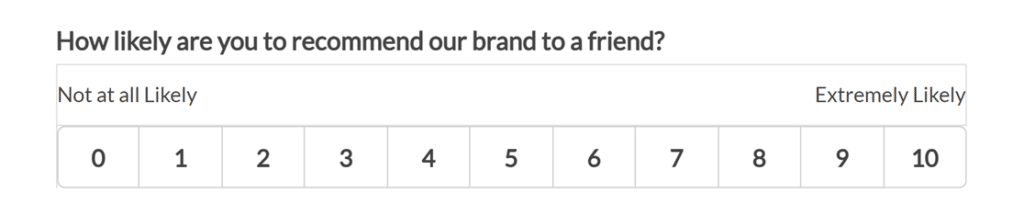
WPForms makes NPS surveys like, stupid simple. The dedicated Net Promoter Score field provides the standard 0-10 rating scale that users are familiar with.
Users see the question “How likely are you to recommend our brand to a friend?” along with the numbered scale. Which, by the way, is totally customizable — you can write the question or message that prompts users to click a number on the scale.
Automatic NPS Calculation
Just like Delighted, WPForms automatically calculates your Net Promoter Score. The system categorizes responses as:
- Promoters (9-10): Your enthusiastic supporters who will recommend you to others
- Passives (7-8): Satisfied but not enthusiastic customers
- Detractors (0-6): Unhappy customers at risk of sharing negative feedback
Your overall NPS is calculated using the standard formula (% Promoters – % Detractors), giving you scores from -100 to 100. WPForms then displays this data in clean graphs and tables within your WordPress dashboard.
Smart Conditional Logic
One advantage WPForms has over many NPS tools is its conditional logic capabilities. You can automatically show follow-up questions based on how someone rates you.
For example, if someone gives you a score of 6 or below, you can immediately ask, “How did we disappoint you and what can we do to make things right?” This gives you actionable insights while the customer’s experience is fresh in their mind.
For Promoters scoring 9 or 10, you might ask for a testimonial or invite them to leave a review. This turns your NPS survey into a tool for both improvement and marketing.
Visual Reports and Analytics
The Surveys and Polls addon generates comprehensive reports that rival enterprise platforms. You get:
- Real-time NPS score calculations
- Visual graphs showing the distribution of Promoters, Passives, and Detractors
- Historical data tracking to monitor trends over time
- Exportable reports in JPG or PDF format for presentations
- Entry-level data showing individual responses with timestamps
Unlike Delighted’s/Qualtric’s external dashboard, these reports live right in your WordPress admin area, accessible to your entire team without additional logins.
Switching From Delighted to WPForms
Transitioning from Delighted to WPForms is straightforward, especially compared to migrating to enterprise platforms like Qualtrics.
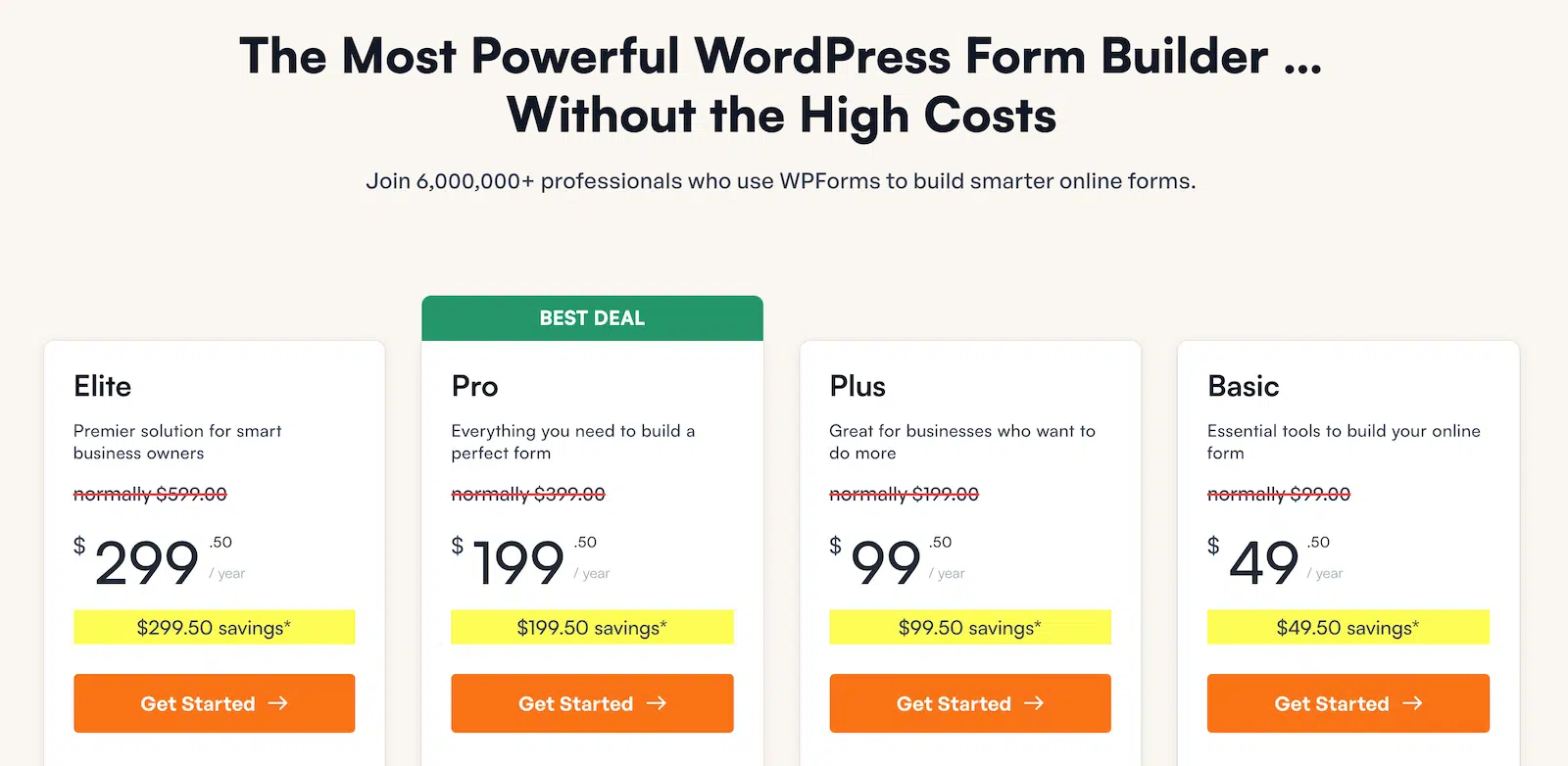
Step 1: Install WPForms Pro
After securing a WPForms Pro license, install the plugin from your WordPress dashboard. The license verification is automatic, and you’ll be ready to build forms within minutes.
Step 2: Activate the Surveys and Polls Addon
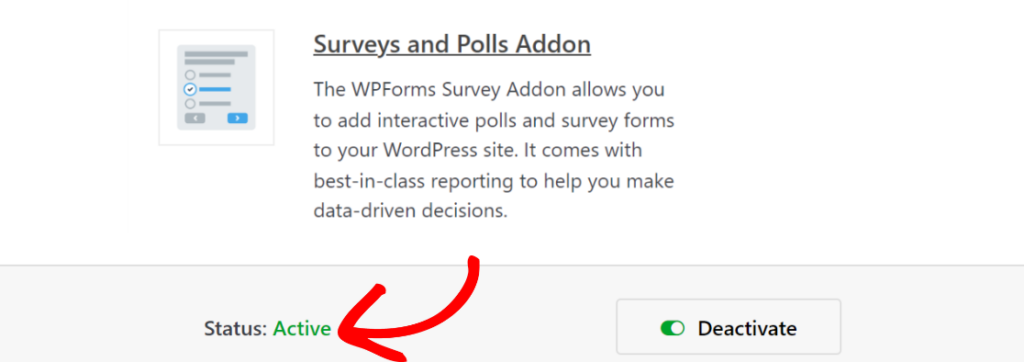
Navigate to WPForms » Addons in your WordPress dashboard and activate the Surveys and Polls addon. This unlocks the Net Promoter Score field and all survey reporting features.
Step 3: Build Your NPS Form
You can recreate your existing Delighted surveys by adding the same follow-up questions and customization you had before.
And since our WPForms template gallery includes NPS survey templates, you don’t have to start from scratch. Just choose a template and customize it with your branding and specific questions.
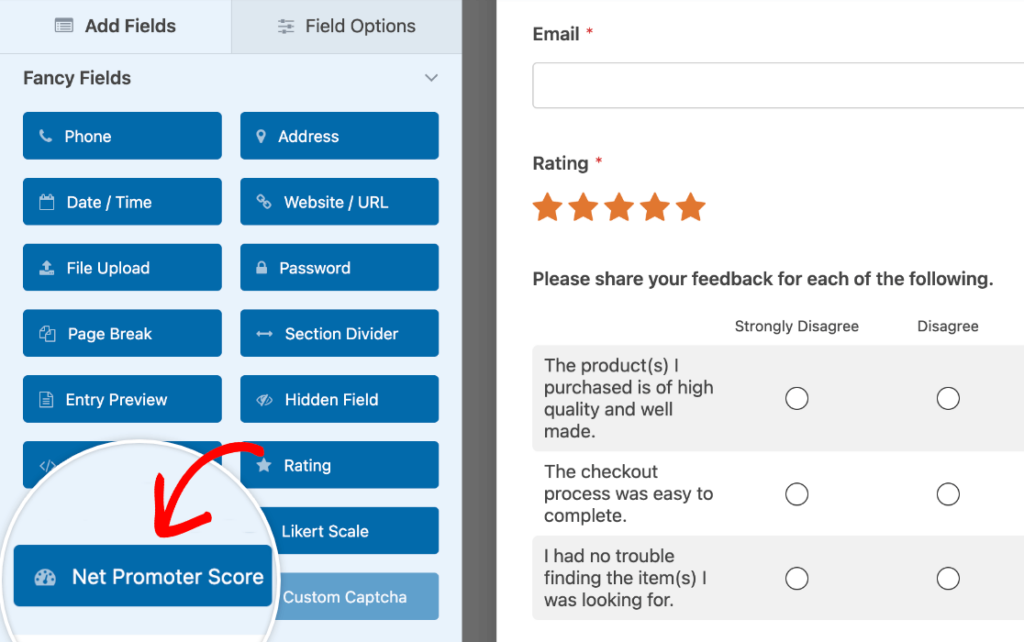
Or simply add the Net Promoter Score field to an already existing survey form.
But if you do want to build a new form, another option is to utilize our A.I. tool within the form builder. Just describe the type of survey form you want to use NPS scoring with, and the form will be generated in a matter of seconds!
Step 4: Embed and Launch
Add your NPS form to any page, post, or widget area on your WordPress site. You can create dedicated feedback pages, add post-purchase surveys to your WooCommerce thank you pages, or even include forms in your email campaigns.

Step 4: View Results
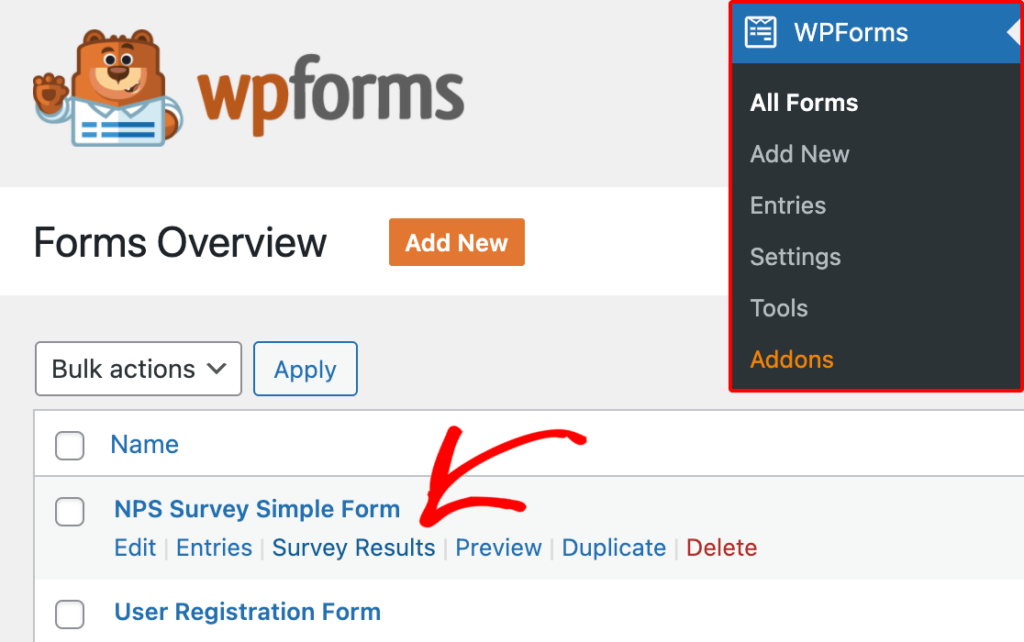
WPForms will calculate your NPS based on the ratings your users submit. To view your results, go to WPForms » All Forms. From here, hover over the form name, then click Survey Results.
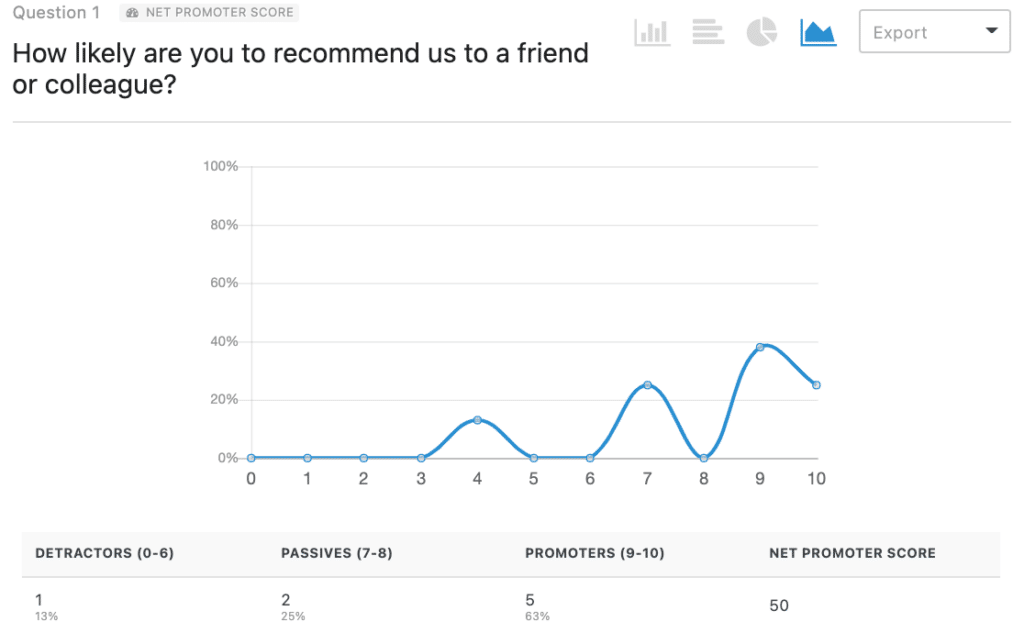
From the Survey Results page, you can easily see your NPS data in a graph and as a table. The table displays the percentage and the total number of users who fall into each NPS category.
It will also show your overall Net Promoter Score based on these values.
Ready-Made NPS Form Templates
Did I mention that we have all kinds of form templates to get you started with surveys and polls? 🤪 Here are a few of them that already have the NPS field included:
- NPS Email Survey Template
- Participant Feedback Form Template
- In-Store Experience Survey Template
- 30-Day Feedback Form Template
- Coaching Feedback Form Template
Unique Advantages for WordPress Users
If your business runs on WordPress or WooCommerce, WPForms offers several advantages that external NPS platforms like Delighted simply can’t match.
Complete Data Ownership
Your NPS survey responses are stored in your WordPress database, not on external servers. This gives you complete control over data retention, backup, and compliance with privacy regulations like GDPR and CCPA.
Seamless WooCommerce Integration
For eCommerce businesses, WPForms integrates easily with WooCommerce. You can:
- Send automatic NPS surveys after purchase
- Segment surveys by product category or customer lifetime value
- Connect customer satisfaction data to your sales analytics
- Trigger different surveys based on order value or customer status
Page Builder Compatibility
WPForms works with all major WordPress page builders, including Elementor and Divi. This means you can design beautiful, on-brand survey pages that match your site’s aesthetic perfectly.
But also! You have access to Form Themes right there in form builder, which means you can also apply professionally designed colors, images, and styling to keep your forms on-brand with one click.

Privacy and Compliance
WPForms is GDPR, CCPA, and PCI compliant. Our plugin includes built-in privacy tools, spam protection, and data handling features that help you stay compliant with international data regulations.
Advanced Features Beyond Basic NPS
While you’re primarily looking for an NPS solution, WPForms offers features that can transform how you collect customer feedback.
- Form Abandonment Tracking: See when users start but don’t complete your NPS surveys. This insight helps you optimize survey length and timing for better response rates.
- User Journey Reports: Track how customers interact with your forms, including time spent and drop-off points. This data helps you create more effective surveys over time.
- Save and Resume: Allow customers to save their progress and return later to complete longer feedback forms. This is particularly useful for detailed customer satisfaction surveys beyond simple NPS.
- Conversational Forms: Present your NPS survey as a conversational, one-question-at-a-time interface that feels more engaging and less overwhelming than traditional forms.
Real-World Use Cases

Don’t think you need NPS surveys on your website? Think again! These are just a handful of the real-world ways that this scoring tool can be used:
eCommerce Store Post-Purchase Feedback
Scenario: A WooCommerce store owner uses WPForms to automatically send NPS surveys 7 days after purchase. The conditional logic asks satisfied customers for reviews while capturing specific improvement areas from detractors. This feedback loop helps them increase repeat purchase rates by double-digit percentages.
SaaS Product Feedback
Scenario: A WordPress-based SaaS company replaces Delighted with WPForms, integrating NPS surveys into their customer dashboard. They use the data to identify at-risk accounts and trigger proactive support outreach, reducing churn by a large margin.
Nonprofit Donor Satisfaction
Scenario: A nonprofit organization surveys donors after each campaign using WPForms NPS surveys. The insights help them understand which campaigns resonate most, leading to better fundraising messaging and a major increase in recurring donations.
Freelance Client Feedback
Scenario: A web design freelancer uses WPForms to collect NPS scores from clients after project completion. The testimonials from promoters become case studies, while feedback from detractors helps improve service delivery.
Delighted’s shutdown doesn’t have to disrupt your customer feedback strategy. WPForms offers a more affordable, more integrated, and more powerful solution for WordPress and WooCommerce sites.
And now is the perfect time to make the switch! You’ll not just get NPS for your site, but also gain access to a complete form and survey platform that grows with your business.
FAQs About Adding NPS to WordPress Forms
Can WPForms handle high survey volumes?
Yes. WPForms Pro includes unlimited form submissions with no hidden usage fees or throttling. Whether you’re collecting 50 or 50,000 responses per month, the price stays the same.
Will my NPS data be secure?
Your data stays on your WordPress server with the same security measures protecting the rest of your site. WPForms includes spam protection, CAPTCHA integration, and follows WordPress security best practices.
Can I customize the NPS scale labels?
Yes. While the standard 0-10 scale is default, you can customize labels using CSS or use the Likert Scale field for completely custom rating options.
Next, Build a Survey Form
There are all kinds of ways to gather feedback from your website visitors and customers! NPS fields are just one of them. Take a look at another helpful read that covers additional tools and ways to build a survey form in WordPress.
Ready to build your form? Get started today with the easiest WordPress form builder plugin. WPForms Pro includes lots of free templates and offers a 14-day money-back guarantee.
If this article helped you out, please follow us on Facebook and Twitter for more free WordPress tutorials and guides.


