


AI Summary
We’ve all seen those “Top 47 Email Marketing Platforms!” listicles that basically just compare Mailchimp vs. everyone else. Yawn.
But before you can obsess over open rates and A/B test subject lines, you actually need people to email! And not just any people: the right people who want to hear from you.
The ROI on email marketing is insane, but that only works if your entire lead generation system is firing on all cylinders. You need the right tools at every stage: capturing leads, segmenting them, delivering instant value, and then nurturing them with amazing email campaigns.
So aside from emailing platforms, let’s talk about the other stuff that can make or break your email marketing success.
The Email Marketing Tools You Actually Need
- 1. The Foundation: Great Lead Capture Tools
- 2. Never Lose a Lead Again: Form Abandonment Is Your Secret Weapon
- 3. Make Lead Generation Fun: Interactive Quizzes
- 4. Understand Why People Subscribe: User Journey Tracking
- 5. Automated PDF Delivery: The Lead Magnet Revolution
- 6. Connect Everything: Integrations That Just Work
- 7. The Critical Piece Nobody Talks About: Email Deliverability
- 8. Email Marketing Best Practices
Why Most Email Marketing Strategies Fail

(Spoiler: It’s not the platform)
You’ve got your mailer account set up. You’ve designed a gorgeous welcome email. You’ve written the perfect subject line.
And… crickets.
That because your signup form is just a little box buried in your footer that says “Subscribe to our newsletter!” with zero context about what people will actually get.
The brutal truth: Your email marketing is only as good as your lead capture strategy.
Here’s why:
- Generic subscribers = instant unsubscribes. When everyone gets the same emails regardless of their interests, your list dies fast
- No instant value = high bounce rates. If someone signs up and hears nothing for three days, they’ve already forgotten who you are
This is where most “email marketing tools” guides completely lose the plot.
1. The Foundation: Great Lead Capture Tools
You gotta start with forms that actually convert! I know the Y2K aesthetic might be cool and all but if your signup forms look and act like they were designed before 2009, people aren’t filling them out.
You need to create mobile-responsive, actually-attractive forms in minutes. The kind with conditional logic that shows different questions based on what users select, so you can segment people from the moment they hit submit.
(Luckily I know of a handy form-builder that can help with that…)
Think about what you can do with smart forms:
- A fitness coach offers both meal plans and workout guides. Using conditional fields, the form asks “What’s your main goal?” and shows relevant options based on the answer, automatically adding people to different email lists
- An agency asks “What’s your budget?” and only shows their premium services package if someone selects “$10k+”
- A course creator collects quiz results during signup to automatically segment students by experience level
Oh, and here’s a game-changer: form pages that create distraction-free landing pages. No navigation, no sidebar widgets, no “Hey, check out our blog!” It’s just your offer and a conversion-focused form.
2. Never Lose a Lead Again: Form Abandonment Is Your Secret Weapon
Ready for a stat that’ll make you cry? The average form abandonment rate is 67%. That means that two-thirds of people who start filling out your form never finish it.
They get distracted. Their phone rings. They need to find their credit card. Their cat walks across the keyboard. Whatever. They’re gone.
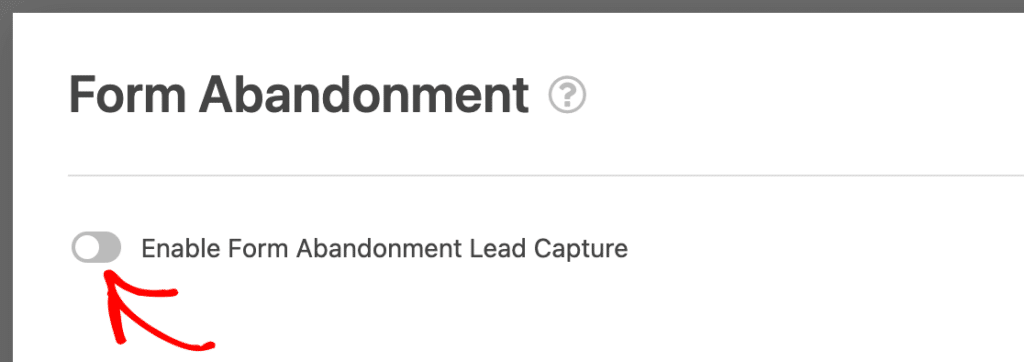
BUT! Someone who filled in their name and email but bailed before hitting submit has already shown clear interest. That’s not a cold lead… that’s a warm one who just needs a gentle nudge.
Form abandonment tracking captures those partial entries automatically. Then you can:
- Send a “Hey, we noticed you started signing up for our newsletter. Want to finish where you left off?” email
- See exactly which field made people bounce (spoiler: it’s usually the phone number field)
- Recover abandoned signups without driving any new traffic
Tackling form abandonment is so helpful for email marketing! It can grow your email list by a third without spending another dollar on ads.
3. Make Lead Generation Fun: Interactive Quizzes
Okay, time to talk about the hottest trend in lead generation right now: quizzes.

(Like this quiz? Get the customizable What’s Your Stress Coping Style? Quiz template here!)
Interactive quizzes are crushing it because they:
- Get 40-50% higher completion rates than regular forms
- Provide instant value (people love learning about themselves)
- Automatically segment your audience based on their answers
- Create shareable content that expands your reach organically
The quiz builder approach lets you create:
- Personality quizzes — “What’s Your Marketing Personality Type?” Results determine which email nurture sequence they enter. Your “Data-Driven Analyst” subscribers get different emails than your “Creative Storytellers.”
- Knowledge quizzes — “How Much Do You Know About Email Deliverability?” Deliver their score instantly, then follow up with targeted content based on their knowledge gaps.
- Assessment quizzes — “Is Your Website Actually Converting Visitors?” Provide personalized recommendations and automatically add them to relevant email segments.
Also Read: How to Build a Personality Quiz in Under 10 Minutes
The slick move is requiring an email address to see results. 😉 Then use conditional logic to route quiz-takers to different email lists based on their outcome.
A skincare brand might send completely different email sequences to “Dry Skin,” “Oily Skin,” and “Combination Skin” quiz results.
4. Understand Why People Subscribe: User Journey Tracking
Do you ever wonder what content actually drives your email signups? User journey tracking shows you exactly what visitors did before subscribing.

You can explore user data like:
- Which pages they visited
- How long they spent on each page
- What they searched for on your site
- The complete path from landing to conversion
- Timestamps for every interaction
This intel is marketing gold!
Find your MVPs (Most Valuable Pages). If 80% of subscribers read your “Ultimate Guide to Cold Emails” before signing up, you know that content resonates. Create more like it.
Optimize your welcome series. If new subscribers consistently checked out your pricing page before subscribing, they’re probably interested in buying. Your welcome emails should reflect that, not just pitch them your free webinar.
Better attribution. Discover which traffic sources produce engaged subscribers. It’s usually not the channel with the most traffic. Quality over quantity.
Smart segmentation. Auto-segment based on behavior. Someone who read three product comparison articles before subscribing should get different emails than someone who only visited your homepage.
You can pass all this data to your email platform through field mapping, so every subscriber arrives with rich behavioral context already attached.
The Instant Gratification Factor: Deliver Value Immediately
Here’s where things get spicy.
Someone subscribes to your list. What happens next?
If your answer is “They get added to Mailchimp and I’ll send them a welcome email in a few days,” you’re doing it wrong.
The moment someone gives you their email is peak interest. That’s when you need to deliver value…not tomorrow, not in a few hours, now!
5. Automated PDF Delivery: The Lead Magnet Revolution
Most people build lead magnets (ebooks, checklists, templates) and then manually email them to subscribers. Or they set up Zapier workflows that sometimes work. Or they use clunky third-party tools that cost extra.
There’s a better way: automated PDF generation and delivery.

Here’s how it works: someone fills out your form, and instantly they receive a branded PDF via email. No manual work for you and no delays for them. And especially no “please wait 24 hours for your download link.”
Perfect use cases:
Lead magnets — Create a form for “The Ultimate Social Media Checklist.” The PDF addon generates a beautifully branded PDF and automatically emails it the second they submit. They get value immediately, you get a qualified lead.
Service businesses — Generate instant quotes or proposals as PDFs. Collect their project details through a form, and they receive a professional proposal PDF within seconds.
Course creators — Deliver certificates, completion documents, or lesson handouts automatically.
Consultants — Send personalized audit reports based on their form responses.
Our PDF addon includes multiple professional templates across different categories (notifications, documents, financial forms, certificates), 40+ design themes, and a visual editor so you can match your brand perfectly.
You can even use conditional logic to only generate PDFs when certain conditions are met. Like maybe you only want to send the premium template to people who selected “Enterprise” budget range.
The main point is that instant value = happy subscribers who actually open your emails later.
6. Connect Everything: Integrations That Just Work
Your form builder should play nice with your email platform.

Look for integrations that include:
- Real-time data transfer (no manual CSV exports)
- Field mapping (connect form fields to email platform fields)
- Conditional triggers (only add subscribers when specific conditions are met)
- Double opt-in support (for compliance)
- Update existing contacts (not just create new ones)
Most serious form builders integrate natively with Mailchimp, ActiveCampaign, HubSpot, Kit, Drip, AWeber, GetResponse, Campaign Monitor, Salesforce, and Brevo.
For everything else, there’s Zapier. Or webhooks if you want more control.
7. The Critical Piece Nobody Talks About: Email Deliverability
Time for some real talk.
You can have the world’s best forms, the perfect segmentation strategy, and gorgeous email templates. But if your emails aren’t actually reaching people’s inboxes, you’re just screaming into the void.
WordPress email deliverability isn’t always that great. By default, WordPress uses PHP mail() to send emails, which can result in hosting providers either blocking it entirely or throttling it so hard that your emails arrive three days late (if at all).
The symptoms:
- Form notifications never arrive
- Welcome emails hit spam folders
- Password reset emails vanish into thin air
- Your carefully crafted lead magnets never get delivered
- Nobody’s getting your form abandonment follow-ups
And, unfortunately, you often don’t even know it’s happening until someone complains.
Fix Your Email Delivery (Like, Right Now)
This is where WP Mail SMTP becomes absolutely essential. It reroutes your WordPress emails through a proper email service provider instead of relying on your flaky hosting server.

Here’s what it does:
- Connects to reliable mail services — Gmail, Outlook, SendGrid, Mailgun, Amazon SES, Postmark, and more
- Improves deliverability dramatically — Your emails actually reach inboxes instead of spam folders
- Provides email logs — See exactly what’s being sent (or not sent) from your site
- Handles authentication — Automatic SPF and DKIM setup so ISPs trust your emails
- Scales effortlessly — Whether you’re sending 10 emails a day or 10,000
The setup is stupid simple: pick your email service, add your API key, and you’re done. Your form notifications, PDF deliveries, abandoned form follow-ups, and all WordPress emails immediately become reliable.
Why this matters for email marketing: If your form confirmation emails aren’t arriving, people think your site is broken. If your instant PDF delivery fails, they’ll never trust you enough to open your marketing emails. If your form abandonment follow-ups hit spam, you’re leaving money on the table.
Fix email deliverability first, then worry about optimizing everything else.
8. Email Marketing Best Practices

Let’s cut through all the other fluff and get to the TLDR:
1. Start with value, not pitches. Your welcome series should provide immediate value. Nobody wants to subscribe just to get sold to.
2. Segment ruthlessly. Use conditional logic, quiz results, and user journey data to segment from day one. Generic blasts are dead.
3. Automate the fundamentals. Welcome series, re-engagement campaigns, abandoned cart (for eCommerce). Set these up once and let them run.
4. Mobile-first everything. Over 60% of emails are opened on mobile. If your forms and emails aren’t mobile-optimized, you’re losing half your audience.
5. A/B test continuously. Subject lines, send times, content — test it all. Even small improvements compound.
6. Clean your list regularly. Remove inactive subscribers. Better deliverability > vanity metrics.
7. Personalize beyond first names. Use the behavioral data and preferences you collected through forms.
8. Make unsubscribing easy. Seriously. It’s better than spam complaints, and some countries legally require it.
9. Follow up on abandoned forms. That form abandonment feature? Actually use it. It’s basically free subscribers.
10. Analyze user journeys. Understand what content drives your best subscribers, then create more of it.
11. Fix your deliverability. None of this matters if your emails aren’t reaching inboxes. Fix WordPress email delivery before doing anything else.
Build the foundation right, and your email marketing practically runs itself. Start with the unglamorous stuff like the deliverability. The forms. The segmentation. The user journey. The instant value delivery.
Then watch your email list actually grow with quality subscribers who want to hear from you!
Next, Customize Your Form Notification Emails
Now that you have plenty of email marketing ideas to inspire you, why not focus on the emails that come from WPForms? You can customize the styling of your form notification emails to match your brand personality and website.
Take a look at our full guide to find out more!
Ready to build your form? Get started today with the easiest WordPress form builder plugin. WPForms Pro includes lots of free templates and offers a 14-day money-back guarantee.
If this article helped you out, please follow us on Facebook and Twitter for more free WordPress tutorials and guides.


