


AI Summary
Which type of bread are you? If you’ve ever wondered if you lean more sourdough than wheat, I guarantee there’s a quiz somewhere that can tell you. Or — as I’m going to show you — you can just make one! A quiz, that is… Not a loaf of bread (well, you can make that too).
Personality quizzes are everywhere for good reason. They’re fun. They get shared. And they’re one of the most effective ways to grow your email list while learning what your audience actually wants.
But people are often stopped by the fact that building a quiz meant either paying hundreds per year for standalone quiz software or spending hours wrestling with complicated conditional logic that broke the moment you changed one thing.
Quiz lovers, rejoice!
With the new WPForms Quiz addon, you can build a complete, working personality quiz in about 10 minutes. No coding. No complex setup. Let me show you exactly how to do it.
Why Build Your Personality Quiz With WPForms?
Plenty of tools can make a quiz, but WPForms is a great fit because it turns your quiz into a lead-capturing part of your website instead of a novelty hosted somewhere else, and the Quiz addon is purpose-built for exactly that.
You map each answer to a personality type, WPForms tallies the results, and conditional logic decides which outcome each person sees. You can add images to your answer choices, see which results come up most often, and drop the finished quiz onto any page with a block or shortcode.
WPForms AI can alsogenerate an entire quiz from a single prompt when you’re short on time, which makes a solid first draft in seconds. And if you’d rather show one question at a time, you can switch the same quiz to a conversational, one-question-at-a-time format that feels more like a chat.
Because all of this is part of WPForms, there’s no separate quiz software to pay for every month, and your leads land in the same dashboard as the rest of your forms. That’s a big part of why 5+ million site owners already build their forms with it.
How to Build a Personality Quiz for Your WordPress Website in Under 10 Minutes
Here’s the whole process, from turning on quiz mode to capturing leads and getting your finished quiz live.
- Step 1: Enable Quiz Mode (30 seconds)
- Step 2: Choose Personality Quiz Type (15 seconds)
- Step 3: Define Your Personality Types (2 minutes)
- Step 4: Add Your Questions and Map Answers (5 minutes)
- Step 5: Set Up Outcome Messages (2 minutes)
- Step 6: Publish and Share (30 seconds)
- FAQs About Building a Personality Quiz
What You’ll Need
Before we start, make sure you have:

Not sure how to upgrade? Check out this guide on how to upgrade your WPForms license for step-by-step instructions.
Skip Everything!
If you’re short on time or just want to get a working graded quiz up fast, the WPForms AI Form Builder can handle the heavy lifting for you.
Generate Your Quiz with AI
From your WordPress dashboard, go to WPForms » Add New. Then, hover over the purple Generate With AI button and click Generate Form.
You’ll land on the AI form builder screen. This is where you describe what kind of quiz you want. You can type your own prompt or choose from the suggestions on the left.
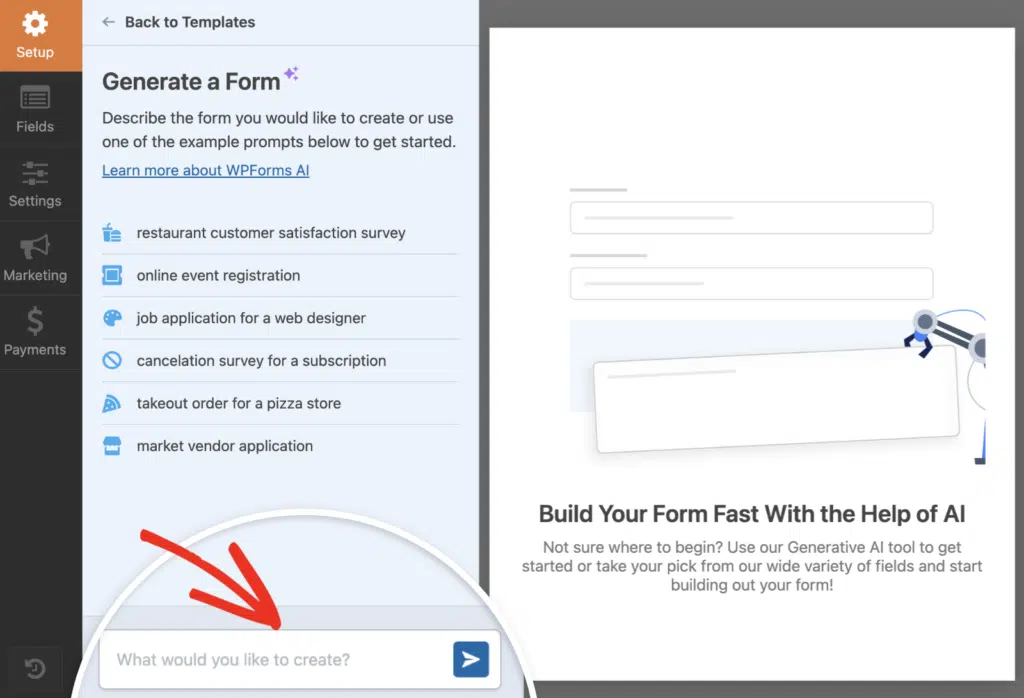
Once you hit generate, the AI takes a few seconds to build your quiz. It’ll automatically add quiz fields, set answer choices, and even configure scoring if your prompt includes grading.
From there, you can tweak questions, adjust correct answers, or change point values. The Quiz settings will already be enabled, so you’re basically starting from the finish line.
Try the WPForms AI Quiz Builder! 🙂
If you’d rather have full control over every detail, skip this step and follow the manual method instead. Follow the steps below to build your quiz from scratch!
Step 1: Enable Quiz Mode (30 seconds)
First, create a new form or edit an existing one to open the WPForms builder. And keep in mind we have thousands of form templates ready to go for you, including a growing selection of quiz templates.
Inside the builder, go to Settings » Quiz and click the Enable Quiz button.

That’s it. Quiz mode is now on, and WPForms automatically adds new tabs at the top specifically for quiz configuration: Questions, Outcomes, Results, and Settings.
Step 2: Choose Personality Quiz Type (15 seconds)
After enabling quiz mode, you’ll be asked to choose a quiz type. Select Personality Quiz.

This tells the form builder that you want to map answers to personality types rather than grading for correctness.
You’ll see two fields appear:
- Title: This is what users see at the top of your quiz. Something like “What’s Your Marketing Style?” or in my case, “Which type of Bread Are You?”
- Description: Optional intro text explaining what the quiz is about
Fill these in with whatever makes sense for your quiz.
Step 3: Define Your Personality Types (2 minutes)
Now you’ll create the possible outcomes people can get. These are your personality types.
In the Personality Types section under Settings, add 3-5 personality types.

Here are some examples:
For a marketing quiz:
- The Strategist
- The Creator
- The Analyst
- The Connector
For a product recommendation quiz:
- Beginner Package
- Growth Package
- Pro Package
For a fun brand quiz:
- The Planner
- The Adventurer
- The Homebody
- The Socializer
Keep the names short and positive. Nobody wants to get “The Couch Potato” as their personality type (unless the quiz is Which Type of Potato Are You?).
Step 4: Add Your Questions and Map Answers (5 minutes)
This is where your quiz comes together. Click the Questions tab at the top to be instantly taken to the fields in the form builder.
Add Multiple Choice (like mine), Dropdown, or Checkbox fields for each question. A typical personality quiz usually has 5-10 questions.

Here’s what makes a good personality quiz question:
- It’s relatable. Ask about real situations people encounter.
- All answers feel valid. There’s no “wrong” choice.
- It reveals something. The answer tells you something about their preferences or priorities.
For example:
- “How do you approach a new project?”
- “What does your ideal weekend look like?”
- “When making a big decision, you usually…”
After adding each question, you’ll map the answer choices to personality types. Click the dropdown next to each choice and select which personality type that answer should count toward.

Do this for every answer choice in every question. It sounds tedious, but it goes fast once you get into a rhythm.
And as a reminder — if you want to skip this part, you can have our built-in AI assistant generate these quiz questions and mapping for you.
Step 5: Set Up Outcome Messages (2 minutes)
Now go to the Outcomes tab. This controls what people see after they complete the quiz.

You’ll create one outcome for each personality type.
Then, click Add New Outcome for each additional personality beyond the default.

For each outcome:
- Toggle on Enable Conditional Logic
- Set the condition to show when Quiz Personality Type equals that specific type
- Write the outcome message

Your outcome message should:
- Celebrate their result
- Explain what their personality type means
- Suggest a next step (download a resource, book a call, check out a product)
You can use the {quiz_personality_type} smart tag to automatically insert their result into the message.
Here’s an example outcome from my bread personality quiz:
You are Sourdough!
You’re patient, complex, and you get better with time.
You’re the kind of person who trusts the process. You have layers–curious, thoughtful, and quietly confident. You may take longer to warm up, but once you do, people remember you.
Tips
- When things feel slow, remember: fermentation takes time for a reason.
- Keep nurturing your craft — your best results come from consistent practice.
- Let others in on your process; sharing your “why” builds connection

Step 6: Publish and Share (30 seconds)
When you’re finished with the outcomes, Save your form, then embed it on any page using the WPForms block or shortcode.

Publish the page — now your quiz is live!
Promote it on social media, in your email newsletter, or anywhere your audience hangs out. Personality quizzes get shared naturally because people love showing off their results.
Real Ways to Use Personality Quizzes
Here’s how different businesses are using personality quizzes:
- eCommerce store: “Find Your Perfect Skincare Routine” quiz that recommends products based on skin concerns and budget. Every quiz taker gets added to their email list with personalized product recommendations.
- Consulting business: “What’s Your Business Growth Stage?” quiz that qualifies leads. High-scoring prospects who indicate they’re ready get routed to the sales team. Lower scores get nurture emails.
- Content creator: “What’s Your Content Creation Style?” quiz that segments their audience. Different personality types get different content recommendations and email sequences.
- Language tutor: “Which Learning Style Fits You Best?” quiz that helps place students in the right class format without scheduling assessment calls.
Tips for Quiz Success
- Keep questions short. People don’t want to read paragraphs. One line is ideal.
- Make all personality types feel positive. Frame every outcome as a strength, not a weakness.
- Add social sharing. Include share buttons in your outcome messages so people can post their results.
- Track your results. Check the Results tab in WPForms to see which personality types are most common. This tells you a lot about your audience.
- Test your quiz. Take it yourself a few times, selecting different answers to make sure each personality type shows up correctly.
That’s the whole process. Enable quiz mode, choose personality quiz, define your types, add questions, map answers, write outcomes, publish.
The hard part isn’t building the quiz anymore… The hard part is deciding what quiz to build first.
Ready to create your first personality quiz? Get the Quiz addon and start building now!
FAQs About Building a Personality Quiz
Here are the questions that come up most often about building a personality quiz in WordPress, from pricing to lead generation.
How long does it take to build a personality quiz with WPForms?
You can build a complete personality quiz in under 10 minutes using the WPForms Quiz addon. The process includes enabling quiz mode, defining personality types, adding questions, mapping answers, and setting up outcome messages. No coding or technical knowledge required.
What’s the difference between a personality quiz and a graded quiz?
A personality quiz maps answers to personality types or outcomes with no right or wrong answers. Users get matched with a personality type based on their choices. A graded quiz has correct answers and scores users based on how many questions they answer correctly, showing results as scores, percentages, or letter grades.
Can I use personality quizzes for lead generation?
Yes! Personality quizzes are excellent for building your email list. You can collect names and emails before showing quiz results, then send personalized follow-up content based on which personality type each person receives. Many businesses use personality quizzes to qualify leads and segment their email lists automatically.
How many personality types should I include in my quiz?
Most effective personality quizzes have 3-5 personality types. This gives enough variety to feel personalized without overwhelming users or making the quiz too complex to build. You can always start with fewer types and add more later based on your audience’s needs.
Next, Pick a Theme For Your Quiz
Now that you know how to build a personality quiz that tells users which sort of bread, marketer, or even potato they are, it’s time to beautify your quiz with the perfect theme for your form. I’m thinking “Harvest” for mine…
Join us on a tour through our 40+ form themes that you can reach right inside the form builder. Colors, button styles, and backgrounds, everything you need to brand your form without touching code. I guarantee you’ll find one you love.
Once you’ve got the personality quiz down, you can use the same builder to create a weighted quiz that scores answers on a scale, which is handy for recommendation quizzes and assessments.
Ready to build your form? Get started today with the easiest WordPress form builder plugin. WPForms Pro includes lots of free templates and offers a 14-day money-back guarantee.
If this article helped you out, please follow us on Facebook and X (Twitter) for more free WordPress tutorials and guides.





