


AI Summary
You land on a page, you’re genuinely interested, and then you see a wall of fifteen fields staring back at you. So you close the tab and move on.
That reaction is exactly what quietly drains leads from long forms every day. The good news is the fix is simple, and some of the biggest brands on the web already use it.
Multi-page forms are a great way to get more people to finish filling out their info, so you can get more leads and make more money online.
So in this article, I’ll show you some great multi-page form examples so you can get inspired and start creating effective multi-part forms for your website.
Create Your Multi-Page Form Now
Why Multi-Step Forms Convert Better Than One Long Form
Before we jump into multi-page form examples, let’s look at why you should consider breaking long forms into multiple pages.
Sometimes to get a site visitor to convert, you need to get a lot of info from them. In fact, unlike simple contact forms, you might need much more than just a name and email.
However, your site visitor may feel annoyed or get bored by a form that asks them too much info all at once. This can lead to form abandonment and low conversion rates.

To boost conversion rates on your longer forms and improve user experience, you can create a multi-step form in WordPress and break your form’s parts up into easier-to-digest sections!
You’ll also get better-qualified leads this way. By having people go through multiple steps to convert, you know only those really interested in what you have to offer will finish.
More leads don’t mean more sales. Qualified leads mean more sales.
After all, it doesn’t matter how many people complete your site’s form if they don’t turn out to be the kind of person you’re looking for.
Excellent Multi-Step Form Examples
The examples below come from very different industries, but each one solves the same problem in a smart way. To make them easy to scan, here’s the single tactic I’d steal from each form before you read the full breakdown:
1. Uber
Uber needs a lot of information to sign up a new driver, so it does a careful job of easing people into a long, multi-part form.

The first step asks for the basics only, like name, email, and phone number. There’s also a question about location, which quietly personalizes the next step instead of feeling invasive.
None of it takes more than a few seconds, so there’s almost no reason not to start. The green Next button does a lot of work here too.
The label makes it obvious that more steps are coming, and the small arrow reinforces that you’re moving forward rather than committing to one giant submission. That kind of clear, low-pressure first step is what gets people to start at all.
2. Quick Base
Quick Base takes a slightly different angle by setting expectations before you type anything at all.
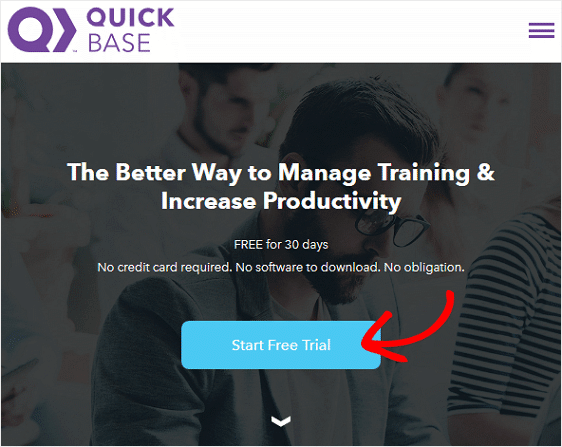
It opens with a bold headline that tells you exactly what you’ll get after converting, paired with one simple call to action.
There’s no clutter and no confusion about what happens next. Once you click that button, the next step appears, and it’s refreshingly short. It only asks for an email and a password.
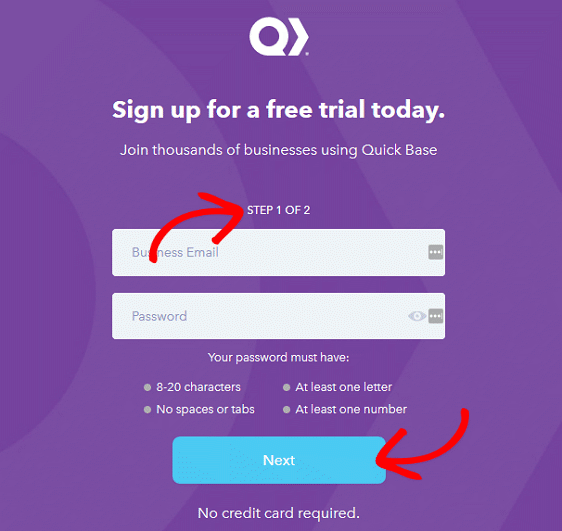
The Next button makes it clear there’s still a little more to do, but by this point most people will follow through. Creating a password is a small commitment, and people who’ve made that commitment tend to finish.
It also means Quick Base is capturing a genuinely interested lead, someone who could turn into a paying customer down the line. That’s a strong example of a form that sets the right expectations and keeps people moving.
3. Sprout Social
Sprout Social uses a multi-step form to sign people up for a free trial, and the standout feature is how clearly it maps out the journey.
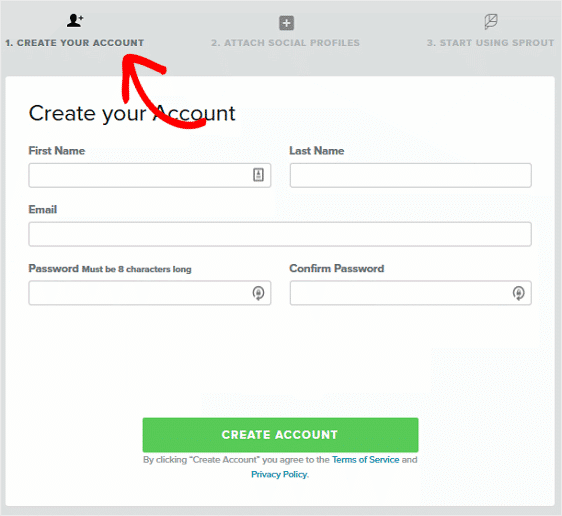
Much like a checkout page, the steps are laid out across the top so visitors can see there are three of them. Even better, each step has a short description, so people know what they’ll be doing before they get there.
The first step creates an account, the second attaches social profiles, and the last one finishes the signup. Once someone creates an account in step one, getting them to finish is much easier, because people like to stay consistent with choices they’ve already made.
It also means Sprout Social has an email address to follow up with if the person drops off partway through. That’s something you can do on your own forms by capturing abandoned form entries before people hit submit.
4. Cirius Marketing
Cirius Marketing combines two clever ideas into one signup flow, starting with a two-step opt-in landing page. The page offers a bold call to action that’s hard to ignore for anyone who wants the free homepage template on offer.
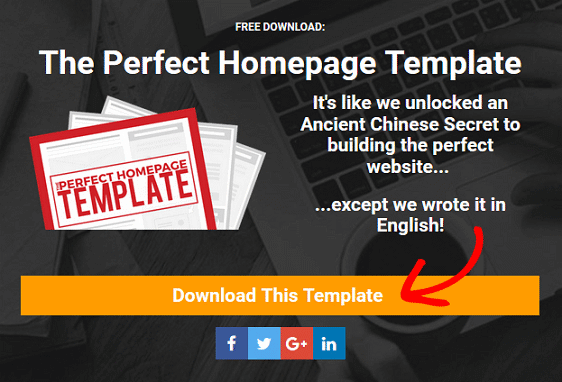
Click that button and you’re taken to a short popup form that shows two steps thanks to a progress bar at the top.
The trick is that clicking the button on the first page already counts as completing step one of two on the landing page. So before you’ve entered anything, you already feel halfway done.
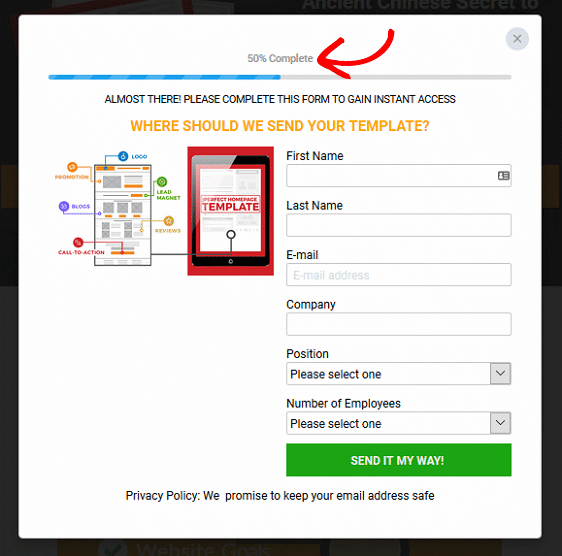
This works because it pairs a real incentive (a free download) with a sense of progress, so only genuinely interested people trade their details to finish.
If you want to build something similar, we’ve put together a whole set of landing page form examples for more inspiration.
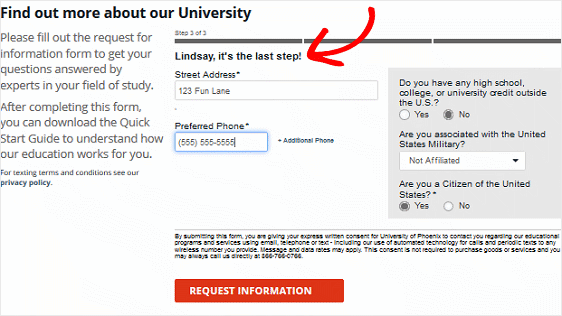
5. University of Phoenix
The University of Phoenix is great at turning a genuinely long enrollment form into something that feels easy to start.
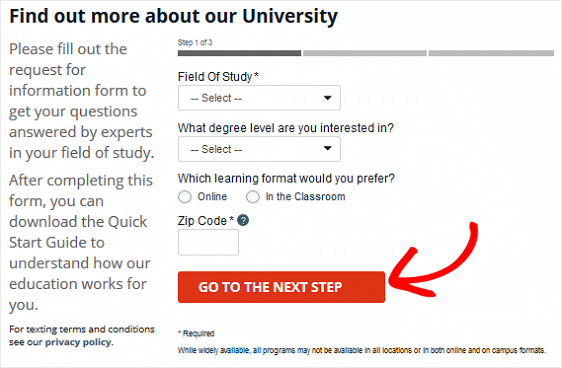
The first step is short and low-pressure, which puts anyone hesitant about a long form at ease. A red Go to the Next Step button makes it clear that more is coming, and a progress bar shows exactly where you are at any moment.
The next step stays minimal too, asking only for a name and email.
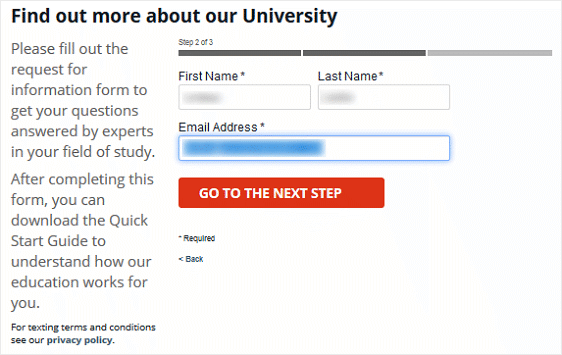
The final step is where it asks for more personal details like an address and phone number. By this point, someone who has already shared their name and email is much more willing to finish, so the sensitive questions land at the right moment.
What the Best Multi-Step Forms Have in Common
Look across all five examples and the same handful of design choices keep showing up. These are the patterns worth building into your own forms, and most of them are covered in more depth in our guide to form design best practices.
- Make the first step almost too easy: A short, low-friction opening step removes the reason people hesitate. Once they start, momentum carries them forward.
- Show progress clearly: A progress bar or labeled steps tells people how much is left, which keeps them moving. You can add a progress bar to any WordPress form in a couple of clicks.
- Group related fields together: Keep each step focused on one theme, like contact details on one page and preferences on the next. It’s easier to fill out and friendlier for screen readers and accessibility.
- Mind the order of your asks: Start with easy, low-stakes questions and save anything sensitive for later, once people are already invested.
- Tell people what to expect: Label your steps or your buttons so visitors know how many steps there are and what each one involves.
- Use conditional logic to stay short: With conditional logic, you can show or hide steps based on earlier answers, so nobody wastes time on questions that don’t apply to them.
- Capture partial entries: Even a great form loses some people partway through. Saving their progress or their email means a drop-off isn’t always a lost lead.
- Design for mobile: Plenty of people will fill out your form on a phone, so make sure each step looks clean and taps cleanly on a small screen.
How to Build a Multi-Step Form in WordPress
You don’t need a developer to build any of the forms above. The easiest way to do it on a WordPress site is with WPForms, which lets you add page breaks to any form and automatically creates a progress bar for you.
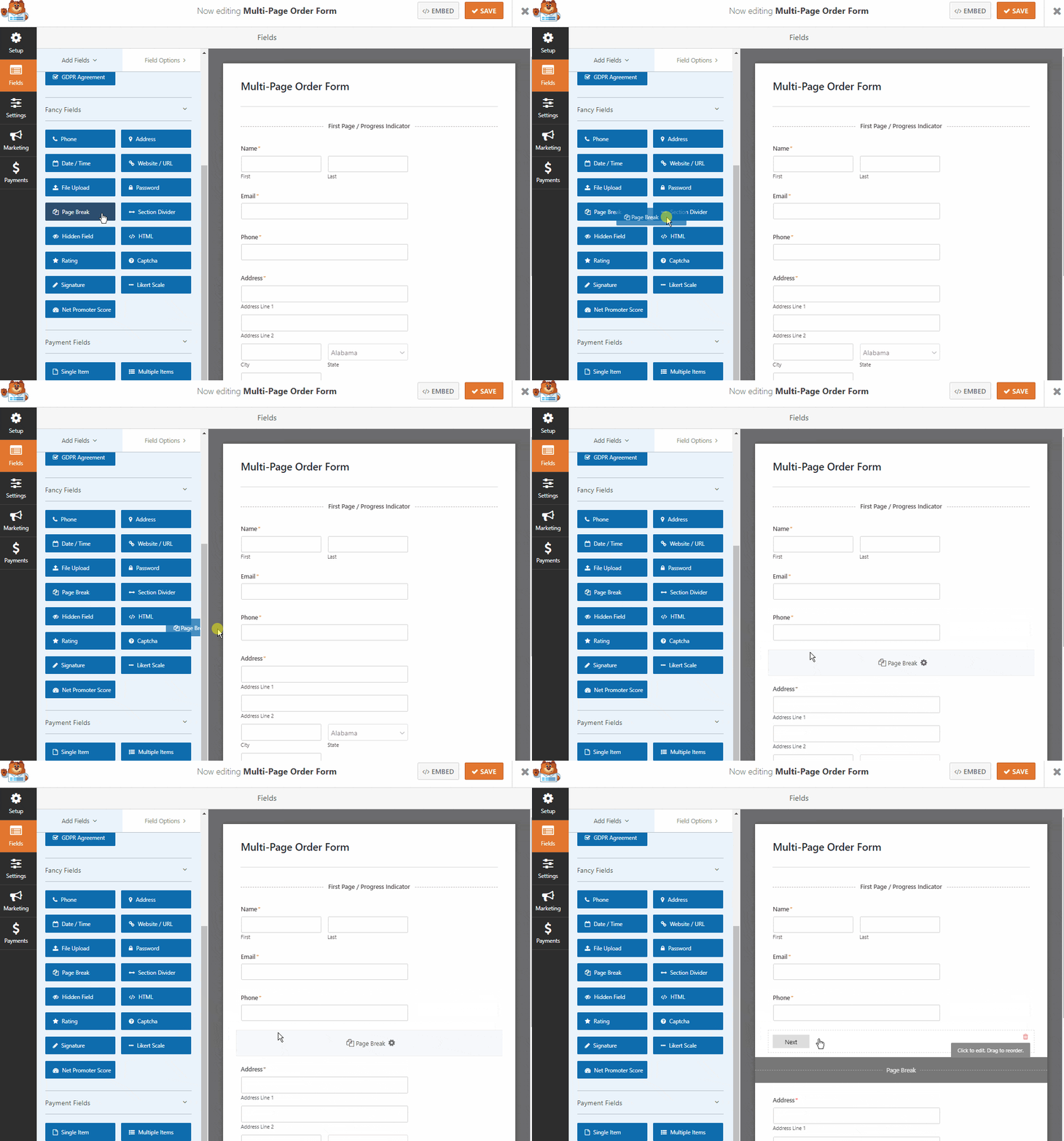
Here’s why WPForms makes this so simple:
- It’s beginner-friendly: The drag-and-drop builder lets you create multi-page forms visually, with no code at all.
- You can start from a template: There are 2,100+ form templates for job applications, registrations, order forms, and more, all of which you can split into pages.
- You can build it on a distraction-free page: The Form Pages addon turns your multi-step form into its own dedicated landing page, just like the Cirius Marketing example.
- You can recover lost leads: The Form Abandonment addon captures details from people who start your form but don’t finish.
- Your forms stay smart: Conditional logic lets you hide steps and fields that don’t apply, keeping every form as short as possible.
- It works on every device: Your multi-page forms automatically look great on phones, tablets, and desktops.
You can build a basic multi-page form on any paid WPForms plan, and the conversion extras like form landing pages, abandonment capture, and lead forms come with Pro. When you’re ready to set one up, follow our step-by-step guide on how to create a multi-step form in WordPress.
WPForms is trusted by over 5+ million website owners and holds a 4.8/5 rating from 13+ thousand five-star reviews on WordPress.org, so you’re in good company.
Create Your Multi-Step Form Now
Multi-Step Form Templates to Start From
If you’d rather skip the blank canvas, WPForms has a large library of ready-made multi-step form templates. They’re a great starting point when you know you want a multi-page form but aren’t sure how to structure it. A few popular ones include:
- Multi-Step Contact Form Template
- Multi-Step Office Survey Form Template
- Mailchimp Multi-Step Form Template
Open any of them in the builder, adjust the fields to match what you need, and you’ve got a working multi-step form in minutes.
FAQs About Multi-Step Forms
Multi-page form examples raise a lot of the same questions, so here are quick answers to the ones I hear most often before people build their first one.
What is a multi-step form?
A multi-step form is a single form split across two or more pages, with a progress bar or step indicator showing how far along you are. Instead of seeing every field at once, people fill out one small section at a time, which makes long forms feel much easier to complete.
Do multi-step forms increase conversions?
They often do, especially for longer forms. Breaking a form into steps lowers the intimidation factor, so more people start, and the sense of progress encourages them to finish. They also tend to bring in better-qualified leads, since people who complete several steps are usually more serious.
How many steps should a multi-step form have?
There’s no magic number. The goal is to group your fields into logical chunks rather than hitting a specific step count. Two to four steps works well for most forms. If a single step starts to feel long, that’s a good sign it should be split in two.
Can multi-step forms integrate with my other tools?
Yes. WPForms connects your multi-step forms to popular email marketing and CRM platforms like Mailchimp, Brevo, Constant Contact, Kit (formerly ConvertKit), and HubSpot, so every submission can flow straight into the tools you already use.
Which industries get the most out of multi-step forms?
Multi-page forms are popular in healthcare, education, SaaS, finance, technology, and legal services, where longer forms are common. That said, they’re useful anywhere you have a form with more than a handful of fields, so don’t be afraid to test one on your own site.
How do I create a good user experience with a multi-step form?
Study the best examples and you’ll notice the same habits, like clear progress indicators and fields grouped in a logical order. WPForms adds a progress bar automatically when you insert page breaks, so your job is mostly making sure related fields sit together and each step has a clear purpose.
Next, Boost Engagement with Conversational Forms
Multi-step forms are one of the best ways to keep people engaged, but they aren’t the only one. If you want to make your forms feel even more personal, you can show one question at a time in a chat-style layout instead.
Take a look at our guide on creating a conversational form to give visitors the smoothest possible experience as they fill out your most important forms.
Boost Conversions With a Multi-Step Form Now
Ready to build your form? Get started today with the easiest WordPress form builder plugin. WPForms Pro includes lots of free templates and offers a 14-day money-back guarantee.
If this article helped you out, please follow us on Facebook and Twitter for more free WordPress tutorials and guides.





I purchased once, but paid twice.
Why do you pay in duplicate?
And why pay $399? Isn’t it $199 for WPForms Pro?
Is your company honest?
-below-
Payment Details
Thanks for being a WPForms customer! Below are the details of your purchase.
Date June 23, 2020
Plan WPForms Pro
Payment Status Renewal
Payment ID 883644
Subtotal $399.00
Total Paid $399.00
Payment Method Credit Card
License Key –hidden–
Hi David.
We can absolutely help you with this issue. Please submit a support ticket using your WPForms account email address so our support team members can figure this out for you.
I apologize for any inconvenience.
Have a good one 🙂
Hi, I need a form as the one of Uber in this article, but I don’t understand how to split the different steps in different pages of my website
Hi Pieroluca! We have a guide on how to use our Multi Page Forms feature here. Please take a look 🙂
I hope this helps to clarify 🙂 If you have any further questions about this, please contact us if you have an active subscription. If you do not, don’t hesitate to drop us some questions in our support forums.