


AI Summary
You installed WordPress. The theme looks solid, the homepage is shaping up, and your business is almost online.
Then you realize WordPress by itself doesn’t do very much. It doesn’t come with a contact form, SEO tools, a security layer, or backups. Out of the box, it’s a blank canvas — and your business needs more than a canvas.
That’s where plugins come in. They add the features your site needs to actually work for your business — collecting leads, ranking in search results, staying secure, loading quickly.
The catch: there are 60,000+ plugins in the WordPress directory. When you’re trying to get a site launched, sorting through that many options isn’t how you want to spend your afternoon.
So we did it for you.
This guide covers 13 plugins across the categories every small business WordPress site needs. Each one is beginner-friendly, battle-tested across millions of sites, and solves a specific problem you’ll hit within your first few weeks.
Must Have WordPress Plugins for Small Business Sites
Here’s the quick overview, then we’ll break each one down.
Overview
| Plugin | Category | Best For | Pricing |
|---|---|---|---|
| All in One SEO | SEO | Ranking in Google | Lite version available; plans from $49/yr |
| WPForms | Contact Forms | Lead capture and customer inquiries | Lite version available; plans from $49/yr |
| Wordfence | Security | Firewall and malware scanning | Lite version available; Premium from $149/yr |
| Duplicator | Backups | Scheduled backups to cloud storage | Lite version available; plans from $49/yr |
| WP Rocket | Performance | Page speed and caching | Plans from $59/yr |
| MonsterInsights | Analytics | Google Analytics in your dashboard | Lite version available; plans from $99/yr |
| WP Mail SMTP | Email Delivery | Making sure WordPress emails arrive | Lite version available; plans from $49/yr |
| SeedProd | Page Builder | Landing pages and coming soon pages | Lite version available; plans from $39/yr |
| OptinMonster | Lead Generation | Popups and exit-intent campaigns | Plans from $9/mo |
| Constant Contact | Email Marketing | Email campaigns and newsletters | Plans from $12/mo |
| WooCommerce | eCommerce | Selling products online | Core plugin included; extensions vary |
| Akismet | Spam Protection | Blocking comment and form spam | Personal plan available; commercial from $10/mo |
| WPCode | Code Snippets | Adding custom code without editing files | Lite version available; plans from $49/yr |
Let’s get into each one.
1. All in One SEO (AIOSEO)

If nobody can find your site on Google, the rest of this list doesn’t matter much. SEO (search engine optimization) is how your site shows up when someone searches for what you sell — and WordPress doesn’t handle it on its own.
All in One SEO is the most complete SEO plugin for WordPress, and it’s built so you don’t need to know what “canonical URLs” or “schema markup” mean to use it. The setup wizard walks you through your site’s SEO basics in under 10 minutes, and from there, every page and post gets a checklist showing exactly what to improve.

Why Your Small Business Needs It
When someone in your area searches for the service you offer, your site should be one of the first results they see. Without an SEO plugin, WordPress doesn’t generate XML sitemaps, set meta descriptions, or help search engines understand what your pages are about. AIOSEO handles all of that — plus local SEO features that help you show up in Google Maps and local search results.
Key Features
- Setup wizard that configures your site’s SEO in minutes
- On-page SEO analysis with a clear scoring checklist for every page
- XML sitemap generation automatically submitted to search engines
- Local SEO support with Google Business Profile integration
- Schema markup so search results display your ratings, hours, and business info
Pricing: Lite version available with core features. Paid plans start at $49.60/year.
2. WPForms
A business site without a contact form is a billboard with no phone number. Visitors need a way to reach you — to ask about services, request a quote, book a consultation, or just say “I’m interested.”
WPForms is a drag-and-drop form builder with over 2,100 templates, so you’re never starting from a blank page. Pick a template that matches what you need (contact form, quote request, feedback survey), customize it visually, and embed it on any page. The whole process takes a few minutes, and you don’t need to write any code.

Why Your Small Business Needs It
Every visitor who leaves your site without a way to contact you is a potential customer you’ll never hear from. A contact form captures that intent the moment it happens — and with WPForms, you can go beyond basic contact forms into payment collection, appointment requests, file uploads, and smart conditional logic that shows different fields based on a visitor’s answers.
Key Features
- Drag-and-drop builder that works without any code
- 2,100+ pre-built templates across industries and use cases
- Smart conditional logic to personalize forms based on visitor choices
- Built-in payment integration with Stripe, PayPal, and Square
- Instant email notifications so you never miss a submission
Pricing: Lite version available. Paid plans start at $49.50/year.
3. Wordfence

WordPress powers over 40% of the web, which makes it a target. Brute-force login attempts, malware injections, and vulnerability exploits aren’t hypothetical — they happen to small business sites regularly.
Wordfence is the most widely installed WordPress security plugin. It includes a web application firewall that blocks malicious traffic before it reaches your site, a malware scanner that checks your files against known threats, and login security features like two-factor authentication and rate limiting.
Why Your Small Business Needs It
A hacked site doesn’t just cost you time — it can cost you customers, search rankings, and reputation. Google flags compromised sites with a warning page that sends visitors running. Wordfence gives your site a security layer that runs in the background, catching threats before they become problems. For a small business owner without a dedicated IT team, that kind of protection is worth the setup time.
Key Features
- Web application firewall with real-time threat intelligence
- Malware scanner that checks core files, themes, and plugins
- Two-factor authentication for login security
- Brute-force attack protection with login attempt limits
- Security alerts delivered straight to your email
Pricing: Lite version available. Premium starts at $149/year.
4. Duplicator

Things break. A plugin update goes sideways, a theme change wrecks your homepage, or your hosting provider has an outage with no recovery plan. Without backups, you’re rebuilding from memory.
Duplicator handles scheduled, automatic backups of your entire WordPress site — files, database, everything — and stores them safely in cloud services like Google Drive, Dropbox, Amazon S3, or OneDrive. If something goes wrong, you restore to a clean version in a few clicks.
Why Your Small Business Needs It
Your website is a business asset. The contact form submissions, the product pages you spent weeks writing, the blog posts driving traffic — all of it lives in one place. Duplicator makes sure a bad update or a server failure doesn’t erase months of work. It’s also the simplest way to migrate your site if you ever switch hosting providers.

Key Features
- Scheduled automatic backups on a daily, weekly, or monthly cadence
- Cloud storage integration with Google Drive, Dropbox, S3, and more
- One-click restore to roll back after a problem
- Full site migration for moving between hosts
- Email notifications when backups complete or fail
Pricing: Lite version available. Paid plans start at $49.50/year.
5. WP Rocket

Most visitors will abandon a page that takes more than three seconds to load — and Google uses page speed as a ranking factor. If your site is sluggish, you’re losing both visitors and search visibility at the same time.
WP Rocket is a caching and performance plugin that makes your site faster without asking you to understand what “minification” or “GZIP compression” means. Install it, and it immediately starts caching pages, compressing files, lazy-loading images, and optimizing your database. Most sites see a noticeable speed improvement within minutes.
Why Your Small Business Needs It
Your visitors don’t have patience for a slow site — especially on mobile. And Google’s Core Web Vitals now directly influence where your site appears in search results. WP Rocket handles both of those problems at once. It’s one of the few performance plugins that works well right out of the box, so you won’t need to spend an afternoon tweaking settings.
Key Features
- Page caching that serves pre-built pages instead of running database queries on every visit
- CSS and JavaScript minification to reduce file sizes
- Lazy loading for images and videos (they load as visitors scroll to them)
- Database optimization to clean up revisions and transients
- CDN compatibility for faster load times worldwide
Pricing: Plans start at $59/year for a single site.
6. MonsterInsights

You can’t improve what you don’t measure. How many people visit your site each week? Where do they come from? Which pages keep them engaged, and which ones make them leave?
MonsterInsights connects your WordPress site to Google Analytics and puts the data you actually care about right inside your WordPress dashboard. No logging into a separate analytics account and deciphering reports built for data analysts. MonsterInsights translates the numbers into insights you can act on.
Why Your Small Business Needs It
Knowing that 60% of your traffic comes from Google search — and most of it lands on two blog posts — changes how you spend your time. Analytics tells you what’s working so you can do more of it, and what’s underperforming so you can fix it. For a small business owner wearing multiple hats, that clarity is the difference between guessing and growing.

Key Features
- Real-time stats dashboard inside WordPress
- Top pages, referral sources, and audience demographics at a glance
- eCommerce tracking if you’re running WooCommerce
- Form conversion tracking (pairs directly with WPForms)
- Outbound link and file download tracking
Pricing: Lite version available. Paid plans start at $99.60/year.
7. WP Mail SMTP

Here’s a problem most small business owners don’t know they have: WordPress sends emails through a method that many hosting servers don’t properly support. That means your contact form notifications, password resets, and order confirmations might be landing in spam — or not arriving at all.
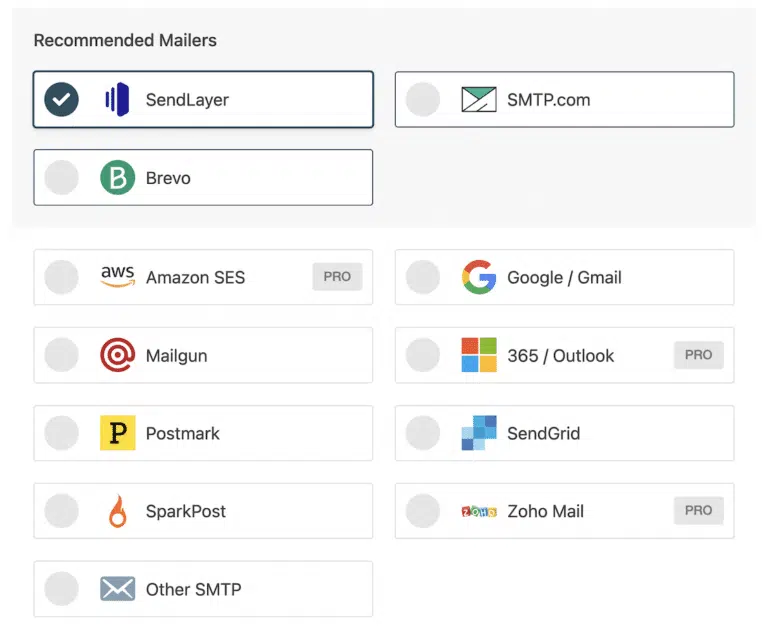
WP Mail SMTP fixes this by routing your WordPress emails through a proper SMTP service (SendLayer, Gmail, Outlook, Amazon SES, and others). Once configured, your emails actually land where they’re supposed to.
Why Your Small Business Needs It
If a customer fills out your contact form and you never get the notification, you’ve lost a lead without even knowing it. If a buyer completes a purchase and never gets a confirmation email, they lose trust. WP Mail SMTP is the kind of plugin you install once, configure in ten minutes, and then stop thinking about — but it prevents a long list of problems you’d otherwise never trace back to the source.
Key Features
- One-click setup with major email services (SendLayer, Gmail, Outlook, SMTP.com)
- Email logging so you can see every email WordPress sends
- Open and click tracking on sent emails
- Weekly email summary reports
- Failure alerts when emails don’t send
Pricing: Lite version available. Paid plans start at $49.50/year.
8. SeedProd

WordPress’s built-in block editor has come a long way, but when you need a polished landing page, a custom coming-soon page, or a maintenance-mode screen, you need more control.
SeedProd is a drag-and-drop page builder that lets you design professional pages without writing code. It comes with 350+ templates, built-in sections for testimonials, pricing tables, countdown timers, and opt-in forms, and it works alongside your existing theme instead of replacing it.

Why Your Small Business Needs It
Your homepage, your services page, your “launching soon” placeholder — these are the first pages visitors see. SeedProd lets you build pages that look custom-designed without hiring a designer. It’s especially useful for one-off landing pages (a seasonal promotion, a webinar signup, a product launch) where you need something polished and targeted on short notice.
Key Features
- Drag-and-drop builder with live preview
- 350+ professionally designed templates
- Built-in coming-soon and maintenance-mode pages
- WooCommerce support for custom product and checkout pages
- Works with any WordPress theme
Pricing: Lite version available. Paid plans start at $39.50/year.
9. OptinMonster

Getting traffic to your site is only half the equation. Most visitors leave without doing anything — no form submission, no purchase, no email signup. They browse and bounce.
OptinMonster helps you convert more of those visitors before they leave. It creates targeted popups, slide-in forms, floating bars, and exit-intent campaigns that trigger at the right moment — when someone’s about to close the tab, after they’ve scrolled a certain percentage, or when they’ve been on the page for a set amount of time.

Why Your Small Business Needs It
The average website converts about 2-3% of its traffic. That means 97 out of 100 visitors leave without taking action. OptinMonster’s exit-intent technology alone can recover a meaningful share of those abandoning visitors. For a small business, even a small improvement in conversion rate translates to real revenue — without spending another dollar on advertising.
Key Features
- Exit-intent detection that triggers campaigns as visitors move to leave
- Page-level targeting so different pages show different offers
- A/B testing to find which messages convert best
- Pre-built campaign templates for lead magnets, discounts, and email signups
- Integrations with every major email marketing platform
Pricing: Plans start at $9/month (billed annually).
10. Constant Contact

Once you’ve collected email addresses through your forms and lead-generation campaigns, you need a way to stay in touch. An email marketing platform lets you send newsletters, promotions, automated welcome sequences, and updates that keep your business top of mind.
Constant Contact makes this approachable for small business owners who aren’t email marketing experts. The drag-and-drop email builder, pre-designed templates, and straightforward list management take the intimidation out of sending your first campaign.
Why Your Small Business Needs It
Social media reach is unpredictable. Search rankings shift. But your email list is yours — a direct line to people who’ve already said “I’m interested.” Regular emails keep customers engaged between purchases, remind past clients you exist, and turn one-time buyers into repeat customers. Email marketing consistently outperforms every other digital channel on ROI, and Constant Contact makes it manageable from day one.
Key Features
- Drag-and-drop email builder with brand-ready templates
- Contact list management with tags and segments
- Automated email sequences (welcome series, birthday emails, re-engagement)
- Reporting on opens, clicks, and conversions
- Native integrations with WPForms, WooCommerce, and OptinMonster
Pricing: Plans start at $12/month.
Also worth considering: Mailchimp is another popular email platform with a generous starter tier and strong automation features.
11. WooCommerce

If your business sells anything — physical products, digital downloads, services, subscriptions, gift cards — WooCommerce turns your WordPress site into a full online store.
It’s the most widely used eCommerce plugin for WordPress, powering millions of online stores worldwide. You get product listings, a shopping cart, checkout, payment processing, shipping calculations, tax management, and inventory tracking — all inside the WordPress dashboard you already know.
Why Your Small Business Needs It
Even if your main business isn’t eCommerce, WooCommerce opens the door to selling online. A consultant can sell a course. A bakery can take pre-orders. A gym can sell membership passes. Because it’s built into WordPress, you don’t need a separate Shopify or Squarespace account — your store lives on the same site as the rest of your business.
Key Features
- Full product management for physical, digital, variable, and subscription products
- Built-in payment processing with Stripe and PayPal
- Shipping zones, rates, and label printing
- Tax calculations for multiple regions
- Thousands of extensions for additional functionality
Pricing: The core WooCommerce plugin is included with WordPress. Premium extensions and themes vary by need.
Also worth considering: Easy Digital Downloads is a better fit if you only sell digital products like PDFs, software, or online courses.
12. Akismet

The moment your site goes live, spam starts arriving. Fake comments, bot-generated form submissions, and junk trackbacks fill your dashboard and — if left unchecked — can hurt your site’s credibility with both visitors and search engines.
Akismet is a spam-filtering plugin that automatically checks comments and form submissions against a global spam database. It catches spam before it ever reaches your moderation queue, so you’re not starting every morning by deleting bot comments.
Why Your Small Business Needs It
Spam isn’t just annoying — it can contain malicious links, hurt your SEO, and make your site look untrustworthy to real visitors scrolling past a wall of bot comments. Akismet handles the filtering behind the scenes so your real customers’ comments and form entries don’t get buried. It pairs well with WPForms, which includes its own built-in anti-spam features, for a layered defense.
Key Features
- Automatic spam detection powered by a global database
- Works across comments, contact forms, and registration forms
- Spam history and stats in your dashboard
- “Discard worst spam” option to auto-delete obvious junk
- No CAPTCHAs required — filtering happens invisibly
Pricing: Personal plan available for low-traffic sites. Commercial plans start at $10/month.
Also worth considering: CleanTalk is another anti-spam service that offers cloud-based protection across comments, forms, and registrations.
13. WPCode

At some point, you’ll want to add a small piece of custom code to your site — a tracking pixel, a Facebook conversion snippet, custom CSS for a specific page, or a PHP function someone shared in a tutorial.
WPCode lets you add those snippets safely, without editing your theme’s functions.php file (which is a common way to break things). You paste the code, choose where it runs, and toggle it on or off. If a snippet causes an error, WPCode catches it and deactivates the snippet automatically before your site goes down.
Why Your Small Business Needs It
Theme files get overwritten every time you update your theme. Any custom code you added directly just disappears. WPCode keeps your snippets separate from the theme, so updates are safe and your customizations persist. It also includes a library of ready-to-use snippets for common WordPress tasks — like removing the admin bar for certain users or adding custom fonts — so you don’t need to search forums for code you can trust.
Key Features
- Safe code insertion without editing theme files
- Auto-deactivation if a snippet throws an error
- Built-in snippet library with popular WordPress customizations
- Conditional logic for running snippets only on specific pages or for specific users
- Supports PHP, JavaScript, CSS, and HTML
Pricing: Lite version available. Paid plans start at $49.50/year.
Which Plugins Should You Install First?
If 13 plugins feels like a lot to set up at once, start with the five that have the biggest immediate impact:
- All in One SEO — so search engines can index your site from day one
- WPForms — so customers can actually reach you
- Wordfence — so your site is protected before it starts getting traffic
- Duplicator — so you have a safety net before you change anything
- WP Rocket — so your site loads fast for every visitor
Once those five are running, add analytics, email delivery, and the rest as your business and traffic grow.
Start Building a Site That Works for Your Business
Your WordPress site is more than a placeholder — it’s your storefront, your lead generator, and often the first impression someone has of your business.
The right plugins turn it from a basic website into a tool that captures leads, ranks in search results, stays secure, and scales with you.
FAQ
How many plugins should a WordPress site have?
There’s no magic number, but most well-run small business sites use between 10 and 25 plugins. Quality matters more than quantity — 13 well-chosen plugins will outperform 40 random installs. The key is picking plugins that are actively maintained, don’t duplicate each other’s functionality, and come from developers with a track record.
Do WordPress plugins slow down your site?
Poorly coded plugins can affect your site’s speed, but well-built plugins from established developers add minimal overhead. Every plugin in this guide is optimized for performance and used across millions of sites. That said, it’s good practice to only keep plugins you’re actively using — deactivate and delete anything you’ve outgrown.
Are all of these plugins compatible with each other?
Yes. Every plugin on this list is widely deployed and tested for compatibility with popular themes and other plugins. Several of them — WPForms, MonsterInsights, All in One SEO, WP Mail SMTP, Duplicator, OptinMonster, SeedProd, and WPCode — are built by the same team (Awesome Motive) and are designed to work together out of the box.
Do I need all 13 plugins?
Not necessarily. The first five (SEO, forms, security, backups, performance) are close to essential for any business site. The rest depend on your needs — if you’re not selling products online, skip WooCommerce for now. If you’re not doing email campaigns yet, Constant Contact can wait. Build your plugin stack the same way you’d build the business: start with the foundation, then expand.
Can I switch plugins later if I change my mind?
Absolutely. WordPress plugins are modular — you can deactivate one and activate a replacement without rebuilding your site. Some categories (like SEO) require a bit of migration when switching, but most plugins in this guide offer import/export features that make transitions straightforward. Start with what fits your needs today and adjust as you grow.
Next, See It In Action
Ready to start capturing leads from your site? WPForms makes it simple to build contact forms, quote requests, payment forms, and more — with a drag-and-drop builder and 2,100+ templates to get you started.
Now, check out our guide on how to create a contact form in WordPress to see it in action.
Ready to build your form? Get started today with the easiest WordPress form builder plugin. WPForms Pro includes lots of free templates and offers a 14-day money-back guarantee.
If this article helped you out, please follow us on Facebook and X (Twitter) for more free WordPress tutorials and guides.





