



AI Summary
Are you looking for the fastest web hosting services? Site speed is vital in delivering a seamless user experience and Google factors that lag into where you rank.
Your web host is what decides how fast your server responds to each of those visitors, so it is the first thing worth getting right.
This post will take a look at some of the fastest web hosting services to help you determine which is best for you based on independent speed tests.
My Top Picks for the Fastest Web Hosting Services
Below are the seven web hosts I rate highest for speed in 2026, ranked from fastest down, with a short note on how I judged them and a comparison table before the full reviews. If you only have a minute, the table covers the essentials, and you can jump straight to any host that catches your eye.
| Provider | Best For | Standout Speed Tech | Starting Price | My Verdict |
|---|---|---|---|---|
| Hostinger | Fastest speed for the price | LiteSpeed servers, NVMe, free CDN | $2.99/mo | The host I would point most people to first |
| Kinsta | Premium managed WordPress performance | Google Cloud C2 machines, edge caching | $35/mo | The fastest option if the budget is there |
| Cloudways | Scalable managed cloud hosting | Your choice of cloud, NGINX, Redis | $11/mo | Cloud-grade speed without hiring a sysadmin |
| SiteGround | Speed with excellent support | Google Cloud, SuperCacher, ultrafast PHP | $3.99/mo | Fast, and the support actually helps |
| A2 Hosting | LiteSpeed speed on a budget | LiteSpeed caching (now Hosting.com) | $2.99/mo | Quick plans, but know about the rebrand |
| InMotion Hosting | Growing sites that want NVMe headroom | UltraStack (NGINX, PHP-FPM), NVMe | $4.79/mo | A dependable all-rounder, not the speed king |
| Bluehost | WordPress beginners | NVMe storage, free CDN | $3.99/mo | The easiest WordPress start on this list |
1. Hostinger
Best for: The fastest all-around performance at a price almost anyone can justify.

Hostinger is the host I point most people to when they want a quick site without overthinking it. It runs LiteSpeed web servers with LiteSpeed Cache, NVMe storage, and a free CDN on its shared plans.
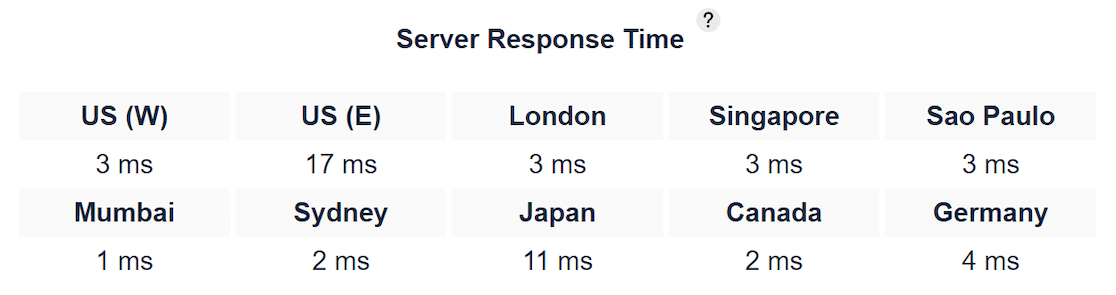
This is the same speed stack you used to only get from pricier managed hosts. In independent 2026 speed tests, its servers have posted global response times around 136 milliseconds, near the front of every roundup I checked.
The custom hPanel dashboard is genuinely beginner-friendly, so you can manage your site, domain, email, and WordPress install from one place without hunting through cPanel menus.
You also get a free CDN and a free domain for the first year, which takes one more cost and one more setup step off your plate.
What I Liked
- Speed for the money: LiteSpeed, NVMe, and a free CDN on a plan that starts at a few dollars is hard to beat on raw price-to-performance.
- hPanel: The control panel is one of the clearest I have used, especially for a first-time site owner.
- Global data centers: Servers across multiple regions let you host close to where your visitors actually are.
- Everything bundled: Free SSL, a free domain for year one, email, and a website builder all come in the box.
How Much Does Hostinger Cost?
The Premium shared plan starts at $2.99 per month on a promotional term and renews at $10.99 per month. It covers up to 100 websites, includes the free CDN and domain, and comes with a 30-day money-back guarantee if you want to test it risk-free.
2. Kinsta
Best for: Premium managed WordPress hosting where raw speed matters more than the monthly cost.
Kinsta is what you move to when your site has outgrown budget hosting and slow load times start costing you money. It runs entirely on Google Cloud’s premium tier using their fast C2 compute machines, with edge caching and an included CDN spanning 260-plus locations.
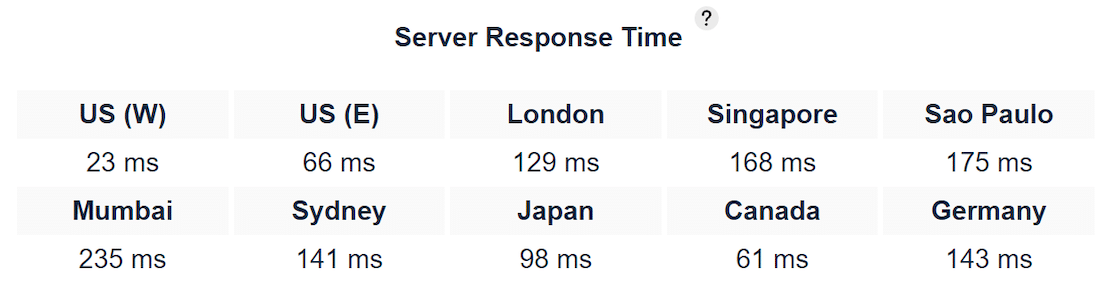
That setup consistently lands Kinsta among the fastest managed WordPress hosts in head-to-head tests. Because it is fully managed, Kinsta handles caching, security, and daily backups for you, and the MyKinsta dashboard shows real performance data instead of hiding it.
There are no cPanel-style menus to wrestle with, which is part of what you pay for. If you are comparing this tier of host, my roundup of the best managed WordPress hosting goes deeper on the alternatives.
What I Liked
- Google Cloud C2 machines: Kinsta runs on some of the fastest infrastructure available, not commodity shared servers.
- Edge caching included: Pages are served from the location closest to each visitor, with no extra plugin or fee.
- Managed everything: Backups, staging, and security are handled for you, which frees you to work on the site itself.
- Clear performance tools: MyKinsta surfaces load and resource data so you can see what your site is actually doing.
How Much Does Kinsta Cost?
Plans start at $35 per month, or $30 per month billed annually, for the entry Starter plan with one WordPress install, 10 GB of storage, and 125 GB of CDN bandwidth. The first month is free, so you can trial it before committing.
3. Cloudways
Best for: Scalable cloud hosting speed without managing a server yourself.

Cloudways sits between shared hosting and running your own server. You pick the cloud provider underneath, from DigitalOcean to Google Cloud or AWS, and Cloudways manages the hard parts on top with its NGINX-based stack and built-in Redis caching.
The result is dedicated server resources, so your site is not fighting hundreds of neighbors for speed the way it would on cheap shared hosting.
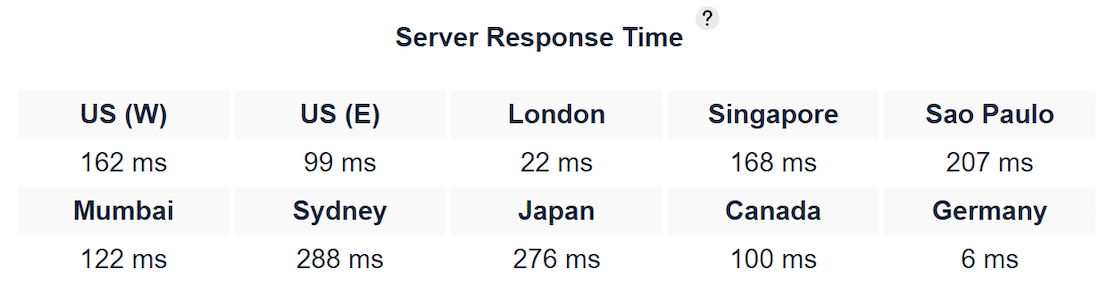
That flexibility is the main draw, since you can start small and scale the server up as traffic grows, paying only for the resources you use.
The trade-off is that it assumes a little more comfort than a one-click shared host, and a CDN is a paid add-on rather than something bundled in.
What I Liked
- Dedicated resources: Your site runs on its own cloud server, not a shared box, which keeps speed steady under load.
- Choice of cloud: You can host on DigitalOcean, Vultr, Google Cloud, or AWS depending on your budget and speed needs.
- Built-in Redis and NGINX: The performance stack is set up for you, with no manual server tuning required.
- Scales with you: Bumping up server size as traffic climbs takes a few clicks, not a migration.
How Much Does CloudWays Cost?
The entry DigitalOcean plan starts at $11 per month for 2 GB of RAM, one core, and 50 GB of storage, with unlimited sites and visits. A Cloudflare Enterprise CDN add-on runs an extra $4.99 per month per domain if you want it.
4. SiteGround
Best for: Fast hosting backed by support that actually solves your problem.
SiteGround builds its shared plans on Google Cloud and layers its own speed tools on top, including custom ultrafast PHP and the multi-level SuperCacher system.
A free CDN with 170-plus locations comes included, so your pages are served close to visitors wherever they are. On raw speed it holds its own against pricier hosts, and its higher plans get quicker still.
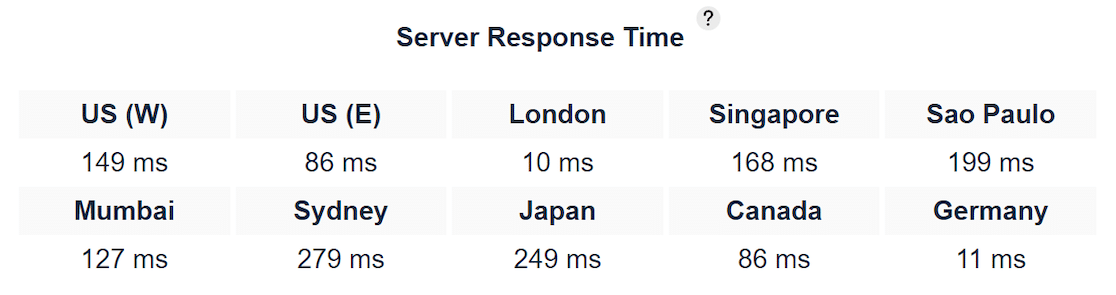
What has always set SiteGround apart for me is support. When something breaks at 2 a.m., their team answers fast and knows the platform well, which is not something I can say about most budget hosts.
If live help matters to you, it is worth pairing a fast host with dependable live chat on your own site too.
What I Liked
- Google Cloud plus SuperCacher: The infrastructure and caching combine for consistently quick load times.
- Free CDN included: 170-plus locations at no extra cost keeps global visitors fast.
- Standout support: Fast, knowledgeable help across chat and phone, which is rare at this price.
- Ultrafast PHP: SiteGround’s custom PHP setup squeezes extra speed out of WordPress specifically.
How Much Does SiteGround Cost?
The StartUp plan starts at $3.99 per month on promotion and renews at $17.99 per month. It covers one website with the free CDN, free SSL, and daily backups included.
5. A2 Hosting
Best for: LiteSpeed-powered speed on a budget, if you do not mind a brand in transition.
A2 Hosting made its name on Turbo plans that ran LiteSpeed servers for faster page loads, and that speed reputation is why it earns a spot here.
There is one important update since this list last ran. A2 Hosting now operates as Hosting.com, and the old a2hosting.com address redirects there.
The platform still leans on LiteSpeed caching for performance, so the core speed story carries over even as the name changes.
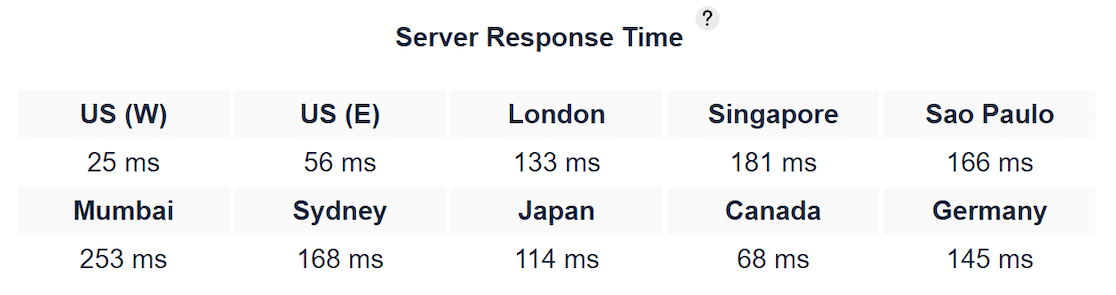
If you go this route, read the current plan details closely, since a rebrand is exactly when features and pricing tend to get reshuffled.
The speed foundation is solid, but I would confirm the specifics of whatever plan you sign up for rather than assuming the old A2 Turbo setup transferred over unchanged.
What I Liked
- LiteSpeed caching: The same server technology that made A2’s Turbo plans quick still underpins the platform.
- Budget entry price: Shared hosting starts low, which keeps it accessible for a first site.
- WordPress-ready: Managed WordPress plans are available if you want the platform handling more for you.
- Free migration: Moving an existing site over has long been part of the offer.
How Much Does A2 Hosting Cost?
Shared hosting starts at $2.99 per month, with managed WordPress plans from $5.83 per month, based on current Hosting.com rates. Check the renewal terms before you commit, as promotional pricing steps up after the first term.
6. InMotion Hosting
Best for: Growing sites that want NVMe storage and room to scale up.
InMotion Hosting takes a different route to speed than the LiteSpeed hosts on this list. Instead of LiteSpeed, it runs what it calls UltraStack, an NGINX and PHP-FPM setup with layered caching, paired with NVMe storage across its plans.
In practice that means quick, steady performance, even if it rarely tops the very fastest benchmarks. Where InMotion earns its place is range, with everything from entry shared hosting up through VPS and dedicated servers, so you can start small and grow without switching providers.
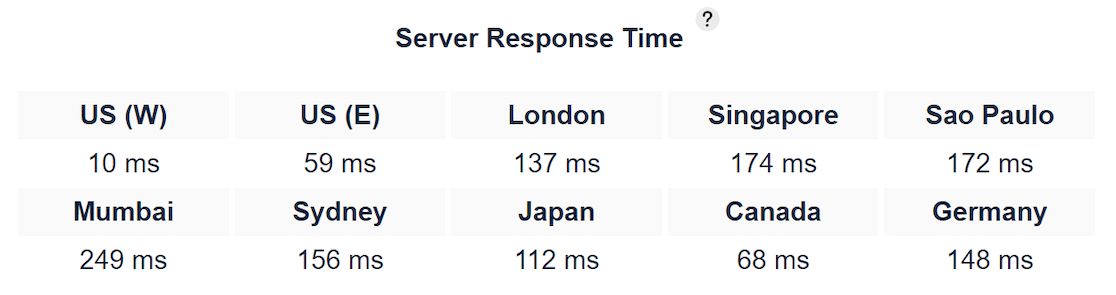
That makes it a sensible home for a site you expect to scale over the next few years rather than one you want cheap today and forgotten tomorrow.
What I Liked
- NVMe storage across plans: Faster drives help load times even on the entry tiers.
- UltraStack tuning: The NGINX and PHP-FPM stack is built for stable WordPress performance.
- Room to grow: A clear upgrade path from shared to VPS to dedicated hosting under one roof.
- Longer money-back window: InMotion has historically offered a generous refund period to test the service.
How Much Does InMotion Hosting Cost?
The Launch plan starts at $4.79 per month on a longer term and includes 100 GB of NVMe storage plus the UltraStack speed setup. Higher tiers add more sites and resources as you need them.
7. Bluehost
Best for: WordPress beginners who want the easiest possible start.

Bluehost is one of the few hosts officially recommended by WordPress.org, and that shapes what it is good at. Setup is about as smooth as WordPress hosting gets, with WordPress preinstalled, NVMe storage, and a free CDN included to help with load times.
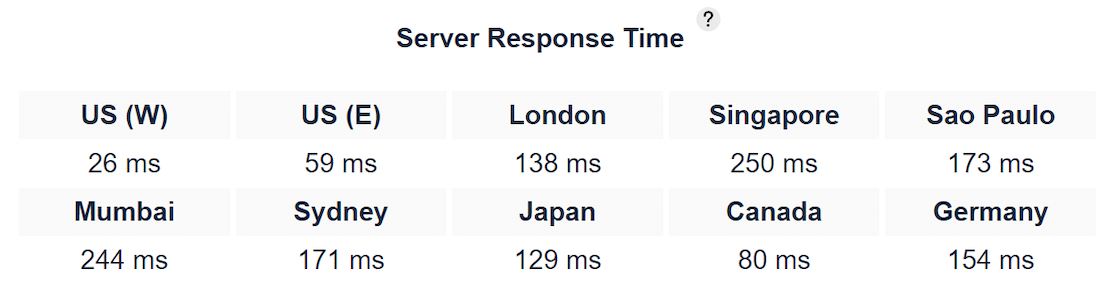
For someone building a first site, that hand-holding is worth a lot. I am ranking Bluehost last here on pure speed, and that is the honest read. It is not the fastest host on this list, and it is not trying to be.
What it offers instead is an easy on-ramp to WordPress, a free domain for the first year, and a familiar dashboard, which is why it stays a common first pick despite the speed hosts above it.
What I Liked
- Officially WordPress-recommended: One of a short list of hosts WordPress.org points beginners toward.
- Beginner-friendly setup: WordPress comes preinstalled and the dashboard is easy to find your way around.
- NVMe and free CDN: Faster storage and a bundled CDN take some of the sting out of shared-hosting speed.
- Free domain year one: A free domain and SSL lower the total cost of getting started.
How Much Does Bluehost Cost?
The Starter plan starts at $3.99 per month on a promotional term and renews higher afterward. It includes 10 GB of NVMe storage, a free CDN, a free domain for the first year, and free SSL.
Why Web Hosting Speed Matters for Your Site
Research on page speed has long shown that visitors start leaving after just a few seconds of waiting, and every extra second of load time chips away at conversions.
A quicker server protects the sales and signups you are already working to earn, before you touch a single image. Search rankings ride on speed as well, because Google factors page experience, including how fast your pages load and become interactive, into rankings through Core Web Vitals.
A slow server drags those scores down no matter how strong your content is, while a fast one gives your SEO room to work. If you are still choosing a host, my guide to choosing WordPress hosting covers the wider decision beyond speed alone.
Your host can only do so much on its own, though. Bloated themes, oversized images, and a pile of plugins will slow down even the quickest server, so treat fast hosting as the foundation and your own speed tweaks as the rest of the job.
Which Fast Web Host Should You Choose?
The right pick comes down to your budget and how much you want the host to handle for you, which is really the shared versus managed hosting question in disguise. Here is how I would decide.
- For most sites, choose Hostinger: It gives you LiteSpeed speed, NVMe storage, and a free CDN for a few dollars a month, which is the best raw value on this list.
- For a premium, revenue-generating WordPress site, choose Kinsta: When speed directly affects income and the budget allows, its Google Cloud performance and hands-off management are worth the price.
- For a growing site that needs to scale, choose Cloudways: Dedicated cloud resources and easy upgrades handle rising traffic without a migration.
- For fast hosting with great support, choose SiteGround: You get Google Cloud speed plus a support team that genuinely helps when you are stuck.
- For the easiest WordPress start, choose Bluehost: It trades top-end speed for the smoothest beginner setup on the list.
Whichever you pick, moving an existing site over is usually straightforward, and most of these hosts include free migration.
If you are bringing your web address along too, here is how to take over an existing domain without downtime.
FAQs About the Fastest Web Hosting Providers
Speed is one of the most common questions I get about web hosting, especially from people running WordPress. Here are quick answers to what readers ask most about finding the fastest web hosting for their site.
Which web hosting is the fastest?
For most sites, Hostinger offers the fastest speed for the price, thanks to LiteSpeed servers, NVMe storage, and a free CDN. If budget is not a concern, Kinsta and Cloudways deliver even higher managed and cloud performance.
What is the fastest WordPress hosting?
Kinsta is among the fastest for managed WordPress, running on Google Cloud’s premium tier with edge caching. Hostinger and SiteGround are strong, more affordable WordPress options that still post quick load times.
Does web hosting really affect site speed?
Yes. Your host determines how quickly the server responds to each visitor, which sets the baseline for your load times. A fast host with caching and a CDN can shave seconds off your pages before you make any other change.
What makes a web host fast?
The biggest factors are server technology like LiteSpeed or NGINX, NVMe storage, built-in caching, a content delivery network, and up-to-date PHP. Data centers close to your visitors and quality hardware round it out.
How do I test my web hosting speed?
Run your live site through a free tool like GTmetrix, Pingdom, or Google PageSpeed Insights. Test from a location near your audience, and pay attention to server response time, also called time to first byte, as the clearest measure of host speed.
Is faster web hosting better for SEO?
Indirectly, yes. Google uses page experience and Core Web Vitals, both tied to load speed, as ranking signals. Faster hosting improves those scores and keeps visitors on the page longer, which supports your rankings.
Next, Speed Up Your WordPress Site and Forms
Once you are on quicker hosting, the next win is making sure your forms load just as fast, and my guide on how to speed up your form loading times shows you how.
WPForms is built to stay lightweight, so your forms load quickly and stay off the critical path even on a busy page, and you can spin one up in minutes with the drag-and-drop builder.
Build Faster WordPress Forms Now
Ready to build your form? Get started today with the easiest WordPress form builder plugin. WPForms Pro includes lots of free templates and offers a 14-day money-back guarantee.
If this article helped you out, please follow us on Facebook and X (Twitter) for more free WordPress tutorials and guides.





