









WordPress Mercado Pago Plugin
Accept Mercado Pago Payments Right on Your Forms
While other tools send buyers to a hosted checkout, you’ll have a payment field for credit cards and installments to close the sale. No added fees or coding needed.
One WordPress Mercado Pago Plugin. Every Kind of Payment Form.
Helping you get paid, wherever your customers are, is exactly the kind of work we love shipping.
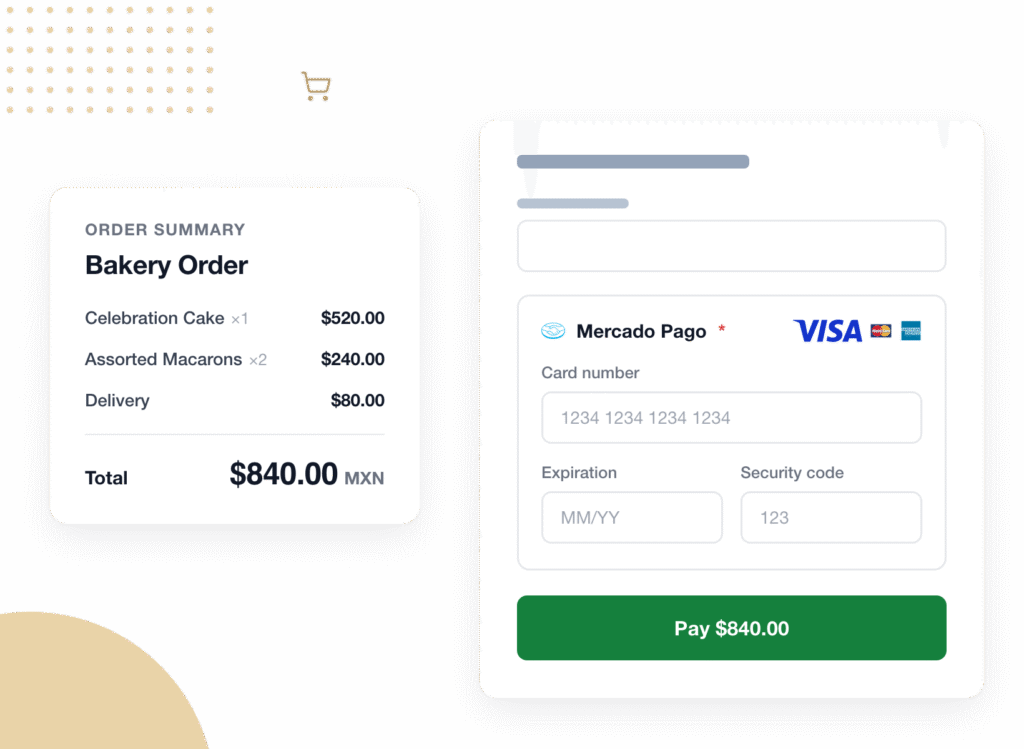
Order Forms
A shopper picks their items, sees the total update, and pays by card without ever leaving the page. Quantities and coupon codes recalculate the total on your server before the charge, so what the buyer confirms is exactly what gets charged.


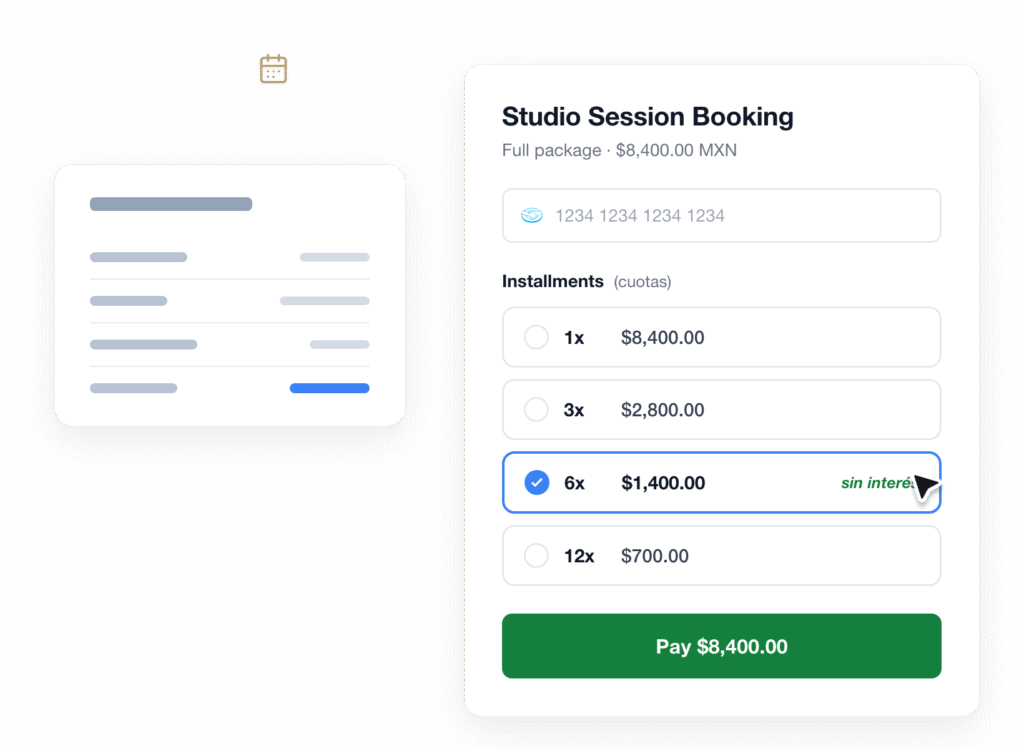
Booking Forms
Bigger tickets stop feeling like bigger decisions once installments are on the table. A client books a package, splits it into monthly cuotas inside the card field, and confirms. The booking and the payment land in the same submission.


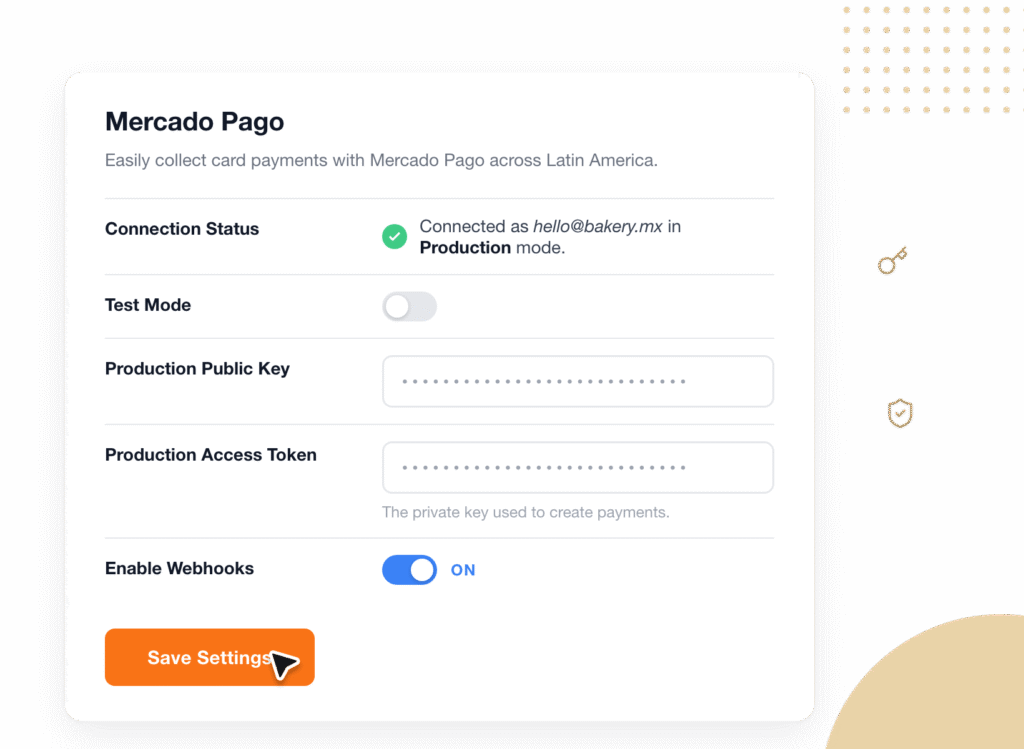
Connect Your Account
Go to WPForms, then Settings, then Payments, and paste your Public Key and Access Token. Both are checked the moment you save, so a bad copy and paste fails right there instead of failing on your first real customer.


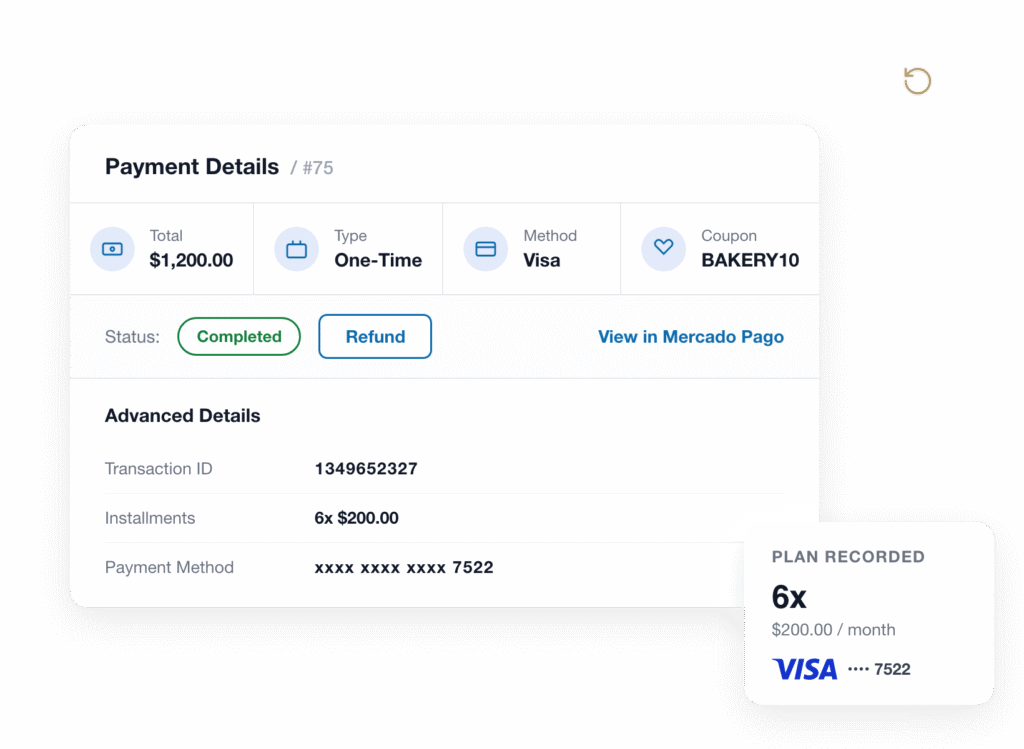
Payments Dashboard
Every payment lands in WPForms with its amount, currency, card brand, and installment plan recorded. From there you can refund in full, refund part of it, or jump straight to the transaction inside Mercado Pago.


Get the Full Power of WPForms + Mercado Pago
Mercado Pago payments that live inside your form, not on somebody else’s checkout page.


Keep Buyers on Your Page, All the Way to Payments
The moment a buyer decides to pay is the worst possible moment to send them somewhere unfamiliar. This WordPress Mercado Pago plugin puts the card fields inside your own form, on your own page, with your own branding. Buyers type their card number, clear their bank’s verification check if their bank asks for one, and hit submit. That’s the whole flow.
Installments Show Up on Their Own
Across much of Latin America, splitting a purchase into monthly installments is not a premium financing option. It is simply how people buy, and a checkout that cannot offer it feels broken. So the installment choices render right inside the payment field, pulled from Mercado Pago, with nothing for you to configure and no separate setting to find. Your buyer picks a plan and the form handles the rest.


Skip the Ecommerce Setup You Don’t Need
Most advice about accepting payments online starts with installing a full ecommerce platform like WooCommerce or Shopify, picking a theme, configuring a cart, and building a checkout. That is a lot of scaffolding for a business that just needs to charge for a booking, an order, or a deposit. Instead, you add one field to a form you already have. No products to import, no cart, no store to maintain.
Charge in the Currency Your Buyer Actually Uses
Charge in Brazilian reais, Peruvian soles, or pesos from Argentina, Chile, Colombia, Mexico, and Uruguay. Pick the currency once in the WPForms payment settings and every amount on the form formats correctly, including the currencies that don’t use decimal places. Plus, WPForms adds no transaction fee of its own on top. You pay Mercado Pago’s own processing rates and nothing more.


Refunds and Status Changes, Handled From WordPress
An approved charge completes inside the same submission, so your confirmation email, your notifications, and your integrations all fire at the moment the payment actually clears, not before. A declined card shows a specific reason under the field, creates no stray entry, and fires nothing. Later, refund in full or in part from your payments screen. And if somebody refunds from the Mercado Pago side instead, your WPForms record updates itself to match.
Works With the Forms and Builders You Already Use
This is a payment field, so it behaves like one. Drop it on a multi-page form and validation follows the buyer from page to page. Pair it with Coupons and the discounted total is what gets charged. Add conditional logic and the payment only appears when it should. It runs inside Conversational Forms, Lead Forms, Form Pages, the block editor, Elementor popups, and Divi. You can even run two payment forms on the same page.


Elevate Your Payment Forms With 2,100+ Ready-Made Templates
- Simple Order Form
- Online Order Form
- Product Order Form
- Bakery Order Form
- Appointment Booking
- Beauty Salon Booking
- Pet Grooming Appointment
- Bed and Breakfast Booking
- Deposit Form
- Invoice Form
- Billing / Order Form
- Charitable Donation
- Church Donation
- Alumni Donation
- Virtual Event Ticket Order
- Music Lesson Enrollment
Frequently Asked Questions and Resources
Have questions about the Mercado Pago addon? We’ve got answers.
What is the WPForms Mercado Pago addon?
The WPForms Mercado Pago addon is a WordPress Mercado Pago plugin that connects your own Mercado Pago account to your WPForms payment forms, so you can accept credit and debit card payments with installments directly on the form. You add a Mercado Pago field in the drag and drop form builder, enable Mercado Pago under the form’s payment settings, and map your email and name fields. The buyer pays without ever being redirected to an external checkout page.
Can buyers pay in installments (cuotas)?
Yes. Installments render automatically inside the Mercado Pago payment field, with no extra configuration on your side. The available plans come from Mercado Pago based on the buyer’s card and your account, so your buyer simply picks the plan they want before submitting. The installment plan they chose is then recorded on the payment record in WPForms alongside the card brand.
Do I need WooCommerce or an online store to accept Mercado Pago payments?
No. The Mercado Pago addon is a payment field on a form, not an online store, so there is no cart, no product catalog, and no checkout page to set up. If you already run an ecommerce platform you can keep it. But if all you need is to charge for a booking, an order, a deposit, or a donation, a single payment form does the job on its own.
Is it safe to accept card payments through my WordPress form?
Card details are entered into payment fields hosted by Mercado Pago, so they never touch your site or your server. Your site only ever receives a single-use token that stands in for the card. On top of that, your Mercado Pago credentials are stored encrypted, every total is recalculated on your server before the charge so a tampered amount is rejected, and repeated failed card attempts from the same visitor are rate limited to shut down card testing.
Which currencies does the Mercado Pago addon support?
The Mercado Pago addon supports seven local currencies: Argentine pesos (ARS), Brazilian reais (BRL), Chilean pesos (CLP), Colombian pesos (COP), Mexican pesos (MXN), Peruvian soles (PEN), and Uruguayan pesos (UYU). Five of those are new additions to WPForms core, so your forms keep a valid currency even if the addon is ever deactivated. Note that Mercado Pago accounts also carry their own minimum charge amounts, which vary by account and currency.
Which WPForms plan includes the Mercado Pago addon?
The Mercado Pago addon is included with the WPForms Pro plan and above, so both Pro and Elite licenses unlock it. Every plan includes unlimited forms and unlimited submissions, and WPForms adds no transaction fee of its own to Mercado Pago payments on any tier. You pay only Mercado Pago’s own processing rates. See the pricing page for a full tier comparison.
Can I refund a Mercado Pago payment from WordPress?
Yes. Every Mercado Pago payment is stored in your own WordPress database and appears under WPForms, then Payments, with its amount, currency, card brand, installment plan, and payer details. From the single payment view you can issue a full or partial refund in just a few clicks. Refunds issued on the Mercado Pago side sync back automatically, so the two records never drift apart. Read more about viewing and managing payments.
Does the Mercado Pago addon support Pix, the Mercado Pago wallet, or subscriptions?
This version of the Mercado Pago addon handles credit and debit card payments, including installments and bank verification. It does not process Pix, Mercado Pago wallet balances, or recurring subscriptions. If you need recurring payments today, Stripe and Square both support them in WPForms, and you can offer more than one payment method on the same form.
Does the Mercado Pago payment field work on mobile devices?
Yes. The Mercado Pago payment field is fully responsive, so the card inputs, the installment selector, and any bank verification screen all work on phones and tablets just as they do on desktop. Because everything happens inside your form rather than on a separate checkout page, mobile buyers never get bounced between browser tabs mid-payment.
How long does the Mercado Pago addon take to set up?
Most people connect it in under 5 minutes. Install the addon, paste your Public Key and Access Token into WPForms settings, and save. Both keys validate immediately so you know the connection worked. Then drag the Mercado Pago field onto a form, switch on Mercado Pago in the form’s payment settings, and pick your email and name fields. No code required at any step.


