









Typeform Alternative for WordPress

The Typeform Alternative That Doesn’t Charge Per Answer

Typeform built its name on beautiful one-question-at-a-time forms, then priced every response you collect. WPForms gives you the same conversational experience on your own WordPress site, where every answer is yours and no response cap is waiting.

WPForms vs Typeform

Typeform lives on its own servers and reaches your visitors through an embed, while WPForms is native to WordPress, with every entry landing in the dashboard you already work in. Here’s how the two compare.

FeatureWPFormsTypeform
Monthly response limitUnlimited on every license100 on Basic, 1,000 on Plus, 10,000 on Business
What happens at the limitThere is no limit to reachForms “go into Private mode” until the next month or an upgrade
Are limits per form or per account?Not applicableAccount-wide. Three forms on Plus share the same 1,000
One question at a timeConversational Forms, included with ProYes. It’s the core Typeform experience
Where the form livesYour own domain, as ordinary WordPress contentA Typeform address. Your own domain is Enterprise only
Where responses are storedYour own WordPress databaseTypeform’s platform, with export available
Field-level analyticsViews, interactions, errors, drop-off and time spent, per fieldQuestion Drop-off Analysis, on the Business plan
Conversion goal trackingSet a target and track it in your dashboardConversion tracking, on the Business plan
AI chat on your own form dataIncluded with ProSmart Insights, on Growth Flow
Your branding onlyYes, on every licenseRemoving Typeform branding starts on Plus
Users includedUnlimited on every license1 on Basic, 3 on Plus, 5 on Business
Official WordPress pluginWPForms is the pluginClosed on WordPress.org since April 2025 and unavailable there
Price to unlock drop-off analytics$199.50 a year for Pro$91 a month billed annually, or $1,092 a year

What Changes When You Leave Typeform

The response caps go, the per-seat pricing goes, and your entries settle into your own WordPress dashboard. Here’s what the switch looks like, feature by feature.

One Question at a Time

This is the part people worry about losing, so let’s settle it first. WPForms Conversational Forms turns any form you’ve already built into a full-page experience that asks one question at a time,.

If you’d rather keep a standard layout but strip away the distractions, Lead Forms gives you the same focused, one-thing-at-a-time feel inside your page. Both are included with Pro, and run on your own site.

The typeform alternative for WordPress showing a conversational form asking one question at a time

Nothing Goes Private

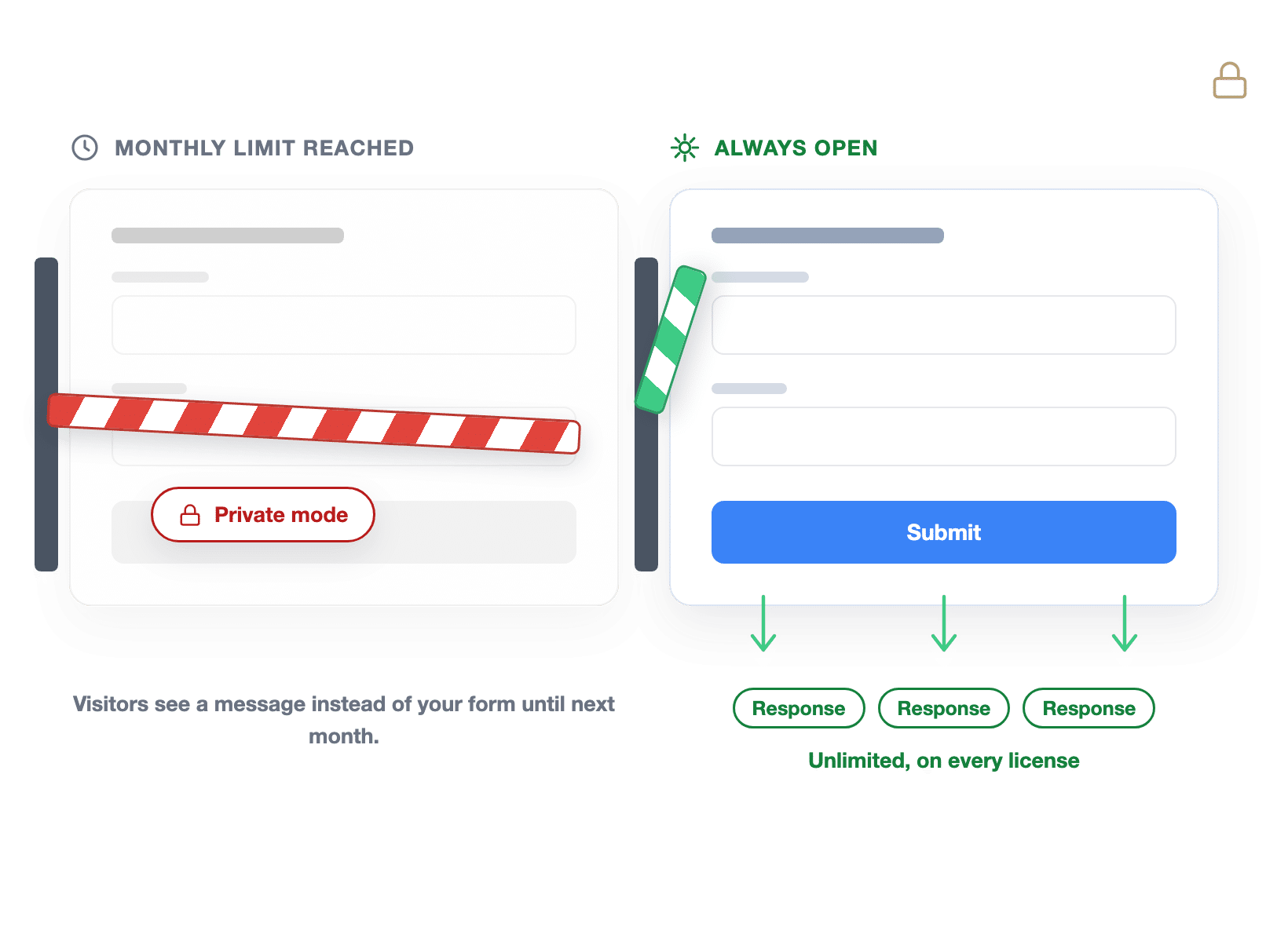
Typeform’s response allowance is a real ceiling, at 100% of your limit, “your forms will go into Private mode,” and visitors “will see a message” instead of your form.

The allowance is also account-wide rather than per form, unused responses don’t roll over, and deleting old responses “won’t add them back.” WPForms has no meter to run out of.

A form closed by a monthly response limit beside a WPForms form still accepting responses

Analytics by Field

Typeform does measure drop-off and conversion tracking, and these are the two features its pricing page names when it explains why you’d move up to the Business plan.

WPForms Analytics comes with Pro and goes a level deeper than the question. Every field reports views, interactions, errors, drop-off, and the average time people spend on it.

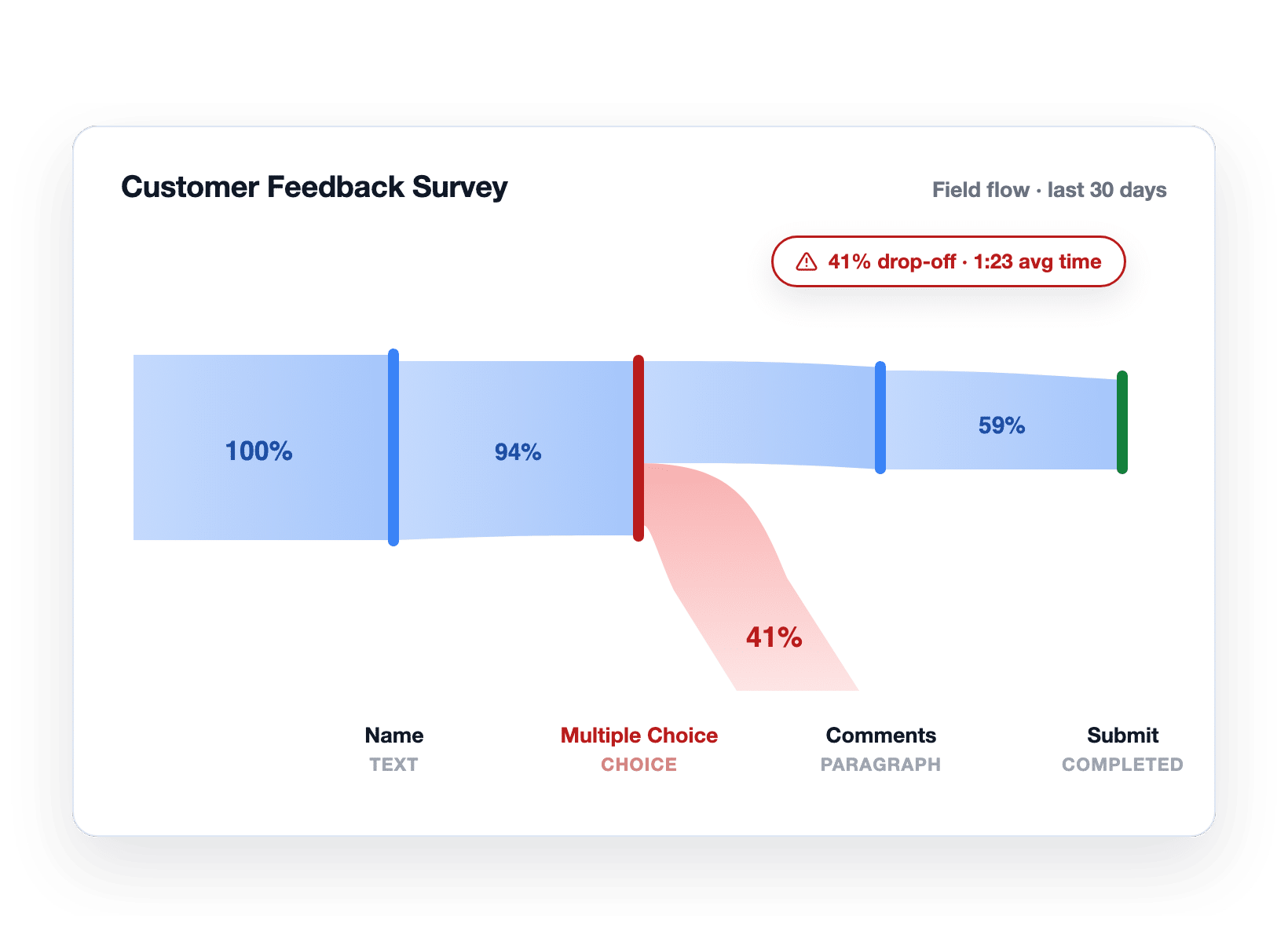
WPForms field-level analytics showing 41% drop-off on the Multiple Choice field

Your Domain, Your Data

A Typeform is served from a Typeform address and embedded into your page, and its pricing table lists “Connect a custom domain to your account” as Enterprise only.

So the form collecting your customers’ details sits on a domain that isn’t yours. In WPForms a form is just WordPress content. It loads with your site, inherits your theme’s fonts and colors, and every response lands as a row in your own database.

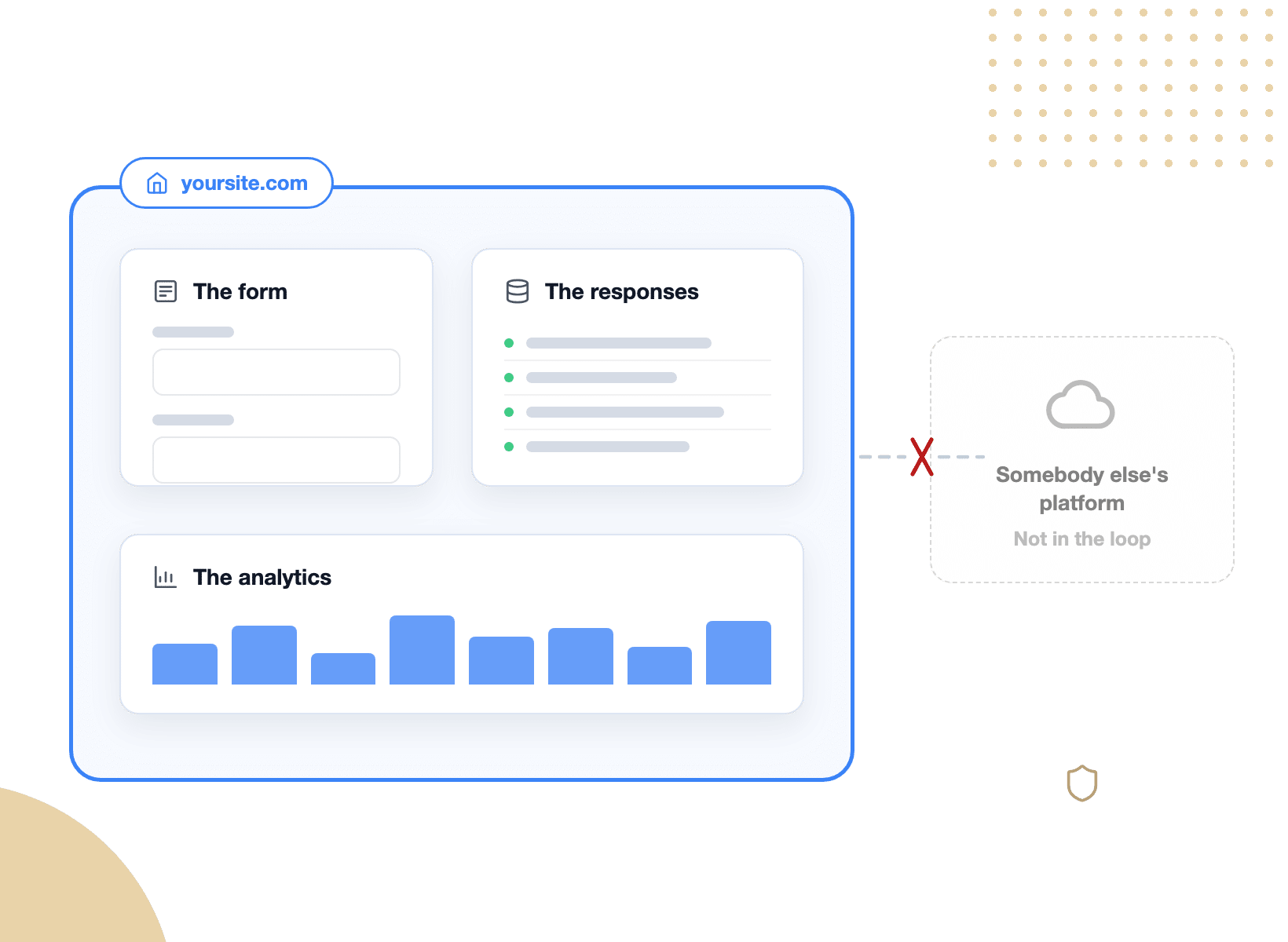
A WPForms form, its responses, and its analytics all inside the boundary of your own WordPress site

Surveys and Polls

Plenty of people reach for a hosted tool because they need to run a survey, not just a contact form.

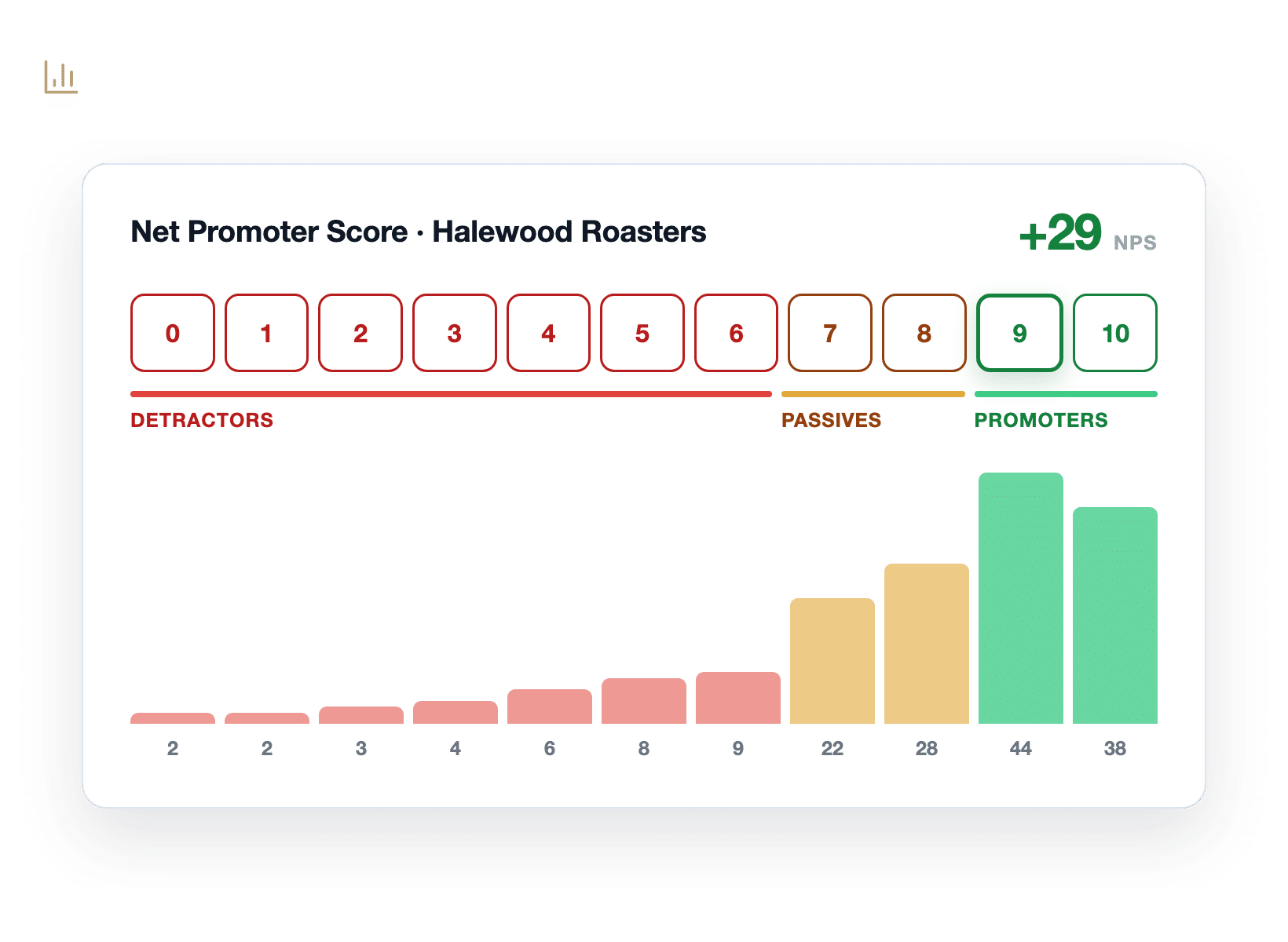
WPForms Surveys and Polls covers that on its own, with NPS scoring, a Likert scale field, and real-time poll results that publish straight to your site.

Reports render as interactive charts you can export or print. Meanwhile every response stays in your database, so last year’s survey is still there to compare against this year’s.

A WPForms NPS survey report with a segmented zero to ten scale and a response distribution

Everything You Get When You Switch

Six reasons a Typeform alternative is easier to adopt than it looks, and why most people end up with a better form than the one they left.

A WPForms conversational form stepping through questions one at a time with a progress path

Give Visitors the Experience They Expect

The one-question-at-a-time format works because it hides the length of the form.

WPForms Conversational Forms does exactly that, on a distraction-free page of its own, with your fonts and your colors.

Flip the toggle and the form you already built becomes a chat-style flow.

For everything else there’s Lead Forms, which keeps your form in place but shows one question at a time inside a clean, focused card.

See Exactly Which Question Loses People

WPForms Form Analytics reports every field separately. How many people saw it, how many interacted, how many hit an error, how many gave up, and how long they spent trying.

So when you find that 41% of visitors abandoned your Customer Feedback Survey at the Multiple Choice field, after an average of 1:23 on that one question, the fix is obvious.

Fewer options, clearer labels with no event tracking to configure and no analytics account to connect.

The typeform alternative with field-level analytics, showing 41% drop-off and 1:23 average time on the Multiple Choice field
A WPForms conversion goal at 11.6% against an 18% target with an AI chat answer alongside

Set a Goal, Then Ask Your Data Questions

Measuring is only half of it, and. WPForms lets you set a conversion goal on a form and track how close you are.

So, your survey climbing from 11.6% toward an 18% target is a number on a dashboard rather than a feeling.

Better still, there’s a built-in AI chat sitting on top of your own form data.

Ask why completions dropped last week and you get a plain-English answer with fixes to try.

Keep Every Response Inside Your Own Site

The plainest argument for a Typeform alternative inside WordPress is ownership.

With a hosted tool, your form lives at somebody else’s address and your responses live in their account.

WPForms keeps all of it in one place. The form is a WordPress page, the responses are rows in your database, and the analytics sit beside them in your dashboard.

If you ever change tools, the data is already yours, and you can export it to Excel, CSV, or PDF whenever you like.

Form, responses, and analytics contained inside one WordPress site boundary, with a cloud platform outside it
3,542 responses moving from a CSV export into WPForms on a conveyor into the WordPress database

Bring Your Typeform Responses With You

Download your responses from Typeform as a CSV, then run the WPForms Entry Importer and map the columns to your new form’s fields.

You can easily move responses this way in an afternoon, and its historical reports still line up, and WPForms AI can handle building the form for you in a matter of minutes.

Every paid WPForms license includes the Entry Importer. Plus you can leave your Typeform account running while you test, then switch the embed over once you’re happy.

Your Brand, Not Somebody Else’s

On Typeform, removing Typeform’s branding from your form is a paid step up.

Its pricing page lists “Remove Typeform branding” as one of the reasons to move from Basic to Plus.

A WPForms form carries your branding only, on every license, because it’s your site rendering it.

Styling lives in the block editor with real controls for colors, fonts, borders, and spacing, so the form matches the page instead of approximating it.

A third-party powered-by badge peeling off a form card to reveal the site owner's own branding

What You Get That a Hosted Form Builder Rents You

Everything below is included with your license the day you install, with no response allowance to track and no per-seat math to do. Typeform bills for these monthly, WPForms just hands them over.

Conversational Forms

Turn any form into a one-question-at-a-time chat flow with a single toggle.

Unlimited Responses

No monthly ceiling, no add-on packs, and no forms going quiet mid-campaign.

Field-Level Analytics

Views, interactions, errors, drop-off, and time spent, reported field by field.

Conversion Goals

Set a target completion rate and watch your form climb toward it.

Built-In AI Chat

Ask questions about your own form data and get plain-English fixes to try.

Surveys, Polls and NPS

NPS scoring, Likert fields, and live poll results published to your site.

Your Own Database

Every response is a row in your WordPress install, exportable any time.

Unlimited Users

Give the whole team access without buying another seat.

Entry Importer

Move your existing responses in from a CSV export and keep your history.

Collect Every Response. It’s That Simple.

Join the 5,000,000 professionals who use WPForms to capture leads and convert more visitors, without a monthly response limit.

✓ 14-Day Money-Back Guarantee · ✓ Setup in Under 5 Minutes · ✓ No Coding Required · ✓ Used on 5,000,000 Sites

View all

Frequently Asked Questions and Resources

Thinking about a Typeform alternative for your WordPress site? Here’s what people ask first.

Is WPForms a good Typeform alternative?

WPForms is a strong Typeform alternative for anyone whose website already runs on WordPress.

You get the same one-question-at-a-time experience through Conversational Forms, plus unlimited responses, unlimited users, and field-level analytics on every Pro license.

The difference is where it runs as your form is WordPress content on your own domain, and every response is a row in your own database rather than an account somewhere else.

Can WPForms create conversational forms like Typeform?

Yes. The WPForms Conversational Forms addon converts any form you’ve built into a full-page, one-question-at-a-time flow, styled with your own colors and fonts. It’s a toggle in the form settings, not a separate build.

If you’d rather keep the form embedded in your page, Lead Forms gives you the same focused feel in a compact card. Both come with Pro and above.

Does WPForms limit how many responses I can collect?

No. WPForms places no limit on responses. Unlimited forms, unlimited submissions, and unlimited users are included with every license, from Basic upward, because the form runs on your own hosting rather than a metered platform.

That’s the practical difference from a hosted tool. Typeform’s plans include a set number of responses each month, and its documentation notes that at 100% of the limit, “your forms will go into Private mode.”

How do Typeform's response limits actually work?

Typeform’s monthly response allowance is account-wide rather than per form. Its help documentation gives the example directly: on a Plus plan with three forms, “you can collect a total of 1,000 responses per month, not 1,000 responses per form.”

Two details catch people out. Unused responses don’t carry over to the next month, and deleting responses “won’t add them back to the number of remaining responses for the month.”

Does WPForms have form analytics like Typeform?

WPForms has deeper form analytics, and they’re included earlier. Form Analytics comes with Pro and reports every field separately: views, interactions, errors, drop-off, and average time spent, alongside conversion goals and a built-in AI chat.

Typeform does offer drop-off analysis, but its pricing page lists Question Drop-off Analysis and conversion tracking as Business-plan features, at $91 a month billed annually.

Can I move my existing Typeform responses to WPForms?

Yes. Export your responses from Typeform as a CSV, then use the WPForms Entry Importer to map each column onto a field in your new form. Your history moves across with the data, so year-over-year reporting still works.

The Entry Importer is included with every paid WPForms license. Plus you can keep your Typeform account live while you test, and switch the embed only once you’re satisfied.

Is there a free Typeform alternative for WordPress?

WPForms Lite is free and available in the WordPress plugin directory. It covers unlimited forms, unlimited submissions, entry management, conditional logic, multi-page forms, spam protection, and mobile-friendly styling with no response cap.

Conversational Forms, Lead Forms, Surveys and Polls, and the full Form Analytics experience are Pro features, so most people evaluating a free Typeform alternative start on Lite and upgrade once the form matters.

Does Typeform have an official WordPress plugin?

Not one you can install from WordPress.org today. Typeform’s official plugin listing there states it “has been closed as of April 8, 2025 and is not available for download,” so embedding a typeform now means pasting its embed code into your page yourself.

WPForms is a WordPress plugin by design, so it installs from the plugin directory, builds forms in a drag and drop editor inside your dashboard, and updates alongside the rest of your site.

Will my form still look good on mobile?

Yes. WPForms forms are mobile-friendly out of the box on every license, and Conversational Forms was built with mobile surveys in mind, since one question per screen is exactly what a small screen wants.

Styling is handled in the block editor with real controls for colors, fonts, borders, and spacing, so the form matches your theme on every screen size without custom CSS.

Which WPForms plan do I need to replace Typeform?

Pro, at $199.50 a year, is the plan that matches what most people use Typeform for. It unlocks Conversational Forms, Lead Forms, Form Landing Pages, Surveys and Polls, Form Abandonment, and the full Form Analytics experience, on up to five sites.

Basic and Plus already include unlimited forms, submissions, and users if all you need is a standard form. Compare the tiers on the pricing page, and every paid license carries a 14-day money-back guarantee.

🔔 Subscribe to get our latest updates
📧 Subscribe to Emails

Email Subscription

Join our Newsletter

We won’t spam you. We only send an email when we think it will genuinely help you. Unsubscribe at any time!
New Feature

WPForms Dashboard

Dark blue hero with a circular bear logo on the left, large headline'Introducing the New WPForms Dashboard' and an ANNOUNCEMENT badge; a dashboard mockup is visible on the right.

The WPForms Dashboard is a new home screen that opens the moment you click WPForms in your admin menu. Stat cards across the top total up your forms, entries, payments, views, and spam across the whole site.

An Entries widget charts activity over your chosen date range with a per-form table of entries, views, interactions, and conversion rate, and a payments widget totals everything collected once a gateway is connected.

With the Geolocation addon active, Top Locations ranks the countries your visitors come from, and a Suggested Next Steps panel points to features worth turning on.

Nothing to install, as it comes with every plan, including Lite!

New Feature

WPForms QR Code

Announcement banner: dark blue background with headline'Say Hello to WPForms QR Code: One Scan Opens Your Form' and a large QR code on the right.

Every form now has its own built-in QR code generator, with nothing extra to install or buy.

Open a form’s General settings, choose the page the form lives on or paste its URL, and click Generate QR Code to copy it or download it as a PNG or a print-ready SVG.

Put it on menus, packaging, event badges, or business cards, and every scan opens your form instead of a page that only hands people something to read.

Included with every plan, including Lite; Pro and Elite plans can keep, remove, or replace the WPForms logo in the center with their own.

New Feature

Ranking Field for Surveys & Polls

Announcement hero: dark blue background, bear avatar left, large'Introducing the New WPForms Ranking Field' text, and three stacked white option cards with 'Movies' highlighted.

The Surveys & Polls addon gains a Ranking field!

Instead of scoring each option separately, respondents drag options (or tap arrow buttons on a phone) into the order they prefer, so one option always has to come first.

WPForms tallies every response into a “Times at #1” count and an average rank for each option, with a chart that makes the winner obvious.

Lay options out as a vertical list or a grid, and use Image Choices or Icon Choices in place of plain text labels.

Integration New Feature Payments

Mercado Pago Addon

Introducing the WPForms Mercado Pago Addon: Card Payments Built for Latin America

The Mercado Pago addon brings on-page card payments built for Latin America to your forms.

Buyers enter their card details into secure, Mercado Pago-hosted fields inside the form, choose an installment plan, and pay in ARS, BRL, CLP, COP, MXN, PEN, or UYU without leaving your page.

An approved charge fires your confirmation, notifications, and integrations at the moment money actually moves, and full or partial refunds can be issued from WPForms » Payments.

WPForms takes no transaction fee, and it works with Quantities, Coupons, multi-page forms, Conversational Forms, Lead Forms, and Form Pages.

AI New Feature

WPForms Analytics

Dark blue hero with a bear avatar left, large WPForms v2.0 headline and a form analytics screenshot on the right.

WPForms 2.0 adds a complete form performance tracking suite inside your WordPress dashboard.

The All Forms page now shows Views, Entries, and Conversion Rate for every form, and each form gets its own analytics dashboard with views, interactions, conversion rate, abandonments, and errors over the last 7, 30, or 90 days or a custom range.

A field-by-field table shows interactions, time spent, errors, and abandonment for every field, so you can see exactly where people give up, and you can set a conversion goal to track progress.

There’s also a built-in AI chat reads your form data and tells you what is working, what is hurting conversions, and what to fix first.