










WordPress Elementor Form Integration

The Elementor Form Integration That Works With Free Elementor.

Elementor’s own form widget requires Elementor Pro. WPForms gives Elementor users a native form integration on the free tier, with entries that persist to WordPress, 2,100+ pre-built form templates, and payments that ship out of the box.

Everything the WPForms + Elementor Integration Gives You.

Nine capabilities the built-in Elementor form widget doesn’t ship. All live on the free tier of Elementor once WPForms is active.

Native Elementor Widget

The WPForms widget appears in Elementor’s Basic sidebar. Drag it, drop it, pick a form. No shortcode paste.

Modern Markup Integration Prerequisite

One toggle in WPForms » Settings » General (Modern Markup) unlocks Elementor styling for every embedded form.

Form Themes for Elementor

One-click preset themes tuned for Elementor pages, a WPForms-only capability.

Free Elementor Compatible

The integration works with free Elementor. Elementor Pro is not required.

Elementor Integration Entries Persist to WordPress

Every submission from an Elementor-embedded form is stored in the WPForms entries database, searchable and exportable from wp-admin.

Anti-Spam Inside Elementor Preview

Honeypot and modern spam protection stay active while you preview forms in Elementor’s editor.

2,100+ Elementor-Ready Templates

Every WPForms template embeds inside the Elementor widget with one click.

Payment Forms Inside Elementor

Stripe, Square, PayPal, and Authorize.Net (one-time + recurring, coupons + subscriptions) inside any Elementor layout.

Native Integrations Keep Working

Mailchimp, HubSpot, Salesforce, Google Sheets, Zapier and more sync from every Elementor-embedded form.

Every WPForms Form Type. Rendered Natively Inside Elementor.

Contact, signup, payment, and multi-step forms all embed through the same Elementor integration widget. Build once in WPForms, drop into any Elementor layout.

Contact Form Integration

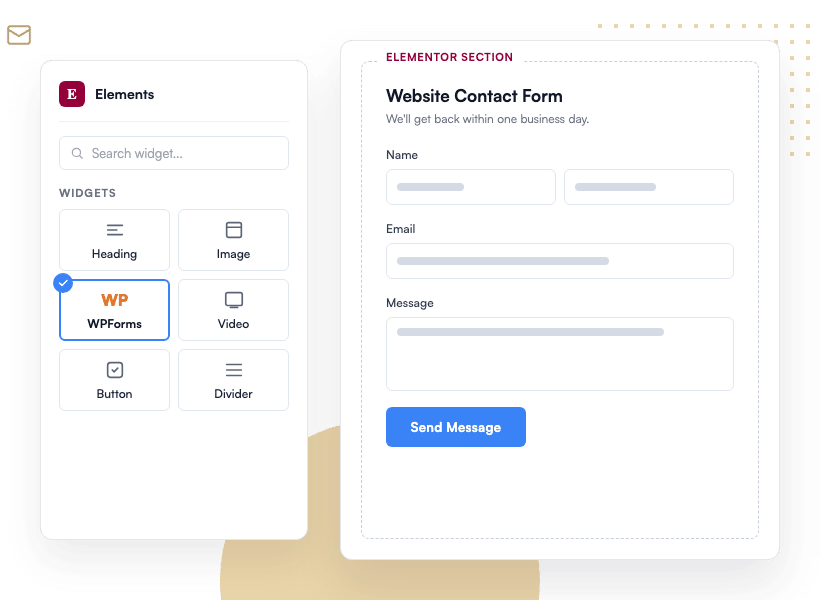
Drop the WPForms widget into any Elementor section or footer, pick your contact form, and style it with Elementor’s native controls. Entries persist to WordPress, unlike Elementor Forms’ default behavior.

The WPForms widget selected in Elementor's Elements sidebar with a website contact form rendering in an Elementor section

Signup Form Integration

Grow your list from any Elementor landing page. WPForms syncs new signups to Mailchimp, ConvertKit (Kit), Constant Contact, ActiveCampaign, MailerLite, Brevo, AWeber, or MailPoet, all managed inside the WPForms admin.

A newsletter signup form built with WPForms on an Elementor page, syncing new subscribers to Mailchimp

Payment Form Integration

Accept payments inside any Elementor layout. WPForms supports one-time and recurring payments via Stripe (with subscriptions and coupons), Square, PayPal, and Authorize.Net. No ecommerce store required.

A WPForms payment form inside an Elementor layout taking a one-time card payment through a connected Stripe account

Multi-Step Form Integration

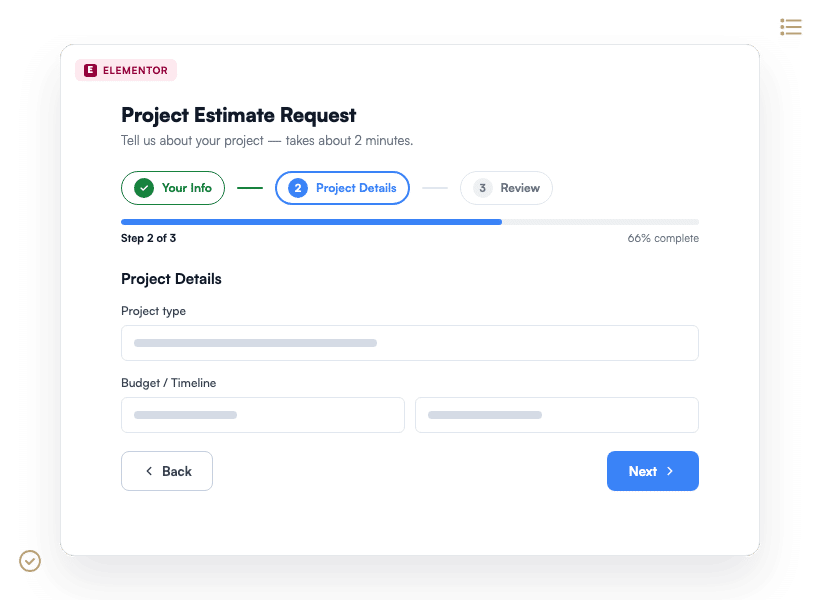
Break long forms across steps with a progress bar. Every page you build in WPForms renders inside your Elementor layout with zero re-setup.

A multi-step WPForms project estimate form rendering inside an Elementor layout with a progress bar on step 2 of 3

Why 5+ Million Websites Trust the WPForms + Elementor Integration.

Six workflow details that make the WPForms + Elementor integration different from any other form option, each grounded in the real WPForms + Elementor codebase.

The WPForms widget rendered inside the Elementor Basic sidebar

A Native Widget in Elementor’s Basic Sidebar

Open any Elementor page and the WPForms widget lives inside the Basic sidebar alongside Elementor’s core widgets. Drag it into your layout, pick a form you built in WPForms, and it renders live in the Elementor preview. No shortcodes. No bridge plugins. No cache-busting.

The Modern Markup Toggle Unlocks Every Elementor Integration Style Control

The Elementor integration relies on WPForms Modern Markup, one toggle inside WPForms » Settings » General. Once it’s on, every embedded form exposes Field, Label, Button, Container, and Background style panels inside Elementor’s editor. Nothing else to configure.

Elementor Style controls exposed for a WPForms form
Form Themes preset library applied to a WPForms form in Elementor

Form Themes for Elementor: One Click, Whole-Form Restyle

WPForms Form Themes ship a growing library of preset themes tuned for Elementor pages. Apply one to an embedded form and every field, label, and button restyles to match. No competing form plugin gives Elementor users this level of one-click theming.

Anti-Spam That Still Works Inside Elementor’s Preview

Elementor’s live preview environment is where a lot of embedded form widgets quietly drop their spam protection. The WPForms integration keeps honeypot and modern spam protection active throughout the Elementor preview and on the published page, with no gap between design and production.

Anti-spam and style controls inside an Elementor preview
Every Elementor Integration Submission Lands in the WordPress Database

Every Elementor Integration Submission Lands in the WordPress Database

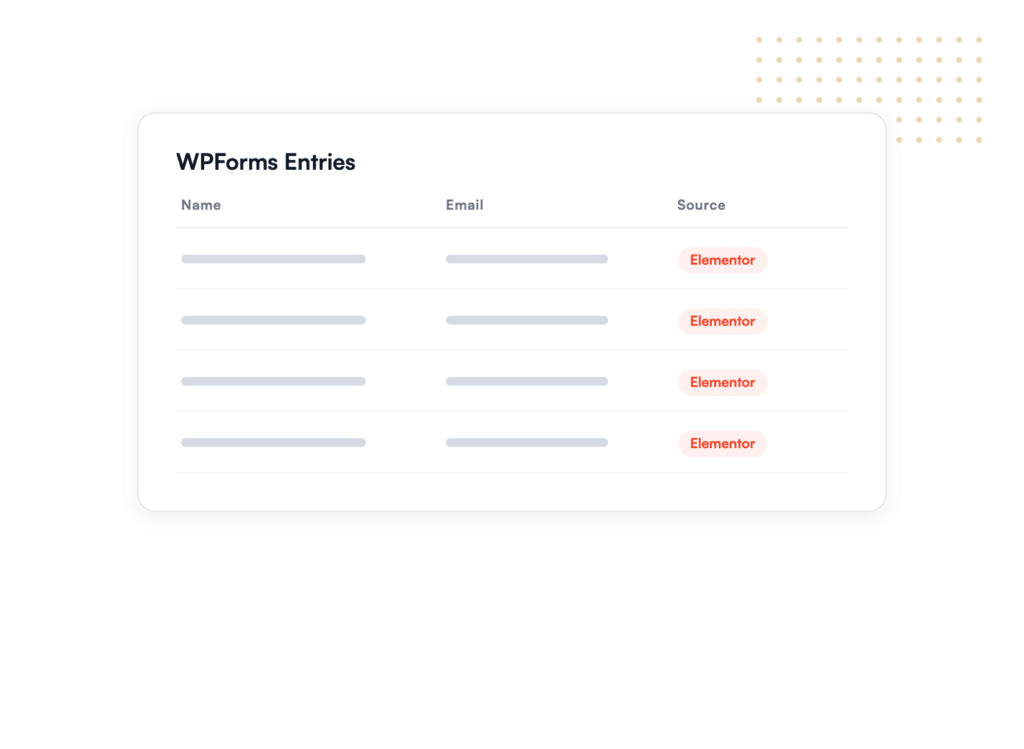
Elementor Forms doesn’t persist entries to WordPress by default. WPForms writes every Elementor-embedded submission to the WPForms entries database, searchable, exportable to CSV/Excel/PDF, routable via email notifications, and syncable to your CRM. Nothing gets lost between Elementor and your inbox.

Payments in Any Elementor Layout, Free Elementor Included

Build a payment form in WPForms with Stripe (subscriptions and coupons supported), Square, PayPal, or Authorize.Net. Drop it into any Elementor section on a free Elementor site. No ecommerce store, no Elementor Pro license, no extra fees per transaction.

Payment form rendering inside an Elementor layout

Add the WPForms Integration to Your Elementor Site. It’s That Simple.

Join the 5,000,000 professionals who trust WPForms to collect leads, accept payments, and grow their Elementor sites.

✓ 14-Day Money-Back Guarantee · ✓ Setup in Under 5 Minutes · ✓ No Coding Required · ✓ Used on 5+ Million Sites

View all

WPForms + Elementor Integration – Frequently Asked Questions and Resources

Have questions about the WPForms Elementor integration? We’ve got answers.

What do I need to enable before the WPForms Elementor integration works?

Enable the Modern Markup toggle inside WPForms » Settings » General. Once it’s on, every embedded WPForms form exposes Elementor’s Field, Label, Button, Container, and Background style controls. See our step-by-step guide to adding WPForms to an Elementor page.

Does the WPForms Elementor integration work with free Elementor?

Yes. The WPForms Elementor integration works with both free Elementor and Elementor Pro. Elementor’s own form widget requires Elementor Pro; the WPForms integration does not.

How is WPForms different from Elementor Forms?

Elementor Forms is Pro-only and does not persist entries to the WordPress database by default. WPForms works with free Elementor, stores every submission in the WPForms entries database, and ships 2,100+ pre-built form templates. See our Elementor Forms vs WPForms comparison for a full side-by-side.

Can I create a new WPForms form without leaving the Elementor editor?

Yes. Click New Form inside the WPForms widget and the WPForms builder opens in a popup right inside Elementor. Build your form, save, and it’s embedded and ready to style.

Can I style WPForms forms inside the Elementor integration without writing CSS?

Yes. Elementor’s Style tab exposes every part of an embedded WPForms form: fields, labels, buttons, containers, and backgrounds. Change fonts, colors, borders, and spacing without touching CSS. See our guide to customizing WPForms in Elementor.

Does the WPForms + Elementor integration keep working inside Elementor popups?

Yes. The WPForms widget renders correctly inside Elementor popups. Follow our Elementor popup setup doc for step-by-step instructions.

Where do submissions from an Elementor-embedded WPForms form go?

Every submission is stored in the WPForms entries database inside WordPress. Entries are searchable, exportable to CSV / Excel / PDF, and routable via email notifications or any of the native WPForms integrations (Mailchimp, HubSpot, Salesforce, Google Sheets, and more).

Can I accept payments through the WPForms Elementor integration?

Yes. Build a payment form in WPForms with Stripe (subscriptions and coupons supported), Square, PayPal, or Authorize.Net, then embed it on any Elementor page. No ecommerce store required.

🔔 Subscribe to get our latest updates
📧 Subscribe to Emails

Email Subscription

Join our Newsletter

We won’t spam you. We only send an email when we think it will genuinely help you. Unsubscribe at any time!
Integration New Feature Payments

Paystack Addon

Introducing the WPForms Paystack Addon: Accept Payments in Nigeria, Ghana, South Africa, and Kenya

The Paystack addon brings card, bank transfer, and mobile money payments to your forms for buyers in Nigeria, Ghana, South Africa, and Kenya.

Buyers click submit and pay in the Paystack popup in naira, cedis, rand, or Kenyan shillings, with no new field to add to your form.

Bank transfer and mobile money payments are saved as Pending, and WPForms can hold your notification emails until Paystack confirms the payment, then completes the order on its own.

Every Paystack payment shows up in WPForms » Payments, and full refunds can be issued without leaving WordPress.

New Feature

WPForms Dashboard

Dark blue hero with a circular bear logo on the left, large headline'Introducing the New WPForms Dashboard' and an ANNOUNCEMENT badge; a dashboard mockup is visible on the right.

The WPForms Dashboard is a new home screen that opens the moment you click WPForms in your admin menu. Stat cards across the top total up your forms, entries, payments, views, and spam across the whole site.

An Entries widget charts activity over your chosen date range with a per-form table of entries, views, interactions, and conversion rate, and a payments widget totals everything collected once a gateway is connected.

With the Geolocation addon active, Top Locations ranks the countries your visitors come from, and a Suggested Next Steps panel points to features worth turning on.

Nothing to install, as it comes with every plan, including Lite!

New Feature

WPForms QR Code

Announcement banner: dark blue background with headline'Say Hello to WPForms QR Code: One Scan Opens Your Form' and a large QR code on the right.

Every form now has its own built-in QR code generator, with nothing extra to install or buy.

Open a form’s General settings, choose the page the form lives on or paste its URL, and click Generate QR Code to copy it or download it as a PNG or a print-ready SVG.

Put it on menus, packaging, event badges, or business cards, and every scan opens your form instead of a page that only hands people something to read.

Included with every plan, including Lite; Pro and Elite plans can keep, remove, or replace the WPForms logo in the center with their own.

New Feature

Ranking Field for Surveys & Polls

Announcement hero: dark blue background, bear avatar left, large'Introducing the New WPForms Ranking Field' text, and three stacked white option cards with 'Movies' highlighted.

The Surveys & Polls addon gains a Ranking field!

Instead of scoring each option separately, respondents drag options (or tap arrow buttons on a phone) into the order they prefer, so one option always has to come first.

WPForms tallies every response into a “Times at #1” count and an average rank for each option, with a chart that makes the winner obvious.

Lay options out as a vertical list or a grid, and use Image Choices or Icon Choices in place of plain text labels.

Integration New Feature Payments

Mercado Pago Addon

Introducing the WPForms Mercado Pago Addon: Card Payments Built for Latin America

The Mercado Pago addon brings on-page card payments built for Latin America to your forms.

Buyers enter their card details into secure, Mercado Pago-hosted fields inside the form, choose an installment plan, and pay in ARS, BRL, CLP, COP, MXN, PEN, or UYU without leaving your page.

An approved charge fires your confirmation, notifications, and integrations at the moment money actually moves, and full or partial refunds can be issued from WPForms » Payments.

WPForms takes no transaction fee, and it works with Quantities, Coupons, multi-page forms, Conversational Forms, Lead Forms, and Form Pages.