Forminator Alternative

The Forminator Alternative That Builds What You See

Forminator makes you build in the abstract and preview later. WPForms shows you the finished form as you drag every field into place, then goes further with field-level analytics and an AI toolkit that fixes what’s costing you leads. That’s the builder 5+ million websites build with.

WPForms vs Forminator

A form builder should tell you why visitors leave, take payments without extra setup, and improve with every submission. Here’s how both plugins measure up against that standard.

FeatureWPFormsForminator
Free VersionDrag and drop builder, 2,100+ form template gallery, Stripe, Square, and PayPal payments, AI Choices and Smart Edit, and smart spam protectionConditional logic, calculations, repeatable field groups, file uploads, database entries with CSV export, polls, quizzes, and Stripe plus PayPal payments
Form Analytics DepthField-level views, drop-offs, errors, and time spent on every field, plus conversion goals, CSV export, and an AI chat over your dataForm-level Reports: views, submissions, conversion rate, payments, and locations, with scheduled email summaries
AI in the BuilderGenerate a form from a prompt, edit any form conversationally with Smart Edit, write choices and calculations, translate a whole form, and connect Claude, ChatGPT, or CursorNone
Survey ReportingLikert scale, NPS scoring, star ratings, and interactive survey reports you can export or printPolls with live charts and quizzes with lead capture, no survey reports
Publishing a FormEmbed wizard puts your form on a new or existing page from inside the builderCopy the shortcode from a modal, or place the block yourself
Form Templates2,100+ ready-made form templates searchable in the builder27 preset templates listed in its docs, 7 of them before you connect an account
Distraction-Free FormsConversational Forms ask one question at a time, and Form Pages give any form its own landing pageNot available
Payment GatewaysStripe, Square, and PayPal in every version, plus Authorize.Net and Mercado Pago on higher plans, with recurring subscriptions and couponsStripe and PayPal free, and Stripe subscriptions on Pro
What You’re BuyingA form builder, sold on its own, where every plan’s budget goes into formsFour Pro features bundled inside a WPMU DEV membership with nine other plugins, a CDN, backups, and hosting tools
SwitchingRebuild forms in minutes with AI or a template, then import your entry history from a CSVForms and entries both export, so your data can leave whenever you want
WordPress.org Reviews4.8 stars on WordPress.org with 13+ thousand 5-star reviews across 5+ million sites4.8 stars from 2,108 total ratings across 600,000+ installs

Where WPForms Goes Further Than Forminator

WPForms picks up where Forminator stops, from spotting the fields that lose visitors to acting on what your submissions reveal.

Form Analytics

Forminator’s Reports tell you how many people saw a form and how many finished it. WPForms Analytics tracks views, interactions, errors, abandonment, and the time visitors spend on every single field, automatically, with no tracking code and no Google Analytics account. You can also set a conversion goal, and ask the built-in AI chat what to fix first.

WPForms field-level form analytics, the Forminator alternative that shows every drop-off

AI Form Building

Forminator has no AI form building at any price. WPForms AI creates an entire form, fields, labels, validation, and all. Then Smart Edit changes any existing form from a chat box, AI Choices writes your dropdown options, AI Calculations generates formulas, and Instant Translations localize a whole form in one prompt. Plus, the AI Connector lets assistants like Claude, ChatGPT, or Cursor build and edit your forms.

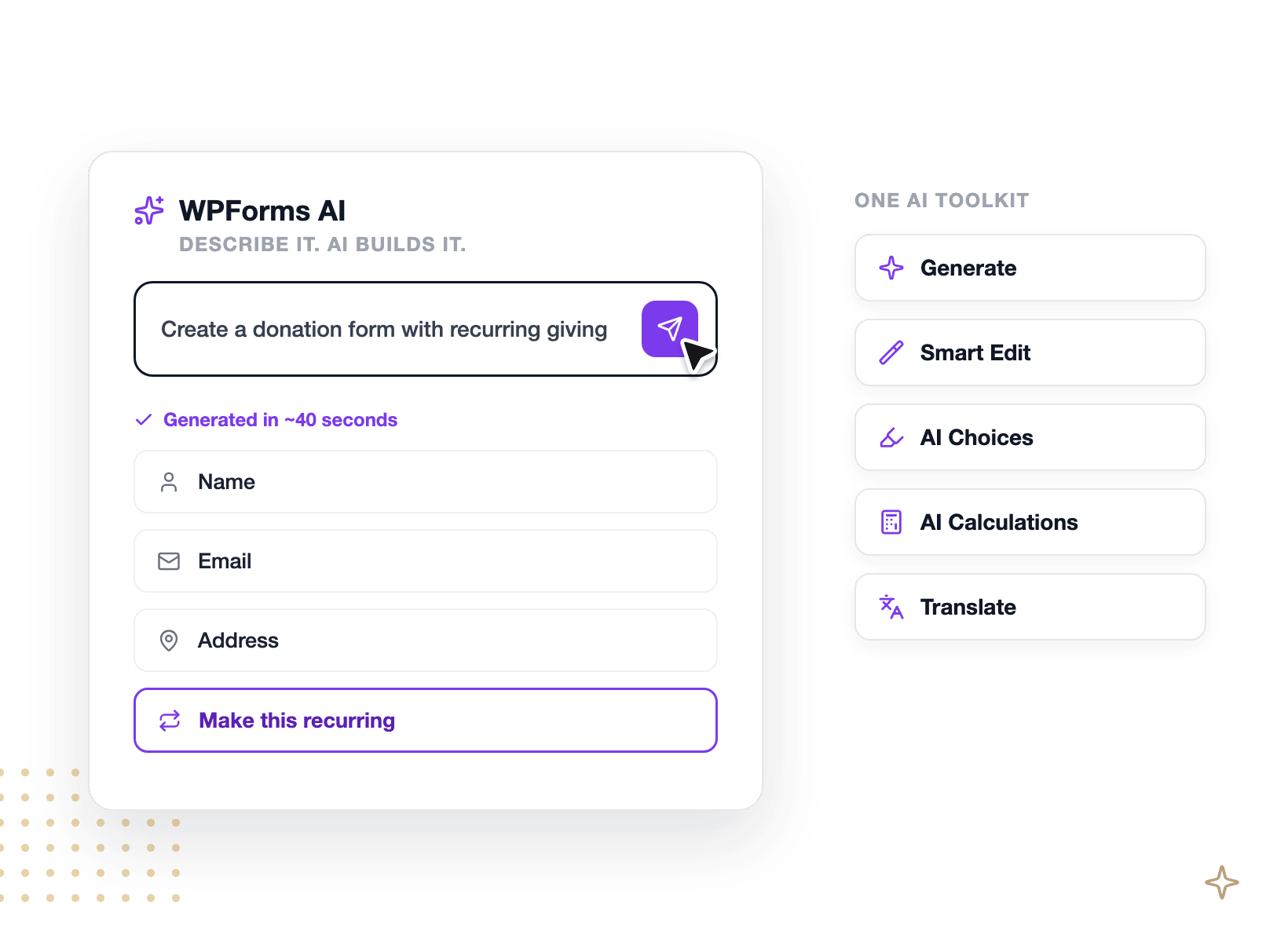
WPForms AI generating and editing a donation form inside the WordPress dashboard

Surveys & Reporting

Forminator gives you polls with live charts and quizzes that capture leads, which is real and useful. What it doesn’t give you is survey reporting. WPForms Surveys and Polls adds a Ranking field, Likert scale field, NPS scoring, and star ratings, then turns every response into an interactive report with bar, pie, and line views you can export to CSV or print for a client.

WPForms survey report showing an NPS score, Likert grid, and star ratings

Publishing & Templates

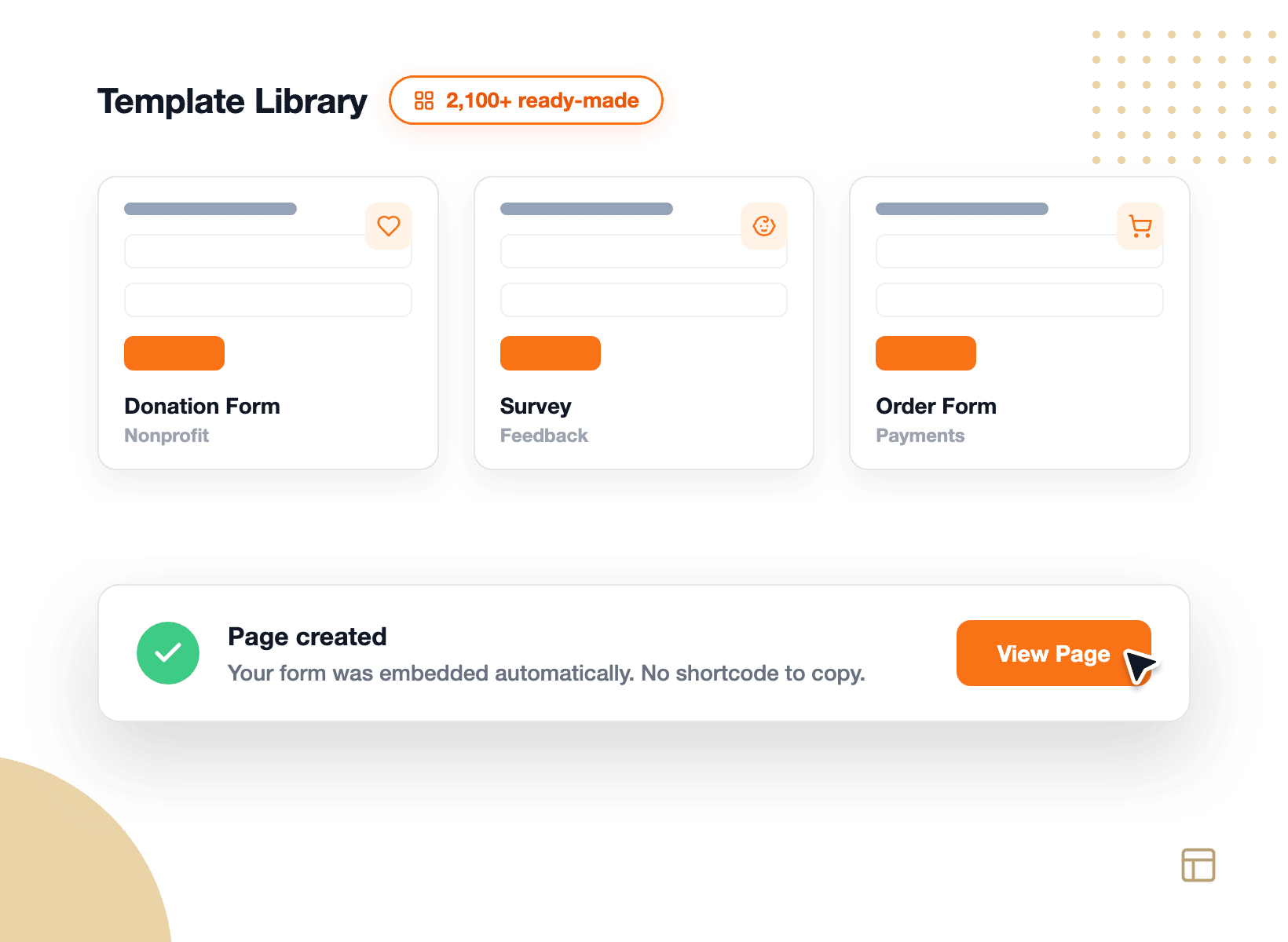
In Forminator, hitting Publish makes the form live inside Forminator. You still have to copy a shortcode and place it yourself. WPForms finishes the job with the embed wizard that drops your form onto an existing page or creates a new one for you, right from the builder. You also get 2,100+ form templates that you can search and filter in the builder.

WPForms embed wizard publishing a form and the 2,100+ template gallery

Payments at Scale

Forminator’s free Stripe and PayPal support is strong, but WPForms matches that footing and then widens it. Stripe, Square, and PayPal work in every version including the free one, Authorize.Net and Mercado Pago arrive on higher plans, and recurring subscriptions, coupons, and conditional payment logic come with Pro. A built-in Payments screen tracks every transaction beside the entry that created it.

WPForms payment form with Stripe, Square, PayPal, Apple Pay, and Google Pay

Support & Trust

WPForms runs on 5+ million websites and holds 4.8 stars on WordPress.org with 13+ thousand 5-star reviews. Forminator holds the same 4.8 stars from 2,108 total ratings across 600,000+ installs, so the difference here is volume of evidence. Paid WPForms plans include ticket support from the team that writes the plugin, with priority handling on Pro and Elite, plus 200+ documentation guides. Forminator’s support runs through a WPMU DEV membership.

WPForms 4.8 stars and 13,500+ five-star reviews on WordPress.org

The Forminator Alternative 5+ Million Users Trust

Every panel below is something you can do in WPForms today. Here’s where switching pays off first.

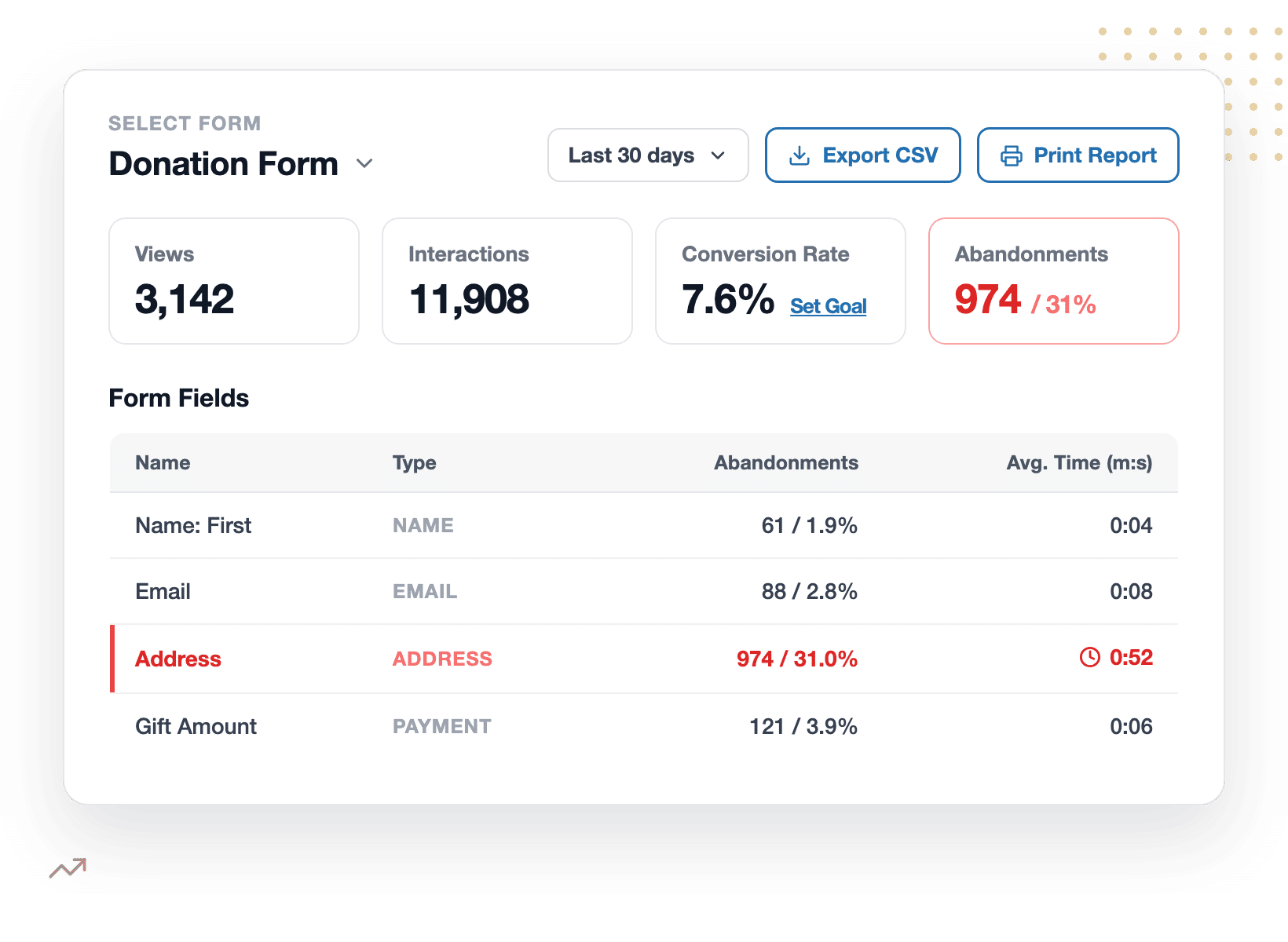
WPForms field drop-off report showing an address field losing 31% of visitors

See the Exact Field Where People Give Up

A conversion rate tells you that a form has a problem but it never tells you where. WPForms Analytics give you a field-by-field table: how often each field was seen, how long people spent in it, how often it threw an error, and where they quit. Tracking starts automatically, uses no cookies, and sends nothing to an outside service.

Set a Goal, Then Watch It Climb

Is 4% a good conversion rate? Without a benchmark, nobody knows. WPForms lets you set a target for any form and tracks your progress on a goal ring, so every change you ship has a scoreboard. Sitting at 7.6% against a 10% goal reads very differently from a bare percentage. When you want a second opinion, the built-in AI chat reads your real form data and then suggests something to try.

WPForms conversion goal ring at 7.6% against a 10% target with AI suggestions
WPForms Smart Edit changing a donation form from a plain-English request

Build and Edit Forms by Describing Them

Forminator has no AI at any tier, so every change is a settings hunt. Meanwhile, with WPForms you can instantly create entire forms using our AI chat feature, edit existing ones with Smart Edit, and Instant Translations localize a whole form in one prompt. You can even connect assistants like Claude, ChatGPT, or Cursor to build and edit forms for you.

Turn Feedback Into a Report, Not a Spreadsheet

WPForms Surveys & Polls adds a Ranking field, Likert scale, NPS scoring, and star ratings, then reports every answer back as an interactive chart you can switch between bar, pie, and line views. You can also export results as a JPG, PDF or use Print preview with custom layouts.

WPForms survey report showing an NPS of 47 across 214 responses
Importing 2,146 entries from a Forminator CSV export into WPForms

Bring Your Entry History With You

Switching doesn’t mean starting over. Forminator exports your submissions to CSV for free, and you can even schedule those exports. From there, the WPForms Entry Importer matches your CSV columns to your new form’s fields automatically by label. As for the forms themselves, WPForms AI or a template rebuilds each one in minutes, so the whole move fits in an afternoon.

Try the Switch Without Risking Anything

WPForms Lite is free, so you can build your first form today, embed it in a couple of clicks, and judge the difference yourself before spending a cent. When you do upgrade, every paid plan carries a 14-day, 100% money-back guarantee. And you’re joining the most-reviewed form builder with 4.8/5 stars on WordPress.org with 13+ thousand 5-star reviews.

WPForms 4.8 stars, 13,500+ reviews, and a 14-day money-back guarantee

Everything You Need to Build Forms That Get Better

One plugin covers the whole loop, from the first drag to the report that tells you what to change next. It’s easier than you think.

Field-Level Analytics

See views, errors, time per field, and the exact drop-off point.

Conversion Goals

Set a target rate and track every form against it automatically.

WPForms AI Toolkit

Generate, edit, translate, and calculate with plain-English prompts.

Drag & Drop Builder

Build in a full-screen live preview, no coding required.

Surveys & Polls

Run Likert and NPS surveys with automatic interactive reports.

Conversational Forms

Ask one question at a time for higher completion rates.

Payments Built In

Accept credit cards with Stripe, Square, PayPal, or Authorize.Net.

CSV Entry Importer

Move your Forminator entry history across in a single pass.

Smart Spam Protection

Anti-spam on by default, plus Akismet, reCAPTCHA, hCaptcha, and Turnstile.

Build Forms That Get Better. It’s That Simple.

Make WPForms your Forminator alternative and join the 5,000,000 professionals who use it to capture more leads, see exactly what’s working, and grow, starting free.

✓ 14-Day Money-Back Guarantee · ✓ Setup in Under 5 Minutes · ✓ No Coding Required · ✓ Used on 5,000,000 Sites

Frequently Asked Questions and Resources

Have questions about switching from Forminator? We’ve got answers.

  • What I like best about WPForms is how easy it is to use while still being powerful. The drag and drop builder makes creating forms quick, even for more advanced setups, and everything just works without unnecessary complexity. It integrates smoothly with WordPress, looks professional out of the box, and saves a lot of time compared to other form plugins.

  • What I like best about WPForms is its ease of use — it’s so intuitive that even without any technical background, I was able to build and manage all our forms with confidence. I use it frequently, and every time, I’m reminded how seamless the implementation and integration are with the rest of our website. The platform offers an impressive number of intuitive features, from conditional logic to smart notifications, all designed to make form creation effortless. On top of that, their customer support is amazing — always responsive, helpful, and genuinely committed to solving problems. After 14 years of using WPForms for everything from volunteer sign-ups to donation forms, I can honestly say it’s one of the most dependable and user-friendly tools we’ve ever used.

  • The complete suite of plugins available in this program. Polls and Surveys has been a great time saver; Form Locker has allowed me to schedule forms to shut down instead of me rushing to close them if I forget to do it manually; Smart Logic has been a great way to correct my coding mistakes, and the Dropbox feature and Payment feature saves me time in invoicing after receiving a clients form. Now they just pay online and upload their add to our Dropbox. I find the interface to me easy to use and quite intuitive. Placing objects is easy and if I need to change things around it is easy to move sections around. Customer support has always been helpful and I can count on a response the same day or early the next. I use this product on a daily basis to run our organizations website and keep information flowing for our annual event and finding new ways to collect data necessary for future events.

  • I’ve tried several form builders over the years, but WPForms stands out as the most user-friendly and powerful option out there. The drag-and-drop interface is incredibly intuitive, even for someone without coding experience. I was able to create beautiful, fully functional contact forms, surveys, and even payment forms in minutes. What I love most is how seamlessly it integrates with my email marketing and payment tools. The spam protection features are excellent, and the customer support is fast, knowledgeable, and always helpful. WPForms has definitely streamlined the way I collect and manage user data. Highly recommend it to anyone running a WordPress site!

  • Great app. Switched from another forms app because it wasn’t user friendly and wp forms has been great. A little higher price but worth it.

  • Very easy to use. We’ve converted all of our previous forms over to WPForms. Not just for contact forms either. We use it to send out notifications to all subscribers, schedule events in Events Calendar, and keep our users aware of the latest happenings on our site. Using this package, we have the ability for subscribers to take an active role in our website. Enhancements are continually provided and support is outstanding! Combine this package with the Events Calendar plugin and the Members plugin and you can do just about everything you need to do with your site.

  • What I like best about WPForms is how easy it is to use while still being powerful. The drag and drop builder makes creating forms quick, even for more advanced setups, and everything just works without unnecessary complexity. It integrates smoothly with WordPress, looks professional out of the box, and saves a lot of time compared to other form plugins.

  • What I like best about WPForms is its ease of use — it’s so intuitive that even without any technical background, I was able to build and manage all our forms with confidence. I use it frequently, and every time, I’m reminded how seamless the implementation and integration are with the rest of our website. The platform offers an impressive number of intuitive features, from conditional logic to smart notifications, all designed to make form creation effortless. On top of that, their customer support is amazing — always responsive, helpful, and genuinely committed to solving problems. After 14 years of using WPForms for everything from volunteer sign-ups to donation forms, I can honestly say it’s one of the most dependable and user-friendly tools we’ve ever used.

  • The complete suite of plugins available in this program. Polls and Surveys has been a great time saver; Form Locker has allowed me to schedule forms to shut down instead of me rushing to close them if I forget to do it manually; Smart Logic has been a great way to correct my coding mistakes, and the Dropbox feature and Payment feature saves me time in invoicing after receiving a clients form. Now they just pay online and upload their add to our Dropbox. I find the interface to me easy to use and quite intuitive. Placing objects is easy and if I need to change things around it is easy to move sections around. Customer support has always been helpful and I can count on a response the same day or early the next. I use this product on a daily basis to run our organizations website and keep information flowing for our annual event and finding new ways to collect data necessary for future events.

View all

Is WPForms a good Forminator alternative?

Yes, WPForms is the most-used Forminator alternative for WordPress, active on 5+ million websites.

Both plugins have capable free versions and drag and drop builders, so the honest difference is depth.

WPForms adds field-level form analytics with conversion goals, an AI toolkit that builds and edits forms from prompts, real survey reporting with a Ranking field, NPS and Likert, and 2,100+ templates.

What are the key differences between WPForms and Forminator?

The key differences between WPForms and Forminator sit after the submit button. Forminator’s Reports cover form-level numbers: views, submissions, conversion rate, and locations.

WPForms goes field by field, showing drop-offs, errors, and time spent on each field, plus goals and an AI chat over the data.

WPForms also has an AI form builder, which Forminator doesn’t offer at any tier, along with survey reporting, conversational forms, form landing pages, and an embed wizard.

Does Forminator have form analytics?

Yes, and it’s worth being accurate about this. Forminator includes a Reports dashboard with views, submissions, conversion rate, payment totals, and scheduled email summaries.

What it doesn’t include is field-level data. There’s no view of which field people abandon, how long they linger on it, or how often it errors.

WPForms Analytics covers both levels, tracks automatically without any code, and keeps everything in your own WordPress database.

Does Forminator have an AI form builder?

No. Forminator has no AI features of any kind, on its free plan or its Pro plan. WPForms AI generates a whole form from a description, and Smart Edit then changes any existing form conversationally, including conditional logic, notifications, and calculation formulas.

Smart Edit and AI Choices are available to all users, free plans included, while entire-form generation comes with any paid license. WPForms also connects to Claude, ChatGPT, and Cursor through the WordPress Abilities API.

Can I migrate from Forminator to WPForms?

Yes, and you can do it without losing your submission history. There’s no direct form importer for Forminator, so rebuild each form in minutes with WPForms AI or one of 2,100+ form templates.

For your data, export your Forminator submissions to CSV, then the Entry Importer maps those columns to your new form’s fields automatically, with a paid WPForms license.

Is Forminator free, and is WPForms free too?

Forminator’s free version is generous, with conditional logic, calculations, file uploads, database entries, polls, quizzes, and Stripe plus PayPal payments.

WPForms Lite is free forever and includes the drag and drop builder, the 2,100+ form template gallery, Stripe, Square, and PayPal payments, Smart Edit, AI Choices, smart spam protection, and unlimited forms and submissions.

See exactly what each tier adds in the Lite vs Pro comparison.

How much does Forminator cost compared to WPForms?

Forminator itself is free, and Forminator Pro isn’t sold on its own. It arrives inside a WPMU DEV membership, whose Pro plans start at $60 a year for one site at regular price and bundle nine other plugins plus a CDN, backups, and hosting tools.

WPForms is sold as a form builder: Basic is $49.50 for the first year, and Pro is $199.50, which is the tier that unlocks the full field-level analytics experience and Surveys and Polls. Compare plans on the pricing page.

What can WPForms do that Forminator can't?

Alongside field-level analytics and AI, WPForms adds four things Forminator has no equivalent for. Conversational Forms turn any form into a one-question-at-a-time experience.

Form Pages give a form its own distraction-free landing page. Survey reporting turns responses into NPS, Likert, and star-rating charts.

And the Form Abandonment addon captures partial entries as leads, so a visitor who quits halfway still becomes a follow-up.

Where is my form data stored if I switch to WPForms?

On paid plans, WPForms stores every entry in your own WordPress database on your own hosting, the same self-hosted approach Forminator uses.

Nothing routes through a third-party service, which keeps you in control for GDPR and privacy reviews.

Analytics data stays in your database too, with no cookies and no external scripts. You can export entries to CSV, Excel, or PDF whenever you like from the entry management screen.

Do WPForms forms work on mobile devices?

Yes, every WPForms form is responsive by default and works on phones, tablets, and desktops with no extra setup.

Templates and AI-generated forms inherit the same mobile-friendly layouts, and forms adapt to any WordPress theme automatically.

Form Analytics tracks mobile visitors too, so you’ll see whether a field that works on desktop is the one costing you phone submissions.

🔔 Subscribe to get our latest updates
📧 Subscribe to Emails

Email Subscription

Join our Newsletter

We won’t spam you. We only send an email when we think it will genuinely help you. Unsubscribe at any time!
New Feature

WPForms Dashboard

Dark blue hero with a circular bear logo on the left, large headline'Introducing the New WPForms Dashboard' and an ANNOUNCEMENT badge; a dashboard mockup is visible on the right.

The WPForms Dashboard is a new home screen that opens the moment you click WPForms in your admin menu. Stat cards across the top total up your forms, entries, payments, views, and spam across the whole site.

An Entries widget charts activity over your chosen date range with a per-form table of entries, views, interactions, and conversion rate, and a payments widget totals everything collected once a gateway is connected.

With the Geolocation addon active, Top Locations ranks the countries your visitors come from, and a Suggested Next Steps panel points to features worth turning on.

Nothing to install, as it comes with every plan, including Lite!

New Feature

WPForms QR Code

Announcement banner: dark blue background with headline'Say Hello to WPForms QR Code: One Scan Opens Your Form' and a large QR code on the right.

Every form now has its own built-in QR code generator, with nothing extra to install or buy.

Open a form’s General settings, choose the page the form lives on or paste its URL, and click Generate QR Code to copy it or download it as a PNG or a print-ready SVG.

Put it on menus, packaging, event badges, or business cards, and every scan opens your form instead of a page that only hands people something to read.

Included with every plan, including Lite; Pro and Elite plans can keep, remove, or replace the WPForms logo in the center with their own.

New Feature

Ranking Field for Surveys & Polls

Announcement hero: dark blue background, bear avatar left, large'Introducing the New WPForms Ranking Field' text, and three stacked white option cards with 'Movies' highlighted.

The Surveys & Polls addon gains a Ranking field!

Instead of scoring each option separately, respondents drag options (or tap arrow buttons on a phone) into the order they prefer, so one option always has to come first.

WPForms tallies every response into a “Times at #1” count and an average rank for each option, with a chart that makes the winner obvious.

Lay options out as a vertical list or a grid, and use Image Choices or Icon Choices in place of plain text labels.

Integration New Feature Payments

Mercado Pago Addon

Introducing the WPForms Mercado Pago Addon: Card Payments Built for Latin America

The Mercado Pago addon brings on-page card payments built for Latin America to your forms.

Buyers enter their card details into secure, Mercado Pago-hosted fields inside the form, choose an installment plan, and pay in ARS, BRL, CLP, COP, MXN, PEN, or UYU without leaving your page.

An approved charge fires your confirmation, notifications, and integrations at the moment money actually moves, and full or partial refunds can be issued from WPForms » Payments.

WPForms takes no transaction fee, and it works with Quantities, Coupons, multi-page forms, Conversational Forms, Lead Forms, and Form Pages.

AI New Feature

WPForms Analytics

Dark blue hero with a bear avatar left, large WPForms v2.0 headline and a form analytics screenshot on the right.

WPForms 2.0 adds a complete form performance tracking suite inside your WordPress dashboard.

The All Forms page now shows Views, Entries, and Conversion Rate for every form, and each form gets its own analytics dashboard with views, interactions, conversion rate, abandonments, and errors over the last 7, 30, or 90 days or a custom range.

A field-by-field table shows interactions, time spent, errors, and abandonment for every field, so you can see exactly where people give up, and you can set a conversion goal to track progress.

There’s also a built-in AI chat reads your form data and tells you what is working, what is hurting conversions, and what to fix first.