Jotform Alternative

The Jotform Alternative That Doesn’t Count Your Submissions

Jotform meters your submissions, your form views, and even your upload space. WPForms runs on your WordPress site with unlimited forms and entries, and it shows you the exact field where visitors quit so you know what to fix.

WPForms vs Jotform

The clearest difference shows up in your busiest month, when a surge of submissions on Jotform can push you past your plan’s cap right as leads pour in. WPForms runs on your own WordPress site with nothing to meter, so every entry gets collected and the data stays yours from day one.

FeatureWPFormsJotform
Price to StartLite is free forever with unlimited forms and submissions. Paid licenses start at $49.50 per yearStarter is free but capped at 5 forms. Bronze is $408 a year billed annually, or $39 a month billed monthly, with no trial on paid plans
FormsUnlimited on every license, including the free one5 on Starter, 25 on Bronze, 50 on Silver, 100 on Gold
Monthly SubmissionsUnlimited, and your form never switches off100 on Starter, 1,000 on Bronze, 2,500 on Silver, 10,000 on Gold. At the cap, their docs say forms are disabled and show “Form over quota”
Stored EntriesUnlimited, stored in your own WordPress databaseA cumulative account cap of 500 on Starter and 10,000 on Bronze. Past it, their docs say the oldest entry is deleted to make room
Form ViewsNot metered. Your forms are pages on your own siteCounted account-wide every month, from 10,000 on Starter to 100,000 on Bronze
UsersUnlimited users on every licenseBy Jotform’s own pricing FAQ, Enterprise “is the only multiuser Jotform plan”
Fields Per FormNo limit100 on Starter, 250 on Bronze, 500 on Silver, 1,000 on Gold
Where Forms LiveNative WordPress content on your own domain, styled by your own themeServed from a jotform.com address and embedded in your page. Custom domains are an Enterprise feature
Form AnalyticsField-level views, interactions, errors, drop-offs, and time spent on every field, plus conversion goals and an AI chat, included with Pro and EliteForm-level views, submissions, conversion rate, device, location, and traffic source. Their analytics page points you to Google Analytics or Google Tag Manager for more
WordPress IntegrationWPForms is a WordPress plugin, active on 5+ million sites and rated 4.8 stars from 113,513 reviews from WordPress.orgAn embed plugin rated 3.2 from 29 reviews, whose own install guide tells block-editor users to “add a Classic block to your post/page”
PaymentsStripe, Square, and PayPal in every version, plus Mercado Pago and Authorize.Net higher up, with unlimited paid orders.40+ gateways with no Jotform fee, but paid orders are capped at 10 a month on Starter, 100 on Bronze, and 1,000 on Gold
AI in the BuilderGenerate a form, then edit any form conversationally with Smart Edit, or drive the builder from Claude, ChatGPT, or CursorA strong AI form generator plus AI Agents on every plan, all inside Jotform’s own dashboard
Templates2,100+ ready-made templates, searchable in the builder, on both free and paid10,000+ templates by Jotform’s own count
Compliance ExtrasGDPR-friendly consent fields, data-request forms, and entry auto-deletion rulesPCI DSS Level 1, GDPR and CCPA, form encryption, and optional HIPAA features on Gold and Enterprise

What Changes When You Leave Jotform

The quota counter disappears, the monthly bill stops, and your entries live on a site you own. Here’s what the switch looks like.

Nothing Gets Metered

Jotform’s Bronze plan gives you 25 forms and 1,000 submissions a month. If you exceed those limits, the tool will disable your forms.

Deleting old submissions doesn’t rescue you either, because their docs confirm purging “will not free up their respective usage count.”

On the contrary, every license with WPForms includes unlimited forms, unlimited submissions, and unlimited users.

The jotform alternative with no submission quota, showing unlimited entries in WPForms

Your Domain, Your Database

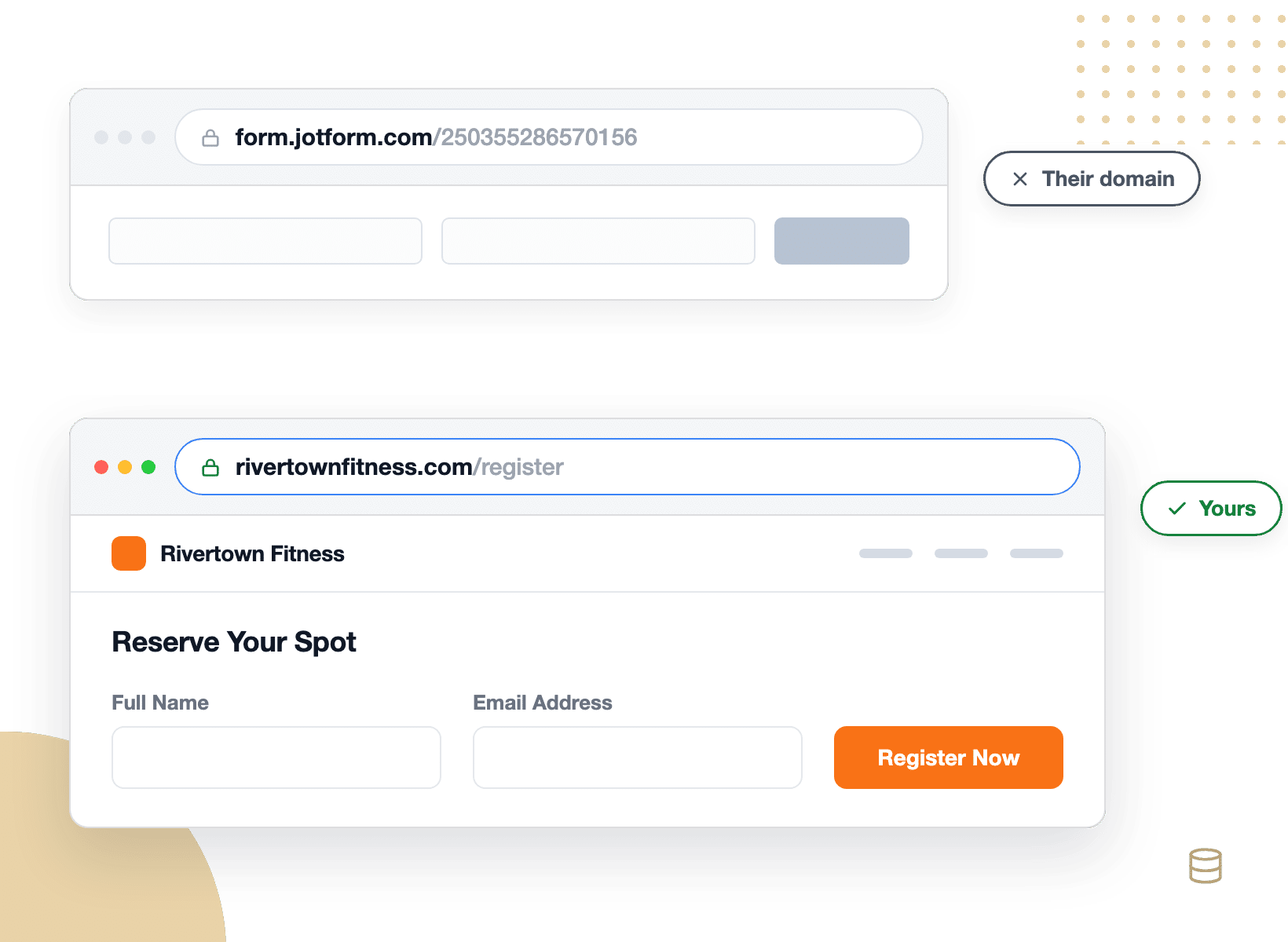
A Jotform form is served from a jotform.com address and dropped into your page, and custom domains only appear on Enterprise.

So the form asking your visitors for a phone number sits on a domain that isn’t yours. In WPForms, a form is ordinary WordPress content.

It loads with your site, inherits your theme’s fonts and colors, and every entry lands as a row in your own database.

A WPForms form on your own domain next to a third-party hosted form URL

Analytics That Name the Field

Jotform does include analytics, and they’re useful: views, submissions, conversion rate, device, location, and traffic source. What they don’t include is anything per field.

Their own analytics page tells you to “connect with third-party apps like Google Analytics” when you need more.

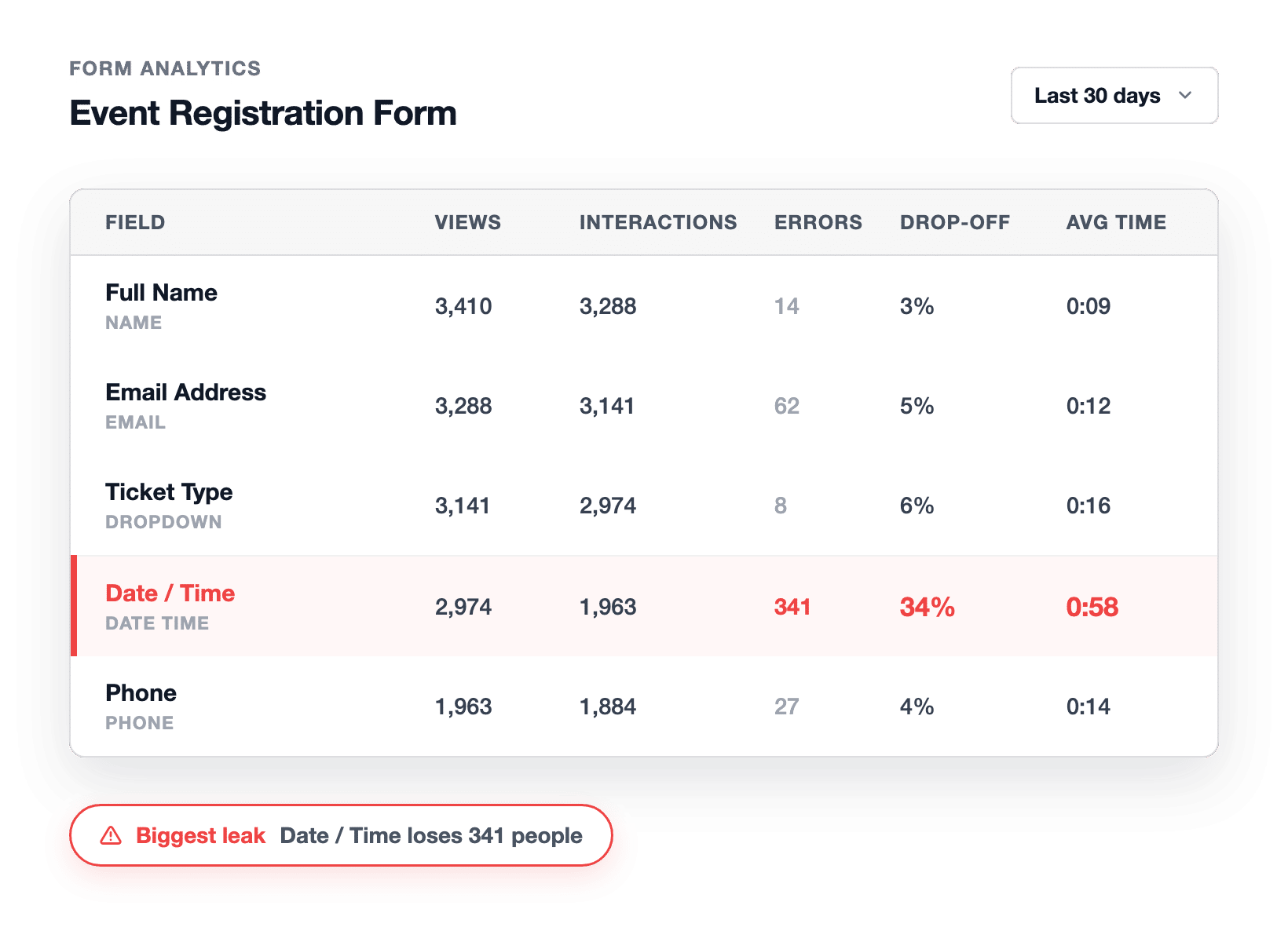
WPForms Form Analytics is included with Pro and Elite and goes straight to the field. Every field reports views, interactions, errors, drop-offs, and average time spent.

WPForms field-level analytics table showing 34% drop-off on the Date / Time field

A Builder Inside WordPress

Jotform’s official WordPress plugin embeds a form you already built somewhere else, and its own install guide still tells block-editor users to “add a Classic block to your post/page” first.

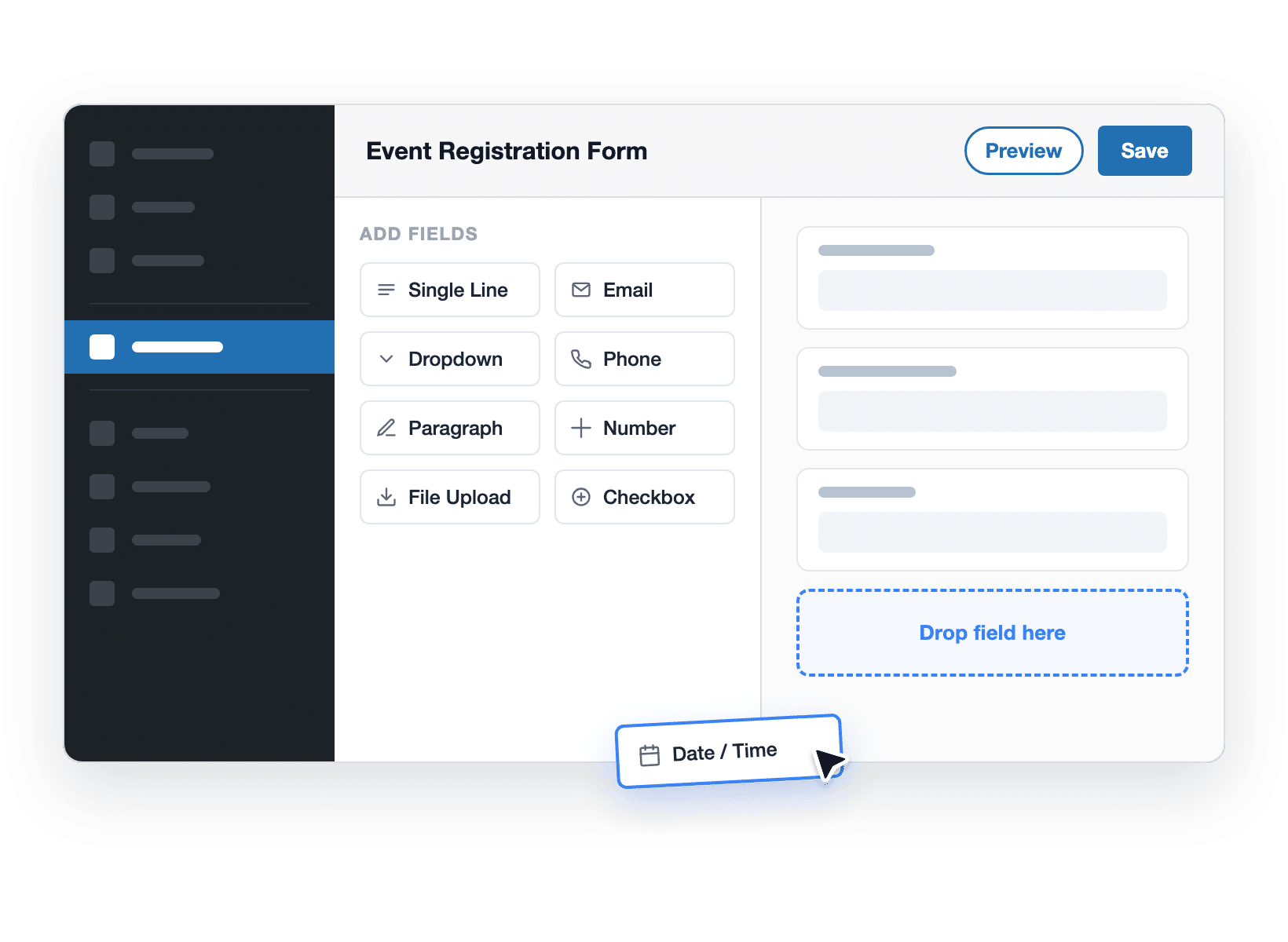
It’s rated 3.2 from 29 reviews. WPForms is the builder itself, rated 4.8 stars from 113,513. You drag fields in a live preview, publish with the embed wizard, and read entries in the same dashboard you already log into.

The WPForms drag and drop builder inside the WordPress dashboard

Paid Orders Without a Ceiling

Jotform charges no transaction fee of its own and supports 40+ gateways. The catch is volume.

Bronze allows 100 paid submissions a month, Silver 250, and Gold 1,000, so a good month can stop your checkout.

WPForms Pro and Elite add no WPForms fee either, and there’s no cap on how many orders you take. Stripe, Square, and PayPal work in every version including the free one, with recurring subscriptions, coupon codes, and conditional payment logic built in.

WPForms payment form with unlimited paid orders and no added transaction fee

One Price, Held Steady

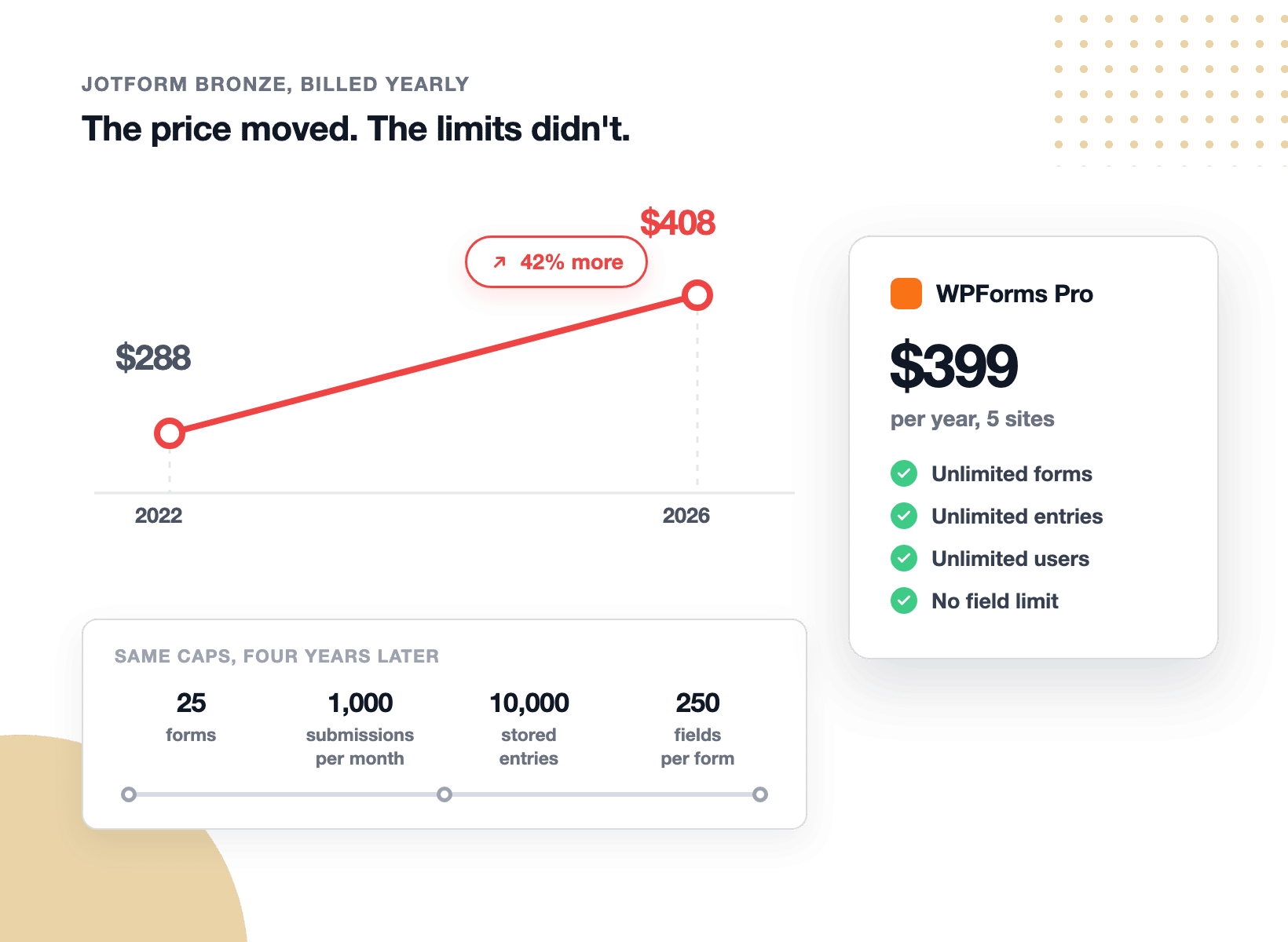
Jotform’s Bronze plan cost $288 a year in mid-2022. Today it’s $408, which is 42% more for the same 25 forms, the same 1,000 submissions a month, the same 10,000 stored entries, and the same 250 fields per form. Only the view allowance moved. WPForms sells a yearly license instead of a metered subscription: $99 for Basic through $599 for Elite, each with unlimited forms, submissions, and users, and each covered by a 14-day, 100% money-back guarantee. In short, you’re buying capability rather than capacity.

Jotform Bronze rising from 8 to 8 a year while its limits stayed the same

The Jotform Alternative 5+ Million Users Trust

Nothing below sits behind a quota or a plan upgrade. Everything here is ready in WPForms the day you switch, starting with what pays off fastest.

A form disabled by a quota message next to a WPForms form still accepting entries

Your Contact Form Should Never Switch Itself Off

On a metered plan, the month you finally go viral is the month your form stops working. Jotform’s help documentation spells it out: at the submission cap “the system will disable your forms” and visitors see a “Form over quota” message.

Purging old entries doesn’t help, because their docs confirm it “will not free up their respective usage count.” WPForms simply has no counter, which means you get unlimited forms, unlimited submissions, and unlimited users with every license.

Find the Exact Field That’s Costing You Signups

A conversion rate tells you a form has a problem. It never tells you where. WPForms Analytics breaks the form down field by field, reporting views, interactions, errors, drop-offs, and the average time visitors spend in each one.

So when the Date / Time field on your Event Registration Form is losing 34% of visitors after 0:58 of effort, the fix picks itself: split the field, make it optional, or set a default. Tracking starts on its own with no Google Analytics account required and the data never leaves your database.

The jotform alternative with field-level analytics, showing a 34% drop-off at 0:58 on the Date / Time field
WPForms conversion goal ring at 9.2% against a 14% target with AI chat suggestions

Set a Conversion Goal, Then Chase It

Is 9.2% a good conversion rate? That depends entirely on your target, so WPForms lets you set one per form and tracks it with a progress ring in real time. Sitting at 9.2% against a 14% goal reads very differently from a bare percentage on a dashboard.

When you want a second opinion, the built-in AI chat reads your real form data and offers fixes you can ship the same afternoon. Form previews are never counted and your own logged-in visits are excluded automatically, so the numbers stay honest.

Keep Every Entry, and Keep It Where You Can Reach It

Jotform’s storage cap is cumulative, not monthly, and their own pricing page says exceeding it means “the system will delete the oldest form response to make room for new submissions.” That’s your history being trimmed.

With WPForms, entries are rows in your own WordPress database. You can search, filter, star, and annotate them, export to CSV, Excel, or PDF whenever you like, and control access with the WordPress user roles you already have. Nothing expires because a plan filled up.

WPForms entries stored in your own WordPress database with export options
Importing 4,186 entries from a Jotform CSV export into WPForms

Bring Years of Jotform Submissions With You

Switching doesn’t mean starting over. Jotform exports your submissions to CSV or Excel whenever you ask, so your history is yours to carry.

From there the WPForms Entry Importer matches your CSV columns to the new form’s fields by label and handles files up to 300 MB in chunks, so a big export won’t time out.

One recent example: 4,186 entries brought across in a single pass with the dates intact. Rebuild the forms themselves in minutes using WPForms AI or one of 2,100+ templates.

Test the Switch Without Cancelling Anything

WPForms Lite is free forever, not a trial, and its free tier is genuinely uncapped with unlimited forms, unlimited submissions, unlimited views, and the full 2,100+ template gallery.

Build one real form this afternoon and judge the difference for yourself. When you’re ready to upgrade, every paid license carries a 14-day, 100% money-back guarantee. You’d be joining the most-reviewed form builder on WordPress.org: 4.8 stars, 13,513 reviews, 5+ million active sites.

WPForms Lite free tier, 14-day guarantee, and 4.8-star rating make switching risk-free

Everything You Need, From Your First Form to Your Busiest

One WordPress plugin covers the whole job, from the first drag to the report that tells you what to fix next. It’s easier than you think.

No Quotas, Ever

Unlimited forms, submissions, views, and users on every license.

Field-Level Analytics

See views, errors, time per field, and the exact drop-off point.

Conversion Goals

Set a target rate per form and watch the progress ring climb.

Your Data, Your Site

Entries live in your WordPress database, exportable anytime.

Drag & Drop Builder

Build any form in a live preview, no coding required.

WPForms AI Toolkit

Generate, edit, translate, and calculate from plain-English prompts.

Unlimited Paid Orders

Accept credit cards with Stripe, Square, PayPal, or Authorize.Net.

CSV Entry Importer

Move your Jotform submission history across in one pass.

Smart Spam Protection

Anti-spam on by default, plus Akismet, reCAPTCHA, hCaptcha, and Turnstile.

Take the Meter Off Your Forms. It’s That Simple.

Make WPForms your Jotform alternative and join 5,000,000 professionals who build, measure, and improve their forms right inside WordPress, starting free.

✓ 14-Day Money-Back Guarantee · ✓ Setup in Under 5 Minutes · ✓ No Coding Required · ✓ Used on 5,000,000 Sites

View all

Frequently Asked Questions and Resources

Have questions about switching from Jotform? We’ve got answers.

Is WPForms a good Jotform alternative?

Yes, WPForms is the most-used Jotform alternative for WordPress sites, active on more than 5 million websites. Rather than renting hosted forms, you build them inside WordPress and keep every submission in your own database.

Every license includes unlimited forms, unlimited submissions, and unlimited users, with field-level form analytics and an AI toolkit on Pro. If your site already runs on WordPress, that’s the natural home for your forms.

What are the key differences between Jotform and WPForms?

The key differences between Jotform and WPForms are metering, hosting, and analytics depth. Jotform is a hosted platform where every plan counts your forms, submissions, stored entries, form views, paid orders, and fields per form, and your form is served from a jotform.com address unless you’re on Enterprise.

WPForms is a WordPress plugin. Forms render on your own domain in your own theme, entries live in your own database with no caps, and field-level analytics come included with Pro. To be fair to Jotform, it counters with a far bigger template library, AI agents on every plan, no payment transaction fee, and optional HIPAA features on Gold.

How much does Jotform cost compared to WPForms?

Jotform’s cheapest paid plan, Bronze, is $408 a year billed annually, or $39 a month billed monthly, and it includes 25 forms with 1,000 submissions a month. Silver is $468 a year and Gold is $1,188.

There’s no trial on paid plans, though Jotform does offer 50% discounts for nonprofits and schools plus a 30-day money-back guarantee.

WPForms Lite is free forever, and paid licenses run from $99 to $599 a year, every one of them with unlimited forms, submissions, and users. Compare tiers on the pricing page.

Does Jotform limit submissions? What happens when you hit the limit?

Yes, Jotform limits submissions on every plan: 100 a month on the free Starter plan, 1,000 on Bronze, 2,500 on Silver, and 10,000 on Gold.

According to Jotform’s own help documentation, once you reach the monthly cap “the system will disable your forms on the scheduled date indicated in the email sent to you” and those forms “will also display the ‘Form over quota’ message” to visitors.

There’s a separate cumulative storage cap too, and their docs say exceeding it “deletes the oldest form entry to make room for the new submission.”

WPForms has no submission limit of any kind. Every license stores unlimited entries in your own WordPress database, and the free version accepts unlimited submissions as well.

Does WPForms have better form analytics than Jotform?

For form analytics, the difference is depth. Jotform does include analytics, and they cover views, submissions, conversion rate, device, location, browser, and traffic source.

What they don’t cover is anything at the field level, which is why Jotform’s own analytics page suggests connecting Google Analytics or Google Tag Manager for more detail.

WPForms Form Analytics is included with Pro and Elite at no extra cost. It reports views, interactions, conversion rate, abandonments, and errors for the form, then breaks every single field down by interactions, error rate, drop-off, and average time spent.

On top of that you get conversion goals with a progress ring, a built-in AI chat over your real data, and CSV or print exports. Tracking is automatic, needs no code, and the data stays in your database.

Can I migrate my Jotform submissions to WPForms?

Yes, and you can keep your history. There’s no direct Jotform importer, so the path runs through CSV. Export your Jotform submissions to CSV or Excel, which Jotform supports on demand, then rebuild each form in WPForms in minutes with WPForms AI or one of 2,100+ templates.

From there the WPForms Entry Importer maps your CSV columns to the new form’s fields by label and processes files up to 300 MB in chunks. An import run requires a paid WPForms license. Keep your Jotform account active until you’ve confirmed everything arrived.

Is there a free Jotform alternative that doesn't limit submissions?

Yes. WPForms Lite is a free Jotform alternative with no submission limit at all, and it isn’t a trial.

Lite gives you unlimited forms, unlimited submissions, unlimited form views, the drag and drop builder, the full 2,100+ template gallery, Stripe, Square and PayPal payments, Smart Edit and AI Choices, and built-in spam protection.

Jotform’s free Starter plan caps you at 5 forms, 100 submissions a month, 500 stored entries, 10,000 form views a month, and 100 fields per form, and it adds Jotform branding to your forms.

Does WPForms have AI like Jotform?

Yes, and both products are strong here, so it’s worth being precise. Jotform has an AI form generator you can chat with plus AI Agents available on every plan, including the free one.

WPForms AI generates a whole form from a description, then Smart Edit lets you change any existing form by describing what you want, including conditional logic, notifications, and calculation formulas, with every change saved as a snapshot you can undo.

The distinctive part is that WPForms also works with outside assistants: you can connect Claude, ChatGPT, or Cursor and have them build and edit your forms for you. Smart Edit and AI Choices are available free.

Where will my form data be stored if I switch from Jotform?

With a paid WPForms license, every entry is stored in your own WordPress database on your own hosting. Nothing routes through WPForms servers, there’s no storage cap, and no entry gets deleted to make room for a newer one. You can export to CSV, Excel, or PDF from the entry management screen at any time.

Form Analytics data lives in your database too, with no external scripts and no analytics account to connect. WPForms also ships GDPR-friendly tools including consent fields, data-request forms, and rules to auto-delete old entries on a schedule.

Do my forms have to look like WordPress forms, or can I style them?

Your forms are styled however you like, and they inherit your site’s look by default. WPForms renders forms as native WordPress content, so your theme’s fonts and colors apply automatically instead of a hosted form sitting in a fixed-width box.

Beyond that, the block editor gives you visual controls for field sizes, label styles, button colors, and border radius with no CSS, and there are native widgets for Elementor and Divi.

That’s a common reason people look for a Jotform alternative in the first place, since an embedded form can be awkward to make match the page around it.

🔔 Subscribe to get our latest updates
📧 Subscribe to Emails

Email Subscription

Join our Newsletter

We won’t spam you. We only send an email when we think it will genuinely help you. Unsubscribe at any time!
New Feature

WPForms Dashboard

Dark blue hero with a circular bear logo on the left, large headline'Introducing the New WPForms Dashboard' and an ANNOUNCEMENT badge; a dashboard mockup is visible on the right.

The WPForms Dashboard is a new home screen that opens the moment you click WPForms in your admin menu. Stat cards across the top total up your forms, entries, payments, views, and spam across the whole site.

An Entries widget charts activity over your chosen date range with a per-form table of entries, views, interactions, and conversion rate, and a payments widget totals everything collected once a gateway is connected.

With the Geolocation addon active, Top Locations ranks the countries your visitors come from, and a Suggested Next Steps panel points to features worth turning on.

Nothing to install, as it comes with every plan, including Lite!

New Feature

WPForms QR Code

Announcement banner: dark blue background with headline'Say Hello to WPForms QR Code: One Scan Opens Your Form' and a large QR code on the right.

Every form now has its own built-in QR code generator, with nothing extra to install or buy.

Open a form’s General settings, choose the page the form lives on or paste its URL, and click Generate QR Code to copy it or download it as a PNG or a print-ready SVG.

Put it on menus, packaging, event badges, or business cards, and every scan opens your form instead of a page that only hands people something to read.

Included with every plan, including Lite; Pro and Elite plans can keep, remove, or replace the WPForms logo in the center with their own.

New Feature

Ranking Field for Surveys & Polls

Announcement hero: dark blue background, bear avatar left, large'Introducing the New WPForms Ranking Field' text, and three stacked white option cards with 'Movies' highlighted.

The Surveys & Polls addon gains a Ranking field!

Instead of scoring each option separately, respondents drag options (or tap arrow buttons on a phone) into the order they prefer, so one option always has to come first.

WPForms tallies every response into a “Times at #1” count and an average rank for each option, with a chart that makes the winner obvious.

Lay options out as a vertical list or a grid, and use Image Choices or Icon Choices in place of plain text labels.

Integration New Feature Payments

Mercado Pago Addon

Introducing the WPForms Mercado Pago Addon: Card Payments Built for Latin America

The Mercado Pago addon brings on-page card payments built for Latin America to your forms.

Buyers enter their card details into secure, Mercado Pago-hosted fields inside the form, choose an installment plan, and pay in ARS, BRL, CLP, COP, MXN, PEN, or UYU without leaving your page.

An approved charge fires your confirmation, notifications, and integrations at the moment money actually moves, and full or partial refunds can be issued from WPForms » Payments.

WPForms takes no transaction fee, and it works with Quantities, Coupons, multi-page forms, Conversational Forms, Lead Forms, and Form Pages.

AI New Feature

WPForms Analytics

Dark blue hero with a bear avatar left, large WPForms v2.0 headline and a form analytics screenshot on the right.

WPForms 2.0 adds a complete form performance tracking suite inside your WordPress dashboard.

The All Forms page now shows Views, Entries, and Conversion Rate for every form, and each form gets its own analytics dashboard with views, interactions, conversion rate, abandonments, and errors over the last 7, 30, or 90 days or a custom range.

A field-by-field table shows interactions, time spent, errors, and abandonment for every field, so you can see exactly where people give up, and you can set a conversion goal to track progress.

There’s also a built-in AI chat reads your form data and tells you what is working, what is hurting conversions, and what to fix first.