



Résumé IA
Des formulaires efficaces sont rarement créés par hasard. Il faut une approche délibérée et scientifique pour créer des formulaires qui produisent les meilleurs résultats.
Et comme toute science, la seule façon fiable de progresser vers vos objectifs est de mesurer les résultats.
L'analyse des formulaires est un terme général désignant divers types de métriques qui vous aident à mesurer les performances de vos formulaires, afin que vous puissiez apprendre ce qui fonctionne et ce qui ne fonctionne pas pour les améliorer au fil du temps.
J'utilise des formulaires depuis que j'ai créé mon premier site Web il y a plus de dix ans. Et ce n'est qu'en commençant à analyser les performances de mes formulaires et à apporter des ajustements basés sur des résultats mesurés que j'ai converti mon premier prospect.
Votre timing est bon aussi. Depuis WPForms v2.0, l'analyse des formulaires est intégrée directement dans le constructeur de formulaires lui-même, vous pouvez donc commencer le suivi sans ajouter d'outil distinct.
Dans cet article, je vais vous montrer ce qu'est l'analyse des formulaires, pourquoi elle est importante, et les meilleurs outils d'analyse des formulaires pour vous aider à tirer le plein potentiel de vos formulaires clés.
Qu'est-ce que l'analyse des formulaires ? Une définition simple
Les analyses de formulaires en ligne sont des mesures de la manière dont les visiteurs de votre site Web interagissent avec vos formulaires Web. Par exemple, vous pouvez suivre le nombre de personnes qui voient votre formulaire par rapport à celles qui le remplissent réellement, où elles se bloquent en cours de route et combien abandonnent à mi-chemin.
Avec ce type de données, vous pouvez déterminer exactement comment améliorer vos formulaires afin d'obtenir plus de prospects et de conversions.

Pourquoi le suivi des formulaires est-il si important ?
Lorsqu'un visiteur de site Web remplit votre formulaire, il devient instantanément un prospect important. C'est parce qu'il vous dit qu'il est prêt et disposé à avancer dans votre entonnoir de vente.
Ceci est vrai pour tout type de formulaire Web, que vos visiteurs demandent un devis, effectuent un achat, ou simplement prennent contact avec vous pour la première fois.
Le suivi de vos analyses de formulaires peut également vous aider à :
- Réduire l'abandon des formulaires : La plupart des personnes qui commencent à remplir des formulaires en ligne ne les terminent jamais (une moyenne de 67 % selon les statistiques moyennes des formulaires), donc découvrir ce qui en est la cause sur votre site peut vous aider à réduire l'abandon des formulaires.
- Développer votre liste d'e-mails : Lorsque vous jetez un coup d'œil à ce qui se passe réellement avec le comportement de vos visiteurs sur vos formulaires, vous pouvez créer des listes d'e-mails segmentées basées sur différents comportements d'utilisateurs et améliorer votre jeu de marketing par e-mail.
- Identifier de nouvelles opportunités : Comprendre ce que votre public cible recherche peut susciter des idées pour développer votre entreprise. Par exemple, si vous remarquez que les gens abandonnent votre formulaire lorsqu'ils arrivent à un champ de prix ou de budget, vous pourriez réaliser qu'ils recherchent une option moins chère, ce qui vous aiderait à cibler un segment de marché différent et à développer votre entreprise.
Prêt à commencer à suivre vos propres formulaires ?
Jetons un coup d'œil à son fonctionnement.
Que pouvez-vous suivre avec l'analyse des formulaires ?
L'analyse des formulaires est bien plus que de simplement voir combien de personnes remplissent vos formulaires. Voici ce que vous pouvez également suivre :
- Vues du formulaire : Combien de fois votre formulaire apparaît-il réellement sur l'écran d'un visiteur ? C'est la base de toutes les autres métriques.
- Taux de conversion : Combien de personnes voient votre formulaire, par rapport à celles qui le terminent et le soumettent réellement ?
- Comportement et interactions des utilisateurs : Comment les gens interagissent-ils avec les champs de votre formulaire, du début à la fin ?
- Abandon de formulaire : Quel pourcentage de personnes commencent à remplir votre formulaire, mais abandonnent en cours de route ? Où s'arrêtent-elles ?
- Erreurs : À quelle fréquence les soumissions échouent-elles à la validation, comme un champ obligatoire laissé vide ou un e-mail saisi dans le mauvais format ?
- Rapports de temps : Combien de temps faut-il aux gens pour remplir chaque champ ?
- Champs les plus corrigés : Y a-t-il des champs de formulaire où les utilisateurs modifient beaucoup leurs réponses avant de soumettre ?
- Champs ignorés : Quelles parties de votre formulaire ne sont pas remplies ?
Maintenant, mettons tout ce que nous avons appris en pratique et examinons le meilleur logiciel d'analyse de formulaires qui existe !
Meilleurs outils d'analyse de formulaires
Le suivi de l'analyse des formulaires ne doit pas être compliqué ni nécessiter de code. Les meilleurs outils d'analyse de formulaires sont faciles à configurer et fournissent des métriques simples qui peuvent néanmoins fournir suffisamment d'informations pour prendre des décisions éclairées concernant le taux de conversion de votre formulaire.
Jetons un coup d'œil.
1. WPForms
Pendant des années, cette entrée nécessitait une clause de non-responsabilité indiquant que WPForms n'était pas vraiment un outil d'analyse. Plus maintenant ! WPForms v2.0 a introduit WPForms Analytics, une suite complète de suivi des performances des formulaires qui se trouve directement dans votre tableau de bord WordPress.
Tableau de bord d'analyse des formulaires
Une fois que votre site exécute WPForms 2.0 ou une version ultérieure, le suivi démarre de lui-même. Il n'y a rien à installer séparément et rien à configurer.
Allez dans WPForms » Tous les formulaires et vous verrez trois nouvelles colonnes à côté des Entrées. Vues, Interactions et Conversion. Un coup d'œil vous indique quels formulaires font leur travail et lesquels nécessitent une attention particulière.
Cliquez sur l'un de ces chiffres (ou survolez un formulaire et cliquez sur Analyse) pour ouvrir la page d'analyse dédiée de ce formulaire, où vous obtenez une carte de statistiques pour chacune des 5 métriques principales :
- Vues : Nombre de fois où le formulaire est apparu sur l'écran d'un visiteur, pas seulement le nombre de fois où la page a été chargée.
- Interactions : Nombre de fois où les visiteurs ont interagi avec les champs du formulaire, comme cliquer dans un champ ou taper.
- Taux de conversion : Le pourcentage de vues qui se sont terminées par une soumission.
- Abandonnements : Nombre de visiteurs ayant commencé à remplir le formulaire mais l'ayant quitté sans le soumettre, affiché en nombre et en pourcentage.
- Erreurs : Nombre de soumissions ayant échoué à la validation, également affiché en nombre et en pourcentage.
Vous pouvez tout filtrer sur les 7, 30 ou 90 derniers jours, ou définir une plage de dates personnalisée. Et sous les cartes de statistiques, un tableau détaillé champ par champ affiche les vues, les interactions, les abandonnements, les erreurs et le temps moyen passé par les visiteurs dans chaque champ.
Ce tableau est honnêtement ma partie préférée. Il vous montre le champ exact où les gens abandonnent. Associez-le au module complémentaire Abandon de formulaire pour capturer les entrées partielles des visiteurs qui ont failli réussir.
Quelques autres choses à savoir :
- Objectifs de conversion : Cliquez sur Définir l'objectif sur la carte Taux de conversion pour définir un objectif pour chaque formulaire, et la carte compare votre progression en temps réel.
- Insights IA WPForms : Cliquez sur l'icône d'étincelle sur la page d'analyse et posez des questions en langage clair, comme « Quels champs ont le plus de départs ? » Les réponses sont basées sur les données réelles de votre formulaire.
- Export CSV et rapports imprimés : Cliquez sur Exporter CSV ou Imprimer le rapport pour partager les chiffres avec un client ou votre équipe.
J'apprécie également le soin apporté à la protection des chiffres. Form Analytics ne place aucun cookie et n'enregistre aucune information personnelle, et toutes les données restent dans votre propre base de données WordPress. Les aperçus de formulaires ne sont jamais comptabilisés, les administrateurs, éditeurs et auteurs connectés sont automatiquement exclus, et le spam ne fausse jamais vos statistiques. Vous trouverez tous les détails dans le guide complet de Form Analytics.
Tableau de bord des entrées de formulaire
WPForms vous montre également les tendances de soumission de formulaires au fil du temps sur la page des entrées de formulaire.
Ces informations sont cruciales pour comprendre les modèles d'engagement des utilisateurs et identifier les problèmes potentiels.
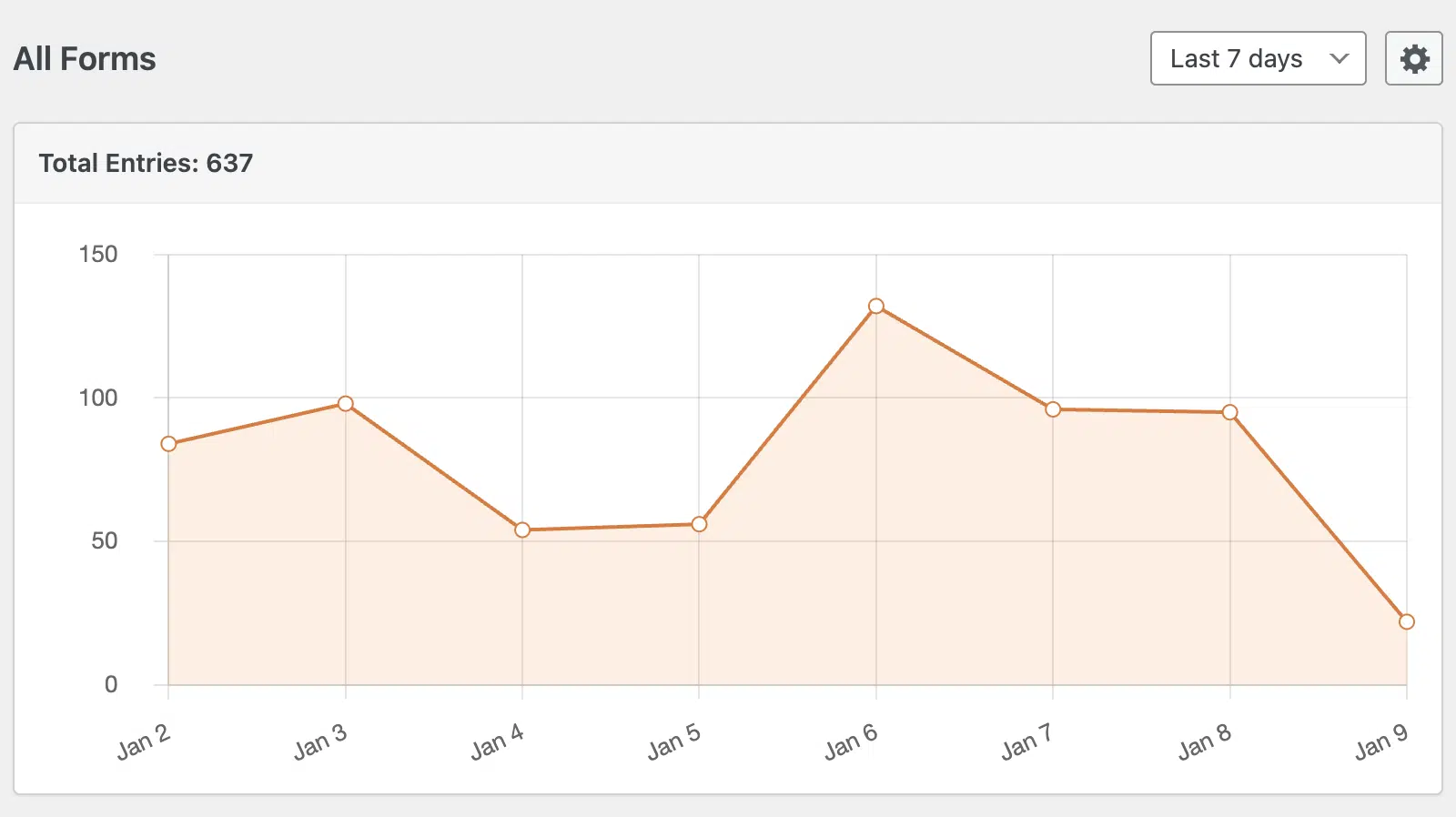
Par exemple, vous pouvez facilement repérer des pics ou des baisses soudaines dans les soumissions de formulaires. Selon votre contexte, ces fluctuations peuvent être influencées par des campagnes marketing réussies, des problèmes techniques ou des variations saisonnières.
En analysant ce qui s'est passé pendant vos périodes de pointe, vous pouvez reproduire les stratégies réussies ou identifier la cause profonde d'un engagement moindre pendant les périodes plus calmes.
Suivi des paiements
Tout site Web qui vend des produits en ligne a besoin d'un moyen de suivre les paiements. WPForms est l'un des rares plugins de formulaire WordPress qui vous permet de suivre les paiements dans WordPress sans nécessiter d'outils supplémentaires.
Ce que je trouve particulièrement utile dans ces statistiques, c'est qu'elles vous donnent des informations sur les ventes et les remboursements.
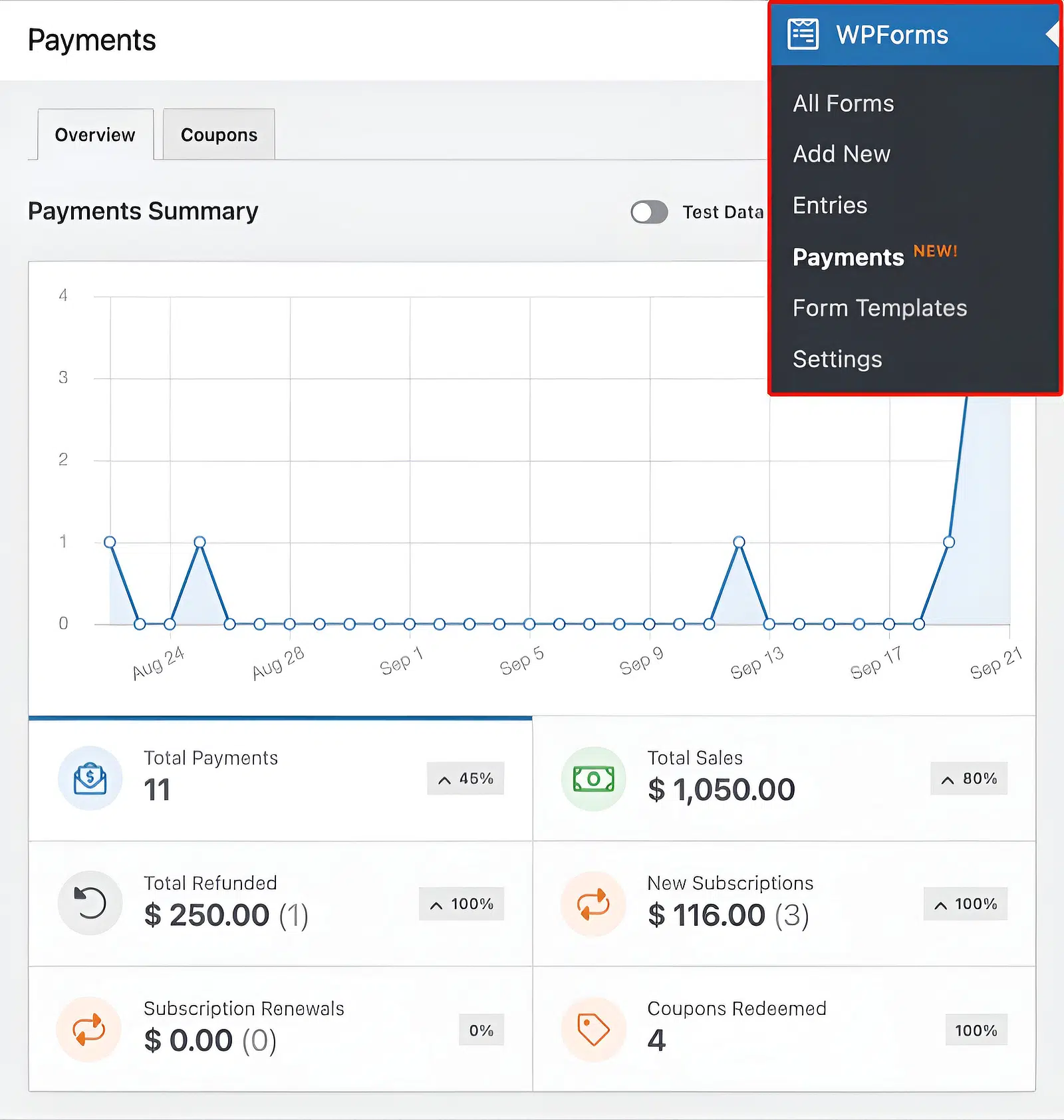
Ainsi, voir que vous avez 11 paiements au total mais 1 remboursement (environ 9 % de taux de remboursement) pourrait signaler un besoin d'améliorer la description du produit ou le processus de paiement. C'est exactement ainsi que j'ai réussi à réduire les demandes de remboursement en travaillant pour une boutique en ligne d'accessoires technologiques lorsque j'étais tout nouveau dans le marketing.
Pour les entreprises dont les tendances d'achat sont influencées par la saisonnalité, ce simple graphique de paiement permet d'identifier vos périodes de vente les plus réussies, vous permettant d'analyser quelles activités marketing ou promotionnelles ont conduit à ce succès.
Parcours utilisateur
Le module complémentaire WPForms User Journey montre des informations utiles sur la façon dont les visiteurs interagissent avec votre site avant de soumettre un formulaire.
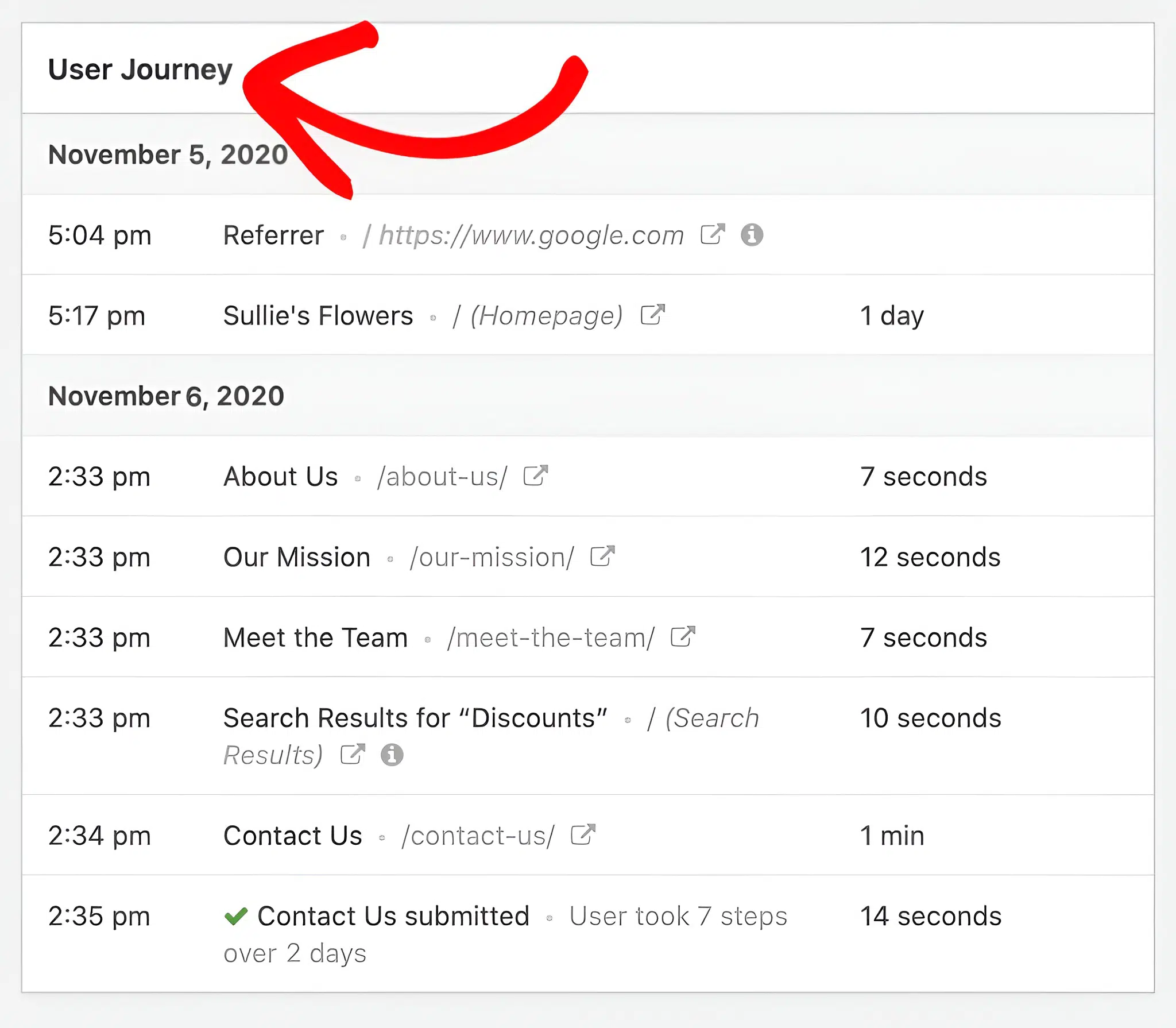
Bien qu'il s'agisse d'un rapport assez simple, les détails révèlent beaucoup plus que ce que vous pourriez réaliser initialement.
Dans cet exemple, nous pouvons voir que l'utilisateur est arrivé de Google, a exploré plusieurs pages, y compris des informations sur l'entreprise et des réductions, avant de finalement remplir le formulaire de contact.
Le parcours des utilisateurs visitant vos pages « À propos » et « Mission » avant de soumettre le formulaire indique fortement que le visiteur pourrait rechercher des signaux de confiance. Une fois que vous savez exactement ce qui motive le comportement de l'utilisateur, vous pouvez placer stratégiquement vos formulaires et ajuster votre flux de contenu pour créer un chemin plus optimisé vers la complétion du formulaire.
Entre les analyses intégrées et ces rapports, WPForms couvre ce dont la plupart des sites Web ont besoin pour mesurer les performances des formulaires. Mais si vous souhaitez également des enregistrements de session et des cartes thermiques sur l'ensemble de votre site, les outils ci-dessous sont spécialisés exactement dans cela.
2. MonsterInsights
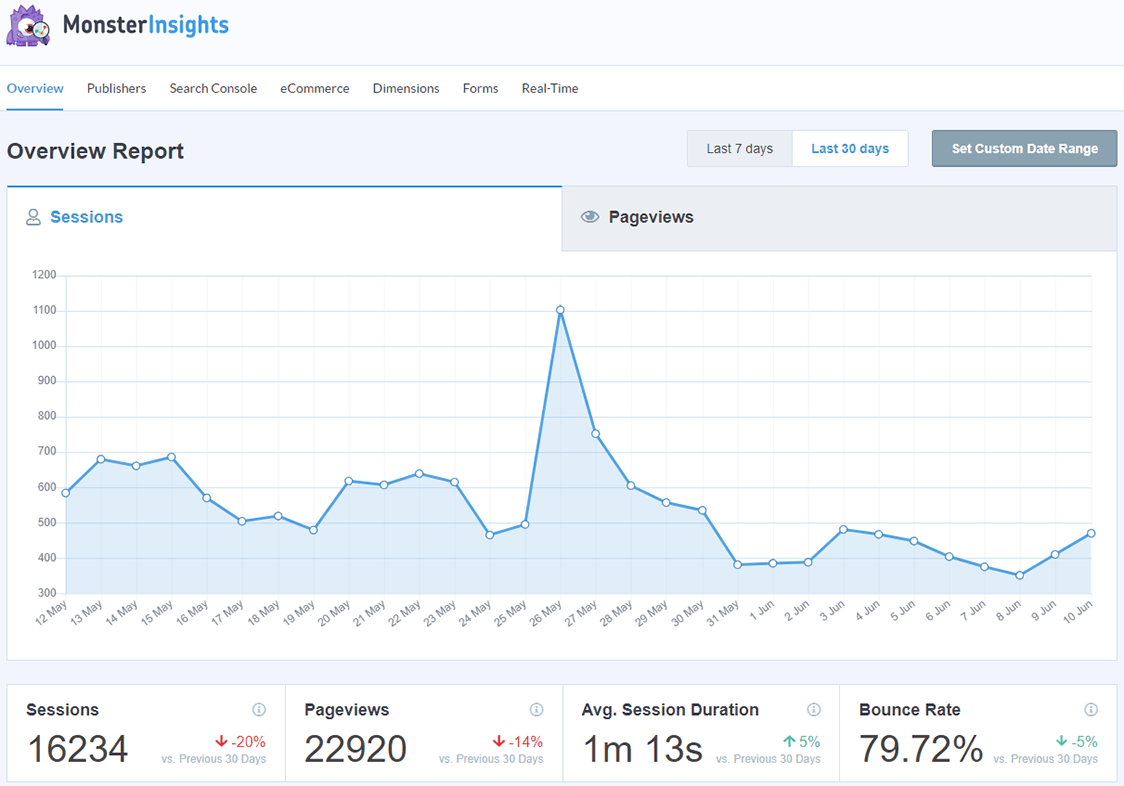
MonsterInsights apporte les analyses GA4 à votre site Web afin que vous puissiez analyser en profondeur n'importe quelle partie de votre site Web. Mais il dispose également d'un module complémentaire Forms simple mais puissant qui vous montre les données d'impressions et de conversion pour vos formulaires.
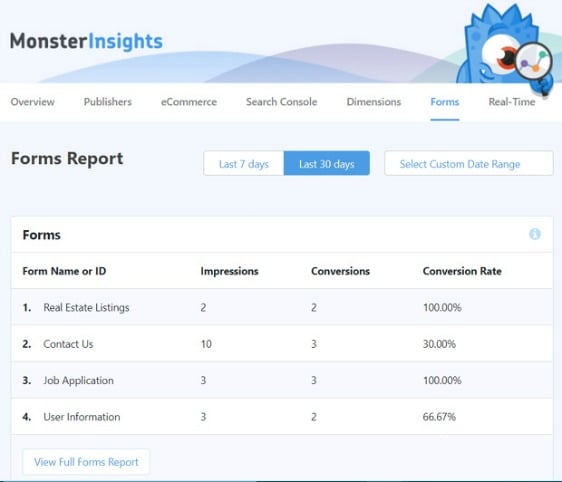
C'est l'analyse des formulaires à son niveau le plus fondamental. En fin de compte, les conversions sont l'objectif principal de chaque type de formulaire.
C'est donc le seul rapport que vous devez consulter si vous souhaitez comparer les conversions entre différents formulaires ou identifier les périodes où vos conversions sont les plus élevées sans compliquer votre analyse.
C'est mon outil de prédilection pour suivre les soumissions de formulaires et les données de conversion pour mes formulaires de génération de prospects.
De plus, MonsterInsights est très pratique pour bien plus que l'analyse des formulaires. C'est le plugin Google Analytics pour WordPress le plus populaire pour suivre vos articles de blog les plus populaires, vos mots-clés les plus consultés, où vos visiteurs cliquent sur votre site Web, et bien plus encore.
Cliquez ici pour commencer avec MonsterInsights dès aujourd'hui !
3. Lucky Orange
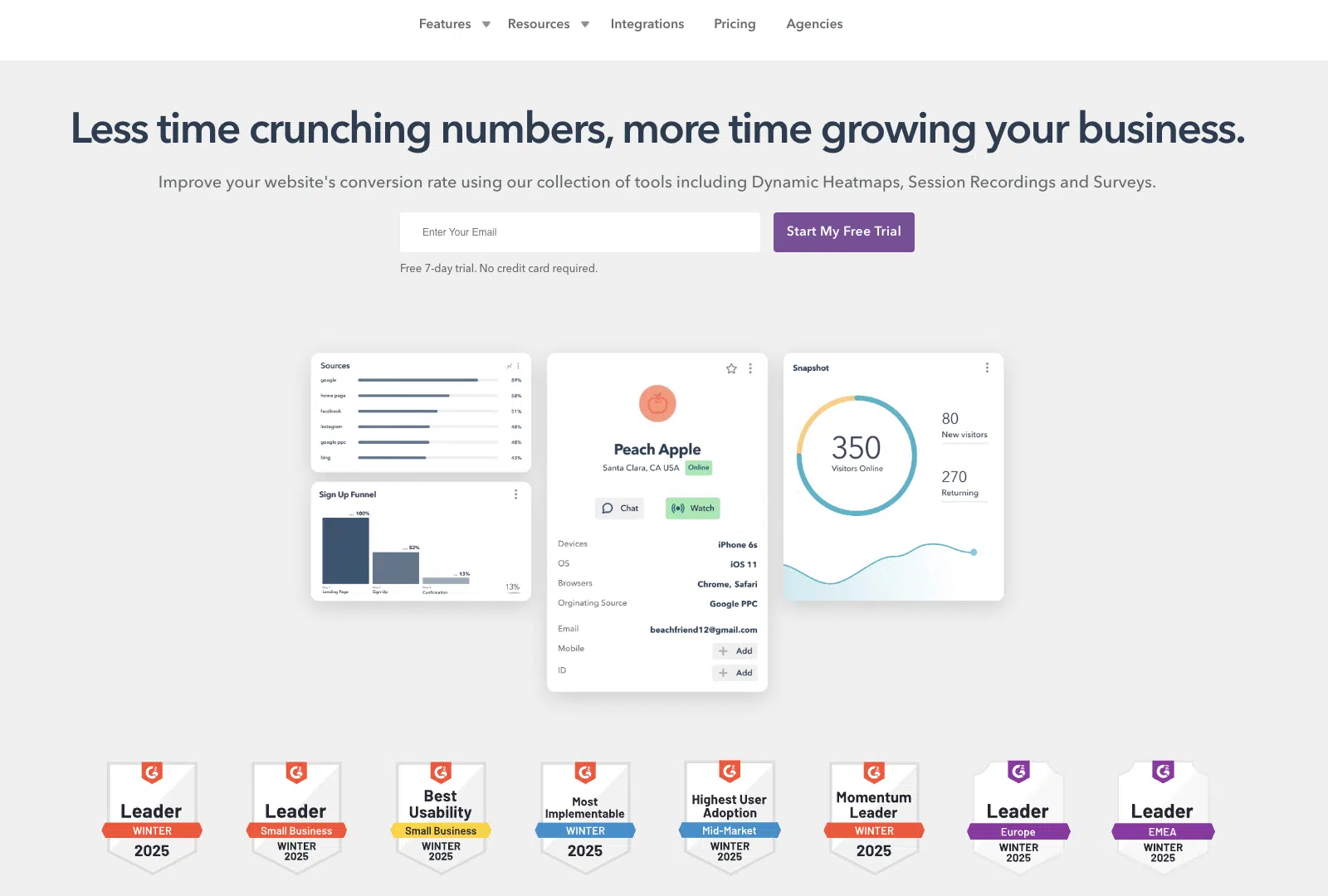
Lucky Orange est l'un de mes outils d'analyse préférés. Il est similaire à Mouseflow en termes de fonctionnalités et de prix. Mais l'avantage est qu'il est livré avec un plan gratuit avec une limite de 100 sessions par mois.
C'est assez limité, mais c'est une bonne affaire si vous voulez implémenter le suivi des formulaires et d'autres fonctionnalités d'analyse et voir comment cela fonctionne pour vous avant de dépenser de l'argent.
J'aime l'analyse des formulaires dans Lucky Orange. Par exemple, l'analyse de la carte thermique champ par champ est très pratique. Elle vous indique exactement quels champs de vos formulaires provoquent les taux d'abandon les plus élevés. Il est également très pratique de voir ces statistiques pour chaque champ de formulaire dans une seule vue, afin de savoir ce qui fonctionne et ce qui ne fonctionne pas.
Lucky Orange vous offre également une gamme décente de métriques pour analyser vos formulaires, y compris les conversions, le temps de démarrage, l'abandon, le temps passé sur le champ, et plus encore.
Et il a également la capacité de vous donner des cartes thermiques et des enregistrements d'écran pour vos pages de destination. J'apprécie l'interface utilisateur propre et épurée qui a moins de courbe d'apprentissage que Mouseflow.
Coût : Les forfaits commencent à 32 $ par mois pour 5 000 sessions mensuelles. Il propose également un forfait entièrement gratuit limité à 100 sessions et un essai gratuit de 7 jours avec 10 000 sessions.
4. Mouseflow

Mouseflow est un autre outil de replay de session et de carte thermique pour votre site Web qui peut vous aider à simplifier l'analyse de vos formulaires.
Il suit la façon dont les visiteurs interagissent avec vos formulaires Web, y compris les soumissions de formulaires, les erreurs, les relectures et les entrées vides, le tout en temps réel. Il peut donc vous aider à trouver des problèmes, à rendre votre site plus facile à utiliser et à augmenter vos conversions de formulaires.
D'après mon expérience, les cartes thermiques et les entonnoirs de conversion de Mouseflow sont intuitifs et fournissent des données visuelles claires. Je les trouve très utiles pour comprendre les interactions des utilisateurs et améliorer l'engagement.
Dans le même temps, l'abondance de données peut parfois être écrasante. Ainsi, si vous effectuez une analyse comparative, vous pourriez vous retrouver à changer différentes vues pour croiser des métriques comme les taux d'abandon.
Alors que les spécialistes du marketing plus expérimentés apprécieraient sûrement ce niveau de détail, il peut être décourageant pour les spécialistes du marketing moins expérimentés de traiter une grande quantité de données lors de l'analyse de formulaires simples.
Pour cette raison, je ne recommande Mouseflow que si vous êtes intéressé par des analyses très stratégiques.
Coût : Les forfaits commencent à 31 $ par mois (payés annuellement) pour 5 000 sessions par mois. Vous pouvez commencer avec un essai de 14 jours sans carte de crédit.
5. Zuko
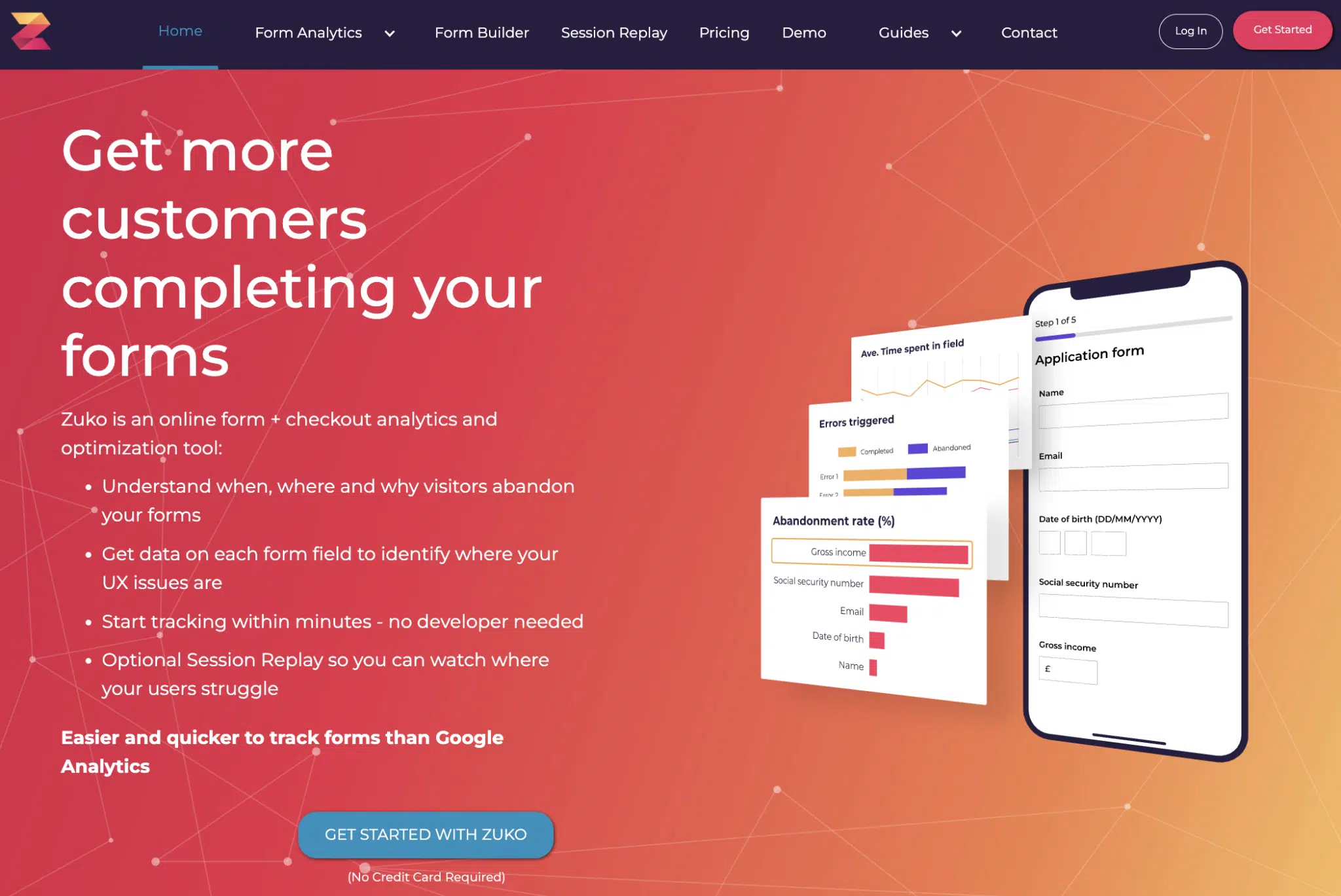
Zuko est une solution fantastique d'analyse de formulaires. Contrairement à la plupart des autres outils, il est spécialisé dans l'analyse de formulaires et propose des rapports intuitifs pour analyser vos formulaires au niveau des champs.
Outre les fonctionnalités standard d'analyse de formulaires comme les statistiques d'abandon, j'aime beaucoup que Zuko dispose d'un rapport soigné qui affiche le parcours réel des visiteurs lorsqu'ils se déplacent dans les champs de votre formulaire. C'est similaire à une heatmap, mais les visualisations sont plus intuitives que ce que proposent d'autres outils.
Mais ma fonctionnalité préférée est l'analyse globale, de haut niveau, de votre formulaire qui vous montre une répartition des champs par taux d'abandon et de complétion dans un graphique.
C'est idéal pour découvrir les champs qui pourraient vous nuire plus qu'autre chose, afin que vous puissiez modifier les éléments de votre formulaire de manière plus éclairée.
Le hic, c'est que Zuko est un peu plus cher que les autres options de cette liste, vous devrez donc tenir compte de votre budget.
Coût : Les forfaits commencent à 56 $ par mois pour un maximum de 5 000 sessions de formulaire.
6. Hotjar

Hotjar est un autre outil d'analyse de formulaires qui vous permet de voir comment les visiteurs de votre site web interagissent avec votre site grâce à des enregistrements de session et des heatmaps. C'est l'un des outils les plus conviviaux que j'ai utilisés, avec d'excellents rapports visuels pour analyser le comportement des utilisateurs sur votre site web.
Il propose également des rapports d'analyse de formulaires de base qui suivent les taux de conversion, les abandons, et des données spécifiques aux champs mettant en évidence les échecs ou les succès de soumission.
Dans l'ensemble, Hotjar peut être un outil très utile non seulement pour analyser vos formulaires, mais aussi pour suivre le comportement des utilisateurs tout au long de l'entonnoir de votre site web.
Coût : Les forfaits commencent à 32 $ par mois pour 100 sessions quotidiennes. Vous pouvez également obtenir la version gratuite qui a des fonctionnalités limitées et autorise 35 sessions par jour.
7. Contentsquare
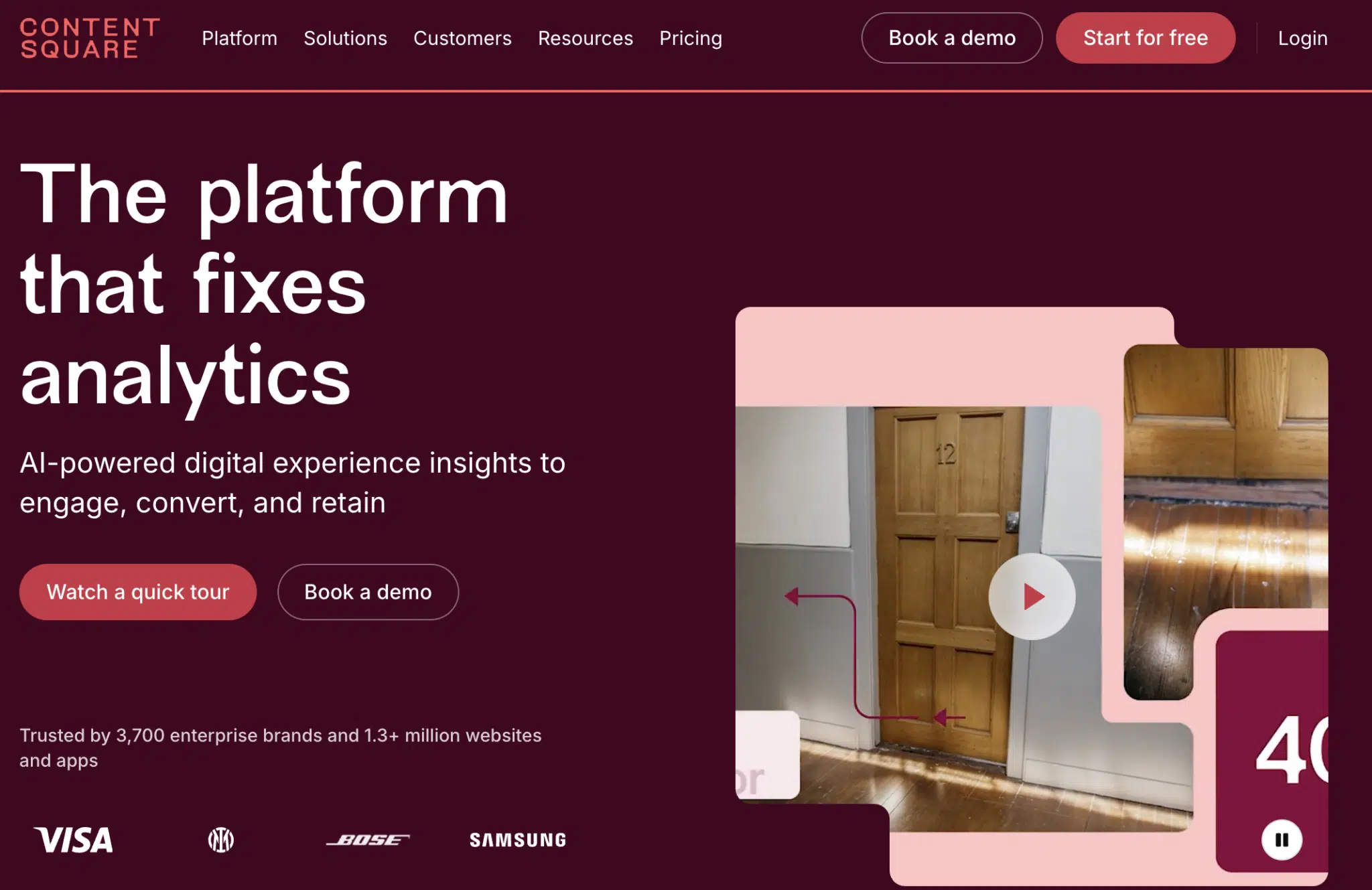
Contentsquare fait un excellent travail pour recueillir les interactions numériques sur votre site et vous présenter des informations utiles grâce à des visualisations.
C'est un outil solide pour découvrir des informations sur les interactions des utilisateurs et l'expérience client sur votre site. Mais bien que ses fonctionnalités d'analyse de formulaires ne soient pas mauvaises en soi, il est facile de constater que l'analyse de formulaires n'est pas la priorité de Contentsquare.
Ne vous méprenez pas. Contentsquare fournit toujours une quantité décente d'informations exploitables en montrant les conversions, les abandons et les champs vides lors de la soumission d'un formulaire. De plus, j'apprécie l'utilité d'avoir des enregistrements de session classés par différentes étapes du parcours.
Ainsi, par exemple, si vous voulez voir exactement où les soumissions de formulaires ont échoué, vous pouvez consulter les enregistrements spécifiques à cet événement.
Mais lorsque vous avez des exigences plus complexes, comme l'analyse d'un formulaire en plusieurs étapes, les limitations de Contentsquare commencent à apparaître rapidement car il n'y a aucun moyen simple de configurer un suivi approprié pour les formulaires en plusieurs étapes.
De plus, il ne vous montre pas de données agrégées sur les champs exacts qui causent des frictions. Vous devrez assembler cela vous-même en consultant les enregistrements de sessions individuelles.
Coût : Les forfaits commencent à 49 € par mois pour un maximum de 7 000 sessions. Il offre également un forfait gratuit impressionnant limité à 5 000 sessions par mois.
8. Medallia Digital Experience Analytics
Medallia Digital Experience Analytics est un logiciel énorme. Il comprend des fonctionnalités pour la recherche de marché, le suivi des interactions utilisateur et même l'écoute des employés.
Pour être honnête, je ne connais que les fonctionnalités de suivi de formulaires de Medallia, je ne peux donc pas me prononcer sur la qualité de ses autres fonctionnalités. Mais son analyse de formulaires est assez intéressante. Elle rapporte des données de base comme l'abandon, les interactions et le taux de complétion. Il est également utile de regarder le taux d'erreur pour déterminer la fréquence à laquelle votre formulaire ne remplit pas sa fonction pour vos visiteurs.
Le seul élément ici qui a attiré mon attention est le Form Experience Score. Cela indique essentiellement à quel point l'expérience du formulaire est fluide et sans friction pour vos visiteurs.
J'aime aussi le fait qu'il liste les problèmes d'expérience dans un onglet séparé, qui décrit les problèmes affectant l'expérience globale de votre visiteur. Ceux-ci facilitent l'identification des problèmes et leur résolution pour vous assurer de continuer à offrir une expérience de formulaire solide pour de meilleurs résultats.
Visuellement, les rapports de formulaires de Medallia sont satisfaisants à regarder. Ils ne vous submergent pas avec une liste de statistiques dénuées de sens.
Au lieu de cela, vous obtenez un rapport magnifiquement présenté qui est facile à comprendre, même si vous évitez de lire des données analytiques.
Le seul problème est que Medallia est un logiciel trop volumineux pour être acheté uniquement pour ses rapports d'analyse de formulaires. Donc, à moins que vous ne soyez une grande entreprise intéressée par la suite complète des outils de Medallia, cela pourrait ne pas être la solution idéale pour vous.
Coût : Les détails des prix ne sont pas publiés car ils proposent un plan basé sur des devis. Nos recherches montrent que vous pourriez vous attendre à environ 400 $ par mois.
9. Inspectlet
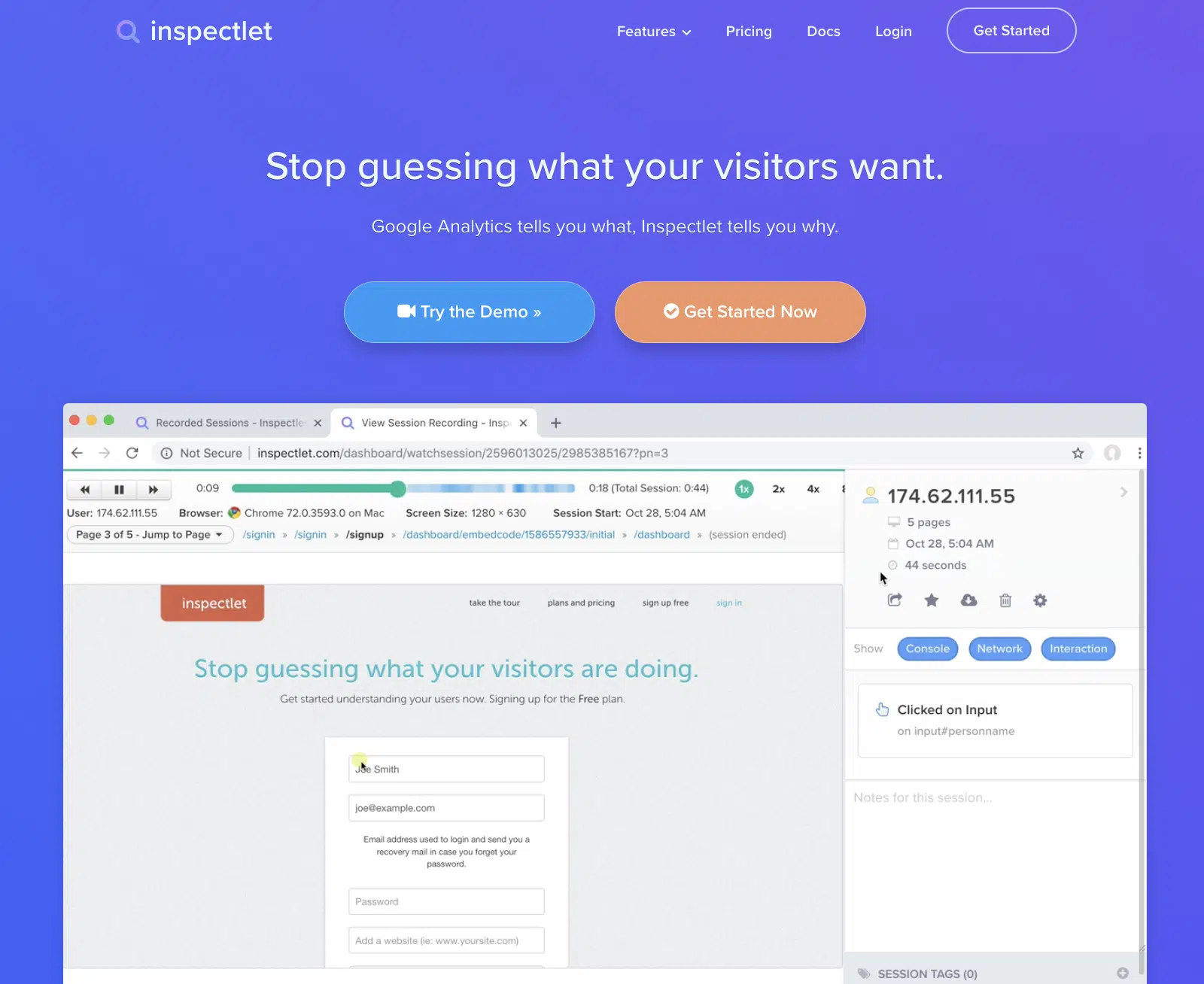
Inspectlet était un très bon outil de suivi de site Web et de formulaires. Sa plateforme d'analyse enregistre des vidéos de vos visiteurs lorsqu'ils utilisent votre site, vous permettant ainsi de voir tout ce qu'ils font. Cela inclut chaque mouvement de souris, défilement, clic et pression de touche.
Vous pouvez ainsi voir exactement comment les visiteurs utilisent non seulement vos formulaires, mais aussi l'ensemble de votre site. Ils disposent également d'une fonctionnalité de carte thermique pour voir quelles zones de votre site reçoivent le plus de clics.
C'était l'un de mes outils préférés. Il était facile à configurer et fournissait des données de formulaire d'excellente qualité. En un coup d'œil, vous pouvez voir le taux de remplissage moyen, le ratio d'utilisateurs qui ont ignoré des champs particuliers, les taux d'échec de validation et le temps perdu à hésiter sur un champ spécifique.
Malheureusement, cet outil semble aujourd'hui presque abandonné. Il fonctionne toujours mais il est bogué. Les enregistrements de session ne fonctionnent parfois pas du tout et le suivi semblait assez imprécis lors de mes tests rapides. Par exemple, l'ignorance d'un champ était toujours comptée dans le taux de remplissage moyen.
Je n'ai pas non plus réussi à joindre le support client. Je ne sais pas ce qui s'est passé, mais il semble malheureusement qu'Inspectlet ne sera bientôt plus là.
Coût : Les forfaits avec analyse des formulaires d'entonnoir de conversion commencent à 149 $ par mois pour 50 000 sessions.
Ensuite, mettez vos analyses de formulaires au travail
Et voilà ! Vous savez maintenant comment suivre les analyses de vos formulaires et quels sont les meilleurs outils pour le faire.
Une fois que vos chiffres commencent à arriver, la prochaine étape consiste à agir en conséquence. Consultez ce guide sur comment utiliser les analyses de WPForms pour améliorer vos formulaires pour des moyens pratiques de transformer les rapports en taux de conversion plus élevés.
Vous pouvez également utiliser votre Pixel Facebook pour suivre les soumissions de formulaires pour vos campagnes publicitaires, et consulter ces conseils exploitables pour améliorer les conversions de vos formulaires de contact une fois votre suivi en place.
Suivez les performances de vos formulaires avec WPForms Pro
Prêt à créer votre formulaire ? Commencez dès aujourd'hui avec le plugin de création de formulaires WordPress le plus simple. WPForms Pro inclut de nombreux modèles gratuits et offre une garantie de remboursement de 14 jours.
Si cet article vous a aidé, veuillez nous suivre sur Facebook et Twitter pour plus de tutoriels et de guides WordPress gratuits.





Bonjour. J'écris de la part de Formisimo (numéro 5 sur votre liste). Notre produit s'appelle désormais Zuko Analytics (zuko.io) et nous avons ajouté de nombreuses nouvelles fonctionnalités pour rendre l'outil d'analyse de formulaires spécialisé plus puissant que jamais. Pourriez-vous s'il vous plaît mettre à jour votre liste avec ces nouvelles informations ? Il est également à noter que certains des autres acteurs de la liste ne font plus d'analyse de formulaires et pourraient donc justifier une révision de leurs entrées.
Salut Alun - Merci pour l'information ! J'ai signalé cette mise à jour à notre équipe concernée. Nous vous recontacterons une fois les modifications apportées 🙂
Passez une bonne journée 🙂