Formstack Alternative

The Formstack Alternative You Actually Own

Formstack rents you forms by the month, meters your submissions, and charges for every seat you add. WPForms lives on your WordPress site, where unlimited forms, entries, and field-level analytics are yours for one license. That’s the setup 5+ million websites already run on.

WPForms vs Formstack

Where your forms live is the first difference between these two. Formstack keeps them on its servers under a monthly subscription while WPForms puts them on your own WordPress site under a license you control. From there the gaps widen:

FeatureWPFormsFormstack
Price to StartLite is free forever, and paid licenses start at $49.50 for the first yearNo free plan. Forms starts at $83 a month billed annually, about $996 a year, after a 14-day trial
Forms & SubmissionsUnlimited forms and unlimited submissions on every license25 forms and 1,000 stored submissions per form on the starting plan, with overflow emailed instead of stored
UsersUnlimited users on every license1 builder user included, and extra users are paid add-ons
Where Forms LiveNative WordPress content on your own domain, styled by your themeHosted on Formstack’s servers and embedded with a JavaScript snippet or iframe
Where Data LivesEntries stored in your own WordPress database, exportable to CSV, Excel, or PDF anytimeStored in Formstack’s cloud against per-form caps, and their docs suggest you export and delete to free up space
Form AnalyticsField-level views, drop-offs, errors, and time spent on every field, plus conversion goals and an AI chat, included with Pro and ElitePer-form views, conversions, and abandonment built in, while field bottlenecks require the extra-cost Conversion Kit add-on and track required fields only
AI in the BuilderGenerate whole forms, then edit any form conversationally, including conditional logic, notifications, and calculationsGenerate with AI drafts a form, but by Formstack’s own docs it can’t add logic, update emails, or set up integrations
WordPress IntegrationWPForms is a WordPress plugin, active on 5+ million sites with 4.8/5 stars on WordPress.orgOfficial plugin last updated 7 years ago, tested to WordPress 5.1, rated 2.5 stars
PaymentsStripe, Square, and PayPal in every version, plus Authorize.Net and Mercado Pago on higher plans, with recurring payments and couponsStripe, PayPal, and Authorize.Net with recurring payments and discounts, and no Square integration
Templates2,100+ ready-made templates, searchable in the builderA few hundred templates plus AI generation
Enterprise WorkflowsNotifications, conditional logic, and GDPR-friendly consent toolsApproval workflows, document generation, and eSignatures on Suite plans, with HIPAA compliance available as a paid add-on

What Changes When You Leave Formstack

The monthly bill stops, the submission caps disappear, and your form data moves onto a site you own. Here’s what the switch looks like, feature by feature.

Unlimited Everything

Formstack’s starting plan includes 25 forms and stores 1,000 submissions per form, and its own help docs recommend you export and delete entries to free up space. WPForms doesn’t meter you. Every paid license, from Basic at $49.50 for the first year, comes with unlimited forms, unlimited submissions, and unlimited users.

WPForms forms list showing unlimited submissions, the Formstack alternative without caps

Built for WordPress

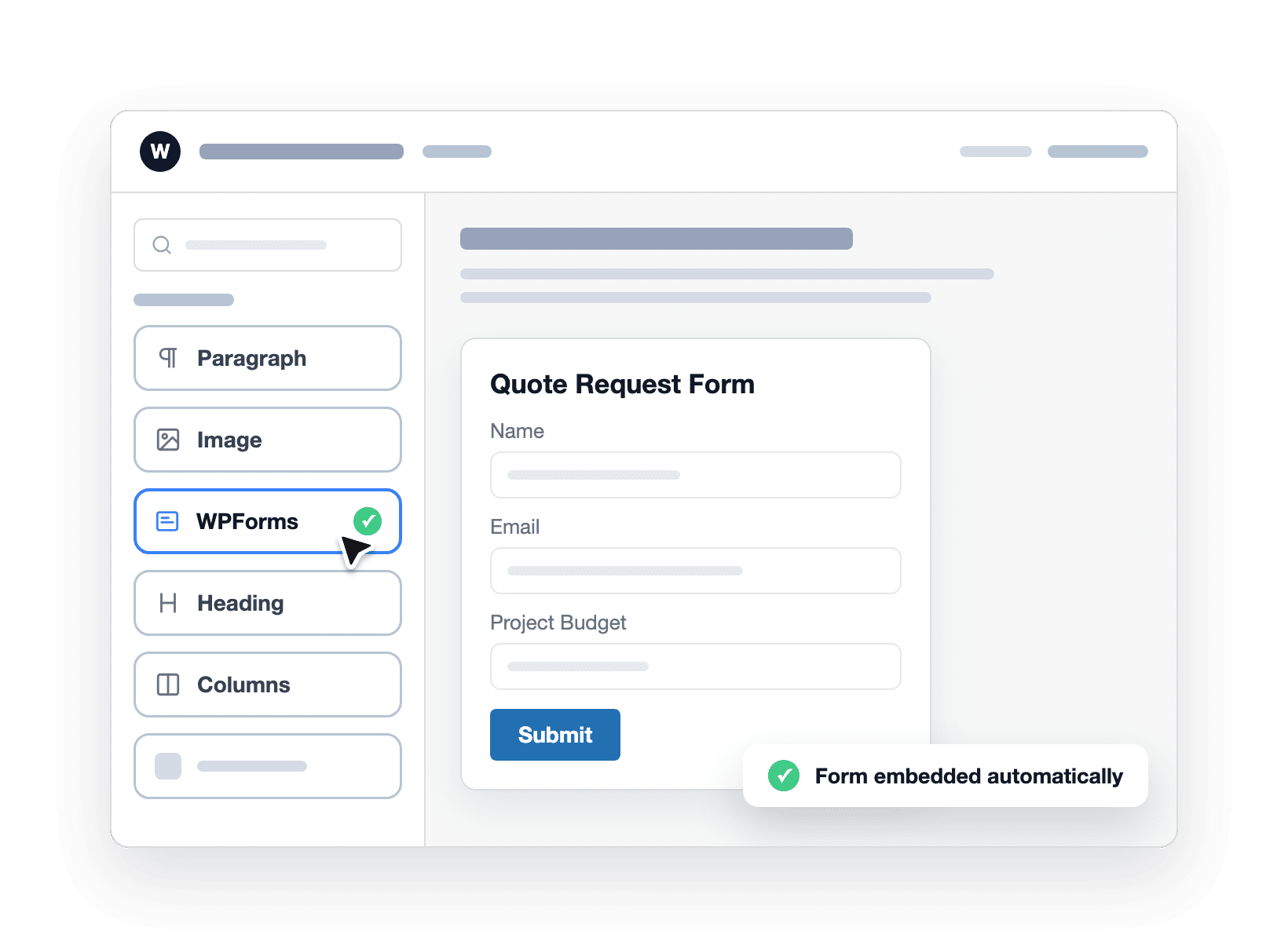
Formstack connects to WordPress through a JavaScript embed, and its official plugin was last updated 7 years ago. WPForms is a WordPress plugin, so forms are built in your dashboard, rendered by your theme, and published with an embed wizard. On top of that, your forms load with your site, match your fonts and colors automatically, and keep working with the block editor, Elementor, Divi, and whatever else your site already uses.

WPForms block inserted natively in the WordPress editor

Form Analytics

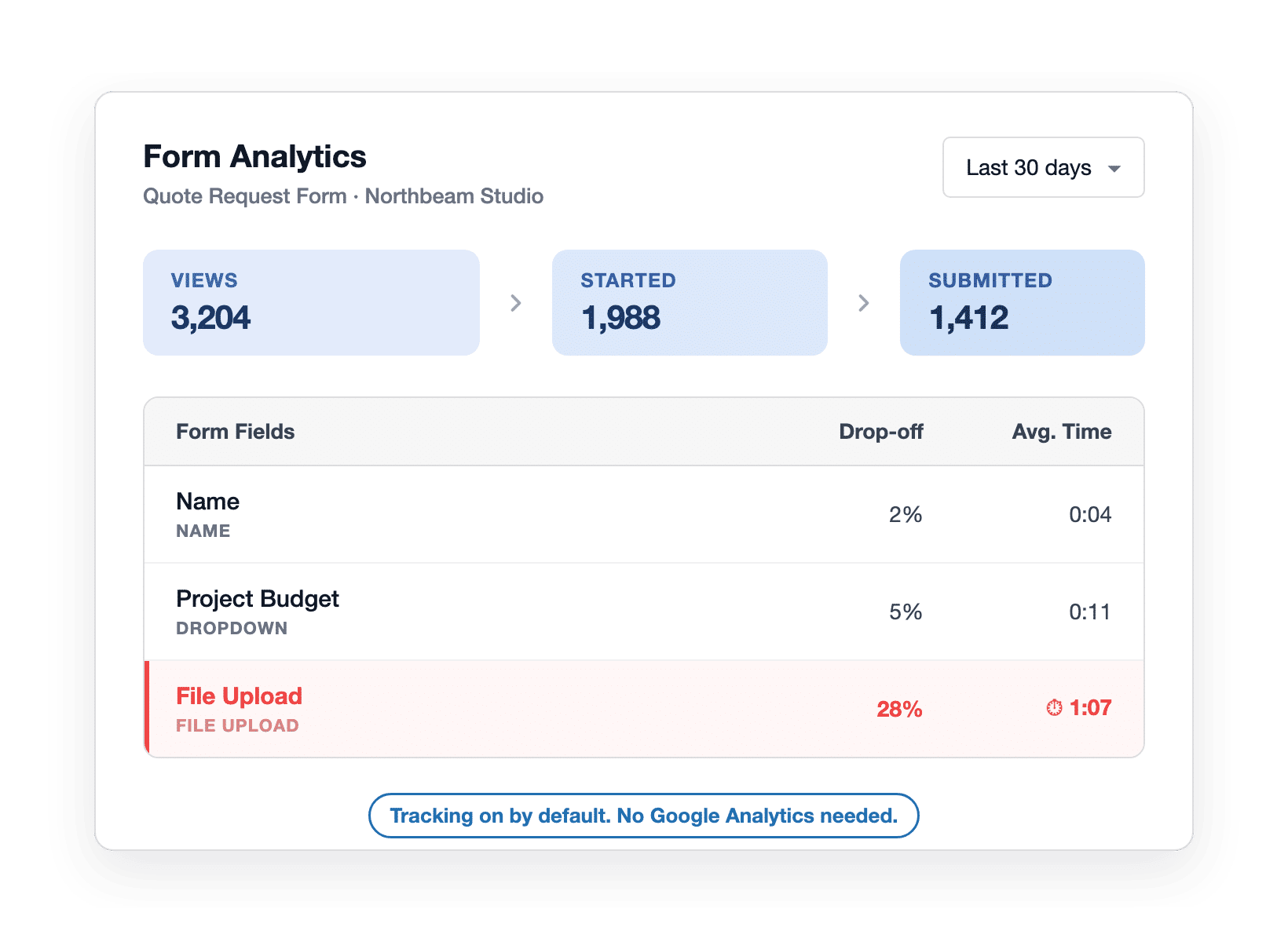
Formstack tracks views, conversions, and abandonment per form, which is genuinely useful. Its field-level tool, Field Bottlenecks, sits inside the extra-cost Conversion Kit add-on and only reports required fields. WPForms Form Analytics goes further and comes included with Pro and Elite. Every field gets views, interactions, errors, drop-offs, and average time spent.

WPForms field-level form analytics funnel showing where visitors drop off

AI That Edits

Formstack’s Generate with AI drafts a starting form, but by its own documentation it can’t add logic, update emails, or set up integrations. WPForms AI picks up exactly there, so you can describe a form and get it built, then tell Smart Edit to make changes to an existing form. Every change is snapshotted, so one click undoes it.

WPForms Smart Edit adding conditional logic and notifications from a plain-English request

Payments Included

WPForms includes more gateways at lower tiers. Stripe, Square, and PayPal work in every version, including the free one, and Authorize.Net and Mercado Pago arrive on higher plans. Formstack supports Stripe, PayPal, and Authorize.Net, with no Square integration. With WPForms Pro there are no added WPForms fees on transactions, and recurring subscriptions, coupon codes, and conditional payment logic are built in.

WPForms recurring payment form with Stripe, Square, and PayPal and a coupon applied

Support & Ownership

WPForms runs on 5+ million websites with 4.8/5 and 113+ thousand 5-star reviews on WordPress.org, plus 4.7 on G2 and 4.8 on Trustpilot. Paid plans include ticket support from the team that builds the plugin, with priority handling on Pro and Elite. Every paid plan carries a 14-day, 100% money-back guarantee.

WPForms ratings across WordPress.org, G2, and Trustpilot with a 14-day guarantee

The Formstack Alternative 5+ Million Users Trust

Everything below is live in WPForms today, not sitting on a roadmap. Here’s where the switch pays off first.

WPForms entries stored in your own WordPress database

Own Your Forms and Your Data Again

On Formstack, your forms and submissions live in their cloud, counted against per-form storage caps. With WPForms, a form is content on your own site and every entry lands in your own WordPress database. You can browse, search, and star entries, export to CSV, Excel, or PDF whenever you like, and control who sees what with WordPress user roles. Nothing routes through a third-party portal, which also makes GDPR conversations shorter.

Find the Field That’s Costing You Quotes

A conversion rate tells you a form has a problem. It never tells you where. WPForms Analytics breaks your form down field by field: views, interactions, errors, drop-offs, and the average time visitors spend in each one, on every field, not just required ones. So when the a field on your form is losing visitors, the fix becomes obvious. Tracking starts automatically, uses no cookies, needs no Google Analytics account, and sends nothing to an outside service.

WPForms field drop-off report, the formstack alternative with field-level analytics on every field
WPForms conversion goal ring at 8.4% against a 12% target with AI suggestions

Set a Conversion Goal, Then Beat It

What is a good conversion rate? It depends on your goal, and WPForms lets you set one per form. A progress ring tracks your current rate against the target in real time, so sitting at 8.4% against a 12% goal reads very differently from a bare percentage. When you want a second opinion, the built-in AI chat reads your actual form data and provides suggestions you can act on the same day. Your own logged-in visits are excluded automatically.

Edit Forms by Describing the Change

Formstack’s AI drafts forms, but its own docs say it can’t touch logic, emails, or integrations. WPForms Smart Edit does precisely those jobs. Ask it to add fields, reorder them, write conditional logic, set up notifications, or generate a calculation formula, all from a chat box inside the builder, and every change is saved as a snapshot you can undo in one click. WPForms AI also fills your dropdowns with AI Choices and translates an entire form in one prompt. Smart Edit and AI Choices are free for everyone.

WPForms Smart Edit updating a quote request form from a chat request
Importing 2,317 entries from a Formstack CSV export into WPForms

Bring Years of Formstack Entries With You

Switching doesn’t mean starting over. Formstack exports your submissions to CSV or Excel whenever you want, and you can even schedule exports. From there, the WPForms Entry Importer matches your CSV columns to your new form’s fields by label and handles files up to 300 MB in chunks, so nothing times out. Rebuild the forms themselves in minutes with WPForms AI or one of 2,100+ templates.

Try the Switch Without Burning a Bridge

WPForms Lite is free, so you can build a form this afternoon and judge the difference before spending anything. Keep Formstack running while you test. When you upgrade, every paid plan carries a 14-day, 100% money-back guarantee, and even Elite at $299.50 for the first year costs a fraction of Formstack’s $996-a-year starting plan. You’d be joining the most-reviewed form builder on WordPress.org: 4.8 stars, 13+ thousand 5-star reviews, 5+ million active installations.

WPForms free version, 14-day guarantee, and 4.8-star reviews make switching risk-free

Everything You Need From Your First Form to Your Busiest

One WordPress plugin covers the whole job, from the first drag to the report that tells you what to improve next. It’s easier than you think.

Unlimited Everything

Unlimited forms, submissions, and users on every WPForms license.

Field-Level Analytics

See views, errors, time per field, and the exact drop-off point.

Conversion Goals

Set a target rate per form and track progress automatically.

WPForms AI Toolkit

Generate, edit, translate, and calculate with plain-English prompts.

Drag & Drop Builder

Build any form in a live preview, no coding required.

Payments Built In

Accept credit cards with Stripe, Square, PayPal, or Authorize.Net.

Your Data, Your Site

Entries live in your WordPress database, exportable anytime.

CSV Entry Importer

Move your Formstack entry history across in a single pass.

Smart Spam Protection

Anti-spam on by default, plus Akismet, reCAPTCHA, hCaptcha, and Turnstile.

Own Your Forms Again. It’s That Simple.

Make WPForms your Formstack alternative and join 5,000,000 professionals who build, measure, and improve their forms right inside WordPress, starting free.

✓ 14-Day Money-Back Guarantee · ✓ Setup in Under 5 Minutes · ✓ No Coding Required · ✓ Used on 5,000,000 Sites

View all

Frequently Asked Questions and Resources

Have questions about switching from Formstack? We’ve got answers.

Is WPForms a good Formstack alternative?

Yes, WPForms is the most-used Formstack alternative for WordPress sites, active on 5+ million websites. Instead of renting hosted forms, you build them inside WordPress and keep every entry in your own database.

Every paid license includes unlimited forms, unlimited submissions, and unlimited users, with field-level form analytics and an AI toolkit on Pro. If your forms live on a WordPress site, that’s the natural home for them.

What are the key differences between Formstack and WPForms?

The key differences between Formstack and WPForms are where forms live, what they cost, and how limits work.

Formstack is a hosted SaaS platform: forms are embedded via JavaScript, plans start at $83 a month billed annually, and the starting plan stores 1,000 submissions per form.

WPForms is a native WordPress plugin: forms render on your own domain, entries live in your database without caps, and paid licenses start at $49.50 for the first year.

Formstack counters with approval workflows, document generation, eSignatures, and Salesforce-native products for enterprise teams.

How much does Formstack cost compared to WPForms?

Formstack’s Forms plan starts at $83 a month billed annually, which is about $996 a year for 1 builder user, 25 forms, and 1,000 stored submissions per form. The Suite bundle starts at $250 a month billed annually, and there’s no free plan, just a 14-day trial.

WPForms Lite is free forever, and paid licenses run from $49.50 to $299.50 for the first year with renewals at full price. All of them include unlimited forms and submissions.

One note for fairness: on Lite, Basic, and Plus, payment forms carry a 3% WPForms fee, which disappears on Pro and Elite. Compare tiers on the pricing page.

Does Formstack limit submissions?

Formstack’s plans include a stored-submission allowance per form, such as 1,000 submissions per form on the starting plan.

It’s a storage cap rather than a monthly quota: once a form hits its limit, new submissions are emailed to you instead of being stored, and Formstack’s docs suggest exporting and deleting entries to free up space.

WPForms has no submission caps of any kind. Every paid license stores unlimited entries in your own WordPress database, and even the free version accepts unlimited submissions.

Does WPForms have form analytics like Formstack?

Formstack includes per-form analytics such as views, conversion rates, and abandonment, while its field-level tool, Field Bottlenecks, is part of the extra-cost Conversion Kit add-on and only reports required fields.

WPForms Form Analytics is included with Pro and Elite at no extra cost. It tracks views, interactions, conversion rate, abandonments, and errors, plus per-field drop-offs and average time on every single field, with conversion goals and a built-in AI chat over your real data.

Everything is tracked automatically, with no code and no Google Analytics account, and the data stays in your WordPress database.

What happened to Formstack? Is Formstack now Intellistack?

In June 2025, the company behind Formstack renamed itself Intellistack, moved its headquarters to Denver, and launched a new flagship automation platform called Streamline.

Formstack itself continues as the product brand for Forms, Documents, and Sign, and the company says those products remain actively sold and supported.

If the change has you re-evaluating your form stack, WPForms is a focused option: one WordPress form plugin, actively developed for over a decade, running on 5+ million sites.

Can I migrate from Formstack to WPForms?

Yes, and you can keep your submission history. There’s no direct Formstack importer, so rebuild each form in minutes with WPForms AI or one of 2,100+ templates. Then export your Formstack submissions to CSV, something Formstack supports on demand or on a schedule.

The WPForms Entry Importer maps your CSV columns to the new form’s fields by label and handles files up to 300 MB in chunks, with a paid WPForms license. Keep Formstack active until you’ve confirmed everything came across.

Is WPForms free? Formstack only offers a trial.

Yes, WPForms Lite is free forever, not a trial. It includes the drag and drop builder, the 2,100+ template gallery, Stripe, Square, and PayPal payments, Smart Edit and AI Choices, smart spam protection, and unlimited forms and submissions.

Formstack offers a 14-day free trial, after which the starting plan is $83 a month billed annually. If you’re testing the switch, WPForms costs nothing to try for as long as you like. See what each tier adds in the Lite vs Pro comparison.

Does WPForms work with Salesforce like Formstack?

WPForms connects to Salesforce through the Salesforce addon, available on the Elite license. It sends form entries to Salesforce objects with flexible field mapping and conditional logic, which covers lead capture and CRM handoff for most WordPress sites.

To be fair to Formstack, its Salesforce-native products go deeper, building forms inside Salesforce itself. If Salesforce-native tooling is your core requirement, Formstack is built for that. If you want WordPress forms that feed Salesforce, WPForms Elite does the job.

Where is my form data stored if I switch to WPForms?

With a paid WPForms license, every entry is stored in your own WordPress database on your own hosting.

Nothing routes through WPForms servers, there’s no per-form storage cap, and you can export entries to CSV, Excel, or PDF from the entry management screen anytime.

Form Analytics data stays in your database too, with no cookies and no external scripts. WPForms also ships GDPR-friendly tools like consent checkboxes and data-request forms to help you meet privacy requirements.

🔔 Subscribe to get our latest updates
📧 Subscribe to Emails

Email Subscription

Join our Newsletter

We won’t spam you. We only send an email when we think it will genuinely help you. Unsubscribe at any time!
New Feature

WPForms Dashboard

Dark blue hero with a circular bear logo on the left, large headline'Introducing the New WPForms Dashboard' and an ANNOUNCEMENT badge; a dashboard mockup is visible on the right.

The WPForms Dashboard is a new home screen that opens the moment you click WPForms in your admin menu. Stat cards across the top total up your forms, entries, payments, views, and spam across the whole site.

An Entries widget charts activity over your chosen date range with a per-form table of entries, views, interactions, and conversion rate, and a payments widget totals everything collected once a gateway is connected.

With the Geolocation addon active, Top Locations ranks the countries your visitors come from, and a Suggested Next Steps panel points to features worth turning on.

Nothing to install, as it comes with every plan, including Lite!

New Feature

WPForms QR Code

Announcement banner: dark blue background with headline'Say Hello to WPForms QR Code: One Scan Opens Your Form' and a large QR code on the right.

Every form now has its own built-in QR code generator, with nothing extra to install or buy.

Open a form’s General settings, choose the page the form lives on or paste its URL, and click Generate QR Code to copy it or download it as a PNG or a print-ready SVG.

Put it on menus, packaging, event badges, or business cards, and every scan opens your form instead of a page that only hands people something to read.

Included with every plan, including Lite; Pro and Elite plans can keep, remove, or replace the WPForms logo in the center with their own.

New Feature

Ranking Field for Surveys & Polls

Announcement hero: dark blue background, bear avatar left, large'Introducing the New WPForms Ranking Field' text, and three stacked white option cards with 'Movies' highlighted.

The Surveys & Polls addon gains a Ranking field!

Instead of scoring each option separately, respondents drag options (or tap arrow buttons on a phone) into the order they prefer, so one option always has to come first.

WPForms tallies every response into a “Times at #1” count and an average rank for each option, with a chart that makes the winner obvious.

Lay options out as a vertical list or a grid, and use Image Choices or Icon Choices in place of plain text labels.

Integration New Feature Payments

Mercado Pago Addon

Introducing the WPForms Mercado Pago Addon: Card Payments Built for Latin America

The Mercado Pago addon brings on-page card payments built for Latin America to your forms.

Buyers enter their card details into secure, Mercado Pago-hosted fields inside the form, choose an installment plan, and pay in ARS, BRL, CLP, COP, MXN, PEN, or UYU without leaving your page.

An approved charge fires your confirmation, notifications, and integrations at the moment money actually moves, and full or partial refunds can be issued from WPForms » Payments.

WPForms takes no transaction fee, and it works with Quantities, Coupons, multi-page forms, Conversational Forms, Lead Forms, and Form Pages.

AI New Feature

WPForms Analytics

Dark blue hero with a bear avatar left, large WPForms v2.0 headline and a form analytics screenshot on the right.

WPForms 2.0 adds a complete form performance tracking suite inside your WordPress dashboard.

The All Forms page now shows Views, Entries, and Conversion Rate for every form, and each form gets its own analytics dashboard with views, interactions, conversion rate, abandonments, and errors over the last 7, 30, or 90 days or a custom range.

A field-by-field table shows interactions, time spent, errors, and abandonment for every field, so you can see exactly where people give up, and you can set a conversion goal to track progress.

There’s also a built-in AI chat reads your form data and tells you what is working, what is hurting conversions, and what to fix first.