Elementor Forms Alternative

The Purpose-Built Elementor Forms Alternative

While Elementor treats forms as just another page widget, you’ll have a purpose-built form builder inside any Elementor page to capture more leads, with a dedicated builder, field analytics, and 2,100+ templates that drop straight into any Elementor page.

WPForms vs Elementor Forms

Elementor is a page builder that added forms but WPForms is dedicated form builder for WordPress, and that focus shows everywhere.

FeatureWPFormsElementor Forms
Standalone Form PluginYes, a dedicated form builder that works with any theme and page builder, including ElementorNo, forms are a widget inside the Elementor Pro page builder
Free VersionDrag and drop builder, 2,100+ template gallery, Stripe, Square, and PayPal payments, and smart spam protectionFree Elementor includes no form widget at all
Entry StorageEvery entry saved in your WordPress dashboard on all paid plansNot included on the $60 Essential plan; submission storage starts at $84 per year
Form Templates2,100+ ready-made form templatesA blank three-field default form; no library of ready-made form types
Conditional LogicBuilt in, point and click, on every licenseNot built in and Elementor’s docs suggest custom JavaScript or a third-party addon
Built-In Form AnalyticsField-level views, drop-offs, and time per field, plus conversion goals and AI insightsThere is no built-in form analytics just a submissions list with CSV export
PaymentsStripe, Square, and PayPal in every version, plus Authorize.Net and Mercado Pago on higher plans, with recurring subscriptions and couponsNo payment fields and Stripe and PayPal are separate buy-button widgets
AI Form BuildingGenerate, edit, translate, and calculate by prompt, included with your licenseAngie AI drafts form layouts in the new V4 editor, using metered plan credits
Spam ProtectionreCAPTCHA, hCaptcha, Cloudflare Turnstile, Akismet, and custom CAPTCHAreCAPTCHA, honeypot, and Akismet
WordPress.org Reviews4.8 stars on WordPress.org with 13+ thousand 5-star reviews across 5+ million sites4.5 stars for the free page builder, which doesn’t include forms

Where WPForms Pulls Ahead of Elementor Forms

A widget can only stretch so far and this is where a dedicated form builder pulls away, from payment fields to conversion tracking, all without leaving your Elementor pages.

Works With Elementor

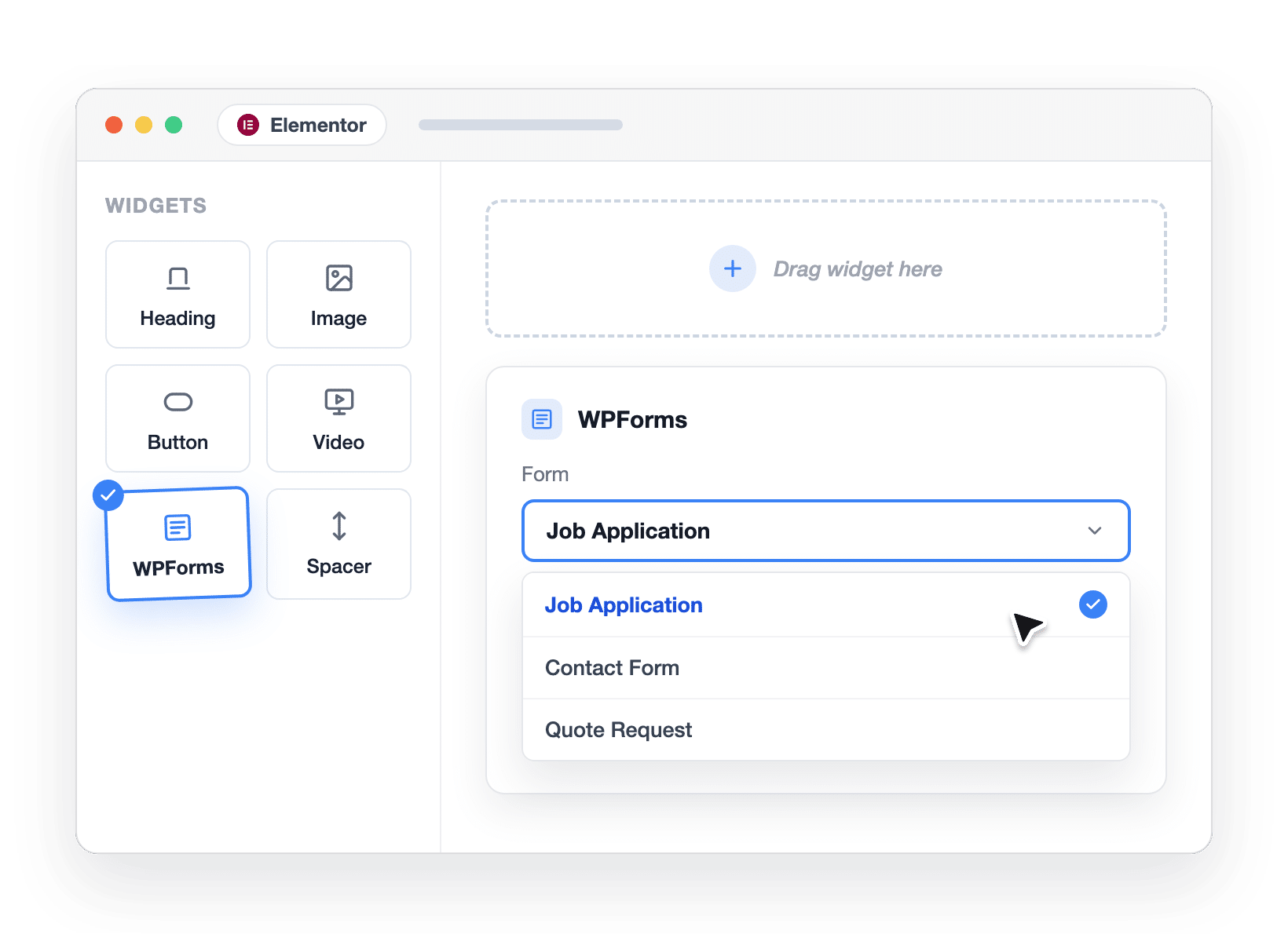
WPForms ships a native Elementor widget so you can build your form in WPForms, then drag the widget into any Elementor page and pick your form from a dropdown. It works with the free version of Elementor and free WPForms Lite, and the Style tab lets you match fields, labels, and buttons to your design without CSS, allowing you to create branded forms.

Dragging the native WPForms widget into an Elementor page, the Elementor Forms alternative that works inside Elementor

Ease of Use

In Elementor, a form only exists inside a page, so every form starts by editing a page and clicking through sidebar tabs. WPForms flips that with a dedicated drag and drop builder. Watch a live preview as you work, and embed the finished form anywhere, on as many pages as you like. Column layouts are drag and drop too, so there’s no calculating width percentages to line up two fields.

WPForms dedicated drag and drop form builder with live preview and layout fields

Form Analytics

Elementor stores submissions, and that’s where its tracking ends. There’s no dashboard for views, conversion rates, or drop-off anywhere in its stack. WPForms includes built-in Form Analytics that go field by field: views, interactions, drop-offs, errors, and the time visitors spend on every field. You can also set a conversion goal, and ask the built-in AI what to fix first to improve lead acquistion.

WPForms field-level form analytics showing a phone field losing 23% of visitors

AI Form Building

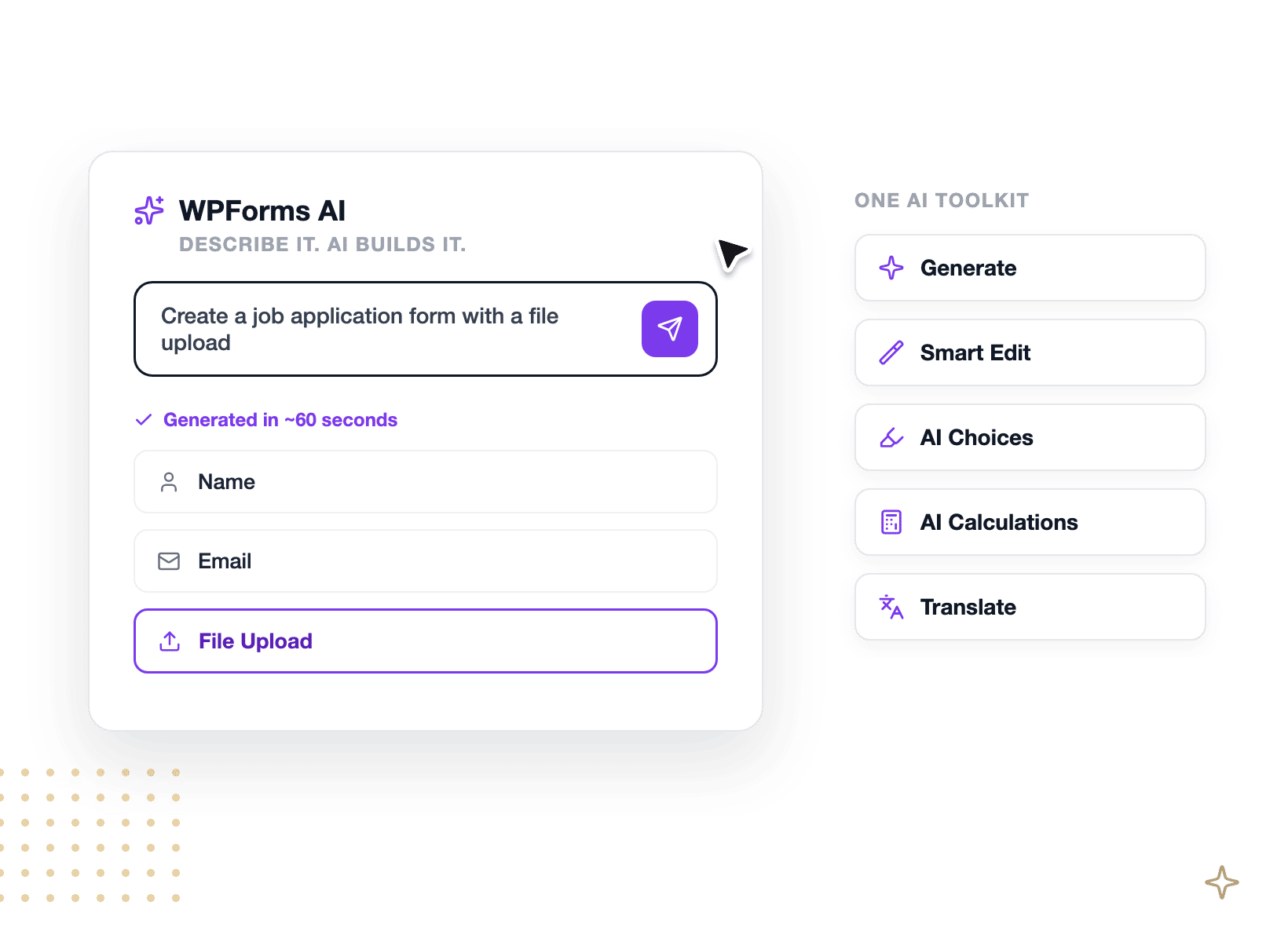
Elementor’s Angie assistant can draft a form layout in the new V4 editor, using metered plan credits. WPForms AI builds an entire form for you. You can also use Smart Edit to change any existing form from a chat box, let AI Choices fill in dropdown options, generate calculation formulas, and translate entire forms. Abilities API support also lets assistants like Claudeor. ChatGPT build and edit forms for you.

WPForms AI toolkit generating and editing forms inside the WordPress dashboard

Payments

Elementor forms can’t charge anyone and its Stripe and PayPal widgets are standalone buy buttons that don’t know what a visitor picked in your form. WPForms puts payment fields inside the form. Stripe, Square, and PayPal work in every version, including the free one, totals react to what visitors select, and recurring subscriptions are available on all paid plans. There is also a built-in Payments screen.

WPForms payment form with Stripe, Square, PayPal, Apple Pay, and Google Pay

Support & Trust

WPForms is active on 5+ million websites and holds 4.8 stars on WordPress.org with 13+ thousand 5-star reviews, more validation than any other form builder. Even Elementor’s own blog ranks WPForms among the top form plugins for WordPress. Paid plans include ticket support with typical responses around one business day, priority handling on Pro and Elite, 200+ doc guides, and a 20k-member community.

WPForms 4.8 stars and 13,500+ five-star reviews on WordPress.org

The Elementor Forms Alternative 5+ Million Users Trust

Every panel below is something you can do in WPForms today. Here’s where switching from Elementor Forms pays off first.

Styling a WPForms form inside the Elementor editor without CSS

Keep Your Page Builder. Upgrade Your Forms.

You built your site in Elementor because you love the design control. Keep it and build forms in WPForms’ dedicated drag and drop builder, then drop the native widget into any Elementor page and pick your form from a dropdown. The Style tab matches fields, labels, and buttons to your theme with point and click controls, no CSS. It even works with the free version of Elementor and free WPForms Lite, so the whole setup can cost exactly nothing.

Edit Any Form by Chatting With It

Describe the form you want and WPForms AI builds it, fields, labels, and all. From there, Smart Edit updates any existing form from a plain-English request, AI Choices writes your dropdown options, AI Calculations generates formulas, and Instant Translations localize a whole form in one prompt. As a result, editing a form stops being a sidebar-tab hunt and starts being a conversation.

WPForms Smart Edit changing an existing form from a plain-English request
WPForms field drop-off report showing a phone field losing 23% of visitors

See the Exact Field That Loses People

Elementor can show you the submissions you got. WPForms shows you the ones you almost got. Built-in Form Analytics track views, interactions, abandonment, and time spent on every field, with no cookies, no outside services, and no setup. So when the Phone field on your Job Application form is losing 23% of visitors after 37 seconds of hesitation, you’ll spot it, fix it, and watch your conversion goal ring climb.

2,100+ Templates and Connect 9,000+ Apps

Elementor’s form widget starts you with a blank three-field form every time. WPForms gives you 2,100+ emplates, so registrations, surveys, quotes, and order forms start from a working form instead. Then connect your forms to email marketing tools, CRMs, and 9,000+ apps through Zapier, plus Make and n8n for automation workflows.

WPForms 2,100+ templates and 9,000+ app integrations via Zapier
Importing 1,847 entries from an Elementor Submissions CSV export into WPForms

Bring Your Entry History With You

Switching doesn’t mean losing your data and you can export your submissions from Elementor as a CSV, and the WPForms Entry Importer maps those CSV columns to your new form’s fields with a paid license. One example: 1,847 entries imported in a single pass, history intact. As for the forms themselves, WPForms AI or a template rebuilds each one in minutes, so the whole move fits in an afternoon.

Switch to the Most-Reviewed Form Builder on WordPress

WPForms holds 4.8/5 stars with 13+ thousand 5-star reviews on WordPress.org, more validation than any other form builder, and it’s active on 5+ million websites. Every paid plan comes with a 14-day, 100% money-back guarantee, so trying the switch is risk-free. And because WPForms Lite is free while Elementor’s forms require a Pro subscription, trying the alternative is the cheaper experiment.

WPForms 4.8 stars, 13,500+ reviews, and 14-day money-back guarantee

Everything You Need to Build Smarter Forms

One plugin covers the whole workflow, from the first drag to the final report. It’s easier than you think.

Drag & Drop Builder

Build forms in a dedicated live-preview builder, no code required.

Works Inside Elementor

Drop any form into your Elementor pages with the native widget.

WPForms AI Toolkit

Generate, edit, translate, and calculate with plain-English prompts.

Field-Level Analytics

See views, conversions, and the exact field where people drop off.

2,100+ Templates

Start from a proven form for almost any use case, even on Lite.

Payments Built In

Accept credit cards with Stripe, Square, PayPal, Mercado Pago, or Authorize.Net.

Smart Conditional Logic

Show, hide, and route fields based on answers, no code.

CSV Entry Importer

Move your Elementor submission history over in minutes.

Smart Spam Protection

Anti-spam on by default, plus Akismet, reCAPTCHA, hCaptcha, and Turnstile.

Upgrade Your Forms. It’s That Simple.

Make WPForms your Elementor Forms alternative and join the 5,000,000 professionals who use it to build smarter forms, capture more leads, and grow, without leaving Elementor.

✓ 14-Day Money-Back Guarantee · ✓ Setup in Under 5 Minutes · ✓ No Coding Required · ✓ Used on 5,000,000 Sites

View all

Frequently Asked Questions and Resources

Have questions about switching from Elementor Forms? We’ve got answers.

Is WPForms a good alternative to Elementor Forms?

Yes, WPForms is the most popular Elementor Forms alternative for WordPress, active on 5+ million websites.

Elementor treats forms as one widget inside its Pro page builder, while WPForms is a purpose-built form builder with field-level analytics, payments inside your forms, conditional logic, and 2,100+ templates.

And since WPForms ships a native Elementor widget, you get all of that without giving up Elementor.

Can I use WPForms with Elementor?

Yes. WPForms integrates with Elementor through a dedicated widget: build your form in WPForms, then drag the WPForms widget into any Elementor page and select your form from a dropdown.

It works with the free version of Elementor and free WPForms Lite, so the combination costs nothing to try. The Style tab lets you adjust fields, labels, and buttons right inside the Elementor editor, no CSS needed.

Does Elementor Forms have conditional logic?

No, Elementor Forms doesn’t include built-in, no-code conditional logic for form fields.

Elementor’s own documentation suggests adding custom JavaScript inside an HTML field to show or hide fields, or you can buy a third-party addon.

WPForms includes smart conditional logic on every license, so your forms react to visitors’ answers with point and click rules.

Can Elementor Forms accept payments?

Elementor offers standalone Stripe and PayPal buy-button widgets, but its forms have no payment fields, so a form can’t charge based on what a visitor selects.

WPForms includes Stripe, Square, and PayPal payments from the free version, with recurring subscriptions on paid plans and totals that react to your visitors’ choices.

Does Elementor Forms have built-in form analytics?

No. Elementor stores form submissions and exports them to CSV, but there’s no built-in dashboard for form views, conversion rates, or drop-off anywhere in its stack.

WPForms includes Form Analytics that track views, interactions, conversions, abandonment, and errors for every form, down to the exact field where people quit. The full field-level experience comes with Pro and Elite licenses.

How do I switch from Elementor Forms to WPForms?

Rebuild your forms in minutes using WPForms AI or one of 2,100+ templates, since Elementor forms live inside its page builder and can’t move to another form system.

Your data comes with you: export your submissions from Elementor as a CSV, then the Entry Importer maps the CSV columns to your new form’s fields with a paid WPForms license.

Finally, drop the WPForms widget into the same Elementor pages where your old forms lived.

Is there a free version of WPForms?

Yes. WPForms Lite is free forever and includes the drag and drop builder, the 2,100+ template gallery, Stripe, Square, and PayPal payments, smart spam protection, and unlimited forms and submissions.

That’s a real difference from Elementor, where the free plugin includes no form widget at all. Paid plans start at $49.50 for the first year. See the full breakdown in the Lite vs Pro comparison.

How much does WPForms cost compared to Elementor Pro?

WPForms starts free, and paid plans start at $49.50 for the first year.

Elementor’s forms require a Pro subscription: the $60-per-year Essential plan includes the form builder but doesn’t store submissions, submission storage starts on the $84-per-year Advanced Solo plan, and AI features come with the $228-per-year One bundle.

Note that WPForms Lite, Basic, and Plus add a 3% fee on payments, which disappears on Pro. Compare plans on the WPForms pricing page.

Do WPForms forms work on mobile devices?

Yes, every WPForms form is responsive by default and works on phones, tablets, and desktops with no extra configuration.

Templates and AI-generated forms inherit the same mobile-friendly layouts, and forms adapt to any WordPress theme automatically.

You can also preview any form at different screen sizes before publishing it.

Where is my form data stored if I switch to WPForms?

On paid plans, WPForms stores every entry in your own WordPress database, on your own hosting, the same self-hosted approach Elementor uses for submissions.

Nothing routes through a third-party service, which keeps you in control for GDPR and privacy. Form Analytics data stays in your database too, with no cookies or outside scripts.

You can also export entries to CSV or Excel anytime.

🔔 Subscribe to get our latest updates
📧 Subscribe to Emails

Email Subscription

Join our Newsletter

We won’t spam you. We only send an email when we think it will genuinely help you. Unsubscribe at any time!

No announcements available at the moment.