Formester Alternative for WordPress

The Formester Alternative That Runs Inside WordPress

Formester hosts your forms on its servers and reaches your pages through an embed script. WPForms installs like any WordPress plugin, so forms load with your site, entries land in your dashboard, and the exact field leaking conversions is right there to fix.

WPForms vs Formester

A form builder proves itself in the details of a normal week, from the Monday your form gets a traffic spike to the Friday you pull entry reports for the team.

FeatureWPFormsFormester
Where the form livesYour own WordPress pages, as native contentFormester’s servers, embedded by script or by pasting the form URL into a block
Where responses are storedYour own WordPress databaseFormester’s hosted database, with CSV export
Conditional logicEvery paid license, from Basic at $49.50 a yearPersonal plan and up, $12 a month billed annually
Users includedUnlimited on every licenseNo team seats on Free or Personal, 25 on Business
Drop-off analyticsPer field, with interactions and errors, included with ProPer page on every plan, with a field-level map described under Form Abandonment Recovery on Business
Time trackingAverage time spent on each fieldTime to complete the whole form
Conversion goals and AI chat on your dataIncluded with ProNot among the six metrics its analytics page lists
Partial entries and Save and ResumeForm Abandonment and Save and Resume, included with ProPartial Submissions and Save and Resume, on Business
Your branding onlyEvery license, including LiteFormester branding on Free, removal starts on Personal
Your own domainAlways. The form is a page on your siteBusiness, through a CNAME subdomain
AI form generationEvery paid license, with Smart Edit and AI Choices free on LiteEvery plan, capped at 2, 10, or 50 generations a day
Email marketing integrations12 native services included with PlusMailchimp, per its integrations list
Form templates2,100+ on every license1,000+ per its footer
Official WordPress pluginWPForms is the pluginA block that embeds a published Formester form by its URL

What Changes When You Leave Formester

Your forms move onto a platform with ten years of refinement behind it, and the difference shows in every row below. Here’s what the switch looks like.

Native, Not Embedded

You build the form on Formester, add its block to a page, and paste in the published form’s URL. The form renders from Formester and every response goes to Formester.

WPForms simply uses a WordPress block, the same as a paragraph or an image, so it picks up your theme’s fonts and colors, saves every entry to your own database.

Because it’s WordPress, it can also do things a hosted form can’t, like register users, accept front-end post submissions, or unlock only for logged-in members.

The formester alternative for WordPress showing a form block snapping into a page like a puzzle piece

Field, Not Just Page

Formester’s analytics page lists six metrics it tracks automatically. These include views, submissions, time to complete, drop-off rate, top countries, and devices.

Its drop-off analysis, in its own words, “shows the page where people leave,” which is useful useful, but a page is a wide place to search.

WPForms Analytics comes with Pro and reports every field on its own: views, interactions, errors, drop-off, and the average time visitors spend there.

A WPForms field-level analytics ledger with a stopwatch beside each field, showing 1:12 and 36% drop-off on Company Size

Logic on Every License

Formester’s Conditional Logic page carries a plan badge that reads “Available on the Personal plan,” which is $12 a month billed annually.

WPForms includes smart conditional logic on every paid license, starting with Basic at $49.50 a year.

Show or hide fields based on an answer, send different confirmations, route notifications to the right person, and branch multi-page forms without a workaround.

A conditional logic flowchart with a decision diamond routing a form into two branches, tagged as included with WPForms Basic

Users Aren’t Seats

Formester’s compare-plans table lists “Number of Seats” as unavailable on Free and Personal and 25 on Business, at $45 a month billed annually.

Meanwhile, WPForms includes unlimited users. Anyone with a WordPress account and the right role can build forms, review entries, and read analytics.

In addition, each site keeps its own entries and its own analytics, which keeps client reporting clean by default. Elite adds advanced access control for teams.

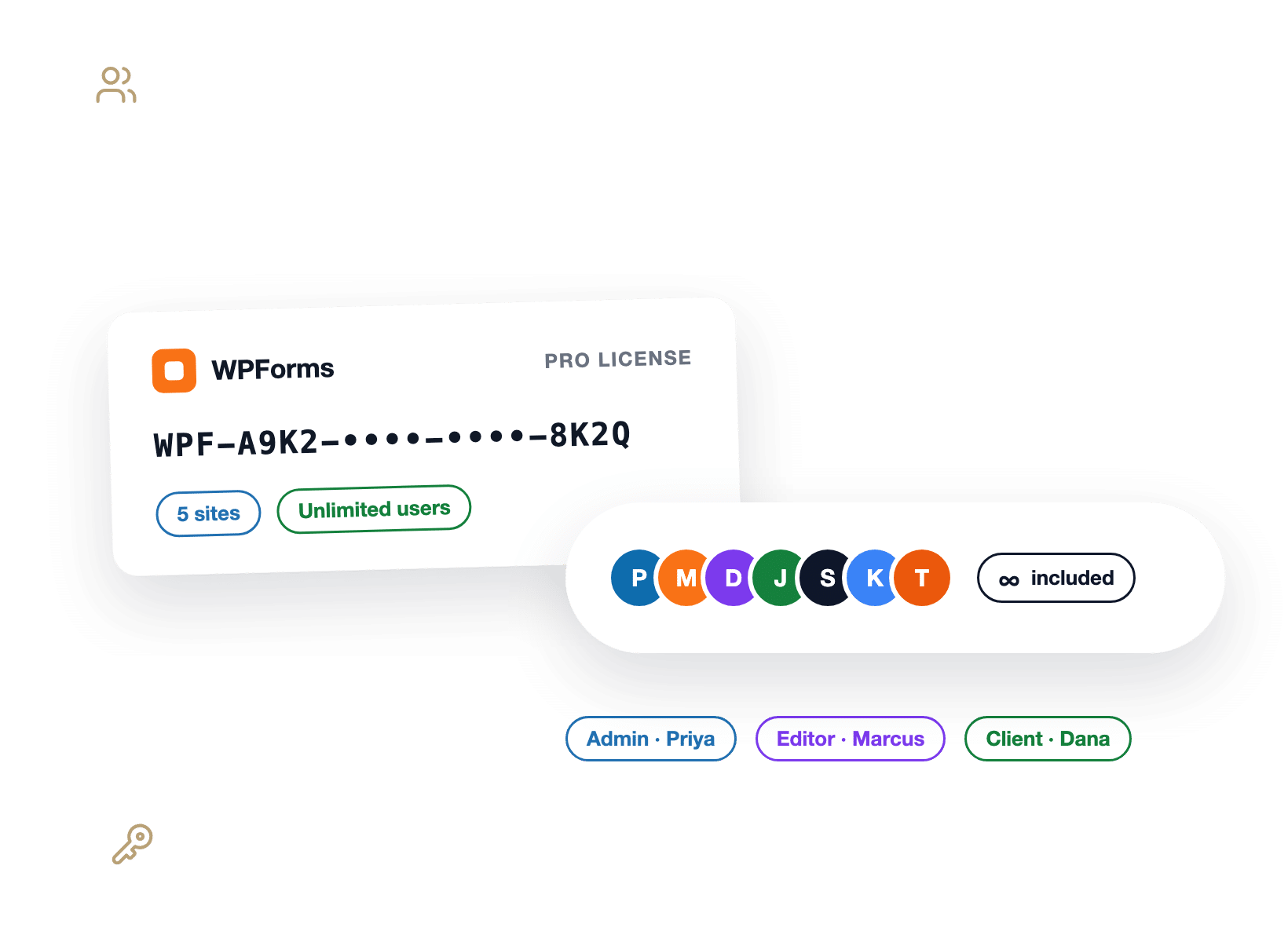
One WPForms license key card with a stack of team member avatars, all included

AI Inside the Builder

Formester’s AI generates forms from a prompt, a PDF, an image, or a URL, and its table meters it at 2, 10, or 50 generations a day with a monthly credit allowance.

WPForms AI lives inside the WordPress form builder you’re already in. Describe the form and it appears on every paid license, similar to Formester.

On top of that, you can connect Claude, ChatGPT, or Cursor and let your AI assistant build and edit forms for you.

A command palette open over the WPForms builder with a prompt adding a Company Size dropdown to a form

The Yearly Math

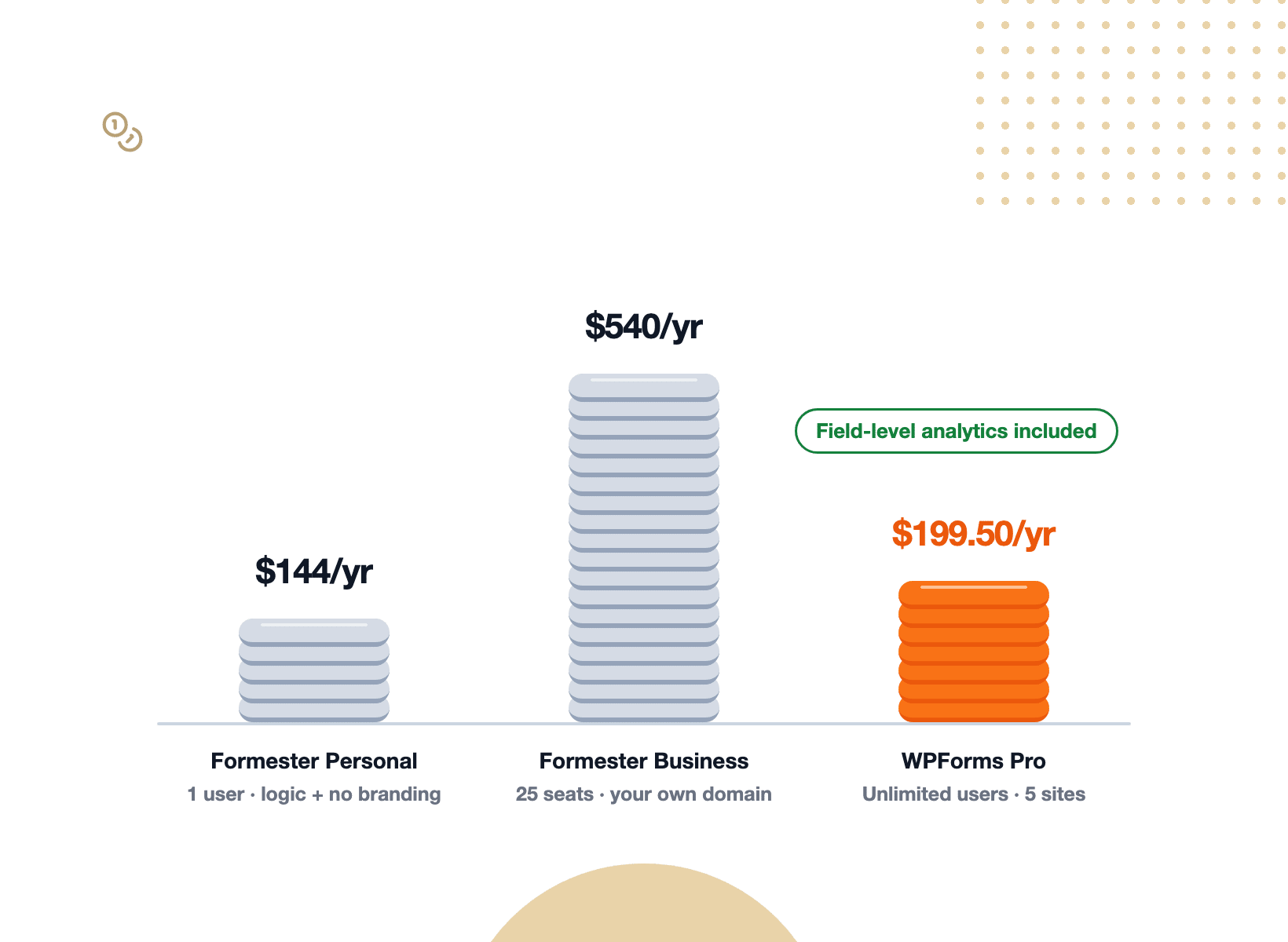
On Formester, removing its branding and unlocking conditional logic means Personal, at $12 a month billed annually, which works out to $144 a year for a single user. Team seats, your own domain, partial submissions, and Save and Resume sit on Business at $45 a month billed annually, or $540 a year. WPForms Basic is $49.50 a year with conditional logic, entry storage, and unlimited users. WPForms Pro is $199.50 a year and adds field-level analytics, Form Abandonment, Save and Resume, surveys, and payments with no platform fee, on up to five sites. Compare the tiers on the pricing page.

Three stacks of coins comparing yearly cost, with the WPForms Pro stack tagged unlimited users

Everything You Get When You Switch

Moving takes less time than building your first Formester form did, and everything below is waiting when you land. Here are six things you gain the day WPForms goes live:

A WordPress page canvas with a WPForms block selected and a fan of theme color swatches applied to it

Drop the Form Into Any Page Like Any Other Block

A hosted form arrives on your page inside a frame, wearing the builder’s defaults until you restyle it.

A WPForms form arrives as a block and gets real styling controls in the block editor for colors, borders, and spacing.

Because the form is WordPress content, it can also create user accounts, accept guest posts. or lock itself to logged-in members,

Know Which Field Loses People, and How Long They Fought It

A form that leaks visitors quietly is still a leaky form. WPForms Form Analytics reports every field separately.

How many people saw it, how many interacted, how many hit an error, how many gave up, and how long they spent trying.

No tracking code, no analytics account, and your own logged-in visits never pollute the numbers.

The formester alternative with field-level analytics, drawn as a pipe leaking 36% of visitors at the Company Size field after 1:12
A trail map climbing from 13.4% to a summit flag at 20%, with a WPForms AI chat answer beside the path

Turn a Target Into a Scoreboard

WPForms lets you set a conversion goal on any form and tracks progress toward it.

Better still, a built-in AI chat sits on top of your own form data. Ask why completions dipped last week.

You get a plain-English answer with fixes to try. Then export the report to CSV or print it for the client.

Give the Whole Team Access, Not a Seat Each

Formester’s plans list team seats only on Business. WPForms includes unlimited users on every license.

So the person who builds the form, the person who reads the entries, and the client who wants the monthly numbers all log in to the same WordPress site with roles you already manage.

In addition, each site keeps its own entries and analytics, which makes agency reporting clean by default.

A theater seat map where every seat is marked included, beside one seat marked per-seat plan
Labeled moving crates of 2,864 responses rolling on a hand truck from a CSV export into WordPress

Bring Your Formester Responses With You

Switching doesn’t mean starting from zero. Formester’s own analytics FAQ confirms you can export submissions as a CSV file.

So download them, run the WPForms Entry Importer, and map each column to a field on your new form.

The Entry Importer is included with every paid WPForms license. Plus, you can leave your Formester account running while you test, then switch the page over once you’re happy.

Every Form Wears Your Brand on Your Own Domain

On Formester’s free plan, your form carries Formester branding, and hosted on their servers.

A WPForms form is your branding on your domain on every license, including the free one, because it’s your site rendering it.

The address bar shows your URL, the styling matches your pages, and nothing about the form points anywhere else.

And if you want to try before you commit, WPForms Lite is free, and every paid license carries a 14-day money-back guarantee.

A storefront awning carrying the site owner's own name over a form in the shop window, on the owner's own domain

What You Get When the Form Builder Is Part of Your Site

Your forms live where your site lives, with no separate account to check and no embed script to keep working. Everything below installs with the license and runs from your own dashboard.

Native WordPress Block

Add a form to any page or post the way you add a paragraph or an image.

Field-Level Analytics

Views, interactions, errors, drop-off, and time spent, reported for every field.

Conversion Goals

Set a target completion rate and watch the built-in progress ring climb toward it.

Built-In AI Chat

Ask plain-English questions about your form data and get fixes to try.

Conditional Logic From Basic

Show, hide, and route fields on every paid license, from $49.50 a year.

Unlimited Users

Every license includes unlimited users, so nobody buys a seat.

Your Own Database

Every entry is a row in your WordPress install, exportable to CSV, Excel, or PDF.

WPForms AI

Generate forms from a prompt, edit them by chatting, or let Claude, ChatGPT, or Cursor build them.

Entry Importer

Move your existing responses in from a CSV export and keep your history.

Build Forms on Your Own Site. It’s That Simple.

Join the 5,000,000 professionals who use WPForms to capture leads and convert more visitors, without renting a form builder.

✓ 14-Day Money-Back Guarantee · ✓ Setup in Under 5 Minutes · ✓ No Coding Required · ✓ Used on 5+ Million Sites

View all

Frequently Asked Questions and Resources

Thinking about a Formester alternative for your WordPress site? Here’s what people ask first.

Is WPForms a good Formester alternative?

WPForms is a strong Formester alternative for anyone whose website already runs on WordPress.

The form is native WordPress content on your own domain, every response is a row in your own database, and every license includes unlimited forms, unlimited submissions, and unlimited users.

So, the difference is mainly architectural, as Formester builds and serves the form from its own platform and embeds it into your page.

Meanwhile, WPForms is the form builder inside your dashboard, so there’s no second account, embed script, or data living somewhere else.

What are the key differences between Formester and WPForms?

The key differences between Formester and WPForms come down to where the form lives, how deep the analytics go, and what each price unlocks.

Formester’s WordPress plugin embeds a published Formester form by its URL, while a WPForms form is a block in your own page that saves to your own database.

On analytics, Formester’s page tracks drop-off by page and time to complete for the whole form. Meanwhile, WPForms Analytics goes well beyond that.

It reports views, interactions, errors, drop-off, and time spent for every field, plus conversion goals and an AI chat.

Is Formester free, and is WPForms free too?

Yes, both have a free version. Formester’s free plan includes unlimited forms and responses with Formester branding on the form, no conditional logic, and no team seats.

WPForms Lite is free in the WordPress plugin directory with unlimited forms, unlimited submissions, spam protection, AI Choices, Smart Edit, and Stripe payments with a 3% platform fee.

Does Formester have form analytics?

Yes, Formester has form analytics on every plan.

Its analytics page lists six metrics tracked automatically: views, submissions, time to complete, drop-off rate, top countries, and devices, and it describes drop-off analysis as showing “the page where people leave.”

A field-level drop-off map appears on its Form Abandonment Recovery page, which is a Business-plan feature.

WPForms Analytics is included with Pro and goes a level deeper on every plan it ships with.

Every field reports views, interactions, errors, drop-off, and average time spent, and you also get conversion goals, CSV export, and a built-in AI chat that answers questions about your own data.

Can I move my existing Formester responses to WPForms?

Yes. Formester’s analytics FAQ confirms you can export submissions as a CSV file. Download it, open the WPForms Entry Importer, and map each column onto a field in your new form. Your history moves across with the data, so year-over-year reporting still works.

The Entry Importer is included with every paid WPForms license, from Basic upward. Plus you can keep your Formester account live while you test, and switch the page over only once you’re satisfied. Here’s the full walkthrough on importing form entries.

Does WPForms have AI like Formester?

Yes, WPForms AI covers the same ground and works inside the WordPress builder. Describe the form you want and WPForms generates it on every paid license. Smart Edit and AI Choices work on the free version too. Smart Edit adds fields, rewrites labels, and translates a form by chatting, and on a paid license it can also write conditional logic and calculation formulas.

You can also connect Claude, ChatGPT, or Cursor through WPVibe and let your assistant build and edit forms for you. Formester’s AI is genuinely strong, and its pricing table meters it at 2, 10, or 50 form generations a day depending on the plan. Read more on the WPForms AI feature page.

Where is my form data stored if I switch to WPForms?

Your form data is stored in your own site’s WordPress database when you switch to WPForms. Entries, file uploads, and the analytics that describe them all live on your hosting, and nothing is sent to a third-party analytics service or an outside form platform.

That’s the practical difference from a hosted builder like Formester, where the form and its responses live in the vendor’s system and you export a copy. With WPForms, you can export to CSV, Excel, or PDF whenever you like, but the original is already yours.

Which WPForms plan do I need to replace Formester?

Basic, at $49.50 a year, replaces Formester for most single-site forms: conditional logic, entry storage in your dashboard, the Entry Importer, multi-page forms, file uploads, and unlimited users. Plus adds twelve email marketing integrations, including Mailchimp.

Pro, at $199.50 a year on up to five sites, is the plan that matches how teams use Formester’s Business plan.

It unlocks the full Form Analytics experience, Form Abandonment, Save and Resume, Surveys and Polls, Conversational Forms, and payments with no platform fee.

Compare the tiers on the pricing page.

🔔 Subscribe to get our latest updates
📧 Subscribe to Emails

Email Subscription

Join our Newsletter

We won’t spam you. We only send an email when we think it will genuinely help you. Unsubscribe at any time!
Improvement

Weekly Email Summary

Hero banner announcing the WPForms Weekly Email Summary with a mascot circle on the left and a white analytics card on the right, on a dark blue background.

The weekly summary WPForms emails you now opens with stat tiles for entries, views, and spam, each marked with how it moved against the previous week.

Beneath them, a table gives every form its own line, and when the data earns it the headline changes to call out a best week, a milestone, or a form that has gone quiet.

A single button takes you from the email back into WPForms, so the thing worth checking is one click away.

Integration New Feature Payments

Paystack Addon

Introducing the WPForms Paystack Addon: Accept Payments in Nigeria, Ghana, South Africa, and Kenya

The Paystack addon brings card, bank transfer, and mobile money payments to your forms for buyers in Nigeria, Ghana, South Africa, and Kenya.

Buyers click submit and pay in the Paystack popup in naira, cedis, rand, or Kenyan shillings, with no new field to add to your form.

Bank transfer and mobile money payments are saved as Pending, and WPForms can hold your notification emails until Paystack confirms the payment, then completes the order on its own.

Every Paystack payment shows up in WPForms » Payments, and full refunds can be issued without leaving WordPress.

New Feature

WPForms Dashboard

Dark blue hero with a circular bear logo on the left, large headline'Introducing the New WPForms Dashboard' and an ANNOUNCEMENT badge; a dashboard mockup is visible on the right.

The WPForms Dashboard is a new home screen that opens the moment you click WPForms in your admin menu. Stat cards across the top total up your forms, entries, payments, views, and spam across the whole site.

An Entries widget charts activity over your chosen date range with a per-form table of entries, views, interactions, and conversion rate, and a payments widget totals everything collected once a gateway is connected.

With the Geolocation addon active, Top Locations ranks the countries your visitors come from, and a Suggested Next Steps panel points to features worth turning on.

Nothing to install, as it comes with every plan, including Lite!

New Feature

WPForms QR Code

Announcement banner: dark blue background with headline'Say Hello to WPForms QR Code: One Scan Opens Your Form' and a large QR code on the right.

Every form now has its own built-in QR code generator, with nothing extra to install or buy.

Open a form’s General settings, choose the page the form lives on or paste its URL, and click Generate QR Code to copy it or download it as a PNG or a print-ready SVG.

Put it on menus, packaging, event badges, or business cards, and every scan opens your form instead of a page that only hands people something to read.

Included with every plan, including Lite; Pro and Elite plans can keep, remove, or replace the WPForms logo in the center with their own.

New Feature

Ranking Field for Surveys & Polls

Announcement hero: dark blue background, bear avatar left, large'Introducing the New WPForms Ranking Field' text, and three stacked white option cards with 'Movies' highlighted.

The Surveys & Polls addon gains a Ranking field!

Instead of scoring each option separately, respondents drag options (or tap arrow buttons on a phone) into the order they prefer, so one option always has to come first.

WPForms tallies every response into a “Times at #1” count and an average rank for each option, with a chart that makes the winner obvious.

Lay options out as a vertical list or a grid, and use Image Choices or Icon Choices in place of plain text labels.