


Resumo de IA
Todos adoram um bom questionário, pois são uma das formas mais eficazes de aumentar o envolvimento e capturar novos leads no seu site.
Mas criar um ótimo questionário envolve mais do que apenas perguntas. Tem de acertar na pontuação, na lógica e na experiência do utilizador para o fazer corretamente.
É por isso que fui numa caça aos melhores plugins de questionários WordPress disponíveis. Queria encontrar as ferramentas que tornam todo o processo fácil.
Eu testei pessoalmente cada um destes plugins. Este guia é uma análise do mundo real sobre quais realmente cumprem as suas promessas.
Os 5 Melhores Plugins de Questionário para WordPress
Encontrar o plugin de questionário certo para WordPress pode ser complicado. O próprio termo "questionário" é incrivelmente amplo. Uma pessoa pode estar à procura de uma ferramenta simples para criar um teste pontuado para os seus alunos. Outra pode precisar de um questionário de personalidade complexo concebido para se tornar viral nas redes sociais e capturar milhares de leads por e-mail.
Estes são dois trabalhos muito diferentes, e nem todos os plugins conseguem lidar com ambos. É por isso que preparei a tabela de comparação abaixo. Antes de entrar na minha experiência prática com cada ferramenta, queria dar-lhe uma visão rápida e lado a lado das funcionalidades mais importantes.
| Funcionalidades | WPForms | Thrive Quiz Builder | Formidable Forms | MemberPress | Interactive Quiz Maker |
| Tipos de Questionário | Pontuado, Personalidade, Ponderado | Número, Percentagem, Personalidade | Pontuado (Classificado) | Pontuado (Múltipla Escolha, Verdadeiro/Falso) | Personalidade, Pontuado, Avaliação |
| Geração de Quizzes com IA | Sim | N oun | N oun | N oun | Sim |
| Resultados Condicionais | Sim | Sim | Sim | N oun | Sim |
| Limites de Tempo | Sim | N oun | N oun | Sim | Sim |
| Captura de Leads / Porta de E-mail | Sim | Sim | Sim | (Via Adesão) | Sim |
| Relatórios Detalhados | Sim | Sim | Sim | Sim (Caderno de Notas) | Sim |
| Preço Inicial para Questionário | Plano Pro | 99 €/ano | Plano Plus | Plano Launch | 27 €/mês (faturado anualmente) |
1. WPForms
Se já passou algum tempo com o WordPress, já conhece o WPForms. Construiu uma base de utilizadores massiva ao tornar o processo de criação de formulários poderosos incrivelmente simples e intuitivo.
O construtor de arrastar e soltar é notoriamente fácil de usar, e é suportado por uma tonelada de funcionalidades que lidam com praticamente qualquer cenário que possa imaginar.
- Classificação WordPress.org: 4,8/5 estrelas
- Instalações Ativas: Mais de 5 milhões
A Minha Experiência
Começar foi incrivelmente simples. Após instalar o plugin principal do WPForms, tive apenas de ativar o Quiz Addon. A partir desse momento, um novo separador Quiz apareceu nas definições de qualquer formulário que criasse.
O meu primeiro passo foi ativar o modo de quiz, que imediatamente me apresentou uma escolha crucial. Tive de escolher entre três tipos de quiz distintos.

Havia um Quiz Pontuado para respostas certas ou erradas, um Quiz de Personalidade para classificar os utilizadores em diferentes tipos, e um Quiz Ponderado para pontuar respostas numa escala.
Ver estas opções apresentadas de forma tão clara tornou óbvio o quanto de pensamento foi dedicado ao Quiz Addon. Isto não é um simples avaliador, mas um sistema completo.

Para ver como funcionava, decidi criar um quiz ponderado usando o construtor de formulários com IA. Digitei um prompt rápido para um quiz ponderado, e um quiz completo com perguntas e lógica apareceu em segundos.
Para cada pergunta de escolha múltipla, pude definir um peso para cada escolha com base no quanto quero que essa opção contribua para o resultado final.

Curioso, alterei o tipo de quiz para Pontuado para ver o que mudaria. Os menus suspensos de mapeamento foram substituídos por simples botões de rádio para marcar a única resposta correta.
Também encontrei definições para fornecer feedback instantâneo, permitindo-me escrever mensagens personalizadas para respostas corretas e incorretas logo após um utilizador fazer uma escolha.

Depois experimentei o quiz de Personalidade, e novamente, as opções mudaram, desta vez dando-me uma caixa ao lado de cada resposta para atribuir a personalidade específica. Todo o sistema é incrivelmente inteligente e consciente do contexto.
Para cada pergunta de escolha múltipla, pude abrir as opções e ver um simples menu suspenso ao lado de cada resposta, permitindo-me mapeá-la para um tipo de personalidade como “Génio Criativo” ou “Dinamo de Dados”.

O Que Gostei
O que realmente se destaca para mim é a personalização do Quiz Addon. A capacidade de escolher entre quizzes pontuados, de personalidade e ponderados significa que pode criar para quase qualquer objetivo.
Pode criar um exame de certificação sério tão facilmente como pode criar um teste de personalidade divertido e viral. O gerador com IA é o ponto de partida perfeito para isto ou mesmo para a longa lista de modelos de quiz disponíveis.

As funcionalidades que impactam diretamente a pessoa que faz o quiz também são incrivelmente bem pensadas. A opção de mostrar feedback e explicações instantâneas após cada pergunta é uma grande vantagem para quizzes educativos.
Para questionários graduados, a capacidade de incluir um link para um relatório de resumo completo é outro grande detalhe. Permite aos utilizadores rever as suas respostas e ver exatamente onde acertaram ou erraram, o que acrescenta muito valor à experiência.

Mas o verdadeiro poder de marketing vem dos resultados condicionais. É aqui que pode mostrar um "Solucionador de Problemas", por exemplo, uma mensagem personalizada com um apelo à ação específico.
Quando combina isto com a captura de leads integrada e a capacidade de etiquetar subscritores com base nos seus resultados, o questionário torna-se um motor poderoso para a segmentação do público.

No entanto, o trabalho não termina quando alguém completa o questionário. Depois de o seu questionário estar ativo e a recolher entradas, pode ver o desempenho e os dados das respostas no separador Resultados.
Na página Resultados, pode rever gráficos e detalhamento das perguntas para ver como os utilizadores estão a responder a cada pergunta e como os resultados estão distribuídos.
À medida que percorre, cada pergunta inclui o seu próprio gráfico e contagem de respostas, para que possa identificar rapidamente as respostas mais comuns.

Quanto Custa?
O Quiz Addon é uma funcionalidade premium disponível no plano WPForms Pro, que tem atualmente um preço de 199,50 € por ano. Este plano é um pacote completo, pelo que, além de toda a funcionalidade de questionário, também tem acesso ao construtor de formulários AI completo, integrações de pagamento com Stripe e PayPal, funcionalidades de inquéritos e sondagens, e dezenas de outras ferramentas poderosas.
2. Thrive Quiz Builder
O Thrive Quiz Builder é uma ferramenta com um foco muito claro e singular. Foi construído de raiz para ser uma máquina de construção de listas. Faz parte do popular Thrive Suite de ferramentas WordPress focadas em conversão.
O plugin é conhecido pela sua poderosa lógica de ramificação, capacidades de teste A/B e análises detalhadas que o ajudam a otimizar os seus questionários para os melhores resultados possíveis.
- Instalações Ativas: (Não disponível no WordPress.org, vendido como produto premium)
- Classificação dos Utilizadores: Altamente considerado na comunidade de marketing pelas suas funcionalidades de conversão.

A Minha Experiência
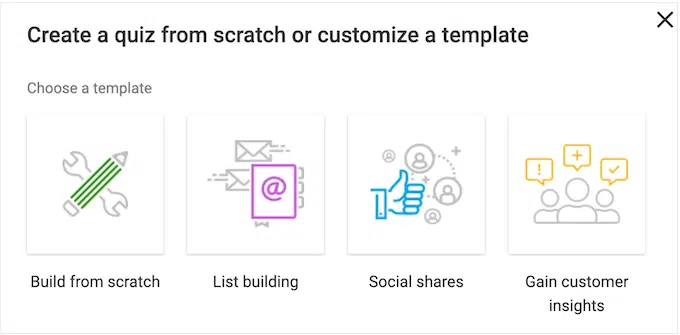
Desde o momento em que lancei o plugin, ficou claro que o Thrive Quiz Builder pensa nos questionários de forma diferente. Fui recebido por um assistente de configuração dedicado.
O primeiro passo não foi adicionar perguntas, foi escolher um objetivo. Queria construir a minha lista de e-mail, obter partilhas sociais ou apenas mostrar um resultado?
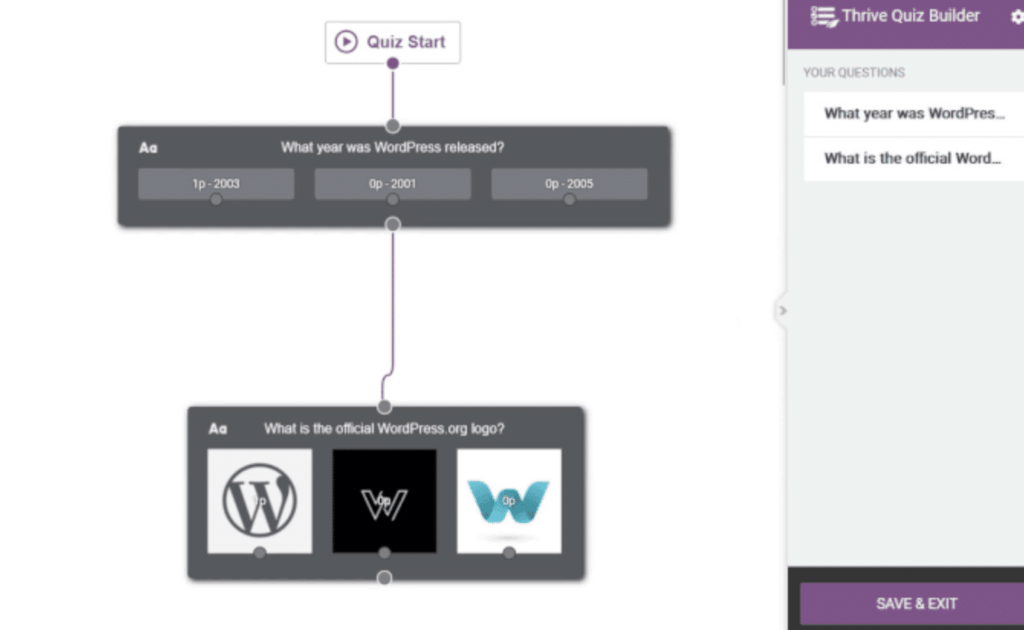
O construtor em si é um mapa visual, passo a passo, de todo o funil do questionário. Mostra-lhe todas as fases, desde a página de introdução às perguntas, ao importantíssimo portão de opt-in e, finalmente, à página de resultados.
Clica numa fase do mapa e ele leva-o ao editor dessa parte específica. Adicionar perguntas foi simples, mas o verdadeiro poder tornou-se óbvio quando comecei a definir a lógica.

Eu poderia literalmente desenhar linhas de uma resposta específica para uma pergunta de seguimento específica. Isto significava que eu podia criar um caminho dinâmico onde uma resposta podia levar a um resultado específico e outra resposta a algo diferente.
É incrivelmente poderoso para criar experiências de questionário altamente personalizadas. Definitivamente pareceu mais complexo do que um simples sistema de mapeamento, mas o editor visual tornou-o gerenciável.
O Que Gostei
A dedicação absoluta do Thrive Quiz Builder em ser uma ferramenta de marketing é a sua maior força. Todo o processo é construído em torno da otimização do seu funil de questionário para conversões.
A lógica visual de ramificação é uma característica verdadeiramente destacada. Ser capaz de enviar utilizadores por diferentes caminhos de perguntas com base nas suas respostas permite um nível de personalização que pode ser realmente útil.

As análises incorporadas também são impressionantes e focadas na performance. Os relatórios não mostram apenas como as pessoas responderam.
Eles mostram exatamente onde os utilizadores estão a desistir no seu funil de questionário, para que possa identificar pontos fracos e corrigi-los. Estes dados são inestimáveis para melhorar as taxas de conclusão.

Mas a funcionalidade que realmente o diferencia para mim é o teste A/B. Pode testar diferentes páginas de introdução umas contra as outras para ver qual delas leva mais pessoas a iniciar o questionário.
Quanto Custa?
O Thrive Quiz Builder é vendido de duas formas: uma licença independente para um único site e o Thrive Suite completo por $299 por ano. A página de preços da Thrive lista apenas o Suite, portanto, verifique a página do produto para o valor independente atual.
Isto dá-lhe acesso ao Thrive Quiz Builder mais todas as suas outras ferramentas focadas em conversão como Thrive Architect, Thrive Leads, Thrive Apprentice, Thrive Ultimatum, Thrive Ovation, Thrive Optimize, Thrive Comments.
3. Formidable Forms
O Formidable Forms é conhecido pelo seu incrível poder e flexibilidade, especialmente quando se trata de dados. É a ferramenta de eleição para programadores que querem construir aplicações complexas baseadas em formulários, como diretórios, listagens e calculadoras avançadas.
Fiel à sua natureza, a abordagem do Formidable aos questionários é tratada através de um Addon dedicado de Criador de Questionários. Esta funcionalidade é menos sobre funis de questionário chamativos e mais sobre a criação de avaliações poderosas e orientadas por dados.
- Avaliação do WordPress.org: 4,8 de 5 estrelas
- Instalações Ativas: 300.000+

A Minha Experiência
A minha jornada com o Formidable Forms foi muito diferente desde o início. Após ativar o seu plugin Quiz Maker, fui construir um novo formulário, mas não consegui encontrar quaisquer definições específicas de questionário no construtor principal.
Adicionei algumas perguntas de escolha múltipla para um simples questionário de trivia, mas não havia forma óbvia de marcar uma resposta como correta diretamente nas opções do campo.

Demorei um minuto a perceber o fluxo de trabalho. Com o Formidable, constrói-se o formulário primeiro e depois aplicam-se as regras do questionário. Toda a magia acontece nas definições de Ações e Notificações do formulário.
Aqui, adicionei uma nova ação chamada Pontuação do Questionário (também pode escolher Resultado do Questionário). Isto abriu um painel de configurações único e poderoso onde pude configurar todo o questionário.

O Que Gostei
O que realmente me fez entender é como o Formidable gere toda a lógica do questionário num local limpo e poderoso. Para cada pergunta, tive de configurar uma regra.
Parecia algo assim. Pergunta “Qual personagem de desenho animado vive num Ananás debaixo do mar”, se a resposta do utilizador for “Sponge Bob” atribui 1 ponto.

Depois de configurar a pontuação para todas as minhas perguntas, configurei a mensagem de resultados ali mesmo, no mesmo painel de ações. Pude usar códigos curtos especiais para exibir a pontuação final do utilizador ou a percentagem de respostas corretas.
Quanto Custa?
O Complemento Criador de Questionários está disponível a partir do plano Plus do Formidable Forms, que está atualmente a ser comercializado a 99,50 $ por ano.
Este plano também lhe dá acesso às suas integrações com serviços como Mailchimp e Constant Contact, bem como à sua biblioteca de modelos de formulários pré-construídos.
4. MemberPress
MemberPress é uma entrada um pouco única nesta lista porque não é um construtor de formulários ou questionários no seu âmago. É um dos plugins de adesão tudo-em-um mais poderosos e populares para WordPress.
A funcionalidade de questionário no MemberPress é basicamente uma parte integrada do seu Complemento de Cursos. Isto significa que os questionários são concebidos com um propósito muito específico em mente: ser usados como avaliações dentro de um curso online.
- Instalações Ativas: (Não disponível no WordPress.org, vendido como produto premium)
- Classificação do Utilizador: Amplamente respeitado como uma solução de topo para criação de adesões e cursos.
A Minha Experiência
Para chegar ao construtor de questionários, tive primeiro de passar pelo processo de criação de um curso online. Isto porque no MemberPress, um questionário é um elemento que adiciona diretamente ao currículo do seu curso como uma lição.
Usei o seu construtor de cursos visual para criar um esboço de curso simples com algumas secções e lições. Assim que a estrutura do meu curso estivesse no lugar, pude simplesmente criar um questionário com o editor Gutenberg padrão.

Construí facilmente o questionário digitando uma pergunta num campo de título e depois adicionando as respostas possíveis abaixo usando um simples botão “Adicionar Resposta”.
Para cada resposta que adicionei, havia uma simples caixa de seleção ao lado para marcá-la como correta. É um sistema direto concebido para testes pontuados.

O Que Gostei
Aquilo que mais aprecio no MemberPress é o seu foco completo. Sabe exatamente o que é e não tenta ser uma ferramenta de questionários que faz tudo.
Os questionários são concebidos para uma coisa e essa é apoiar um curso online. E para essa tarefa específica, a integração é brilhante.

Depois de construir as minhas perguntas, fui às definições do questionário. Aqui, pude definir a nota de aprovação para o questionário e personalizar as mensagens que os alunos veriam se passassem ou falhassem.
O livro de notas integrado também lhe dá uma visão clara de como todos os seus alunos estão a ter desempenho nos seus questionários, o que é essencial para gerir um programa educacional.
Quanto Custa?
A funcionalidade de questionários faz parte do Addon de Cursos integrado, que está incluído em todos os planos MemberPress. O plano de entrada Basic para MemberPress começa em 179,50 € por ano. Isto dá-lhe a plataforma completa de adesão, o construtor de cursos e todas as funcionalidades de questionários para usar num único site.
5. Interact Quiz Maker
O Interact não é um plugin nativo do WordPress, mas sim uma plataforma dedicada, baseada na web, para criar questionários, inquéritos e sorteios online.
Constrói o seu questionário no site do Interact usando o seu editor polido e depois incorpora-o no seu site WordPress usando um plugin dedicado.
- Instalações Ativas: (Não é um plugin WordPress. Integra-se através de um plugin oficial)
- Classificação do Utilizador: Muito popular entre profissionais de marketing e criadores pela sua atratividade visual e poderosas funcionalidades de geração de leads.

A Minha Experiência
Trabalhar com o Interact exigiu sair do mundo WordPress. Todo o processo de construção do questionário acontece no site deles, não no seu painel WordPress.
Após a inscrição, a primeira coisa que vi foi uma enorme biblioteca de modelos de questionários de aspeto profissional. Eles têm modelos para quase todas as indústrias que possa imaginar, o que é um ótimo ponto de partida.

Escolhi um modelo para um questionário de "Recomendação de Produto". O construtor era incrivelmente elegante e polido. É um fluxo de trabalho limpo, de esquerda para a direita, que o guia em cada passo.
Edita a página de capa, depois escreve as suas perguntas e, em seguida, configura os resultados. O editor é muito visual. Adicionar perguntas parecia mais criar diapositivos numa apresentação do que construir um formulário.

O Que Gostei
A parte mais poderosa da experiência foram os resultados e a lógica de ramificação. Pude mapear respostas para resultados específicos, mas também pude criar caminhos de ramificação complexos, semelhantes ao Thrive Quiz Builder.
Após configurar as perguntas, configurei as definições de geração de leads. Consegui configurar um formulário de captura de e-mail que aparecia mesmo antes de o utilizador ver os seus resultados, e pude conectá-lo facilmente ao meu serviço de marketing por e-mail.

Assim que o meu questionário foi concebido e a lógica definida, colocá-lo no meu site foi o passo final. Instalei o plugin oficial deles para WordPress, copiei um shortcode do meu painel do Interact e colei-o numa página.
Quanto Custa?
O Interact é uma ferramenta SaaS baseada em subscrição, e o seu preço é baseado no número de leads que recolhe por ano. O plano Lite de entrada começa em $27 por mês quando faturado anualmente. Este plano permite-lhe criar questionários ilimitados e recolher até 6.000 leads por ano.
Os Melhores Plugins Gratuitos de Quiz para WordPress
Quiz and Survey Master é o melhor plugin gratuito de quiz para WordPress, com 40.000 instalações ativas e uma classificação de 4,7 no WordPress.org. Ele oferece quizzes ilimitados, pontuação e páginas de resultados personalizadas sem pedir um cartão de crédito.
Os cinco plugins acima são ferramentas pagas, e o WPForms Quiz Addon é um recurso Pro. Se o seu orçamento for zero, estes são os quatro plugins gratuitos que eu recomendaria.
| Plugin | Instalações ativas | Avaliação do WordPress.org | Melhor uso gratuito | A contrapartida |
|---|---|---|---|---|
| Quiz and Survey Master | 40,000 | 4.7 | Quizzes pontuados com acompanhamento de resultados | Os utilizadores relatam que as funcionalidades mais avançadas estão nos níveis pagos |
| Quiz Maker by AYS | 20,000 | 4.9 | Perguntas de correspondência, classificação e verdadeiro ou falso | Uma versão Pro separada restringe as opções mais ricas |
| HD Quiz | 6,000 | 4.9 | Trivia leve que herda o estilo do seu tema | Criado para quizzes simples, não para captura de leads |
| Quiz Cat | 4,000 | 4.7 | Quizzes de personalidade curtos criados para partilha | Pontuação e captura de e-mail requerem a versão paga |
O Quiz and Survey Master tem a maior base de instalações de qualquer plugin de quiz gratuito no WordPress.org, e cobre quizzes pontuados e inquéritos numa única interface.
A geração de relatórios é mais simples do que qualquer uma das ferramentas pagas acima, que é a contrapartida por não pagar. Para um teste de sala de aula ou um quiz pontuado simples, isso geralmente é suficiente.
Cada um destes quatro colocará um quiz funcional no seu site, e para um teste de sala de aula ou um pouco de trivia, isso é suficiente. Nenhum deles coloca resultados condicionais, captura de leads com tags e relatórios no mesmo construtor, que é a lacuna que o WPForms Quiz Addon preenche.
Se está a comparar quizzes com inquéritos e sondagens, o mesmo construtor trata de ambos. O WPForms constrói qualquer formulário com um construtor de arrastar e soltar e sem código.
Qual é o Melhor Plugin de Questionários para WordPress?
Depois de passar muito tempo a criar questionários com cada uma destas ferramentas, um plugin destaca-se claramente como a melhor escolha geral.
Embora cada ferramenta tenha os seus próprios pontos fortes únicos, apenas uma delas consegue fazer tudo excecionalmente bem, tudo dentro de uma única plataforma intuitiva.
O Thrive Quiz Builder é uma ferramenta fantástica para profissionais de marketing puros, mas o seu foco intenso em funis pode ser excessivo para um questionário simples. O Formidable e o MemberPress são poderosos por direito próprio, mas servem propósitos muito específicos.
E embora o Interact crie questionários bonitos, toda a experiência acontece numa plataforma separada, que nunca parece verdadeiramente integrada com o seu site WordPress.
Os plugins gratuitos são uma opção real se não estiver pronto para gastar nada, e o Quiz and Survey Master, em particular, cobrirá um quiz pontuado direto.
Eles param quando quer que a página de resultados mude com base na resposta e que o lead seja marcado automaticamente.
É por isso que o WPForms é o vencedor claro para mim.
O WPForms é o construtor de formulários WordPress mais amigável para iniciantes. É o único plugin que lhe dá o melhor de TODOS os mundos.
Obtém o poder de marketing de resultados condicionais e captura de leads, a flexibilidade para criar questionários graduados, de personalidade ou ponderados, e a facilidade da interface nativa do WordPress.
Sem mencionar que o gerador de IA por si só o coloca numa liga diferente. Nenhuma outra ferramenta torna tão fácil ter um questionário completo e bem pensado pronto a funcionar em poucos segundos.
FAQs sobre os Melhores Plugins de Questionários para WordPress
Qual é o melhor plugin para questionários no WordPress?
O melhor plugin geral para questionários no WordPress é o WPForms.
Destaca-se porque combina um construtor fácil de usar, com arrastar e largar, com um poderoso Addon de Questionários.
Isto permite-lhe criar facilmente qualquer tipo de questionário, incluindo testes classificados, questionários de personalidade e avaliações ponderadas.
Funcionalidades como o gerador de questionários com IA, resultados condicionais e relatórios integrados tornam-no a escolha mais completa e versátil para qualquer objetivo.
Posso criar um questionário gratuitamente no WordPress?
Sim, pode criar um questionário básico gratuitamente no WordPress usando plugins como a versão gratuita do Watu Quiz. Estas ferramentas permitem-lhe configurar simples questionários classificados com perguntas de escolha múltipla.
No entanto, para funcionalidades mais avançadas como tipos de questionários de personalidade, captura de leads, relatórios detalhados e lógica condicional, normalmente precisará de um plugin premium como o WPForms Pro.
Como crio um questionário interativo no WordPress?
Para criar um questionário interativo no WordPress, precisa de um plugin que suporte funcionalidades como lógica condicional e resultados personalizados.
Uma ferramenta como o WPForms com o seu Quiz Addon é ideal para isso. Pode criar um questionário onde a página de resultados muda com base na pontuação ou tipo de personalidade do utilizador.
Para ainda mais interatividade, pode usar funcionalidades como feedback instantâneo após cada pergunta ou dividir o seu questionário num formato de várias páginas com uma barra de progresso para manter os utilizadores envolvidos.
Posso criar um questionário para gerar leads?
Absolutamente. Criar um questionário para gerar leads é uma das estratégias de marketing mais eficazes que pode usar. Para isso, precisa de um plugin de questionários com funcionalidades de captura de leads ou "email gating".
Com um plugin como o WPForms ou Thrive Quiz Builder, pode exigir que os utilizadores insiram o seu endereço de e-mail para verem os resultados do questionário.
As melhores ferramentas também permitem segmentar esses leads, marcando-os com base no resultado do questionário, permitindo um marketing de acompanhamento altamente direcionado.
Seguinte, O Melhor Construtor de Formulários IA para WordPress
Usar IA para gerar instantaneamente um questionário foi uma das funcionalidades mais proeminentes para mim nesta comparação, poupando imenso tempo na configuração inicial.
Para ver o que mais esta tecnologia pode fazer pelo seu fluxo de trabalho, consulte a nossa comparação sobre os melhores construtores de formulários IA e o que eles podem fazer por si.
Crie o Seu Formulário WordPress Agora
Pronto para construir o seu formulário? Comece hoje com o plugin construtor de formulários WordPress mais fácil. O WPForms Pro inclui muitos modelos gratuitos e oferece uma garantia de devolução do dinheiro em 14 dias.
Se este artigo o ajudou, siga-nos no Facebook e no X (Twitter) para mais tutoriais e guias gratuitos sobre WordPress.





