


Résumé IA
Choisir un plugin de formulaire pour votre site WordPress se résume généralement à une courte liste, et Formidable Forms et WPForms y ont tous deux leur place.
Formidable Forms vs WPForms est une comparaison plus serrée que ce que la plupart des articles admettent, puisque les deux plugins ont une note de 4,8 sur WordPress.org.
WPForms est le constructeur de formulaires que je choisirais pour la plupart des sites WordPress, et Formidable Forms est le spécialiste pour une tâche : transformer les soumissions en répertoires et calendriers front-end grâce à sa fonctionnalité Vues. WPForms achemine ces mêmes soumissions vers des articles WordPress, des feuilles de calcul, des PDF et des rapports à la place.
- Premières impressions : Formidable Forms et WPForms
- Premiers pas : Installation et configuration
- Utilisation quotidienne : Interface et expérience
- Le cœur du sujet : Fonctionnalités et caractéristiques
- Où vont les données de votre formulaire après la soumission
- Créer des formulaires avec l'IA : quels outils IA sont intégrés ?
- Aide quand vous en avez besoin : Support et documentation
- Mesurer ce qui fonctionne : analyses de formulaires intégrées
- Plans payants et tarifs comparés
- Mon verdict final : Formidable Forms vs WPForms
Premières impressions : Formidable Forms et WPForms
Formidable Forms et WPForms s'installent tous deux depuis le répertoire des plugins et s'ouvrent tous deux sur un constructeur visuel par glisser-déposer qui ne vous demande jamais de code.
La première impression que chacun donne vient de ce que son équipe a choisi de mettre en avant, et ce choix vous indique sur quoi chaque plugin est organisé.
Formidable Forms

Formidable Forms est sur WordPress.org depuis 2009, ce qui en fait l'un des plus anciens constructeurs de formulaires encore en développement actif. Il compte plus de 300 000 installations actives avec une note de 4,8 basée sur 1 382 évaluations. L'équipe l'a construit autour de ce qui arrive à une soumission après qu'elle soit arrivée.
Formidable Views, la fonctionnalité pour laquelle le plugin est le plus connu, affiche vos entrées sur le front-end sous forme de tableaux et de répertoires, et le constructeur vous montre cette ambition immédiatement avec plus de paramètres visibles dès le premier écran. Cela lui confère une courbe d'apprentissage légèrement plus raide.
WPForms

WPForms est arrivé sur WordPress.org en 2016 et fonctionne maintenant sur plus de 5 millions de sites, avec plus de 13 000 avis 5 étoiles derrière la même note de 4,8. Cela en fait le plugin de formulaire le plus installé sur la plateforme, et de loin.
Le plugin est le constructeur de formulaires le plus avancé dans l'espace WordPress qui couvre toute la gamme maintenant, d'un premier formulaire de contact à des agents IA qui construisent des formulaires pour vous, sans vous demander d'apprendre d'abord un panneau de configuration.
Premiers pas : Installation et configuration
L'installation est un non-événement pour les deux plugins, puisque vous recherchez dans le répertoire, cliquez sur Installer maintenant, puis sur Activer, puis collez une clé de licence si vous en avez acheté une. C'est entre l'activation et un formulaire en ligne sur une page que Formidable Forms et WPForms divergent.
Formidable Forms
Après l'activation, vous arrivez sur le tableau de bord Formidable et créez un formulaire à partir d'un modèle ou d'une toile vierge.
La bibliothèque de modèles a une catégorie dédiée aux modèles d'applications pour les job boards et les répertoires, ce qui est une touche intelligente.
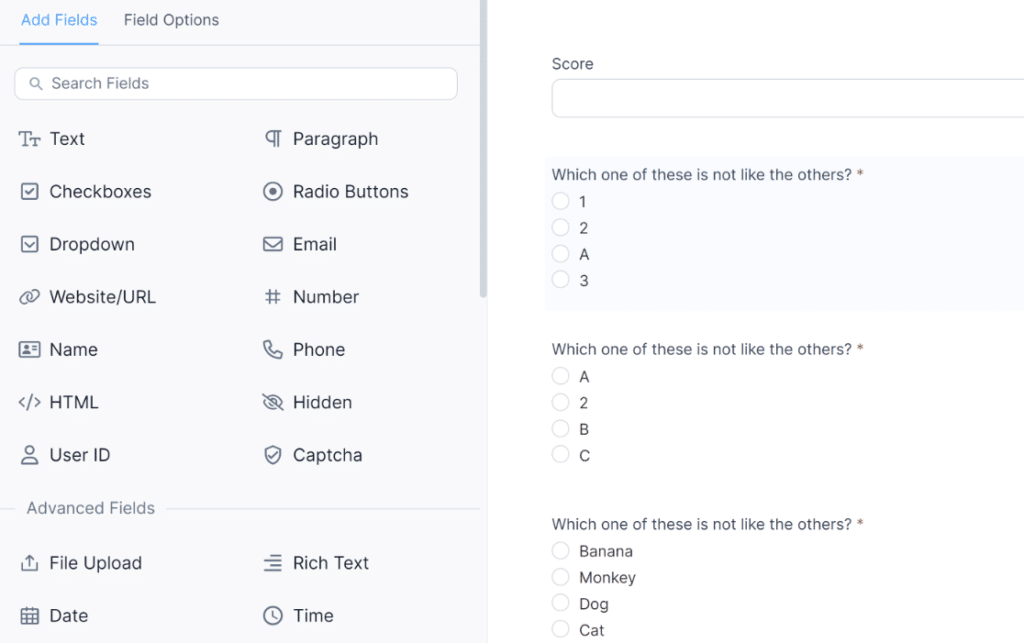
Ces modèles d'applications pré-faits sont une fonctionnalité Elite, donc sur les trois plans inférieurs, vous assemblez vous-même les mises en page.
WPForms
WPForms ouvre un assistant de configuration à l'activation qui vous guide à travers le premier formulaire, et vous pouvez choisir un modèle ou sélectionner Générer avec l'IA et décrire le formulaire en une phrase.
Pro débloque plus de 2 100 modèles de formulaires, ce qui couvre la plupart des cas d'entreprise avant que vous ne personnalisiez quoi que ce soit.

Vous pouvez créer un formulaire avec WPForms et commencer à collecter des données en moins de 5 minutes. Pour un formulaire de contact ou de prospects standard, le chemin est suffisamment court pour le confirmer. Vous décrivez ce que vous voulez, vérifiez les champs qu'il a générés, puis intégrez le bloc sur une page.
Utilisation quotidienne : Interface et expérience
La configuration se fait une fois et l'interface est celle avec laquelle vous vivez chaque semaine, donc l'utilisation quotidienne a plus de poids que toute première impression lorsque je compare Formidable Forms et WPForms.
Formidable Forms
Le constructeur Formidable est visuellement correct et expose davantage de lui-même que la plupart des plugins de formulaire.
Les options au niveau des champs et la logique conditionnelle se trouvent à côté de la configuration des vues et de l'organisateur d'applications, le tout accessible sans quitter le constructeur.

Formidable encadre les décisions supplémentaires entre vous et un formulaire terminé comme un juste échange pour ce que Views peut faire des données par la suite.
WPForms
L'éditeur WPForms place les champs à gauche et l'aperçu du formulaire au centre, avec les paramètres derrière des onglets clairement étiquetés pour que l'écran n'affiche que ce sur quoi vous travaillez.
WPForms met l'intelligence dans le produit, pas sur l'utilisateur : la logique conditionnelle, les paiements, les sondages et les calculs se trouvent derrière une interface simple.
Les thèmes de formulaire gèrent le style sans CSS, et l'intégration dans l'éditeur de blocs signifie choisir le formulaire dans une liste déroulante. Smart Edit donne à l'éditeur une boîte de dialogue, et taper ce que vous voulez est souvent plus rapide que de chercher le paramètre qui le fait.

Lui demander de rendre le champ téléphone obligatoire et d'afficher une question de suivi lorsque quelqu'un choisit une autre option prend une seule phrase, et chaque modification est instantanée, de sorte qu'un seul clic l'annule.
Gérer les formulaires après le lancement
Le véritable test d'un constructeur de formulaires arrive six mois plus tard, lorsque quelqu'un vous demande de corriger un formulaire que vous n'avez pas construit et que vous ouvrez un constructeur que vous n'avez pas touché depuis le printemps.
Formidable Forms vous récompense pour savoir où se trouvent ses paramètres. WPForms réduit ce que vous devez retenir, car un changement décrit dans Smart Edit fonctionne que vous vous souveniez ou non de l'onglet qui contient la logique conditionnelle.
Le cœur du sujet : Fonctionnalités et caractéristiques
WPForms et Formidable Forms se chevauchent sur bien plus de fonctionnalités que la plupart des comparaisons ne l'admettent, donc les blocs ci-dessous prennent les vraies différences une par une avec les deux plugins côte à côte.
Logique conditionnelle, répéteurs et champs de formulaire
Les deux plugins proposent la logique conditionnelle et les champs répétitifs dans leur niveau payant d'entrée, donc les bases sont égales.
WPForms applique une logique conditionnelle intelligente aux champs et aux pages ainsi qu'aux notifications et confirmations à partir de Basic. Basic ajoute également les champs que la plupart des sites recherchent ensuite.
- Champ Répéteur : Permet aux visiteurs de dupliquer un groupe de champs à l'intérieur d'un formulaire
- Champs Téléphone et Adresse Intelligents : Détection du pays et formats d'adresse intégrés
- Champs Date et Heure, Email Intelligent et Évaluation : Planification, saisie d'e-mail validée et évaluations par étoiles
- Champ Caméra : Capture de photos ou de vidéos à l'intérieur du formulaire

Le champ Recherche de Formidable extrait les options d'une liste déroulante des entrées d'un autre formulaire, de sorte que choisir une marque de voiture filtre la liste des modèles à partir de Basic et au-delà.
WPForms gère les listes déroulantes dépendantes avec une logique conditionnelle qui affiche la bonne deuxième liste déroulante pour tout ce qui a été choisi en premier, et Choix Dynamiques remplit automatiquement une liste déroulante à partir de vos articles ou produits.
La différence réside donc dans l'origine des options plutôt que dans la possibilité de les enchaîner.
Calculs
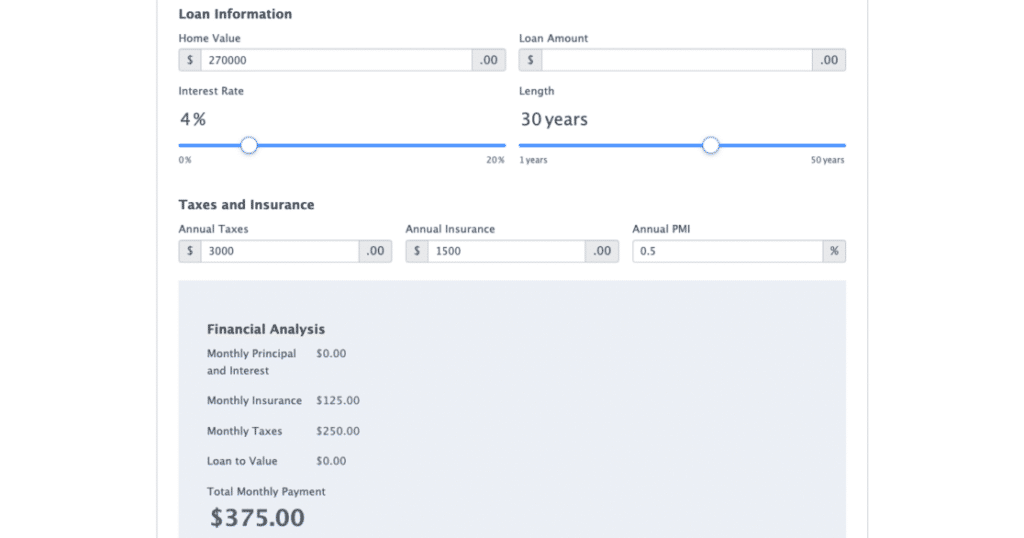
Le module complémentaire Calculs de WPForms exécute des formules en temps réel pour les formulaires de devis et les estimateurs d'expédition ainsi que pour le calcul de score et les calculateurs d'IMC, et Calculs IA écrit la formule de travail à partir d'une description simple des calculs.
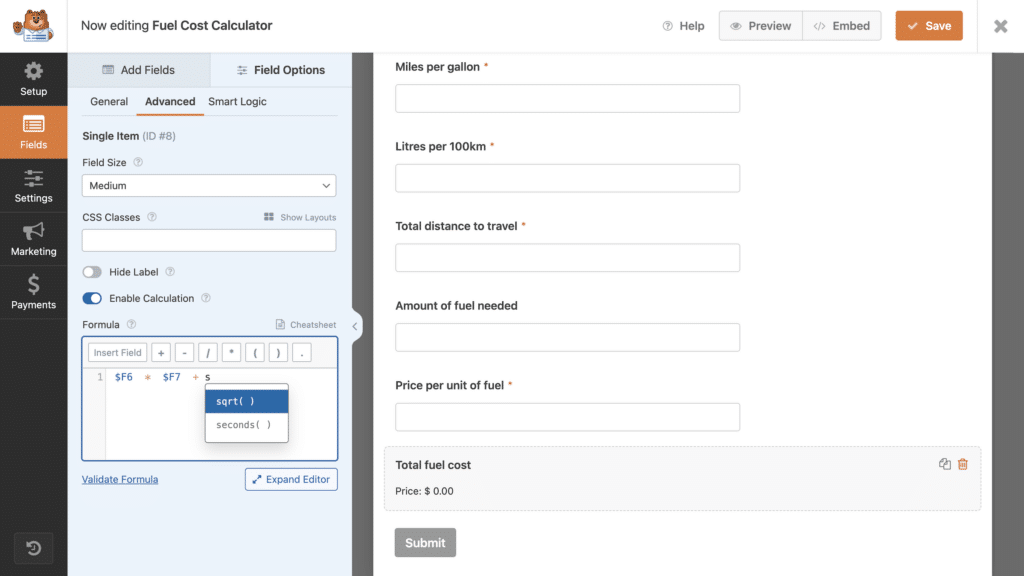
Formidable inclut des champs calculés à partir de son plan Basic à 39,50 $ et ajoute des modèles de calculatrice dans Business, tandis que WPForms place les Calculs dans Pro.
Ainsi, Formidable atteint les mathématiques de base avec un plan moins cher et WPForms atteint une formule finie sans que vous ayez à l'écrire.
Paiements
Les deux versions gratuites acceptent les paiements Stripe avec des frais de plateforme de 3 %, et WPForms Lite accepte PayPal et Square aux mêmes conditions.
Sur les plans payants, les deux convergent, car Formidable supprime ses frais dans Business et WPForms supprime les siens dans Pro, qui est le même échelon de 199,50 $ sur les deux échelles.
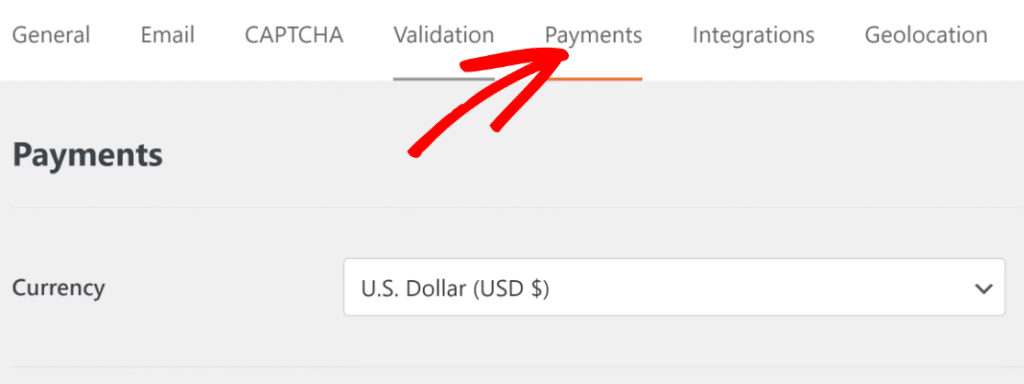
La logique conditionnelle sur Basic couvre tout sauf les paramètres de paiement Stripe, qui nécessitent Pro. Vérifiez donc cela avant d'acheter Basic si les paiements conditionnels sont l'objectif.
Pro ajoute également des codes de réduction et Elite ajoute Authorize.Net, tandis que les abonnements Stripe récurrents fonctionnent sur tous les niveaux payants. WPForms ne facture aucun frais de transaction sur les paiements Stripe Pro, Square Pro ou PayPal Commerce. Vous ne payez que les frais de votre processeur de paiement.
Spam, sécurité et conformité
WPForms inclut sa propre protection anti-spam dans toutes les versions, y compris Lite, et prend en charge reCAPTCHA ainsi que hCaptcha et Cloudflare Turnstile.

Basic ajoute des CAPTCHA personnalisés et une liste d'autorisation et de refus, ainsi que des outils de conformité GDPR et CCPA. ActiveLayer, le filtre anti-spam IA que WPForms recommande dans ses paramètres, s'installe en un clic par-dessus.
Formidable inclut une protection anti-spam sur tous les plans et répertorie les formulaires conformes WCAG sur ses niveaux payants, donc les deux sont solides ici et la protection anti-spam ne devrait pas décider de votre achat.
Intégrations et automatisation
C'est là que WPForms prend l'avantage en termes de largeur, et l'écart se creuse dans les niveaux supérieurs. Chez Plus, WPForms se connecte à dix services de marketing par e-mail contre quatre pour Formidable au même échelon de 99,50 $.

Plus apporte également Slack et Notion sans contrepartie Formidable, ainsi que Twilio pour les SMS et WhatsApp deux niveaux plus tôt que le niveau Business de Formidable pour Twilio.
Les niveaux supérieurs creusent encore l'écart.
- Pro : Zapier, Make, n8n, Google Sheets, Google Drive, Google Calendar et Dropbox
- Elite : Six CRM natifs (Salesforce, HubSpot, Pipedrive, Zoho CRM, ActiveCampaign et Airtable), où Formidable Elite en liste trois
- Automatisation Elite : Automatisation des entrées pour les exportations et suppressions planifiées, et Webhooks pour envoyer des entrées à n'importe quel point de terminaison sans connecteur intermédiaire
Formidable couvre un terrain similaire à ces deux derniers grâce à son module complémentaire API sur Business et à l'automatisation des actions de formulaire sur Elite.
Les fonctionnalités qu'un seul d'entre eux possède
Chaque plugin a des fonctionnalités que l'autre n'a pas, et les deux listes pointent dans des directions différentes. Du côté de WPForms, aucune de ces fonctionnalités n'apparaît dans les plans de Formidable, et elles se trouvent aux côtés des exclusivités d'intégration listées ci-dessus.
- Formulaires hors ligne : Continue de collecter les soumissions lorsqu'une connexion est perdue
- Formulaires de prospects : Transforme n'importe quel formulaire en une mise en page de capture de prospects à forte conversion
- Verrouillage de formulaire : Protège un formulaire par mot de passe, le restreint aux utilisateurs connectés ou limite ses entrées
- Champ appareil photo : Capture de photo ou de vidéo dans le formulaire
- Analytique de formulaire intégrée : un tableau de bord de conversion sans équivalent chez aucun autre niveau de Formidable.
Les exclusivités de Formidable se concentrent sur une tâche : faire fonctionner votre site comme une application de données.
- Vues et graphiques Formidable (Plus) : Affichez les données des entrées sur le front-end sous forme de tableaux, de calendriers ou d'annuaires
- Modification front-end et en ligne (Plus) : Les utilisateurs mettent à jour leurs propres soumissions sans toucher à l'administration
- Champ de recherche (Basic) : Chaîne des listes déroulantes à partir des entrées d'autres formulaires
- Générateur de marque blanche et configurateur de produits WooCommerce (Elite) : Extras pour agences et boutiques
Où vont les données de votre formulaire après la soumission
WPForms et Formidable Forms empruntent des chemins différents une fois qu'une soumission arrive, et c'est dans cette dimension que les deux produits sont le plus clairement conçus pour des tâches différentes.
WPForms
WPForms déplace vos données là où le travail s'effectue.
Publication d'entrées publie les entrées en tant qu'articles WordPress sur Pro, de sorte que les articles d'invités et les témoignages deviennent du contenu réel que votre thème rend et que votre recherche de site couvre, sans donner aux contributeurs un accès administrateur.

À partir de là, les données continuent de circuler dans la direction dont vous avez besoin.
- Enquêtes et sondages : Rapports d'enquête interactifs avec score NPS, échelles de Likert et résultats de sondage en direct que vous pouvez intégrer sur le front-end
- PDF : Les entrées deviennent des documents de marque à partir d'un modèle
- Google Sheets et Airtable : les soumissions arrivent dans une feuille de calcul ou une base en temps réel
- Automatisation des entrées : Planifie les exportations et les suppressions pour que le rapport du vendredi s'exécute tout seul
- Webhooks : envoie les entrées partout où vous les pointez
WPForms est conçu autour des résultats : prospects capturés, paiements collectés, données organisées et flux de travail automatisés.
Formidable Forms
Formidable Views prend vos entrées et les affiche sur le front-end sous forme de tableaux et de calendriers ou en tant qu'annuaire consultable tel qu'un tableau d'offres d'emploi ou une liste immobilière, avec filtrage et vues imbriquées pour des éléments tels que les avis.
Les graphiques créés à partir des données d'entrée sont mis à jour à mesure que de nouvelles soumissions arrivent, et la modification front-end et en ligne permet aux utilisateurs de mettre à jour leurs propres entrées sans toucher à l'administration.
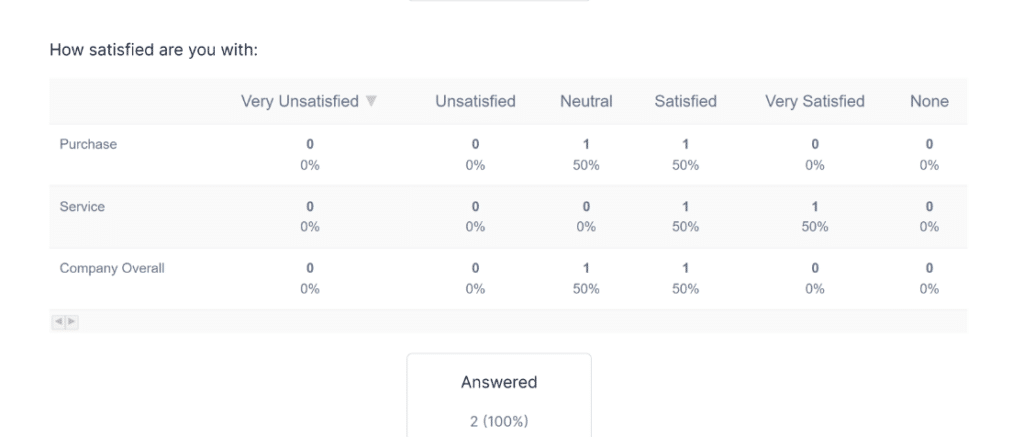
Tout cela commence à partir de Plus, tandis que l'action Créer des articles WordPress de Formidable se situe à Basic, où la publication d'entrées de WPForms est un module complémentaire Pro.
Ainsi, lorsque votre site lui-même est la base de données, Formidable Views est l'outil spécialisé pour cette tâche et WPForms répond au même besoin en publiant les entrées sous forme d'articles et en les acheminant ailleurs plutôt qu'en rendant un tableau front-end.
Créer des formulaires avec l'IA : quels outils IA sont intégrés ?
La création de formulaires par IA est gratuite sur WPForms et commence au plan Business de Formidable à 199,50 $, ce qui fait la différence pour la plupart des gens. Les deux plugins abordent l'IA sous des angles différents.
WPForms
IA à l'intérieur du constructeur
L'IA de WPForms se trouve dans le constructeur de formulaires lui-même, où Smart Edit est une boîte de dialogue qui modifie les champs et les paramètres en votre nom et AI Choices remplit un champ déroulant ou de cases à cocher à partir d'une courte description.
Chaque modification est instantanément enregistrée pour une annulation en un clic, et Smart Edit gère le travail de configuration qui implique habituellement de chercher dans les onglets.
- Ajoute, supprime et réorganise les champs
- Active ou désactive les paramètres obligatoires et met à jour le texte d'espace réservé
- Configure la logique conditionnelle et met en place les notifications par e-mail
- Génère des formules de calcul
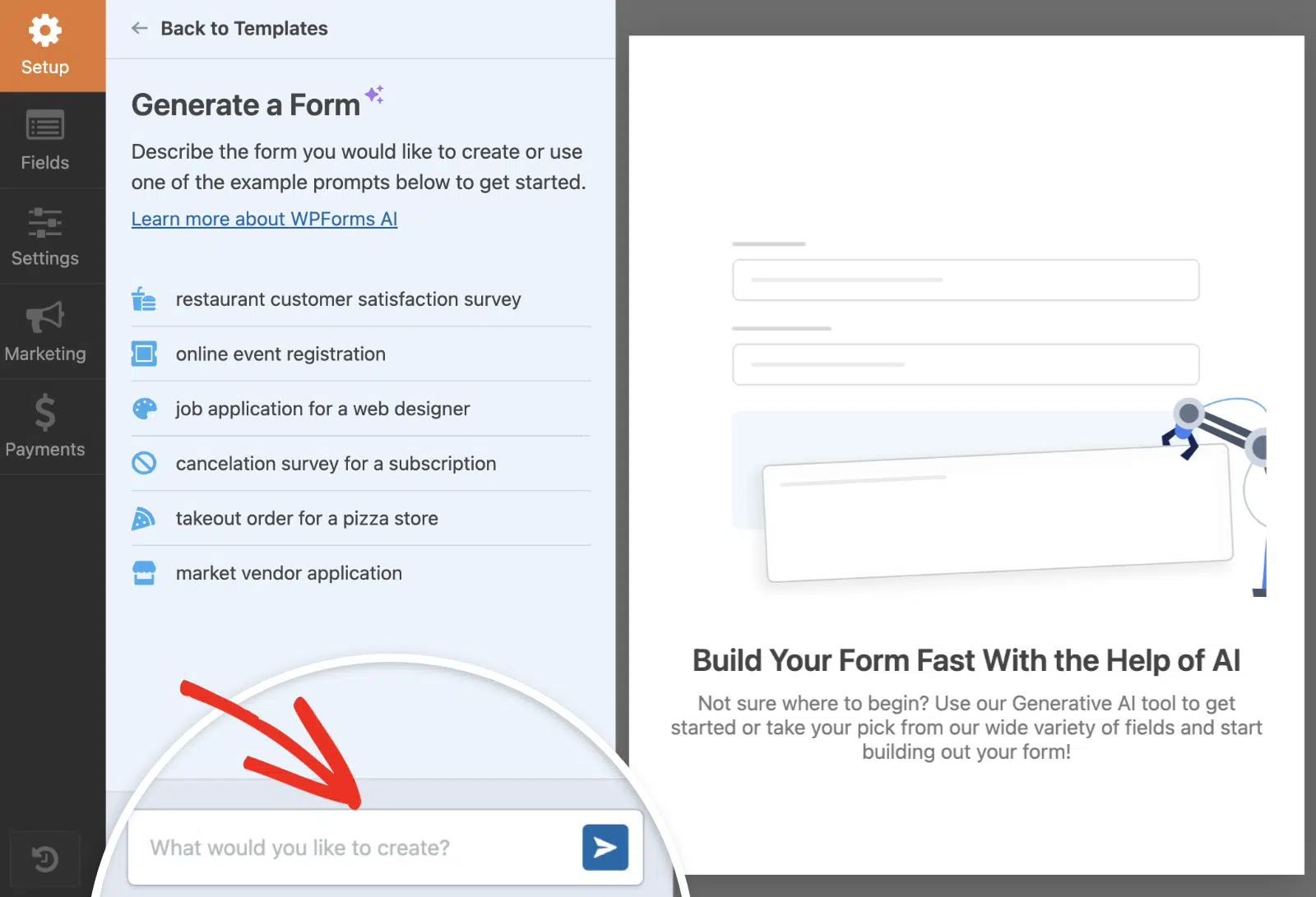
La génération complète de formulaires à partir d'une invite est incluse avec toute licence payante, et AI Calculations est inclus avec le module complémentaire Calculations sur Pro.
Smart Edit et AI Choices sont gratuits sur Lite et sur tous les plans payants. La traduction par IA transforme un formulaire terminé dans une autre langue.
Smart Edit configure la logique conditionnelle et les notifications depuis l'intérieur du constructeur partout où votre licence les inclut, donc la voie de l'assistant externe n'est pas la seule façon dont l'IA de WPForms atteint ces paramètres.
L'IA en dehors du constructeur
WPForms répond également aux assistants IA en dehors du constructeur grâce à la prise en charge de l'écriture pour l'API WordPress Abilities, la norme WordPress ouverte plutôt qu'un point d'accès propriétaire.
Vous connectez des assistants comme Claude et ChatGPT via WPVibe, un serveur MCP gratuit, sur WordPress 6.9 ou plus récent.
Cela fonctionne sur Lite avec l'ensemble de champs standard, et les plans payants ajoutent les champs téléphone et date ainsi que les téléchargements de fichiers. Ouvrez n'importe quel formulaire et allez dans Paramètres » IA MCP pour installer WPVibe et activer l'accès en écriture sans quitter le constructeur.

Formidable Forms
L'IA de Formidable commence à Business. Son chemin MCP pour Claude ou ChatGPT nécessite le module complémentaire API sur Business et supérieur, et à partir de là, l'assistant peut créer des formulaires et des entrées ainsi que des Vues et des applications entières.
Le générateur d'invites intégré est également Business et supérieur, et selon la propre page AI Form Builder de Formidable, il est préférable pour les formulaires de base, tandis qu'ils recommandent la voie MCP pour tout ce qui est plus avancé.

L'intégration ChatGPT est livrée avec 1 000 crédits IA mensuels sur Business et 3 000 sur Elite, et il n'y a pas d'IA sur la version gratuite ou sur Basic et Plus.
Cette voie MCP peut assembler une application Vues à partir d'une description une fois que vous payez pour Business, et l'IA de WPForms fonctionne à l'intérieur du constructeur à partir du plugin gratuit et répond également aux mêmes assistants via l'API Abilities ouverte.
Aide quand vous en avez besoin : Support et documentation
Le support est difficile à comparer équitablement, car l'expérience de chaque personne n'est qu'un échantillon, donc cette section se concentre sur les aspects vérifiables du support de Formidable Forms et de WPForms.
Formidable Forms
Formidable utilise un système de tickets hiérarchisé avec un support Standard sur ses deux plans inférieurs et un support Prioritaire sur le plan Business, puis un support Elite sur le plan supérieur, soutenu par une documentation complète.
Les plans supérieurs obtiennent des réponses plus rapides selon l'arrangement habituel, et les plans payants bénéficient d'une période de remboursement de 14 jours.
WPForms
WPForms vous offre un support humain rapide sur chaque plan payant, avec un support prioritaire sur Pro et un support premium sur Elite.
La documentation est exhaustive, et la bibliothèque pour développeurs contient plus de 500 extraits de code pour les cas où vous souhaitez utiliser du code, ainsi que des hooks, des webhooks et un support d'agent IA via l'API WordPress Abilities.
Les deux plugins ont une note de 4,8 sur WordPress.org, et la moyenne de WPForms repose sur plus de dix fois plus de notes, ce qui indique que le score a été maintenu sur une base d'utilisateurs beaucoup plus large et plus diversifiée.
Chaque plan payant de WPForms est assorti d'une garantie de remboursement de 14 jours à 100 %. Le désavantage de tester le support vous-même est donc limité.
Mesurer ce qui fonctionne : analyses de formulaires intégrées
Une fois qu'un formulaire est en ligne, la question suivante est de savoir s'il convertit, et WPForms est le seul des deux plugins à disposer d'un tableau de bord d'analyse de formulaires intégré, ce qui en fait l'écart de capacités le plus important dans cette comparaison.
WPForms
WPForms dispose d'une analyse intégrée des formulaires à l'intérieur du plugin, qui ne nécessite rien de plus à installer et aucun compte Google Analytics ni code de suivi à configurer au préalable. Le tableau de bord suit cinq indicateurs pour chaque formulaire publié.
- Vues et Interactions : Combien de personnes ont vu le formulaire et combien ont commencé à le remplir
- Taux de Conversion : Soumissions par rapport aux vues, avec un objectif que vous définissez et un anneau de progression qui le suit
- Abandonnements et Erreurs : Où les gens ont abandonné et quels champs ont généré des erreurs de validation

Le tableau au niveau des champs est la partie qui change les décisions, car il montre combien de temps les visiteurs ont passé sur chaque champ et où ils ont abandonné.
Le chat IA intégré lit vos données de formulaire réelles et répond aux questions en langage clair, ce qui est plus rapide que de lire des graphiques lorsque vous voulez simplement savoir quel formulaire sous-performe.

Les analyses de n'importe quel formulaire s'exportent en CSV ou s'impriment sur des fenêtres prédéfinies de 7 à 90 jours ou une plage personnalisée, et les aperçus de formulaires ne sont jamais comptabilisés et les administrateurs et éditeurs connectés sont automatiquement exclus.
Vos données de suivi restent dans votre propre base de données WordPress, donc rien ne va à un service extérieur. Nous avons un guide sur la façon de transformer ces chiffres en corrections si vous souhaitez la version pratique.
Formidable Forms
Formidable Forms possède des éléments de cela sans reporting à domicile, puisque le suivi des utilisateurs arrive à Plus et l'abandon de formulaire à Business, tandis que les graphiques et diagrammes visualisent les données que les gens ont soumises via Views.
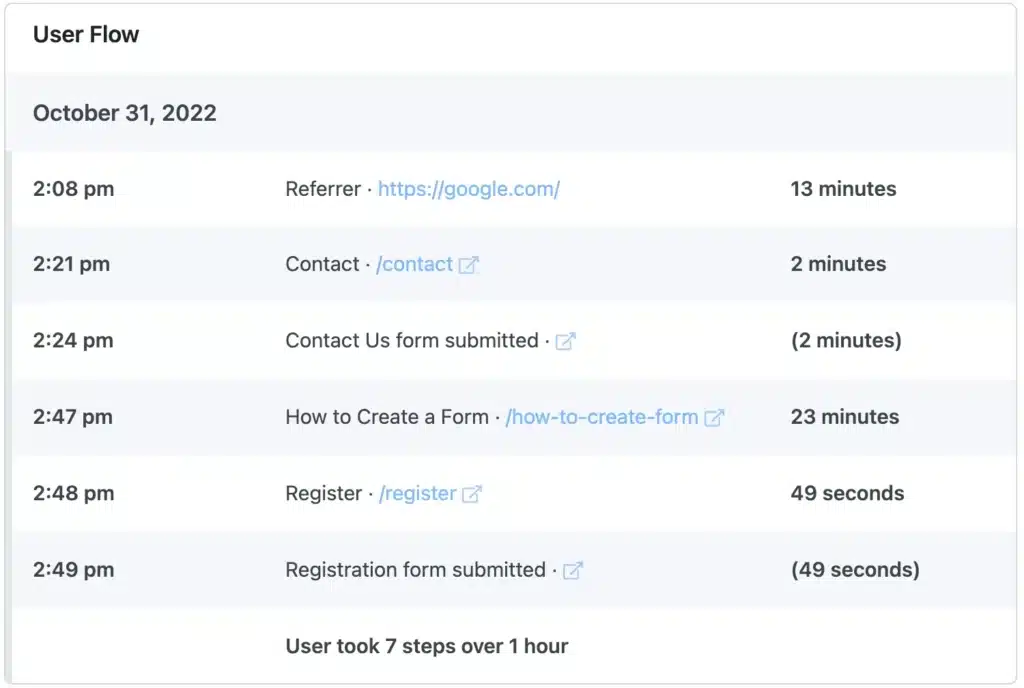
Les graphiques de ce que les gens ont soumis et les analyses de l'efficacité du formulaire sont des questions différentes, et Formidable répond à la première.
Le taux de conversion et le taux d'abandon au niveau des champs n'ont pas d'équivalent dans ses niveaux, tandis que WPForms répond aux deux questions car Enquêtes et Sondages gère le reporting des données d'entrée avec des rapports interactifs et des résultats de sondage en direct.
Plans payants et tarifs comparés
Formidable Forms et WPForms ont des prix quasiment identiques, puisque tous deux offrent 50 % de réduction la première année et se renouvellent au tarif normal, tandis que trois des quatre niveaux correspondent au dollar près. La décision dépend donc de ce que chaque niveau inclut.
Versions gratuites : Formidable Forms Lite vs WPForms Lite
La version gratuite de Formidable stocke chaque entrée dans votre base de données WordPress, et WPForms Lite vous envoie plutôt chaque soumission par e-mail et conserve une sauvegarde Lite Connect qui se restaure dans votre tableau de bord lors de la mise à niveau, tout en incluant une édition de formulaire par IA que le plugin gratuit de Formidable n'a pas.
Formidable Lite inclut également les champs téléphone et masqués ainsi que des blocs HTML, et il accepte les paiements Stripe avec des frais de transaction.
WPForms Lite inclut le constructeur complet et tous les champs standard, et la version gratuite peut ajouter ou réorganiser les champs par chat et remplir automatiquement les listes de choix tandis que l'IA de Formidable attend jusqu'à Business.
Lite est également livré avec une liste plus longue que la plupart des gens ne s'y attendent.
- Champs de paiement avec Stripe, PayPal et Square (frais de plateforme de 3 %)
- Constant Contact, Form Themes et la protection anti-spam moderne
- reCAPTCHA, hCaptcha et Cloudflare Turnstile
- Smart Edit et AI Choices
Il y a une ventilation plus détaillée dans WPForms Lite vs Pro si vous voulez la comparaison complète.
Tarifs de Formidable Forms
Les prix de Formidable proposent quatre niveaux, tous facturés annuellement avec 50 % de réduction la première année.
- Basic : 39,50 $ pour 1 site, renouvellement à 79 $
- Plus : 99,50 $ pour 3 sites, renouvellement à 199 $
- Business : 199,50 $ pour jusqu'à 7 sites, renouvellement à 399 $
- Elite : 299,50 $ pour des sites illimités, renouvellement à 599 $
Ce qui se débloque où est plus important que le nombre.
- Basic : Logique conditionnelle, répétiteurs, listes déroulantes en cascade, gestion des entrées, calculs, téléchargements de fichiers et création de publications WordPress
- Plus : Vues, graphiques et diagrammes, édition front-end, pages de destination et suivi des utilisateurs
- Business : Paiements sans frais, modèles de calculatrice, enquêtes, quiz, signatures, géolocalisation, PDF, Zapier, Google Sheets et toutes les fonctionnalités IA
- Elite : Marque blanche, le configurateur WooCommerce et ses trois intégrations CRM

Tarifs WPForms
Les tarifs de WPForms sont identiques, facturés à l'année avec la remise d'introduction de 50 %.
- Basique : 49,50 $ pour 1 site, renouvellement à 99 $
- Plus : 99,50 $ pour 3 sites, renouvellement à 199 $
- Pro : 199,50 $ pour 5 sites, renouvellement à 399 $
- Elite : 299,50 $ pour des sites illimités, renouvellement à 599 $
Les déblocages fonctionnent comme suit.
- Basique : Logique conditionnelle, gestion des entrées, téléversements de fichiers, formulaires multipages, champs Répéteur et Appareil photo, CAPTCHAs personnalisés et génération complète de formulaires par IA
- Plus : Dix services de marketing par e-mail plus Slack, Twilio et Notion
- Pro : Paiements sans frais, calculs, sondages et enquêtes, suite d'analyse complète, boîte à outils de conversion et soumissions post-formulaire
- Elite : Six CRM, Authorize.Net, webhooks, automatisation des entrées et multisite

| Point de prix | WPForms | Formidable Forms | Sites |
|---|---|---|---|
| Entrée | Basique, 49,50 $ (renouvellement à 99 $) | Basique, 39,50 $ (renouvellement à 79 $) | 1 et 1 |
| Deuxième | Plus, 99,50 $ (renouvellement à 199 $) | Plus, 99,50 $ (renouvellement à 199 $) | 3 et 3 |
| Troisième | Pro, 199,50 $ (renouvellement à 399 $) | Business, 199,50 $ (renouvellement à 399 $) | 5 et 7 |
| Haut | Elite, 299,50 $ (renouvellement à 599 $) | Elite, 299,50 $ (renouvellement à 599 $) | Illimité et illimité |
Trois des quatre niveaux sont identiques en prix, et le seul écart se situe au niveau d'entrée. Le niveau Basique de Formidable coûte 10 $ de moins la première année et son niveau à 199,50 $ couvre 7 sites contre 5 pour le niveau Pro de WPForms.
WPForms inclut la création de formulaires par IA sur tous les plans et ajoute la suite d'analyse ainsi que les formulaires hors ligne et de prospects au niveau Pro, où le niveau Business de Formidable n'a pas d'équivalent.
Les paiements sans frais coûtent le même prix de 199,50 $ des deux côtés, et les champs calculés de Formidable arrivent plus tôt au niveau Basique, tandis que le module complémentaire Calculs de WPForms arrive au niveau Pro avec l'IA écrivant la formule.
Mon verdict final : Formidable Forms vs WPForms
WPForms est mon choix pour la plupart des sites WordPress, et il remporte cette comparaison sur la gamme et sur le prix pour ce que vous obtenez, et sur le fait d'être le seul des deux à mesurer si un formulaire fonctionne.
Pourquoi WPForms se démarque
WPForms couvre toute la gamme, du premier formulaire de contact à la logique conditionnelle intelligente, aux calculs, aux flux de paiement, aux enquêtes et aux agents IA qui créent et modifient vos formulaires, et ses 39 modules complémentaires sont tous de première partie.
Des prix identiques sur trois des quatre niveaux signifient que la plus large bibliothèque de modules complémentaires et les six CRM natifs arrivent sans surcoût, et l'opération de support derrière plus de 5 millions de sites et plus de 13 000 avis 5 étoiles a été testée à une échelle digne de confiance.
Les modifications intelligentes et les choix d'IA sont gratuits sur Lite, où la capacité Formidable équivalente commence à 199,50 $. Le tableau de bord de conversion n'a pas d'équivalent de l'autre côté, quel que soit le prix.
FAQ sur Formidable Forms vs WPForms
Formidable Forms vs WPForms revient constamment parmi les utilisateurs de WordPress, et la même poignée de questions l'accompagne. Voici des réponses directes aux plus courantes.
Formidable Forms est-il meilleur que WPForms ?
WPForms est le meilleur choix pour la plupart des sites WordPress, car il couvre tout, d'un formulaire de contact à la logique conditionnelle, aux calculs, aux paiements, aux sondages et à l'automatisation par agent IA, inclut la modification gratuite de formulaires par IA, et est le seul des deux avec des analyses de formulaires intégrées.
Formidable Forms est le spécialiste lorsque vous avez besoin d'afficher les soumissions sur le front-end sous forme d'annuaire ou de calendrier via Views, une tâche que WPForms gère en publiant les entrées comme des articles à la place.
WPForms a-t-il des calculs, des champs répétitifs et une logique conditionnelle ?
Oui. WPForms inclut une logique conditionnelle intelligente et le champ Répéteur dès son plan Basic, et le module complémentaire Calculs dans Pro exécute des formules en temps réel pour les devis, l'expédition et le score des prospects, avec des Calculs IA écrivant la formule à partir d'une description simple.
Formidable Forms propose également la logique conditionnelle, les répéteurs et les champs calculés dès son plan Basic.
La version gratuite de WPForms stocke-t-elle les entrées ?
Pas dans le tableau de bord WordPress sur Lite, car WPForms Lite vous envoie chaque soumission par e-mail et conserve une sauvegarde Lite Connect qui se restaure dans votre tableau de bord lors de la mise à niveau, tandis que la version gratuite de Formidable stocke les entrées dans votre base de données dès le départ.
Le stockage des entrées dans WPForms arrive au plan Basic pour 49,50 $ par an avec la logique conditionnelle et les téléchargements de fichiers, et WPForms Lite est le seul des deux plugins gratuits qui inclut la modification de formulaires par IA.
Puis-je passer de Formidable Forms à WPForms ?
Oui, bien que vous reconstruisiez les formulaires eux-mêmes, car aucun des deux plugins n'a d'importateur natif pour les formulaires de l'autre.
Vos entrées sont déplacées, car Formidable exporte les entrées vers un fichier CSV dans tous les plans et l'importateur d'entrées de WPForms mappe les colonnes d'un fichier CSV sur les champs de votre nouveau formulaire.
WPForms et Formidable Forms fonctionnent-ils tous deux avec des assistants IA comme Claude ?
Oui, les deux se connectent à des assistants comme Claude, ChatGPT et Cursor.
WPForms le fait grâce à un support d'écriture pour l'API ouverte WordPress Abilities, connecté via le serveur gratuit WPVibe MCP, et cela fonctionne sur le plugin gratuit ainsi que sur tous les plans payants.
Pendant ce temps, la voie MCP de Formidable nécessite son module complémentaire API sur les plans Business et supérieurs, donc cela commence à 199,50 $ par an.
Lequel est le plus facile à utiliser, WPForms ou Formidable Forms ?
WPForms est plus facile à utiliser, car la génération par IA et la bibliothèque de modèles vous permettent de publier un formulaire plus rapidement et Smart Edit configure la logique conditionnelle et les notifications à partir d'une phrase.
Formidable Forms met plus de paramètres à l'écran, ce qui est payant une fois que vous savez où ils se trouvent, et les deux sont beaucoup plus faciles que de coder un formulaire à la main.
Puis-je voir comment mes formulaires se comportent réellement ?
Avec WPForms, oui, et c'est la différence la plus claire entre les deux.
WPForms Analytics suit les vues, les interactions, le taux de conversion, les abandons et les erreurs, plus un tableau au niveau du champ montrant exactement où les visiteurs abandonnent, les objectifs de conversion et un chat IA qui répond aux questions sur vos données, le tout sur Pro ou Elite.
Formidable Forms a le suivi des utilisateurs et l'abandon de formulaire, mais pas de tableau de bord de performance des formulaires.
Ensuite, découvrez ce que vos formulaires WordPress peuvent faire avec de meilleures données
Si la section analytique est ce qui a attiré votre attention, la prochaine étape logique est de faire quelque chose concernant les visiteurs qui n'appuient jamais sur soumettre.
Le module complémentaire Form Abandonment capture les entrées partielles en temps réel, de sorte que les personnes que votre tableau de bord compte comme abandonnées parviennent toujours à votre boîte de réception avec une adresse e-mail utilisable.
Et si vous êtes toujours en train de présélectionner, WPForms reçoit le même traitement caractéristique par caractéristique par rapport à Gravity Forms et Forminator ainsi qu'à Ninja Forms afin que vous puissiez consulter la comparaison qui correspond à ce que vous utilisez aujourd'hui.
Créez votre premier formulaire avec WPForms
Prêt à créer votre formulaire ? Commencez dès aujourd'hui avec le plugin de création de formulaires WordPress le plus simple. WPForms Pro inclut de nombreux modèles gratuits et offre une garantie de remboursement de 14 jours.
Si cet article vous a aidé, veuillez nous suivre sur Facebook et Twitter pour plus de tutoriels et de guides WordPress gratuits.





