



Resumen de IA
¿Estás creando un sitio web con un presupuesto ajustado y necesitas una solución de formularios? Quizás buscas un formulario de contacto sencillo, o tal vez necesitas algo más complejo como un formulario de pago.
Mientras buscas en el directorio de plugins de WordPress, WPForms llama tu atención. Pero quizás te preguntes: ¿es demasiado bueno para ser verdad?
¿Puedes usar WPForms gratis? ¿O es uno de esos frustrantes plugins freemium que te permiten instalar pero bloquean toda la funcionalidad útil hasta que pagas?
Buenas noticias: WPForms ofrece una versión gratuita robusta que podría sorprenderte con sus capacidades. En este artículo, explicaré exactamente qué obtienes con la versión gratuita de WPForms (conocida como WPForms Lite) y cómo se compara con WPForms Pro.
Crea tu formulario de WordPress ahora
¿Puedes usar WPForms gratis?
Sí, puedes usar WPForms gratis. WPForms ofrece una versión gratuita robusta llamada WPForms Lite. No es solo una demostración descafeinada: es un plugin constructor de formularios de arrastrar y soltar totalmente funcional que puedes usar sin limitaciones.
Con WPForms Lite, tienes la libertad de crear un número ilimitado de formularios, y cada uno es completamente funcional.
Lo mejor de todo es que tus formularios no estarán plagados de marcas o anuncios molestos. Ya sea que necesites un formulario o cien, WPForms te cubre, todo sin costarte un céntimo.
Funciones de WPForms Lite
Muchas versiones gratuitas de plugins premium pueden estar severamente limitadas, dejando a los usuarios frustrados. Sin embargo, WPForms Lite rompe este molde al ofrecer un conjunto robusto de funciones que pueden satisfacer las necesidades de muchos usuarios.
Exploremos lo que obtienes con la versión gratuita de WPForms.
Sin limitación en el número de formularios o tamaño de los mismos
Primero, permíteme enfatizar que WPForms Lite es verdaderamente un plugin constructor de formularios totalmente funcional.
He usado versiones gratuitas de plugins premium que eran esencialmente inútiles, con todas las funciones excepto las más básicas eliminadas o severamente limitadas en su uso.
Este no es el caso de WPForms Lite. Puedes crear tantos formularios en tu sitio como necesites, hacerlos tan largos y detallados como quieras, y no tendrás que preocuparte por el logo de la marca WPForms pegado por todas partes, haciendo que tu sitio parezca poco profesional. Los formularios que creas con la versión gratuita se ven tan pulidos como los formularios básicos que harías con el plugin Pro.
Para ser claros, a menos que necesites algunas de las funcionalidades avanzadas de WPForms Pro, puedes seguir usando WPForms Lite indefinidamente para crear formularios básicos a tu gusto.
Constructor de formularios de arrastrar y soltar
Al igual que WPForms Pro, WPForms Lite ofrece un constructor de formularios de arrastrar y soltar súper intuitivo que te permitirá publicar tu primer formulario en menos de cinco minutos.

Conozco la frustración de lidiar con plugins de formularios gratuitos que no son nada fáciles de usar, así que es refrescante que la funcionalidad intuitiva del mejor constructor de formularios de WordPress esté disponible en la versión gratuita.
WPForms Lite incluye todos los campos de formulario esenciales que necesita para crear un formulario básico, como:
- Texto de una sola línea
- Texto de párrafo
- Desplegable
- Opción múltiple (botones de radio)
- Casillas de verificación
- Números
- Nombre
- Correo electrónico
- Captcha de control deslizante numérico
También tiene acceso a las opciones básicas de campos de WPForms, que incluyen:
- Tamaño del campo (Pequeño, Mediano o Grande)
- Texto de marcador de posición
- Limitar longitud del texto
- Valores predeterminados
- Etiquetas inteligentes
- Clases CSS
- Campos de formulario ocultos

Crear un formulario no podría ser más sencillo: simplemente arrastre y suelte los campos que desee en su formulario, realice las personalizaciones necesarias y ¡listo!
WPForms también garantiza que todos los diseños de formularios sean totalmente adaptables a dispositivos móviles por defecto, por lo que independientemente de cómo diseñe su formulario, se verá genial y proporcionará una excelente experiencia de usuario en cualquier dispositivo.
Notificaciones y confirmaciones de formulario instantáneas
WPForms Lite envía notificaciones por correo electrónico personalizables a una dirección de correo electrónico de su elección cada vez que alguien envía un formulario en su sitio.
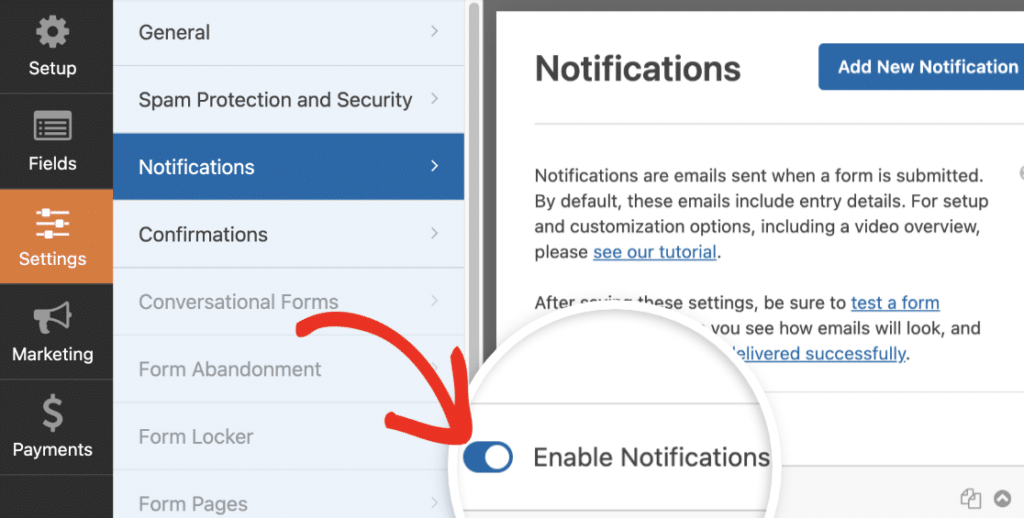
Desde el punto de vista del usuario, puede personalizar un mensaje de confirmación para que se muestre después del envío del formulario o redirigir automáticamente a otra página de su sitio o a una URL externa.
Formularios de pago
Una de las características más impresionantes de WPForms Lite es la capacidad de crear formularios que aceptan pagos de forma segura sin necesidad de actualizar a Pro. Obtiene dos integraciones de pago completas directamente desde el principio: PayPal y Stripe.
Pagos con Stripe
WPForms Lite viene con integración de Stripe incorporada, lo que le permite agregar varios campos de pago a su formulario, que incluyen:
- Elemento único
- Múltiples artículos
- Elementos de casilla de verificación
- Artículos desplegables
- Tarjeta de crédito de Stripe
- Total
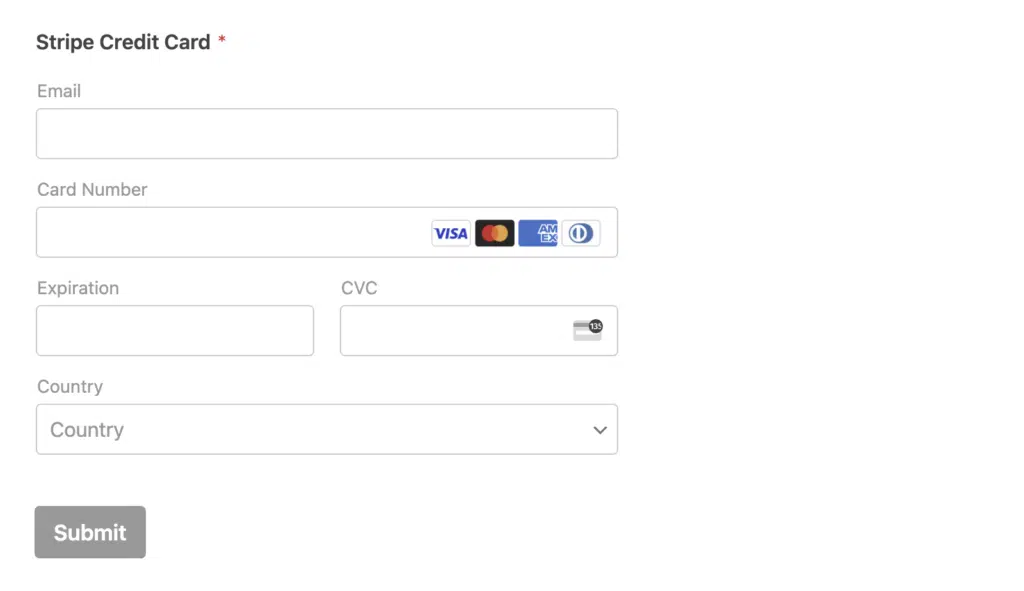
Y como todo lo demás en WPForms, integrar pagos con tarjeta de crédito con Stripe es sencillo y no requiere codificación.
Simplemente conéctese a su cuenta de Stripe y arrastre y suelte el campo de tarjeta de crédito de Stripe en su formulario. Los usuarios de Lite pagan tarifas de procesamiento adicionales en las transacciones de Stripe. La actualización a WPForms Pro elimina esas tarifas adicionales.
Pagos con PayPal para todos los usuarios
WPForms ahora incluye PayPal Commerce para todos los usuarios, incluido Lite. Esto significa que puede aceptar pagos de PayPal, tarjetas de crédito y débito, e incluso Apple Pay, Google Pay y Venmo directamente desde sus formularios gratuitos.
No necesita una licencia Pro para comenzar a cobrar pagos a través de PayPal. Simplemente conecte su cuenta de PayPal Business y estará listo. Utilice estas plantillas de PayPal listas para usar para que pueda comenzar rápidamente:
- Formularios de donación
- Formularios de suscripción y pago recurrente
- Formularios de membresía
- Formularios de pago mensual
- Formularios de registro con pago
- Formularios de pedido anticipado
- Formularios de depósito
- Formularios de pignoración
- Formularios de pago de cuotas
- Formularios de pedido de varios artículos
Cada plantilla es totalmente personalizable en el creador de arrastrar y soltar. Puede ajustar campos, cambiar importes y configurar pagos únicos y recurrentes.
Panel de Pagos
Los pagos de PayPal y Stripe se registran en una pantalla de Pagos dedicada:
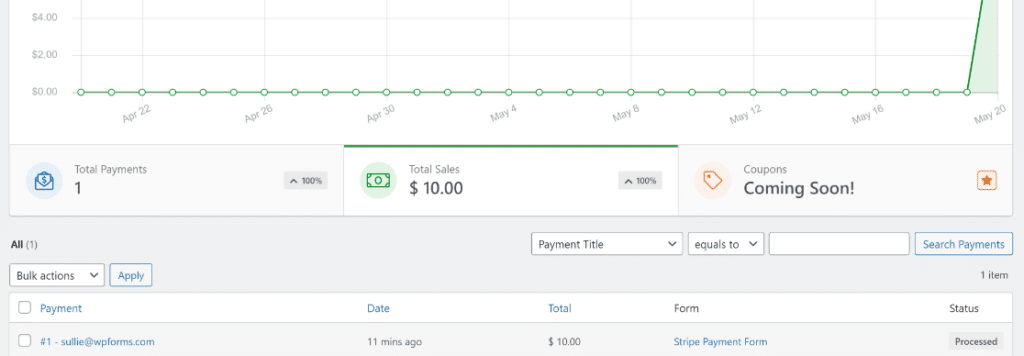
Esto le permite supervisar las ventas y emitir reembolsos directamente desde su panel de WordPress. No es necesario cambiar entre plataformas para ver lo que entra.
Integraciones de marketing
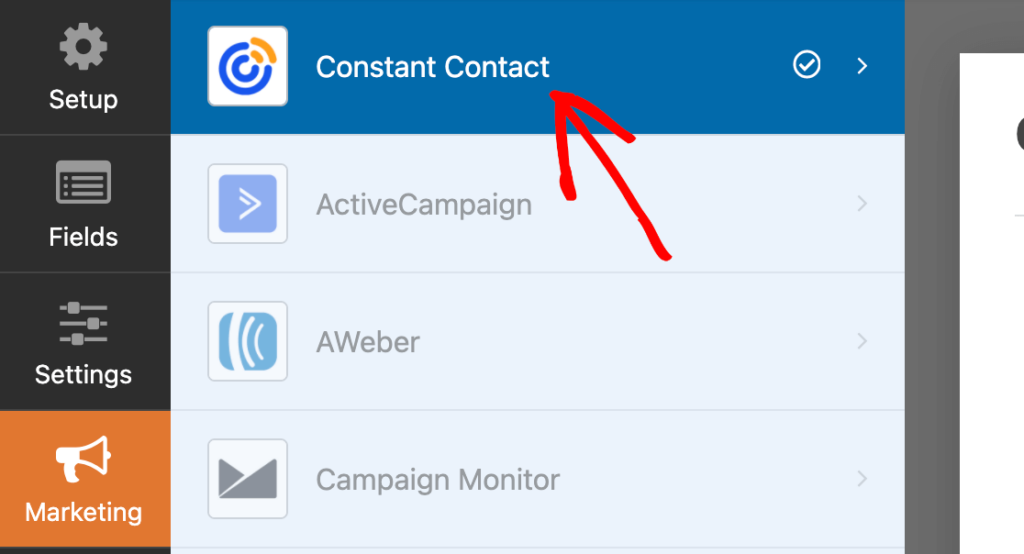
Tendrás que actualizar a WPForms Pro para acceder a la mayoría de las integraciones de marketing por correo electrónico. Pero si no tienes preferencia sobre qué plataforma de marketing por correo electrónico utilizas, la integración con Constant Contact está integrada directamente en WPForms Lite.
Puede crear fácilmente formularios de suscripción por correo electrónico y enviar los detalles de suscripción automáticamente a sus listas de correo de Constant Contact.
Como extra, WPForms Lite también viene con la integración con Uncanny Automator. Esto le permite crear potentes automatizaciones para más de 170 aplicaciones y servicios y conectar sus formularios con redes sociales, plugins de membresía, plataformas de e-learning y más.
Protección contra spam
WPForms Lite viene con potentes funciones de protección contra spam, que están habilitadas por defecto.
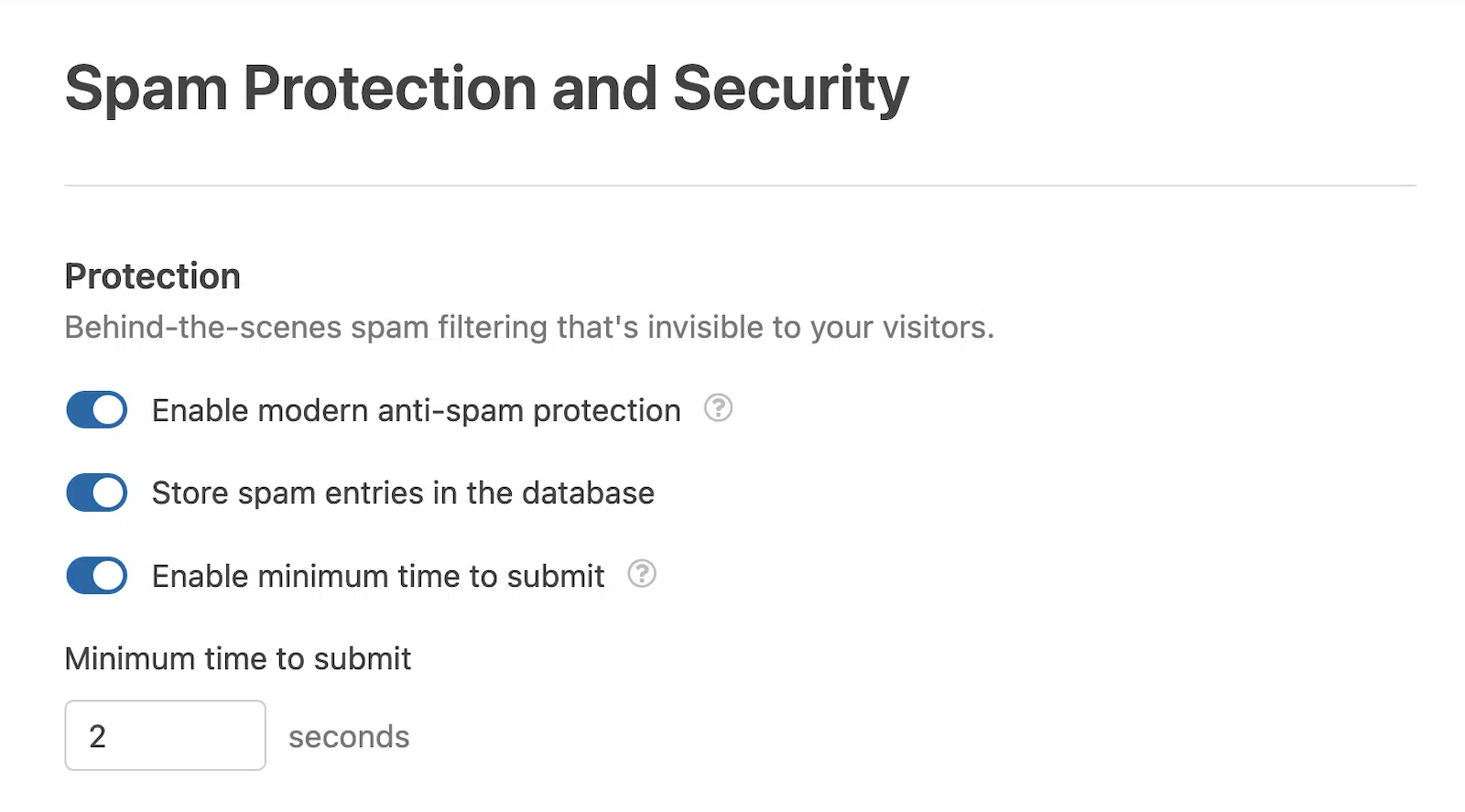
También puede ajustar el tiempo mínimo para enviar, lo que puede ayudar a eliminar las entradas de bots de spam, y activar servicios de CAPTCHA y anti-spam de terceros, incluyendo reCAPTCHA de Google, hCaptcha con orientación a la privacidad, Cloudflare Turnstile y Akismet.
Plantillas gratuitas de WPForms
Si bien WPForms Lite le permite crear formularios personalizados desde cero, también proporciona un valioso atajo: plantillas de formularios prediseñadas.
Aunque muchas plantillas premium son exclusivas para usuarios Pro, WPForms Lite todavía ofrece una impresionante variedad de plantillas gratuitas para acelerar su proceso de creación de formularios.

Estas plantillas gratuitas cubren una amplia gama de casos de uso, incluyendo:
- Formularios de contacto básicos
- Formularios de suscripci ilde;n a boletines
- Formularios de registro
- Formularios de solicitud
- Formularios de pago sencillos
Puede usar estas plantillas tal cual para una solución rápida, o personalizarlas para que se ajusten perfectamente a sus necesidades específicas. Esta función no solo le ahorra tiempo, sino que también proporciona una excelente manera de explorar el potencial de WPForms Lite y descubrir nuevas formas de interactuar con los visitantes de su sitio web.
Cómo usar WPForms gratis
Para empezar con WPForms Lite, inicie sesión en el panel de su sitio de WordPress y navegue a Plugins » Añadir Nuevo Plugin.

Escriba “wpforms” en el cuadro de búsqueda y pulse Intro para ejecutar la búsqueda.

Haga clic en el botón Instalar ahora junto al plugin WPForms.

Cuando el plugin haya terminado de instalarse, haga clic en el botón Activar.

¡Y listo! ¡Eso es todo! Ahora está preparado para empezar a crear formularios gratis con WPForms.
Para una guía visual, puedes ver el vídeo a continuación, que te guía a través del proceso de creación de un formulario de contacto básico con WPForms.
WPForms gratis vs de pago (Lite vs Pro)
Dado que WPForms Lite ofrece tantas funciones, podrías preguntarte por qué alguien actualizaría a la versión Pro de pago.
La respuesta simple es: no necesitas hacerlo si WPForms Lite cumple todos tus requisitos. Para crear formularios básicos con un presupuesto limitado, es difícil de superar.
Sin embargo, WPForms Pro desbloquea un conjunto de potentes funciones que pueden mejorar significativamente tus formularios, permitiendo flujos de trabajo e integraciones complejas.
Gestión de entradas
Mientras que WPForms Lite envía las presentaciones de formularios por correo electrónico, WPForms Pro va un paso más allá. Ofrece un potente sistema de gestión de entradas que almacena las entradas del formulario dentro de WordPress.
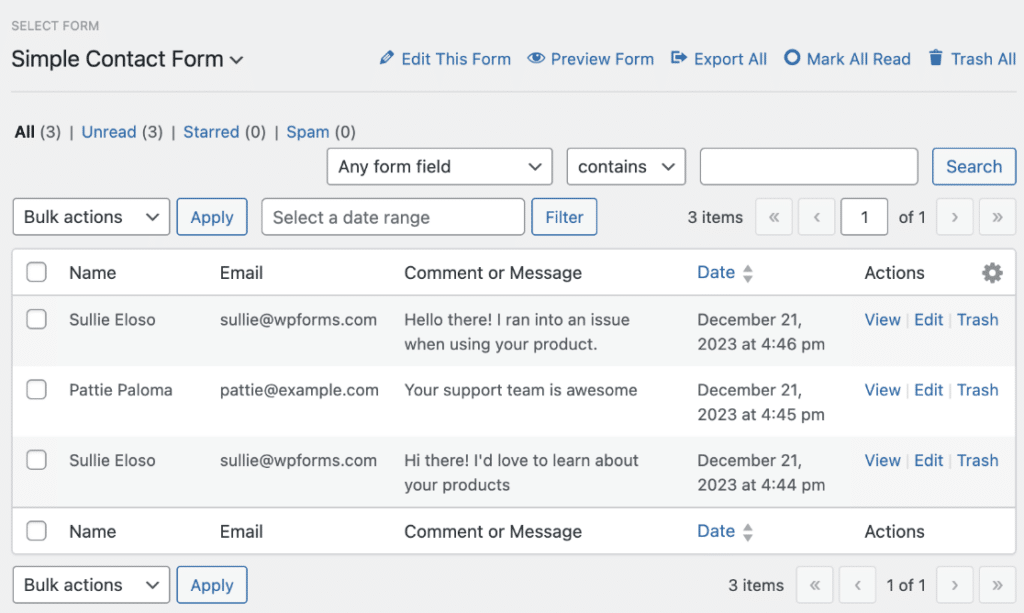
Este sistema te permite buscar y ordenar envíos, exportar datos y personalizar cómo se muestra la información. Cambia las reglas del juego para las empresas que necesitan gestionar y analizar grandes volúmenes de envíos de formularios.
Campos de formulario de fantasía
WPForms Pro amplía tu kit de herramientas de creación de formularios con campos adicionales como selectores de fecha y hora, campos de contraseña, cargas de archivos, valoraciones, firmas y escala Likert.

También introduce campos especiales para mejorar la funcionalidad del formulario, como campos repetidores para duplicar secciones, saltos de página para formularios de varias páginas y campos de diseño para opciones de diseño avanzadas.
En el frente de los pagos, WPForms Pro ofrece campos avanzados que incluyen cupones e integraciones con más servicios de pago como Authorize.net, PayPal y Square. Como extra, disfrutarás de comisiones de transacción de Stripe más bajas en comparación con la versión Lite.
Lógica Condicional Inteligente
Una de las características más potentes de WPForms Pro es la lógica condicional. Esto te permite crear formularios dinámicos e inteligentes que se adaptan en función de la entrada del usuario.
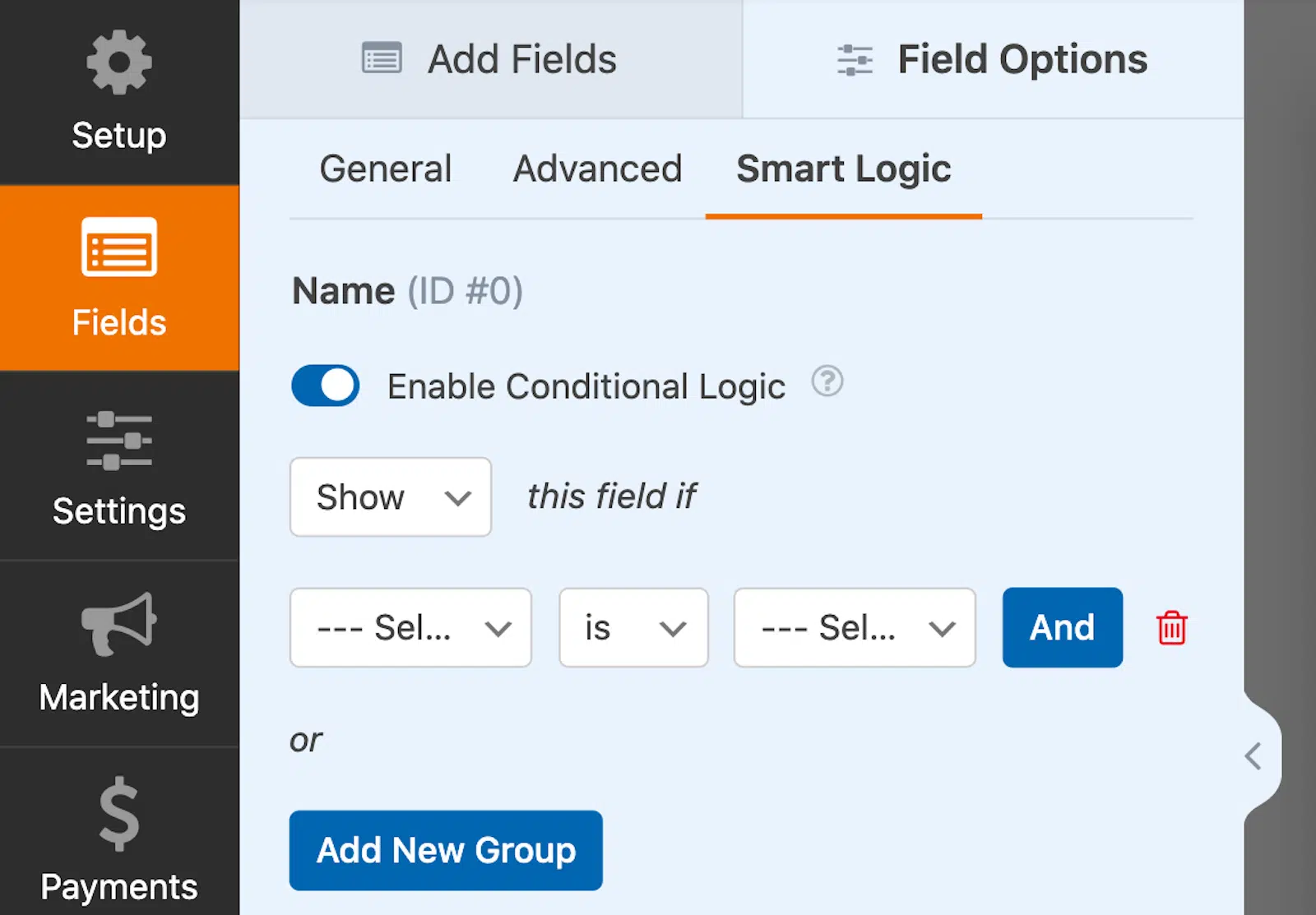
Puedes mostrar u ocultar campos basándote en las selecciones del usuario, configurar reglas de lógica avanzada y automatizar acciones basándote en la entrada del formulario.
Por ejemplo, puedes permitir a los usuarios seleccionar su propio método de pago, crear notificaciones de formulario condicionales o configurar el enrutamiento automático de clientes potenciales.
Características avanzadas de formularios
WPForms Pro incluye varias funciones avanzadas y complementos que llevan tus formularios al siguiente nivel.
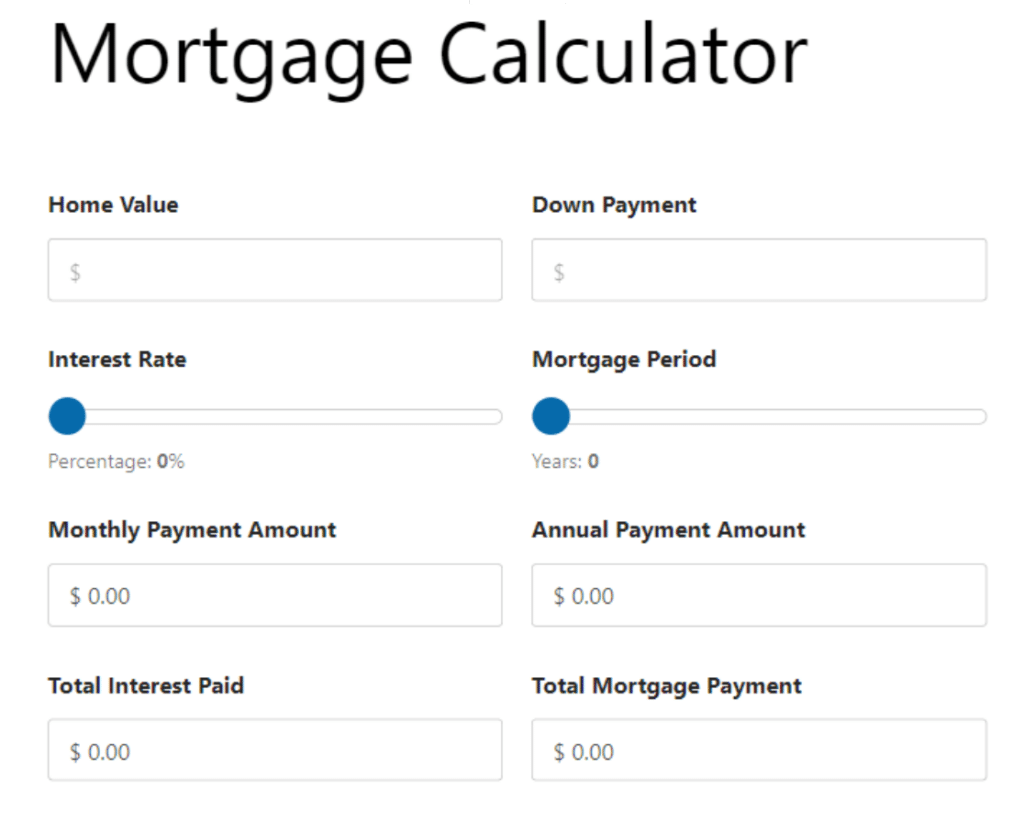
Por ejemplo, el complemento de Cálculos convierte tus formularios básicos en calculadoras personalizadas avanzadas. Puedes calcular automáticamente los totales de los pedidos, crear formularios de presupuesto personalizados con cálculos en tiempo real y crear calculadoras personalizadas para atraer tráfico y clientes potenciales para cualquier necesidad del usuario, desde salud y fitness hasta negocios y finanzas.
Los complementos Formularios sin conexión y Guardar y reanudar aumentan las tasas de finalización al permitir a los usuarios guardar su progreso y regresar más tarde. Para el control de acceso, el complemento Bloqueo de formularios te permite limitar quién puede enviar formularios.
Y si te dedicas a la recopilación de datos, el complemento Encuestas y Sondeos facilita la recopilación de comentarios con informes interactivos que presentan gráficos y diagramas atractivos.
Más de 10.000 integraciones
Con WPForms Pro, puedes conectar tus formularios a múltiples servicios de marketing por correo electrónico, incluyendo Campaign Monitor, Mailchimp, Brevo, y aplicaciones de terceros como Google Sheets.

Pero la verdadera potencia proviene de la integración con Zapier, que abre conexiones a más de 10.000 aplicaciones. Esto permite potentes automatizaciones y acciones desencadenantes al enviar un formulario. Por ejemplo, podrías añadir automáticamente un evento a Google Calendar o crear una tarea en Trello o Asana.
Herramientas de conversión
Si utilizas formularios para capturar clientes potenciales, WPForms Pro ofrece varias funciones diseñadas para aumentar las conversiones.
Puedes crear páginas de destino y formularios atractivos y sin distracciones, diseñados específicamente para altas conversiones. El complemento Formularios Conversacionales te permite crear formularios interactivos y similares a los humanos que hacen una pregunta a la vez. Páginas de Formularios y Formularios de Clientes Potenciales están diseñados para capturar tantos clientes potenciales como sea posible.

Y si alguien empieza un formulario pero no lo termina, el complemento Abandono de Formularios te ayuda a capturar ese cliente potencial perdido y a hacer un seguimiento directo.
Más de 2.100 plantillas
Si creías que las plantillas que obtienes con WPForms Lite son buenas, te quedarás totalmente asombrado con las plantillas Pro.
WPForms Pro lleva las plantillas al siguiente nivel con una amplia gama de plantillas diseñadas profesionalmente y personalizables para diversas industrias y casos de uso, incluyendo operaciones empresariales, atención al cliente, educación, planificación de eventos, entretenimiento, retroalimentación, y más.
¿Quieres guardar un formulario que has personalizado o creado para usarlo más tarde? WPForms te permite guardar tus propias plantillas personalizadas para que puedas añadirlas fácilmente a tu biblioteca de plantillas y usarlas de nuevo en una fecha posterior.
Formularios Bonitos con Personalizaciones Avanzadas
Además de las plantillas, WPForms Pro viene con una biblioteca de más de 40 temas de formularios diseñados profesionalmente.
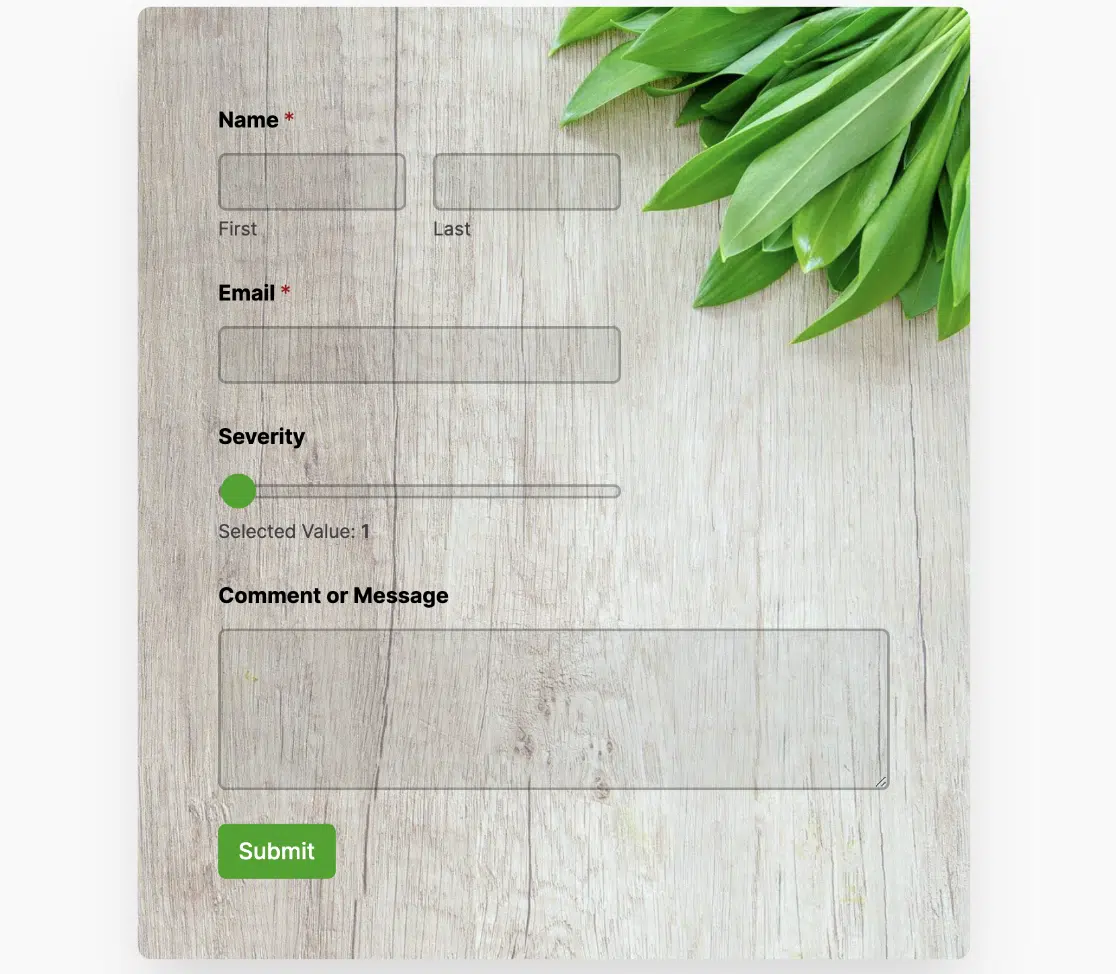
Cada tema está diseñado con colores, bordes, imágenes de fondo y estilos de botones para adaptarse a diferentes estéticas. Puedes personalizar estos temas para que coincidan perfectamente con tu sitio y guardar tus temas personalizados para usarlos más tarde.
Incluso las notificaciones de formularios reciben un cambio de imagen en Pro. Puedes elegir entre varias plantillas de notificación de formularios y personalizarlas con tus propios colores de fondo y logotipo, asegurando una experiencia de marca coherente a lo largo del recorrido del usuario.
WPForms gratis o de pago: ¡Tú decides!
WPForms Lite ofrece un conjunto robusto de funciones para crear formularios básicos sin coste alguno. Para una funcionalidad más avanzada, WPForms Pro proporciona una solución completa para empresas y sitios web con necesidades de formularios complejas. Elige la versión que mejor se adapte a tus requisitos y presupuesto.
¿Así que puedes usar WPForms gratis? ¡Claro! Pero obtienes mucho más si decides actualizar a Pro.
| Característica | Lite | Pro |
|---|---|---|
| Entradas del formulario | ||
| Campos del formulario | ||
| Plantillas de formularios | ||
| Protección contra spam y seguridad | ||
| Lógica Condicional Inteligente | ||
| Integraciones de marketing | ||
| Formularios de pago | ||
| Encuestas y sondeos | ||
| Características avanzadas de formularios | ||
| Complementos de WPForms | ||
| Herramientas de conversión | ||
| Soporte al cliente |
Pero no hay ninguna presión. Puedes usar WPForms Lite gratis durante el tiempo que quieras y crear tantos formularios como necesites. Cuando tu negocio o sitio web crezca y necesites una funcionalidad más potente, puedes actualizar en cualquier momento.
¿Cuánto cuesta actualizar? Echa un vistazo a esta captura de pantalla que tomé para mostrar los diferentes niveles de licencia.
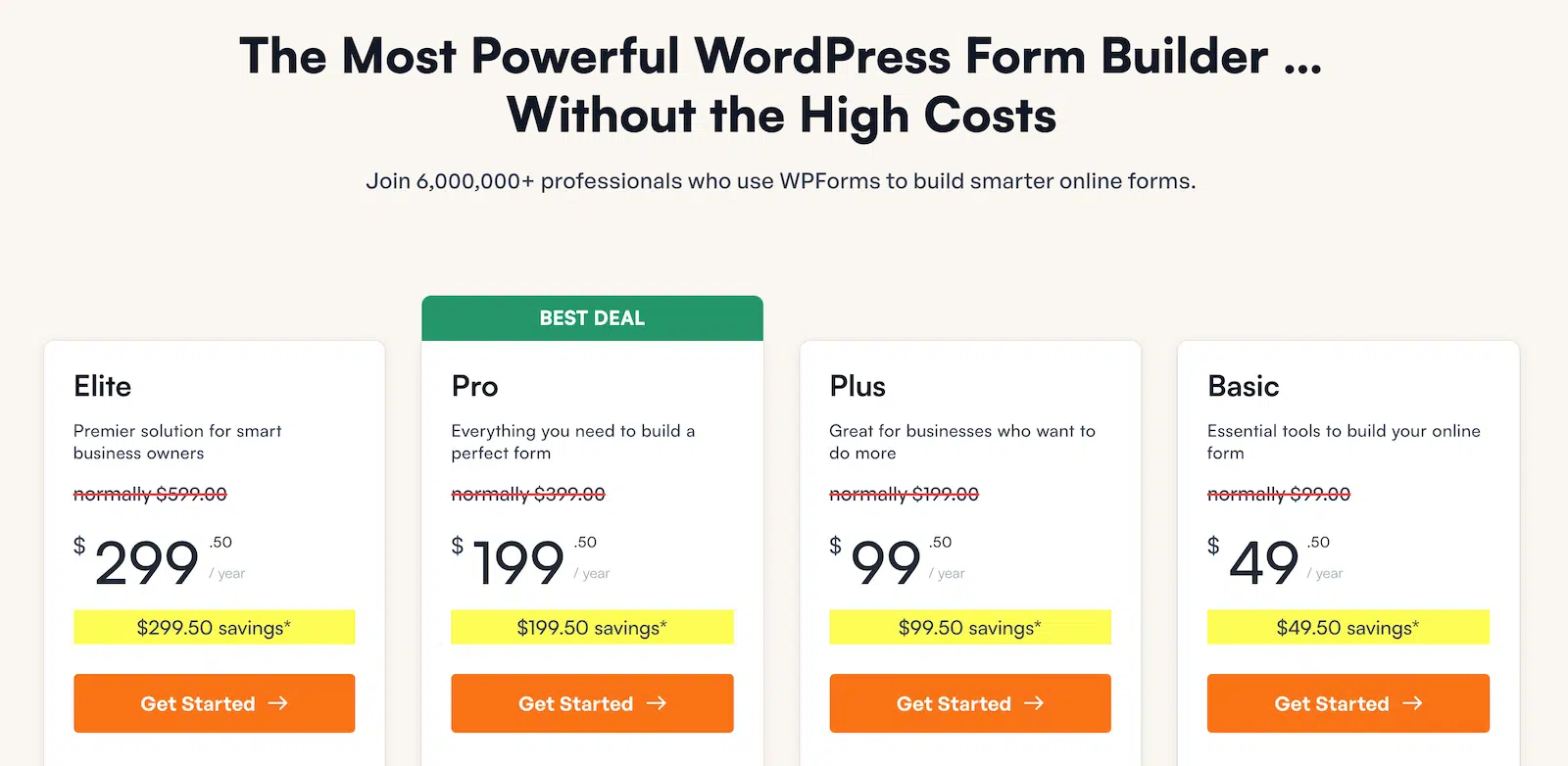
Asegúrate de consultar la página de precios para ver los precios actuales.
Crea tu formulario de WordPress ahora
Preguntas Frecuentes Sobre el Uso de WPForms Gratis
¿Te preguntas si WPForms Lite es la opción correcta para ti? Aquí tienes algunas de las preguntas más comunes que hacemos sobre el uso de WPForms Gratis:
¿Cómo ver las entradas de WPForms gratis?
Aunque WPForms Lite no guarda las entradas directamente en WordPress, todos los envíos de formularios se envían por correo electrónico a tu dirección especificada, asegurando que nunca te pierdas una entrada importante.
Además, puedes activar la función Lite Connect. Esta solución te permite hacer una copia de seguridad de tus entradas de formulario de forma segura en WordPress de forma gratuita. Luego puedes restaurar todas tus entradas y gestionarlas dentro de tu panel de WordPress si decides actualizar a Pro más adelante.
¿Vale la pena WPForms Pro?
¡Absolutamente! WPForms Pro ofrece un valor excepcional para empresas y sitios web que necesitan una funcionalidad de formulario avanzada. Mientras que WPForms Lite es genial para necesidades básicas, Pro desbloquea un mundo de posibilidades con funciones como lógica condicional, integraciones de pago avanzadas y conexiones a más de 10.000 aplicaciones a través de Zapier. Si buscas crear formularios más complejos, automatizar flujos de trabajo o recopilar datos detallados de los usuarios, WPForms Pro definitivamente vale la inversión.
¿Puedo crear formularios de pago con WPForms Lite?
¡Sí, puedes! Una de las características destacadas de WPForms Lite es su integración integrada con Stripe. Esto te permite crear formularios de pago, formularios de donación y formularios de pedido sin necesidad de actualizar a Pro. Puedes aceptar fácilmente pagos con tarjeta de crédito directamente a través de tus formularios, lo que lo convierte en una herramienta potente para pequeñas empresas y organizaciones sin ánimo de lucro.
¿Puedo usar WPForms en varios sitios web?
Con WPForms Lite, puedes instalar y usar el plugin en tantos sitios web como quieras, de forma gratuita. No hay restricciones de uso, lo que lo hace perfecto para autónomos o agencias que gestionan varios sitios. Si actualizas a Pro, el número de sitios en los que puedes usarlo depende del plan que elijas, con opciones disponibles para 1, 3, 5 o sitios ilimitados.
¿Puedo personalizar el aspecto de mis formularios?
¡Absolutamente! Incluso con WPForms Lite, tienes opciones para personalizar tus formularios y que coincidan con el diseño de tu sitio web. Puedes ajustar el tamaño de los campos, añadir clases CSS personalizadas y elegir entre diferentes plantillas de formularios. Si actualizas a Pro, obtienes aún más opciones de personalización, incluyendo impresionantes temas de formularios modernos con esquemas de color e imágenes de fondo, además de la capacidad de crear diseños y estilos completamente personalizados.
¿WPForms Lite recibe actualizaciones gratuitas?
WPForms se mantiene activamente y se actualiza regularmente. Tanto la versión Lite como la Pro reciben actualizaciones frecuentes para garantizar la compatibilidad con la última versión de WordPress, corregir errores e introducir nuevas funciones. Este compromiso con el desarrollo continuo significa que puedes confiar en WPForms como una solución estable y segura para tus necesidades de formularios.
¿WPForms Lite es realmente gratis para siempre?
Sí, WPForms Lite es genuinamente gratuito para siempre. No hay cargos ocultos, límites de tiempo ni actualizaciones forzadas. Puedes usar todas las funciones de WPForms Lite en tantos sitios web como quieras, durante el tiempo que desees, sin pagar nada. Este compromiso de proporcionar una versión gratuita robusta es parte de lo que hace que WPForms destaque en el mercado de constructores de formularios de WordPress. Si bien la versión Pro ofrece funciones avanzadas adicionales, WPForms Lite sigue siendo una opción potente y completamente gratuita para aquellos con necesidades básicas de formularios.
¿Puedo cambiar a Pro sin perder mis formularios?
¡Absolutamente! WPForms ha hecho que el proceso de actualización sea fluido y sin preocupaciones. Cuando actualizas de WPForms Lite a cualquier plan Pro, todos tus formularios, configuraciones y entradas existentes se transfieren automáticamente. No necesitas recrear tus formularios ni preocuparte por perder ningún dato. Esta transición fluida te permite empezar a aprovechar inmediatamente las funciones avanzadas de Pro sin ninguna interrupción en tus formularios o flujos de trabajo existentes.
A continuación, Obtén más información sobre los complementos de WPForms
Los complementos de WPForms, disponibles solo para WPForms Pro, son una de las formas más sencillas de potenciar tus formularios. Descubre más sobre los complementos de WPForms disponibles, cómo usarlos y cómo pueden ampliar la funcionalidad de tus formularios en nuestra guía de los mejores complementos de WPForms.
Crea tu formulario de WordPress ahora
¿Listo para crear tu formulario? Empieza hoy mismo con el plugin de creación de formularios de WordPress más fácil. WPForms Pro incluye muchas plantillas gratuitas y ofrece una garantía de devolución de dinero de 14 días.
Si este artículo te ha sido útil, síguenos en Facebook y X (Twitter) para más tutoriales y guías gratuitas de WordPress.





