


Resumen de IA
Si alguna vez ha rellenado un formulario que le hacía 20 preguntas cuando solo 6 de ellas le importaban, ya sabe por qué existe la lógica condicional.
Los formularios inteligentes ocultan los campos que no se aplican y solo muestran lo que es relevante según las respuestas que ya ha dado. Bien hecho, reduce el abandono de formularios y le proporciona datos más limpios al final.
He pasado bastante tiempo creando y rompiendo formularios en la mayoría de los creadores más importantes que existen, y la lógica condicional es la característica en la que las diferencias realmente se notan.
Así que probé 7 de los creadores de formularios más populares con lógica condicional uno al lado del otro. A continuación, se muestra lo que encontré, clasificado según lo bien que funciona cada uno en la práctica para casos de uso reales.
¡Crea tu formulario de lógica condicional ahora! 🙂
Los mejores creadores de formularios con lógica condicional
Los mejores creadores de formularios de lógica condicional para WordPress que he analizado en esta publicación se comparan a continuación. Consulta la tabla para obtener más información sobre cada servicio:
| Constructor de Formularios | Plataforma | Configuración de lógica | Plan gratuito | Precio inicial | Mejor para |
|---|---|---|---|---|---|
| WPForms | WordPress | Conmutador de lógica inteligente | Sí | 49,50 $/año | El mejor en general para sitios de WordPress |
| Formidable Forms | WordPress | Reglas a nivel de campo | Sí | 39,50 $/año | Formularios de WordPress con muchos cálculos |
| JotForm | Basado en la web | Menú de condiciones | Sí | 34 $/mes | Formularios basados en la nube con plantillas detalladas |
| Zoho Forms | Basado en la web | Barra de herramientas de reglas | Sí | 10 $/mes | Equipos ya dentro de la suite de Zoho |
| Gravity Forms | WordPress | Ajustes de campo | No | 59 €/año | Desarrolladores de WordPress y desarrollos personalizados |
| Typeform | Basado en la web | Saltos lógicos | Sí | 29 $/mes | Formularios conversacionales, una pregunta a la vez |
| Formstack | Basado en la web | Menú desplegable de lógica en la barra lateral | 14 días de prueba | 50 $/mes | Industrias con muchos flujos de trabajo y reguladas |
También he resumido mi investigación aquí para ayudarte a tomar la mejor decisión comercial. Estas son las mejores opciones, junto con sus características y precios.
1. WPForms (El mejor en general para WordPress)
Primero, me quito lo obvio de encima. Sí, este es el blog de WPForms. Pero he utilizado este plugin en docenas de sitios de clientes y en mis propios proyectos durante años, así que te diré lo que realmente hace bien y dónde es excesivo, de la misma manera que lo haría para cualquiera de los otros.
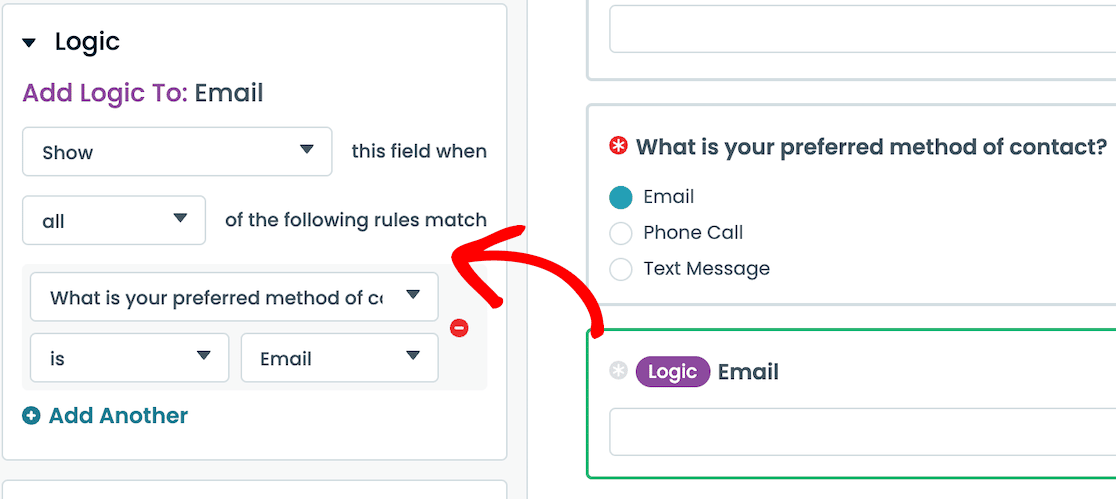
WPForms es un creador de formularios de arrastrar y soltar para WordPress con Lógica Condicional Inteligente integrada en todos los niveles de pago. La configuración es la más intuitiva con la que he trabajado: haces clic en cualquier campo, cambias a la pestaña Lógica Inteligente, activas el interruptor Habilitar Lógica Condicional y empiezas a añadir reglas.
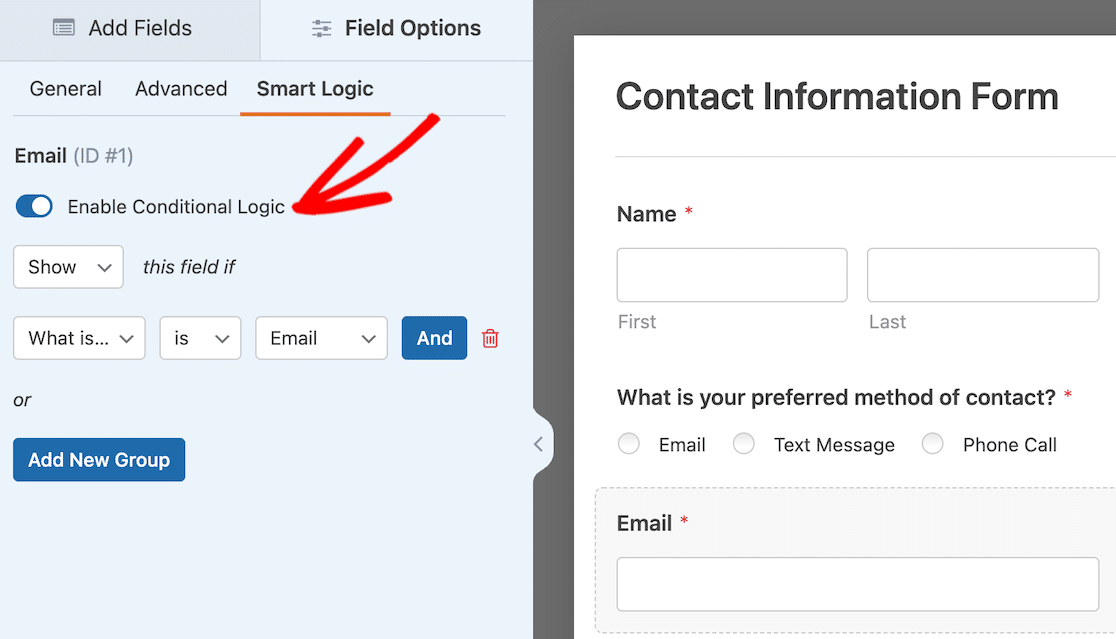
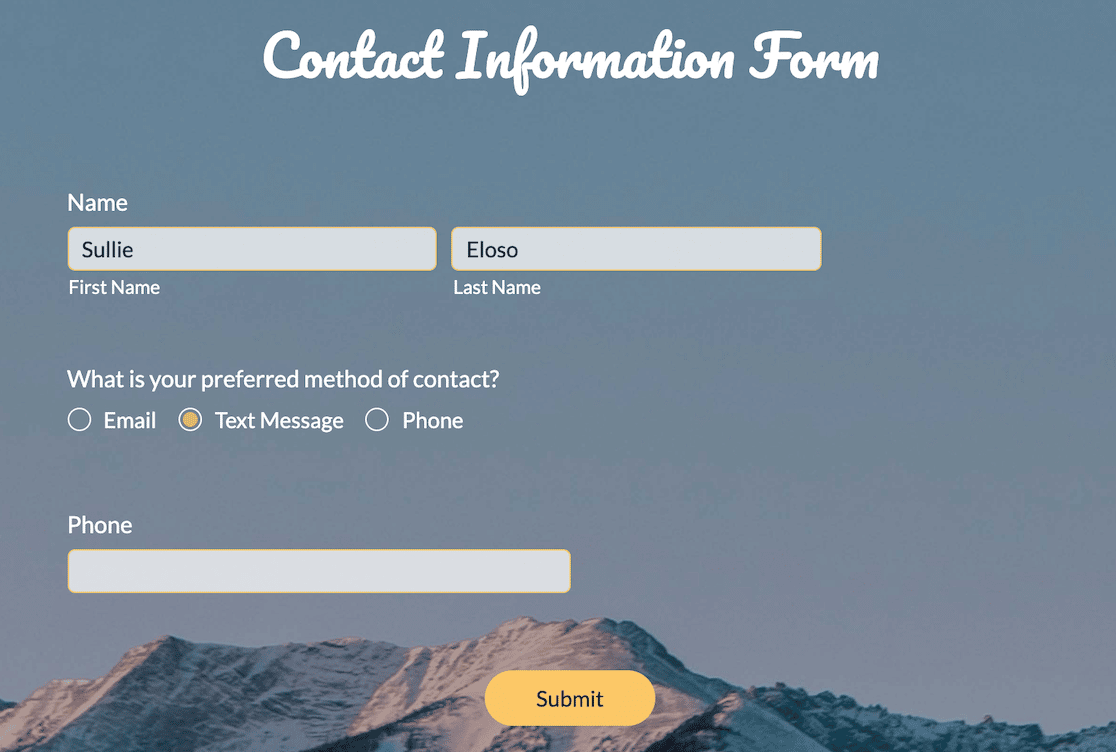
En el ejemplo anterior, establecí una regla para que el campo de correo electrónico solo se muestre si el usuario elige el correo electrónico como su método de contacto preferido.
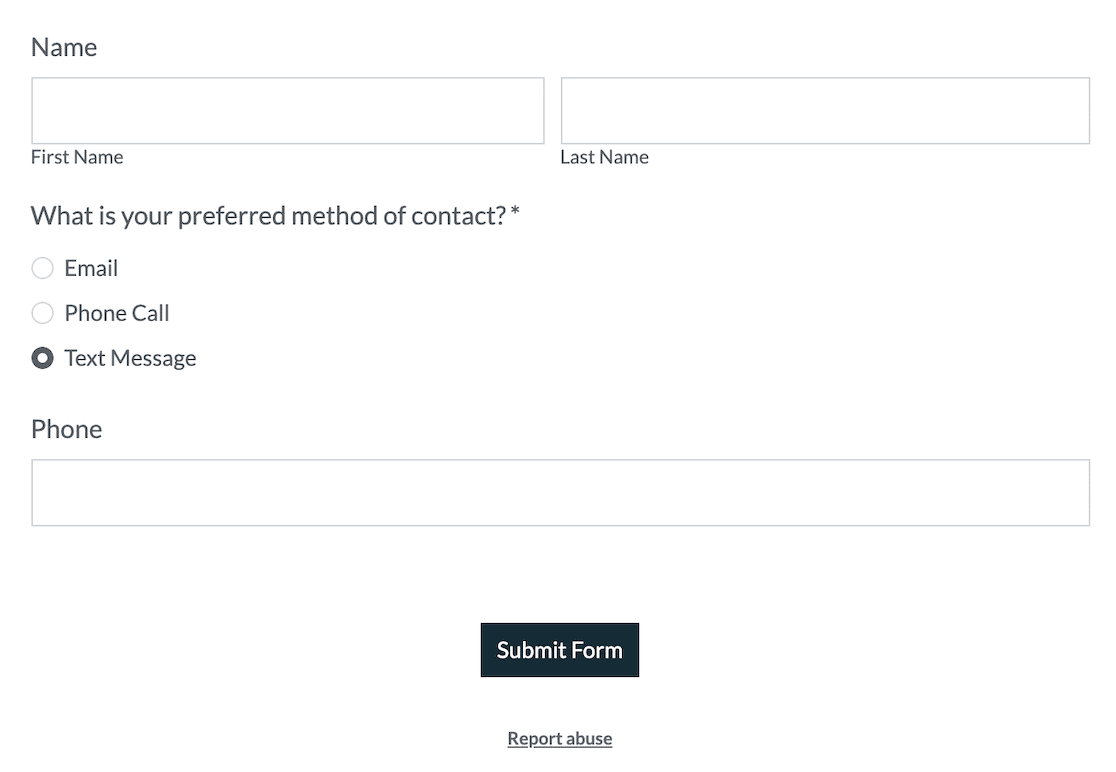
Eso me llevó unos 15 segundos. Luego añadí una segunda regla en un campo de número de teléfono para las otras dos opciones de contacto. Así es como se ve el formulario publicado.
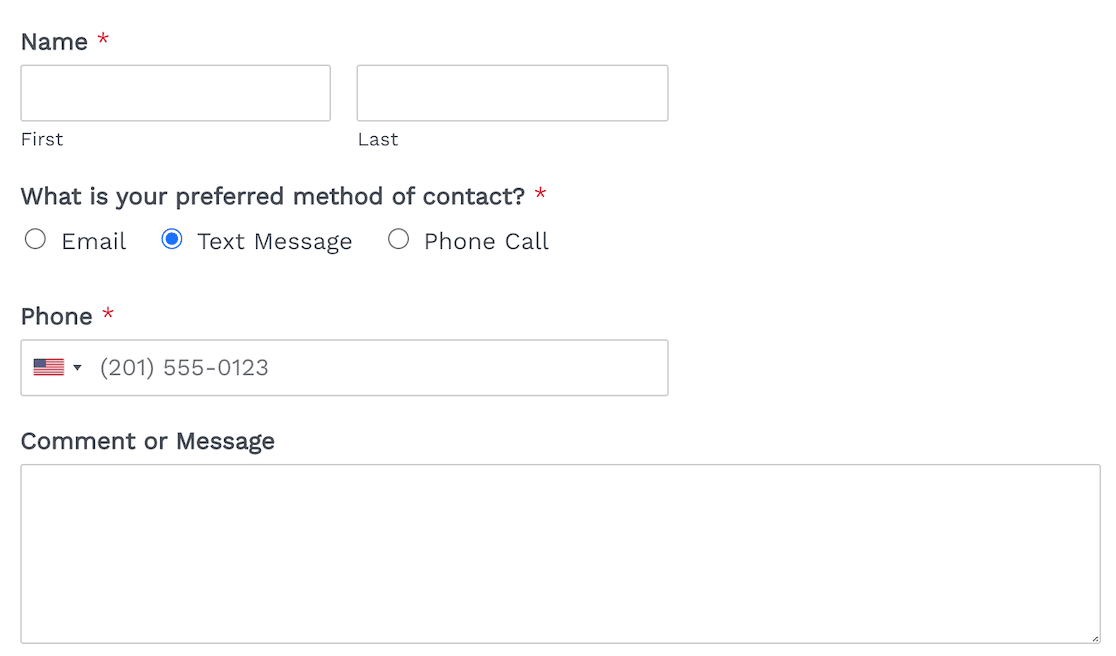
Lo que realmente me gustó de WPForms es hasta dónde llega la lógica condicional. Puedes aplicar reglas a secciones enteras, navegación de páginas múltiples y notificaciones por correo electrónico (enviar diferentes envíos a diferentes bandejas de entrada del equipo).
También puedes añadir lógica condicional a las confirmaciones del formulario (mostrar diferentes mensajes de agradecimiento según las respuestas), e incluso a los campos de pago con las integraciones Stripe Pro, Square Pro o PayPal Commerce.
Esto último, la lógica condicional en los pagos, es realmente útil. Lo he utilizado para configurar un formulario donde el precio cambia según un servicio que el usuario elige, o donde una oferta de producto muestra una opción de pago único y otra muestra suscripciones recurrentes en el mismo formulario.
Combinado con el complemento de Cálculos, puedes crear formularios de puntuación de clientes potenciales o calculadoras de presupuestos dinámicos donde las matemáticas se actualizan a medida que el usuario completa el formulario.
Lo que me gustó
- Flujos de Trabajo Inteligentes y Enrutamiento de Datos: Establece reglas condicionales que envíen ciertas presentaciones a listas de correo electrónico, CRM o canales de Slack específicos según la entrada del usuario.
- Formularios Conversacionales: Un formato de una pregunta a la vez que combina bien con la lógica condicional cuando deseas una experiencia al estilo Typeform sin salir de WordPress.
- Formularios de Clientes Potenciales: Convierte cualquier formulario existente en un formato de captura de clientes potenciales de varios pasos. Útil cuando la ramificación condicional se alarga tanto que una sola página se siente pesada.
- Más de 2.100 plantillas de formularios: Estas incluyen ejemplos de lógica condicional que puedes clonar y ajustar.
- Más de 35 campos de formulario: Con soporte completo de lógica condicional.
Precios
WPForms Lite es gratuito pero no incluye lógica condicional. Las licencias de pago comienzan en 49,50 $/año (Basic), donde la Lógica Condicional Inteligente se desbloquea para todos los campos estándar.
La lógica condicional en los pagos de Stripe requiere Pro (199,50 $/año), que también desbloquea PayPal Commerce, Square Pro, suscripciones recurrentes, el complemento de Cálculos y Formularios Conversacionales.
2. Formidable Forms
Formidable Forms es lo más parecido a WPForms en el espacio de WordPress. También es un constructor de arrastrar y soltar, y la lógica condicional aparece directamente en la barra lateral de opciones de campo.
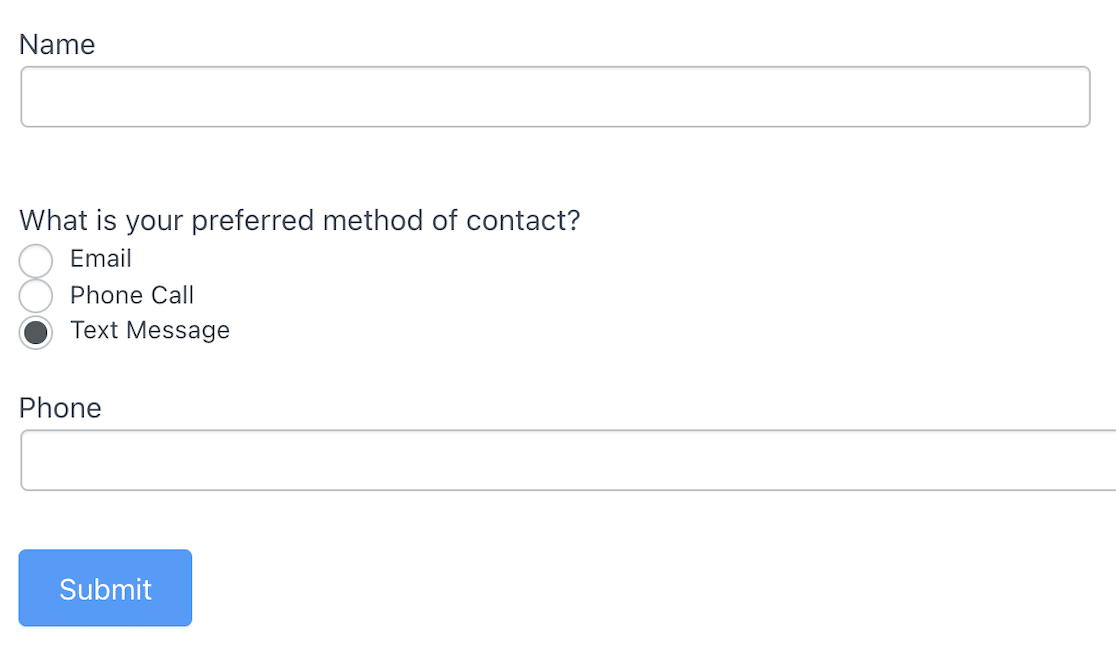
Cuando lo probé, la configuración de las reglas era clara y no ocultaba nada en menús oscuros. Añadí una condición de mostrar/ocultar en un campo de correo electrónico vinculado a un botón de radio, y funcionó al primer intento.
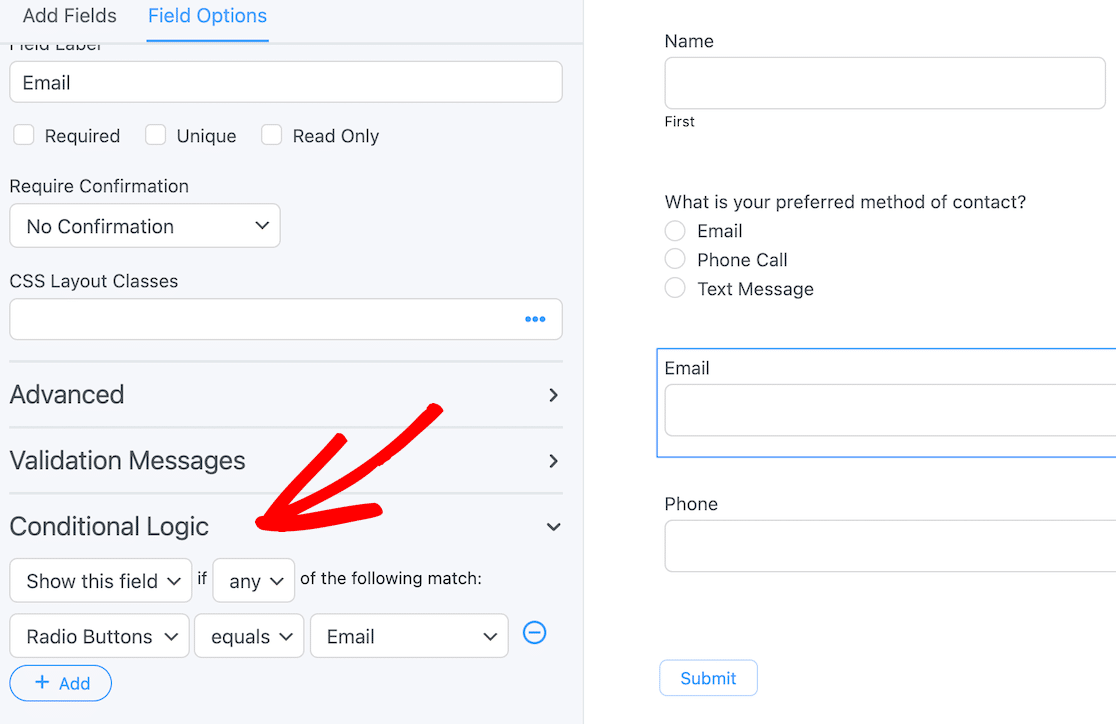
Lo único que me confundió es que la configuración de la lógica condicional hace referencia al tipo de campo en lugar de a la etiqueta del campo.
Así que, si tuviera tres botones de radio en mi formulario, tendría que recordar contra cuál estaba construyendo la regla. No es un inconveniente para un formulario de contacto, pero se vuelve complicado en formularios más grandes.
Donde Formidable realmente brilla es en los cálculos. Si necesitas un formulario de cálculo real (piensa en un estimador de hipotecas, una calculadora de IMC o un presupuesto de envío), el motor de cálculo de Formidable es uno de los más potentes de esta lista.
Su lógica condicional también funciona bien con esos cálculos, por lo que puedes crear formularios dinámicos donde las matemáticas reaccionan a la entrada del usuario.
Lo que me gustó
- Fácil de encontrar la lógica condicional, sin tener que buscar en menús
- Plugin de WordPress con acceso completo a la base de datos
- Potentes funciones de cálculo combinadas con reglas condicionales
- Pagos de Stripe disponibles en el nivel gratuito (similar a WPForms)
- Más de 300 plantillas y 40 opciones de campos de formulario
Precios
Una versión gratuita limitada de Formidable Forms está disponible en el repositorio de WordPress. Las licencias de pago comienzan en 39,50 €/año para el plan Básico. Empieza con Formidable Forms.
3. JotForm
JotForm es el peso pesado en el lado de la nube. No es un plugin de WordPress (aunque hay una opción de incrustación), por lo que tiene más sentido si quieres formularios que vivan independientemente de cualquier sitio web.
Lo que realmente distingue a JotForm es su biblioteca de plantillas. Estás viendo más de 25.000 formularios preconstruidos que cubren prácticamente todas las industrias y casos de uso. Eso solo es razón suficiente para considerarlo si no quieres construir desde cero.
La lógica condicional en JotForm me pilló desprevenido al principio porque no estaba donde esperaba encontrarla. La mayoría de los constructores ponen las reglas en la configuración del campo. JotForm las pone en Configuración » Condiciones a nivel de formulario. Una vez que lo supe, la configuración fue sencilla.
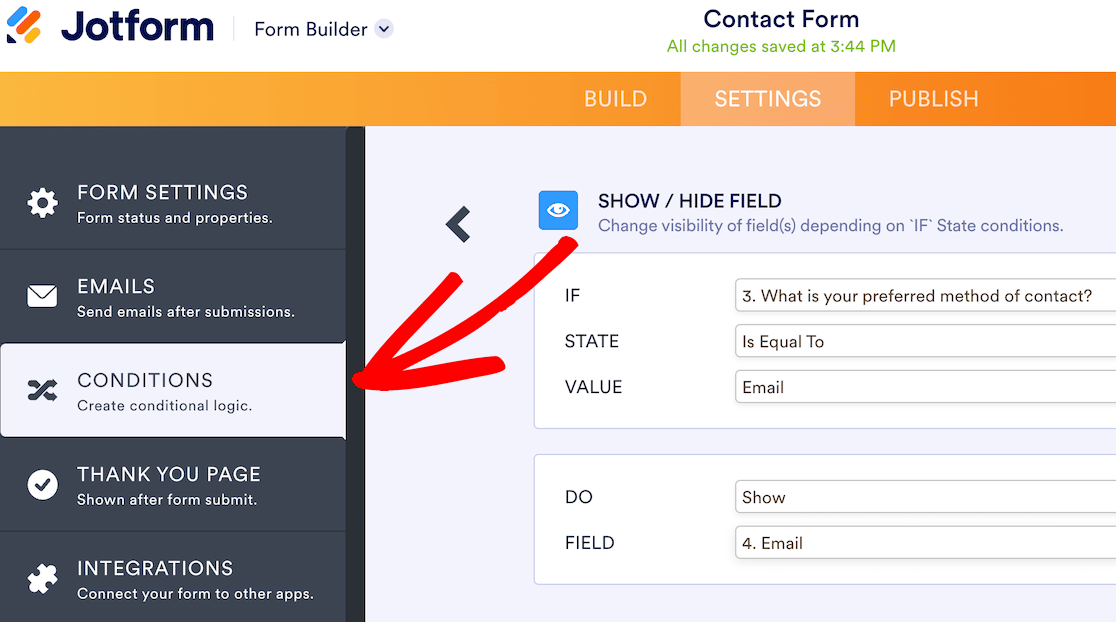
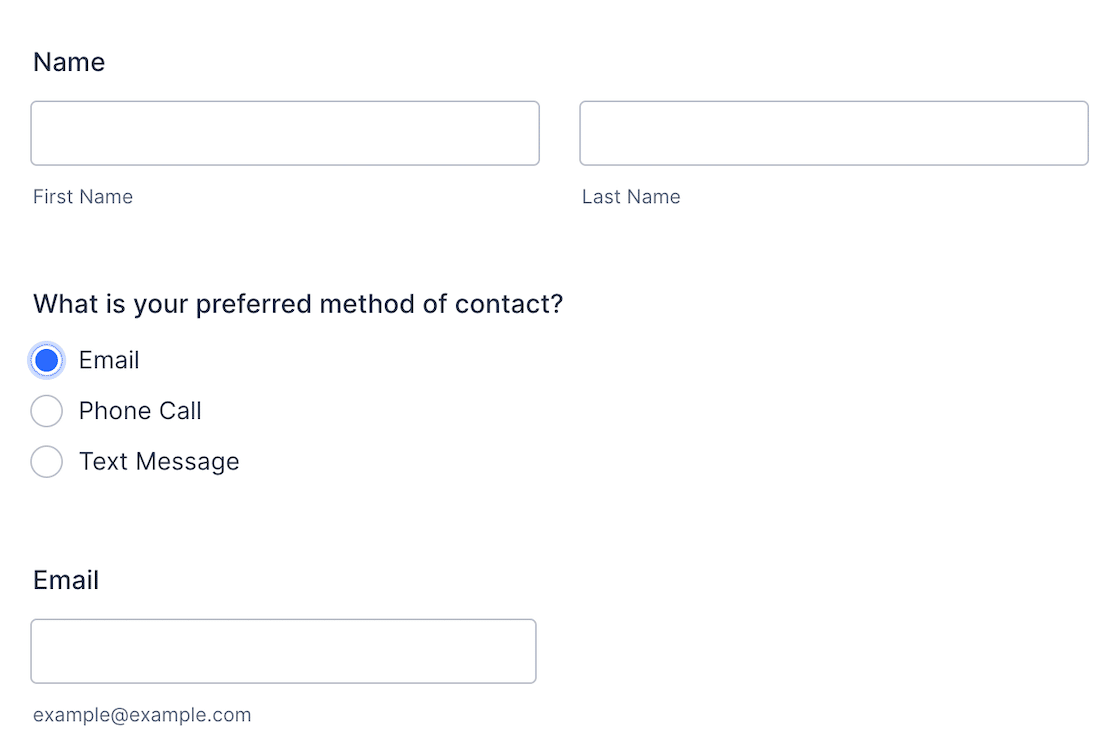
Creas condiciones de "si/entonces" a través de menús desplegables. La interfaz es limpia y JotForm te ofrece más tipos de acciones que la mayoría: puedes mostrar u ocultar campos, saltar a páginas específicas, cambiar el destinatario del correo electrónico, calcular valores o actualizar valores del formulario dinámicamente.
Lo que me gustó
- Basado en web con incrustación opcional de WordPress
- Más de 25.000 plantillas, la biblioteca más grande de esta lista
- Múltiples tipos de acciones más allá del simple mostrar/ocultar
- Funciones de IA para la generación de formularios y sugerencias de campos
- Cientos de integraciones nativas y widgets
Precios
JotForm tiene un plan gratuito que permite hasta 5 formularios con marca de JotForm y 100 envíos mensuales. Los planes de pago comienzan en 34 $/mes (Bronce) si se paga anualmente, con niveles superiores para más formularios y envíos.
4. Zoho Forms
Zoho Forms forma parte de la suite empresarial de Zoho, por lo que tiene más sentido si ya utilizas Zoho CRM, Zoho Mail o Zoho Books. Para los demás, es un creador competente basado en web con un enfoque diferente para la lógica condicional.
Zoho no aplica reglas a nivel de campo. Primero creas el formulario con todos los campos que podrías necesitar y luego vas a una barra de herramientas separada de Reglas para configurar la lógica. Te saca del creador de formularios mientras lo haces, lo que me pareció un cambio de contexto al que tuve que acostumbrarme.
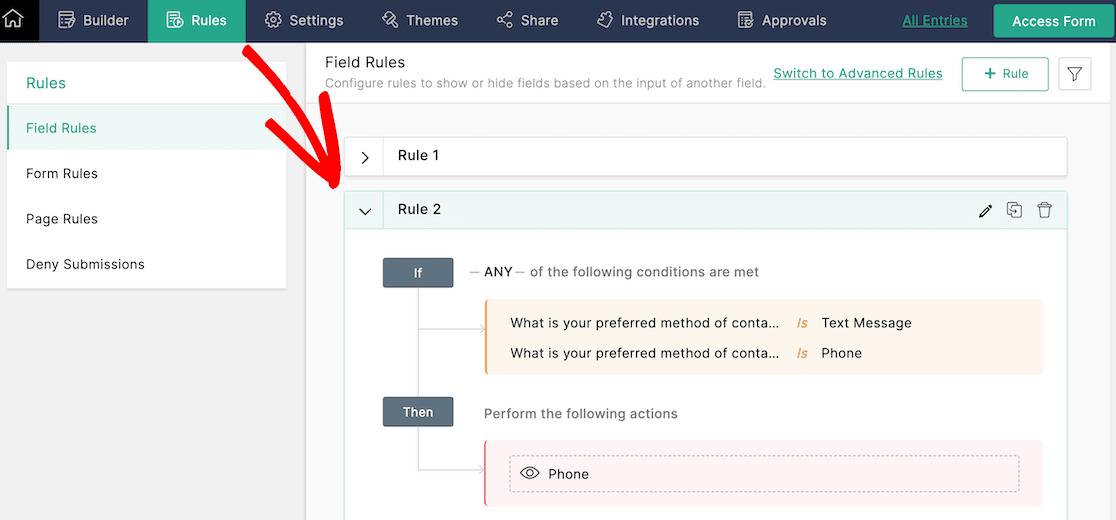
Una vez que le cogí el truco, la configuración de reglas en sí era limpia. Cada regla tiene condiciones de activación y una o más acciones, y puedes apilar reglas sin problemas.
Lo que me gustó
- Estrecha integración con Zoho CRM y el resto de la suite Zoho
- Modo de formulario sin conexión para la recopilación de datos tipo quiosco
- Funciones de flujo de trabajo (enrutamiento de aprobaciones, creación de tareas)
- Generosa capa gratuita (3 formularios, 500 envíos/mes)
Precios
Hay un plan gratuito con marca de Zoho. Los planes de pago comienzan en 10 $/mes (Básico) si se paga anualmente, lo que incluye formularios ilimitados y 10.000 envíos. Ese es el precio de nivel de entrada más generoso de esta lista. Prueba Zoho Forms.
5. Gravity Forms
Gravity Forms es la opción de WordPress orientada a desarrolladores. Tiene más de 30 campos de formulario, más de 500 ganchos para código personalizado y una enorme biblioteca de complementos. Si eres un desarrollador de WordPress o trabajas con uno, esa flexibilidad es la razón principal para considerarlo.
La lógica condicional en Gravity Forms se encuentra en la configuración de cada campo, similar a WPForms y Formidable. Añadí una regla básica de mostrar/ocultar en un formulario de contacto y funcionó sin ningún problema.
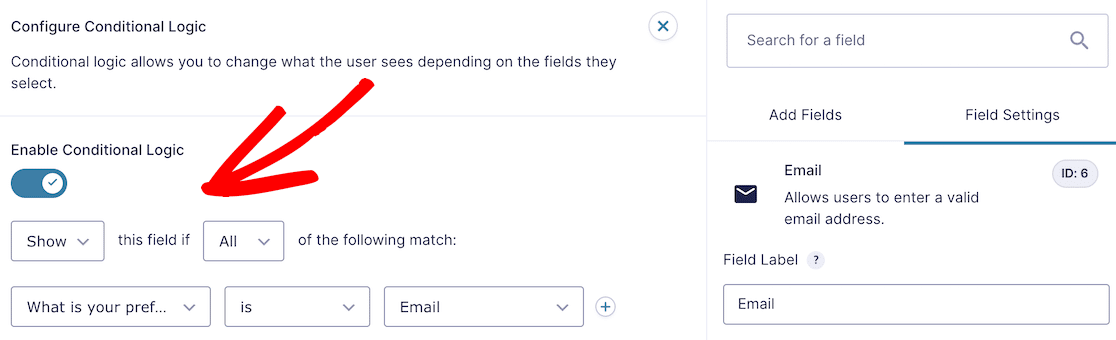
Hay una peculiaridad que quiero señalar para cualquiera que configure lógica de múltiples reglas. Gravity Forms, por defecto, coincide con TODAS las reglas en un campo. La mayoría de los otros creadores, por defecto, coinciden con CUALQUIERA.
Si configuras dos condiciones y esperas que cualquiera de ellas active la visualización/ocultación, debes recordar cambiar el menú desplegable a "Cualquiera" o no se comportará como esperarías.

Lo que Me gustó
- Favorable para desarrolladores con una profunda biblioteca de complementos
- Más de 500 ganchos y filtros para desarrollo personalizado
- Funciones de comercio electrónico integradas, incluidos códigos de descuento
- Creación de cuestionarios integrada (sin complemento separado)
Precios
Gravity Forms no tiene una versión gratuita, puedes registrarte para una demostración. Los planes comienzan en 59 $ / año para la licencia Básica. Prueba Gravity Forms.
6. Typeform
Typeform es la opción visualmente impactante. Muestra una pregunta a la vez en un formato conversacional, lo que es ideal para encuestas, cuestionarios y cualquier formulario donde la participación sea más importante que la velocidad.
La lógica condicional de Typeform se llama Logic Jumps, y es la configuración visualmente más impresionante que probé. Cuando haces clic en la configuración de lógica de una pregunta, obtienes una vista de diagrama de flujo de todo tu formulario.
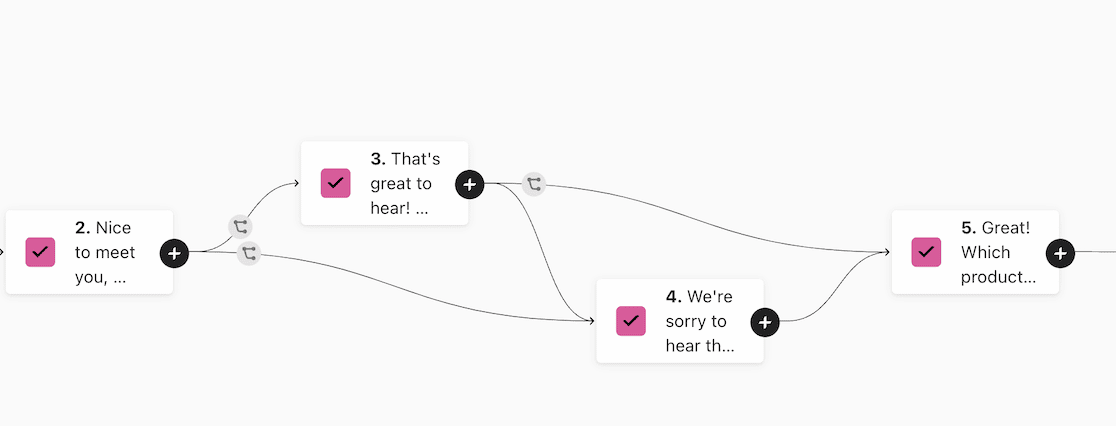
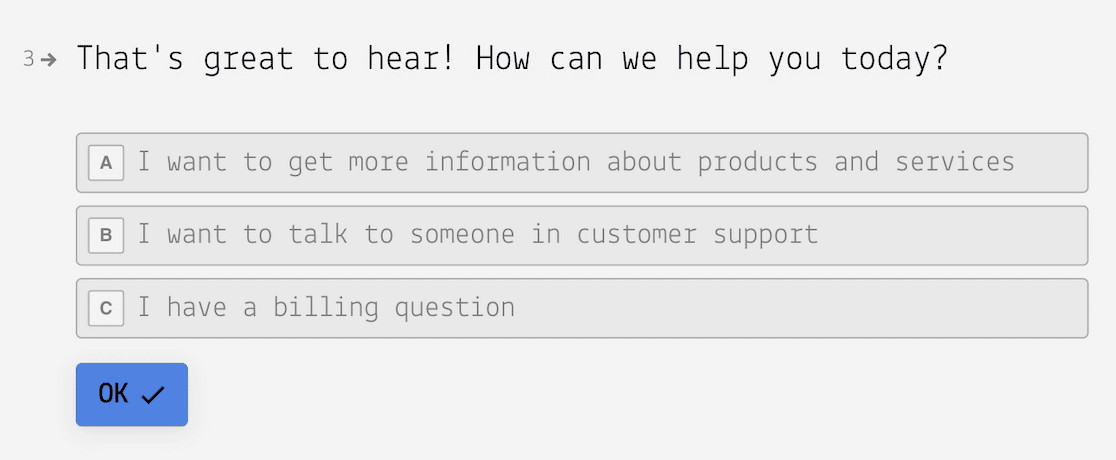
A medida que agregas reglas, el gráfico se transforma para mostrar cómo los encuestados se mueven por el formulario según sus respuestas. Una vez que haces clic en una pregunta, la configuración de la regla en sí es sencilla, creas condiciones si/entonces al igual que en cualquier otro creador.
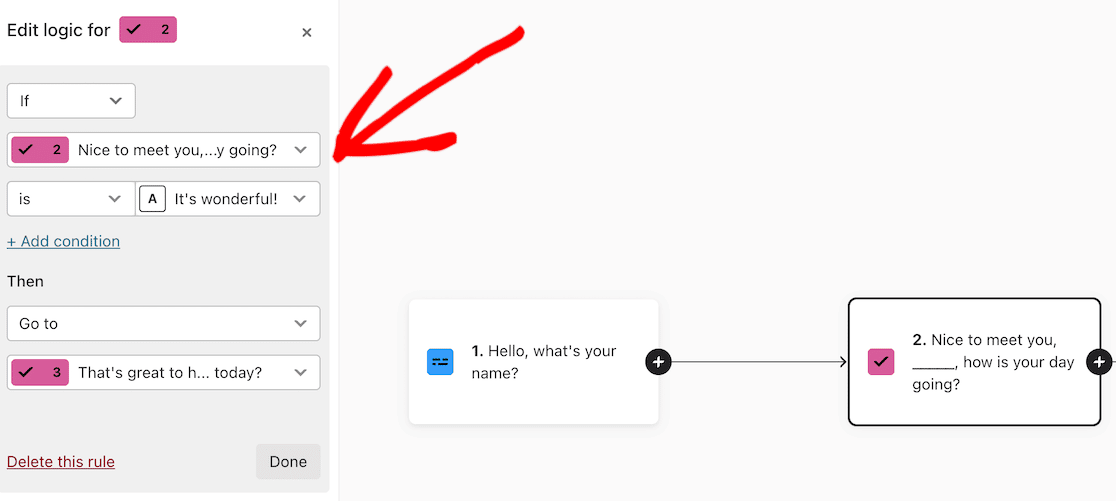
El flujo visual es realmente útil cuando tu formulario tiene más de 15 ramificaciones. Es más difícil perder la pista de dónde puede terminar un encuestado.
Lo que me gustó
- Experiencia conversacional, una pregunta a la vez
- Diagrama de flujo visual para mapeo de lógica
- Cientos de plantillas con cuestionarios y encuestas
- Potente API para integraciones personalizadas
Precios
Typeform tiene un plan gratuito con 10 preguntas por formulario y 10 respuestas mensuales. Los planes de pago comienzan en 29 $ / mes (Básico) al facturar anualmente, con límites de respuestas y formularios en cada nivel. Prueba Typeform.
7. Formstack
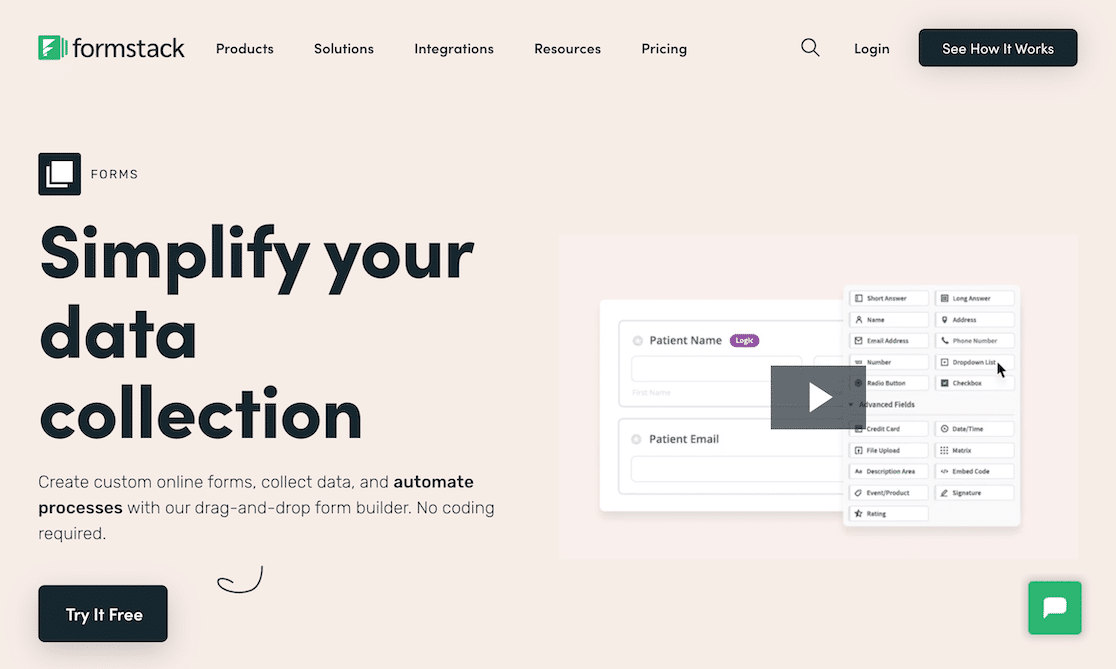
Formstack es la opción orientada a empresas. Forma parte de una plataforma más amplia de automatización de flujos de trabajo, y el creador de formularios funciona bien como producto independiente si solo necesitas esa parte.
Agregar lógica condicional en Formstack fue sencillo. Haz clic en cualquier campo, luego usa el menú desplegable de lógica en la parte superior de la barra lateral izquierda para agregar reglas.
Al igual que Gravity Forms, Formstack, por defecto, coincide con todas las reglas. Si deseas que coincidan algunas reglas, cambia la configuración antes de guardar. Vale la pena señalarlo porque es el mismo error dos veces en esta lista.
Lo que Me gustó
- Automatización de flujos de trabajo integrada (flujos de aprobación, generación de documentos)
- Planes compatibles con HIPAA para atención médica
- Subdominios personalizados con URL de marca
- Análisis e informes detallados
Precios
Formstack ofrece una prueba gratuita de 14 días. Después, los planes comienzan en 50 $/mes (Formularios) si se paga anualmente. Prueba Formstack.
Preguntas frecuentes sobre creadores de formularios con lógica condicional
Algunas de las preguntas que me hacen con más frecuencia sobre formularios con lógica condicional, además de las que aparecen en las búsquedas. Si estás indeciso entre dos creadores o te preguntas cómo funciona una función específica, esto debería cubrir la mayor parte.
¿Qué es la lógica condicional en los creadores de formularios?
La lógica condicional es una función que permite que un formulario cambie a medida que alguien lo completa. La mayoría de las veces muestra u oculta campos según una respuesta anterior, pero también puede omitir páginas, cambiar mensajes de confirmación o dirigir envíos a diferentes destinatarios. El objetivo es mantener el formulario corto y relevante para cada persona, lo que reduce el abandono y te proporciona datos más limpios.
¿Qué creador de formularios tiene la lógica condicional más potente?
Para sitios de WordPress, WPForms cubre la mayor área de superficie. La lógica funciona en campos, secciones, páginas, pagos, notificaciones por correo electrónico y confirmaciones, con encadenamiento de reglas y coincidencia AND/OR. Para formularios basados en la nube, JotForm tiene la mayor cantidad de tipos de acciones más allá de mostrar/ocultar. La lógica de Typeform es más superficial en alcance, pero tiene el mejor mapeo visual para ramificaciones complejas.
¿Puedo usar lógica condicional en un creador de formularios gratuito?
Algunos planes gratuitos incluyen lógica condicional pero con límites. JotForm y Zoho Forms incluyen lógica condicional básica en sus planes gratuitos. El plan gratuito de Typeform incluye Saltos de Lógica con un límite de 10 preguntas. WPForms Lite no incluye lógica condicional, necesitas el plan Básico (49,50 $/año) como mínimo. La mayoría de los creadores que incluyen lógica en planes gratuitos limitan el número de formularios o los envíos mensuales.
¿Se puede usar la lógica condicional para formularios de pagos en línea y comercio electrónico?
Sí, y es una de las aplicaciones más útiles. Con WPForms Pro, puedes establecer reglas condicionales que cambien el campo de pago que aparece, ofrezcan diferentes precios según las selecciones del usuario o cambien entre pagos únicos y recurrentes en el mismo formulario. Stripe, Square y PayPal Commerce admiten lógica condicional en el nivel Pro y superior.
¿La lógica condicional ralentiza un formulario?
Un creador de formularios bien construido ejecuta la lógica condicional en el front-end sin viajes de ida y vuelta al servidor, por lo que no hay un impacto real en el rendimiento. WPForms, por ejemplo, evalúa las reglas en JavaScript mientras el usuario escribe o selecciona respuestas, lo que mantiene todo ágil. La única vez que notarías una ralentización sería en formularios con cientos de campos y docenas de reglas superpuestas, lo cual es raro.
¿Puedo probar la lógica condicional antes de publicarla?
La mayoría de los creadores te permiten previsualizar tu formulario con la lógica condicional activada. WPForms tiene un botón Vista previa en la parte superior del creador que abre el formulario en una nueva pestaña para que puedas completarlo y confirmar que las reglas se comportan como esperas. Siempre prueba también en un dispositivo real, los teclados móviles a veces interactúan con la lógica condicional de maneras que el escritorio no revela.
¿Admite Google Forms lógica condicional?
Google Forms tiene una versión básica llamada ramificación de secciones. Puedes dirigir a alguien a diferentes secciones del formulario basándote en una respuesta de opción múltiple. Es suficiente para escenarios simples, pero no admite mostrar/ocultar a nivel de campo, lógica de pago o reglas de múltiples condiciones. Si necesitas algo más allá de los saltos de sección, querrás uno de los creadores de esta lista.
¿Cómo configuro la lógica condicional en WPForms?
Abre el formulario en el creador de WPForms, haz clic en el campo al que deseas agregar una regla y cambia a la pestaña Lógica inteligente en la barra lateral de configuración del campo. Activa Habilitar lógica condicional, luego agrega tu regla usando los menús desplegables (mostrar/ocultar este campo si [campo] [es/no es] [valor]). Puedes apilar múltiples reglas y elegir COINCIDENCIA Y o CUALQUIERA. No se requiere código.
A continuación, crea formularios más inteligentes que conviertan
La lógica condicional es una pieza del rompecabezas. Las otras piezas son un buen diseño de formulario y una comprensión clara de por qué las personas abandonan los formularios en primer lugar.
Si todavía estás eligiendo una herramienta, echa un vistazo a la guía más amplia de los mejores creadores de formularios en línea para obtener contexto sobre plataformas más allá de la lógica condicional.
Y si deseas combinar la lógica condicional con un diseño de mayor conversión, nuestro tutorial sobre formularios de generación de leads de varios pasos muestra cómo dividir un formulario largo en páginas manejables que combinan bien con la lógica de ramificación.
Para los fundamentos del diseño de formularios, la guía de mejores prácticas para el diseño de formularios cubre el orden de los campos, la ubicación de las etiquetas y los patrones de validación que funcionan en todos los creadores.
Combina eso con mejores prácticas de diseño de formularios que aumentan las conversiones y verás menos abandonos independientemente de la herramienta que elijas.
Crea tu formulario de WordPress ahora
¿Listo para crear tu formulario? Empieza hoy mismo con el plugin de creación de formularios de WordPress más fácil. WPForms Pro incluye muchas plantillas gratuitas y ofrece una garantía de devolución de dinero de 14 días.
Si este artículo te ha sido útil, síguenos en Facebook y X (Twitter) para más tutoriales y guías gratuitas de WordPress.





