


Resumo de IA
Após o lançamento do addon Stripe, queríamos abordar alguns pedidos essenciais de recursos durante a atualização desta semana. Espero que a maioria de vocês já tenha atualizado para o WPForms 1.1.3. Se não o fez, aqui estão os novos recursos e melhorias que você está perdendo.
Modelos de E-mail Personalizados com Marca
Desde o dia em que lançamos, uma das maiores reclamações que recebemos foi que nosso modelo de e-mail precisava de estilo. Então, ouvimos.
Nesta atualização, você tem a opção de escolher entre um modelo HTML elegante ou o modelo básico como antes.
Você também pode adicionar uma imagem de cabeçalho personalizada para dar marca aos seus e-mails. No futuro, adicionaremos mais modelos de e-mail para você escolher.
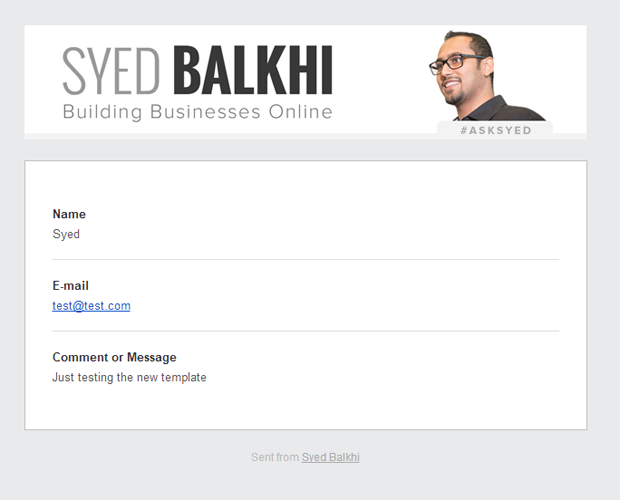
Notificações de e-mail com marca são um dos bons benefícios que você pode oferecer aos seus clientes e fazer seus serviços se destacarem.
Aqui está um guia completo passo a passo sobre como adicionar imagens de cabeçalho personalizadas no modelo de e-mail do WPForms.
Melhoria de Confirmação de Formulário
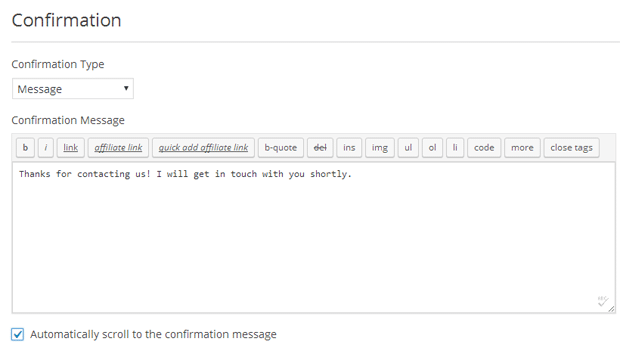
Algumas versões atrás, adicionamos um editor visual para a mensagem de confirmação do formulário. A maior reclamação que recebemos foi que, se o seu formulário estivesse incorporado na parte inferior da página, os usuários não veriam a mensagem de confirmação a menos que rolassem.
Agora você tem a opção de rolar automaticamente para a mensagem de confirmação, o que deve melhorar tremendamente a experiência do usuário.
De E-mail em Notificação por E-mail
Outro recurso mais solicitado que tivemos dos usuários foi a capacidade de adicionar um E-mail de Remetente nas configurações de notificação.
Não adicionamos isso no início porque o Gmail frequentemente marca esses e-mails como spam. No entanto, com tantos pedidos dos usuários, decidimos adicionar esse recurso.
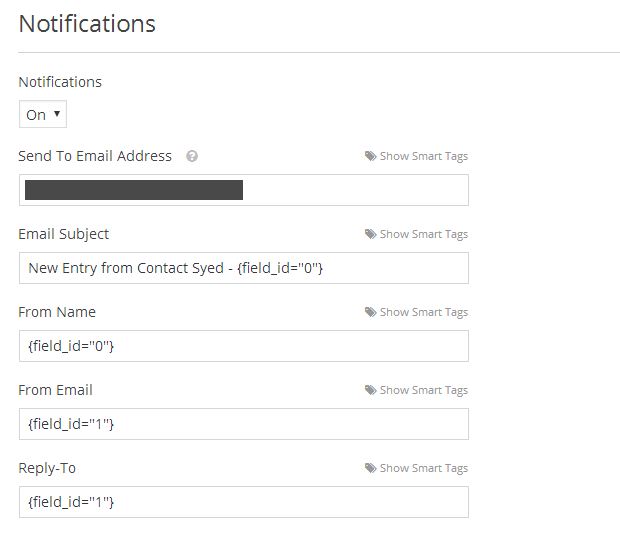
Por padrão, ele define o e-mail do remetente como o endereço de e-mail do seu administrador. Você pode alterá-lo para o endereço de e-mail do remetente.
Se você não vir suas notificações por e-mail, certifique-se de que elas não estejam na sua pasta de spam. Também recomendamos fortemente usar SMTP para enviar e-mails do WordPress para máxima confiabilidade.
O que Vem a Seguir?
Há muito a ser feito em nossa lista este mês, mas as principais coisas que você pode esperar de nós são a capacidade de duplicar um formulário, novo modelo de formulário, melhorias no gerenciamento de entradas, como a capacidade de exportar entradas de formulário, reenviar notificações por e-mail e muito mais.
Também estamos trabalhando na adição de três novos add-ons, incluindo o formulário de login de usuário, formulário de registro de usuário e uma integração com GetResponse.
O WPForms já é o plugin de formulário WordPress mais amigável para iniciantes. Agora estamos em uma missão para torná-lo o plugin de formulário mais poderoso e flexível do mercado.
Procurando um construtor de formulários WordPress de arrastar e soltar? Obtenha o WPForms hoje e desbloqueie todos os recursos incríveis.


Syed,
Estou realmente ansioso pelo Add-on de Registro, considerando que mudei do ProfilePress para o WPForms!!
Pré-lançamento???????
Chegando mais cedo do que você pensa :)
Estou testando seu plugin de formulário e parece que o e-mail de confirmação não está sendo enviado. Felizmente, o envio real do formulário está funcionando. Alguma ideia?
Olá Allison, como os provedores de hospedagem e e-mail estão apertando as regras para combater spam, encontrar problemas de entrega de e-mail está se tornando bastante comum. No entanto, isso pode ser resolvido usando um plugin/serviço SMTP. Temos um artigo sobre isso aqui https://wpforms.com/docs/how-to-fix-wordpress-contact-form-not-sending-email-with-smtp/
Minha recomendação pessoal é o SendGrid, que uso em todos os meus sites. É gratuito, fácil de configurar e resolve o problema 🙂
Olá,
existe alguma opção para enviar e-mail ao usuário que preencheu o formulário?
Como obter o campo de e-mail de um formulário específico?
Olá Ajay,
Sim, é absolutamente possível enviar um e-mail para a pessoa que preenche um formulário. Para configurar isso:
1) Abra o construtor de formulários e vá para Configurações > Notificações
2) Procure o campo E-mail de e clique em Mostrar Smart Tags à direita dele
3) Isso deve abrir um menu suspenso que inclui uma opção E-mail. Se você clicar nela, ela adicionará uma Smart Tag para o endereço de e-mail que o usuário inserir
Aqui está uma captura de tela como exemplo de como isso deve parecer. Conforme mostrado nessa captura de tela, se você adicionar mais de um endereço de e-mail (ou Smart Tag), certifique-se de colocar uma vírgula entre cada um.
Para mais informações sobre notificações, por favor, confira nosso tutorial aqui.
Espero que isso ajude! 🙂
Olá, adoro seu plugin, obrigado.
O único problema que estou tendo é que, quando marco "rolar automaticamente para a mensagem de confirmação", o plugin rola para baixo da mensagem, não parando no topo dela (na verdade, a mensagem fica acima da tela).
Você pode encontrar o formulário aqui: http://www.foodlab.consulting/en/home-2/
Obrigado
Olá Federico,
Dei uma olhada no URL que você compartilhou e enviei um formulário de teste, mas parece que você desativou a animação de rolagem, então não consegui replicar o problema. Parece, no entanto, que há um conflito de código ocorrendo (potencialmente com seu tema ou com outro plugin).
Se você estiver disposto, pode tentar estas etapas de solução de problemas para localizar a origem do problema.
Ou, se você preferir uma opção mais rápida/simples, pode considerar substituir a confirmação no estilo Mensagem por uma página de Agradecimento. Dessa forma, o usuário seria redirecionado para esta outra página e você não precisaria do efeito de rolagem.
Se você quiser saber mais sobre como configurar isso, bem como ideias sobre como criar uma página de Agradecimento eficaz, aqui está nosso tutorial com todos os detalhes.
Espero que isso ajude! Se você tiver alguma dúvida, sinta-se à vontade para entrar em contato com nosso suporte (aqui estão os links para nosso suporte Lite e nosso suporte para a versão paga).
Obrigado! 🙂
Olá, eu amo o Wpforms. Não entendo por que nunca o usei antes.
Atualmente, há apenas uma coisa me incomodando. Quero poder gerenciar facilmente as notificações por e-mail. Portanto, fui em frente e coloquei um arquivo HTML/PHP completo em uma tag inteligente.
ex: $myemail_template = file_get_contents(‘https://MEUDOMINIO.COM/wp-content/themes/meu-tema/emails/email-template.php’);
No entanto, isso só funciona na primeira vez, mas nunca mais funciona.
Você tem alguma ideia de como posso fazer isso funcionar? Isso tornaria o plugin ainda mais poderoso se isso fosse possível.
Obrigado antecipadamente
Olá Benjamin,
Por favor, entre em contato com nossa equipe de suporte e poderemos ajudá-lo a partir daí. 🙂
Obrigado!
Como alterar o estilo do texto usado no e-mail de notificação enviado, quero deixar algum texto em negrito, alguns em itálico e sublinhar algo. mas não consigo fazer isso. Tentei usar tags HTML, mas o e-mail chega sem alterações
Olá Rosh,
Não temos um modelo de e-mail exatamente da mesma forma que outros plugins, então para fazer o que você descreve, requer uma abordagem um pouco diferente para nossas notificações. Você pode adicionar CSS inline diretamente no corpo da notificação do seu formulário, como descrito aqui. você verá que esse código específico serve para mudar o fundo para branco (em vez do cinza padrão), mas você pode mudar quaisquer estilos que desejar aqui. Há também instruções no topo do código para onde colocá-lo nos arquivos do seu site.
Espero que isso ajude! :)
Como posso corrigir o modelo para envio de e-mails?
Olá Alex — Teríamos o prazer de ajudar! Quando tiver um tempo, entre em contato conosco no suporte para que possamos ajudar.
Se você tiver uma licença WPForms, terá acesso ao nosso suporte por e-mail, portanto, envie um ticket de suporte. Caso contrário, oferecemos suporte complementar limitado no fórum de suporte do WPForms Lite no WordPress.org.
Obrigado 🙂
Olá,
Como dar, digamos, ao campo… {field_id=”1″} um text-decoration: none;
Obrigado
Olá Hans – Por padrão, essa abordagem não funcionará. Normalmente, o CSS interno dentro de uma tag precisa ser incluído na tag ou, preferencialmente, inline de cada elemento HTML individual (por exemplo, Negrito).
Permitimos HTML como este no corpo da notificação, e se você quiser fazer modificações nisso, pode fazer isso diretamente no construtor de formulários em Configurações > Notificações.
Aqui está um exemplo de como isso pode parecer:
– Configuração da Mensagem: https://a.supportally.com/klWvLo
– E-mail Recebido: https://a.supportally.com/ywFhFb
Você pode absolutamente usar HTML com WPForms para personalizar suas notificações por e-mail, como no exemplo acima.
No entanto, os provedores de e-mail estão atrasados em termos de CSS e o estilo que pode ser aplicado aos e-mails. Pode ser possível com desenvolvimento personalizado que está fora do nosso escopo de suporte.
E caso ajude, incluí um link para algumas das opções integradas para personalizar suas notificações de e-mail do formulário aqui.
Caso você queira explorar opções de desenvolvimento personalizado, recomendamos fortemente o uso do Seahawk. O Seahawk verifica todos os desenvolvedores para você, garantindo que eles sejam altamente qualificados e comunicativos, e depois também ajuda a guiar todo o processo de conexão e comunicação com um desenvolvedor adequado.
Você pode agendar uma consulta gratuita com a equipe deles aqui.
Caso queira verificar outras opções de desenvolvimento personalizado, por favor, consulte o seguinte guia.
Espero que ajude. Obrigado 🙂