


Resumo de IA
Você está montando um site com um orçamento apertado e precisa de uma solução de formulários? Talvez você esteja procurando um formulário de contato simples, ou talvez precise de algo mais complexo, como um formulário de pagamento.
Ao pesquisar no diretório de plugins do WordPress, o WPForms chama sua atenção. Mas você pode estar se perguntando: é bom demais para ser verdade?
Você pode usar o WPForms gratuitamente? Ou é um daqueles plugins freemium frustrantes que permitem a instalação, mas bloqueiam toda a funcionalidade útil até que você pague?
Boas notícias: o WPForms oferece uma versão gratuita robusta que pode surpreendê-lo com suas capacidades. Neste artigo, explicarei exatamente o que você obtém com a versão gratuita do WPForms (conhecida como WPForms Lite) e como ela se compara ao WPForms Pro.
Crie Seu Formulário WordPress Agora
Você Pode Usar o WPForms Gratuitamente?
Sim, você pode usar o WPForms gratuitamente. O WPForms oferece uma versão gratuita robusta chamada WPForms Lite. Este não é apenas um teaser simplificado – é um plugin construtor de formulários de arrastar e soltar totalmente funcional que você pode usar sem limitações.
Com o WPForms Lite, você tem a liberdade de criar um número ilimitado de formulários, e cada um deles é completamente funcional.
O melhor de tudo é que seus formulários não serão poluídos com marcas ou anúncios irritantes. Se você precisa de um formulário ou de cem, o WPForms cuida de você – tudo sem custar um centavo.
Recursos do WPForms Lite
Muitas versões gratuitas de plugins premium podem ser severamente limitadas, deixando os usuários frustrados. No entanto, o WPForms Lite quebra esse padrão ao oferecer um conjunto robusto de recursos que podem satisfazer as necessidades de muitos usuários.
Vamos explorar o que você obtém com a versão gratuita do WPForms.
Sem Limitação no Número de Formulários ou Tamanho do Formulário
Primeiro, deixe-me enfatizar que o WPForms Lite é verdadeiramente um plugin construtor de formulários totalmente funcional.
Eu já usei versões gratuitas de plugins premium que eram essencialmente inúteis, com todos os recursos, exceto os mais básicos, removidos ou severamente limitados em uso.
Este não é o caso do WPForms Lite. Você pode criar quantos formulários em seu site precisar, torná-los tão longos e detalhados quanto quiser, e não terá que se preocupar com o logotipo da marca WPForms estampado em todos os lugares, fazendo seu site parecer não profissional. Os formulários que você cria com a versão gratuita parecem tão polidos quanto os formulários básicos que você criaria com o plugin Pro.
Para ser claro, a menos que você precise de algumas das funcionalidades avançadas do WPForms Pro, você pode continuar usando o WPForms Lite indefinidamente para criar formulários básicos à vontade.
Construtor de Formulários de Arrastar e Soltar
Assim como o WPForms Pro, o WPForms Lite oferece um construtor de formulários de arrastar e soltar super amigável que fará você publicar seu primeiro formulário em menos de cinco minutos.

Eu conheço a frustração de lidar com plugins de formulários gratuitos que não são nada amigáveis, então é revigorante que a funcionalidade intuitiva do melhor construtor de formulários do WordPress esteja disponível na versão gratuita.
O WPForms Lite inclui todos os campos de formulário essenciais que você precisa para criar um formulário básico, como:
- Texto de Linha Única
- Texto de Parágrafo
- Dropdown
- Múltipla Escolha (botões de rádio)
- Caixas de seleção
- Números
- Nome
- Captcha de Controle Deslizante de Número
Você também tem acesso às opções básicas de campo do WPForms, incluindo:
- Tamanho do campo (Pequeno, Médio ou Grande)
- Texto de espaço reservado
- Limitar o comprimento do texto
- Valores padrão
- Tags inteligentes
- Classes CSS
- Campos de formulário ocultos

Criar um formulário não poderia ser mais simples – basta arrastar e soltar os campos que você deseja em seu formulário, fazer as personalizações necessárias e pronto!
O WPForms também garante que todos os layouts de formulário sejam totalmente responsivos a dispositivos móveis por padrão, portanto, independentemente de como você projetar seu formulário, ele ficará ótimo e proporcionará uma excelente experiência ao usuário em qualquer dispositivo.
Notificações e Confirmações de Formulário Instantâneas
O WPForms Lite envia notificações por e-mail personalizáveis para um endereço de e-mail de sua escolha toda vez que alguém envia um formulário em seu site.
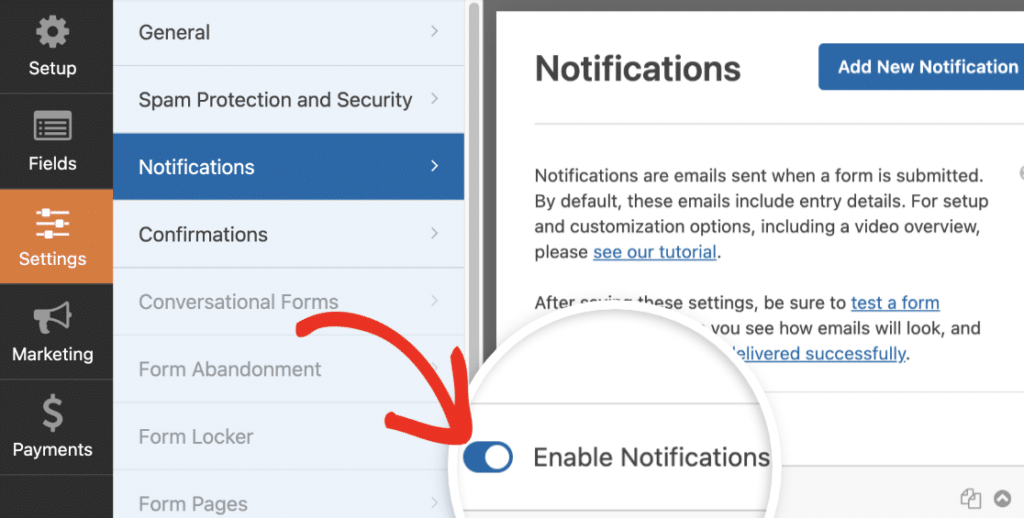
Do lado do usuário, você pode personalizar uma mensagem de confirmação para exibir após o envio do formulário ou redirecionar automaticamente para outra página em seu site ou um URL externo.
Formulários de Pagamento
Um dos recursos mais impressionantes do WPForms Lite é a capacidade de criar formulários que aceitam pagamentos com segurança sem a necessidade de atualizar para o Pro. Você obtém duas integrações completas de pagamento prontas para uso: PayPal e Stripe.
Pagamentos Stripe
O WPForms Lite vem com integração Stripe integrada, permitindo que você adicione vários campos de pagamento ao seu formulário, incluindo:
- Item Único
- Itens Múltiplos
- Itens de Caixa de Seleção
- Itens de Dropdown
- Cartão de Crédito Stripe
- Total
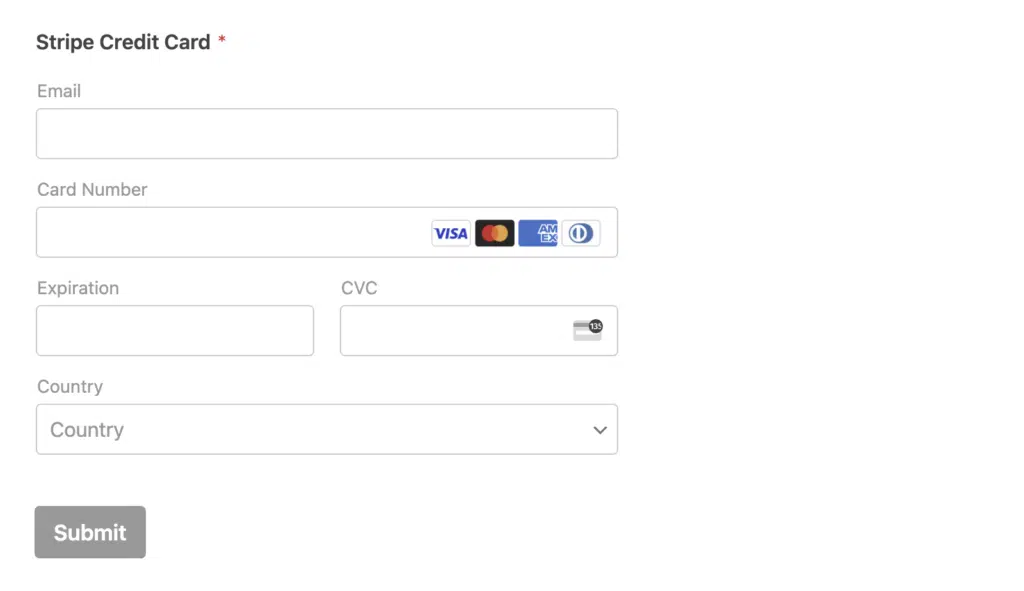
E, como todo o resto no WPForms, integrar pagamentos com cartão de crédito com a Stripe é simples e não requer codificação.
Basta conectar-se à sua conta Stripe e arrastar e soltar o campo Stripe Credit Card em seu formulário. Usuários Lite pagam taxas de processamento adicionais em transações Stripe. A atualização para o WPForms Pro remove essas taxas extras.
Pagamentos PayPal para Todos os Usuários
O WPForms agora inclui o PayPal Commerce para todos os usuários, incluindo o Lite. Isso significa que você pode aceitar pagamentos do PayPal, cartões de crédito e débito, e até mesmo Apple Pay, Google Pay e Venmo diretamente de seus formulários gratuitos.
Você não precisa de uma licença Pro para começar a coletar pagamentos via PayPal. Basta conectar sua conta comercial do PayPal e você estará pronto. Use estes modelos PayPal prontos para começar rapidamente:
- Formulários de doação
- Formulários de assinatura e pagamento recorrente
- Formulários de associação
- Formulários de pagamento mensal
- Formulários de registro com pagamento
- Formulários de pré-venda
- Formulários de depósito
- Formulários de promessa
- Formulários de pagamento de taxas
- Formulários de pedidos com vários itens
Cada modelo é totalmente personalizável no construtor de arrastar e soltar. Você pode ajustar campos, alterar valores e configurar pagamentos únicos e recorrentes.
Painel de Pagamentos
Os pagamentos do PayPal e Stripe são rastreados em uma tela dedicada de Pagamentos:
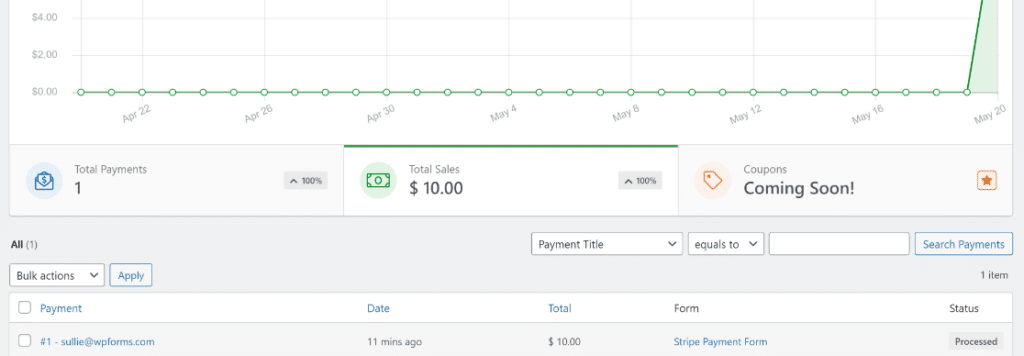
Isso permite que você monitore as vendas e emita reembolsos diretamente do seu painel do WordPress. Não há necessidade de alternar entre plataformas para ver o que está entrando.
Integrações de Marketing
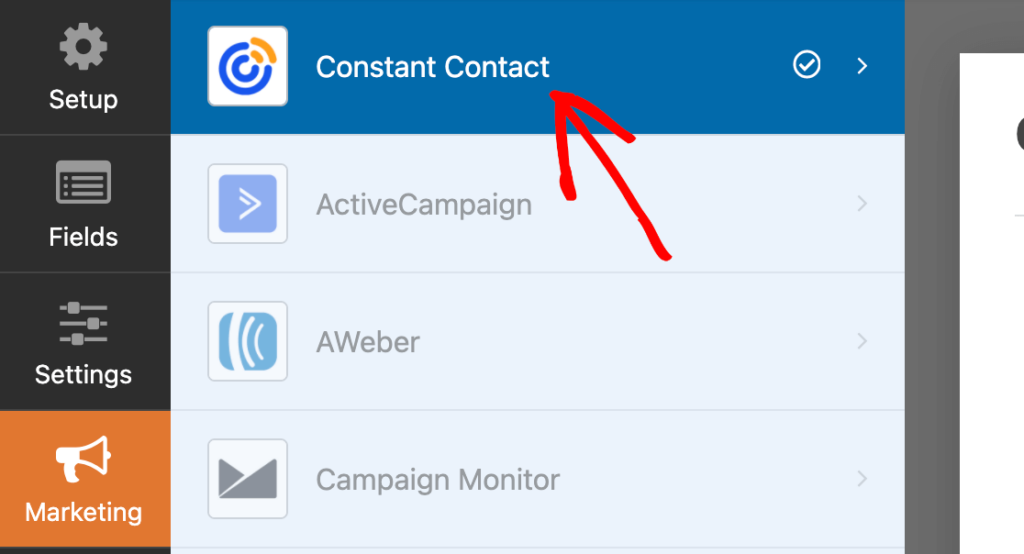
Você precisará fazer upgrade para o WPForms Pro para ter acesso à maioria das integrações de marketing por e-mail. Mas se você não tem preferência sobre qual plataforma de marketing por e-mail usar, a integração com Constant Contact está integrada diretamente ao WPForms Lite.
Você pode criar facilmente formulários de inscrição por e-mail e enviar detalhes de inscrição automaticamente para suas listas de e-mail do Constant Contact.
Como bônus, o WPForms Lite também vem com a integração com Uncanny Automator. Isso permite que você crie automações poderosas para mais de 170 aplicativos e serviços e conecte seus formulários a mídias sociais, plugins de associação, plataformas de e-learning e muito mais.
Proteção contra Spam
O WPForms Lite vem com poderosos recursos de proteção antispam nos bastidores, que estão ativados por padrão.
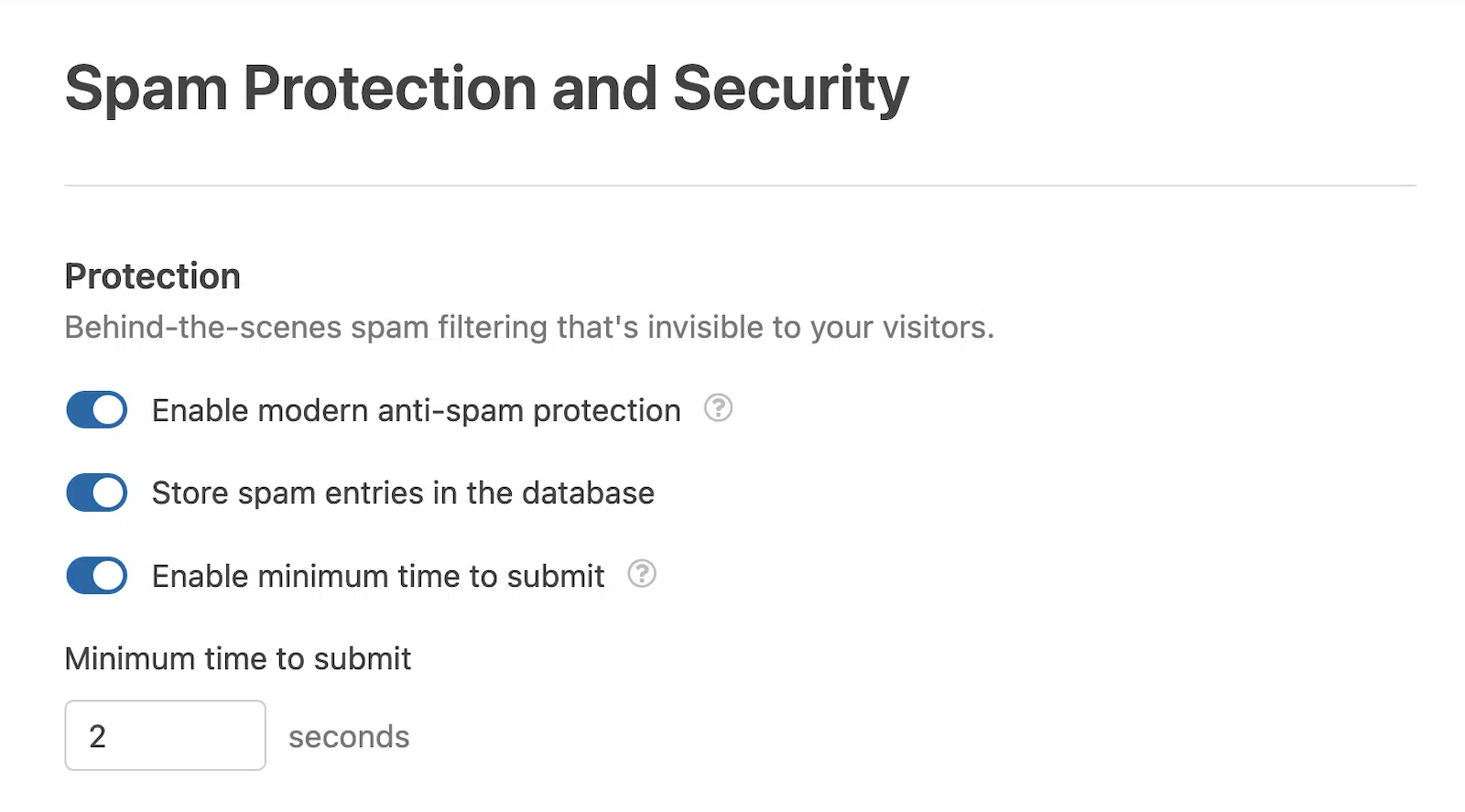
Você também pode ajustar o tempo mínimo para envio, o que pode ajudar a eliminar entradas de bots de spam, e ativar serviços de CAPTCHA e antispam de terceiros, incluindo o reCAPTCHA do Google, o hCaptcha com foco em privacidade, o Cloudflare Turnstile e o Akismet.
Modelos Gratuitos do WPForms
Embora o WPForms Lite permita que você crie formulários personalizados do zero, ele também oferece um atalho valioso: modelos de formulário pré-projetados.
Embora muitos modelos premium sejam exclusivos para usuários Pro, o WPForms Lite ainda oferece uma impressionante variedade de modelos gratuitos para acelerar seu processo de criação de formulários.

Esses modelos gratuitos cobrem uma ampla gama de casos de uso, incluindo:
- Formulários de contato básicos
- Formulários de inscrição para newsletters
- Formulários de registro
- Formulários de inscrição
- Formulários de pagamento simples
Você pode usar esses modelos como estão para uma solução rápida ou personalizá-los para atender perfeitamente às suas necessidades específicas. Esse recurso não apenas economiza tempo, mas também oferece uma excelente maneira de explorar o potencial do WPForms Lite e descobrir novas maneiras de interagir com os visitantes do seu site.
Como Usar o WPForms Gratuitamente
Para começar com o WPForms Lite, faça login no painel do seu site WordPress e navegue até Plugins » Adicionar Novo Plugin.

Digite “wpforms” na caixa de pesquisa e pressione Enter para executar a pesquisa.

Clique no botão Instalar agora ao lado do plugin WPForms.

Quando o plugin terminar de instalar, clique no botão Ativar.

E pronto! É isso! Agora você está pronto para começar a criar formulários gratuitamente com o WPForms.
Para um guia visual, você pode assistir ao vídeo abaixo, que o orienta no processo de criação de um formulário de contato básico com o WPForms.
WPForms Gratuito vs Pago (Lite vs Pro)
Com o WPForms Lite oferecendo tantos recursos, você pode se perguntar por que alguém faria upgrade para a versão paga Pro.
A resposta simples? Você não precisa se o WPForms Lite atender a todos os seus requisitos. Para criar formulários básicos com um orçamento limitado, é difícil de superar.
No entanto, o WPForms Pro desbloqueia um conjunto de recursos poderosos que podem aprimorar significativamente seus formulários, permitindo fluxos de trabalho e integrações complexas.
Gerenciamento de Entradas
Enquanto o WPForms Lite envia envios de formulários por e-mail, o WPForms Pro vai além. Ele oferece um poderoso sistema de gerenciamento de entradas que armazena as entradas do formulário dentro do WordPress.
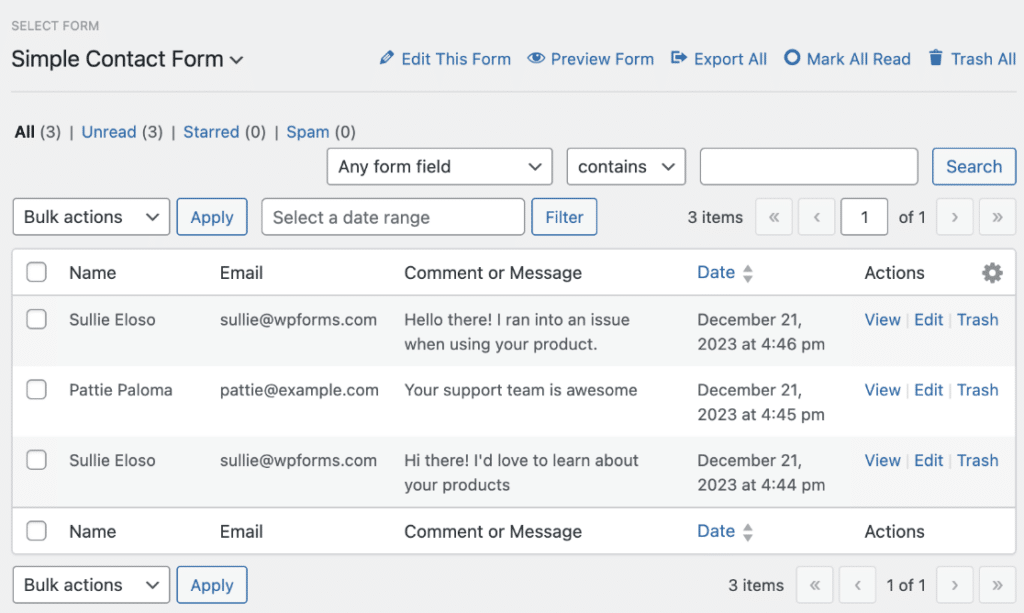
Este sistema permite pesquisar e classificar envios, exportar dados e personalizar como você exibe as informações. É um divisor de águas para empresas que precisam gerenciar e analisar grandes volumes de envios de formulários.
Campos de Formulário Elegantes
O WPForms Pro expande seu kit de ferramentas de criação de formulários com campos adicionais, como seletores de data e hora, campos de senha, upload de arquivos, avaliações, assinaturas e Escala Likert.

Ele também introduz campos especiais para aprimorar a funcionalidade do formulário, como campos repetidores para duplicar seções, quebras de página para formulários de várias páginas e campos de layout para opções de design avançadas.
Na frente de pagamentos, o WPForms Pro oferece campos avançados, incluindo cupons e integrações com mais serviços de pagamento como Authorize.net, PayPal e Square. Como bônus, você desfrutará de taxas de transação Stripe mais baixas em comparação com a versão Lite.
Lógica Condicional Inteligente
Um dos recursos mais poderosos do WPForms Pro é a lógica condicional. Isso permite que você crie formulários dinâmicos e inteligentes que se adaptam com base na entrada do usuário.
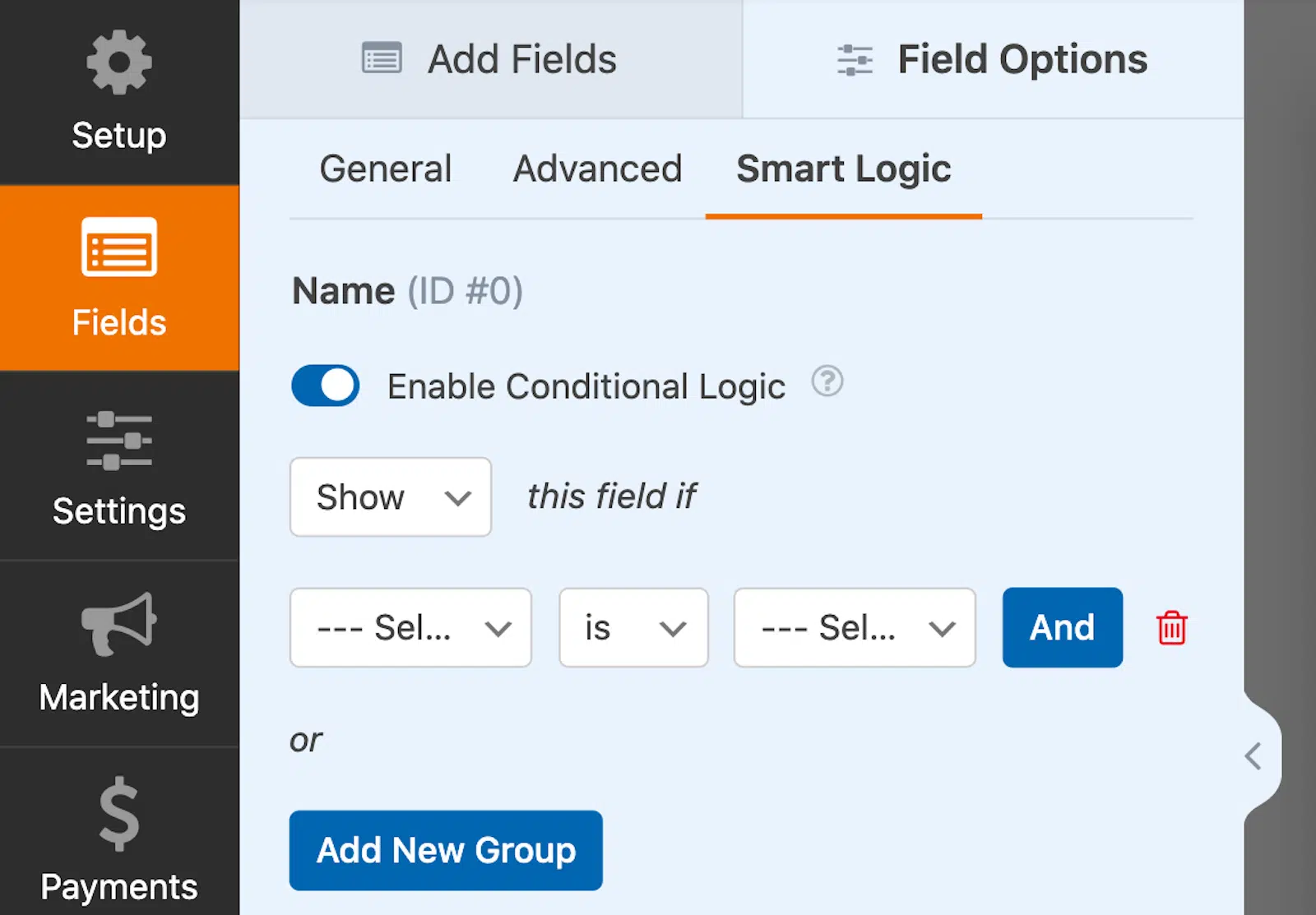
Você pode mostrar ou ocultar campos com base nas seleções do usuário, configurar regras de lógica avançadas e automatizar ações com base na entrada do formulário.
Por exemplo, você pode permitir que os usuários selecionem seu próprio método de pagamento, criar notificações de formulário condicionais ou configurar o roteamento automático de leads.
Recursos Avançados de Formulário
O WPForms Pro inclui vários recursos avançados e addons que levam seus formulários para o próximo nível.
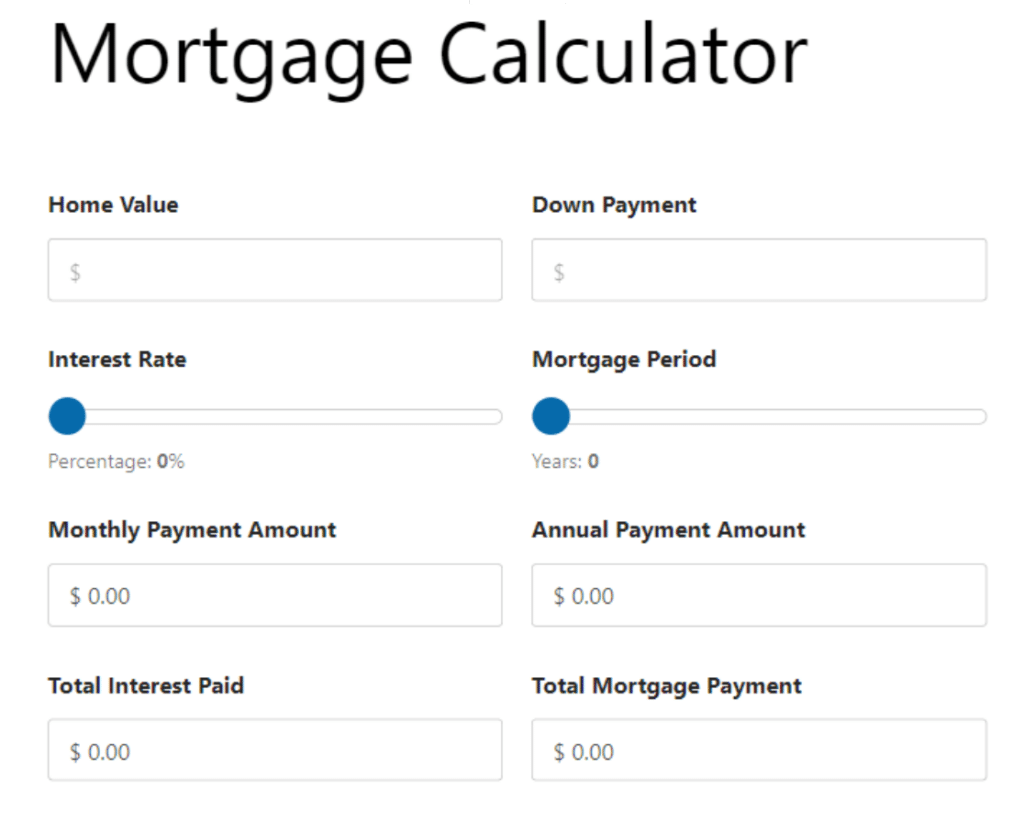
Por exemplo, o addon de Cálculos converte seus formulários básicos em calculadoras personalizadas avançadas. Você pode calcular automaticamente totais de pedidos, criar formulários de cotação personalizados com cálculos em tempo real e criar calculadoras personalizadas para atrair tráfego e leads para qualquer necessidade do usuário, de saúde e fitness a negócios e finanças.
Os addons Formulários Offline e Salvar e Continuar aumentam as taxas de conclusão, permitindo que os usuários salvem seu progresso e retornem mais tarde. Para controle de acesso, o addon Bloqueio de Formulário permite que você limite quem pode enviar formulários.
E se você gosta de coleta de dados, o addon Pesquisas e Enquetes facilita a coleta de feedback com relatórios interativos apresentando gráficos e tabelas atraentes.
Mais de 10.000 Integrações
Com o WPForms Pro, você pode conectar seus formulários a vários serviços de marketing por e-mail, incluindo Campaign Monitor, Mailchimp, Brevo e aplicativos de terceiros como Google Sheets.

Mas o verdadeiro poder vem da integração com o Zapier, que abre conexões para mais de 10.000 aplicativos. Isso permite automações poderosas e ações de gatilho no envio de formulários. Por exemplo, você pode adicionar um evento automaticamente ao Google Agenda ou criar uma tarefa no Trello ou Asana.
Ferramentas de Conversão
Se você está usando formulários para capturar leads, o WPForms Pro oferece vários recursos projetados para aumentar as conversões.
Você pode criar páginas de destino e formulários atraentes e sem distrações, projetados especificamente para altas conversões. O addon Conversational Forms permite criar formulários interativos e semelhantes aos humanos, que fazem uma pergunta por vez. Form Pages e Lead forms são projetados para capturar o máximo de leads possível.

E se alguém começar, mas não terminar um formulário, o addon Form Abandonment ajuda você a capturar esse lead perdido e a fazer um acompanhamento direto.
Mais de 2.100 modelos
Se você achou que os modelos que você obtém com o WPForms Lite são bons, você ficará totalmente impressionado com os modelos Pro!
O WPForms Pro leva os modelos para o próximo nível com uma ampla gama de modelos personalizáveis e projetados profissionalmente para vários setores e casos de uso, incluindo operações comerciais, atendimento ao cliente, educação, planejamento de eventos, entretenimento, feedback e muito mais.
Quer salvar um formulário que você personalizou ou construiu para usar mais tarde? O WPForms permite que você salve seus próprios modelos personalizados para que possa adicioná-los facilmente à sua biblioteca de modelos para usar novamente em uma data posterior.
Formulários Bonitos com Personalizações Avançadas
Além dos modelos, o WPForms Pro vem com uma biblioteca de mais de 40 temas de formulário projetados profissionalmente.
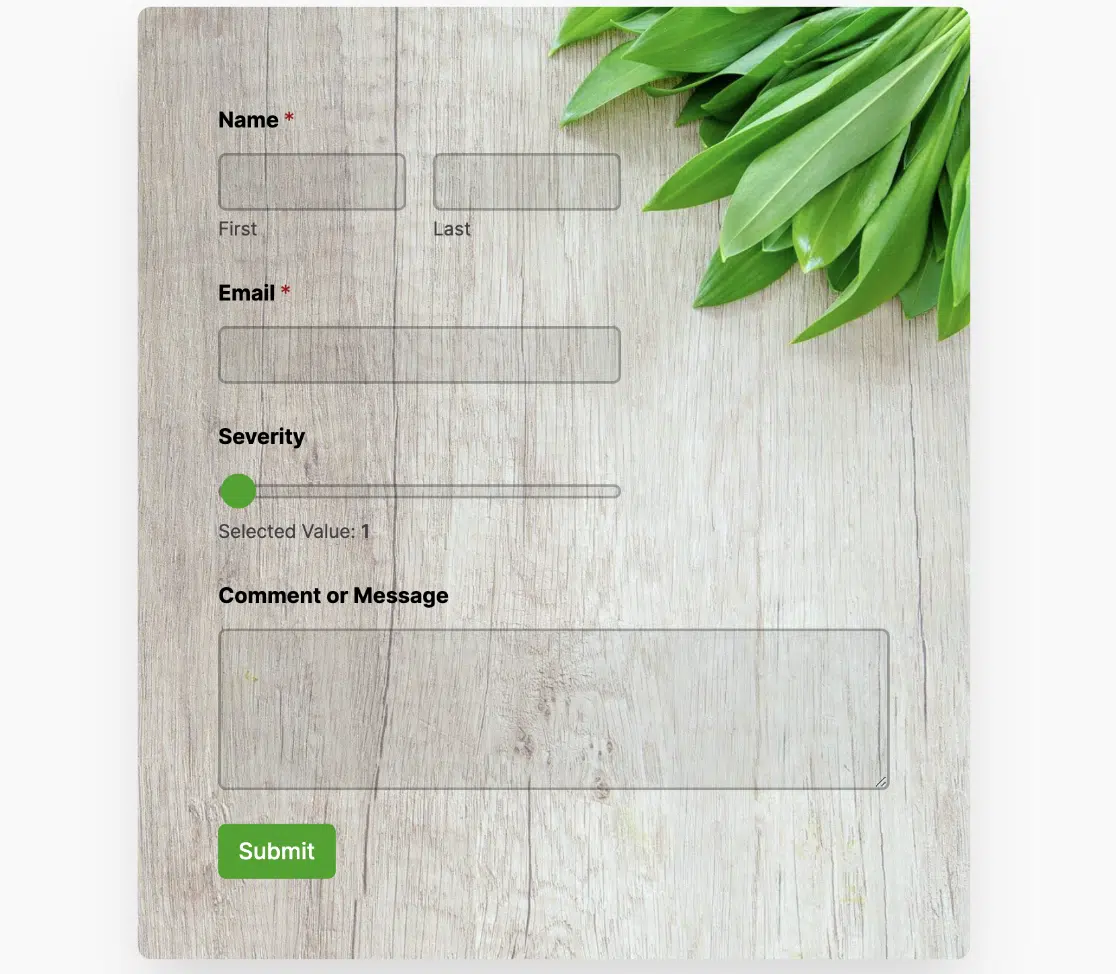
Cada tema é projetado com cores, bordas, imagens de fundo e estilos de botão para se adequar a diferentes estéticas. Você pode personalizar esses temas para combinar perfeitamente com seu site e salvar seus temas personalizados para uso posterior.
Até as notificações de formulário ganham uma reformulação no Pro. Você pode escolher entre vários modelos de notificação de formulário e personalizá-los com suas próprias cores de fundo e logotipo, garantindo uma experiência de marca consistente em toda a jornada do usuário.
WPForms Gratuito ou Pago – Você Decide!
O WPForms Lite oferece um conjunto robusto de recursos para criar formulários básicos sem custo. Para funcionalidades mais avançadas, o WPForms Pro fornece uma solução abrangente para empresas e sites com necessidades complexas de formulários. Escolha a versão que melhor se adapta aos seus requisitos e orçamento.
Então, você pode usar o WPForms gratuitamente? Claro! Mas você obtém muito mais se decidir fazer o upgrade para o Pro.
| Recurso | Lite | Pro |
|---|---|---|
| Entradas de Formulário | ||
| Campos de Formulário | ||
| Modelos de Formulário | ||
| Proteção contra Spam e Segurança | ||
| Lógica Condicional Inteligente | ||
| Integrações de Marketing | ||
| Formulários de Pagamento | ||
| Pesquisas e Enquetes | ||
| Recursos Avançados de Formulário | ||
| Suplementos WPForms | ||
| Ferramentas de Conversão | ||
| Suporte ao Cliente |
Mas não há pressão alguma. Você pode usar o WPForms Lite gratuitamente pelo tempo que desejar e criar quantos formulários precisar. Quando seu negócio ou site crescer e você precisar de funcionalidades mais poderosas, poderá fazer o upgrade a qualquer momento.
Quanto custa fazer o upgrade? Dê uma olhada nesta captura de tela que tirei para mostrar os diferentes níveis de licença.
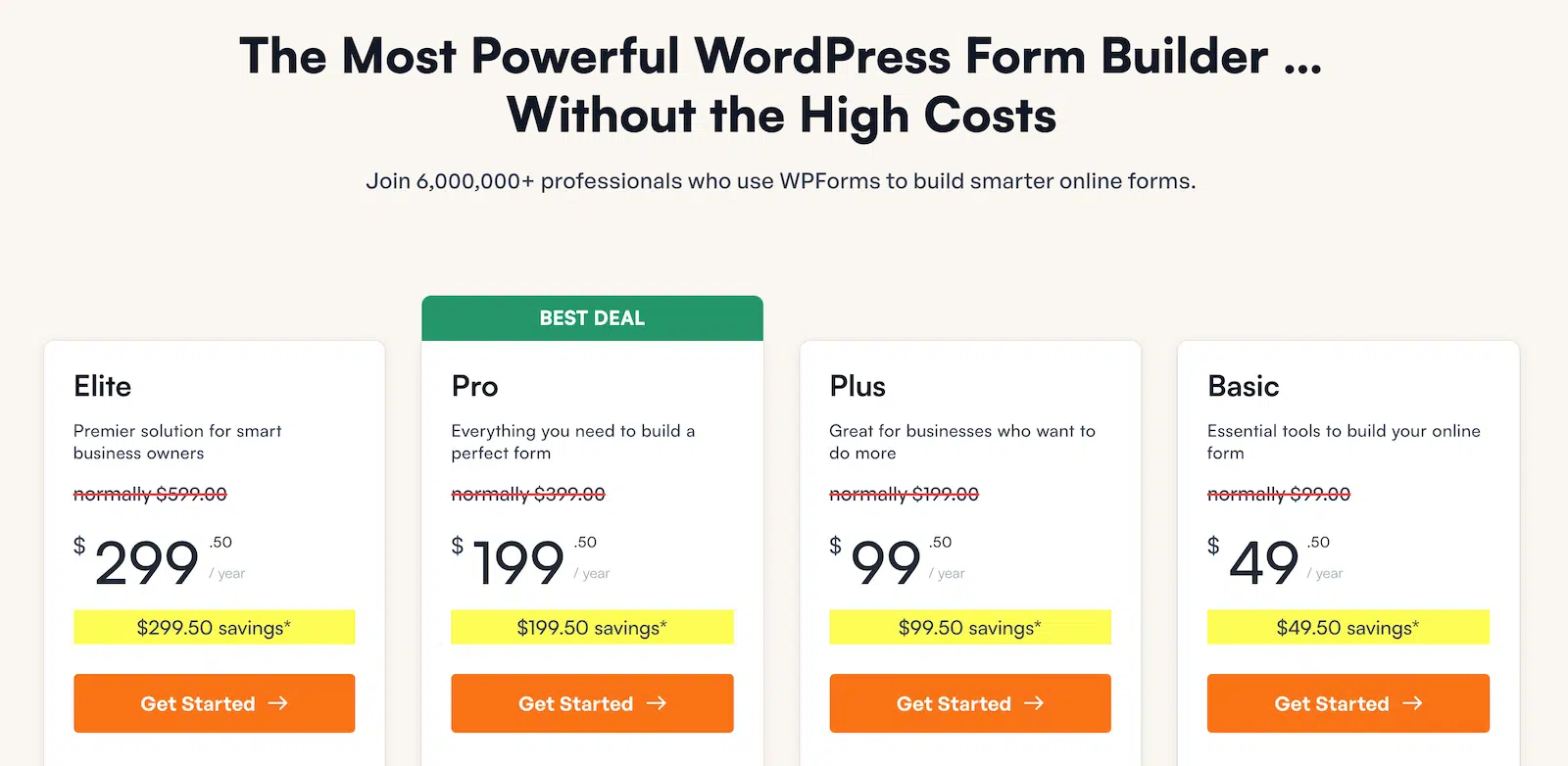
Certifique-se de verificar a página de preços para os preços atuais.
Crie Seu Formulário WordPress Agora
Perguntas Frequentes Sobre o Uso Gratuito do WPForms
Perguntando se o WPForms Lite é a escolha certa para você? Aqui estão algumas das perguntas mais comuns que fazemos sobre o uso gratuito do WPForms:
Como visualizar entradas do WPForms gratuitamente?
Embora o WPForms Lite não salve as entradas diretamente no WordPress, todas as submissões de formulário são enviadas por e-mail para o seu endereço especificado, garantindo que você nunca perca uma entrada importante.
Além disso, você pode ativar o recurso Lite Connect. Esta solução permite fazer backup seguro das suas entradas de formulário no WordPress gratuitamente. Você pode então restaurar todas as suas entradas e gerenciá-las dentro do seu painel do WordPress se decidir fazer o upgrade para o Pro mais tarde.
O WPForms Pro vale o dinheiro?
Com certeza! O WPForms Pro oferece um valor excepcional para empresas e sites que precisam de funcionalidades avançadas de formulários. Enquanto o WPForms Lite é ótimo para necessidades básicas, o Pro desbloqueia um mundo de possibilidades com recursos como lógica condicional, integrações de pagamento avançadas e conexões com mais de 10.000 aplicativos através do Zapier. Se você está procurando criar formulários mais complexos, automatizar fluxos de trabalho ou coletar dados detalhados do usuário, o WPForms Pro definitivamente vale o investimento.
Posso criar formulários de pagamento com o WPForms Lite?
Sim, você pode! Uma das características de destaque do WPForms Lite é sua integração nativa com o Stripe. Isso permite que você crie formulários de pagamento, formulários de doação e formulários de pedido sem precisar fazer o upgrade para o Pro. Você pode facilmente aceitar pagamentos com cartão de crédito diretamente através dos seus formulários, tornando-o uma ferramenta poderosa para pequenas empresas e organizações sem fins lucrativos.
Posso usar o WPForms em vários sites?
Com o WPForms Lite, você pode instalar e usar o plugin em quantos sites desejar, gratuitamente. Não há restrições de uso, o que o torna perfeito para freelancers ou agências que gerenciam vários sites. Se você atualizar para o Pro, o número de sites em que pode usá-lo depende do plano escolhido, com opções disponíveis para 1, 3, 5 ou sites ilimitados.
Posso personalizar a aparência dos meus formulários?
Com certeza! Mesmo com o WPForms Lite, você tem opções para personalizar seus formulários para combinar com o design do seu site. Você pode ajustar o tamanho dos campos, adicionar classes CSS personalizadas e escolher entre diferentes modelos de formulário. Se você atualizar para o Pro, terá ainda mais opções de personalização, incluindo temas de formulário modernos e impressionantes com esquemas de cores e imagens de fundo, além da capacidade de criar layouts e estilos completamente personalizados.
O WPForms Lite recebe atualizações gratuitas?
O WPForms é ativamente mantido e atualizado regularmente. Ambas as versões, Lite e Pro, recebem atualizações frequentes para garantir a compatibilidade com a versão mais recente do WordPress, corrigir quaisquer bugs e introduzir novos recursos. Esse compromisso com o desenvolvimento contínuo significa que você pode confiar no WPForms como uma solução estável e segura para suas necessidades de formulários.
O WPForms Lite é realmente gratuito para sempre?
Sim, o WPForms Lite é genuinamente gratuito para sempre. Não há cobranças ocultas, limites de tempo ou atualizações forçadas. Você pode usar todos os recursos do WPForms Lite em quantos sites desejar, pelo tempo que quiser, sem nunca pagar nada. Esse compromisso em fornecer uma versão gratuita robusta é parte do que faz o WPForms se destacar no mercado de construtores de formulários do WordPress. Embora a versão Pro ofereça recursos avançados adicionais, o WPForms Lite permanece uma opção poderosa e totalmente gratuita para aqueles com necessidades básicas de formulários.
Posso mudar para o Pro sem perder meus formulários?
Com certeza! O WPForms tornou o processo de atualização simples e sem preocupações. Ao atualizar do WPForms Lite para qualquer plano Pro, todos os seus formulários, configurações e entradas existentes são automaticamente transferidos. Não há necessidade de recriar seus formulários ou se preocupar em perder quaisquer dados. Essa transição suave permite que você comece imediatamente a aproveitar os recursos avançados do Pro sem qualquer interrupção em seus formulários ou fluxos de trabalho existentes.
Em seguida, Saiba Mais Sobre os Addons do WPForms
Os addons do WPForms, disponíveis apenas para o WPForms Pro, são uma das maneiras mais fáceis de turbinar seus formulários. Descubra mais sobre quais addons do WPForms estão disponíveis, como usá-los e como eles podem estender a funcionalidade do seu formulário em nosso guia sobre os principais addons do WPForms.
Crie seu formulário WordPress agora
Pronto para criar seu formulário? Comece hoje mesmo com o plugin de criação de formulários WordPress mais fácil. WPForms Pro inclui muitos modelos gratuitos e oferece uma garantia de devolução do dinheiro em 14 dias.
Se este artigo ajudou você, por favor, siga-nos no Facebook e Twitter para mais tutoriais e guias gratuitos do WordPress.


