
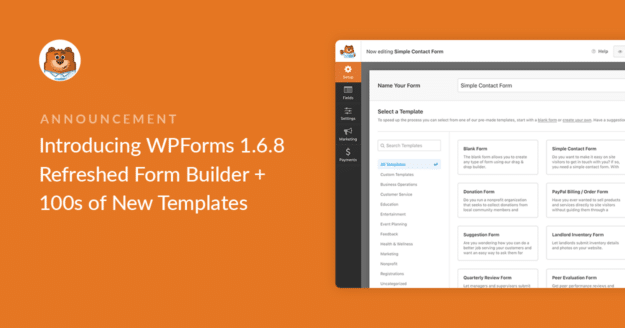


Resumo de IA
Temos orgulho em anunciar que o WPForms 1.6.8 foi lançado e é uma atualização realmente empolgante.
O construtor de formulários foi completamente renovado e adicionamos centenas de novos modelos de formulários. Nossa equipe dedicou muito trabalho a esta atualização e realmente acreditamos que refazer o construtor valeu 100% a pena (especialmente se tornar mais simples gerenciar seu site de pequeno negócio).
Há muito o que amar no construtor de formulários com visual renovado, então prepare-se enquanto mergulhamos nas novidades do plugin WPForms.
Construtor de Formulários Renovado
Agora há um visual e uma sensação mais limpos e otimizados dentro do construtor de formulários.
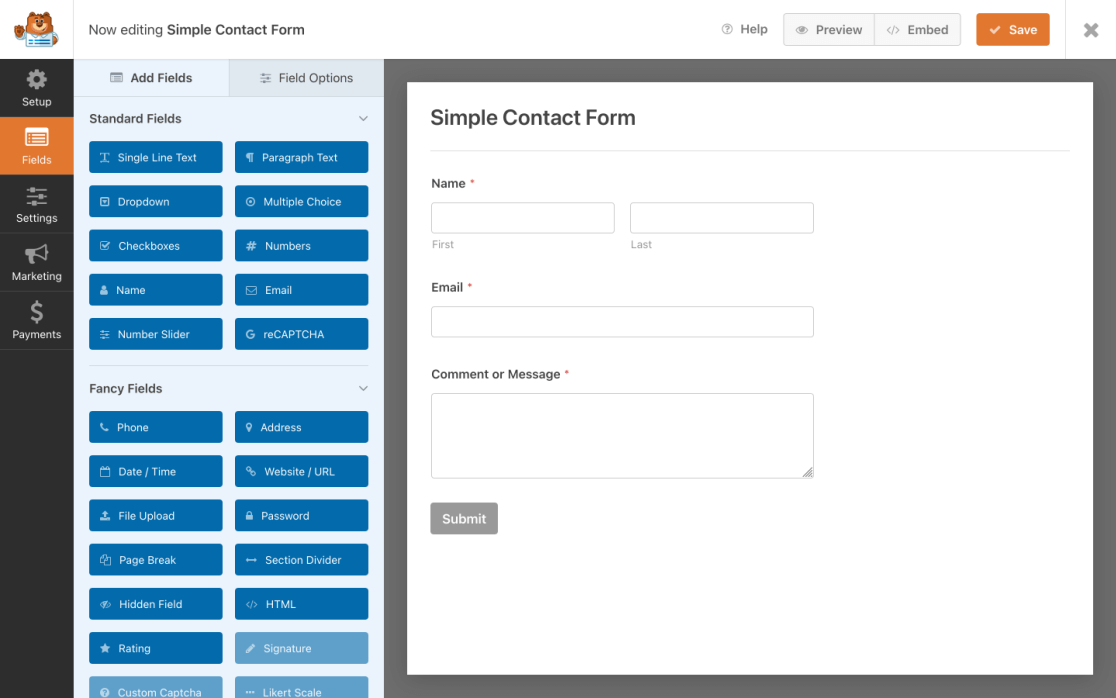
Demos ao editor visual que você conhece e ama um bom polimento e reformulação. Tudo o que torna o construtor de arrastar e soltar tão ótimo agora é mais fácil do que nunca de encontrar.
Já se passaram cinco anos desde que lançamos o plugin e, embora ele tenha passado por algumas grandes mudanças, sentimos que era hora de renovar o próprio construtor de formulários.
Queríamos otimizar sua experiência em todo o plugin, tornando as coisas mais consistentes, tanto em como funciona quanto em como se parece.
Anteriormente, usávamos interruptores em alguns lugares e caixas de seleção em outros. Também descobrimos que estávamos usando várias versões de interruptores com cores arbitrárias. Queremos que a experiência de uso do plugin seja perfeita e intuitiva, então organizamos e alinhamos todos os controles, estilos e cores em todo o construtor de formulários.
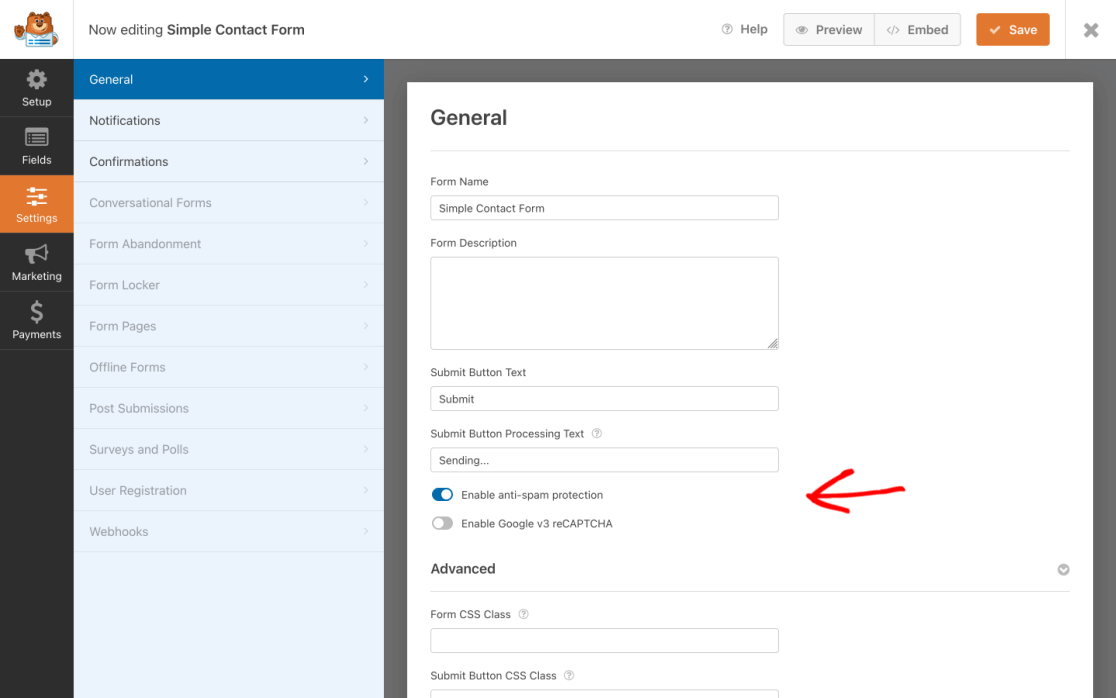
Não foi uma tarefa pequena: cada parte da interface do usuário foi avaliada e aprimorada de acordo, então temos trabalhado duro esperando poder continuar a ajudá-lo a levar seus formulários a novos patamares, facilmente.
Melhoramos o desempenho do construtor de formulários tanto para o uso diário quanto para quando você está trabalhando com formulários maiores e mais robustos. Dessa forma, todos se beneficiam deste ajuste, independentemente de como você usa seus formulários.
Incluídas nesta otimização em larga escala em todas as telas, aqui estão algumas adições notáveis que a renovação do construtor de formulários traz:
Opções de Campo Otimizadas
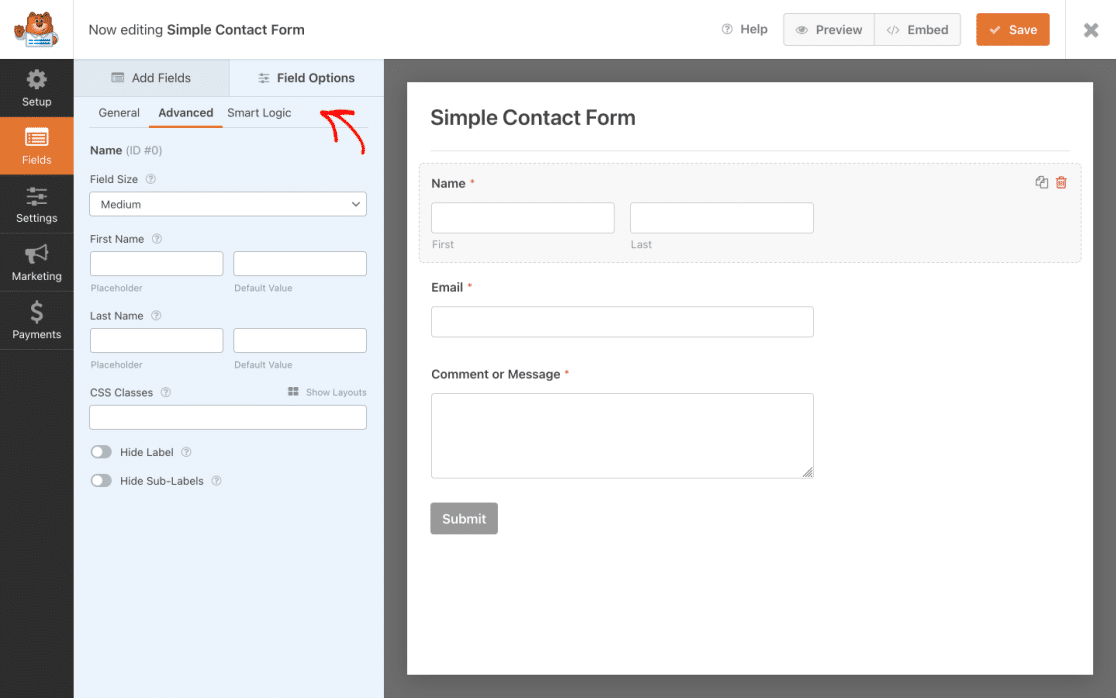
Decidimos pegar os recursos que funcionam bem no construtor e torná-los mais simples de encontrar e usar. Movemos essas configurações populares para suas próprias abas dedicadas, para que você pudesse vê-las melhor e acessá-las mais facilmente:
- Aba Geral: As configurações básicas de campo agora estão localizadas nesta aba padrão e são menos confusas.
- Aba de Configurações Avançadas: Acesse as configurações específicas do campo de forma rápida e fácil nesta nova aba.
- Aba de Lógica Inteligente: A Lógica Condicional agora tem sua própria aba aninhada dentro da aba Opções de Campo.
Botão de Pré-visualização do Formulário
Também adicionamos um útil botão de Pré-visualização ao construtor de formulários para que você possa ver como seu formulário fica enquanto o constrói.
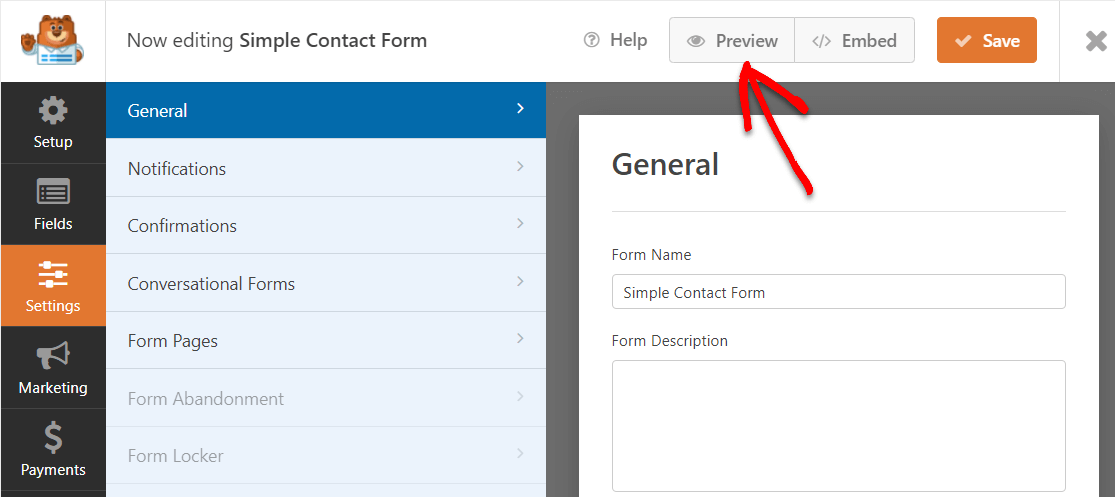
Dessa forma, não há surpresas e você obtém muito mais controle durante a experiência de construção de formulários.
Anteriormente, você precisava incorporar uma página antes de poder visualizá-la. Mas agora, você pode saber exatamente o que está acontecendo vendo uma prévia do formulário. Ao clicar no botão Visualizar, uma nova janela será aberta exibindo o formulário em seu status atual, mesmo enquanto você ainda está editando.
Achamos que você vai adorar as novidades nesta atualização do construtor de formulários. Há ainda mais ajustes e adições que você notará em todo o construtor de formulários. Há muita coisa que mudou e se moveu no novo construtor de formulários, mas tudo para melhor.
Porque sabemos que, quando é mais fácil, rápido e simples gerenciar os formulários do seu site, você pode fazer mais como proprietário de uma pequena empresa. E é por isso que investimos tanto para acertar o novo construtor de formulários. Esperamos que você goste de usá-lo.
Mas isso não é tudo. A reformulação do construtor de formulários inclui outra grande adição hoje.
Novos Modelos de Formulário
Estamos animados em informar que ainda mais modelos de formulário foram criados.
Há uma nova área de modelos que inclui centenas de modelos. Tornando o lançamento, crescimento e gerenciamento do site da sua pequena empresa um pedaço de bolo.
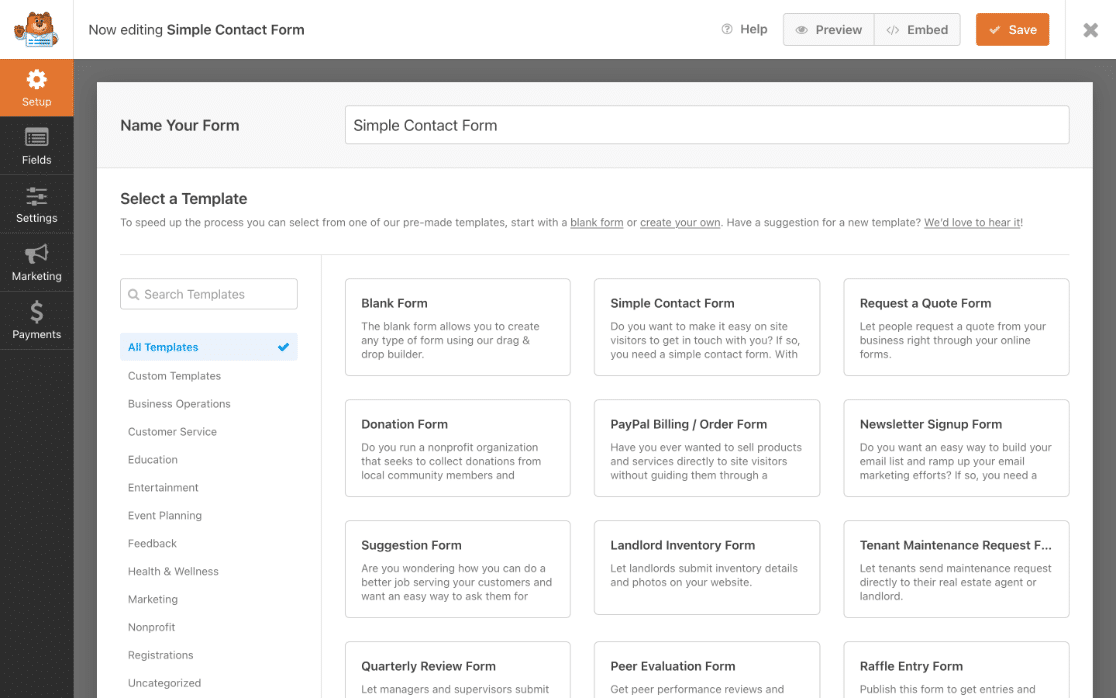
Você notará uma nova e elegante seção de categorias abaixo da barra de função de pesquisa útil que foi movida para o painel esquerdo da tela de Configuração.
Isso é super emocionante porque todos os usuários do WPForms agora têm acesso fácil e instantâneo a uma enorme biblioteca de novos modelos (e estamos adicionando mais o tempo todo).
Em vez de simplesmente rolar por todos os modelos que oferecemos, agora você pode navegar facilmente por várias categorias de modelos e usar a função de pesquisa para encontrar exatamente o que precisa e colocar seu formulário em funcionamento o mais eficientemente possível.
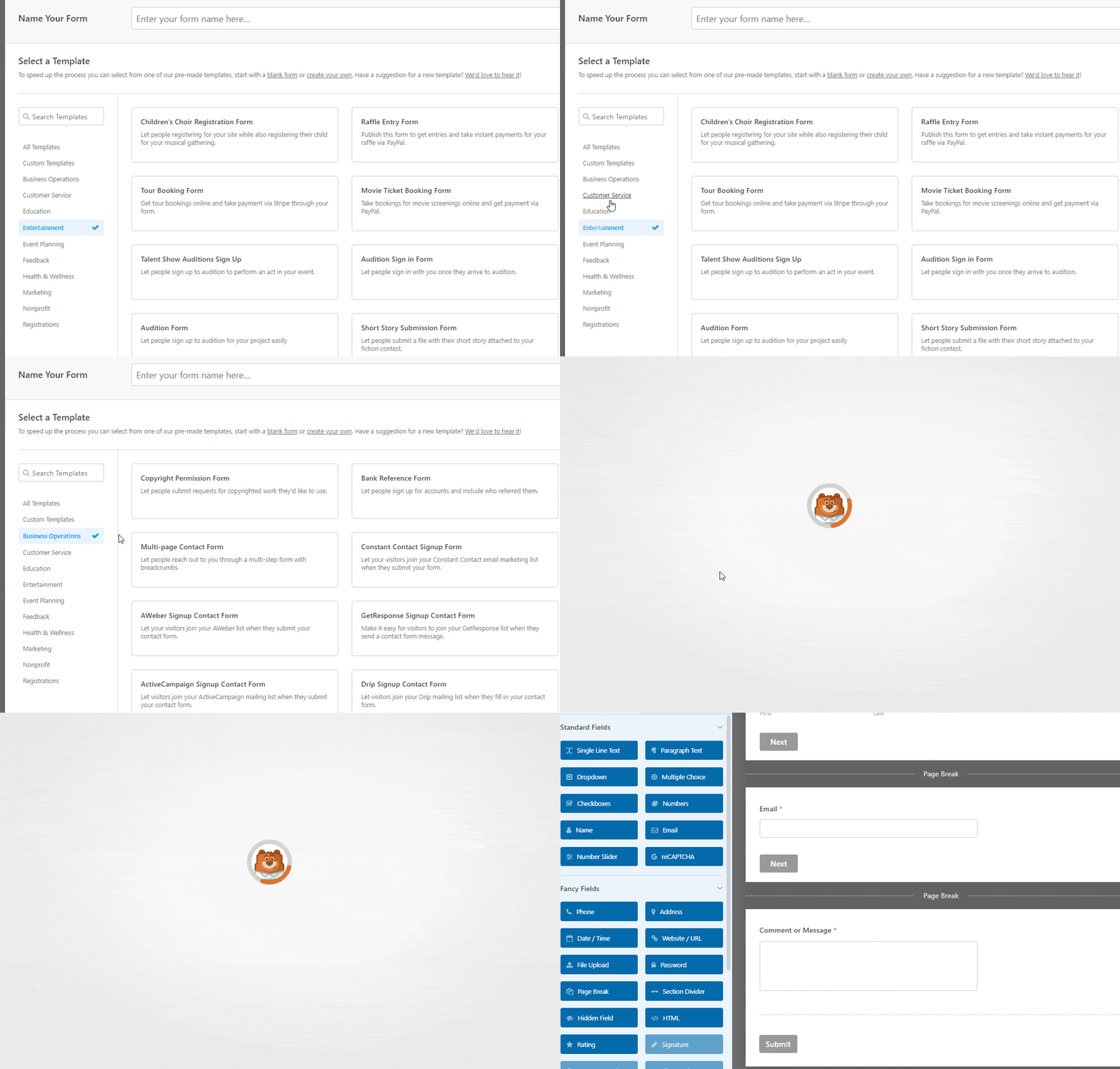
O que você vê agora é apenas o começo.
Esperamos trazer milhares de modelos para esta biblioteca crescente. Isso inclui quaisquer sugestões de modelos que você possa ter e que tornarão as coisas mais fáceis para você.
Nenhum addon é necessário para acessar esses modelos. Portanto, fique atento à tela de modelos nas próximas semanas – mais aparecerão automaticamente, sem necessidade de atualização!
Daqui para frente, o addon Form Templates Pack será descontinuado em favor de nossa nova área de modelos. Se você tiver esse addon instalado, ele será desativado após a atualização para o WPForms 1.6.8. Você poderá remover o addon com segurança, pois todos os modelos de formulário estarão acessíveis diretamente no construtor automaticamente.
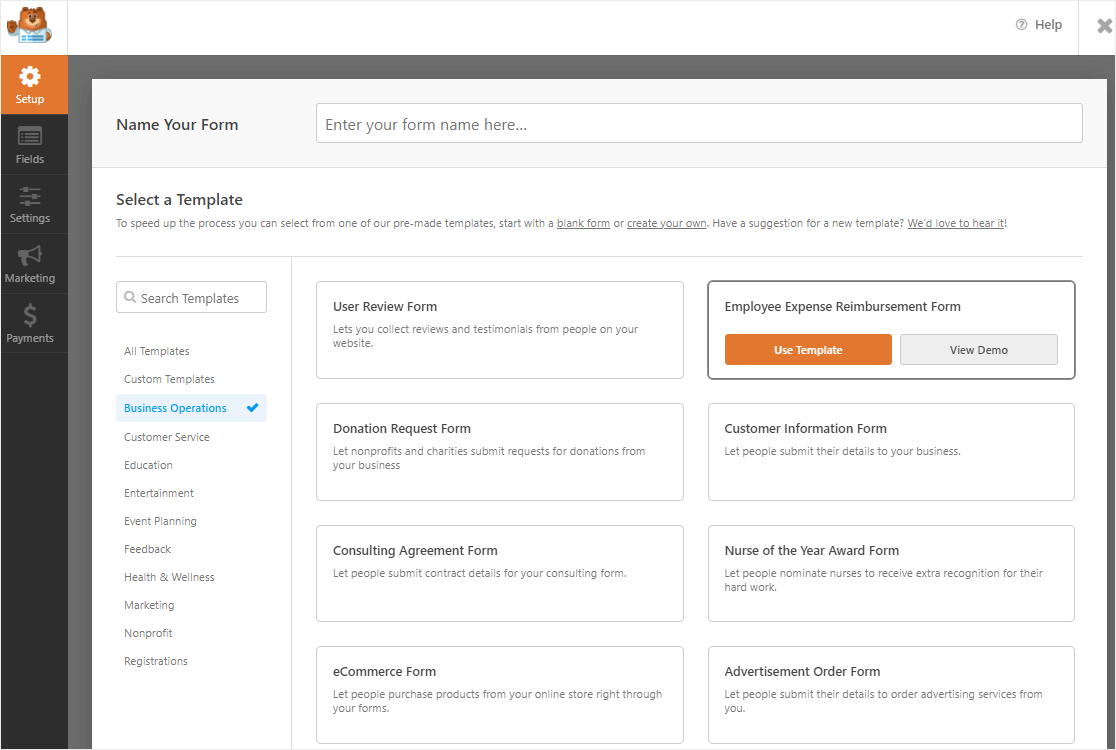
Nós sabemos, coisas muito legais, né?
Portanto, além de adicionar novos modelos de formulário, a atualização do construtor de formulários também inclui algumas melhorias nos bastidores que otimizarão o desempenho geral do plugin para que toda a experiência ao construir seu formulário seja perfeita.
Atualize seu plugin WPForms agora
Isso conclui tudo o que há de novo no WPForms. Esperamos que você aproveite o poderoso novo construtor de formulários e os modelos de formulário.
Se você ainda não o está usando, hoje é um ótimo dia para começar com o WPForms Pro. Você terá acesso instantâneo a todos esses novos e brilhantes modelos para usar no construtor de formulários redesenhado, além de muito mais por vir.
Trabalhamos arduamente nesta versão com a esperança de que nosso produto torne seu trabalho ainda mais fácil. Mas não sabemos o que funciona e o que não funciona sem o seu feedback.
Então conte-nos o que você pensa sobre o WPForms 1.6.8. Seu feedback nos ajuda a planejar novas versões e agradecemos por compartilhar suas experiências usando nosso produto.
Como sempre, obrigado pelo seu apoio contínuo ao WPForms.
Jared Atchison e a equipe WPForms


Os formulários wp deveriam competir com os formulários avada em funcionalidade para realmente se tornarem reis, dê uma olhada, também um salvar em PDF é um pedido comum dos usuários para pessoas que querem o formulário postado junto com os produtos.
Olá Taz! Obrigado pelo seu feedback! No momento, não temos nenhuma capacidade de salvar em PDF, mas anotei seu interesse neste recurso e adicionei seu voto a ele 🙂
Obrigado!
Olá, vocês são uma equipe muito boa no WP-Forms. Seu construtor de formulários é O.K. Eu o uso em ultraschallgeraete.de. Mas o que eu preciso são campos calculados, algo como um formulário de pedido. Uma coluna, 5 campos:
- descrição do item
– preço unitário
– campo de desconto (não editável pelo cliente)
– resumo da coluna
Se o cliente pedir 1 item, 0 de desconto
Se o cliente pedir mais de 10, 10% de desconto
Se o cliente pedir mais de 50, 30% de desconto
E assim por diante.
Atenciosamente
Thomas Hodapp
Olá Thomas! Atualmente, nosso plugin não tem a capacidade de fazer cálculos além de somas básicas. Concordo que seria muito útil, no entanto. Fiz uma anotação sobre a solicitação do recurso e a manteremos em nosso radar enquanto planejamos nosso roteiro para o futuro.
Enquanto isso, uma possível solução alternativa pode ser usar a lógica condicional para exibir o campo de pagamento correto dependendo da entrada do usuário em outro campo. Temos um guia detalhado sobre como fazer isso aqui.
Peço desculpas por não podermos fornecer o que você procura no momento, mas aprecio a sugestão! É sempre útil obter insights de nossos usuários.
Se você tiver mais alguma dúvida sobre isso, por favor entre em contato conosco se tiver uma assinatura ativa. Se não tiver, não hesite em nos fazer algumas perguntas em nossos fóruns de suporte.
Melhorias incríveis! Por favor, adicione um campo de seletor de cores em breve! 🥳
Olá Brandon - Obrigado por sua sugestão! Adicionamos seu voto 🙂
Obrigado pelas melhorias! Fico feliz por ter investido no WPForms!
Olá Jim! Obrigado pelas palavras gentis e agradecemos seu apoio contínuo 🙂
É ótimo ver como o wpforms continua melhorando e se adaptando. Estou ansioso para ver a nova versão entrar em vigor!
Olá Oliver! A versão 1.6.8 já está disponível 🙂 Basta atualizar o plugin e você poderá conferir imediatamente nosso novo Construtor de Formulários e sua interface de usuário renovada!
Se você tiver mais alguma dúvida sobre isso, por favor entre em contato conosco se tiver uma assinatura ativa. Se não tiver, não hesite em nos fazer algumas perguntas em nossos fóruns de suporte.
Obrigado por seu apoio contínuo!
Bom trabalho! Mal posso esperar para experimentar em primeira mão! Ver a melhoria contínua e o orgulho em seu próprio produto definitivamente me dá fé de que posso continuar usando-o e ele só vai melhorar.
Uma coisa que espero ver no futuro é um pouco mais de matemática… ou seja, gostaria de poder combinar dois campos para usar com o campo de totais já disponível – essencialmente para dar um valor a algo e uma quantidade separada para calcular no total. Eu o uso como um formulário de pedido (já que para o meu propósito um carrinho não é ideal), mas fornecer preço+quantidade+total em andamento seria incrível.
Independentemente disso, vou esperar e amar o que vocês têm feito e o trabalho árduo dedicado a isso.
Abraços!
Agradecemos as gentis palavras, Jamie!
Nosso plugin não é capaz de fazer cálculos além de somas básicas no momento, mas anotei seu interesse neste recurso e adicionei seu voto! Você também receberá quaisquer atualizações sobre este recurso quando houver atualizações para compartilhar 🙂
Se você tiver mais alguma dúvida, por favor, não hesite em nos contatar se tiver uma assinatura ativa. Se não tiver, não hesite em nos fazer algumas perguntas em nossos fóruns de suporte.
Obrigado!
Boas adições, e eu amo a simplicidade dos formulários. Acho que o pedido mais comum que recebo é a capacidade de inserir múltiplos de um produto (o que aumentaria proporcionalmente o total), com isso eu poderia dominar o mundo!
podemos por favor ter a opção de anexar arquivos diretamente ao e-mail que o formulário envia em vez de fazer upload para o site?
Olá,
O WPForms não suporta a inclusão de anexos em e-mails no momento. O motivo é que isso pode prejudicar a entrega de e-mails. Diferentes provedores de e-mail têm limites diferentes para o tipo e tamanho de arquivos que podem aceitar. Enviar arquivos que não passam nessas regras, na maioria das vezes, significa que o e-mail não será entregue ou retornará.
Por exemplo, se o provedor de e-mail permitir apenas um tamanho total de anexo de 10 MB, mas o usuário fizer upload de JPEGs de 28 MB, o e-mail não será entregue.
No entanto, incluímos links para quaisquer arquivos enviados para o formulário diretamente dentro da notificação por e-mail para que possam ser visualizados rapidamente ao ler o e-mail (sem necessidade de o usuário fazer login para vê-los). Caso ajude, você pode ver um exemplo disso aqui.
Espero que ajude 🙂
A atualização parece ter quebrado minha biblioteca de mídia! Como minha biblioteca de mídia funciona quando desativo o WPForms e para de funcionar [círculo de carregamento infinito] quando o reativo… Ajuda por favor!
Oi Lisa - Sinto muito por esse problema estranho.
Para qualquer ajuda adicional sobre isso, por favor, nos envie uma mensagem no suporte para que possamos ajudar.
Se você tiver uma licença do WPForms, terá acesso ao nosso suporte por e-mail, então por favor envie um ticket de suporte. Caso contrário, oferecemos suporte complementar limitado no fórum de suporte do WPForms Lite no WordPress.org.
Obrigado 🙂
É fácil de usar ao atualizar um formulário de contato no WordPress, mas ao clicar em "salvar", as alterações não aparecem no site. Mais alguém já passou por isso e como consertou?
Obrigado! Continue criando.
Oi Edina! Geralmente, quando as alterações salvas com sucesso no construtor de formulários não aparecem no front-end do site, é porque seu site ainda está servindo versões antigas em cache do seu site. Por favor, tente limpar seus caches :)
Espero que isso ajude 🙂 Se você tiver mais alguma dúvida sobre isso, por favor entre em contato conosco se você tiver uma assinatura ativa. Se não tiver, não hesite em nos enviar algumas perguntas em nossos fóruns de suporte.
Este artigo é muito útil. No entanto, estou com um problema e gostaria de saber seu conselho especializado sobre isso.
Qual é o melhor modelo para eu usar no meu blog WordPress?
Meu blog WP é sobre compartilhar certas informações. Não estou administrando um negócio, nem preciso comercializar nenhum produto. Da mesma forma, não preciso entrar em contato com (possíveis) clientes.
Eu só preciso de um formulário mostrando que as pessoas podem seguir meu blog WP.
Obrigada
Jackie
Oi Jackie,
Você se importaria de entrar em contato conosco no suporte com detalhes adicionais sobre o modelo que você espera? Teremos prazer em sugerir um modelo relacionado. Saiba que você também pode criar um formulário personalizado usando o Modelo em Branco e personalizá-lo de acordo com suas necessidades, escolhendo os campos de formulário disponíveis.
Se você tiver uma licença do WPForms, terá acesso ao nosso suporte por e-mail, então por favor envie um ticket de suporte. Caso contrário, oferecemos suporte complementar limitado no fórum de suporte do WPForms Lite no WordPress.org.
Obrigado 🙂
Se você tiver uma licença do WPForms, terá acesso ao nosso suporte por e-mail, então por favor envie um ticket de suporte. Caso contrário, oferecemos suporte complementar limitado no fórum de suporte do WPForms Lite no WordPress.org.
Obrigado
Melhorias incríveis. Posso sugerir a integração de cálculo básico do WPFORMS? Isso poderia ser um divisor de águas. Outros provedores o utilizam e estão crescendo por causa disso.
Oi Fran! Obrigado pelo seu feedback :) Anotei seu interesse em recursos de cálculo para que você receba atualizações sobre isso quando estiver disponível!
Como posso inserir campos ocultos, como informações sobre URL, dinamicamente de qual página o formulário é enviado?
Oi Chitra - Boa pergunta!
Você pode usar a tag inteligente {page_url} e obter o URL da página. Por favor, consulte este guia sobre tags inteligentes.
Espero que ajude! 🙂
Olá, gostaria de saber se o plugin WPForms é compatível com o tema Avada no WordPress? E também é compatível com o tema Impreza sempre no WordPress?
Olá Franc, o WPForms segue os padrões mais recentes e, portanto, deve funcionar bem com qualquer tema ou plugin do WordPress. No entanto, não podemos garantir que não haverá problemas ou conflitos, pois não podemos garantir a qualidade ou os padrões de codificação para o seu tema específico (e sua versão) ou para todos os seus plugins. Se surgirem problemas, entre em contato conosco e tentaremos resolvê-los o mais rápido possível.
Na chance incrivelmente pequena de ocorrer um conflito profundo (que ainda não encontramos), oferecemos com orgulho uma garantia de 14 dias. Isso significa que se você experimentar o WPForms e, nos primeiros 14 dias, decidir que o WPForms não é adequado, reembolsaremos 100% do seu dinheiro. Sem perguntas.
Espero que isso ajude.