


AI要約
サインアップフォームとメールリストは、名前をコピー&ペーストする2つのタブではなく、1つのシステムとして機能する必要があります。WordPressフォームのメールマーケティング連携の仕事はまさにそれで、すべての送信で自動的に連絡先がリストに追加され、タグ付けされて次のキャンペーンの準備が整います。
WPFormsは、MailchimpからKit、Klaviyoまで、13のメールマーケティングプラットフォームとネイティブに連携します。
この記事では、これら13すべてについて、それぞれの最適な機能、そしてあなたのスタックにどれが適しているかを見つける方法を説明します。
WordPressフォームとネイティブに統合されるEメールマーケティングツールはどれですか?
WPFormsには13のメールマーケティングプラットフォーム用のネイティブアドオンがあり、すべて同じ方法で設定できます。フォームビルダー内でコード不要です。以下に全リストと、あなたのサイトに最適なものを選ぶ方法を紹介します。
ネイティブ連携とは?
ネイティブ連携とは、WPFormsチームによって構築・保守されている、フォームとメールプラットフォーム間の直接的な接続のことです。フォームビルダー内で設定し、フォームフィールドとリストフィールドを一度マッピングすれば、それ以降のすべての送信で接続が実行されます。

これは、Zapierのような仲介サービスを経由して送信をルーティングするのとは異なります。Zapierは他に選択肢がない場合に役立ちますが(詳細は後述)、ネイティブアドオンは設定が速く、別の自動化ツールの月額料金がかからず、リードとリストの間にサードパーティサービスを挟むこともありません。
1. Mailchimp

最適:初めて本格的なメールリストを作成する中小企業。
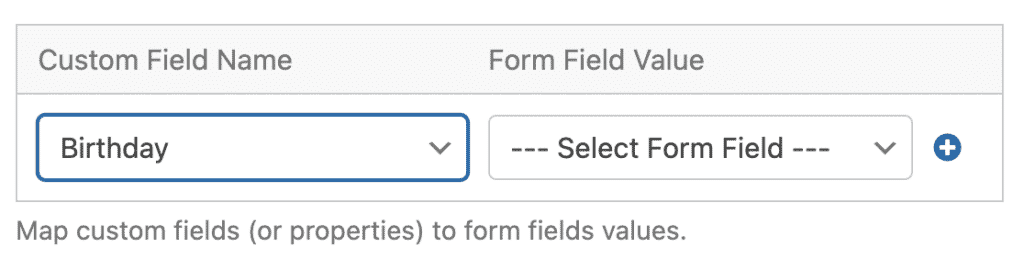
Mailchimpは中小企業の間で最も人気のあるメールプラットフォームであり、WPFormsとの連携もそれを反映しています。Mailchimpアドオンを接続すれば、すべてのサインアップ、オプトイン、注文フォームで、適切なタグとマージフィールドが適用された状態で、適切なオーディエンスに連絡先を追加できます。フィールドを一度マッピングすれば、それ以降のすべての送信でリストが自動的に成長します。
フォームプラグインから連絡先をエクスポートして手動でMailchimpにインポートしたことがあるなら、このアドオンはその手間をなくします。リードは送信した瞬間に追加されるため、温かいうちにウェルカムメールが届きます。
2. Constant Contact

最適:プランをアップグレードせずに始めたい方。
Constant Contactはこのリストで特別な位置を占めています。WPFormsのすべてのプラン(Liteを含む)で利用可能な唯一のメールマーケティング連携です。サインアップフォームから初日から実際のメールリストにフィードしたい場合、これが最も簡単な方法です。
プラットフォーム自体は、最も初心者向けの使いやすいメールツールの一つであり、中小企業、教会、非営利団体に人気があります。サインアップはConstant Contactのリストに直接流れ込み、ニュースレター、イベントプロモーション、育成キャンペーンの準備が整います。
3. Kit (旧ConvertKit)
最適:リストでビジネスを運営するブロガー、ポッドキャスター、クリエイター。
Kitはクリエイターに選ばれるメールツールであり、WPFormsアドオンは最も重要な部分、つまりタグ付けとシーケンスに接続します。フォームをKitに接続すると、すべてのサインアップが適切なタグを取得し、ホームページのオプトイン、リードマグネット、またはコースのウェイティングリストから取得したかどうかにかかわらず、適切なシーケンスが自動的に開始されます。
ここで重要なのはタグ付けです。すべてのフォームが独自のタグを適用すると、ローンチはフラットなリストへの一括送信ではなく、それを求めた人々に届けられます。
4. MailerLite

最適: メールは欲しいけれど、余計な機能は不要なクリエイターや小規模チーム。
MailerLiteには、その主な理由で熱心なファンがいます。それはシンプルさを保っていることです。WPFormsアドオンはその精神に合っています。フィールドをマッピングし、フォームをドロップインするだけで、すべてのサインアップがリストに登録され、MailerLiteの自動化が開始される準備が整います。
すべてのプラットフォームのデモが副業を学ぶような感覚で、メールマーケティングを先延ばしにしていたなら、MailerLiteとWPFormsの組み合わせは、低オーバーヘッドで始める方法です。
5. Brevo (旧Sendinblue)

最適: メール、SMS、CRMを1か所で管理したい小規模ビジネス。
Brevoは、メール、SMS、CRMツールを単一のプラットフォームにバンドルしており、WPFormsアドオンはそれらすべてにデータを供給します。1つのフォーム送信で、各チャネルの別々のベンダーを連携させることなく、メールとテキストの両方で連絡可能な連絡先を追加できます。
これにより、マーケティングスタックが肥大化している場合に強力な選択肢となります。3つではなく、1つのツールと1つの請求書で済みます。
6. MailPoet

最適: WordPress内でメールマーケティングを行いたいサイトオーナー。
MailPoetはこのリストの中では異色ですが、良い意味で、WordPressダッシュボード内で完全に動作します。リスト、キャンペーン、そして(WPFormsアドオンを使用すると)サインアップフォームはすべて、すでに作業しているのと同じ場所に存在します。ログインする別のプラットフォームはありません。
特にボランティアで運営されているチームに適しています。1つのツールをトレーニングする方が、3つのツールをトレーニングするよりもはるかに簡単です。
7. AWeber

最適: 信頼性の高い配信能力を備えた、オートメーションファーストのリスト構築。
AWeberは何十年もメール業界に携わっており、長年のユーザーは配信能力と自動化のために使い続けています。WPFormsアドオンは、サインアップをリスト、タグ、または自動化キャンペーンに直接ドロップするため、ウェルカムシーケンスは人が送信した瞬間に開始されます。
ウェルカムメールがまだ手動で送信されている場合は、これによって自動化されます。
8. GetResponse

最適: 1つのプラットフォームからメールとウェビナーを実行するマーケター。
GetResponseは、メールマーケティング、自動応答、ウェビナーツールを組み合わせており、コース作成者やB2Bチームに人気があります。WPFormsに接続すると、登録フォームとオプトインフォームが、ウェビナーを実行するのと同じオーディエンスにデータを供給します。
これが実用的なメリットです。リードキャプチャ、メール育成、ウェビナープロモーションはすべて1つの連絡先データベースを共有するため、システム間で誰も取り残されることはありません。
9. Campaign Monitor
最適: 美しいメールを重視するブランドや代理店。
Campaign Monitorはデザイン性の高いメールで評判を築き、厳格なブランド基準を持つチームを引きつけます。WPFormsのアドオンは、その方程式の地味な半分、つまり新しい連絡先を適切なセグメンテーションで適切なリストに自動的に追加する部分を処理します。
見栄えの良いテンプレートは、その背後にあるリストが成長し続けない限り、効果を発揮しません。この連携により、それが確実に実現します。
10. Drip

最適: 行動に基づいたメールを実行するオンラインストア。
Dripは、Eコマース向けに構築されたマーケティングオートメーションであり、カート放棄フロー、購入後のフォローアップ、および購入金額によるセグメンテーションを備えています。WPFormsのアドオンは、フォームデータをそのエンジンに渡し、Dripのオートメーションが機能するために必要なタグとトリガーとともにサインアップが到着するようにします。
オンラインで販売していて、メール戦略がまだ「一斉送信して希望する」だけなら、DripとWPFormsの組み合わせは大きなアップグレードです。
11. Klaviyo

最適: セグメント化されたメールおよびSMSフローを実行するEコマースブランド。
Klaviyoは、特に顧客を行動や購入履歴に基づいて深くセグメント化できるため、本格的なオンラインストアのメールプラットフォームとして選ばれるようになりました。WPFormsのアドオンは、フォームの回答を添付して新しい連絡先をKlaviyoリストに追加するため、フローは最初のタッチから実際のデータを使用して機能します。
ストアのメール収益がセグメンテーションにかかっている場合、この連携はサインアップフォームがそれを供給し続けるためのものです。
12. SendGrid

最適: マーケティングメールとトランザクションメールを1つのプラットフォームで管理したいチーム。
SendGrid(Twilioの一部)は、大規模な配信能力で最もよく知られており、マーケティングキャンペーンとサイトが既に送信しているトランザクションメールの両方を処理します。WPFormsのアドオンは、フォームの連絡先をSendGridのマーケティングリストに追加するため、領収書やパスワードリセットで信頼されているプラットフォームがオーディエンスを拡大することもできます。
SendGridが既にサイトのメールを処理しており、新しいツールを追加するよりも既存のツールを強化したい場合に自然な選択肢です。
13. ActiveCampaign

最適: オートメーションの深さ、ディールステージ、およびセールスパイプラインを必要とするチーム。
ActiveCampaignは、このリストの中で最も高度な機能を提供します。マーケティングオートメーションに加えてCRMとセールスパイプラインを備えています。WPFormsのアドオンは、単一のフォーム送信から連絡先にタグを付け、オートメーションをトリガーし、ディールを前進させることができます。
WPFormsのEliteプランで利用可能であり、その価値を証明しています。リードが受信トレイに留まるのではなく、パイプラインステージを通過する必要がある場合、これは構築すべき連携です。
メールツールがこのリストにない場合はどうなりますか?
それでも対応できます。WPFormsはZapier経由で9,000以上のアプリに接続でき、Makeやn8nも利用できます。また、WebhooksアドオンはAPIを持つほぼすべてのプラットフォームに送信データを送信できます。ネイティブ連携が利用可能な場合はより良いエクスペリエンスを提供しますが、どのメールツールも手の届かないものではありません。

WordPressフォームのメールマーケティング連携に最適なものを選ぶ方法
絞り込むための簡単な方法:
- 始めたばかりの場合: Constant Contact(すべてのプランで利用可能)またはMailerLite。
- クリエイタービジネスを実行している場合: Kit。
- WordPress内で全てを完結させたい場合: MailPoet。
- オンライン販売の場合: KlaviyoまたはDrip、または予算重視でSMSも利用したい場合はBrevo。
- 真剣な自動化とセールスパイプラインが必要な場合: ActiveCampaign。
- すでに13のいずれかを使用している場合: それを使い続けてください。最良のインテグレーションは、リストがすでに存在するプラットフォームです。
WordPressフォームのメールマーケティング連携に関するFAQ
ネイティブインテグレーションとZapier経由での接続の違いは何ですか?
ネイティブインテグレーションは、WPFormsチームによって構築および保守される直接接続であり、フォームビルダー内で直接設定できます。Zapierはデータをサードパーティサービス経由でルーティングします。これはうまく機能しますが、管理するツールが1つ増え、支払うサブスクリプションが1つ増えます。プラットフォームがネイティブインテグレーションをサポートしている場合はそれを使用し、サポートしていない場合はZapierを使用してください。
どのメールマーケティングインテグレーションがすべてのWPFormsプランで機能しますか?
Constant Contactです。Liteを含むすべてのプランに含まれています。他のインテグレーションはPlusプラン以上で利用可能になり、ActiveCampaignはElite専用です。
これらのインテグレーションを設定するためにコーディングの知識が必要ですか?
いいえ。メールプラットフォームアカウントを一度接続し、ビルダー内でフォームフィールドをリストフィールドにマッピングします。どのステップでもコードは必要ありません。
1つのフォームで複数のメールプラットフォームに連絡先を送信できますか?
はい。同じフォームに複数のマーケティング接続を追加できるため、1回のサインアップでMailchimpとBrevoに同時に送信できます。ほとんどのサイトでは1つで十分ですが、プラットフォーム移行時にはオプションがあります。
オプトインボックスをチェックした場合にのみ購読者を追加できますか?
はい、そしてそうすべきです。フォームにチェックボックスを追加し、マーケティング接続で条件付きロジックを使用して、ボックスがチェックされた場合にのみ連絡先を購読させます。これにより、リストの同意に基づいた状態と、GDPRに準拠したサインアップフローが維持されます。
フォームの回答に基づいて、購読者をタグ付けまたはセグメント化できますか?
はい。フィールドマッピングにより、回答をプラットフォームのカスタムフィールドに渡すことができます。Kit、Mailchimp、ActiveCampaignなどのプラットフォームは、接続でのタグ付けをサポートしています。条件付きロジックを使用して、異なる回答を異なるリストまたはタグにルーティングすることもできます。
接続に問題が発生した場合、リードはどうなりますか?
失うことはありません。すべての送信は引き続きメール通知をトリガーし、WordPressダッシュボードのエントリとして保存されるため、同期に問題が発生しても連絡先の情報は安全です。
メールプラットフォームごとに個別のサインアッププラグインが必要ですか?
いいえ、それが魅力の半分です。WPFormsは、13のすべてのプラットフォームを1つのフォームビルダーで処理するため、メールツールを切り替える場合でも、フォームを再構築するのではなく接続を切り替えるだけです。
次に、サインアップフォームを機能させましょう
これで、WPFormsでネイティブに動作するWordPressフォーム向けのメールマーケティングインテグレーション(13すべて)がカバーされました。リストを実行しているプラットフォームが何であれ、セットアップは同じです。フォームを作成し、アドオンを接続し、フィールドをマッピングし、すべての送信がそこからオーディエンスを成長させるようにします。
次に、WordPressでニュースレターサインアップフォームを作成する方法を学びます [ニュースレターサインアップチュートリアルへのリンク] — これは、これらのインテグレーションが接続するフォームの構築を最初から最後まで説明しています。
フォームの作成準備はできましたか?最も簡単なWordPressフォームビルダープラグインで今日から始めましょう。WPForms Proには多くの無料テンプレートが含まれており、14日間の返金保証が付いています。
このブログ記事がお役に立ちましたら、無料のWordPressチュートリアルやガイドをさらにご覧いただくために、 Facebook と X (Twitter) でフォローしてください。





