


Resumo de IA
Você usa Mailchimp e WPForms para seu marketing por e-mail?
O addon Mailchimp do WPForms torna incrivelmente fácil criar formulários de inscrição com nosso construtor de formulários de arrastar e soltar.
Recentemente, o Mailchimp lançou uma API de integração mais poderosa, v3.0.
Para garantir que este lançamento não afete seus formulários de inscrição, atualizamos nosso addon Mailchimp para funcionar com a nova API.
Pedimos que nossos usuários do addon Mailchimp por favor atualizem o addon e registrem a nova integração do Mailchimp para que seus formulários de inscrição continuem funcionando como esperado.
Renomeamos a antiga integração para Mailchimp (Legado). A nova integração é chamada Mailchimp. O processo para criar uma nova integração do Mailchimp é exatamente como o anterior.
Veja como você pode atualizar sua integração.
Conectar à Nova API do Mailchimp
A primeira coisa que você precisará fazer é atualizar seu addon WPForms Mailchimp abrindo Painel » Atualizações. Para mais detalhes, veja este guia sobre como instalar atualizações no WordPress.
Assim que a atualização for concluída, você precisará ir para WPForms » Configurações e, em seguida, selecionar a aba Integrações.
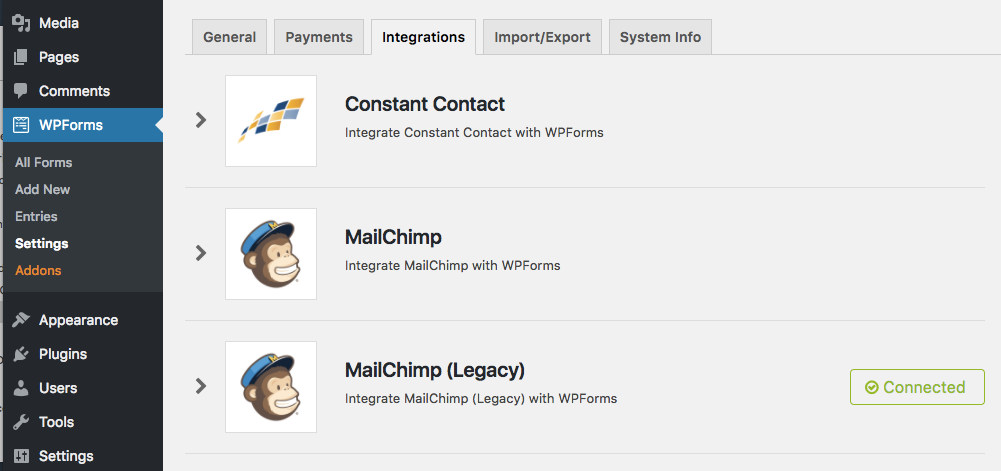
Nesta página, você notará que existem duas listagens do Mailchimp: Mailchimp, que usa a nova API, e Mailchimp (Legado), que usa a API antiga.
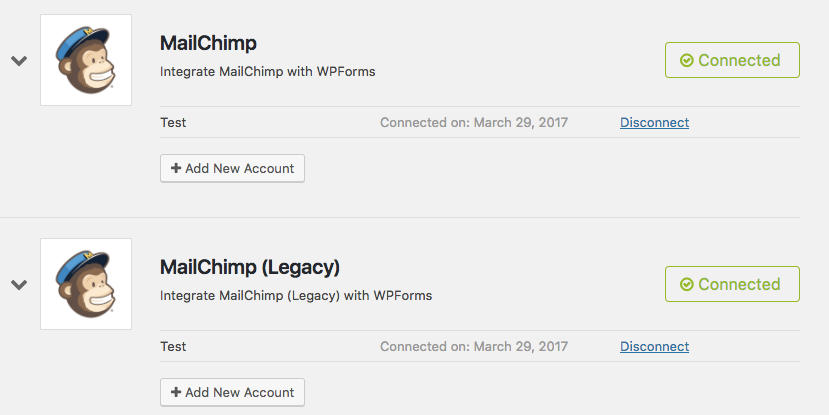
Para conectar sua conta através da nova API, você precisará abrir a listagem do Mailchimp e clicar no botão + Adicionar Nova Conta. Para encontrar sua chave de API do Mailchimp, siga estes passos.
Após adicionar sua conta, você receberá uma caixa verde dizendo "Conectado". É melhor deixar a conta Mailchimp (Legado) conectada por enquanto, pois precisaremos transferir informações adicionais dentro de seus formulários em seguida.
Transferir Configurações do Mailchimp do Formulário para a Nova API
Agora que você conectou o addon à nova API do Mailchimp, precisará copiar as configurações dentro de formulários individuais para uma nova seção para que eles também possam usar a nova API.
Para fazer isso, abra o construtor de formulários de qualquer formulário que utilize o addon Mailchimp e vá para Marketing. Você notará que agora existem duas conexões do Mailchimp, Mailchimp e Mailchimp (Legado).
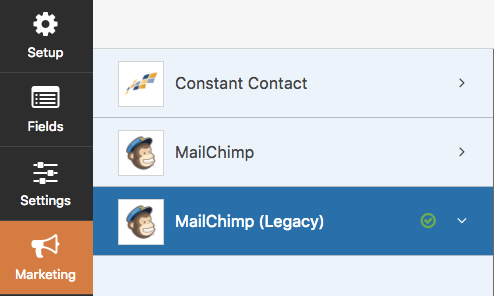
Mailchimp (Legado) contém todas as suas configurações existentes para a API antiga. Para transferi-las para a nova API, selecione Mailchimp e Adicionar Nova Conexão.
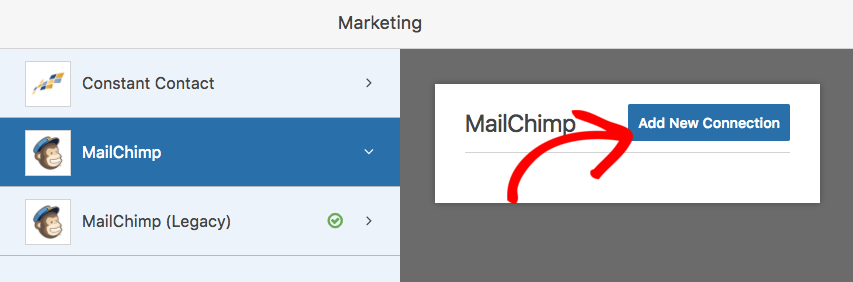
Você será solicitado a inserir um apelido para o formulário e, em seguida, será levado para a página de configurações. A partir daqui, você pode voltar para Mailchimp (Legado) para copiar quaisquer configurações que você configurou para este formulário.
Depois de copiar quaisquer configurações existentes de Mailchimp (Legado) para Mailchimp, você pode excluir as configurações da API descontinuada. Para fazer isso, retorne para Mailchimp (Legado) e clique no 'x' vermelho.
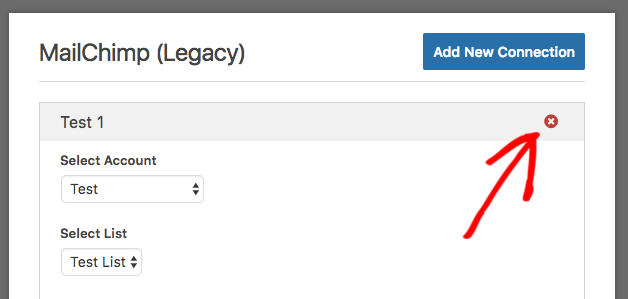
Certifique-se de salvar seu formulário e, em seguida, repita este processo para quaisquer formulários que tenham uma conexão com o Mailchimp.
Agora que todas as configurações do seu formulário foram transferidas para a nova API, podemos excluir a conexão obsoleta. Para fazer isso, retorne a WPForms » Configurações e, em seguida, selecione novamente a guia Integrações. Se você abrir o Mailchimp (Legado), verá um link Desconectar ao lado da sua conta.
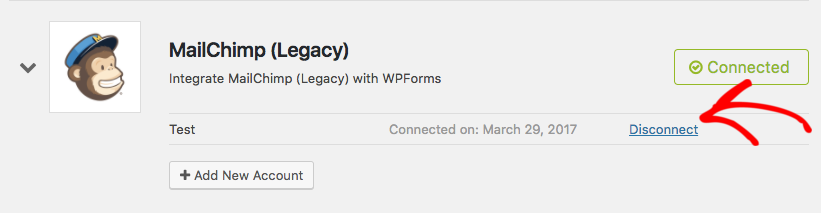
Após clicar neste link, seu site será desconectado da API obsoleta do Mailchimp. A opção Mailchimp (Legado) deve desaparecer desta página (pode ser necessário atualizar a página do navegador).
É isso! Você transferiu seus formulários para a nova API do Mailchimp.
É tudo por esta atualização, mas mais novidades estão chegando em breve. Não se esqueça de assinar nossa newsletter por e-mail para ser o primeiro a saber.
Obrigado mais uma vez por todo o seu apoio e feedback em tornar o WPForms o melhor construtor de formulários de arrastar e soltar.
Jared e a equipe WPForms


Infelizmente não funciona – quando insiro minha API e Nome e clico em “salvar”, o botão apenas muda para “Salvando …” e fica travado lá.
Nada acontece mesmo depois de alguns minutos. Isso é um problema do Mailchimp ou algo errado da sua parte?
Obrigado por cuidar disso!
Olá Christian,
Peço desculpas pelo transtorno. Houve um bug na versão 1.1.0 que causou problemas como os que você está descrevendo. Já lançamos uma atualização (v1.1.1) que resolve o problema. Assim que você atualizar, deve funcionar como esperado. Obrigado!
Ainda não recebi nenhuma atualização para o WPforms – quando podemos esperar que isso chegue no WordPress 4.7.3?
Olá Mike,
Esta atualização foi disponibilizada quando este post foi publicado e deve estar visível em Painel » Atualizações. Se a atualização não aparecer para você, você poderia entrar em contato conosco no suporte? A partir daí, podemos trabalhar com você para ver o que está acontecendo e atualizar o plugin manualmente, se necessário.
Não sei por quê, mas quando tento adicionar uma nova chave de API na nova integração do Mail Chimp, ela fica girando e girando. Nunca salva. Alguma ajuda??
Opa! Acabei de ver o comentário acima. Obrigado!
Olá Brett,
Desculpe por isso e espero que a nova atualização tenha resolvido isso para você! Se tiver mais alguma dúvida, sinta-se à vontade para entrar em contato conosco no suporte 🙂
Olá, tenho uma instalação nova do wpforms e do addon Mailchimp v. 1.1.1, mas quando clico no botão “conectar ao Mailchimp”, ele trava e não faz nada.
Por favor, ajude!
Oi Jorge,
Parece que há um problema específico do seu site e precisaremos coletar mais detalhes para ajudar na solução. Se você puder entrar em contato conosco no suporte, nós o ajudaremos a resolver isso 🙂
Obrigado!
Quando tento salvar meu formulário depois de conectá-lo à nova conta da API "Mail Chimp", recebo esta mensagem…
“Seu formulário contém configurações obrigatórias do MailChimp que não foram configuradas. Por favor, verifique e configure essas configurações para concluir a configuração da conexão.”
Quais configurações preciso verificar?
Oi Kelly,
Isso significa que na sua configuração do MailChimp dentro do WPForms, há um campo que está definido como "obrigatório" no MailChimp e que você não mapeou no seu formulário. Se um campo não for mapeado, o lead não poderá ser enviado ao MailChimp, pois é obrigatório.
Confira https://cl.ly/0w0Q0I0z3221 – neste exemplo, o campo "sometext" está definido como obrigatório no MailChimp (veja o asterisco vermelho). Certifique-se de que todos os campos com esse asterisco tenham um campo mapeado para eles.
Espero que ajude! 🙂
Oi, tenho o mesmo problema que a Kelly e verifiquei os campos obrigatórios no Mailchimp na minha audiência, mas ainda recebo a mesma mensagem
““Seu formulário contém configurações obrigatórias do MailChimp que não foram configuradas. Por favor, verifique e configure essas configurações para concluir a configuração da conexão.””
Oi Frida!
Será bastante difícil responder a esta pergunta aqui em um comentário.
Se você tiver uma licença do WPForms, terá acesso ao nosso suporte por e-mail, então por favor envie um ticket de suporte.
Caso contrário, oferecemos suporte complementar limitado no fórum de suporte do WPForms Lite no WordPress.org.
Espero que isso ajude.
Tenha um bom dia 🙂