


Resumo de IA
Estamos começando o ano novo com um novo addon que melhorará muito suas capacidades de captura de leads.
Apresentando o addon Formulários de Leads para WPForms Pro!
O addon Formulários de Leads transforma seus formulários na ferramenta perfeita de coleta de leads. Com este addon, você agora pode criar formulários de leads incorporáveis que exibem apenas um campo por vez para aumentar as conversões.
Quer ver o incrível poder do addon Formulários de Leads? Continue lendo abaixo para saber mais!
Formulários de Leads Mais Simples, Conversões Mais Altas
Criar formulários de leads fáceis de enviar é um objetivo importante para a maioria das empresas. Quanto mais leads você puder coletar, maior o potencial de crescimento do negócio.
Queríamos oferecer a você uma maneira simples de criar formulários com aparência moderna, projetados para máxima captura de leads.
Com o addon Formulários de Leads, seus visitantes verão um formulário multipágina elegante e estiloso, que é simples de preencher e captura leads de forma eficaz.
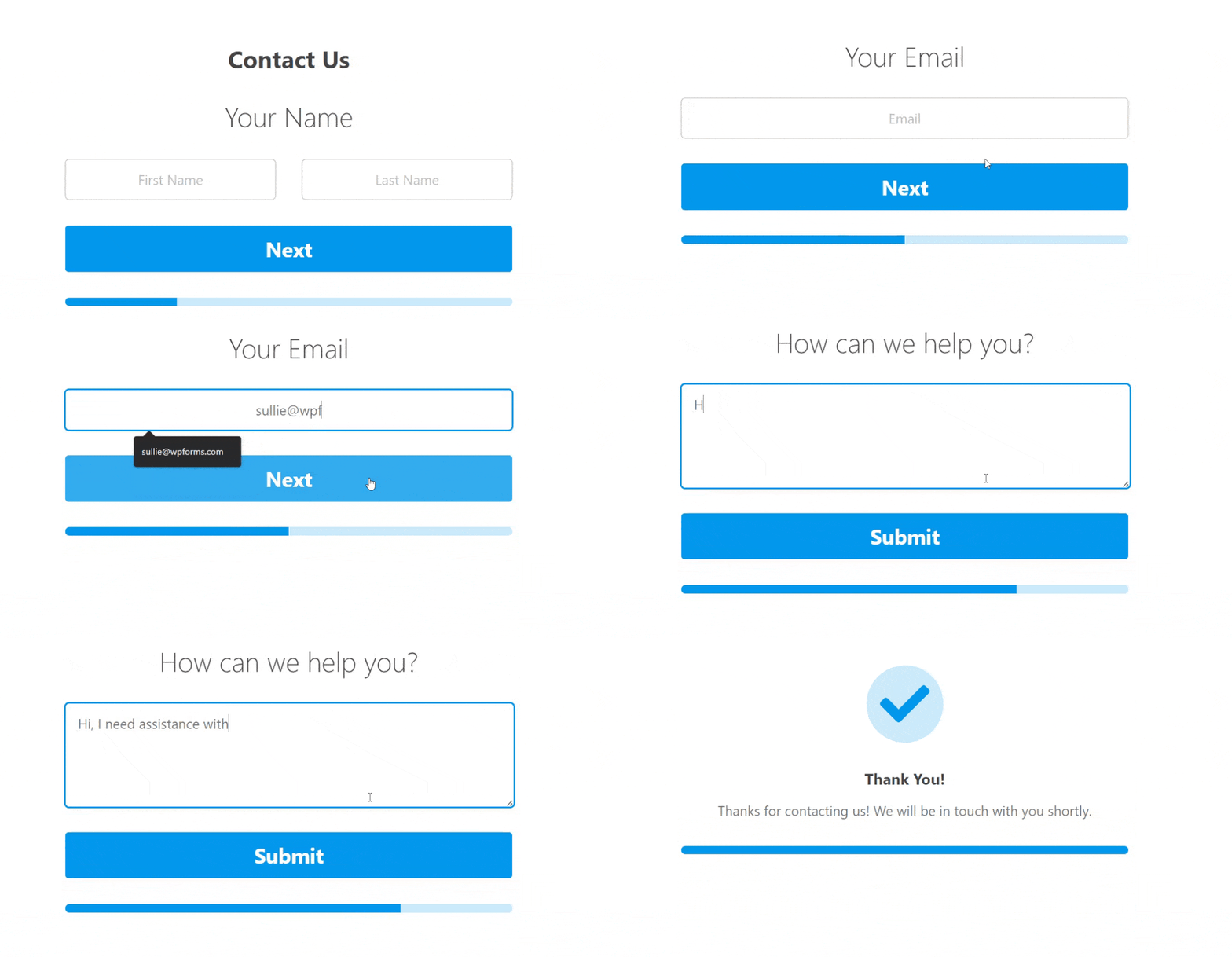
Você pode converter qualquer formulário em um formulário de leads com o toque de um botão. O WPForms inserirá automaticamente quebras de página após cada campo quando você ativar o Modo Formulário de Leads.
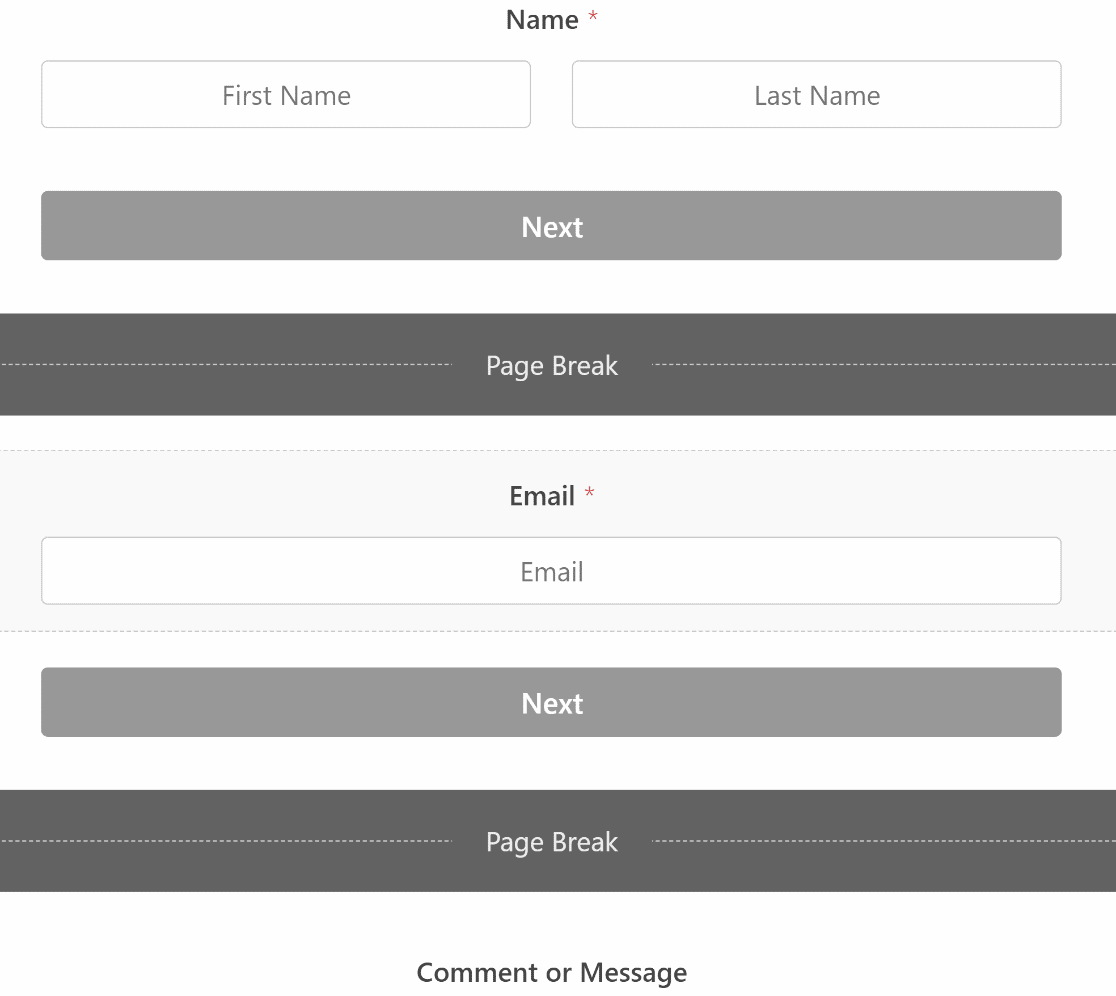
Você pode agrupar campos semelhantes na mesma página para tornar seus formulários ainda mais otimizados. Basta usar o editor fácil de arrastar e soltar para reorganizar seus campos.
A coisa mais empolgante é que você obtém opções avançadas de estilo para personalizar a aparência do seu formulário e torná-lo ainda mais visualmente impressionante.
Por exemplo, você pode adicionar um contêiner ao redor do seu formulário e dar a ele efeitos estilosos, para que ele se destaque mais. E você também pode alterar a cor da barra de progresso, texto e botões usando controles simples de botão.
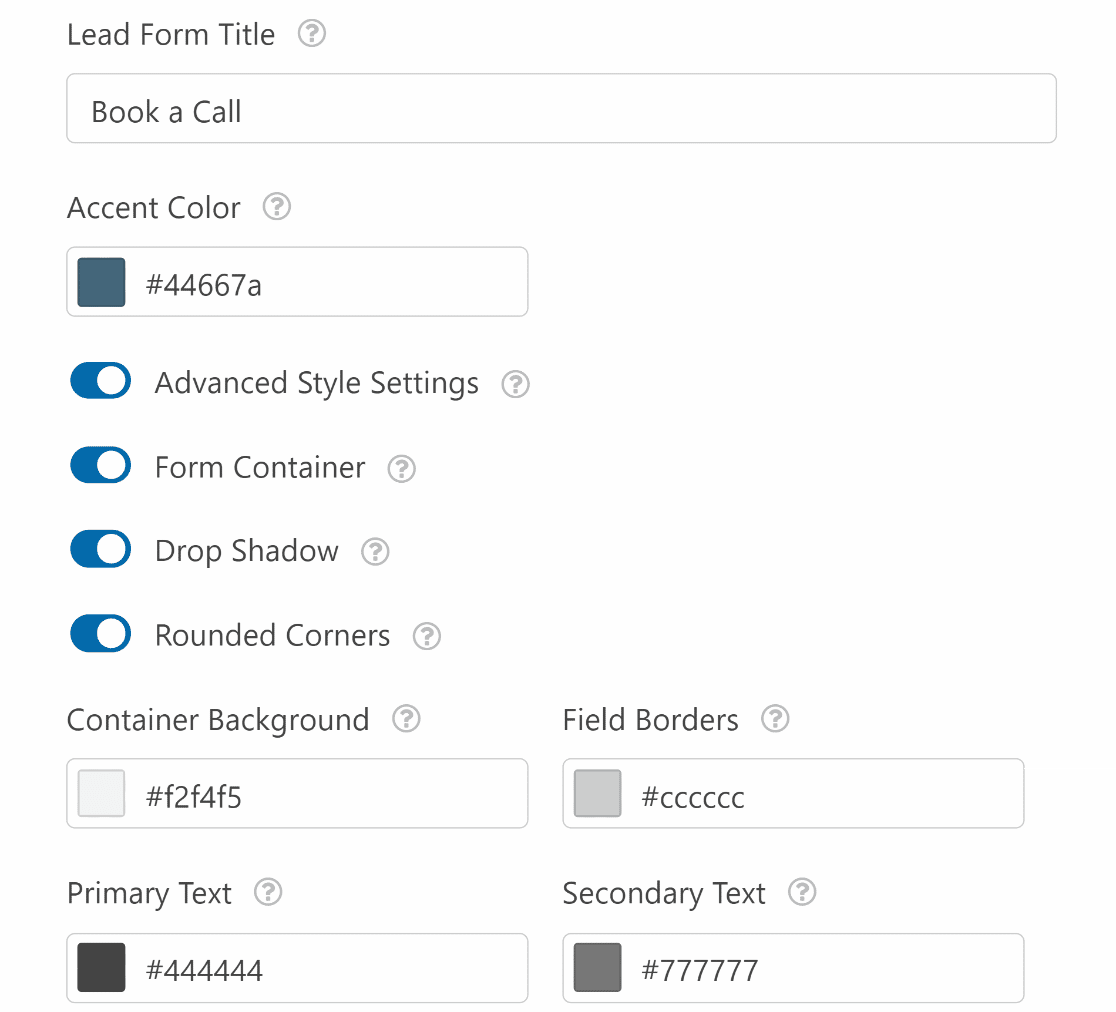
Toda essa simplicidade significa que você pode criar formulários espetaculares sem escrever uma linha de código.
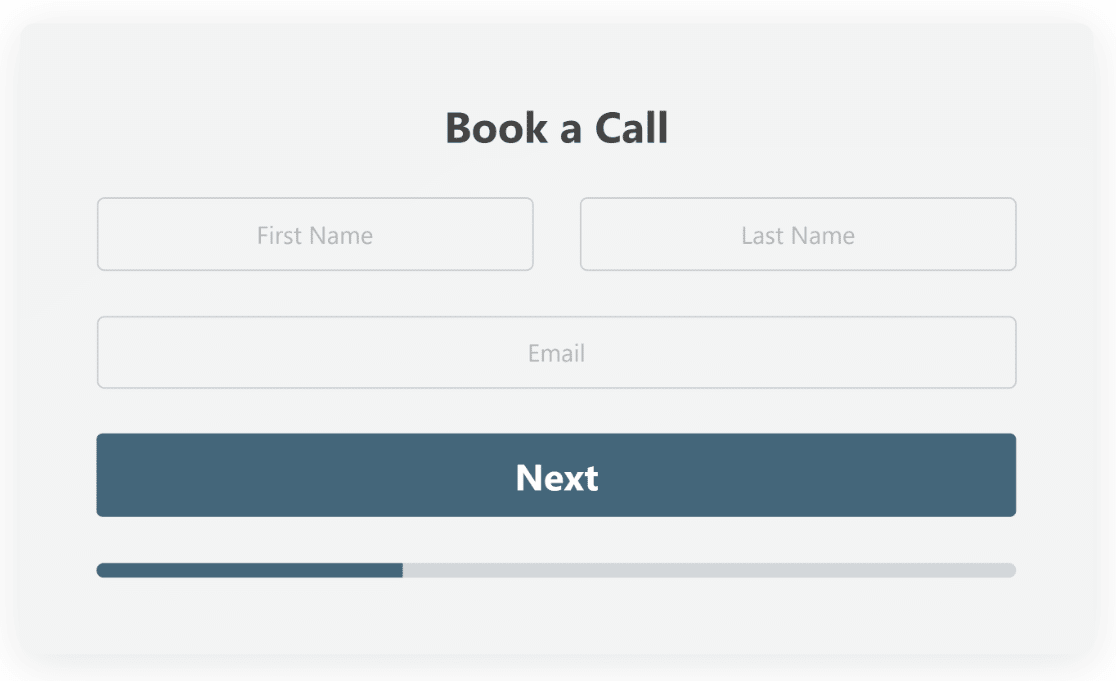
Legal, né?
Os formulários de leads são incorporáveis, então você pode adicioná-los a qualquer parte da sua página, incluindo a barra lateral ou qualquer outro widget.
Você pode conferir nosso guia de documentação para uma exploração aprofundada de todas as maneiras empolgantes que você pode estilizar e formatar seus formulários de leads usando nosso novo addon.
Sabemos que os formulários de leads convertem melhor quando são concisos e não têm mais de 3 campos por página.
Incorporamos a mesma filosofia de design multipágina neste recurso, para que sua empresa tenha a melhor chance de crescer coletando um número maior de leads.
Agora é hora de falar sobre mais um novo recurso que adicionamos recentemente em nossa última versão!
Você já conferiu nosso Recurso de Escolha de Ícones?
Se você estiver usando a versão mais recente do WPForms (1.7.9), deve ter notado um novo recurso de escolha de ícones para os campos Múltipla Escolha e Caixas de Seleção (e seus equivalentes em campos de pagamento).
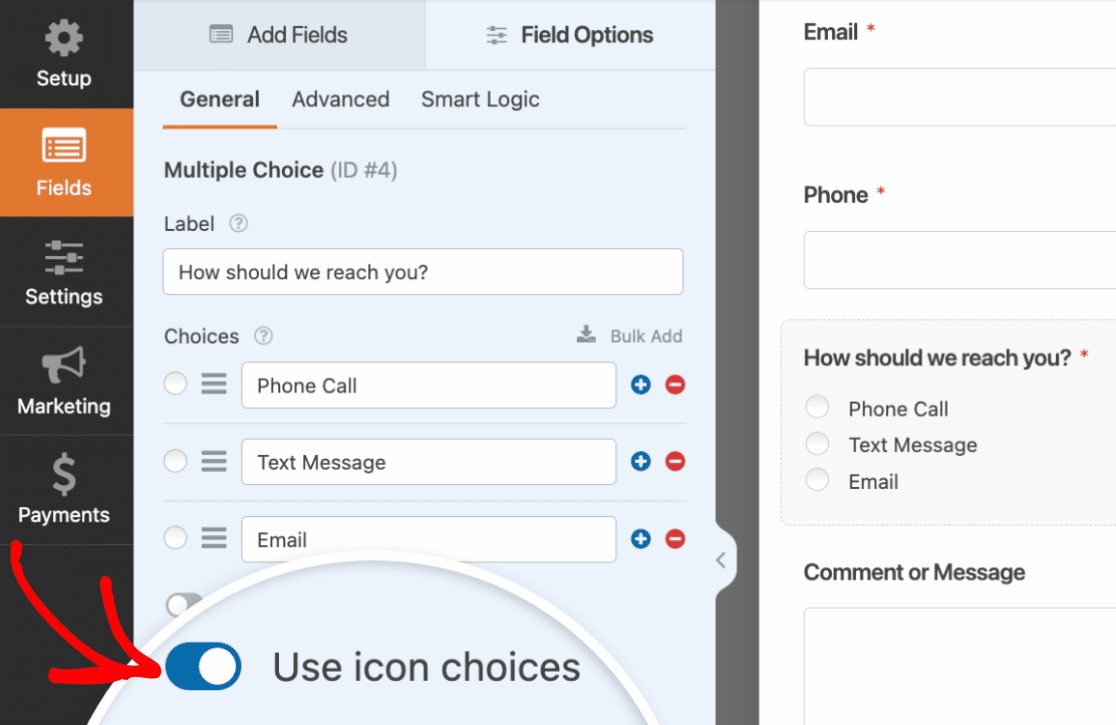
A nova configuração de escolha de ícones é uma alternativa mais simples à escolha de imagens. Ela permite que você insira um ícone de uma biblioteca de mais de 2.000 ícones.
Usar escolhas de ícones nos campos torna seus formulários ainda mais visualmente atraentes.
Se você leva a sério a aparência profissional e elegante dos seus formulários, pode usar o formato de formulário de leads e inserir ícones em um dos seus campos para um toque extra.
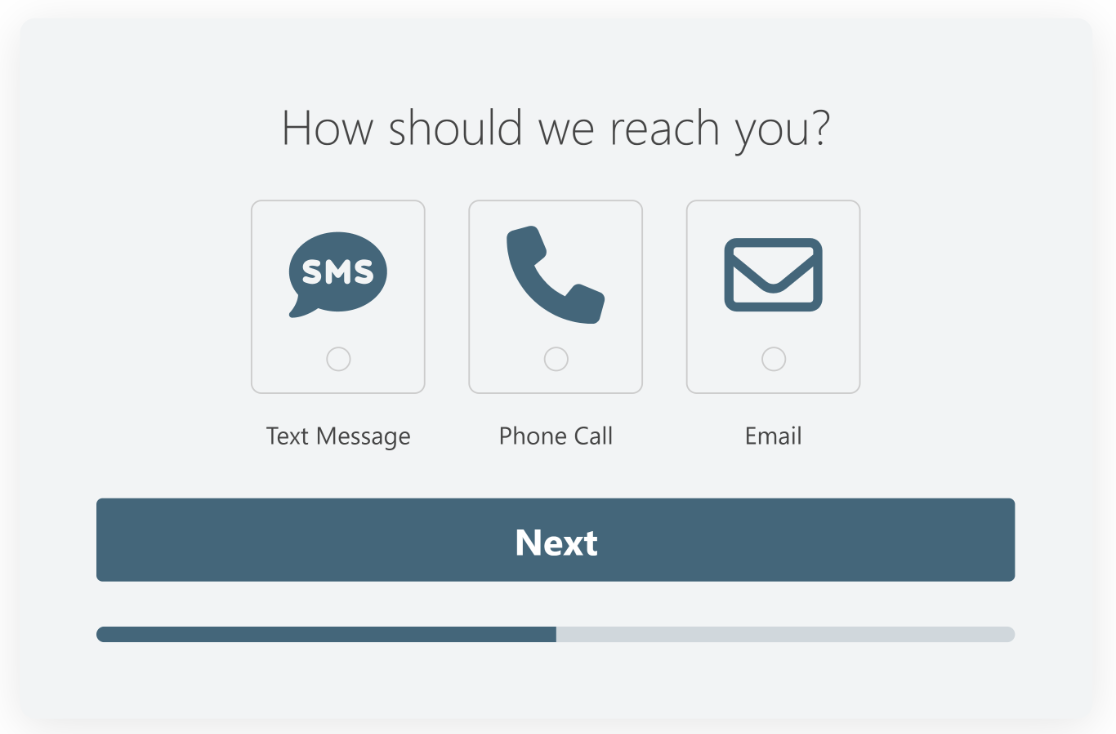
A melhor parte é que as escolhas de ícones estão disponíveis para todas as licenças do WPForms (gratuita + paga)!
Observação: O campo de escolha de ícones não substitui o campo de escolha de imagens. Você ainda pode usar escolhas de imagens quando quiser carregar qualquer imagem personalizada em um campo.
Preparando-se para Mais
Temos muitas atualizações interessantes planejadas para este ano e já estamos trabalhando duro nos bastidores para vários lançamentos de recursos. Fique de olho em nosso blog para mais novidades em um futuro muito próximo!
Até lá, experimente nosso addon de Formulários de Leads disponível para licenças Pro e acima, e acelere o crescimento do seu negócio.
Jared


Sou nova nisso e é muita coisa. Eu queria usar minhas próprias imagens e acho isso muito difícil. Estou neste site há 3 meses e não tenho certeza se quero investir mais dinheiro no que estou fazendo e meu primeiro blog ficou ruim porque eu não estava pronta para publicar. Tentei e toda vez que clico em algo, eles querem dinheiro.
Olá Kathleen,
Sinto muito por saber da frustração que você está enfrentando! Você se importaria de entrar em contato com nossa equipe de suporte abrindo um ticket de suporte
Como resolver este erro ao instalar o wp forms?
Erro fatal: Uncaught RuntimeException: Erro ao salvar ação: Erro ao salvar ação: Entrada duplicada '0' para a chave 'PRIMARY' em /home/customer/www/yunc3.sg-host.com/public_html/wp-content/plugins/wpforms/vendor/woocommerce/action-scheduler/classes/migration/ActionScheduler_DBStoreMigrator.php:44 Stack trace: #0 /home/customer/www/yunc3.sg-host.com/public_html/wp-content/plugins/wpforms/vendor/woocommerce/action-scheduler/classes/data-stores/ActionScheduler_HybridStore.php(242): ActionScheduler_DBStoreMigrator->save_action(Object(ActionScheduler_Action), NULL) #1 /home/customer/www/yunc3.sg-host.com/public_html/wp-content/plugins/wpforms/vendor/woocommerce/action-scheduler/classes/ActionScheduler_ActionFactory.php(177): ActionScheduler_HybridStore->save_action(Object(ActionScheduler_Action)) #2 /home/customer/www/yunc3.sg-host.com/public_html/wp-content/plugins/wpforms/vendor/woocommerce/action-scheduler/classes/ActionScheduler_ActionFactory.php(84): ActionScheduler_ActionFactory->store(Object(ActionScheduler_Action)) #3 /home/ em /home/customer/www/yunc3.sg-host.com/public_html/wp-content/plugins/wpforms/vendor/woocommerce/action-scheduler/classes/migration/ActionScheduler_DBStoreMigrator.php on line 44
Olá Kim,
Lamento saber sobre o problema que você está enfrentando!
Como você é titular de uma licença paga, recomendo que você entre em contato com a Equipe de Suporte e teremos prazer em ajudá-lo ainda mais aqui!
Obrigado,
Não consigo fazer 2 campos ficarem na mesma linha. Versão 1.8.1.1. Campo #1 classe css wpforms-one-half wpforms-first e Campo #2 wp-forms-one-half
Teste2 item de menu morsewellness.com
Olá Carl,
Para ajudá-lo completamente aqui, sugiro que entre em contato conosco via Suporte e compartilhe detalhes adicionais, e ficaremos felizes em ajudar 🙂
Obrigado,
Olá,
Acabamos de descobrir que nosso formulário de contato não funcionou nos últimos 1,5 anos. Agora estávamos nos perguntando se haveria uma chance de que, ao atualizar para o wpforms, teríamos acesso às respostas anteriores.
Somos um clube esportivo e provavelmente perdemos muitos novos membros em potencial. Agradeceria qualquer ajuda.
Olá Till, sinto muito por saber sobre o problema com seu formulário de contato.
Se você tinha o recurso Lite Connect ativado no WPForms Lite, há uma chance de que suas entradas tenham sido copiadas e possam ser restauradas após a atualização. Recomendamos entrar em contato diretamente com nossa equipe de suporte. Eles poderão dar uma olhada mais de perto e aconselhar se há algo que possa ser feito em seu caso específico.