



Resumo de IA
Hoje, estamos entusiasmados em anunciar que o WPForms 1.5.5 chegou.
Agora será mais simples do que nunca visualizar e exportar envios de formulários do seu site. Você poderá tomar melhores decisões de negócios porque agora tem muito mais controle sobre as informações de suas entradas de formulário.
Veja o que está acontecendo no WPForms 1.5.5.
Experiência de Exportação de Entradas Aprimorada
À medida que o WPForms cresceu, o mesmo aconteceu com nossos usuários. Muitos de vocês se tornaram usuários avançados e nos pediram mais controle sobre a exportação de suas entradas de formulário.
Anteriormente, a única maneira de exportar entradas no WPForms era ir para a área de Entradas, clicar em visualizar e clicar no botão Baixar Entradas (CSV) para salvá-las em seu computador. E, às vezes, essa exportação nem sempre era confiável para aqueles de vocês com dezenas de milhares de entradas.
Também não havia filtros e você recebia todas as entradas de seus formulários — sem outras opções ou personalizações de relatório.
O novo recurso de Exportação de Entradas pode lidar com uma quantidade massiva de entradas e permite filtrar quais você deseja exportar. Dessa forma, você pode economizar tempo encontrando os dados de que precisa em seus envios de formulário.
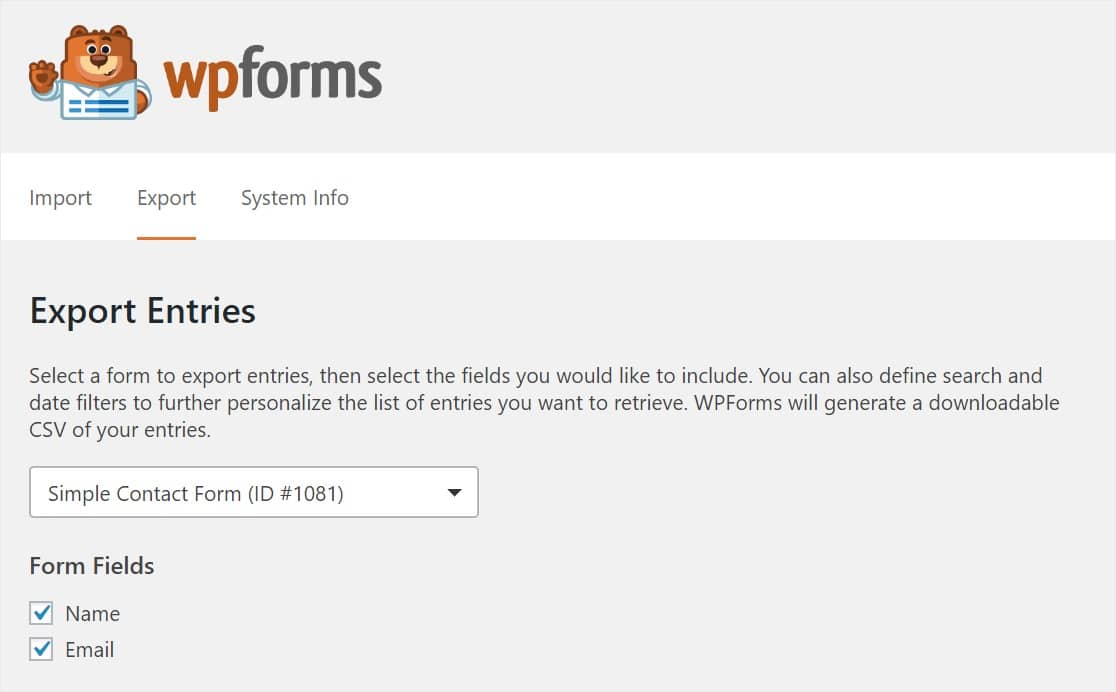
Você encontrará o recurso Exportar Entradas em Ferramentas » Exportar. Ele inclui vários filtros para você selecionar ou desmarcar com base nos dados que você gostaria em seu arquivo CSV exportado, incluindo:
- Campos de Formulário
- Informações Adicionais de Entrada
- Data
- Pesquisar
Quer ver rapidamente os e-mails que você coletou de um formulário, mas não quer todas as outras informações que foram enviadas? Use estas caixas de seleção para personalizar quais campos do formulário aparecerão em seu relatório exportado para tornar as coisas um pouco mais fáceis.
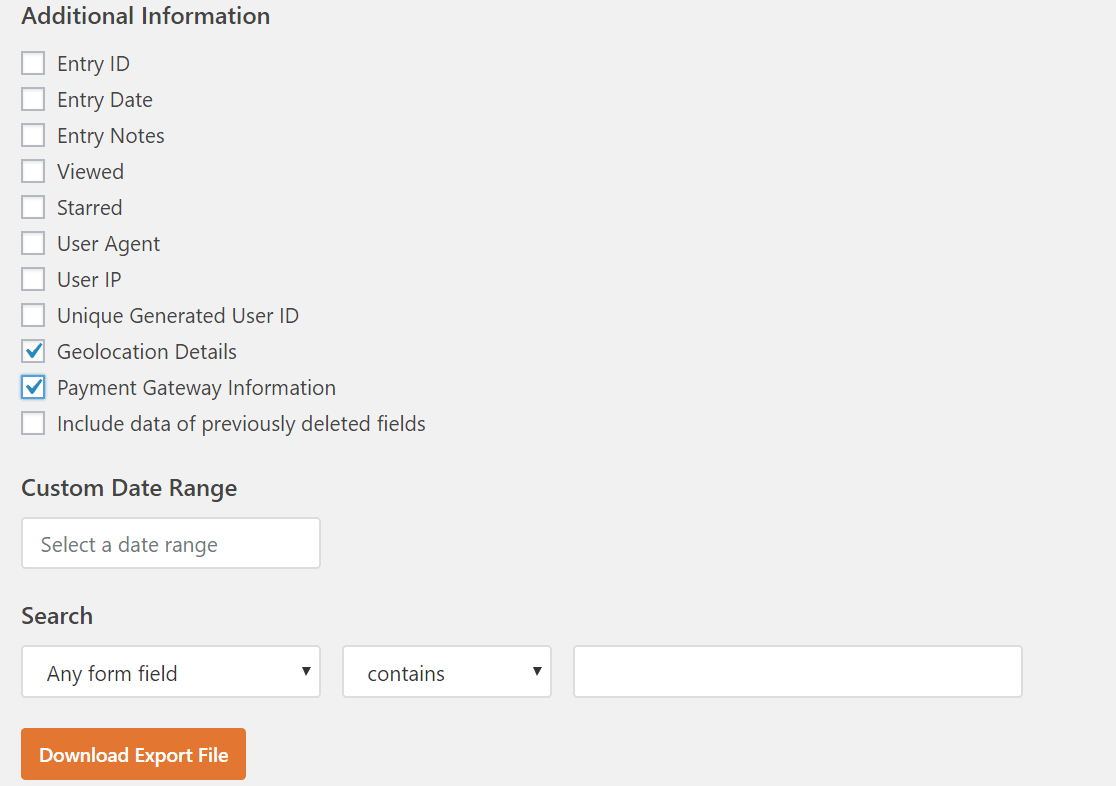
Você pode até adicionar informações adicionais, como dados de geolocalização ou informações de pagamento Stripe se você estiver usando esses add-ons. Além disso, você poderá pesquisar em seus campos de formulário para procurar ou excluir informações específicas.
A experiência de Exportação de Entradas é muito mais polida e achamos que tornará o uso do WPForms ainda mais fácil.
Nova Página de Entradas Padrão
Antes, a tela de Entradas era definida por padrão para o primeiro formulário que você criava. Muitas vezes, o primeiro formulário que você já criou não é o seu formulário mais popular. Portanto, não era muito útil exibir esse formulário como padrão nesta página.
Queríamos tornar mais simples e rápido ver suas entradas de formulário. Com esta última versão, quando você clica em Entradas, agora verá um Painel de Visão Geral de Entradas com as entradas totais de seus formulários.
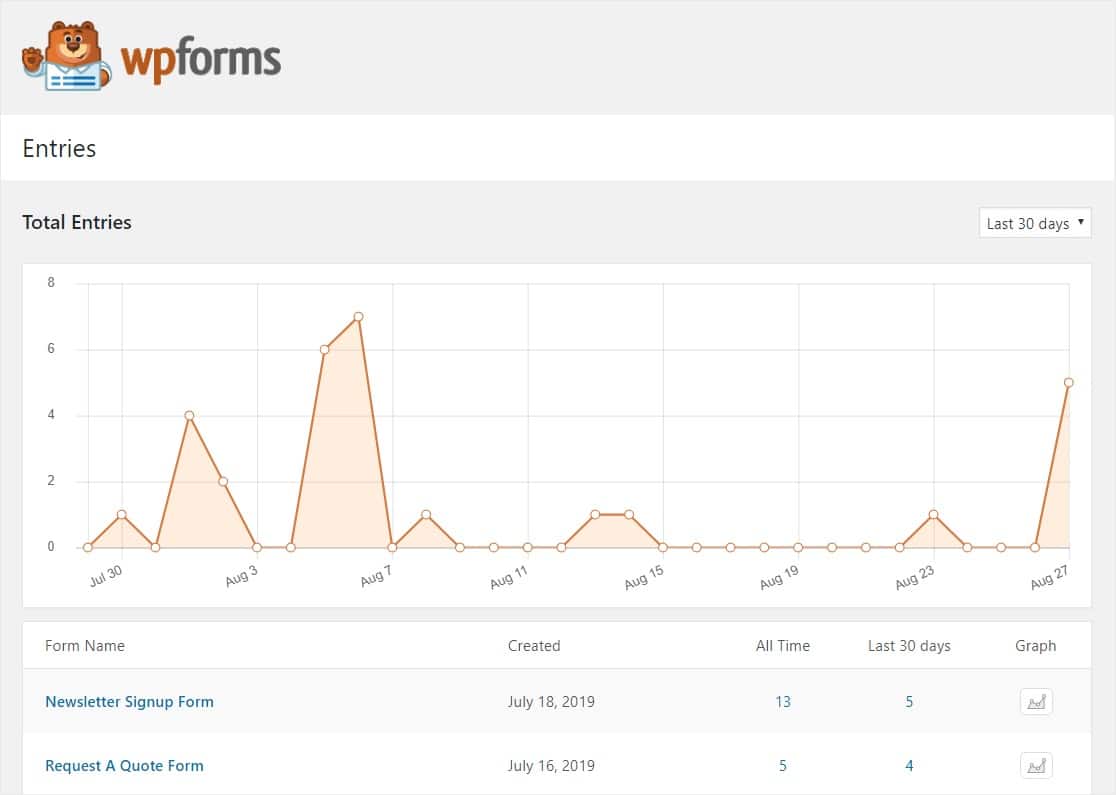
Você verá todos os seus formulários nesta nova página, classificados pela quantidade de entradas no intervalo de datas que você selecionar.
Você também pode conferir o total de entradas de Todos os Tempos e clicar no botão Gráfico para ver visualizações de dados de qualquer um de seus formulários. Você verá uma visão geral rápida e poderá dizer como seus formulários estão se saindo com apenas um olhar.
E isso cobre os 2 novos recursos que você encontrará no WPForms 1.5.5. Experimente a versão mais recente e nos diga o que você acha.
Como sempre, obrigado por seu apoio contínuo ao WPForms. Esperamos ajudá-lo a ter sucesso com seu site e negócios.
Jared e a equipe WPForms
P.S. Ainda não tem uma licença WPForms Pro? Clique aqui para começar hoje e experimente a diferença WPForms.


SIM SIM SIM! Permitir a exportação de dados do Gateway de Pagamento salva minha vida! Vocês são realmente incríveis.
Oi Danny,
Incrível! Fico muito feliz em saber que este novo recurso vai te ajudar muito! 🙂
Tenho um problema… As entradas são baixadas, mas não há nada escrito dentro do CSV.
Oi Agung.
Se você tiver uma licença WPForms, terá acesso ao nosso suporte por e-mail, então por favor abra um ticket de suporte.
Caso contrário, oferecemos suporte gratuito limitado no fórum de suporte do WPForms Lite no WordPress.org.
Espero que isso ajude.
Tenha um bom dia 🙂
Olá, sou novo no WPForms e já parece incrível! Você acha que seria possível para os usuários que preenchem um formulário, imprimir seu formulário preenchido ou salvá-lo como PDF?
Obrigado e bom dia!
Atenciosamente
Leonard Callus
Olá Leonard,
Atualmente, não temos a capacidade de gerar um PDF automaticamente para as entradas enviadas, mas posso sugerir algumas alternativas:
1. Você pode configurar e-mails de notificação do formulário para enviar um e-mail com o conteúdo da entrada enviada. A maioria dos navegadores permitirá que você salve um e-mail como PDF (aqui está um exemplo para o Chrome).
2. Você pode criar manualmente PDFs de cada entrada. Aqui está o nosso tutorial com todos os detalhes.
Espero que isso ajude.
Obrigado! 🙂
Eu tenho que usar o WPforms Pro para ver as entradas?
Olá Mohammed, Sim, você precisará de um dos nossos níveis de licença pagos (incluindo o nível de licença Basic) para armazenar e visualizar entradas em seu site.
Para mais detalhes sobre como o gerenciamento de entradas funciona no WPForms, por favor, veja nosso guia aqui.
Espero que isso ajude.