


Resumo de IA
Conseguir que as pessoas se registrem é uma coisa. Fazê-las comparecer? É aí que o desafio realmente começa. Você pode estar organizando um pequeno workshop, um encontro virtual ou um grande evento comunitário.
No meu mundo, geralmente são encontros de clube do livro. Tentar fazer todos nós, introvertidos, nos reunirmos — *nossa*.
Seja qual for o caso, a participação faz toda a diferença. Mas você não precisa de artimanhas para atrair pessoas… apenas um planejamento inteligente e as ferramentas certas. Então, deixe-me mostrar minhas maneiras favoritas de aumentar a participação em eventos!
Dicas para Aumentar a Participação em Eventos
1. Mantenha o Registro Simples
Ninguém gosta de um formulário de inscrição que parece uma declaração de imposto. Formulários longos com muitas perguntas podem assustar até o convidado mais interessado.
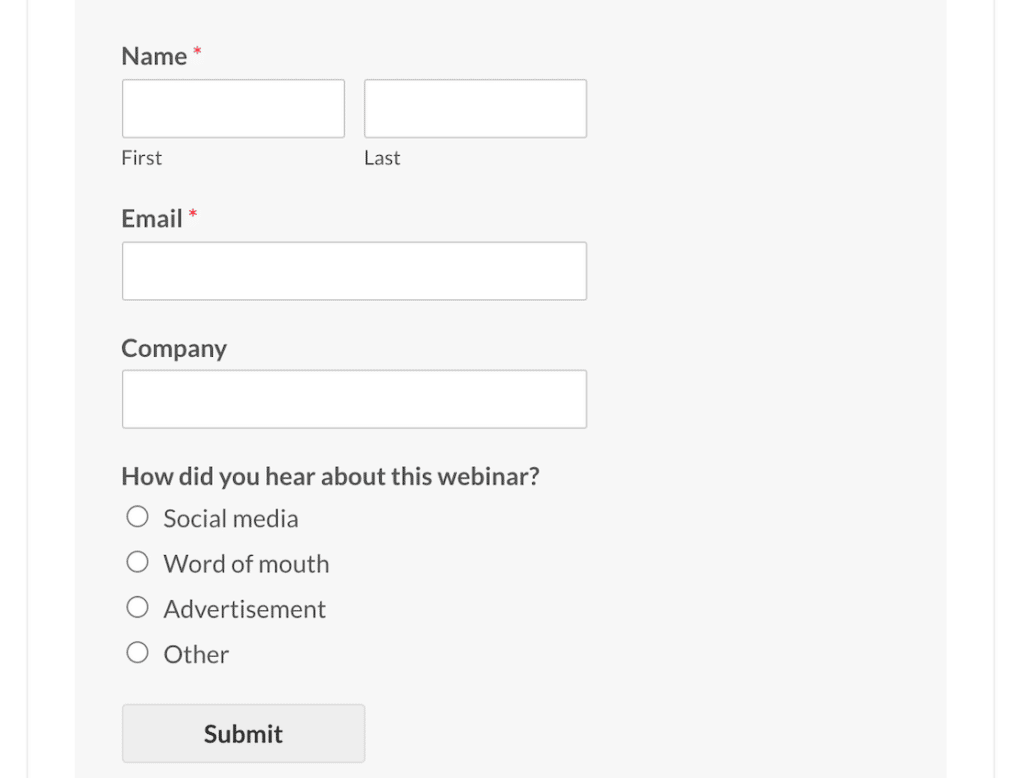
Em vez disso, use nossas ferramentas de Planejamento de Eventos do WPForms para criar formulários de inscrição personalizados que funcionam perfeitamente em qualquer dispositivo, aceitam pagamentos e enviam e-mails de confirmação automáticos. Facilite, e você verá menos desistências.
Crie seu formulário WordPress agora
2. Dê Opções de Ingressos às Pessoas
Nem todo mundo quer a mesma coisa. Algumas pessoas aproveitam os descontos para compradores antecipados assim que os veem, enquanto outras preferem vantagens VIP ou passes de grupo.

Sugar Calendar permite que você venda ingressos diretamente do seu site WordPress usando Stripe ou WooCommerce. Ter uma mistura de tipos de ingressos facilita para mais pessoas dizerem "sim".
3. Lembre-as (Mais de Uma Vez)
A vida é corrida. Mesmo as pessoas que *realmente* querem ir podem esquecer quando o seu evento chegar. É aqui que os lembretes fazem toda a diferença.

Use os dados de inscrição do WPForms para enviar e-mails rápidos de acompanhamento e deixe o Sugar Calendar sincronizar eventos diretamente com os calendários pessoais dos participantes, como Google ou Outlook. Um toque no dia anterior (e talvez na manhã do evento) pode aumentar muito sua participação real.
4. Coloque Seus Eventos em Destaque
O Sugar Calendar facilita a exibição de tudo o que você tem pela frente em uma visualização de calendário ou lista diretamente no seu site. Como seus eventos estão hospedados dentro de um bloco do WordPress, você pode colocar sua lista de eventos em vários lugares do seu site.

Adicione detalhes como palestrantes, locais ou tópicos de sessão para que as pessoas fiquem curiosas e comecem a planejar a participação.
5. Peça Feedback
A participação hoje é boa, mas a participação repetida é ainda melhor. Envie uma pesquisa rápida após o seu evento com o WPForms. Pergunte o que funcionou, o que não funcionou e o que os faria voltar.

Quando os convidados veem que você se importa com a opinião deles, é mais provável que compareçam na próxima vez… e talvez tragam um amigo.
Uma alta participação não vem da sorte. Ela vem de passos pequenos e atenciosos que facilitam para as pessoas se registrarem, lembrarem e retornarem.
Com o WPForms cuidando dos seus formulários e o Sugar Calendar mantendo seus eventos em destaque, você terá duas ferramentas confiáveis para ajudar a transformar o interesse em assentos ocupados.
Crie seu formulário WordPress agora
Perguntas Frequentes
Como posso facilitar o registro de eventos para os participantes?
Mantenha seus formulários curtos e otimizados para dispositivos móveis. Com o WPForms, você pode criar formulários personalizados de registro de eventos que incluem apenas o essencial — além de opções como pagamentos e confirmações automatizadas
Qual é a melhor maneira de lembrar as pessoas sobre meu evento?
Lembretes por e-mail funcionam bem, mas sincronizar eventos com calendários pessoais é ainda melhor. O Sugar Calendar permite que os participantes adicionem eventos ao Google, Outlook ou iCal para que eles não se percam
Devo oferecer diferentes tipos de ingressos?
Sim. Oferecer preços de pré-venda (early-bird), pacotes para grupos ou ingressos VIP dá flexibilidade às pessoas — e geralmente aumenta as inscrições. As ferramentas de ingressos do Sugar Calendar se integram ao Stripe e WooCommerce para facilitar a configuração
Como posso exibir os próximos eventos em meu site?
Em vez de escondê-los em uma única página, exiba-os em um calendário ou lista de eventos. O Sugar Calendar facilita a incorporação de eventos futuros diretamente em seu site, com detalhes como palestrantes e locais.
Qual é a melhor maneira de melhorar a participação em eventos futuros?
Peça feedback aos participantes. O WPForms facilita a criação de pesquisas pós-evento para que você possa aprender o que funcionou e o que ajustar. Agir com base no feedback constrói confiança e faz com que as pessoas voltem.
Em seguida, mude do The Events Calendar para o Sugar Calendar
Você ainda está usando o The Events Calendar em vez do Sugar Calendar? Posso ajudar você a fazer a transição. Dê uma olhada neste tutorial curto e direto para começar a usar o Sugar Calendar. São apenas 5 passos!
Pronto para criar seu formulário? Comece hoje mesmo com o plugin de criação de formulários WordPress mais fácil. WPForms Pro inclui muitos modelos gratuitos e oferece uma garantia de devolução do dinheiro em 14 dias.
Se este artigo ajudou você, por favor, siga-nos no Facebook e Twitter para mais tutoriais e guias gratuitos do WordPress.


