


AI要約
チェックボックスフォームフィールドの選択肢の最小数を設定しますか? WPFormsでは現在、チェックボックスフィールドの選択肢の数を制限できます。ただし、カスタムスニペットを使用すると、PHPコードスニペットを使用してこれらの選択肢の最小数を設定できます。
このチュートリアルでは、チェックボックスフォームフィールドに最小選択数を要求するように設定する手順を説明します。
開始する前に、WPFormsがWordPressサイトにインストールおよび有効化されており、ライセンスが検証済みであることを確認してください。
フォームの作成
まず、新しいフォームを作成するか、既存のフォームを編集してフォームビルダーにアクセスする必要があります。フォームビルダーで、少なくとも1つのチェックボックスフィールドをフォームに追加してください。

最小数を設定するスニペットの追加
選択肢の最小数を設定するには、以下のコードスニペットをサイトに追加する必要があります。コードスニペットをサイトに追加するのに支援が必要な場合は、このチュートリアルを確認してください。
/**
 * Set minimum number of choices for a checkbox for the field
 *
 * @link https://wpforms.com/developers/how-to-set-a-minimum-number-of-choices-for-a-checkbox/
 */

function wpf_checkbox_validation( $field_id, $field_submit, $form_data ) {

    $field_submit  = (array) $field_submit;

    // Make sure we have an array of choices and count the number of choices.
    $count_choices = is_array( $field_submit ) ? count( $field_submit ) : 0;

    if ( $count_choices < 2 ) {
        wpforms()->process->errors[ $form_data[ 'id' ] ][ $field_id ] = esc_html__( 'Please select at least 2 options', 'your-text-domain' );
    }

}

add_action( 'wpforms_process_validate_checkbox', 'wpf_checkbox_validation', 10, 3 );
上記のコードでは、すべてのチェックボックスで最低2つの選択肢が必要になります。最小数を更新したい場合は、ifステートメントの値を変更してください。
注意: このスニペットは、サイト上のすべてのフォームのチェックボックスフィールドに適用されます。
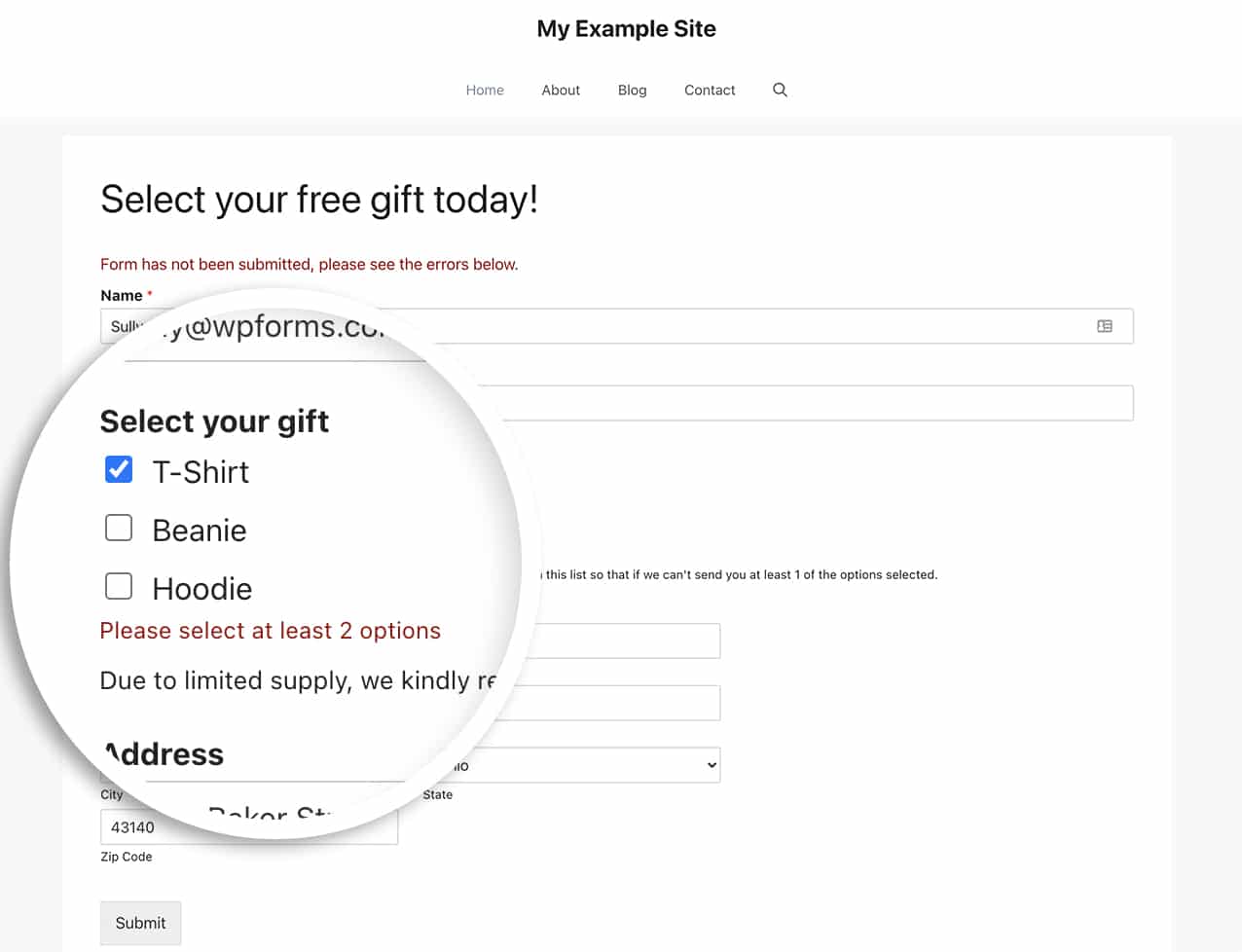
ユーザーがフォームで2つ未満の選択肢を選択すると、フォームが送信されたときにチェックボックスフィールドの下にメッセージが表示されます。
マルチページフォームの制限設定
マルチページフォームを使用する場合、エラーを表示する前にフォーム送信を待たない方が良い場合があります。
マルチページフォームの場合、次へボタンがクリックされたときに、チェックボックスフィールドの下に警告メッセージを簡単に表示できます。
このオプションを使用するには、代わりにこのコードスニペットをサイトに追加するだけです。
/**
 * Set minimum number of choices for a checkbox form field
 *
 * @link https://wpforms.com/developers/how-to-set-a-minimum-number-of-choices-for-a-checkbox/
 */
function wpf_dev_min_checkbox() {
    ?>
    <script type="text/javascript">
    jQuery(document).ready(function($) {
        var checkbox_forms = [
            /* ##### Impostare form e campi ##### */
            {form_id: 348,  min_count: 2, field_ids: [171]},
            {form_id: 348,  min_count: 3, field_ids: [173]},
            {form_id: 546,  min_count: 4, field_ids: [363]},
            {form_id: 631,  min_count: 4, field_ids: [363]},
            {form_id: 1138, min_count: 4, field_ids: [1]},
        ];

        // Live feedback on checkbox click
        $(document).on('click', '[id^=wpforms-] input[type=checkbox]', function() {
            var $form        = $(this).closest('form');
            var this_form_id = $form.data('formid');
            var $container   = $(this).closest('.wpforms-field-checkbox');
            var field_id     = $container.data('field-id');

            checkbox_forms.forEach(function(cfg) {
                if (this_form_id == cfg.form_id && cfg.field_ids.includes(field_id)) {
                    validate_checkbox_min($container, cfg.min_count);
                }
            });
        });

        // Block Next page if validation fails
        $(document).on('wpformsBeforePageChange', function(event, nextPage, $form, direction) {
            if (direction !== 'next') {
                return;
            }

            var this_form_id = $form.data('formid');
            var currentPage  = nextPage - 1;
            var is_valid     = true;

            checkbox_forms.forEach(function(cfg) {
                if (this_form_id != cfg.form_id) {
                    return;
                }

                cfg.field_ids.forEach(function(field_id) {
                    var $container = $form.find('.wpforms-field-checkbox[data-field-id="' + field_id + '"]');
                    if (!$container.length) {
                        return;
                    }

                    var field_page = $container.closest('.wpforms-page').data('page');
                    if (field_page != currentPage) {
                        return;
                    }

                    if (!validate_checkbox_min($container, cfg.min_count)) {
                        is_valid = false;
                    }
                });
            });

            if (!is_valid) {
                event.preventDefault();
            }
        });

        function validate_checkbox_min($container, min) {
            var checked  = $container.find('input[type=checkbox]:checked');
            var form_id  = $container.closest('form').data('formid');
            var field_id = $container.data('field-id');
            var warn_id  = 'wpforms-' + form_id + '-field-' + field_id + '-min-warn';

            $('#' + warn_id).remove();

            if (checked.length > 0 && checked.length < min) {
                $container.addClass('wpforms-has-error');
                $container.append(
                    '<em id="' + warn_id + '" class="wpforms-error" role="alert" aria-label="Error message">' +
                    'Si prega di spuntare tutte le ' + min + ' caselle</em>'
                );
                return false;
            }

            $container.removeClass('wpforms-has-error');
            return true;
        }

    });
    </script>
    <?php
}
add_action('wpforms_wp_footer_end', 'wpf_dev_min_checkbox');
よくある質問
以下に、チェックボックスフィールドの選択肢の最小数を設定することに関して、よくある質問とその回答をいくつか紹介します。
Q: 特定のフォームと特定のフィールドIDにのみ使用できますか?
A: もちろんです!特定のフォームにこのコードを使用するには、以下のコードスニペットを使用してください。
/**
 * Set minimum number of choices for a checkbox form field
 *
 * @link https://wpforms.com/developers/how-to-set-a-minimum-number-of-choices-for-a-checkbox/
 */

function wpf_dev_checkbox_validation( $field_id, $field_submit, $form_data ) {

    // Change the number to match your form ID
    if ( absint( $form_data[ 'id' ] ) !== 1289 ) {
        return;
    }

        $field_submit  = (array) $field_submit;

        // Make sure we have an array of choices and count the number of choices.
        $count_choices = is_array( $field_submit ) ? count( $field_submit ) : 0;

        if ( $count_choices < 2 ) {
            wpforms()->process->errors[ $form_data[ 'id' ] ][ $field_id ] = esc_html__( 'Please select at least 2 options', 'your-text-domain' );
        }

}

add_action( 'wpforms_process_validate_checkbox', 'wpf_dev_checkbox_validation', 10, 3 );
特定のフォームおよび特定のフィールドIDを対象にしたい場合は、このコードスニペットを使用してください。
/**
 * Set minimum number of choices for a checkbox form field
 *
 * @link https://wpforms.com/developers/how-to-set-a-minimum-number-of-choices-for-a-checkbox/
 */

function wpf_dev_checkbox_validation( $field_id, $field_submit, $form_data ) {

    // Change the number to match your form ID
    if ( absint( $form_data[ 'id' ] ) !== 1289 ) {
        return $field_id;
    }

    // Change this number to match the field ID
    if (absint($field_id) === 15 ) {

        $field_submit  = (array) $field_submit;

        // Make sure we have an array of choices and count the number of choices.
        $count_choices = is_array( $field_submit ) ? count( $field_submit ) : 0;

        if ( $count_choices < 2 ) {
            wpforms()->process->errors[ $form_data[ 'id' ] ][ $field_id ] = esc_html__( 'Please select at least 2 options', 'your-text-domain' );
        }

    }

}

add_action( 'wpforms_process_validate_checkbox', 'wpf_dev_checkbox_validation', 10, 3 );
注意: フォームIDとフィールドIDの見つけ方にヘルプが必要な場合は、このチュートリアルを確認してください。
Q: これは支払いフィールドでも機能しますか?
A: もちろんです!支払いチェックボックス項目フォームフィールドに使用するには、このスニペットを使用してください。
/**
 * Set minimum number of choices for a payment checkbox form field
 *
 * @link https://wpforms.com/developers/how-to-set-a-minimum-number-of-choices-for-a-checkbox/
 */

function wpf_dev_limit_payment_field( $field_id, $field_submit, $form_data ) {

    $form_id = 731;  // Limit to form ID: Use 0 to target all forms
    $fieldID = 21;  // Limit to field ID: Use 0 to target all checkbox fields
    $min     = 2;  // Change the minimum amount
    $max     = 5;  // Change the maximum amount

    // Limit to specific form if {$form_id} is set
    if ( absint( $form_data[ 'id' ] ) !== $form_id && !empty( $form_id )  ) {
        return;
    }

    // Limit to specific field ID if {$fieldID} is set
    if ( absint( $field_id ) !== $fieldID && !empty( $fieldID ) ) {
        return;
    }

    // Make sure we have an array of choices and count the number of choices.
    $count = is_array( $field_submit ) ? count( $field_submit ) : 0;

    // Process error if choices count is less than {$min} or greater than {$max}
    if( count( $field_submit ) < $min ) {
        wpforms()->process->errors[ $form_data[ 'id' ] ] [ $field_id ] = esc_html__( 'Please select a minimum of ' . $min .' choices.', 'your-text-domain' );

        } elseif ( count( $field_submit ) > $max ) {
        wpforms()->process->errors[ $form_data[ 'id' ] ] [ $field_id ] = esc_html__( 'Please select a maximum of ' . $max . ' choices.', 'your-text-domain' );
    }

}
add_action( 'wpforms_process_validate_payment-checkbox', 'wpf_dev_limit_payment_field', 10, 3 );
これで、チェックボックスの選択肢の最小数を設定する方法を学びました。
次に、これらのチェックボックスの外観をカスタマイズしますか? チェックボックスと複数選択フィールドをボタンのように表示するようにカスタマイズするガイドをご覧ください。
関連
アクション参照:


