


KI-Zusammenfassung
Möchten Sie eine Mindestanzahl von Auswahlmöglichkeiten für Ihr Kontrollkästchen-Formularfeld festlegen? WPForms unterstützt derzeit die Begrenzung der Anzahl von Auswahlmöglichkeiten für das Kontrollkästchenfeld. Mit einem benutzerdefinierten Snippet können Sie jedoch eine Mindestanzahl für diese Auswahlmöglichkeiten mit einem kleinen PHP-Code-Snippet festlegen.
In diesem Tutorial führen wir Sie durch die Schritte zur Einrichtung Ihres Kontrollkästchen-Formularfelds, um eine Mindestanzahl von Auswahlen zu erfordern.
Stellen Sie vor Beginn sicher, dass WPForms auf Ihrer WordPress-Website installiert und aktiviert ist und dass Sie Ihre Lizenz verifiziert haben.
Erstellen des Formulars
Um zu beginnen, müssen Sie ein neues Formular erstellen oder ein vorhandenes bearbeiten, um auf den Formularersteller zuzugreifen. Stellen Sie im Formularersteller sicher, dass Sie mindestens ein Kontrollkästchen-Feld zu Ihrem Formular hinzufügen.

Hinzufügen des Snippets zum Festlegen einer Mindestanzahl
Um eine Mindestanzahl von Auswahlmöglichkeiten festzulegen, müssen Sie den folgenden Code-Snippet auf Ihrer Website hinzufügen. Wenn Sie Hilfe beim Hinzufügen von Code-Snippets zu Ihrer Website benötigen, lesen Sie bitte dieses Tutorial.
/**
 * Set minimum number of choices for a checkbox for the field
 *
 * @link https://wpforms.com/developers/how-to-set-a-minimum-number-of-choices-for-a-checkbox/
 */

function wpf_checkbox_validation( $field_id, $field_submit, $form_data ) {

    $field_submit  = (array) $field_submit;

    // Make sure we have an array of choices and count the number of choices.
    $count_choices = is_array( $field_submit ) ? count( $field_submit ) : 0;

    if ( $count_choices < 2 ) {
        wpforms()->process->errors[ $form_data[ 'id' ] ][ $field_id ] = esc_html__( 'Please select at least 2 options', 'your-text-domain' );
    }

}

add_action( 'wpforms_process_validate_checkbox', 'wpf_checkbox_validation', 10, 3 );
Im obigen Code muss jedes Kontrollkästchen eine Mindestanzahl von zwei Auswahlmöglichkeiten erfordern. Wenn Sie die Mindestanzahl aktualisieren möchten, ändern Sie den Wert in der if-Anweisung.
Hinweis: Dieses Snippet gilt für das Kontrollkästchen-Feld in allen Formularen auf Ihrer Website.
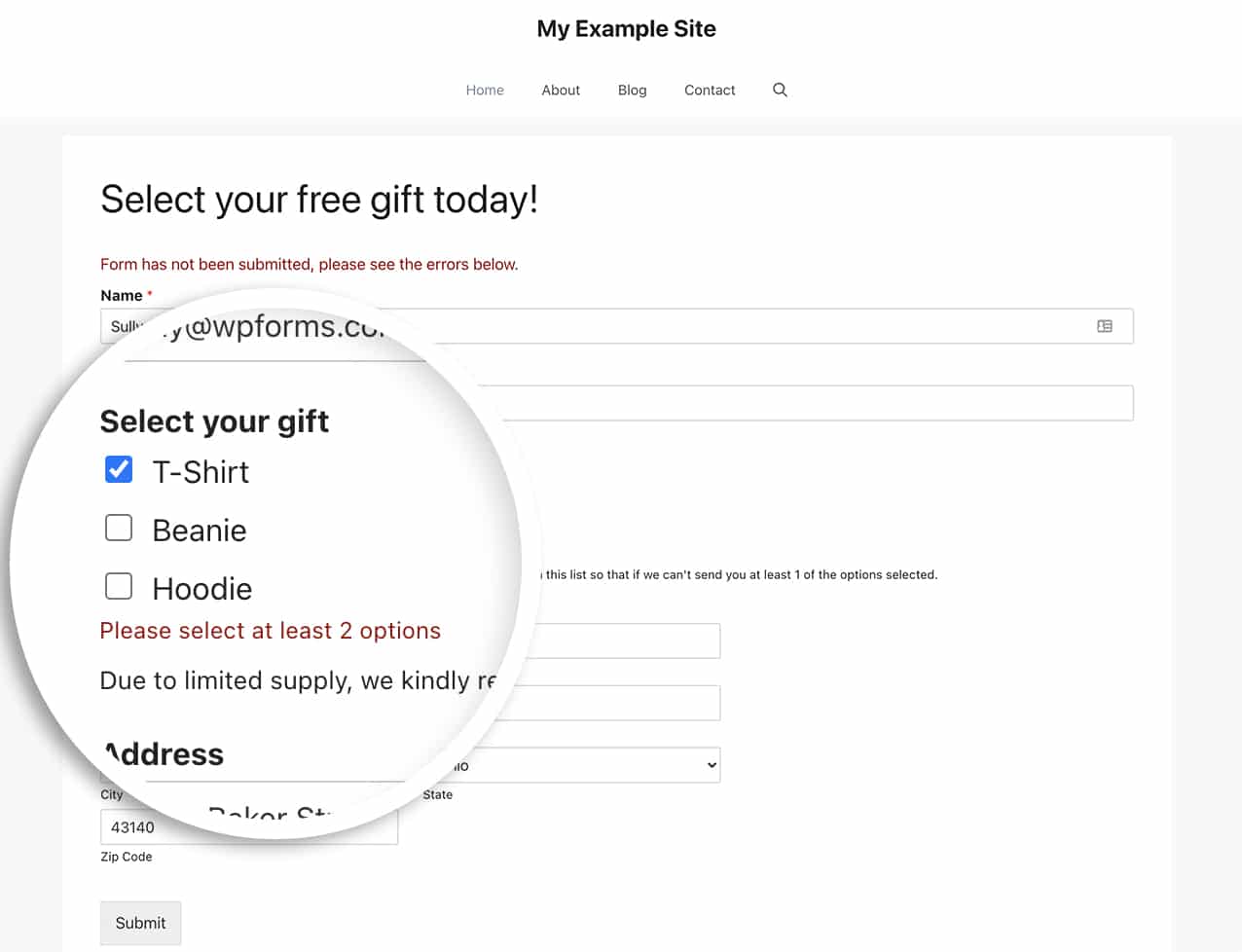
Wenn ein Benutzer weniger als zwei Auswahlen in Ihrem Formular auswählt, wird beim Absenden des Formulars eine Meldung unter dem Kontrollkästchen-Feld angezeigt.
Festlegen eines Limits für mehrseitige Formulare
Bei Verwendung von mehrseitigen Formularen möchten Sie möglicherweise nicht auf die Formularübermittlung warten, bevor Sie den Fehler anzeigen.
Sie können problemlos eine Warnmeldung unter dem Kontrollkästchen-Feld anzeigen lassen, wenn die Schaltfläche Weiter für mehrseitige Formulare geklickt wird.
Um diese Option zu verwenden, fügen Sie einfach dieses Code-Snippet stattdessen zu Ihrer Website hinzu.
/**
 * Set minimum number of choices for a checkbox form field
 *
 * @link https://wpforms.com/developers/how-to-set-a-minimum-number-of-choices-for-a-checkbox/
 */
function wpf_dev_min_checkbox() {
    ?>
    <script type="text/javascript">
    jQuery(document).ready(function($) {
        var checkbox_forms = [
            /* ##### Impostare form e campi ##### */
            {form_id: 348,  min_count: 2, field_ids: [171]},
            {form_id: 348,  min_count: 3, field_ids: [173]},
            {form_id: 546,  min_count: 4, field_ids: [363]},
            {form_id: 631,  min_count: 4, field_ids: [363]},
            {form_id: 1138, min_count: 4, field_ids: [1]},
        ];

        // Live feedback on checkbox click
        $(document).on('click', '[id^=wpforms-] input[type=checkbox]', function() {
            var $form        = $(this).closest('form');
            var this_form_id = $form.data('formid');
            var $container   = $(this).closest('.wpforms-field-checkbox');
            var field_id     = $container.data('field-id');

            checkbox_forms.forEach(function(cfg) {
                if (this_form_id == cfg.form_id && cfg.field_ids.includes(field_id)) {
                    validate_checkbox_min($container, cfg.min_count);
                }
            });
        });

        // Block Next page if validation fails
        $(document).on('wpformsBeforePageChange', function(event, nextPage, $form, direction) {
            if (direction !== 'next') {
                return;
            }

            var this_form_id = $form.data('formid');
            var currentPage  = nextPage - 1;
            var is_valid     = true;

            checkbox_forms.forEach(function(cfg) {
                if (this_form_id != cfg.form_id) {
                    return;
                }

                cfg.field_ids.forEach(function(field_id) {
                    var $container = $form.find('.wpforms-field-checkbox[data-field-id="' + field_id + '"]');
                    if (!$container.length) {
                        return;
                    }

                    var field_page = $container.closest('.wpforms-page').data('page');
                    if (field_page != currentPage) {
                        return;
                    }

                    if (!validate_checkbox_min($container, cfg.min_count)) {
                        is_valid = false;
                    }
                });
            });

            if (!is_valid) {
                event.preventDefault();
            }
        });

        function validate_checkbox_min($container, min) {
            var checked  = $container.find('input[type=checkbox]:checked');
            var form_id  = $container.closest('form').data('formid');
            var field_id = $container.data('field-id');
            var warn_id  = 'wpforms-' + form_id + '-field-' + field_id + '-min-warn';

            $('#' + warn_id).remove();

            if (checked.length > 0 && checked.length < min) {
                $container.addClass('wpforms-has-error');
                $container.append(
                    '<em id="' + warn_id + '" class="wpforms-error" role="alert" aria-label="Error message">' +
                    'Si prega di spuntare tutte le ' + min + ' caselle</em>'
                );
                return false;
            }

            $container.removeClass('wpforms-has-error');
            return true;
        }

    });
    </script>
    <?php
}
add_action('wpforms_wp_footer_end', 'wpf_dev_min_checkbox');
Häufig gestellte Fragen
Nachfolgend haben wir einige der häufigsten Fragen zum Festlegen einer Mindestanzahl von Auswahlmöglichkeiten für das Kontrollkästchen-Feld beantwortet.
F: Kann ich dies nur für ein bestimmtes Formular und eine bestimmte Feld-ID verwenden?
A: Absolut! Um diesen Code für ein bestimmtes Formular zu verwenden, verwenden Sie das folgende Code-Snippet:
/**
 * Set minimum number of choices for a checkbox form field
 *
 * @link https://wpforms.com/developers/how-to-set-a-minimum-number-of-choices-for-a-checkbox/
 */

function wpf_dev_checkbox_validation( $field_id, $field_submit, $form_data ) {

    // Change the number to match your form ID
    if ( absint( $form_data[ 'id' ] ) !== 1289 ) {
        return;
    }

        $field_submit  = (array) $field_submit;

        // Make sure we have an array of choices and count the number of choices.
        $count_choices = is_array( $field_submit ) ? count( $field_submit ) : 0;

        if ( $count_choices < 2 ) {
            wpforms()->process->errors[ $form_data[ 'id' ] ][ $field_id ] = esc_html__( 'Please select at least 2 options', 'your-text-domain' );
        }

}

add_action( 'wpforms_process_validate_checkbox', 'wpf_dev_checkbox_validation', 10, 3 );
Wenn Sie ein bestimmtes Formular und eine bestimmte Feld-ID ansprechen möchten, verwenden Sie dieses Code-Snippet.
/**
 * Set minimum number of choices for a checkbox form field
 *
 * @link https://wpforms.com/developers/how-to-set-a-minimum-number-of-choices-for-a-checkbox/
 */

function wpf_dev_checkbox_validation( $field_id, $field_submit, $form_data ) {

    // Change the number to match your form ID
    if ( absint( $form_data[ 'id' ] ) !== 1289 ) {
        return $field_id;
    }

    // Change this number to match the field ID
    if (absint($field_id) === 15 ) {

        $field_submit  = (array) $field_submit;

        // Make sure we have an array of choices and count the number of choices.
        $count_choices = is_array( $field_submit ) ? count( $field_submit ) : 0;

        if ( $count_choices < 2 ) {
            wpforms()->process->errors[ $form_data[ 'id' ] ][ $field_id ] = esc_html__( 'Please select at least 2 options', 'your-text-domain' );
        }

    }

}

add_action( 'wpforms_process_validate_checkbox', 'wpf_dev_checkbox_validation', 10, 3 );
Hinweis: Wenn Sie Hilfe beim Auffinden Ihrer Formular- und Feld-IDs benötigen, lesen Sie bitte dieses Tutorial.
F: Kann dies auch für Zahlungsfelder funktionieren?
A: Absolut! Um dies für das Formularfeld Zahlungskontrollkästchen-Elemente zu verwenden, verwenden Sie dieses Snippet.
/**
 * Set minimum number of choices for a payment checkbox form field
 *
 * @link https://wpforms.com/developers/how-to-set-a-minimum-number-of-choices-for-a-checkbox/
 */

function wpf_dev_limit_payment_field( $field_id, $field_submit, $form_data ) {

    $form_id = 731;  // Limit to form ID: Use 0 to target all forms
    $fieldID = 21;  // Limit to field ID: Use 0 to target all checkbox fields
    $min     = 2;  // Change the minimum amount
    $max     = 5;  // Change the maximum amount

    // Limit to specific form if {$form_id} is set
    if ( absint( $form_data[ 'id' ] ) !== $form_id && !empty( $form_id )  ) {
        return;
    }

    // Limit to specific field ID if {$fieldID} is set
    if ( absint( $field_id ) !== $fieldID && !empty( $fieldID ) ) {
        return;
    }

    // Make sure we have an array of choices and count the number of choices.
    $count = is_array( $field_submit ) ? count( $field_submit ) : 0;

    // Process error if choices count is less than {$min} or greater than {$max}
    if( count( $field_submit ) < $min ) {
        wpforms()->process->errors[ $form_data[ 'id' ] ] [ $field_id ] = esc_html__( 'Please select a minimum of ' . $min .' choices.', 'your-text-domain' );

        } elseif ( count( $field_submit ) > $max ) {
        wpforms()->process->errors[ $form_data[ 'id' ] ] [ $field_id ] = esc_html__( 'Please select a maximum of ' . $max . ' choices.', 'your-text-domain' );
    }

}
add_action( 'wpforms_process_validate_payment-checkbox', 'wpf_dev_limit_payment_field', 10, 3 );
Das ist alles! Sie haben jetzt gelernt, wie Sie eine Mindestanzahl von Auswahlmöglichkeiten für Ihre Kontrollkästchen festlegen.
Möchten Sie als Nächstes das Aussehen dieser Kontrollkästchen anpassen? Sehen Sie sich unseren Leitfaden zum Anpassen der Kontrollkästchen- und Mehrfachauswahlfelder, damit sie wie Schaltflächen aussehen an.
Verwandt
Aktionsreferenzen:


