


Resumo de IA
Introdução
Você quer validar um URL de mídia social no seu formulário? Para fins desta documentação, permitiremos que o usuário insira um URL do Twitter e um URL do Facebook, mas queremos a capacidade de validar os URLs de mídia social antes que o formulário seja enviado. Para fazer isso, usaremos PHP. Neste tutorial, vamos guiá-lo através das etapas sobre como conseguir isso.
Criando o formulário
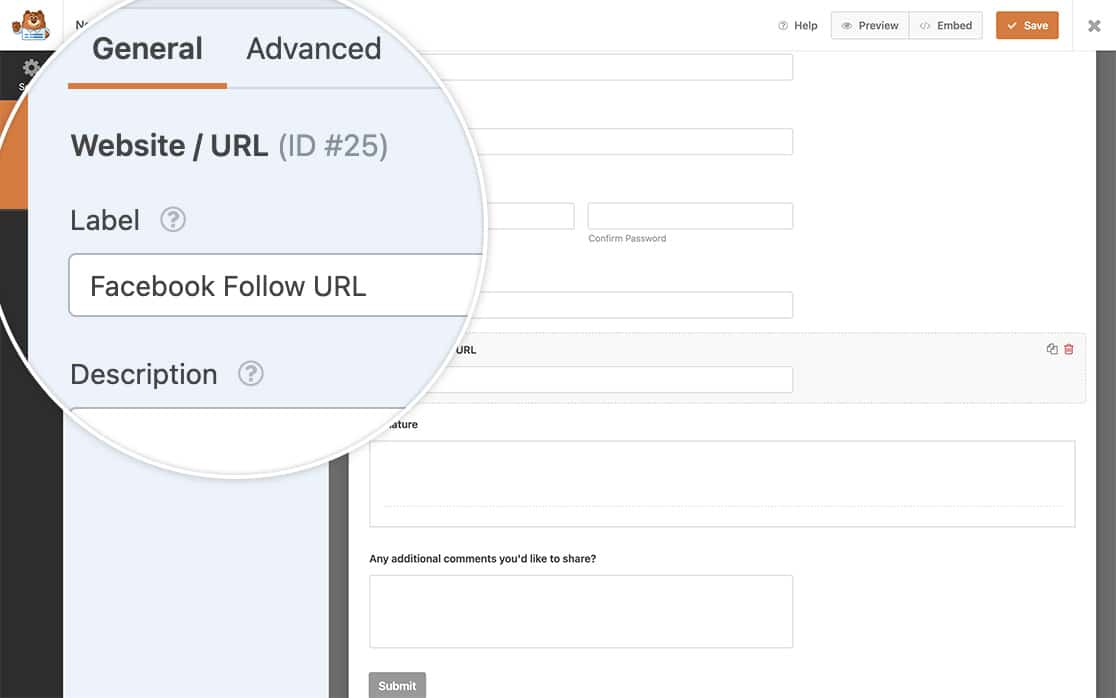
Primeiro, você precisará criar seu formulário. Nosso formulário incluirá dois campos de Website / URL. Um será para um URL de acompanhamento do Twitter e o outro para um URL de acompanhamento do Facebook.
Se precisar de ajuda para criar seu formulário, por favor, revise esta documentação.
Adicionando o snippet
Agora que você adicionou os campos, é hora de adicionar o trecho de código ao seu site que validará um URL de mídia social em seu formulário.
Se você não tem certeza de como ou onde adicionar snippets ao seu site, consulte este tutorial.
/**
 * Confirm the correct social network link in the form.
 *
 * @link   https://wpforms.com/developers/how-to-validate-a-social-media-url-field-in-your-form/
 */

function wpf_dev_process_check_social_url( $fields, $entry, $form_data ) {

    // Optional, you can limit to specific forms. Below, we restrict output to
    // form #902.
    if ( absint( $form_data['id'] ) !== 902 ) {
        return $fields;
    }


	$fb_url = $fields[25][ 'value' ];
	$findfb   = 'facebook.com';
	$find_fb_url = strpos($fb_url, $findfb);

	if ($find_fb_url === false) {
            // Check the field ID 25 to make sure it contains facebook.com
               wpforms()->process->errors[ $form_data[ 'id' ] ] [ '25' ] = esc_html__( 'Please enter a valid Facebook Profile URL.', 'plugin-domain' );

        }

	$twitter_url = $fields[26][ 'value' ];
	$findtwitter   = 'twitter.com';
	$find_twitter_url = strpos($twitter_url, $findtwitter);

	if ($find_twitter_url === false) {

            // Check the field ID 26 to make sure it contains twitter.com
               wpforms()->process->errors[ $form_data[ 'id' ] ] [ '26' ] = esc_html__( 'Please enter a valid Twitter Profile URL.', 'plugin-domain' );

        }

    }
add_action( 'wpforms_process', 'wpf_dev_process_check_social_url', 10, 3 );
No trecho de código acima, estamos usando este trecho apenas no ID do formulário 902 e apenas no ID do campo 25, que é o campo de URL do Facebook, e no campo 26, que é o campo de URL do Twitter.
Quando os usuários inserirem um link nesses campos que não corresponda ao listado em nosso trecho de código acima, eles verão um erro após o envio do formulário.
Você precisará atualizar os IDs do formulário e dos campos para corresponder ao que você tem em seu site. Se precisar de ajuda para encontrar esses IDs, dê uma olhada neste tutorial.
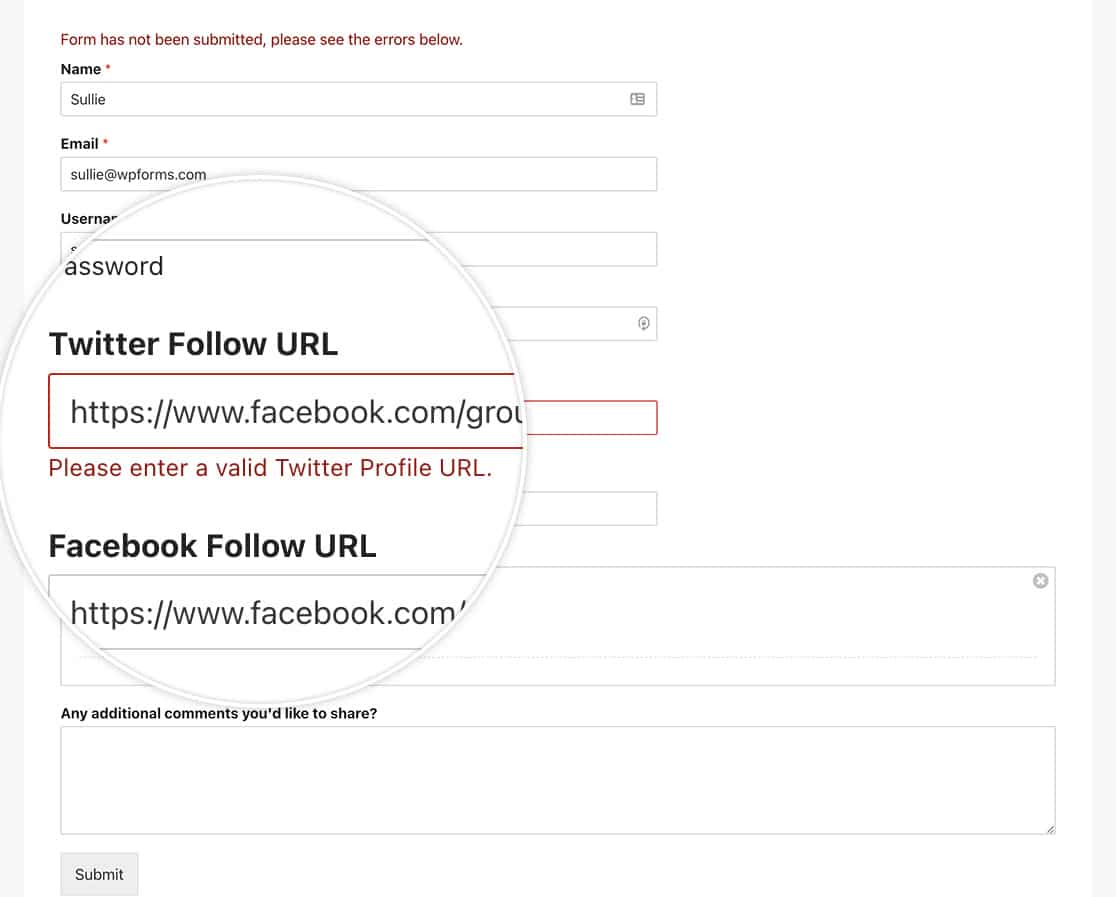
E é isso! Você conseguiu validar com sucesso um URL de mídia social. Gostaria também que os usuários fizessem login automaticamente depois de concluírem o formulário de registro? Dê uma olhada em nosso artigo sobre Como Fazer Login Automático de Usuários Após o Registro.
Relacionado
Referência de Ação: wpforms_process
Perguntas Frequentes
P: Posso adicionar o LinkedIn a este trecho?
R: Com certeza! Para adicionar ao trecho acima para o LinkedIn, use este trecho e atualize os IDs do formulário e dos campos para o formulário que você está usando.
/**
 * Confirm the correct social network link in the form.
 *
 * @link   https://wpforms.com/developers/how-to-validate-a-social-media-url-field-in-your-form/
 */

function wpf_dev_process_check_social_url( $fields, $entry, $form_data ) {

    // Optional, you can limit to specific forms. Below, we restrict output to
    // form #902.
    if ( absint( $form_data['id'] ) !== 902 ) {
        return $fields;
    }


	$fb_url = $fields[25][ 'value' ];
	$findfb   = 'facebook.com';
	$find_fb_url = strpos($fb_url, $findfb);

	if ($find_fb_url === false) {
            // Check the field ID 25 to make sure it contains facebook.com
               wpforms()->process->errors[ $form_data[ 'id' ] ] [ '25' ] = esc_html__( 'Please enter a valid Facebook Profile URL.', 'plugin-domain' );

        }

	$twitter_url = $fields[26][ 'value' ];
	$findtwitter   = 'twitter.com';
	$find_twitter_url = strpos($twitter_url, $findtwitter);

	if ($find_twitter_url === false) {

            // Check the field ID 26 to make sure it contains twitter.com
               wpforms()->process->errors[ $form_data[ 'id' ] ] [ '26' ] = esc_html__( 'Please enter a valid Twitter Profile URL.', 'plugin-domain' );

        }

	$linkedin_url = $fields[27][ 'value' ];
	$findlinkedin   = 'linkedin.com';
	$find_linkedin_url = strpos($linkedin_url, $findlinkedin);

	if ($find_linkedin_url === false) {

            // Check the field ID 27 to make sure it contains linkedin.com
               wpforms()->process->errors[ $form_data[ 'id' ] ] [ '27' ] = esc_html__( 'Please enter a valid LinkedIn Profile URL.', 'plugin-domain' );

        }

    }
add_action( 'wpforms_process', 'wpf_dev_process_check_social_url', 10, 3 );