


AI要約
はじめに
WPFormsでWordPressユーザープロファイルの情報を取り込むカスタムユーザー スマートタグを作成しますか?
スマートタグは、フォーム通知設定やフィールドのデフォルト値に挿入できるコードの一部です。このチュートリアルでは、プロファイルを構成するすべてのデフォルトのWordPressユーザープロンプト用のフォームを作成し、ユーザーが情報を確認できるようにページに表示します。
デフォルトでは、WPFormsにはすでにユーザーID、表示名、ユーザーメタなどのユーザー関連のスマートタグが用意されています。
ユーザーメタスマートタグは、ソーシャルリンクやWordPressユーザープロファイルに追加されたカスタムフィールドなど、WordPressユーザープロファイルに追加されたカスタムフィールドの空白のカバレッジとして使用できます。
新しいユーザー スマートタグの作成
まず、このコードスニペットをサイトに追加する必要があります。wpforms_smart_tagsフィルターを使用する最初の関数がスマートタグを作成します。wpforms_smart_tag_processフィルターを使用する2番目の関数がスマートタグを定義します。
コードスニペットをサイトに追加する方法がわからない場合は、このチュートリアルを確認してください。
/**
 * Create User Smart Tags from the WordPress profile.
 *
 * @link   https://wpforms.com/developers/how-to-create-more-user-smart-tags/
 */

function wpf_dev_register_user_profile_smart_tags ( $tags ) {

    // Key is the tag, item is the tag name.
    $tags[ 'wp_nickname' ]     = 'WP Profile Nickname';
    $tags[ 'wp_username' ]     = 'WP Profile Username';
    $tags[ 'wp_url' ]          = 'WP Profile URL';
    $tags[ 'wp_user_role' ]    = 'WP Profile User Role';
    $tags[ 'wp_user_bio' ]     = 'WP Profile Bio';

    return $tags;
}

add_filter( 'wpforms_smart_tags', 'wpf_dev_register_user_profile_smart_tags', 10, 1 );


/**
 * Process the User Smart Tags from the WordPress profile.
 *
 * @link   https://wpforms.com/developers/how-to-create-more-user-smart-tags/
 */

function wpf_dev_process_user_profile_smart_tags( $content, $tag ) {

    $userID = get_current_user_id();

    // Nickname from WordPress profile
    if ( 'wp_nickname' === $tag ) {

        $wp_nickname = get_the_author_meta( 'nickname', $userID );

        // Replace the tag with the nickname pulled from the user's WordPress profile.
        $content = str_replace( '{wp_nickname}', $wp_nickname, $content );

    }

    // Username from WordPress profile
    if ( 'wp_username' === $tag ) {

        $wp_username = get_the_author_meta( 'user_login', $userID );

        // Replace the tag with the username pulled from the user's WordPress profile.
        $content = str_replace( '{wp_username}', $wp_username, $content );

    }

    // Website URL from WordPress profile
    if ( 'wp_url' === $tag ) {

        $wp_url = get_the_author_meta( 'user_url', $userID );

        // Replace the tag with the Website URL pulled from the user's WordPress profile.
        $content = str_replace( '{wp_url}', $wp_url, $content );

    }

    // Current role from WordPress profile
    switch ($tag) {

        case "wp_user_role":
        $user = wp_get_current_user();
        $roles = implode(', ', (array) $user->roles);
        $content = str_replace( '{' . $tag . '}', $roles, $content );
        break;

    }

    // Bio from WordPress profile
    if ( 'wp_user_bio' === $tag ) {

        $wp_user_bio = get_the_author_meta( 'description', $userID );

        // Replace the tag with the user bio pulled from the user's WordPress profile.
        $content = str_replace( '{wp_user_bio}', $wp_user_bio, $content );

    }

    return $content;
}

add_filter( 'wpforms_smart_tag_process', 'wpf_dev_process_user_profile_smart_tags', 10, 2 );
このスニペットは、WPプロフィールニックネーム、WPプロフィールユーザー名、WPプロフィールURL、WPプロフィールユーザーロール、およびWPプロフィールバイオを追加します。これらのスマートタグは、ユーザーがWordPressプロファイルからすでに持っている情報を取得するためにフォームで使用し、ファイル上の情報を確認できるようにします。
フォームの作成
次に、新しいスマートタグを使用するためのフォームを作成します。フォームの作成方法がわからない場合は、この記事を参照してください。
このフォームのほとんどのフィールドでは、一行テキストフォームフィールドを追加するだけです。フィールドを追加してラベルを更新したら、詳細設定タブをクリックします。デフォルト値フィールドが表示されるので、スマートタグを表示を選択し、追加したばかりの新しいスマートタグのいずれかが見つかるまでスクロールします。正しいものを選択すると、そのスマートタグがフィールドのデフォルト値に表示されます。
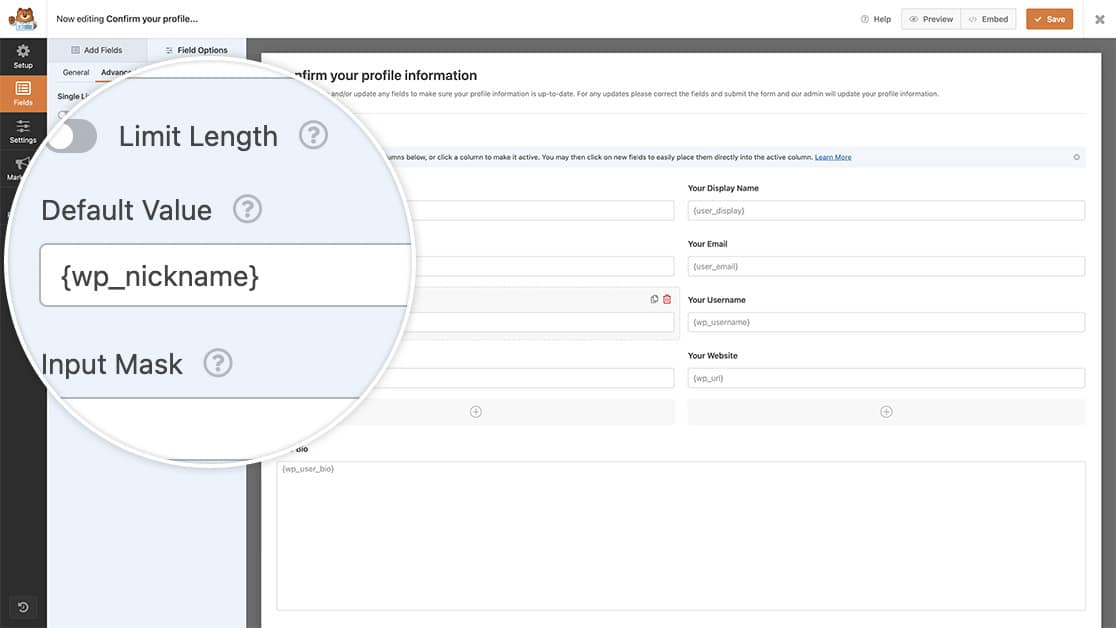
フィールドとスマートタグは同じように追加し続けます。バイオフィールドについては、バイオを表示するために段落テキストフォームフィールドを使用しますが、スマートタグをデフォルト値フィールドに追加する手順は、上記と同じです。
これで、ユーザーがこのフォームにアクセスすると、情報がデフォルトで入力されていることがわかります。
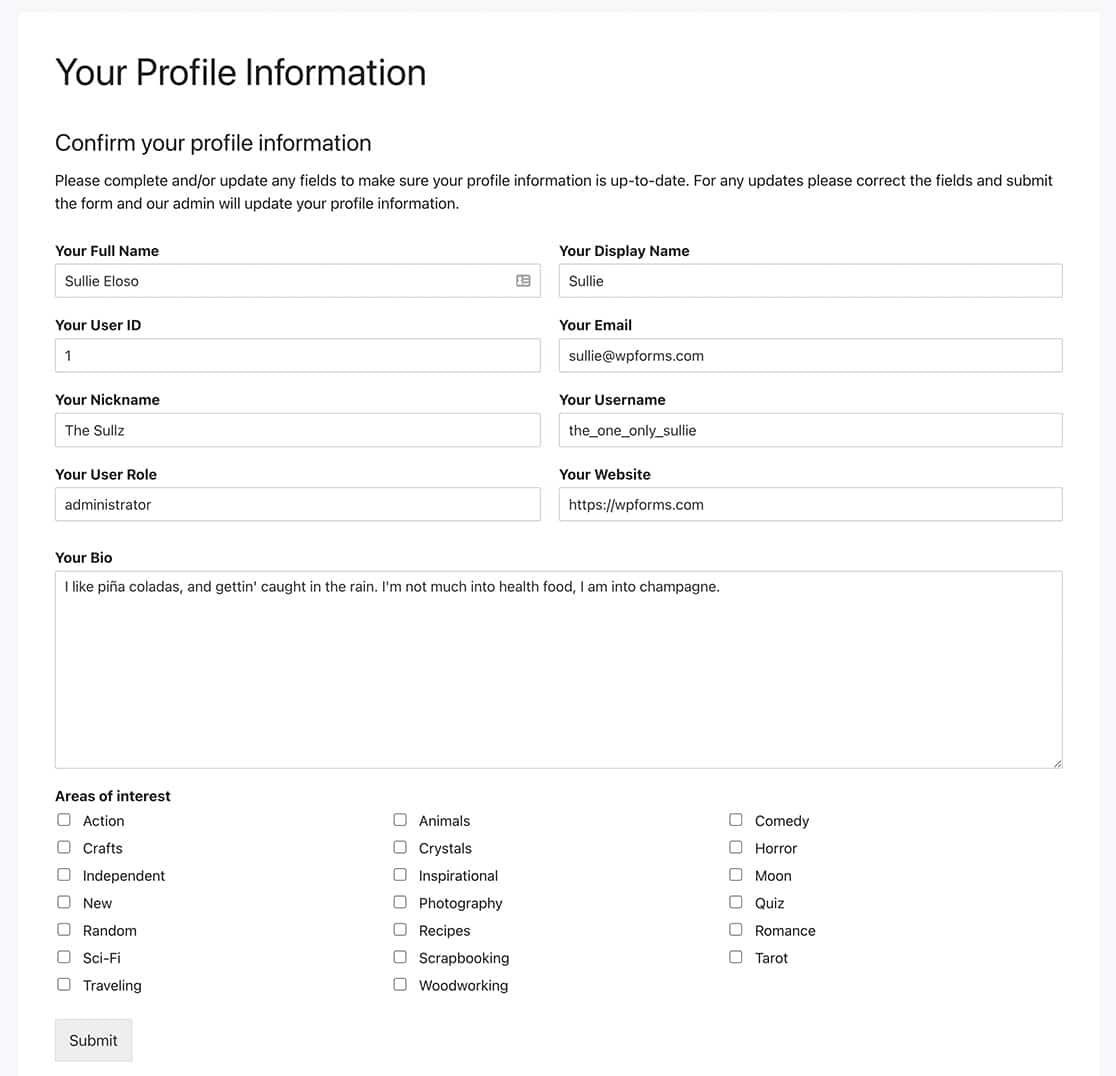
カスタムスマートタグの作成方法に関する記事を表示して、他のスマートタグの作成に関する詳細を確認できます。カスタムスマートタグの作成方法。
これで、WPFormsでさらに多くのユーザーのスマートタグを作成できます。HTML /コードブロック内でこれらのスマートタグを使用しますか?チュートリアル「HTMLフィールドでスマートタグを処理する方法」では、PHPを使用してこのタイプのお問い合わせフォームフィールドでスマートタグを有効にする方法を説明します。
関連
フィルター参照:


