


AI要約
フォームの各エントリーに一意のIDを作成しますか?各フォームエントリーに一意の参照番号を付けると、後で参照したい内部機能を追跡しやすくなります。PHPとWPFormsのスマートタグを使用すると、これを簡単に実現できます。このチュートリアルでは、各ステップを順を追って説明します。
WPFormsには、一意の値を生成するデフォルトのスマートタグが既に存在します。しかし、このチュートリアルの目的は、その一意の値が数字のみに限定される、一意のIDの前にプレフィックスを追加するなど、その値が何であるかを制御することです。ユニークバリュー スマートタグの詳細については、こちらの役立つガイドをご覧ください。
このチュートリアルでは、訪問者向けのサポートフォームを作成します。各サポート送信には一意のIDが割り当てられます。これがサポートチケット番号になります。その後、その番号を非表示フィールドのエントリー内に保存します。
ユニークIDの作成
通常、チュートリアルはフォームの作成から始めます。しかし、今回はフォームビルダー内でこのスマートタグを使用したいので、まずサイトにコードスニペットを追加することから始めます。コードスニペットをサイトに追加するのに支援が必要な場合は、こちらのチュートリアルで確認できます。
/*
 * Create a unique_id Smart Tag and assign it to each form submission.
 *
 * @link https://wpforms.com/developers/how-to-create-a-unique-id-for-each-form-entry/
 */

// Generate Unique ID Smart Tag for WPForms
function wpf_dev_register_smarttag( $tags ) {

    // Key is the tag, item is the tag name.
    $tags['unique_id'] = 'Unique ID';

    return $tags;
}

add_filter( 'wpforms_smart_tags', 'wpf_dev_register_smarttag' );

// Generate Unique ID value
function wpf_dev_process_smarttag( $content, $tag, $form_data, $fields, $entry_id ) {

    // Only run if it is our desired tag.
    if ( 'unique_id' === $tag && !$entry_id ) {

        // Replace the tag with our Unique ID that will be prefixed with wpf.
        $content = str_replace( '{unique_id}', uniqid( 'wpf', true ), $content );
    } elseif ( 'unique_id' === $tag && $entry_id ) {

        foreach ( $form_data['fields'] as $field ) {

            if ( preg_match( '/\b{unique_id}\b/', $field['default_value'] ) ) {
                $field_id = $field['id'];
                break;
            }
        }

        $content = str_replace( '{unique_id}', $fields[$field_id]['value'], $content );
    }

    return $content;
}

add_filter( 'wpforms_smart_tag_process', 'wpf_dev_process_smarttag', 10, 5 );
このスニペットは、フォーム送信ごとにユニークIDを構築するために必要なコードを作成するだけでなく、この番号をスマートタグとして使用できるようにし、フォームエントリーに添付できるようにします。
フォームの作成
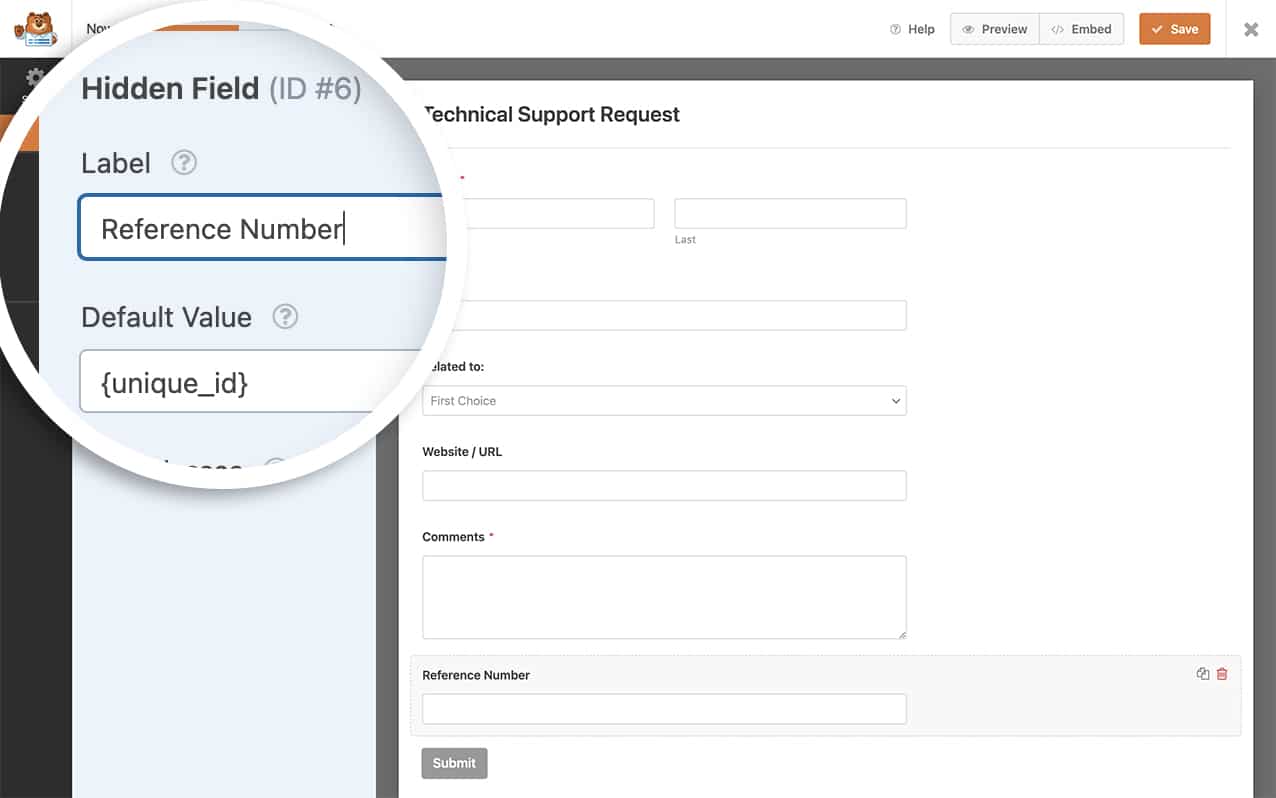
次に、サポートフォームを作成します。このフォームには、名前、メールアドレス、問題をキャプチャするためのドロップダウンフィールド、そして最後に、訪問者が求めているサポートに関する追加情報を提供する場所を許可するための段落テキストフォームフィールドが含まれます。しかし、この番号をエントリーの一部として保存したいので、そのユニークID番号も保存するための非表示フィールドを追加します。
非表示フィールドを追加した後、それをクリックしてフィールドオプションパネルを開きます。次に、高度なオプションセクションに移動します。
デフォルト値に、スマートタグ{unique_id}を単純に追加します。
確認メッセージにユニークIDを追加する
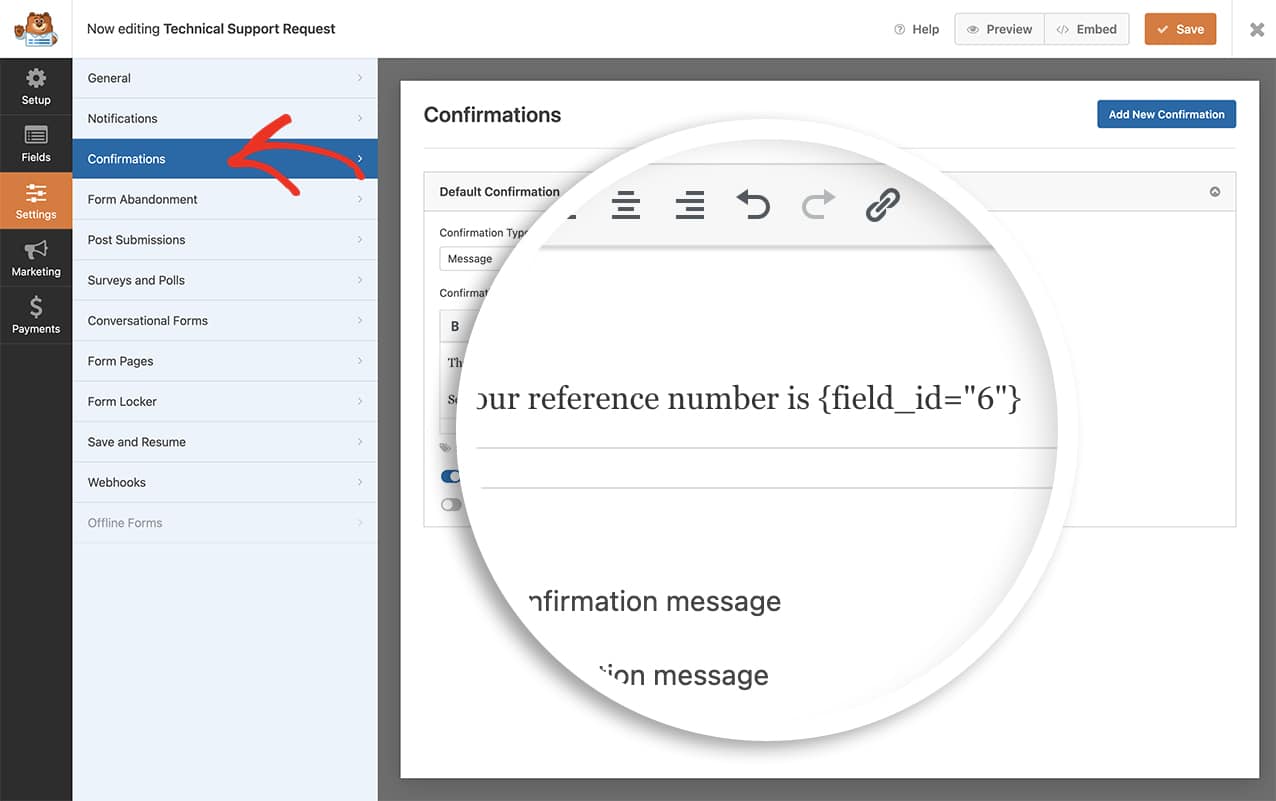
ユニークIDを確認メッセージに追加したい場合は、フォームが送信されたときに非表示フィールド内に保存されている値を配置する必要があります。
私たちのフォームでは、前の画像でわかるように、フィールドIDは6でした。そのため、この値を同じ値に引き込むために、確認メッセージに追加します。
{field_id="6"}
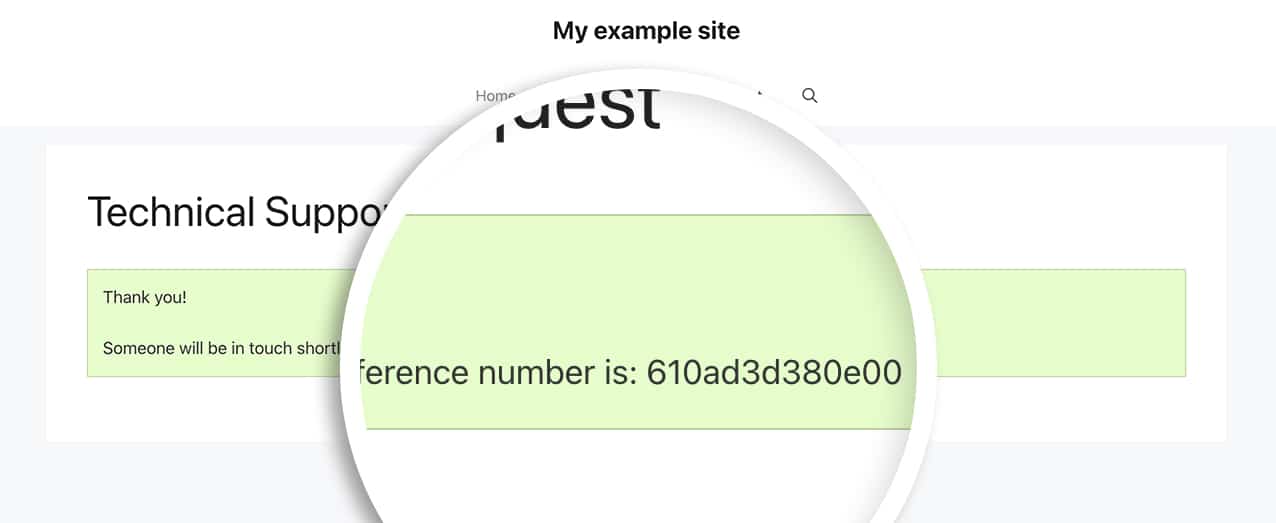
これで、フォームが送信されると、訪問者はユニークIDを確認でき、フォームの非表示フィールド内に記録されます。
よくある質問
Q: ユニークIDに特定の文字数が必要な場合はどうなりますか?
A: 以下の例では、6桁(16進数のみ)のユニークIDのみが提供されます。
/*
 * Create a unique ID with a specific number of characters and assign it to each form submission.
 *
 * @link https://wpforms.com/developers/how-to-create-a-unique-id-for-each-form-entry/
 */

// Generate Unique ID Smart Tag for WPForms
function wpf_dev_register_smarttag( $tags ) {

    // Key is the tag, item is the tag name.
    $tags['unique_id'] = 'Unique ID';

    return $tags;
}

add_filter( 'wpforms_smart_tags', 'wpf_dev_register_smarttag' );

// Generate Unique ID value
function wpf_dev_process_smarttag( $content, $tag, $form_data, $fields, $entry_id ) {

    // Only run if it is our desired tag.
    if ( 'unique_id' === $tag && !$entry_id ) {

        // Generate a hexadecimal string based on the time to ensure uniqueness
        // Reduce the string to 6 characters
        $uuid = substr( md5( time() ), 0, 6 );

        // Replace the tag with our Unique ID.
        $content = str_replace( '{unique_id}', $uuid, $content );

    } elseif ( 'unique_id' === $tag && $entry_id ) {

        foreach ( $form_data['fields'] as $field ) {

            if ( preg_match( '/\b{unique_id}\b/', $field['default_value'] ) ) {
                $field_id = $field['id'];
                break;
            }
        }

        $content = str_replace( '{unique_id}', $fields[$field_id]['value'], $content );
    }

    return $content;
}

add_filter( 'wpforms_smart_tag_process', 'wpf_dev_process_smarttag', 10, 5 );
このスニペットは、現在の時刻を取得し、それを16進数文字列に変換して、6文字の数字に制限します。
Q: このスニペットを数値のみの値を取得するために使用できますか?
A: もちろんです!このスニペットを使用して、1〜5,000,000,000の間のユニークな数値値を返すことができます。この数値範囲を使用すると、1〜10桁のユニークな数値が得られます。生成される桁数を減らしたい場合は、rand(1, 5000000000)で反映します。
/*
 * Create a unique_id numeric-only Smart Tag and assign it to each form submission.
 *
 * @link https://wpforms.com/developers/how-to-create-a-unique-id-for-each-form-entry/
 */

// Generate Unique ID Smart Tag for WPForms
function wpf_dev_register_smarttag( $tags ) {

    // Key is the tag, item is the tag name.
    $tags['unique_number_id'] = 'Unique Number ID';

    return $tags;
}

add_filter( 'wpforms_smart_tags', 'wpf_dev_register_smarttag' );

// Generate Unique ID value
function wpf_dev_process_smarttag( $content, $tag, $form_data, $fields, $entry_id ) {

    // Only run if it is our desired tag.
    if ( 'unique_number_id' === $tag && !$entry_id ) {

        // Generate a random numeric ID between 1 and 5,000,000,000
        $unique_id = rand(1, 5000000000);

        // Replace the tag with our Unique ID.
        $content = str_replace( '{unique_number_id}', $unique_id, $content );

    } elseif ( 'unique_number_id' === $tag && $entry_id ) {

        foreach ( $form_data['fields'] as $field ) {

            if ( preg_match( '/\b{unique_number_id}\b/', $field['default_value'] ) ) {
                $field_id = $field['id'];
                break;
            }
        }

        $content = str_replace( '{unique_number_id}', $fields[$field_id]['value'], $content );
    }

    return $content;
}

add_filter( 'wpforms_smart_tag_process', 'wpf_dev_process_smarttag', 10, 5 );
Q: ユニークIDにプレフィックスを付けることはできますか?
A: もちろんです。プレフィックスを追加したい場合は、このスニペットを使用できます。
/*
 * Create a unique ID and add a prefix.
 *
 * @link https://wpforms.com/developers/how-to-create-a-unique-id-for-each-form-entry/
 */

// Generate Unique ID Smart Tag for WPForms
function wpf_dev_register_smarttag( $tags ) {

    // Key is the tag, item is the tag name.
    $tags['my_unique_id'] = 'My Unique ID';

    return $tags;
}

add_filter( 'wpforms_smart_tags', 'wpf_dev_register_smarttag' );

// Generate Unique ID value
function wpf_dev_process_smarttag( $content, $tag, $form_data, $fields, $entry_id ) {

    // Only run if it is our desired tag.
    if ( 'my_unique_id' === $tag && !$entry_id ) {

        // Replace the tag with our Unique ID that will be prefixed with "WPF-".
        $content = str_replace( '{my_unique_id}', uniqid('WPF-', true), $content );

    } elseif ( 'my_unique_id' === $tag && $entry_id ) {

        foreach ( $form_data['fields'] as $field ) {

            if ( preg_match( '/\b{my_unique_id}\b/', $field['default_value'] ) ) {
                $field_id = $field['id'];
                break;
            }
        }

        $content = str_replace( '{my_unique_id}', $fields[$field_id]['value'], $content );
    }

    return $content;
}

add_filter( 'wpforms_smart_tag_process', 'wpf_dev_process_smarttag', 10, 5 );
Q: カウントをインクリメントして数値を制御できますか?
A: もちろんです。ただし、数値をインクリメントしたい場合は、代わりにこちらの便利なガイドに従うことをお勧めします。
Q: フォームフィールドの値をユニークIDのプレフィックスとして使用できますか?
A: はい。以下のスニペットを使用すると、フォームの特定のフィールドをユニークIDのプレフィックスとして使用できます。
/*
 * Create a unique ID and add a prefix based on user submitted data.
 *
 * @link https://wpforms.com/developers/how-to-create-a-unique-id-for-each-form-entry/
 */

// Generate Unique ID on form submission and add to a hidden field
function wpf_dev_generate_unique_id( $fields, $entry, $form_data ) {

    // Replace '5' with the actual field ID of your field
    $field_id = 5;
    // Replace '3' with the actual field ID of your hidden field for unique ID
    $hidden_field_id = 3;

    // Check if the field exists and has a value
    if ( isset( $fields[$field_id]['value'] ) && ! empty( $fields[$field_id]['value'] ) ) {
        // Get the field value
        $field_value = $fields[$field_id]['value'];

        // Sanitize the field value to use as a prefix
        $prefix = preg_replace( '/[^A-Za-z0-9]/', '', $field_value );

        // Generate unique ID with the dropdown value as prefix
        $unique_id = $prefix . '-' . uniqid();

        // Add the unique ID to the hidden field
        foreach ( $fields as &$field ) {
            if ( $field['id'] == $hidden_field_id ) {
                $field['value'] = $unique_id;
                break;
            }
        }
    }

    return $fields;
}
add_filter( 'wpforms_process_filter', 'wpf_dev_generate_unique_id', 10, 3 );

// Register the Unique ID Smart Tag for WPForms
function wpf_dev_register_smarttag( $tags ) {
    // Key is the tag, item is the tag name.
    $tags['my_unique_id'] = 'My Unique ID';
    return $tags;
}
add_filter( 'wpforms_smart_tags', 'wpf_dev_register_smarttag' );

// Process Unique ID Smart Tag to retrieve the value from the hidden field
function wpf_dev_process_smarttag( $content, $tag, $form_data, $fields, $entry_id ) {
    // Only run if it is our desired tag
    if ( 'my_unique_id' === $tag ) {
        // Replace '3' with the actual field ID of your hidden field for unique ID
        $hidden_field_id = 3;
        if ( isset( $fields[$hidden_field_id]['value'] ) ) {
            $content = str_replace( '{my_unique_id}', $fields[$hidden_field_id]['value'], $content );
        }
    }
    return $content;
}
add_filter( 'wpforms_smart_tag_process', 'wpf_dev_process_smarttag', 10, 5 );
$field_id変数の値を、プレフィックスとして使用したい特定のフォームフィールドのIDに置き換える必要があります。また、$hidden_field_id変数を、フォームのユニークIDスマートタグが含まれる非表示フィールドのIDに置き換えます。
これで、各フォーム送信にユニークIDを作成するために必要なすべてが揃いました。チェックボックスフィールドのラベル内でスマートタグを処理しますか?チェックボックスラベルでスマートタグを処理する方法のチュートリアルを試してください。


