


AI要約
はじめに
スマートタグのサイトURLを作成しますか?このスマートタグをメール通知や確認メッセージで再利用したいですか?このチュートリアルでは、サイトURLのスマートタグを作成する方法、および通知内に配置する方法と場所を説明します。
スニペットの追加
まず、スニペットをサイトに追加します。スニペットの追加方法と場所についてサポートが必要な場合は、こちらの役立つドキュメントを確認してください。
/**
 * Process the Smart Tag.
 *
 * @link   https://wpforms.com/developers/how-to-create-a-smart-tag-for-site-url/
 */

function wpf_dev_register_site_smarttag( $tags ) {

    // Key is the tag, item is the tag name.
    $tags[ 'site_url' ] = 'Site URL';

    return $tags;
}
add_filter( 'wpforms_smart_tags', 'wpf_dev_register_site_smarttag', 10, 1 );

/**
 * Process the Smart Tag.
 *
 * @link   https://wpforms.com/developers/how-to-create-a-smart-tag-for-site-url/
 */

function wpf_dev_process_site_url_smarttag( $content, $tag ) {

    // Only run if it is our desired tag.
    if ( 'site_url' === $tag ) {

        // Assign the site URL to the $url variable
        $url = get_site_url();

        // Replace the tag with our link.
        $content = str_replace( '{site_url}', $url, $content );

    }

    return $content;
}
add_filter( 'wpforms_smart_tag_process', 'wpf_dev_process_site_url_smarttag', 10, 2 );
このスニペットには2つの機能があります。1つ目は、site_urlという名前のスマートタグを作成することを登録するだけですが、この特定のスマートタグのフォームビルダー内で表示されるテキストはSite URLになります。
2つ目の機能は、WordPress関数get_site_url();を使用して現在のサイトURLを検索し、それを関数内に渡してスマートタグ内の$url変数に割り当てます。
スマートタグの使用
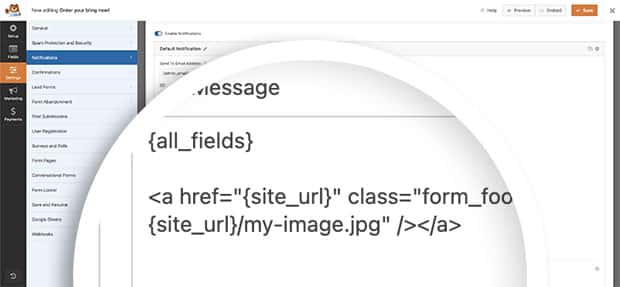
このドキュメントの目的のために、訪問者がフォームを送信した後に受信する各メール通知内にサンキュー画像を追加します。これを行うには、[通知]タブに移動し、通知メッセージの{all_fields}スマートタグの後に追加します。
[通知]タブの[メールメッセージ]にHTMLリンクと画像ソースを追加するだけです。
<a href="{site_url}" class="form_footer_logo"><img src="{site_url}/my-image.jpg" /></a>
これで完了です!WPFormsではスマートタグで多くのことができます。独自のカスタムスマートタグの作成を開始するには、カスタムスマートタグの作成方法に関するチュートリアルを確認してください。
よくある質問
Q: HTMLフォームフィールドまたはラベル内でこれを使用したい場合はどうなりますか?
A:スマートタグは、確認メッセージ、メール通知、特定のフォームフィールドのデフォルト値など、多くの領域でデフォルトで使用できます。ただし、フィールドラベル内またはHTMLフォームフィールド内でスマートタグを使用したい場合は、追加のスニペットが必要になる場合があります。
<a href="{site_url}" class="form_footer_logo"><img src="{site_url}/my-image.jpg" /></a>
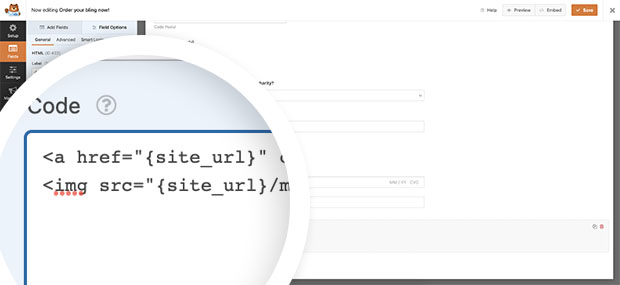
HTMLフォームフィールド内でスマートタグを処理するために必要なスニペットの詳細については、こちらのチュートリアルを確認してください。
フィールドラベル内でスマートタグを処理したい場合は、こちらのチュートリアルを必ず確認してください。
[チェックボックス]フィールドのオプションとしてスマートタグを使用できることをご存知でしたか?こちらのドキュメントを読むことで、そのチュートリアルを確認できます。
Q: URLを切り捨てることは可能ですか?
A:もちろんです!現在の投稿またはページのパーマリンクを使用してフィールドに入力したい場合は、代わりにこのスニペットを使用できます。
/**
 * Process the Smart Tag.
 *
 * @link   https://wpforms.com/developers/how-to-create-a-smart-tag-for-site-url/
 */

function wpf_dev_register_site_smarttag( $tags ) {

    // Key is the tag, item is the tag name.
    $tags[ 'permalink' ] = 'Permalink';

    return $tags;
}
add_filter( 'wpforms_smart_tags', 'wpf_dev_register_site_smarttag', 10, 1 );

/**
 * Process the Smart Tag.
 *
 * @link   https://wpforms.com/developers/how-to-create-a-smart-tag-for-site-url/
 */

function wpf_dev_process_site_url_smarttag( $content, $tag ) {

    // Only run if it is our desired tag.
    if ( 'permalink' === $tag ) {

        // Assign the site URL to the $url variable
	$url = substr( get_permalink(), strlen( home_url('/') ) );

        // Replace the tag with our link.
        $content = str_replace( '{permalink}', $url, $content );

    }

    return $content;
}
add_filter( 'wpforms_smart_tag_process', 'wpf_dev_process_site_url_smarttag', 10, 2 );
関連
フィルター参照:


