### [wpforms_html_field_value](https://wpforms.com/developers/wpforms_html_field_value/)
**Published:** January 20, 2021
**Author:** Editorial Team
**Excerpt:** The wpforms_html_field_value filter is applied to entry field values. It’s used to make the field value more visual when viewing the entry value.
**Content:**
## Description
The `wpforms_html_field_value` filter is applied to entry field values in various places. It’s used to make the field value more visual when viewing the entry value.
## Parameters
$value*(string)* The value.$field*(array)* The field.$form\_data*(array)* Processed form settings/data, prepared to be used later.$context*(string)* Context usage.## Source
`wpforms/pro/includes/admin/entries/class-entries-single.php`
## More Information
The filter is used to display a more visual graphic in the **Entries** list rather than just the pure HTML value that is stored in the database.
## Examples
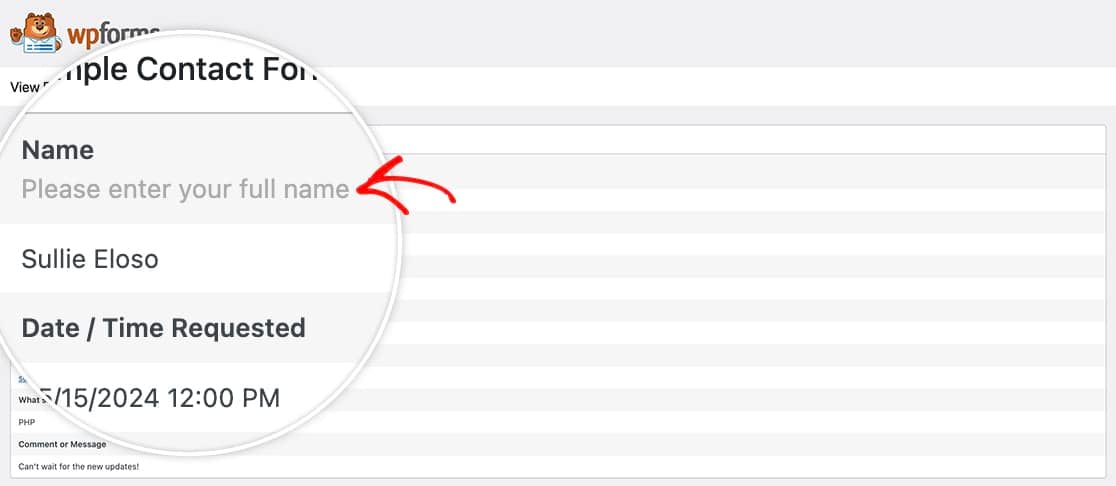
In this example, we want to include field descriptions inside entries.
```
/**
* Filter used to convert a given entry value to a more robust visual format.
*
* In this example, if a hex color code is given in a text value, it's converted
* to a link to view more details about the color.
*
* @link https://wpforms.com/developers/wpforms_html_field_value/
*
* @param string $value The value.
* @param array $field The field.
* @param array $form_data Processed form settings/data, prepared to be used later.
* @param string $context Context usage.
*
* @return string
*/
function wpf_dev_html_field_value( $field_val, $field, $form_data, $context ) {
if ( $context !== 'email-html' ) {
return $field_val;
}
if ( $field['type'] !== 'name' ) {
return $field_val;
}
if ( empty( $form_data[ 'fields' ][$field[ 'id' ]] ) ) {
return $field_val;
}
$field_data = $form_data[ 'fields' ][$field[ 'id' ]];
if ( empty( $field_data[ 'description' ] ) ) {
return $field_val;
}
return $field_val . '' . $field_data[ 'description' ];
}
add_filter( 'wpforms_html_field_value', 'wpf_dev_html_field_value', 20, 4 );
```
## Reference Articles
- [How to Display Form Entries](https://wpforms.com/developers/how-to-display-form-entries/ "How to Display Form Entries")
- [How to Hide the Item Price Value in the Email Notifications](https://wpforms.com/developers/how-to-hide-the-item-price-value-in-the-email-notifications/ "How to Hide the Item Price Value in the Email Notifications")
- [How to Include Field Descriptions Inside Email Notifications](https://wpforms.com/developers/how-to-include-field-descriptions-inside-email-notifications/ "How to Include Field Descriptions Inside Email Notifications")
- [How to Make Phone Numbers a Link in Email Notifications](https://wpforms.com/developers/how-to-make-phone-numbers-a-link-in-email-notifications/ "How to Make Phone Numbers a Link in Email Notifications")
- [How to Store Checkbox Values as an Array](https://wpforms.com/developers/how-to-store-checkbox-values-as-an-array/ "How to Store Checkbox Values as an Array")
**Categories:** Filters Hooks
**Tags:** PHP
---