### [Error Connecting to the Remote API Key](https://wpforms.com/docs/error-connecting-to-the-remote-api-key/)
**Published:** September 30, 2024
**Author:** Umair Majeed
**Excerpt:** Learn how to resolve the 'remote key API' in WPForms.
**Content:**
## Summary
The ‘There was an error connecting to the remote key API’ message appears when attempting to verify your WPForms license. This error typically occurs due to the site’s hosting provider blocking outbound connections to `wpforms.com`, often as a side effect of certain server security measures.
## Causes
This error can occur due to:
- Hosting provider blocking outbound connections to wpforms.com
- Server security measures interfering with the license verification process
- Using a nulled or pirated version of the WPForms plugin
## Solution
To resolve this issue, follow these steps:
1. Check the SSL Connection at **WPForms » Tools **»** System** info to confirm the error. If you see a connection error, contact your hosting provider and provide them with the error message output. They should be able to make the necessary adjustments to resolve the issue.
2. If the error persists, go to **WPForms » Settings » Misc** and ensure the **Uninstall WPForms** toggle button is set to the OFF position.
Then, navigate to **Plugins » All Plugins**, and delete WPForms. Once done, reinstall the WPForms Lite version and activate it.
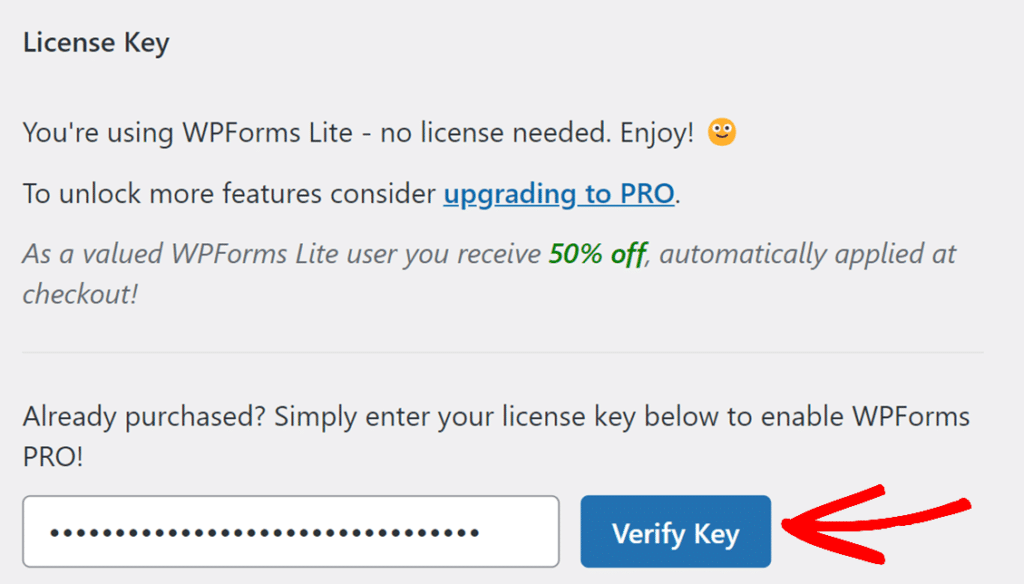
After the WPForms Lite is installed, enter your license key on **WPForms » Settings** page, and click on the **Verify Key** button to upgrade.
Check out our detailed guide on [troubleshooting license verification errors](https://wpforms.com/docs/how-to-troubleshoot-license-verification-errors/) for more details.
That’s it! You now know how to troubleshoot and resolve the ‘There was an error connecting to the remote key API’ error.
**Categories:** Error Library
---