### [Post Submissions Addon - Make Frontend Publishing Easy in WordPress](https://wpforms.com/post-submissions-addon-make-frontend-publishing-easy-in-wordpress/)
**Published:** October 5, 2016
**Author:** Syed Balkhi
**Content:**
Frontend Post Submissions was one of our top requested features, and today I’m excited to share that it’s finally here. We also added various other features and enhancements in WPForms 1.2.9.
### Post Submissions
With our [post submissions addon](https://wpforms.com/addons/post-submissions-addon/ "WPForms Post Submissions Addon"), you can now allow your users to submit blog posts and other content in WordPress without ever logging into the admin area. This way you can [accept guest posts on your blog](https://wpforms.com/how-to-allow-users-to-submit-blog-posts-on-your-wordpress-site/ "How to Allow Users to Submit Blog Posts on Your WordPress Site") while keeping your [WordPress site secure](http://www.wpbeginner.com/wordpress-security/ "Ultimate Guide to WordPress Security").
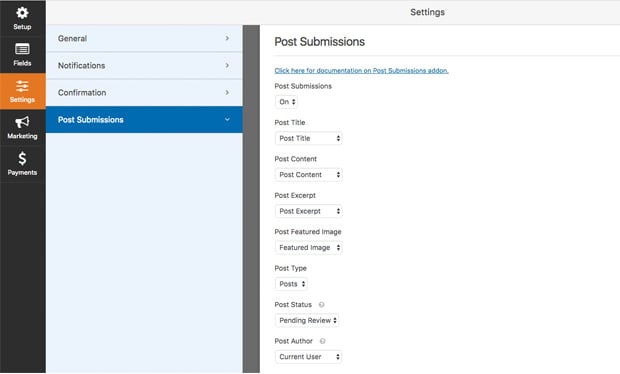
You can collect all the information that you need such as Post Title, Content, Excerpt, Featured Images, and even custom fields.
Once the content is submitted, you have the ability to decide on the default Post Status (draft, pending, private, or published). You can also select between post types (posts, pages, and other custom post types) as well as choose the default post author.
Our goal with this WordPress post submission addon was to make the frontend publishing process easy and secure while giving you all the flexibility that you need.
### Misc. Updates
You might have noticed that we didn’t make any announcements in the month of September, but several minor releases were pushed out. That’s primarily because we were focused on the post submissions addon.
In WPForms 1.2.7, we added the ability to prevent duplicate form submissions. Once the user clicks on the submit button, it grays out while the form submits which should help prevent the duplicate submissions that some of you were getting.
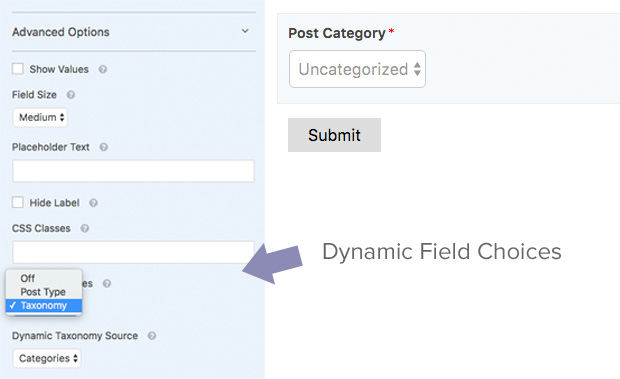
In WPForms 1.2.8, we added a Dynamic Choices feature for Checkbox, Dropdown, and Multiple Choice fields. This allows you to [dynamically populate form fields](https://wpforms.com/docs/how-to-set-dynamic-field-default-values-in-wpforms/ "How to Set Dynamic Field Default Values in WPForms") with existing WordPress content (such as custom post types and taxonomies).
In WPForms 1.2.9, we added the ability to duplicate fields with one click from within our [WordPress form builder](https://wpforms.com/ "WPForms"). Yes, I know a lot of you asked for it.

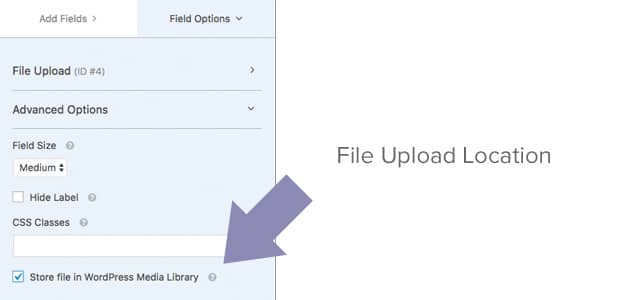
In 1.2.9, we also added the ability to configure the [file upload](https://wpforms.com/how-to-create-a-file-upload-form-in-wordpress/ "How to Create a File Upload Form in WordPress") contents to be stored in the WordPress media library rather than a custom uploads folder that it used to be in.
This was needed to make sure that you can use the same upload field to collect featured images rather than creating a new field type.
You can configure this option by clicking on the Advanced tab on the File Upload Field.
That’s all for this week. I can’t wait to share the other addons that we have in the queue.
Thanks once again for all your support and feedback in making WPForms the [best WordPress form builder](https://wpforms.com/ "WordPress Form Builder").
*Syed and the WPForms Team*
**Categories:** Announcement
**Tags:** duplicate field, dynamic field choices, frontend post submissions, post submissions
---