### [New! Unlock More Leads with Form Abandonment](https://wpforms.com/new-unlock-more-leads-with-form-abandonment/)
**Published:** February 1, 2017
**Author:** Jared Atchison
**Content:**
How many leads do you lose to form abandonment?
Keeping forms short and simple will boost your [form conversion rate](https://wpforms.com/10-research-based-tips-to-improve-contact-form-conversions/) and can help [reduce form abandonment](https://wpforms.com/how-to-combat-order-form-abandonment-and-increase-your-sales/), but that’s not always possible. Sometimes you need more information than just a few fields will provide.
Splitting up a long form into multiple pages will help, but even then users can get impatient and abandon a form halfway through.
Once that happens, they may leave your site and never return.
Now with our new Form Abandonment addon, you can follow up with those interested prospects, even if they don’t complete the whole form.
Form Abandonment will help you to **get more leads without increasing your traffic**.
It works amazingly well with:
- [Request a Quote forms](https://wpforms.com/how-to-create-a-request-a-quote-form-in-wordpress/)
- [Order forms](https://wpforms.com/how-to-create-a-simple-order-form-in-wordpress/)
- Support Request forms
- …and more
### How Form Abandonment Works
First, you’ll need to have the Form Abandonment addon plugin installed. Here’s a tutorial on [how to install and use the Form Abandonment addon](https://wpforms.com/docs/how-to-install-and-use-form-abandonment-with-wpforms).
Then, you’ll need to have a form created. Here’s a tutorial on [creating your first form](https://wpforms.com/docs/creating-first-form/).
You’ll want to make sure that you ask for the user’s name and email address and/or phone number at the beginning of the form, so that you can follow up with them even if they only complete the first few fields.
Then you’ll need to enable Form Abandonment in your form settings.
To do that, navigate to **Settings » Form Abandonment** when editing your form. Then, make sure the **Enable form abandonment lead capture** option is checked.
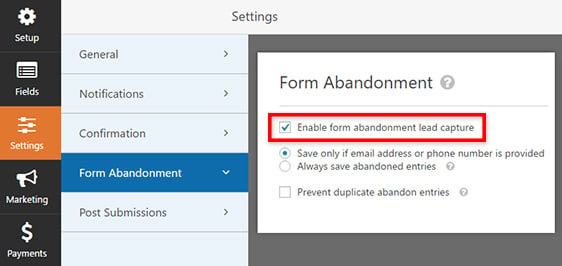
You can also choose to only save partial entries if you have some way to contact the user, and to prevent duplicate entries.
That’s it! Now when someone fills out just a few fields, you’ll still be able to see their name and contact information in your form entries.
Here’s how it looks:
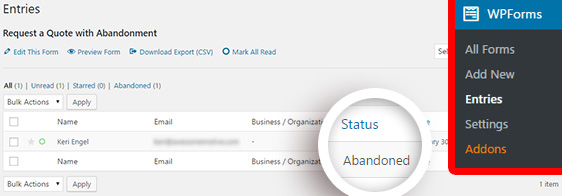
Now you can reach out to those interested prospects and find out how you can help them become customers.
The Form Abandonment Addon is available for all Elite and Pro users. You can go ahead and [download it right now from your account page](https://wpforms.com/account/).
What are you waiting for? Give Form Abandonment a try now, or [click here to get your license](https://wpforms.com/pricing/).
We have a lot more great addons we’re working on that we can’t wait to share, so be sure to subscribe to the newsletter and follow us on [Twitter](http://twitter.com/easywpforms) and [Facebook](https://facebook.com/wpforms) to be the first to know.
Thanks once again for all your support and feedback in making WPForms the [best WordPress form builder](https://wpforms.com).
*Jared and the WPForms Team*
**Categories:** Announcement
**Tags:** lead generation, multi-page form, multi-part form, order form, quote form, request quote
---