### [Introducing the New Form Locker Addon for WPForms](https://wpforms.com/introducing-the-new-form-locker-addon-for-wpforms/)
**Published:** October 9, 2018
**Author:** Jared Atchison
**Content:**
Have you ever wished there was a way to lock your WordPress forms to prevent unwanted submissions? Or maybe you just wanted to limit the number of total form submissions you receive.
Form locking is a popular feature request that we have gotten, and today we’re excited to announce that our [Form Locker addon](https://wpforms.com/addons/form-locker-addon/ "Form Locker Addon") for WPForms is here!
This is a great feature for anyone that wants to manage form permissions or add access control to [reduce the number of unwanted form submissions](https://wpforms.com/how-to-build-spam-free-wordpress-contact-forms-the-ultimate-guide/).
Let’s take a look at the features and what you can do with the Form Locker addon.
### Form Locker Addon Settings
The first thing you’ll notice after installing the Form Locker addon is that there is a new **Form Locker** menu item in the WPForms builder’ Settings section.
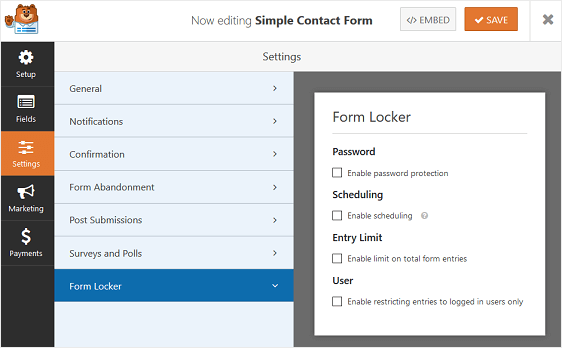
Here you can lock or protect your WordPress forms in 4 different ways:
1. **Password.** Require users to enter a password to submit their form. This added protection decreases the number of unwanted submissions you receive.
2. **Scheduling.** Allows you to close form submissions after specific date or time. This is great for application forms.
3. **Entry Limit.** If you’re wanting to cap the number of form submissions you receive, this is the setting for you. Define how many forms can be submitted and close the form after that quota has been met. This is perfect if you want to run a contest, giveaway, or sweepstakes.
4. **User.** This feature can be used to hide your form from those that aren’t logged into your website. This allows you to create member-only forms.
### Unique Answer Form Field
In addition to the new settings found in the form editor, the Form Locker addon comes with a unique answer feature that will further limit the number of form entries people can submit on your website.
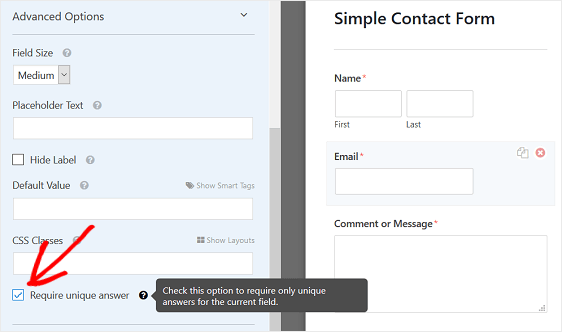
This feature is available for a handful of form fields in WPForms, including:
- Single Line Text
- Name
- Email
- Website/URL
- Phone
- Password
When you enable the **Require unique answer** feature on a form field, the same information cannot be submitted twice on two separate form submissions. For instance, if you’re running a contest and want to limit the entries to one per email address, then you can enable this feature on the Email form field.
The great thing about the unique answer feature is that you can use it in conjunction with any of the other Form Locker addon settings.
And there you have it!
We hope you enjoy the new Form Locker addon for WPForms and find that locking or protecting your WordPress forms is easier than ever.
As always, thank you for your continued support of WPForms, and we look forward to helping you create better online forms.
*Jared and the WPForms team*
P.S. Don’t have a WPForms Pro license? [Click here to get started today](< https://wpforms.com/pricing/>) and experience the WPForms difference.
**Categories:** Announcement
**Tags:** form entries, form fields, form locker addon
---