### [Introducing New GDPR Enhancement Features for Your WordPress Forms](https://wpforms.com/introducing-new-gdpr-enhancements-for-your-wordpress-forms/)
**Published:** May 16, 2018
**Author:** Syed Balkhi
**Content:**
Today we’re excited to announce the release of WPForms 1.4.6!
This is a big one since it relates to something that has been on everyone’s minds for a long time now – **GDPR compliance**.
In this release, we have updated WPForms to help you get on track with GDPR, so that you can continue to nurture leads and build your business, without all the extra worry.
So, let’s see what’s in store for you!
### GDPR Enhancements
There’s been a lot of talk lately about GDPR and how it’ll affect your email marketing, lead generation, and WordPress forms in general moving forward.
That’s because come May 25th, new regulations will be in place that include major changes to data privacy and individual rights for people in the European Union (EU).
These changes are going to affect businesses all around the world, and it has caused quite a panic among users.
As always, at WPForms, we’re staying ahead of the curve and have got you covered.
In an effort to help you comply with GDPR, we have added a set of new features called **GDPR enhancements**.
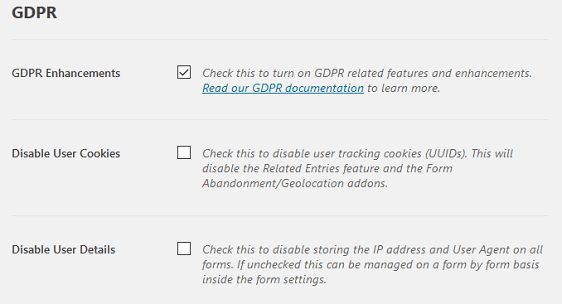
The GDPR enhancement features will help prepare your website to comply with the new law. If you’re using the premium version of WPForms (Basic license or higher), then here’s how the new settings work:
- With a click of a button, you can stop all cookie and geo-location tracking from WPForms.
- We have also added the option to stop collecting and storing IP Addresses as well as User Agent information related to each form entry.
The great thing about these new GDPR enhancements is that they apply globally to all of your forms created with WPForms, meaning it’s a one and done deal once you enable the features.
**WPForms Lite GDPR Enhancements**
While there are no settings for GDPR enhancements in WPForms Lite, we have automatically removed user cookies entirely from the lite version.
The user cookies were not needed in WPForms Lite because the Lite version does not come with the ability to store form entries.
### GDPR Form Field
Aside from the GDPR enhancements related to form entries, we have also added a new ‘GDPR Agreement’ field to make it easy for you to add a consent checkbox to your forms.
This field requires the website visitor to **explicitly consent to you collecting and storing their contact information**. This is specially handy if you are using your form to send data to your email marketing service or CRM.
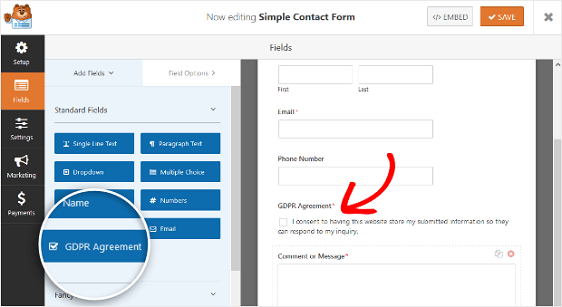
You can easily customize the ‘GDPR Agreement’ field to change the sample text to fit your needs.
### Non-input Field Filter
As an added bonus to our GDPR enhancement features, we’ve also added something that several of you have been asking for: ability to add non-input fields in your form email notifications.
WPForms make it easy for you to [create multi-step forms in WordPress](https://wpforms.com/how-to-create-a-multi-part-form-in-wordpress/) perfect for when you are collecting a lot of information. Multi-step forms help reduce user fatigue.
But the problem is that any time you [send out a form notification email](https://wpforms.com/how-to-create-multiple-notifications-in-wordpress-forms/) from a multi-part form, the non-input fields like HTML, Section Dividers, and Page Breaks are invisible which makes it the notification email hard to read.
This results in a less than an ideal user experience.
That’s why we’ve created a filter that you can use to easily add non-input fields to your form notification emails.
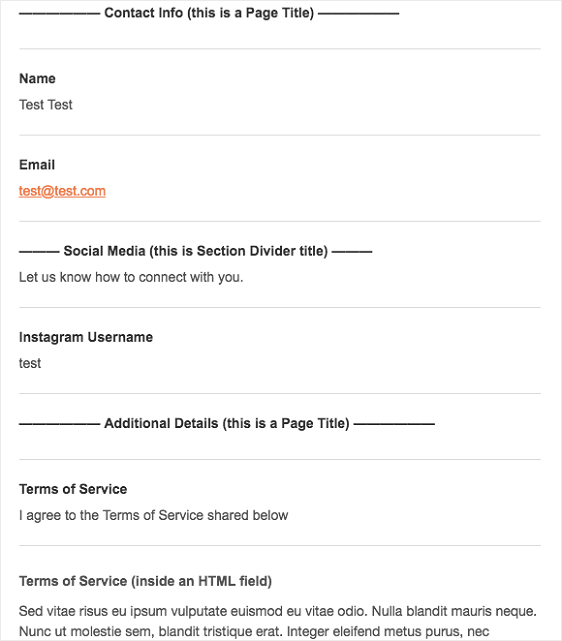
For more information about how to do this, check out our helpful documentation on [how to include non-input form fields in your notification emails](https://wpforms.com/developers/include-page-break-section-divider-and-html-fields-in-notifications/).
### What’s Coming Next?
In this release, we also did major behind-the-scenes improvement to our marketing integration class. This will make it easy for us to quickly add new marketing integrations in the future.
We’re working on putting the final touches on our next email marketing integration, Drip. If you are using Drip as your [email marketing service](http://www.wpbeginner.com/showcase/best-email-marketing-services/ "Best Email Marketing Services for Small Businesses"), which I know a lot of you are, then this will make it easy for you to integrate WPForms with Drip.
We also have several other features that will be coming as part of the next release.
That’s all for today. We hope you like the new features and find them helpful in complying with GDPR and providing a better user experience for your site visitors.
Don’t have a WPForms Pro license? [Click here to Get started today](https://wpforms.com/pricing/) and experience the WPForms difference.
As always, thank you for your continued support of WPForms. We look forward to bringing you more updates soon!
*Syed and the WPForms team*
**Legal Disclaimer:** These features are designed to automate some of the settings required to be in compliance with various EU laws. However due to the dynamic nature of WordPress websites, no single plugin can offer 100% legal compliance. Please consult a specialist internet law attorney to determine if you are in compliance with all applicable laws for your jurisdictions and your use cases.
\*\* We are not lawyers and nothing on this website should be considered legal advice.
**Categories:** Announcement
**Tags:** GDPR, GDPR Enhancements, GDPR Form Field, Non-input Field Filter
---