### [Celebrating WPForms' First Anniversary! What’s New & What’s Next](https://wpforms.com/celebrating-wpforms-first-anniversary-whats-new-whats-next/)
**Published:** March 14, 2017
**Author:** Jared Atchison
**Content:**
Can you believe WPForms was launched just one year ago?
Since then, we’ve released so many new addons, features, and improvements, it feels like much longer!
But it’s true – WPForms was first launched on March 11, 2016.
Recently we shared a [recap of 2016](https://wpforms.com/wpforms-recap-of-2016/ "WPForms Recap of 2016"), where we shared everything we’ve added since launch, plus our favorite blog posts of the year.
In 2016, we added:
- - [Stripe Addon](https://wpforms.com/addons/stripe-addon/)
- [Paypal Addon](https://wpforms.com/addons/paypal-standard-addon/)
- [User Registration](https://wpforms.com/addons/user-registration-addon/)
- [GetResponse Addon](https://wpforms.com/addons/getresponse-addon/)
- [Campaign Monitor Addon](https://wpforms.com/addons/campaign-monitor-addon/)
- [Geolocation Data](https://wpforms.com/addons/geolocation-addon/)
- [Custom CAPTCHA](https://wpforms.com/addons/custom-catpcha-addon/)
- [Zapier Addon](https://wpforms.com/addons/zapier-addon/)
- [Post Submissions Addon](https://wpforms.com/addons/post-submissions-addon/)
- [Signature Addon](https://wpforms.com/addons/signature-addon/)
- [Form Entry Management System](https://wpforms.com/introducing-an-improved-entry-management-system-in-wpforms/ "Introducing an Improved Entry Management System in WPForms")
- [Form Import / Export](https://wpforms.com/docs/how-to-import-and-export-wpforms/ "How to Import and Export WPForms")
- [Branded Email Templates](https://wpforms.com/docs/how-to-add-custom-header-image-in-your-wpforms-email-template/ "How to Add Custom Header Image in your WPForms Email Template")
- [Conditional Form Notifications](https://wpforms.com/how-to-create-clutter-free-forms-with-smart-logic#smart-notifications "How to Create Clutter-Free Forms with Smart Logic")
- [One-Click Form Duplication](https://wpforms.com/how-to-duplicate-a-wordpress-form/ "How to Duplicate a WordPress Form in One Click")
- [Multi-Column Styles](https://wpforms.com/docs/how-to-create-multi-column-form-layouts-in-wpforms/ "How to Create Multi-Column Form Layouts in WPForms")
- [Breadcrumbs for Paginated Forms](https://wpforms.com/docs/how-to-create-multi-page-forms-in-wpforms/ "How to Create Multi Page Forms in WPForms")
- - [Smart Tags](https://wpforms.com/docs/how-to-use-smart-tags-in-wpforms/)
- [Multiple Currency Support](https://wpforms.com/multiple-currency-support-and-payment-enhancements-wpforms-1-2-6/ "Multiple Currency Support and Payment Enhancements – WPForms 1.2.6")
Since the new year, we’ve added even more…
### New Features Released in 2017 (So Far)
This year we’ve already added a lot of updates, features, and addons. Here are the big ones so far.
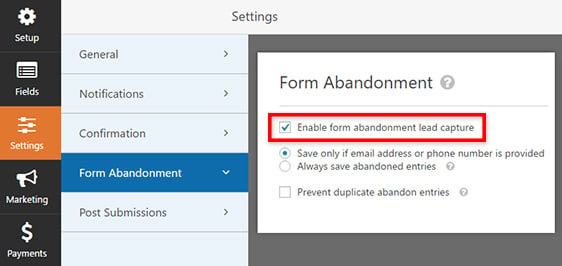
**[Form Abandonment Addon](https://wpforms.com/docs/how-to-install-and-use-form-abandonment-with-wpforms/ "How to Install and Use Form Abandonment With WPForms")**
How many leads are you missing out on when visitors don’t finish your forms? [Form abandonment](https://wpforms.com/how-to-combat-order-form-abandonment-and-increase-your-sales/) is a real problem so with our new Form Abandonment addon, you’ll unlock more leads by capturing partial entries from your forms. You can even set up email notifications to send automatically just to your abandoning users.
**[AWeber Tag Support](https://wpforms.com/introducing-aweber-tags-for-wpforms/)**
We’ve had our AWeber addon available since the beginning, but this year we made it even more useful with new AWeber tag support. This makes it incredibly easy to segment and target subscribers based on which form they fill out on your site.
**[Constant Contact Integration](https://wpforms.com/docs/how-to-connect-constant-contact-with-wpforms/ "How to Connect Constant Contact With WPForms")**
Recently we were very excited to announce that WPForms now has built-in integration with email marketing service [Constant Contact](http://www.wpbeginner.com/refer/constant-contact/). There’s no addon to install; this integration is available to everyone, making it super easy to get started with [email marketing](http://optinmonster.com/beginners-guide-to-email-marketing/ "Beginner's Guide to Email Marketing").
### Best of the Blog So Far This Year
Every Monday and Thursday we publish handy tutorials on WordPress and WPForms. This year we’ve already published over 20.
Here are some of our favorites so far:
**[Are WordPress Forms Secure? The #1 Thing You Need to Watch Out For](https://wpforms.com/are-wordpress-forms-secure/)**
Security is a big concern that stops your visitors from submitting your forms, especially when they’re making a purchase, logging in, or handing over sensitive information. In this post we’ll show you the #1 thing you need in order to secure your WordPress forms.
**[How to Add a Mailchimp Signup Checkbox to Your Contact Form](https://wpforms.com/how-to-add-a-mailchimp-signup-checkbox-to-your-contact-form/ "How to Add a MailChimp Signup Checkbox to Your Contact Form")**
Do you need a quick and easy way to grow your email list? You can get more subscribers by asking them to join your newsletter while they’re filling out your contact form, or any other form on your site. This method also works for AWeber, Constant Contact, and all our other email marketing integrations as well.
**[6 Tactics to Boost Donation Form Conversions](https://wpforms.com/6-tactics-to-boost-donation-form-conversions/ "6 Tactics to Boost Donation Form Conversions")**
Does your charity struggle to meet its online fundraising goals? Chances are your donation form is not fully optimized to boost conversion. In this post we explained 6 proven tactics to get more online donations.
[](https://wpforms.com/6-tactics-to-boost-donation-form-conversions/)
### Fun First-Year Stats for WPForms
WPForms has come a long way since our launch! Here are some fun stats to celebrate our first year.
Since our launch a year ago…
- We’ve published over **80 blog posts**, and have over **200 blog comments**.
- WPForms has over **80,000 active installs** on WordPress sites around the web.
- WPForms plugin is **rated 4.8 out of 5 stars** on WordPress.org.
### What’s Next for WPForms
We’ve added a ton of new features since our launch, but we’re nowhere near finished.
Here’s what we’re working on next:
1. First, we’re working on updating our Mailchimp integration to keep up with their latest code.
2. Then we’re planning a quick update to add a bunch of small features you’ve requested.
3. After that, we’ve got a BIG update to our popular [Conditional Logic addon](https://wpforms.com/addons/conditional-logic-addon/ "Conditional Logic Addon") in store, including toggling whether a field is required, and adding “empty/not empty” rules.
We’re always listening to users for ideas and suggestions. If you ever have an idea for a new addon or feature you’d like to see, please [get in touch](https://wpforms.com/contact/)!
Thank you for your support in making WPForms the [best WordPress contact form plugin](https://wpforms.com/).
Don’t forget to subscribe to our newsletter and follow us on [Twitter](http://twitter.com/easywpforms) and [Facebook](http://twitter.com/easywpforms) to always be the first to learn of new features!
**Categories:** Announcement
---