### [Announcing WPForms + Constant Contact: Email Marketing for Everyone](https://wpforms.com/announcing-wpforms-constant-contact-email-marketing-for-everyone/)
**Published:** March 9, 2017
**Author:** Jared Atchison
**Content:**
Smart business owners know the most effective way to grow your business online is with [email marketing](http://optinmonster.com/beginners-guide-to-email-marketing/ "Beginner's Guide to Email Marketing").
And one of the easiest ways to grow your email list is by connecting your [email marketing service](https://wpforms.com/best-email-marketing-service-providers-with-free-options/) to your WordPress forms. Today, we’re excited to announce a new integration to help you do just that.
Our new **WPForms [Constant Contact](http://www.wpbeginner.com/refer/constant-contact/) integration is available for everyone**, no matter what license you have!
We wanted to make it as easy as possible for everyone to grow their email list, so we’ve built this integration into the WPForms core plugin. That means there’s **no need to install any addon** – you can access the Constant Contact integration right now with the latest version of WPForms.
Now it’s easier than ever to build your Constant Contact list using WPForms.
### How to Connect WPForms With Constant Contact
Getting started with WPForms and Constant Contact is simple.
We’ll show you here how to create a simple newsletter signup form, but you can also [add an email subscription checkbox to any form](https://wpforms.com/how-to-add-a-mailchimp-signup-checkbox-to-your-contact-form/).
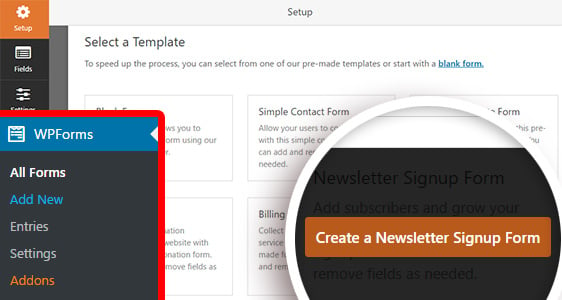
First, you can go to **WPForms » Add New** to create a new **Newsletter Signup** form using our pre-built template.
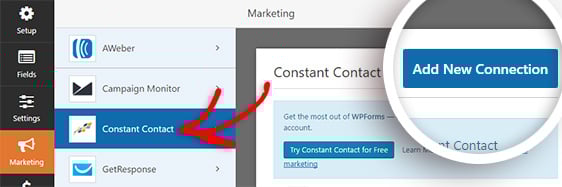
After you edit your form fields as you like, be sure to connect your Constant Contact account in the **Marketing » Constant Contact** menu.
To see every step in detail, check out our guide on [how to connect WPForms with Constant Contact](https://wpforms.com/docs/how-to-connect-constant-contact-with-wpforms).
What are you waiting for? Give [Constant Contact](http://www.wpbeginner.com/refer/constant-contact/) and [WPForms](https://wpforms.com/pricing/ "Pricing") a try now.
That’s all for this update, but we have more new features in store for you soon. Don’t forget to subscribe to our email newsletter to be the first to know!
Looking for the most beginner-friendly [drag & drop WordPress form builder](https://wpforms.com/)?
[Get started with WPForms today](https://wpforms.com/pricing/).
**Categories:** Announcement
**Tags:** email marketing, email optin, newsletter, optin, subscribe
---