




Are you looking for the best reCAPTCHA alternatives on your WordPress forms?
Spambots and other malicious software are only improving with time, reinforcing the need to have effective anti-spam on your website.
However, reCAPTCHA is becoming unpopular amongst website owners for a number of reasons. Privacy issues, user experience, and ineffective spam filtering are the 3 main motivations why people are turning away from reCAPTCHA.
Is There a Way to Avoid reCAPTCHA?
Yes, you can avoid reCAPTCHA by using a reCAPTCHA alternative.
This can help improve user experience as some of the reCAPTCHA tasks are unclear and difficult to complete. We’ve all scratched our heads and questioned whether a painted bicycle sign means a real bicycle. They can be time-consuming too, with web security firm Cloudflare stating humanity wastes 500 years per day on CAPTCHA tasks.
This is especially worrying for those using forms to generate leads, as the more time spent trying to pass the CAPTCHA, the more the user becomes frustrated, increasing the likelihood of them leaving the form, and ultimately your site.
Best reCAPTCHA Alternatives For Your Contact Forms
Let’s take a look at our 5 best reCAPTCHA alternatives for your contact forms.
In This Article
1. Form Tokens in WPForms
Why are WPForms tokens better than reCAPTCHA? Simple, our tokens are extremely user-friendly and eliminate all privacy concerns.
It is by far the easiest spam prevention system and it’s available in all versions of WPForms. These tokens are enabled by default on all new forms. They’re great because the user doesn’t need to do anything to bypass the form spam checks.
WPForms adds a unique token to each form submission. The secret token is undetectable to spambots. Without it, bots can’t submit the form while real human users don’t even notice it’s there — in turn, creating a smooth user experience.
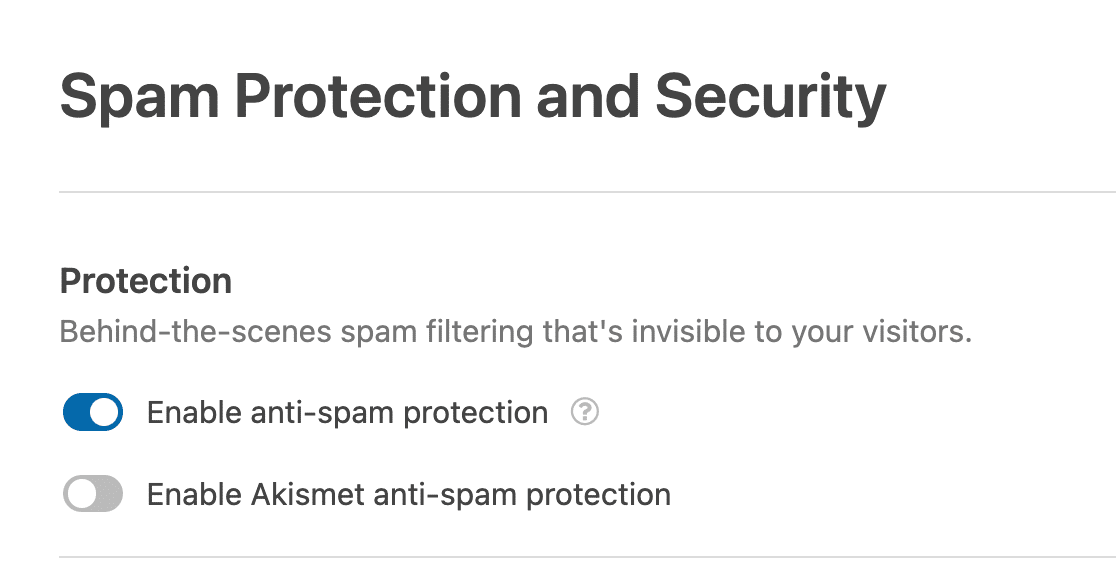
You can easily turn this feature on in the form builder’s Spam Protection and Security settings.
Let’s compare WPForms tokens and reCAPTCHA:
Ease-of-Use
WPForms’ tokens are invisible to anyone using a form. They work in the background protecting the user and the website from any spam or harmful malware.
On the flip side, reCAPTCHA’s tasks are often difficult to complete and occasionally inaccessible for people with disabilities.
It has also been known to fail in some browsers and can easily be bypassed (both by humans and bots). They can also slow down certain sites, impacting your website’s SEO.
The tests you are required occasionally don’t submit, resulting in the user being stuck in a continuous, time-wasting loop, increasing the likelihood the user will either stop filling out the form, leave your site, or both!
Privacy
WPForms’ tokens protect your privacy as they store no data (you and the user can’t even see they are there!).
Some users are concerned about reCAPTCHA because Google recommends that you embed the system on each page of your website. This is so it can follow a user’s behavior and make an accurate assumption that they’re human.
This means that Google can collect user data from their activity. Google insists they do not use this information for targeted ads, etc. but concern arises for 2 reasons: we don’t fully know how reCAPTCHA works, and two, we are taking Google’s word for it. At the end of the day, they’re a for-profit company and not legally bound to protect said data.
This is why some users are now looking for reCAPTCHA alternatives and why so many users are choosing WPForms’ tokens over difficult-to-use, inaccessible, privacy-concerning reCAPTCHA.
2. hCaptcha

hCaptcha is a privacy-focused alternative to reCAPTCHA, available to integrate into WPForms. hCaptcha uses simple tasks and takes less time for most users to complete while stopping more bot traffic, resulting in less spam.
There is a free basic version of hCaptcha and it has a system where they pay you for each form that’s submitted. You can set this to automatically donate to charity too. After installing the WPForms plugin, you’re only a few steps away from adding hCaptcha to your forms.
Read our easy-to-follow guide to setting up hCaptcha on your forms.
3. Cloudflare Turnstile

CAPTCHAs can be annoying for users to complete, but Cloudflare Turnstile provides spam protection without troubling your site visitors with puzzles or questions. A simple checkbox will allow them to submit your web forms.
Turnstile is an ideal solution if reCAPTCHA is not working, or if you’re seeing frustrating errors like error for site owner: invalid domain for site key.
Turnstile also provides privacy for your users and prevents data harvesting which is why so many WordPress users have switched to it.
On top of all of that, Cloudflare Turnstile is free to use and easy to set up when you use WPForms free integration.
Check out our guide to setting up Cloudflare Turnstile for step-by-step instructions on using Turnstile in place of reCAPTCHA in WPForms.
4. WPForms Custom Captcha Addon
Our Custom Captcha addon allows you to create your own custom questions or math puzzles to act as your spam filter! The benefits of using a custom captcha are that it’s easy to use, there’s no coding required, and you can choose what your customers answer by making it as easy or as difficult as you like. This will ultimately ensure you don’t get any unwanted form submissions.
It’s very easy to set up. First, install and activate the Custom Captcha addon. Afterward, go into the form builder and see the option to add a Custom Captcha field.
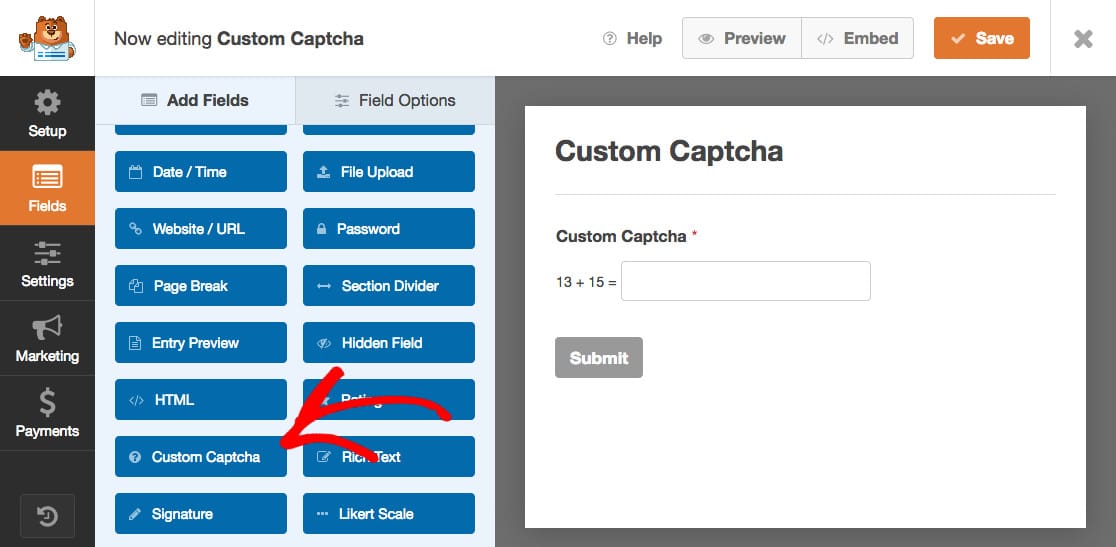
Next, simply drag and drop it into the form preview panel in your form builder. The Custom Captcha field will always be required so users have to answer the questions before submitting the form.
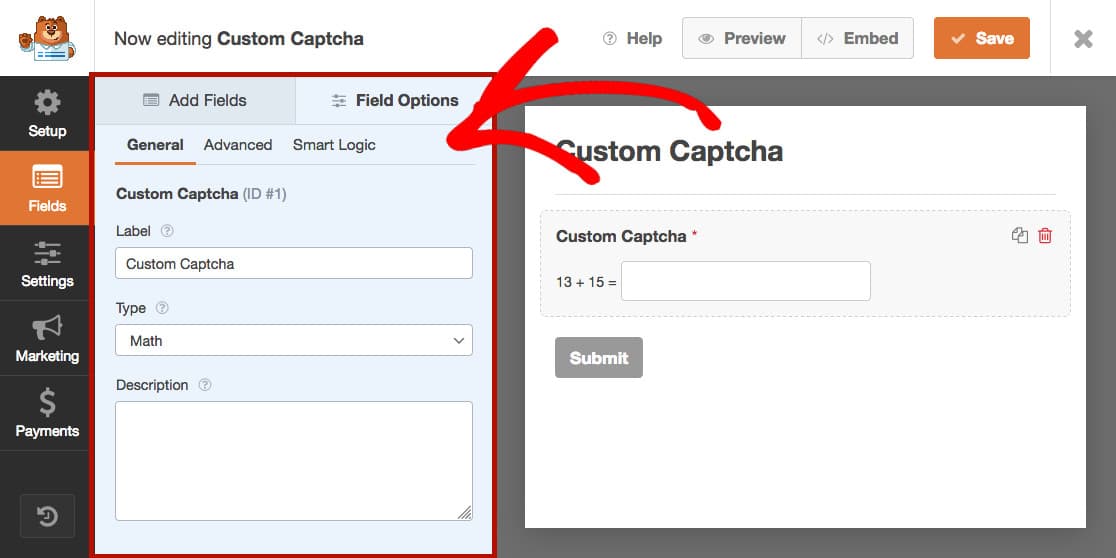
To edit it, click on the field in the form preview panel to open up its Field Options. Here you can make changes to the Custom Captcha field, such as the Label, Type, and Description.
You’re now ready to save your form and embed it to the desired page. Happy form building!
5. WP Armour

WP Armour uses the honeypot anti-spam technique to combat spam submissions on forms. A honeypot is an invisible field added to a form that the user can’t see due to CSS or JavaScript. Spambots can’t use JavaScript, so by inserting the anti-spam field in the form this way, bots can’t fill in the form and pass the anti-spam test.
WP Armour is great as it’s straightforward for users to submit their forms and requires no captcha/extra steps. It’s also compatible with most WordPress form apps including registration and comments plugins and comes standard as a free version with paid options available to unlock premium features.
Important: It’s very common for WordPress users to report that their anti-spam honeypot is not working. WPForms doesn’t offer a honeypot field because our form tokens are more effective.
Bonus: CleanTalk
CleanTalk is an all-in-one tool with the purpose of protecting your forms and comment sections without using CAPTCHA or puzzles. This plugin offers convenient registration/commenting forms to increase the number of registrations. To aid conversion rate, CleanTalk also offers Real-Time Email Address Existence Validation and simply consolidates your tasks into one plugin, saving you time.
It’s a better alternative to reCAPTCHA because your visitors aren’t annoyed by guessing characters or puzzles, helping improve your user experience and contributing to customer loyalty, turning first-time visitors into regulars.
Bonus: Zero Spam for WordPress

Zero Spam for WordPress uses Artificial Intelligence (AI) to monitor your site for spam and block suspicious submissions to your forms. It also protects your registration and login forms from fake users and account break-ins.
The best part about Zero Spam for WordPress is that it doesn’t require anything from you or your users to work. Site visitors can fill out your forms without having to complete a CAPTCHA and you don’t have to mess with moderation queues. This plugin also includes handy features like geolocation blocking, blacklisting, and integrations with popular plugins like WPForms, MemberPress, and WooCommerce.
There’s a free version you can use, or you can upgrade to the premium version for additional features.
What’s the Best reCAPTCHA Alternative?
The standout CAPTCHA alternative is WPForms’ anti-spam form tokens. It’s invisible to those filling out your forms, prevents spam, increases overall user experience, and decreases frustration and time spent filling out forms.
Plus, you can easily pair it with hCaptcha or the WPForms Custom Captcha addon for added protection against spam entries.
So if you’re looking for the easiest, most effective alternative to reCAPTCHA, download and install WPForms or read our guide on how to stop contact form spam in WordPress.
If you’re interested in adding a few more techniques to reduce spam form submissions, be sure to explore these CAPTCHA accessibility options and alternatives in WPForms.
Create Your WordPress Form Now
Next, Protect Your Site With the Best WordPress Security Plugins
Stopping contact form spam is just one item on your WordPress site maintenance checklist. Keeping your site secure also means checking for malware and other suspicious activity.
If you want to learn more about how to make sure your site stays safe, check out our guide to the top WordPress security plugins, and our favorite WordPress management plugins for automating important upkeep tasks.
If this article helped you out, please follow us on Facebook and Twitter for more free WordPress tutorials and guides.
is it possible to ban domains like.xyz or exotics domains when the visitor enters his email address?
Hi There,
Yes, you can absolutely achieve what you have mentioned by adding the domain name in Denylist like
*.xyzin the Email field. For more details, please see this guide.Hope this helps! 🙂
I think the wpforms token is less secure than recaptcha.
I agree that recaptcha lowers the SEO score and also is not gdpr compliant. So it should be blocked when you ask the user to accept all cookies. Obviously if a user only accepts the strictly necessary ones then the form submission will not work. So you really can’t use recpatcha if you want to be gdpr compliant. So the solution is to use the wpforms token. Unfortunately, I get spam this way. They can inject the code and override this token protection. By adding a control to the contact form I found a way to avoid this problem. Many spams have a link in them, so where I find “http” I require a mathematical calculation (your custom catpcha). The problem is on the newsletter where I don’t require you to fill in a message. I did a test. yesterday with recatpcha no spam, this morning with wpforms token 5 bogus registrations. Any extra ideas?
Hi William, We are sorry for any trouble. In order to make sure we answer your question as thoroughly as possible, we will be responding to you request you’ve made via email. When you get some time, could you please check our reply and let me know how it goes via email support?
Thanks.